steering wheel controls Hyundai Santa Fe Sport 2017 Owner's Manual
[x] Cancel search | Manufacturer: HYUNDAI, Model Year: 2017, Model line: Santa Fe Sport, Model: Hyundai Santa Fe Sport 2017Pages: 614, PDF Size: 18.99 MB
Page 83 of 614
361
Safety features of your vehicle
Your vehicle is equipped with a
Supplemental Restraint (Air Bag)
System and the lap/shoulder belts at
both the driver and passenger seat-
ing positions.
The indications of the system's pres-
ence are the letters "SRS AIR BAG"
embossed on the air bag pad cover
in the steering wheel, on the knee
bolster below the steering wheel col-
umn and the passenger's side front
panel pad above the glove box.
The SRS consists of air bags
installed under the pad covers in the
center of the steering wheel , in the
knee bolster below the steering
wheel column and the passenger's
side front panel above the glove box.
The purpose of the SRS is to provide
the vehicle's driver and/or the front
passenger with additional protection
than that offered by the seat belt sys-
tem alone in case of a frontal impact
of sufficient severity.The seat belt buckle sensors deter-
mine if the driver and front passen-
ger's seat belts are fastened. These
sensors provide the ability to control
the SRS deployment based on
whether or not the seat belts are fas-
tened, and how severe the impact is.
The advanced SRS offers the ability
to control the air bag inflation within
two levels. A first stage level is pro-
vided for moderate-severity impacts.
A second stage level is provided for
more severe impacts.
According to the impact severity and
seat belt usage, the SRSCM (SRS
Control Module) controls the air bag
inflation. Failure to properly wear
seat belts can increase the risk or
severity of injury in an accident.
Additionally, your vehicle is equipped
with an occupant classification sys-
tem in the front passenger's seat.
The occupant classification system
detects the presence of a passenger
in the front passenger's seat and will
turn off the front passenger's air bag
under certain conditions. For more
detail, see "Occupant classification
system" in this section.
Page 316 of 614
4219
Features of your vehicle
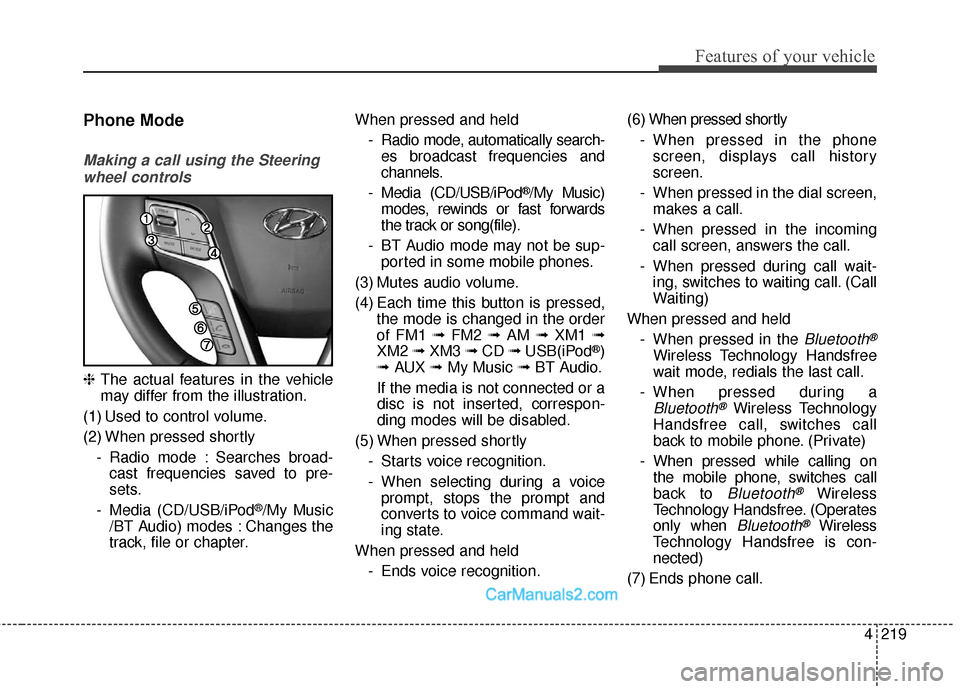
Phone Mode
Making a call using the Steeringwheel controls
❈ The actual features in the vehicle
may differ from the illustration.
(1) Used to control volume.
(2) When pressed shortly - Radio mode : Searches broad-cast frequencies saved to pre-
sets.
- Media (CD/USB/iPod
®/My Music
/BT Audio) modes : Changes the
track, file or chapter. When pressed and held
- Radio mode, automatically search-es broadcast frequencies and
channels.
- Media (CD/USB/iPod
®/My Music)
modes, rewinds or fast forwards
the track or song(file).
- BT Audio mode may not be sup- ported in some mobile phones.
(3) Mutes audio volume.
(4) Each time this button is pressed, the mode is changed in the order
of FM1 ➟ FM2 ➟AM ➟XM1 ➟
XM2 ➟XM3 ➟CD ➟USB(iPod
®)
➟ AUX ➟My Music ➟ BT Audio.
If the media is not connected or a
disc is not inserted, correspon-
ding modes will be disabled.
(5) When pressed shortly - Starts voice recognition.
- When selecting during a voiceprompt, stops the prompt and
converts to voice command wait-
ing state.
When pressed and held - Ends voice recognition. (6) When pressed shortly
- When pressed in the phonescreen, displays call history
screen.
- When pressed in the dial screen, makes a call.
- When pressed in the incoming call screen, answers the call.
- When pressed during call wait- ing, switches to waiting call. (Call
Waiting)
When pressed and held - When pressed in the Bluetooth®
Wireless Technology Handsfree
wait mode, redials the last call.
- When pressed during a
Bluetooth®Wireless Technology
Handsfree call, switches call
back to mobile phone. (Private)
- When pressed while calling on the mobile phone, switches call
back to
Bluetooth®Wireless
Technology Handsfree. (Operates
only when
Bluetooth®Wireless
Technology Handsfree is con-
nected)
(7) Ends phone call.
Page 317 of 614
![Hyundai Santa Fe Sport 2017 Owners Manual Features of your vehicle
220
4
Bluetooth®Wireless Technology
When No Devices have been
Paired
1. Press the [PHONE] button or the
[CALL] button on the steering
wheel controls. The following
screen is](/img/35/16751/w960_16751-316.png "Hyundai Santa Fe Sport 2017 Owners Manual Features of your vehicle
220
4
Bluetooth®Wireless Technology
When No Devices have been
Paired
1. Press the [PHONE] button or the
[CALL] button on the steering
wheel controls. The following
screen is")
Features of your vehicle
220
4
Bluetooth®Wireless Technology
When No Devices have been
Paired
1. Press the [PHONE] button or the
[CALL] button on the steering
wheel controls. The following
screen is displayed.
2. Press the [OK] button to enter the Pair Phone screen. Vehicle Name : Name of device as
shown when searching from your
Bluetooth®Wireless Technology
device
Passkey : Passkey used to pair the device
3. From your
Bluetooth®Wireless
Technology device (i.e. Mobile
Phone), search and select your
car audio system.
❈ SSP : Secure Simple Pairing
Non SSP supported device :
4. After a few moments, a screen is dis- played where the passkey is
entered.
Enter the passkey “0000” to pair your
Bluetooth®Wireless Technology
device with the car audio system. SSP supported device :
4. After a few moments, a screen is
displayed 6 digits passkey.
Check the passkey on your
Bluetooth®Wireless Technology
device and confirm.
5. Once pairing is complete, the fol- lowing screen is displayed.
Page 348 of 614
57
Driving your vehicle
ON
The warning lights can be checked
before the engine is started. This is
the normal running position after the
engine is started.
Do not leave the ignition switch ON ifthe engine is not running to preventbattery discharge.
START
Turn the ignition switch to the START
position to start the engine. The
engine will crank until you release
the key; then it returns to the ON
position. The brake warning light can
be checked in this position.
WARNING - Ignition key
Never turn the ignition switch to LOCK or ACC while the vehi-
cle is moving. This would result
in loss of directional control
and braking function, which
could cause an accident.
The anti-theft steering column lock is not a substitute for the
parking brake. Before leaving
the driver’s seat, always make
sure the shift lever is engaged
in P (Park), set the parking
brake fully and shut the engine
off. Unexpected and sudden
vehicle movement may occur if
these precautions are not
taken.
(Continued)(Continued)
Never reach for the ignitionswitch, or any other controls
through the steering wheel
while the vehicle is in motion.
The presence of your hand or
arm in this area could cause a
loss of vehicle control, an
accident and serious bodily
injury or death.
Do not place any movable objects around the driver’s
seat as they may move while
driving, interfere with the driv-
er and lead to an accident.
Page 352 of 614
511
Driving your vehicle
✽
✽
NOTICE
If you press the engine start/stop
button without depressing the brake
pedal, the engine will not start and
the engine start/stop button changes
as follow:
OFF ➔ ➔
ACC ➔
➔
ON ➔
➔
OFF or ACC
✽
✽
NOTICE
If you leave the engine start/stop
button in the ACC or ON position
for a long time, the battery will dis-
charge.
WARNING
Never press the engine
start/stop button while the
vehicle is in motion. This
would result in loss of direc-
tional control and braking
function, which could cause
an accident.
Before leaving the driver's seat, always make sure the
shift lever is engaged in P
(Park), set the parking brake
fully and shut the engine off.
Unexpected and sudden vehi-
cle movement may occur if
these precautions are not
taken.
(Continued)
(Continued)
Never reach for the enginestart/ stop button or any other
controls through the steering
wheel while the vehicle is in
motion. The presence of your
hand or arm in the area could
cause loss of vehicle control,
an accident and serious bodi-
ly injury or death.
Do not place any movable objects around the driver's
seat as they may move while
driving, interfere with the driv-
er and lead to an accident.