radio Hyundai Sonata
[x] Cancel search | Manufacturer: HYUNDAI, Model Year: , Model line: , Model:Pages: 286, PDF Size: 9.58 MB
Page 139 of 286

1FEATURES OF YOUR HYUNDAI
126
PA710SH01NF-AATIf the i-Pod exclusive cable (if installed) is
connected to the multiple terminal inside
the console on the right hand side of the
driver’s seat, the ‘i-Pod’ icon will be dis-
played on the top right corner of the display
screen.1. i-Pod Selection ButtonIf i-Pod is connected, it switches to the i-
Pod mode from the CD mode to play the
song files stored in the i-Pod.
If there is no CD and AUX mode from the
Radio mode, it displays ‘NO MEDIA’.2. Track Moving Buttono Press the [SEEK
] button for less than
0.8 seconds to play from the beginning
of the song currently played.
Press the button for less than 0.8 sec-
onds and press it again within 1 second
to move and play the previous track.
Press the button for 0.8 seconds or
longer to play the song in reverse direc-
tion in fast speed.
o Press the [SEEK ] button for less than
0.8 seconds to move to the next track.
Press the button for 0.8 seconds or
longer to play the song in forward direc-
tion in fast speed.
3. INFO ButtonDisplays the information of the file cur-
rently played in the order of FILE NAME
➟TITLE➟ARTIST➟ALBUM➟normal dis-
play ➟FILE NAME➟…
.
(Displays no information if the file has no
song information.)4. Category Selection ButtonMoves to the upper category from currently
played category of the i-Pod.
To move to (play) the category (song)
displayed, press MENU(Preset6).
You will be able to search through the
lower category of the selected category.
The order of i-Pod’s category is SONG,
ALBUMS, ARTISTS, GENRES, and i-Pod.5. TUNE/ENTER ButtonWhen you turn the button clockwise, it will
display the songs (category) next to the
song currently played (category in the same
level).
Also, when you turn the button counter-
clockwise, it will display the songs (cat-
egory) before the song currently played
(category in the same level).
If you want to listen to the song displayed
in the song category, press the button, then
it will skip to the selected song and play.Pressing the button changes the BASS,
MIDDLE, TREBLE, FADER and BALANCE
TUNE mode.
The mode selected is shown on the dis-
play.
After selecting each mode, rotate the Au-
dio control knob clockwise or counter-
clockwise.
o BASS Control
To increase the BASS, rotate the knob
clockwise, while to decrease the BASS,
rotate the knob counterclockwise.
o MIDDLE Control
To increase the MIDDLE, rotate the knob
clockwise, while to decrease the MIDDLE,
rotate the knob counterclockwise.
o TREBLE Control
To increase the TREBLE, rotate the knob
clockwise, while to decrease the TREBLE,
rotate the knob counterclockwise.
o FADER Control
Turn the control knob clockwise to empha-
size rear speaker sound (front speaker
sound will be attenuated). When the con-
trol knob is turned counterclockwise, front
speaker sound will be emphasized (rear
speaker sound will be attenuated).
Page 141 of 286
1FEATURES OF YOUR HYUNDAI
128
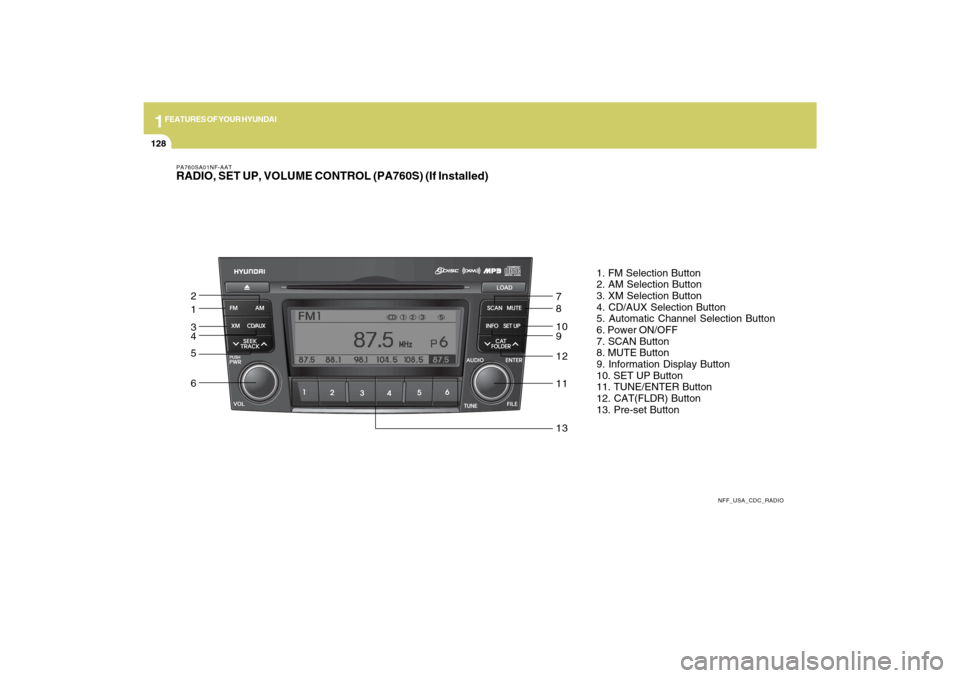
PA760SA01NF-AATRADIO, SET UP, VOLUME CONTROL (PA760S) (If Installed)
NFF_USA_CDC_RADIO
1. FM Selection Button
2. AM Selection Button
3. XM Selection Button
4. CD/AUX Selection Button
5. Automatic Channel Selection Button
6. Power ON/OFF
7. SCAN Button
8. MUTE Button
9. Information Display Button
10. SET UP Button
11. TUNE/ENTER Button
12. CAT(FLDR) Button
13. Pre-set Button
1 2
3
4
5
67
8
10
9
12
11
13
Page 149 of 286
1FEATURES OF YOUR HYUNDAI
136
PA760SF01NF-AATIf a USB is connected to the multiple termi-
nal inside the console on the right hand
side of the driver’s seat, the ‘USB’ icon will
be displayed on the top right corner of the
display screen.1.AUX Selection ButtonIf a USB device is connected, it switches to
the USB mode from the CD mode to play
the song files stored in the USB device.
If there is no CD and USB mode from the
Radio mode, it displays ‘NO MEDIA’.2. Track Moving Buttono Press the [SEEK
] button for less than
0.8 seconds to play from the beginning
of the song currently played.
Press the button for less than 0.8 sec-
onds and press it again within 1 second
to move and play the previous track.
Press the button for 0.8 seconds or
longer to play the song in reverse direc-
tion in fast speed.
o Press the [SEEK ] button for less than
0.8 seconds to move to the next track.
Press the button for 0.8 seconds or
longer to play the song in forward direc-
tion in fast speed.
3. INFO ButtonDisplays the information of the file cur-
rently played in the order of FILE NAME
➟TITLE➟ARTIST➟ALBUM➟FOLDER➟TOTAL
FILE➟normal display➟FILE NAME➟…
(Displays no information if the file has no
song information.)4. Folder moving Buttono Moves [FLDR
] button child folder of
the current folder and displays the first
song in the folder. Press ENT/TUNE
button to move to the folder displayed.
It will play the first song in the folder.
o Moves [FLDR ] button parent folder
and displays the first song in the folder.
Press ENT/TUNE button to move to the
folder displayed. It will play the first song
in the folder.
5. TUNE/ENTER ButtonTurn this button clockwise to display the
songs next to the currently played song.
Turn the button counterclockwise to dis-
play the songs before the currently played
song.
Press the button to skip and play the se-
lected song.Pressing the button changes the BASS,
MIDDLE, TREBLE, FADER and BALANCE
TUNE mode.
The mode selected is shown on the dis-
play.
After selecting each mode, rotate the Au-
dio control knob clockwise or counter-
clockwise.
o BASS Control
To increase the BASS, rotate the knob
clockwise, while to decrease the BASS,
rotate the knob counterclockwise.
o MIDDLE Control
To increase the MIDDLE, rotate the knob
clockwise, while to decrease the MIDDLE,
rotate the knob counterclockwise.
o TREBLE Control
To increase the TREBLE, rotate the knob
clockwise, while to decrease the TREBLE,
rotate the knob counterclockwise.
o FADER Control
Turn the control knob clockwise to empha-
size rear speaker sound (front speaker
sound will be attenuated). When the con-
trol knob is turned counterclockwise, front
speaker sound will be emphasized (rear
speaker sound will be attenuated).
Page 152 of 286

1
FEATURES OF YOUR HYUNDAI
139
PA760SH01NF-AATIn case the i-Pod exclusive cable (if in-
stalled) is connected to the multiple termi-
nal inside the consol on the right hand side
of the driver’s seat. When the i-Pod is
connected, the ‘i-Pod’ icon will be dis-
played on the top right corner of the display
screen.1. i-Pod Selection ButtonIf i-Pod is connected, it switches to the i-
Pod mode from the CD mode to play the
song files stored in the i-Pod.
If there are no CD and AUX mode from the
Radio mode, it displays ‘NO MEDIA’.2. Track Moving Buttono Press the [SEEK
] button for less than
0.8 seconds to play from the beginning
of the song currently played.
Press the button for less than 0.8 sec-
onds and press it again within 1 second
to move and play the previous track.
Press the button for 0.8 seconds or
longer to play the song in reverse direc-
tion in fast speed.
o Press the [SEEK ] button for less than
0.8 seconds to move to the next track.
Press the button for 0.8 seconds or
longer to play the song in forward direc-
tion in fast speed.
3. INFO ButtonDisplays the information of the file cur-
rently played in the order of FILE NAME
➟TITLE➟ARTIST➟ALBUM➟normal dis-
play ➟FILE NAME➟…
.
(Displays no information if the file has no
song information.)4. Category Selection ButtonMoves to the upper category from currently
played category of the i-Pod.
To move to (play) the category (song)
displayed, press MENU(preset6)
You will be able to search through the
lower category of the selected category.
The order of i-Pod’s category is SONG,
ALBUMES, ARTISTS, GENRES, and i-
Pod.5. TUNE/ENTER ButtonWhen you turn the button clockwise, it will
display the songs (category) next to the
song currently played (category in the same
level).
Also, when you turn the button counter-
clockwise, it will display the songs (cat-
egory) before the song currently played
(category in the same level).
If you want to listen to the song displayed
in the song category, press the button, then
it will skip to the selected song and play.Pressing the button changes the BASS,
MIDDLE, TREBLE, FADER and BALANCE
TUNE mode.
The mode selected is shown on the dis-
play.
After selecting each mode, rotate the Au-
dio control knob clockwise or counter-
clockwise.
o BASS Control
To increase the BASS, rotate the knob
clockwise, while to decrease the BASS,
rotate the knob counterclockwise.
o MIDDLE Control
To increase the MIDDLE, rotate the knob
clockwise, while to decrease the MIDDLE,
rotate the knob counterclockwise.
o TREBLE Control
To increase the TREBLE, rotate the knob
clockwise, while to decrease the TREBLE,
rotate the knob counterclockwise.
o FADER Control
Turn the control knob clockwise to empha-
size rear speaker sound (front speaker
sound will be attenuated). When the con-
trol knob is turned counterclockwise, front
speaker sound will be emphasized (rear
speaker sound will be attenuated).
Page 157 of 286
2
DRIVING YOUR HYUNDAI
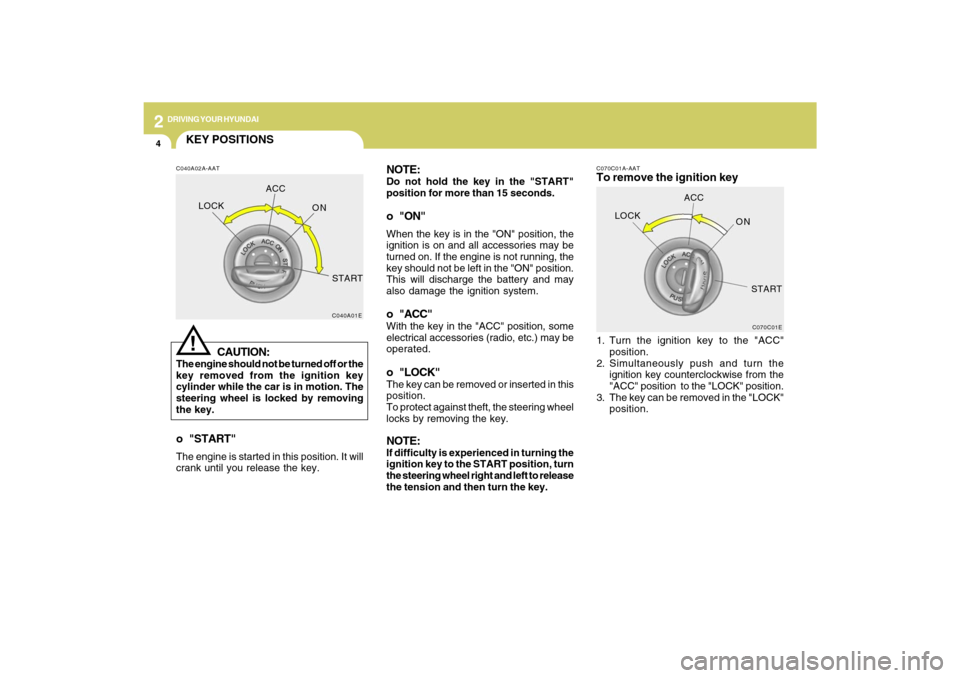
4
NOTE:Do not hold the key in the "START"
position for more than 15 seconds.o "ON"When the key is in the "ON" position, the
ignition is on and all accessories may be
turned on. If the engine is not running, the
key should not be left in the "ON" position.
This will discharge the battery and may
also damage the ignition system.o "ACC"With the key in the "ACC" position, some
electrical accessories (radio, etc.) may be
operated.o "LOCK"The key can be removed or inserted in this
position.
To protect against theft, the steering wheel
locks by removing the key.NOTE:If difficulty is experienced in turning the
ignition key to the START position, turn
the steering wheel right and left to release
the tension and then turn the key.
C070C01A-AATTo remove the ignition key1. Turn the ignition key to the "ACC"
position.
2. Simultaneously push and turn the
ignition key counterclockwise from the
"ACC" position to the "LOCK" position.
3. The key can be removed in the "LOCK"
position.
C070C01E
LOCKACC
ON
START
KEY POSITIONSC040A02A-AAT
CAUTION:
The engine should not be turned off or the
key removed from the ignition key
cylinder while the car is in motion. The
steering wheel is locked by removing
the key.
C040A01E
LOCKACC
ON
START!
o "START"The engine is started in this position. It will
crank until you release the key.
Page 188 of 286

3
WHAT TO DO IN AN EMERGENCY
7
Have the system checked by an autho-
rized Hyundai dealer as soon as pos-
sible to determine the cause of the
problem.
NOTE:
o The TPMS malfunction indicator
may be illuminated if the vehicle
is operated in areas close to elec-
tric power supply cables or radio
transmitters such as near police
stations, government and public
offices, broadcasting stations,
military installations, airports, or
transmitting towers, etc. which can
interfere with normal operation of
the Tire Pressure Monitoring Sys-
tem (TPMS).
o The TPMS malfunction indicator
may be illuminated if snow chains
or some electronic devices, such
as notebook computers, are used
in the vehicle. This can interfere
with normal operation of the Tire
Pressure Monitoring System
(TPMS).o If there is a failed tire sensor, it is
possible for the TPMS to tempo-
rarily learn a replacement sensor
if closely driven to another vehicle
that is also equipped with TPMS.
In rare cases, this may tempo-
rarily delay the TPMS malfunction
indicator from turning on.
Changing a tire with TPMS
If you have a flat tire, the Low Tire
Pressure telltale will turn on. Have the
flat tire repaired by an authorized Hyundai
dealer as soon as possible or replace
the flat tire with the temporary spare
tire. NEVER use a puncture-repairing
agent to repair and/or inflate a low
pressure tire. If used, you will have to
replace the tire pressure sensor.
Each wheel is equipped with a tire
pressure sensor mounted inside the tire
behind the valve stem. You must use
TPMS specific wheels. It is recom-
mended that you always have your tires
serviced by an authorized Hyundai
dealer.After you replace the low pressure tire
with the spare tire, the TPMS malfunc-
tion indicator or the Low Tire Pressure
telltale may illuminate after restarting
and driving for about 20 minutes.
Once the low pressure tire is re-inflated
to the recommended pressure and in-
stalled on the vehicle, the TPMS mal-
function indicator and the low tire pres-
sure telltale will extinguish. If the low
pressure and TPMS malfunction indi-
cators are not extinguished after about
20 minutes of continuous driving, please
visit an authorized Hyundai dealer.
You may not be able to identify a low tire
by simply looking at it. Always use a
good quality tire pressure gauge to
measure the tire's inflation pressure.
Please note that a tire that is hot (from
being driven) will have a higher pres-
sure measurement than a tire that is
cold (from sitting stationary for at least
3 hours and driven less than 1 mile
during that 3 hour period). Allow the tire
to cool before measuring the inflation
pressure.
Page 238 of 286
6
DO-IT-YOURSELF MAINTENANCE
23
!
CAUTION:
When replacing a fusible link, never use
anything but a new fusible link with the
same or lower amperage rating. Never
use a piece of wire or a higher-rated
fusible link. This could result in serious
damage and create a fire hazard.
G200B02NF
4. Replace the blown fuse by pressing a
new fuse of the same rating into place.
The fuse should be a snug fit. If it is not,
have the fuse clip repaired or replaced
by a Hyundai dealer. If you do not have
a spare fuse, you may be able to borrow
a fuse of the same or lower rating from
an accessory you can temporarily get
along without (the radio or cigarette
lighter, for example). Always remember
to replace the borrowed fuse.
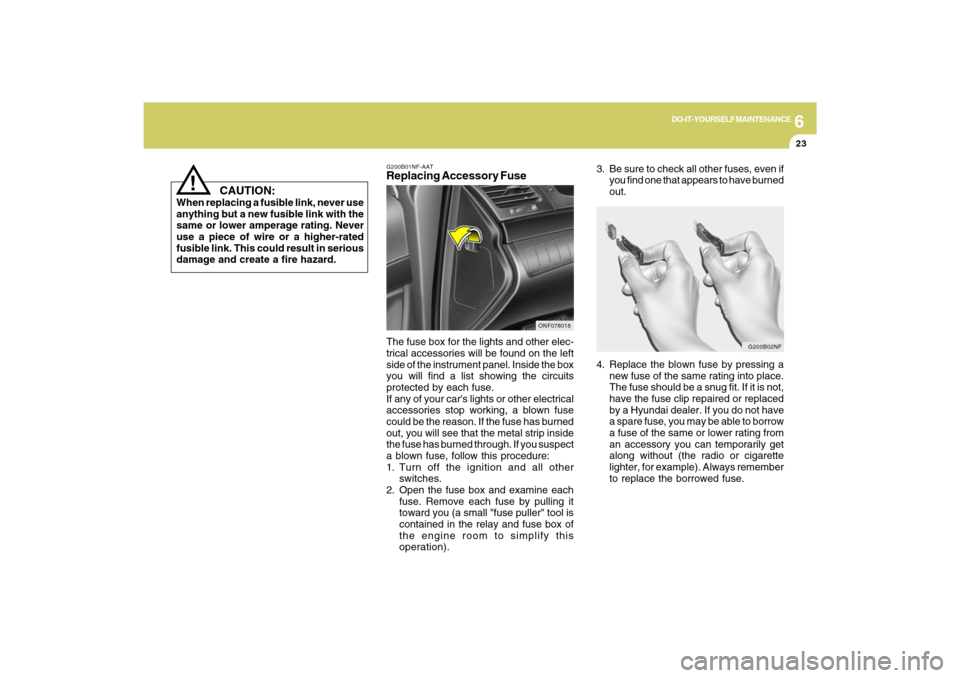
G200B01NF-AATReplacing Accessory FuseThe fuse box for the lights and other elec-
trical accessories will be found on the left
side of the instrument panel. Inside the box
you will find a list showing the circuits
protected by each fuse.
If any of your car's lights or other electrical
accessories stop working, a blown fuse
could be the reason. If the fuse has burned
out, you will see that the metal strip inside
the fuse has burned through. If you suspect
a blown fuse, follow this procedure:
1. Turn off the ignition and all other
switches.
2. Open the fuse box and examine each
fuse. Remove each fuse by pulling it
toward you (a small "fuse puller" tool is
contained in the relay and fuse box of
the engine room to simplify this
operation).
ONF078018
3. Be sure to check all other fuses, even if
you find one that appears to have burned
out.
Page 281 of 286

10
INDEX
2
A
Advanced Supplemental Restraint (AIRBAG) System
(SRS)..................................................................................1-34
Curtain airbag .................................................................1-45
Driver's and passenger's front airbag ............................1-35
Occupant classification system ......................................1-40
Side impact airbag .........................................................1-44
Air Cleaner Filter ................................................................6-11
Air Conditioning
Care.................................................................................6-18
Operation............................................................ 1-101, 6-18
Switch............................................................................1-101
Antenna ............................................................................1-110
Audio System
Audio remote control switch ...........................................1-94
CD (PA710S) ................................................................1-119
CDC (PA760S) .............................................................1-131
Radio, Set up, Volume control (PA710S, PA760S)
........................................................................... 1-115, 1-128
Running i-Pod (PA710S, PA760S) .................. 1-125, 1-139
Using USB (PA710S, PA760S) ........................ 1-123, 1-135
Automatic Heating and Cooling Control System ............1-104
Automatic-Dimming Mirror with Z-Nav™ Electronic Compass
Display and HomeLink
®
......................................................................................
1-77B
Battery .................................................................................6-24
Binding Arbitration .............................................................8-17
Brake
Anti-lock brake system (ABS) .........................................2-12
Checking the brakes ......................................................6-17
Fluid.................................................................................6-17
Pedal clearance ..............................................................6-21
Pedal free-play ...............................................................6-20
Practices..........................................................................2-15
Breaking-In your New Hyundai ........................................... 1-3
C
California Perchlorate Notice ............................................5-10
Care of Discs ....................................................................1-114
Catalytic Converter ............................................................... 7-3
Center Console Compartment ...........................................1-74
Child Restraint System ......................................................1-26
Installing a child restraint system with
"Tether Anchorage" system ...........................................1-28
Securing a child restraint system with
"ISOFIX" system .............................................................1-29
Child-Protector Rear Door Lock .......................................... 1-6
Cigarette Lighter ................................................................1-66
Climate Control Air Fiter ........................................ 1-109, 6-19
Clock...................................................................................1-66
Clutch
Pedal free-play ...............................................................6-21