lock Hyundai Sonata
[x] Cancel search | Manufacturer: HYUNDAI, Model Year: , Model line: , Model:Pages: 286, PDF Size: 9.58 MB
Page 103 of 286
1FEATURES OF YOUR HYUNDAI90
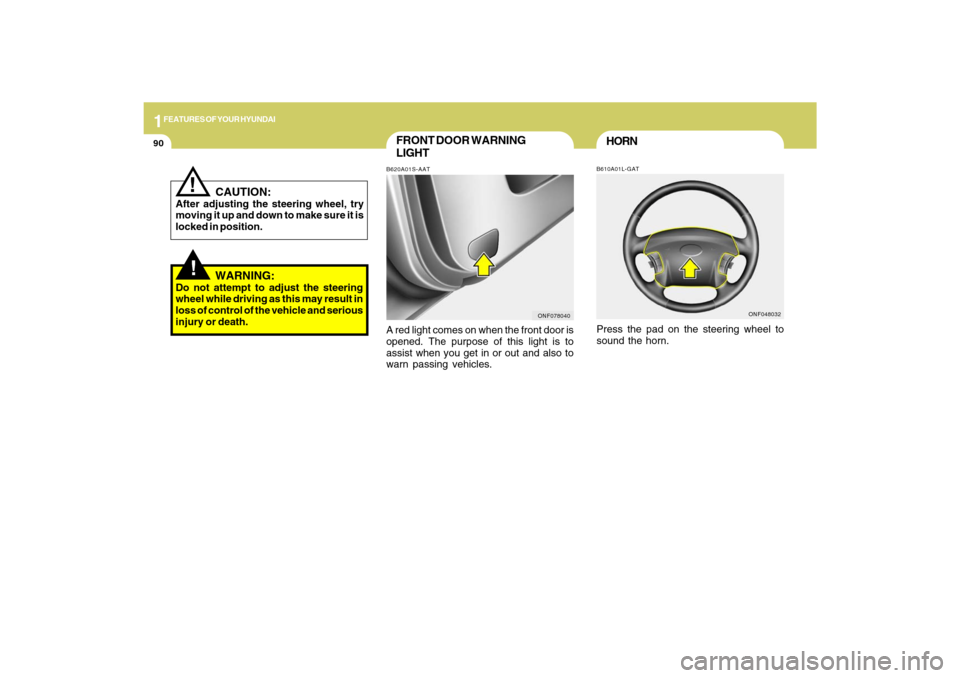
FRONT DOOR WARNING
LIGHTB620A01S-AATA red light comes on when the front door is
opened. The purpose of this light is to
assist when you get in or out and also to
warn passing vehicles.
ONF078040
!
CAUTION:
After adjusting the steering wheel, try
moving it up and down to make sure it is
locked in position.
!
WARNING:
Do not attempt to adjust the steering
wheel while driving as this may result in
loss of control of the vehicle and serious
injury or death.
HORNB610A01L-GATPress the pad on the steering wheel to
sound the horn.
ONF048032
Page 114 of 286
1
FEATURES OF YOUR HYUNDAI
101101
B730A01L-AATOperation Tipso To keep dust or unpleasant fumes from
entering the car through the ventilation
system, temporarily set the air intake
control at the position. Be sure to
return the control to the position
when the irritation has passed to keep
fresh air in the vehicle. This will help
keep the driver alert and comfortable.
o Air for the heating/cooling system is
drawn in through the grilles just ahead
of the windshield. Care should be taken
that these are not blocked by leaves,
snow, ice or other obstructions.
o To prevent interior fog on the wind-
shield, set the air intake control to the
fresh air ( ) position and fan speed to
the desired position, turn on the air
conditioning system, and adjust
temperature control to desired tempera-
ture.
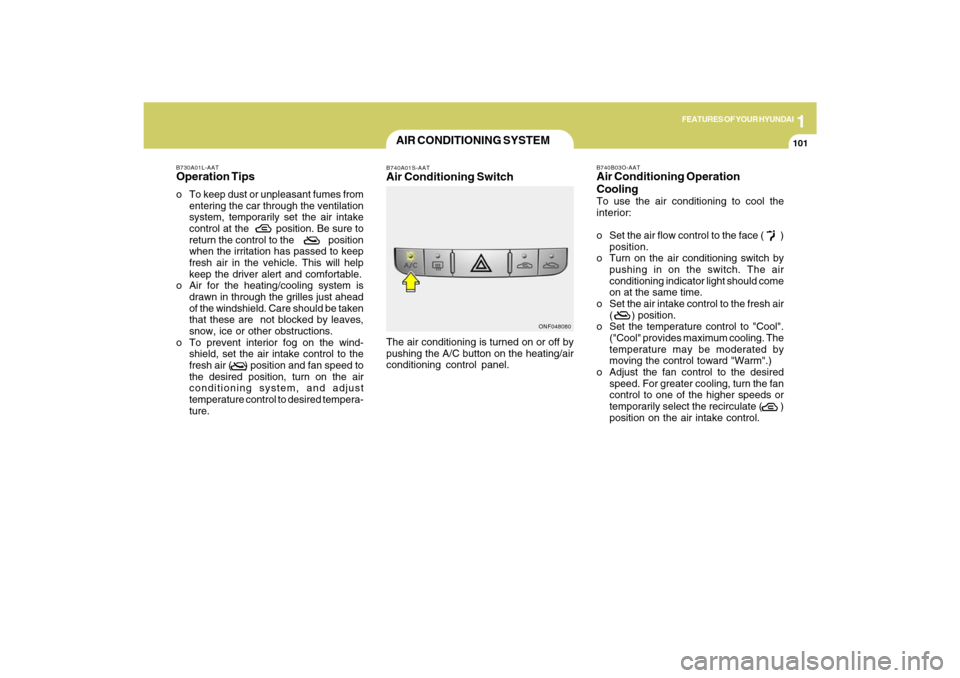
AIR CONDITIONING SYSTEMB740A01S-AATAir Conditioning SwitchThe air conditioning is turned on or off by
pushing the A/C button on the heating/air
conditioning control panel.
ONF048080B740B03O-AAT
Air Conditioning Operation
CoolingTo use the air conditioning to cool the
interior:
o Set the air flow control to the face ( )
position.
o Turn on the air conditioning switch by
pushing in on the switch. The air
conditioning indicator light should come
on at the same time.
o Set the air intake control to the fresh air
( ) position.
o Set the temperature control to "Cool".
("Cool" provides maximum cooling. The
temperature may be moderated by
moving the control toward "Warm".)
o Adjust the fan control to the desired
speed. For greater cooling, turn the fan
control to one of the higher speeds or
temporarily select the recirculate ( )
position on the air intake control.
Page 126 of 286
1
FEATURES OF YOUR HYUNDAI
113113
!
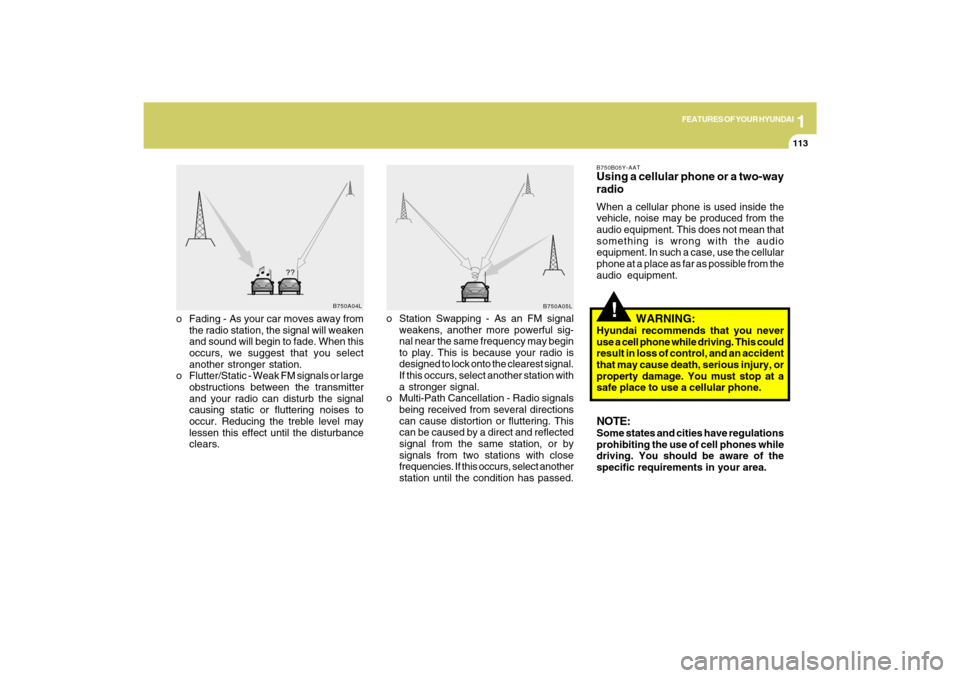
o Fading - As your car moves away from
the radio station, the signal will weaken
and sound will begin to fade. When this
occurs, we suggest that you select
another stronger station.
o Flutter/Static - Weak FM signals or large
obstructions between the transmitter
and your radio can disturb the signal
causing static or fluttering noises to
occur. Reducing the treble level may
lessen this effect until the disturbance
clears.o Station Swapping - As an FM signal
weakens, another more powerful sig-
nal near the same frequency may begin
to play. This is because your radio is
designed to lock onto the clearest signal.
If this occurs, select another station with
a stronger signal.
o Multi-Path Cancellation - Radio signals
being received from several directions
can cause distortion or fluttering. This
can be caused by a direct and reflected
signal from the same station, or by
signals from two stations with close
frequencies. If this occurs, select another
station until the condition has passed.
B750B05Y-AATUsing a cellular phone or a two-way
radioWhen a cellular phone is used inside the
vehicle, noise may be produced from the
audio equipment. This does not mean that
something is wrong with the audio
equipment. In such a case, use the cellular
phone at a place as far as possible from the
audio equipment.
WARNING:
Hyundai recommends that you never
use a cell phone while driving. This could
result in loss of control, and an accident
that may cause death, serious injury, or
property damage. You must stop at a
safe place to use a cellular phone.NOTE:Some states and cities have regulations
prohibiting the use of cell phones while
driving. You should be aware of the
specific requirements in your area.
B750A04L
B750A05L
Page 130 of 286
1
FEATURES OF YOUR HYUNDAI
117
11. TUNE/ENTER ButtonTurn this button clockwise by one notch to
increase frequency by 200Khz from cur-
rent frequency.
Turn this button counterclockwise by one
notch to decrease frequency by 200Khz
from current frequency.
Press this button while holding SET UP
button to activate / inactivate the item.
Select SET UP item using left and right
function of the Tune button.
Pressing the button changes the BASS,
MIDDLE, TREBLE, FADER and BALANCE
TUNE mode.
The mode selected is shown on the dis-
play.
After selecting each mode, rotate the Au-
dio control knob clockwise or counter-
clockwise.
o BASS Control
To increase the BASS, rotate the knob
clockwise, while to decrease the BASS,
rotate the knob counterclockwise.
o MIDDLE Control
To increase the MIDDLE, rotate the knob
clockwise, while to decrease the MIDDLE,
rotate the knob counterclockwise.o TREBLE Control
To increase the TREBLE, rotate the knob
clockwise, while to decrease the TREBLE,
rotate the knob counterclockwise.
o FADER Control
Turn the control knob clockwise to empha-
size rear speaker sound (front speaker
sound will be attenuated). When the con-
trol knob is turned counterclockwise, front
speaker sound will be emphasized (rear
speaker sound will be attenuated).
o BALANCE Control
Rotate the knob clockwise to emphasize
right speaker sound (left speaker sound
will be attenuated). When the control knob
is turned counter clockwise, left speaker
sound will be emphasized (right speaker
sound will be attenuated).
12. CAT(FLDR) ButtonMoves [CAT
] button when Category Up
search operation.
o Category is moved Up from the cat-
egory currently being received and
Category Name becomes displayed.
o If the Enter Key is not pressed within 5
seconds, then the previous mode will
be restored.o If the Key is pressed while in the last
Category, then the first category will
become displayed and operation will
be repeated.
o Corresponding category can be se-
lected by pressing ENTER.
Moves [CAT
] button when Category
Down search operation.
o Category is moved Down from the cat-
egory currently being received and
Category Name becomes displayed.
o If the Enter Key is not pressed within 5
seconds, then the previous mode will
be restored.
o If the [CAT ] Key is pressed while in
the first Category, then the last category
will become displayed and operation
will be repeated.
o Corresponding category can be se-
lected by pressing ENTER.
13. Pre-set ButtonPush [1]~[6] buttons less than 0.8 seconds
to play the channel saved in each button.
Push pre-set button for 0.8 seconds or
longer to save current channel to the re-
spective button with a beep.
Page 132 of 286
1
FEATURES OF YOUR HYUNDAI
119
PA710SD01NF-AAT1. CD loading slotPlease face printed side upward and gen-
tly push in. When the ignition switch is on
ACC or ON and power is off, power is
automatically turned on if the CD is loaded.
This CDP supports 12 cm CD. But if VCD,
Data CD are loaded, "Reading error" mes-
sage will appear and CD will be ejected.2. CD IndicatorWhen car ignition switch is ACC or ON and
if the CD is loaded, this indicator is lighted.
If the CD is ejected the light is turned off.3. CD eject ButtonPush
button to eject the CD during CD
playback. This button is enabled when
ignition switch is off.
4. CD/AUX Selection ButtonIf the auxiliary device is connected, it turns
to AUX MODE to play the sound from the
auxiliary player.
If no Disc and auxiliary device is con-
nected, it displays "NO Media" for 5 sec-
onds and returns to the previous mode.
5. Automatic Track Selection Buttono Push [SEEK
] button for less than 0.8
seconds to play from the beginning of
current song.
o Push [SEEK ] button for less than 0.8
seconds and press again within 1 sec-
onds to play the previous song.
o Push [SEEK ] button for 0.8 or longer
to initiate reverse direction high speed
sound search of current song.
o Push [SEEK ] button for less than 0.8
seconds to play the next song.
o Push [SEEK ] button for 0.8 or longer
to initiate high speed sound search of
current song.
6. INFO ButtonDisplays the information of the current CD
TRACK in the order of DISC TITLE➟ DISC
ARTIST➟TRACK TITLE➟ TRACK
ARTIST➟ TOTAL TRACK➟ Play Screen➟
DISC TITLE ➟···.(not displayed if the infor-
mation is not available on the DISC.)
7. TUNE/ENTER ButtonTurn this button clockwise to display songs
after current song.
Also, turn this button counterclockwise to
display songs before current song.
To listen to the displayed song, press the
button to skip to the song and play.
Pressing the button changes the BASS,
MIDDLE, TREBLE, FADER and BALANCE
TUNE mode.
The mode selected is shown on the dis-
play.
After selecting each mode, rotate the Au-
dio control knob clockwise or counter-
clockwise.
o BASS Control
To increase the BASS, rotate the knob
clockwise, while to decrease the BASS,
rotate the knob counterclockwise.
o MIDDLE Control
To increase the MIDDLE, rotate the knob
clockwise, while to decrease the MIDDLE,
rotate the knob counterclockwise.
o TREBLE Control
To increase the TREBLE, rotate the knob
clockwise, while to decrease the TREBLE,
rotate the knob counterclockwise.
Page 133 of 286
1FEATURES OF YOUR HYUNDAI
120
!
CAUTION IN USING
USB DEVICE:
o To use the external USB device, make
sure the device is not connected when
starting up the vehicle and connect
the device after starting up.
o If you start the vehicle when the USB
device is connected, it may damage
the USB device. (USB is not ESA)
o If the vehicle is started up or turned off
while the external USB device is con-
nected, the external USB device may
not work. o FADER Control
Turn the control knob clockwise to empha-
size rear speaker sound (front speaker
sound will be attenuated). When the con-
trol knob is turned counterclockwise, front
speaker sound will be emphasized (rear
speaker sound will be attenuated).
o BALANCE Control
Rotate the knob clockwise to emphasize
right speaker sound (left speaker sound
will be attenuated). When the control knob
is turned counter clockwise, left speaker
sound will be emphasized (right speaker
sound will be attenuated).
8.REPEAT ButtonRepeats current song when the button is
pressed for less than 0.8 seconds.
Repeats the entire DISC when the button
is pressed for 0.8 seconds or longer.9. RANDOM Play ButtonTurns on/off the randomization of the play
list of files in the currently played DISC.
To cancel the mode, press the key once
again.
10. SCAN Play ButtonPlays first 10 seconds of each song in the
DISC.
To cancel the mode, press the key once
again.11. MUTE ButtonPress this button to temporarily cut off
the Sound. "Audio Mute" is displayed on
the LCD. Press the button once again to
cancel MUTE mode.o It may not play all MP3 or WMA files.
1) It can only play MP3 files with the
compression rate between
8Kbps~320Kbps.
2) It can only play WMA music files
with the compression rate between
8Kbps~320Kbps.
o Take cautions for static electricity
when connecting or disconnecting the
external USB device.
o Encoded MP3 PLAYER'S are not rec-
ognizable.
o Depending on the condition of the ex-
ternal USB device, the connected
external USB device can be unrecog-
nizable.
o When the formatted byte/sector set-
ting of External USB devices is not
either 512BYTE or 2048BYTE, then
the device will not be recognized.
o Only the USB device formatted to FAT
12/16/32 can be used.
o USB device without USB IF
(Implementers-Forum) authentica-
tion may not be recognizable.
o Make sure the USB connection termi-
nal does not come in contact with a
human body or any other object.
Page 136 of 286
1
FEATURES OF YOUR HYUNDAI
123
PA710SF01NF-AATIf a USB device is connected to the multiple
terminal inside the console on the right
hand side of the driver’s seat, the ‘USB’
icon will be displayed on the top right
corner of the display screen.1.AUX Selection ButtonIf USB is connected, it switches to the USB
mode from the CD mode to play the song
files stored in the USB.
If there is no CD and USB mode from the
Radio mode, it displays ‘NO MEDIA’.2. Track Moving Buttono Press the [SEEK
] button for less than
0.8 seconds to play from the beginning
of the song currently played.
Press the button for less than 0.8 sec-
onds and press it again within 1 second
to move and play the previous track.
Press the button for 0.8 seconds or
longer to play the song in reverse direc-
tion in fast speed.
o Press the [SEEK ] button for less than
0.8 seconds to move to the next track.
Press the button for 0.8 seconds or
longer to play the song in forward direc-
tion in fast speed.
3. INFO ButtonDisplays the information of the file cur-
rently played in the order of FILE NAME
➟TITLE➟ARTIST➟ALBUM➟FOLDER➟TOTAL
FILE➟normal display➟FILE NAME➟…
(Displays no information if the file has no
song information.)4. Folder moving Buttono Moves [FLDR
] button to the child
folder of the current folder and displays
the first song in the folder. Press ENT/
TUNE button to move to the folder dis-
played. It will play the first song in the
folder.
o Moves [FLDR ] button to the parent
folder and displays the first song in the
folder. Press ENT/TUNE button to move
to the folder displayed. It will play the
first song in the folder.
5. TUNE/ENTER ButtonTurn this button clockwise to display the
songs next to the currently played song.
Turn the button counterclockwise to dis-
play the songs before the currently played
song.
Press the button to skip and play the se-
lected song.Pressing the button changes the BASS,
MIDDLE, TREBLE, FADER and BALANCE
TUNE mode.
The mode selected is shown on the dis-
play.
After selecting each mode, rotate the Au-
dio control knob clockwise or counter-
clockwise.
o BASS Control
To increase the BASS, rotate the knob
clockwise, while to decrease the BASS,
rotate the knob counterclockwise.
o MIDDLE Control
To increase the MIDDLE, rotate the knob
clockwise, while to decrease the MIDDLE,
rotate the knob counterclockwise.
o TREBLE Control
To increase the TREBLE, rotate the knob
clockwise, while to decrease the TREBLE,
rotate the knob counterclockwise.
o FADER Control
Turn the control knob clockwise to empha-
size rear speaker sound (front speaker
sound will be attenuated). When the con-
trol knob is turned counterclockwise, front
speaker sound will be emphasized (rear
speaker sound will be attenuated).
Page 137 of 286
1FEATURES OF YOUR HYUNDAI
124
o BALANCE Control
Rotate the knob clockwise to emphasize
right speaker sound (left speaker sound
will be attenuated). When the control knob
is turned counter clockwise, left speaker
sound will be emphasized (right speaker
sound will be attenuated).6. RANDOM Playback ButtonPress the button for less than 0.8 seconds
to start or stop the random playback of the
songs in the current folder.
Press the button for more than 0.8 seconds
to randomly play the entire songs in the
USB device.
Press the button again to cancel the mode.7. REPEAT ButtonPress the button for less than 0.8 seconds
to repeat the song currently played.
Press the button for more than 0.8 seconds
to repeat the entire songs in the USB
device.8. SCAN ButtonPlays 10 seconds of each song in the USB
device.
Press the button once again to cancel
scanning.
NOTE FOR USING AN i-Pod DEVICE:o Some i-Pod models might not support
the communication protocol and the
files will not be played. (i-Pod models
supported: Mini, 4G, Photo, Nano, 5G)
o The order of search or playback of
songs in the i-Pod can be different
from the order searched in the audio
system.
o If the i-Pod crashes due to its own
trouble, reset i-Pod. (Reset: Refer to
i-Pod manual)
o An i-Pod may not operate normally on
low battery charge.
!
CAUTION IN USING i-Pod
DEVICE:
o You need the power cable exclusive
for an i-Pod in order to operate i-Pod
with the buttons on the audio system.
The PC cable provided by Apple may
cause a malfunction. Do not use it for
vehicle use.
o When connecting the device with an i-
Pod cable, push in the jack fully to not
interfere with communication.
o When adjusting the sound of an i-Pod
and the audio system, the sound ef-
fects of both devices will overlap each
and might reduce or distort the quality
of the sound.
o Deactivate (turn off) the equalizer
function of an i-Pod when adjusting
the audio system’s volume, and turn
off the equalizer of the audio system
when using the equalizer of an i-Pod.
o When the i-Pod cable is connected,
the system can be switched to the
AUX mode even without the i-Pod
device and can cause noise. Discon-
nect i-Pod cable when you are not
using the i-Pod device.
Page 139 of 286
1FEATURES OF YOUR HYUNDAI
126
PA710SH01NF-AATIf the i-Pod exclusive cable (if installed) is
connected to the multiple terminal inside
the console on the right hand side of the
driver’s seat, the ‘i-Pod’ icon will be dis-
played on the top right corner of the display
screen.1. i-Pod Selection ButtonIf i-Pod is connected, it switches to the i-
Pod mode from the CD mode to play the
song files stored in the i-Pod.
If there is no CD and AUX mode from the
Radio mode, it displays ‘NO MEDIA’.2. Track Moving Buttono Press the [SEEK
] button for less than
0.8 seconds to play from the beginning
of the song currently played.
Press the button for less than 0.8 sec-
onds and press it again within 1 second
to move and play the previous track.
Press the button for 0.8 seconds or
longer to play the song in reverse direc-
tion in fast speed.
o Press the [SEEK ] button for less than
0.8 seconds to move to the next track.
Press the button for 0.8 seconds or
longer to play the song in forward direc-
tion in fast speed.
3. INFO ButtonDisplays the information of the file cur-
rently played in the order of FILE NAME
➟TITLE➟ARTIST➟ALBUM➟normal dis-
play ➟FILE NAME➟…
.
(Displays no information if the file has no
song information.)4. Category Selection ButtonMoves to the upper category from currently
played category of the i-Pod.
To move to (play) the category (song)
displayed, press MENU(Preset6).
You will be able to search through the
lower category of the selected category.
The order of i-Pod’s category is SONG,
ALBUMS, ARTISTS, GENRES, and i-Pod.5. TUNE/ENTER ButtonWhen you turn the button clockwise, it will
display the songs (category) next to the
song currently played (category in the same
level).
Also, when you turn the button counter-
clockwise, it will display the songs (cat-
egory) before the song currently played
(category in the same level).
If you want to listen to the song displayed
in the song category, press the button, then
it will skip to the selected song and play.Pressing the button changes the BASS,
MIDDLE, TREBLE, FADER and BALANCE
TUNE mode.
The mode selected is shown on the dis-
play.
After selecting each mode, rotate the Au-
dio control knob clockwise or counter-
clockwise.
o BASS Control
To increase the BASS, rotate the knob
clockwise, while to decrease the BASS,
rotate the knob counterclockwise.
o MIDDLE Control
To increase the MIDDLE, rotate the knob
clockwise, while to decrease the MIDDLE,
rotate the knob counterclockwise.
o TREBLE Control
To increase the TREBLE, rotate the knob
clockwise, while to decrease the TREBLE,
rotate the knob counterclockwise.
o FADER Control
Turn the control knob clockwise to empha-
size rear speaker sound (front speaker
sound will be attenuated). When the con-
trol knob is turned counterclockwise, front
speaker sound will be emphasized (rear
speaker sound will be attenuated).
Page 140 of 286

1
FEATURES OF YOUR HYUNDAI
127
o BALANCE Control
Rotate the knob clockwise to emphasize
right speaker sound (left speaker sound
will be attenuated). When the control knob
is turned counter clockwise, left speaker
sound will be emphasized (right speaker
sound will be attenuated).6. RANDOM Playback ButtonPress the button for less than 0.8 seconds
to activate or deactivate the random play-
back of the songs within the current cat-
egory.
Press the button for longer than 0.8 sec-
onds to randomly play all songs in the
entire album of the i-Pod.
Press the button once again to cancel the
mode.7. REPEAT ButtonRepeats the song currently played.