USB port Hyundai Sonata
[x] Cancel search | Manufacturer: HYUNDAI, Model Year: , Model line: , Model:Pages: 286, PDF Size: 9.58 MB
Page 124 of 286
1
FEATURES OF YOUR HYUNDAI
111111
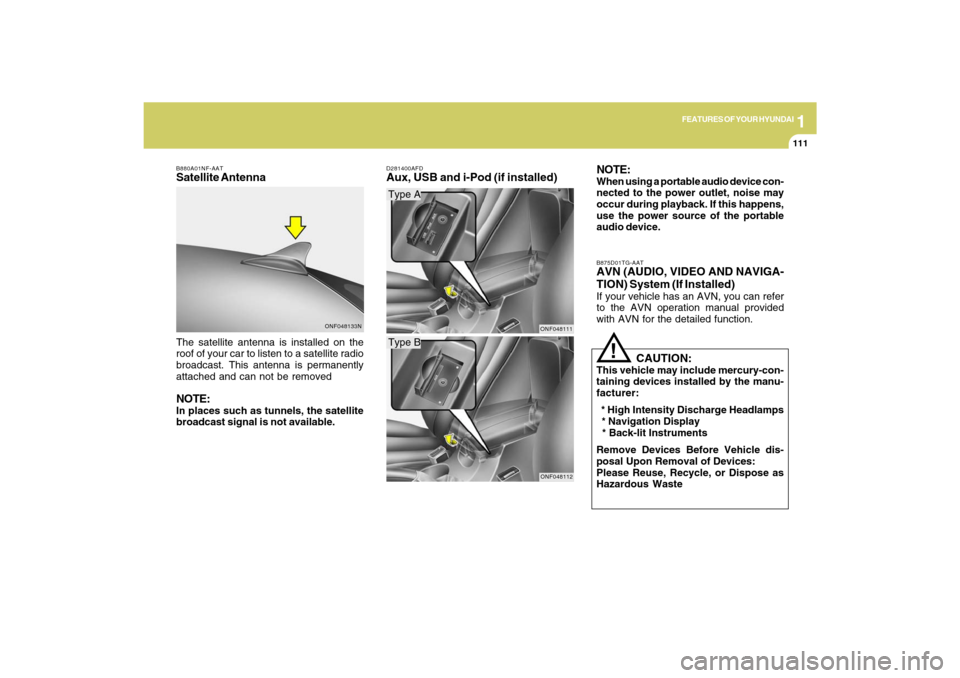
The satellite antenna is installed on the
roof of your car to listen to a satellite radio
broadcast. This antenna is permanently
attached and can not be removedNOTE:In places such as tunnels, the satellite
broadcast signal is not available.
D281400AFDAux, USB and i-Pod (if installed)NOTE:
When using a portable audio device con-
nected to the power outlet, noise may
occur during playback. If this happens,
use the power source of the portable
audio device.
Type AType B
ONF048111ONF048112B875D01TG-AAT
AVN (AUDIO, VIDEO AND NAVIGA-
TION) System (If Installed)If your vehicle has an AVN, you can refer
to the AVN operation manual provided
with AVN for the detailed function.
!
CAUTION:
This vehicle may include mercury-con-
taining devices installed by the manu-
facturer:
* High Intensity Discharge Headlamps
* Navigation Display
* Back-lit Instruments
Remove Devices Before Vehicle dis-
posal Upon Removal of Devices:
Please Reuse, Recycle, or Dispose as
Hazardous Waste
ONF048133N B880A01NF-AAT
Satellite Antenna
Page 137 of 286
1FEATURES OF YOUR HYUNDAI
124
o BALANCE Control
Rotate the knob clockwise to emphasize
right speaker sound (left speaker sound
will be attenuated). When the control knob
is turned counter clockwise, left speaker
sound will be emphasized (right speaker
sound will be attenuated).6. RANDOM Playback ButtonPress the button for less than 0.8 seconds
to start or stop the random playback of the
songs in the current folder.
Press the button for more than 0.8 seconds
to randomly play the entire songs in the
USB device.
Press the button again to cancel the mode.7. REPEAT ButtonPress the button for less than 0.8 seconds
to repeat the song currently played.
Press the button for more than 0.8 seconds
to repeat the entire songs in the USB
device.8. SCAN ButtonPlays 10 seconds of each song in the USB
device.
Press the button once again to cancel
scanning.
NOTE FOR USING AN i-Pod DEVICE:o Some i-Pod models might not support
the communication protocol and the
files will not be played. (i-Pod models
supported: Mini, 4G, Photo, Nano, 5G)
o The order of search or playback of
songs in the i-Pod can be different
from the order searched in the audio
system.
o If the i-Pod crashes due to its own
trouble, reset i-Pod. (Reset: Refer to
i-Pod manual)
o An i-Pod may not operate normally on
low battery charge.
!
CAUTION IN USING i-Pod
DEVICE:
o You need the power cable exclusive
for an i-Pod in order to operate i-Pod
with the buttons on the audio system.
The PC cable provided by Apple may
cause a malfunction. Do not use it for
vehicle use.
o When connecting the device with an i-
Pod cable, push in the jack fully to not
interfere with communication.
o When adjusting the sound of an i-Pod
and the audio system, the sound ef-
fects of both devices will overlap each
and might reduce or distort the quality
of the sound.
o Deactivate (turn off) the equalizer
function of an i-Pod when adjusting
the audio system’s volume, and turn
off the equalizer of the audio system
when using the equalizer of an i-Pod.
o When the i-Pod cable is connected,
the system can be switched to the
AUX mode even without the i-Pod
device and can cause noise. Discon-
nect i-Pod cable when you are not
using the i-Pod device.
Page 150 of 286
1
FEATURES OF YOUR HYUNDAI
137
o BALANCE Control
Rotate the knob clockwise to emphasize
right speaker sound (left speaker sound
will be attenuated). When the control knob
is turned counter clockwise, left speaker
sound will be emphasized (right speaker
sound will be attenuated).6. RANDOM Playback ButtonPress the button for less than 0.8 seconds
to start or stop the random playback of the
songs in the current folder.
Press the button for more than 0.8 seconds
to randomly play the entire songs in the
USB device.
Press the button again to cancel the mode.7. REPEAT ButtonPress the button for less than 0.8 seconds
to repeat the song currently played.
Press the button for more than 0.8 seconds
to repeat the entire songs in the USB
device.8. SCAN ButtonPlays 10 seconds of each song in the USB
device.
Press the button once again to cancel
scanning.
NOTE FOR USING i-Pod DEVICE:o Some i-Pod models might not support
the communication protocol and the
files will not be played. (i-Pod models
supported: Mini, 4G, Photo, Nano, 5G)
o The order of search or playback of
songs in the i-Pod can be different
from the order searched in the audio
system.
o If the i-Pod crashes due to its own
trouble, reset i-Pod. (Reset: Refer to
i-Pod manual)
o i-Pod may not operate normally on
low battery.
!
CAUTION IN USING i-Pod
DEVICE:
o You need the power cable exclusive
for an i-Pod in order to operate i-Pod
with the buttons on the audio system.
The PC cable provided by Apple may
cause a malfunction. Do not use it for
vehicle use.
o When connecting the device with an i-
Pod cable, push in the jack fully to not
interfere with communication.
o When adjusting the sound of an i-Pod
and the audio system, the sound ef-
fects of both devices will overlap each
and might reduce or distort the quality
of the sound.
o Deactivate (turn off) the equalizer
function of an i-Pod when adjusting
the audio system’s volume, and turn
off the equalizer of the audio system
when using the equalizer of an i-Pod.
o When the i-Pod cable is connected,
the system can be switched to the
AUX mode even without the i-Pod
device and can cause noise. Discon-
nect i-Pod cable when you are not
using the i-Pod device.