door Hyundai Sonata
[x] Cancel search | Manufacturer: HYUNDAI, Model Year: , Model line: , Model:Pages: 363, PDF Size: 30.3 MB
Page 89 of 363
417
Features of your vehicle
Operating door locks from inside
the vehicle
With the door lock button
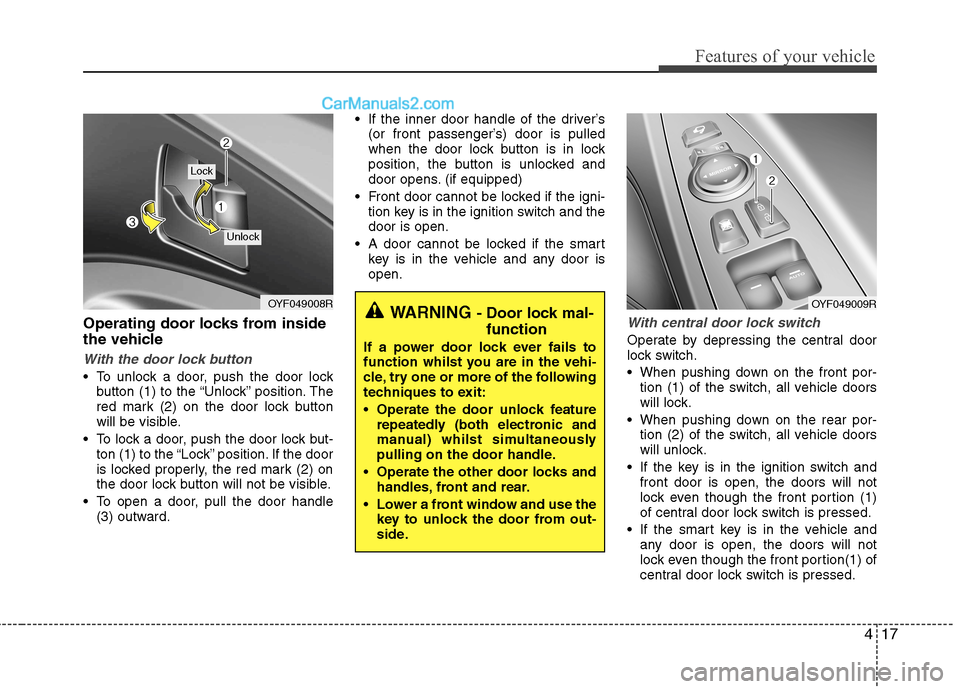
To unlock a door, push the door lockbutton (1) to the “Unlock” position. The
red mark (2) on the door lock button
will be visible.
To lock a door, push the door lock but- ton (1) to the “Lock” position. If the door
is locked properly, the red mark (2) on
the door lock button will not be visible.
To open a door, pull the door handle (3) outward. If the inner door handle of the driver’s
(or front passenger’s) door is pulled
when the door lock button is in lock
position, the button is unlocked and
door opens. (if equipped)
Front door cannot be locked if the igni- tion key is in the ignition switch and thedoor is open.
A door cannot be locked if the smart key is in the vehicle and any door isopen.
With central door lock switch
Operate by depressing the central door
lock switch.
When pushing down on the front por-tion (1) of the switch, all vehicle doors
will lock.
When pushing down on the rear por- tion (2) of the switch, all vehicle doors
will unlock.
If the key is in the ignition switch and front door is open, the doors will not
lock even though the front portion (1)
of central door lock switch is pressed.
If the smart key is in the vehicle and any door is open, the doors will not
lock even though the front portion(1) of
central door lock switch is pressed.
OYF049008R
Lock
Unlock
WARNING - Door lock mal-
function
If a power door lock ever fails to
function whilst you are in the vehi-
cle, try one or more of the following
techniques to exit:
Operate the door unlock feature repeatedly (both electronic and
manual) whilst simultaneously
pulling on the door handle.
Operate the other door locks and handles, front and rear.
Lower a front window and use the key to unlock the door from out-
side.OYF049009R
Page 90 of 363
Features of your vehicle
18
4
Impact sensing door unlock sys- tem
All doors will be automatically unlocked after an impact causes the air bags to
deploy.
✽✽
NOTICE
You can activate or deactivate some auto
door lock/unlock features in the vehicle
setting as follows;
Speed sensing auto door lock
Auto door unlock by unlocking the driver's door
Auto door unlock when the ignition
key is removed from the ignition
switch or the smart key is removed
from the smart key holder.
Auto door lock/unlock by shifting the transaxle shift lever out of P (Park) or
into P (Park)
If you want to activate or deactivate
some door lock/unlock feature, refer to
the “vehicle setting” in this chapter.
WARNING - Unlocked
vehicles
Leaving your vehicle unlocked can
invite theft or possible harm to you
or others from someone hiding in
your vehicle whilst you are gone.
Always remove the ignition key,
engage the parking brake, close all
windows and lock all doors when
leaving your vehicle unattended.
WARNING - Unattended
children
An enclosed vehicle can become
extremely hot, causing death or
severe injury to unattended chil-dren or animals who cannot escape
the vehicle. Furthermore, children
might operate features of the vehi-
cle that could injure them, or they
could encounter other harm, possi-
bly from someone gaining entry to
the vehicle. Never leave children or
animals unattended in your vehicle.
WARNING - Doors
The doors should always be fully closed and locked whilst the
vehicle is in motion to prevent
accidental opening of the door.
Locked doors will also discour-
age potential intruders when the
vehicle stops or slows.
Be careful when opening doors and watch for vehicles, motorcy-
cles, bicycles or pedestrians
approaching the vehicle in the
path of the door. Opening a door
when something is approaching
can cause damage or injury.
Page 91 of 363
419
Features of your vehicle
Child-protector rear door lock
The child safety lock is provided to help
prevent children from accidentally open-
ing the rear doors from inside the vehicle.
The rear door safety locks should be
used whenever children are in the vehi-
cle.
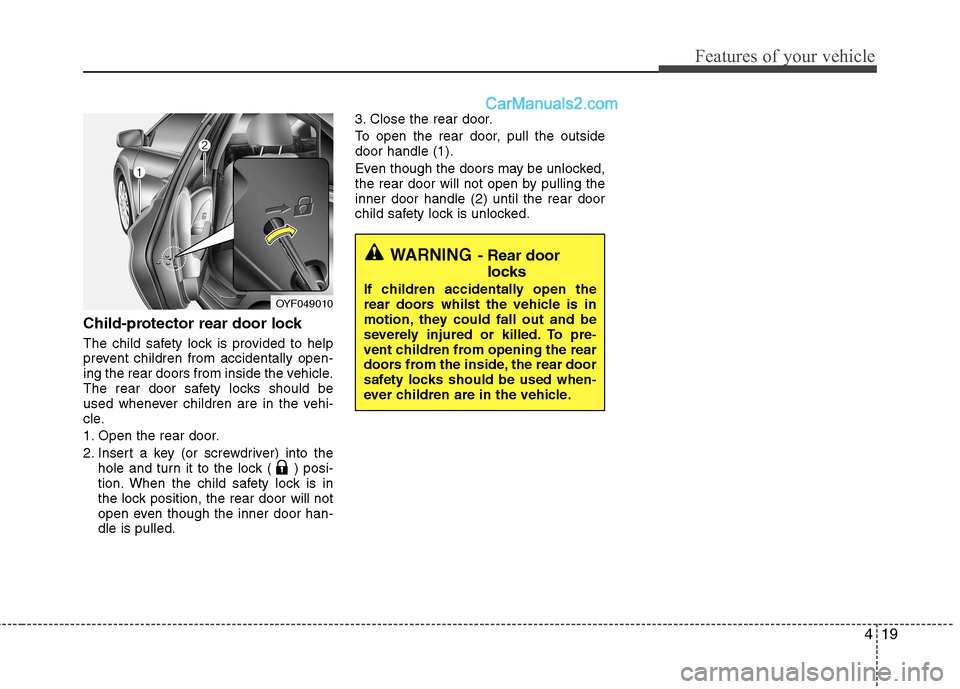
1. Open the rear door.
2. Insert a key (or screwdriver) into thehole and turn it to the lock ( ) posi-
tion. When the child safety lock is in
the lock position, the rear door will not
open even though the inner door han-dle is pulled. 3. Close the rear door.
To open the rear door, pull the outside door handle (1).
Even though the doors may be unlocked,
the rear door will not open by pulling theinner door handle (2) until the rear door
child safety lock is unlocked.
WARNING
- Rear door
locks
If children accidentally open the
rear doors whilst the vehicle is in
motion, they could fall out and be
severely injured or killed. To pre-
vent children from opening the rear
doors from the inside, the rear door
safety locks should be used when-
ever children are in the vehicle.
OYF049010
Page 92 of 363
Features of your vehicle
20
4
Opening the trunk
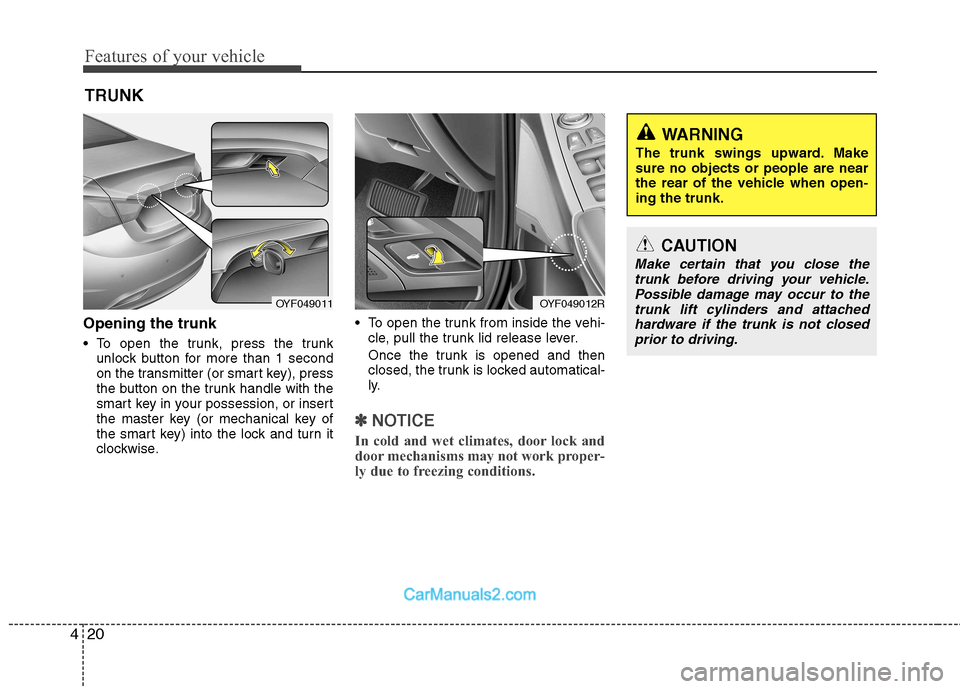
To open the trunk, press the trunk
unlock button for more than 1 second
on the transmitter (or smart key), press
the button on the trunk handle with the
smart key in your possession, or insert
the master key (or mechanical key of
the smart key) into the lock and turn it
clockwise. To open the trunk from inside the vehi-
cle, pull the trunk lid release lever.
Once the trunk is opened and then
closed, the trunk is locked automatical-
ly.
✽✽ NOTICE
In cold and wet climates, door lock and
door mechanisms may not work proper-
ly due to freezing conditions.
TRUNK
OYF049012ROYF049011
CAUTION
Make certain that you close the trunk before driving your vehicle.
Possible damage may occur to thetrunk lift cylinders and attached hardware if the trunk is not closedprior to driving.
WARNING
The trunk swings upward. Make sure no objects or people are near
the rear of the vehicle when open-ing the trunk.
Page 94 of 363
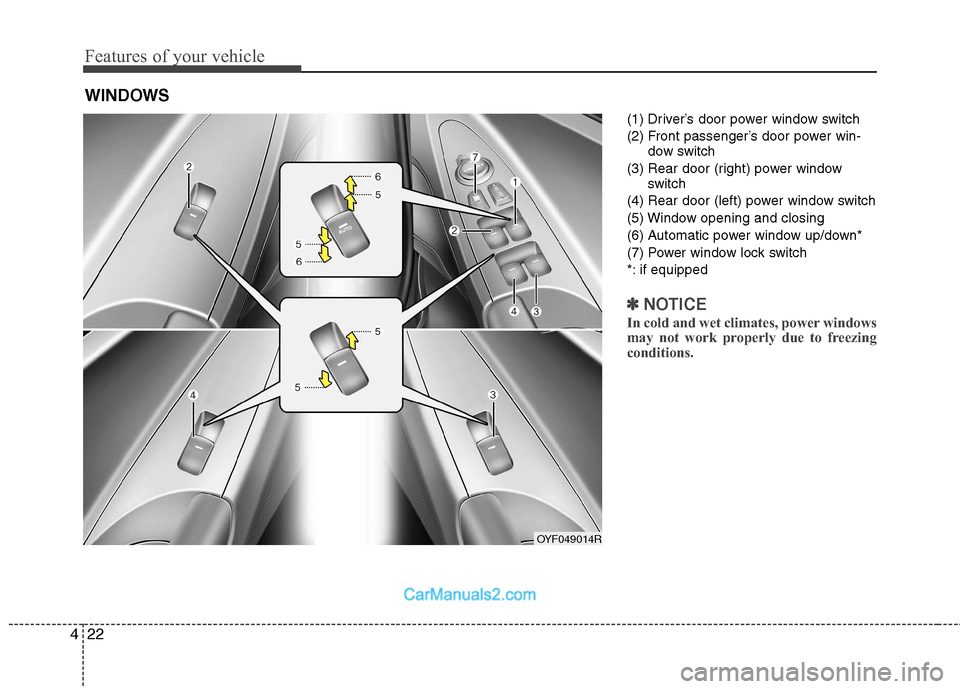
Features of your vehicle
22
4
(1) Driver’s door power window switch
(2) Front passenger’s door power win-
dow switch
(3) Rear door (right) power window switch
(4) Rear door (left) power window switch
(5) Window opening and closing
(6) Automatic power window up/down*
(7) Power window lock switch
*: if equipped
✽✽ NOTICE
In cold and wet climates, power windows
may not work properly due to freezing
conditions.
WINDOWS
OYF049014R
Page 95 of 363
423
Features of your vehicle
Power windows
The ignition switch must be in the ON
position for power windows to operate.
Each door has a power window switch
that controls the door's window. The driv-
er has a power window lock switch which
can block the operation of passenger
windows. The power windows can be
operated for approximately 30 seconds
after the ignition key is removed or turned
to the ACC or LOCK position. However, if
the front doors open, the power windows
cannot be operated within the 30 second
period after ignition key removal.
✽✽NOTICE
Whilst driving with the rear windows
down or with the sunroof (if equipped)
in an open (or partially open position),
your vehicle may demonstrate a wind
buffeting or pulsation noise. This
noise is a normal occurrence and can be
reduced or eliminated by taking the fol-
lowing actions. If the noise occurs with
one or both of the rear windows down,
partially lower both front windows
approximately one inch. If you expe-
rience the noise with the sunroof open,
slightly reduce the size of the sunroof
opening.
Window opening and closing
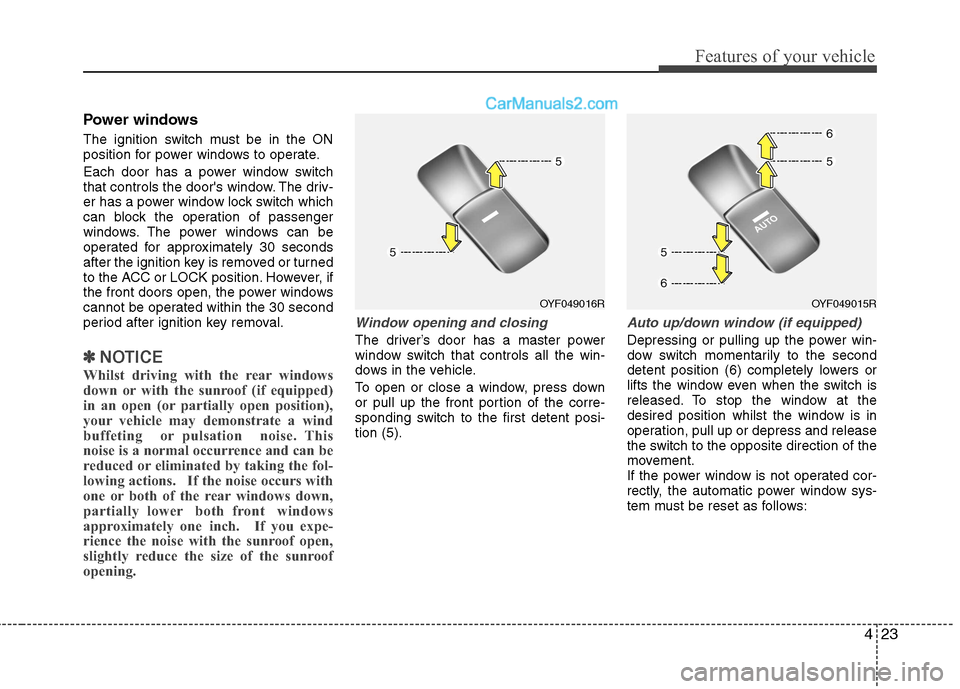
The driver’s door has a master power
window switch that controls all the win-
dows in the vehicle.
To open or close a window, press down
or pull up the front portion of the corre-
sponding switch to the first detent posi-tion (5).
Auto up/down window (if equipped)
Depressing or pulling up the power win-
dow switch momentarily to the second
detent position (6) completely lowers or
lifts the window even when the switch is
released. To stop the window at the
desired position whilst the window is in
operation, pull up or depress and release
the switch to the opposite direction of the
movement.
If the power window is not operated cor-
rectly, the automatic power window sys-
tem must be reset as follows:
OYF049016ROYF049015R
Page 97 of 363
425
Features of your vehicle
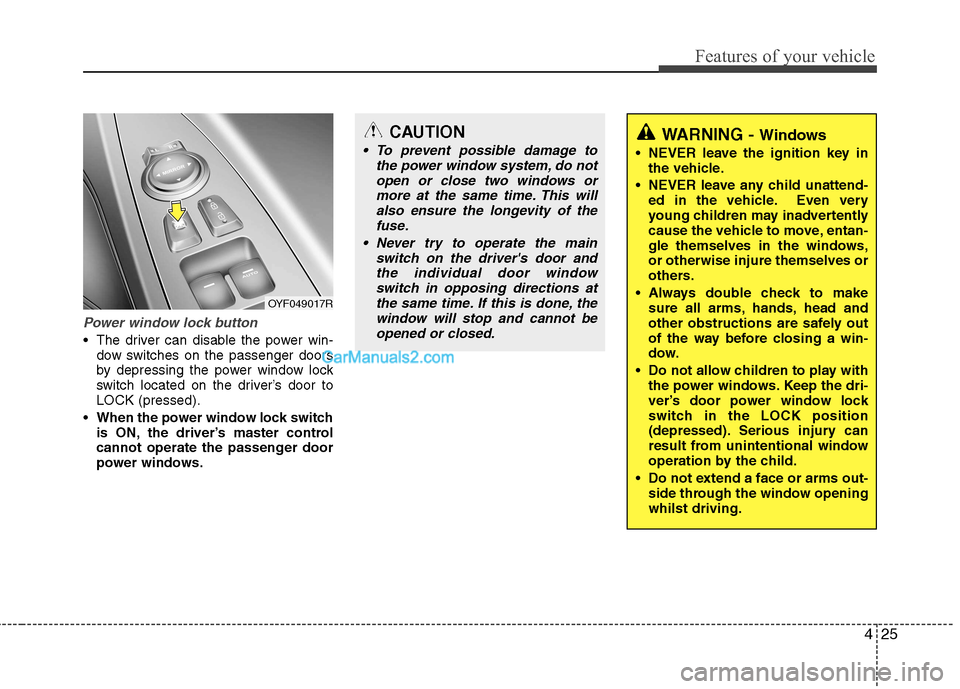
Power window lock button
The driver can disable the power win-dow switches on the passenger doors
by depressing the power window lock
switch located on the driver’s door toLOCK (pressed).
When the power window lock switch is ON, the driver’s master control
cannot operate the passenger door
power windows.
CAUTION
To prevent possible damage to
the power window system, do not
open or close two windows ormore at the same time. This willalso ensure the longevity of the fuse.
Never try to operate the main switch on the driver's door andthe individual door windowswitch in opposing directions at
the same time. If this is done, the window will stop and cannot beopened or closed.WARNING - Windows
NEVER leave the ignition key in the vehicle.
NEVER leave any child unattend- ed in the vehicle. Even very
young children may inadvertently
cause the vehicle to move, entan-
gle themselves in the windows,or otherwise injure themselves or
others.
Always double check to make sure all arms, hands, head and
other obstructions are safely out
of the way before closing a win-
dow.
Do not allow children to play with the power windows. Keep the dri-
ver’s door power window lock
switch in the LOCK position
(depressed). Serious injury can
result from unintentional window
operation by the child.
Do not extend a face or arms out- side through the window openingwhilst driving.
OYF049017R
Page 101 of 363
429
Features of your vehicle
(Continued)
Do not get back into a vehicleonce you have begun refuelling
since you can generate static
electricity by touching, rubbing
or sliding against any item or fab-
ric (polyester, satin, nylon, etc.)
capable of producing static elec-
tricity. Static electricity discharge
can ignite fuel vapours resulting
in rapid burning. If you must re-
enter the vehicle, you should
once again eliminate potentially
dangerous static electricity dis-
charge by touching a metal part
of the vehicle, away from the fuel
filler neck, nozzle or other petrol
source.
When using an approved portable fuel container, be sure toplace the container on the
ground prior to refuelling. Static
electricity discharge from the
container can ignite fuel vapours
causing a fire. Once refuelling
has begun, contact with the vehi-
cle should be maintained until
the filling is complete.
(Continued)WARNING - Refuelling
dangers
Automotive fuels are flammable
materials. When refuelling, please
note the following guidelines care-
fully. Failure to follow these guide-
lines may result in severe personal
injury, severe burns or death by fire
or explosion.
Read and follow all warnings at the petrol station facility.
Before refuelling note the loca- tion of the Emergency Petrol
Shut-Off, if available, at the gas
station facility.
Before touching the fuel nozzle, you should eliminate potentially
dangerous static electricity dis-
charge by touching another metal
part of the vehicle, a safe dis-
tance away from the fuel filler
neck, nozzle, or other gas source.
(Continued)(Continued)Use only approved portable plas-
tic fuel containers designed to
carry and store petrol.
Do not use mobile phones whilst refuelling. Electric current and/or
electronic interference from
mobile phones can potentially
ignite fuel vapours causing a fire.
When refuelling, always shut the engine off. Sparks produced byelectrical components related tothe engine can ignite fuel
vapours causing a fire. Once
refuelling is complete, check tomake sure the filler cap and filler
door are securely closed, before
starting the engine.
DO NOT use matches or a lighter and DO NOT SMOKE or leave a lit
cigarette in your vehicle whilst at
a petrol station especially during
refuelling. Automotive fuel is
highly flammable and can, when
ignited, result in fire.
(Continued)
Page 107 of 363
435
Features of your vehicle
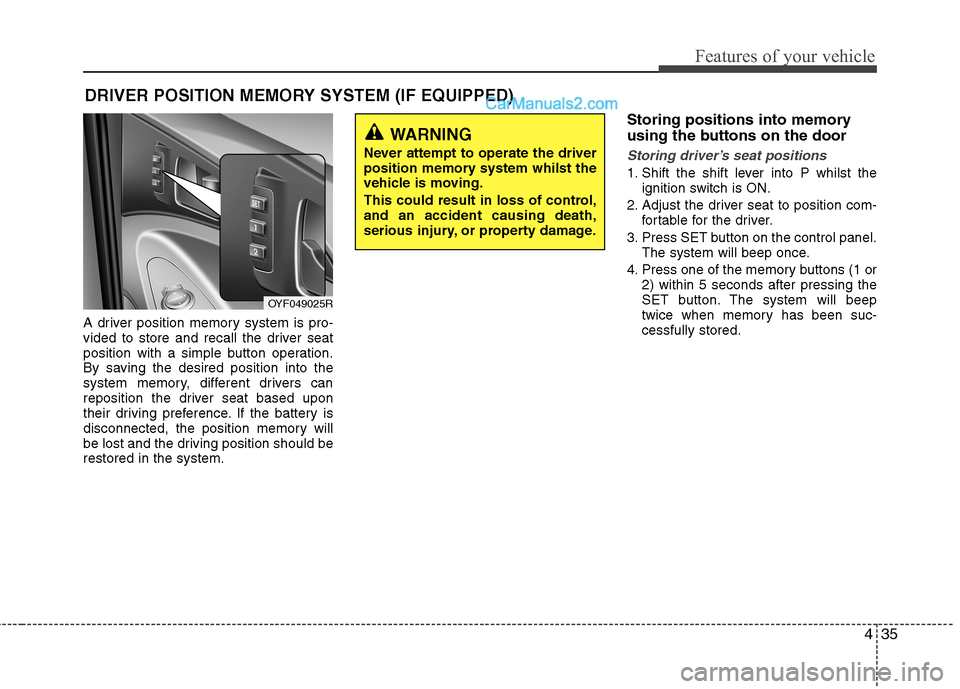
A driver position memory system is pro-
vided to store and recall the driver seat
position with a simple button operation.
By saving the desired position into the
system memory, different drivers can
reposition the driver seat based upon
their driving preference. If the battery is
disconnected, the position memory will
be lost and the driving position should berestored in the system.Storing positions into memory
using the buttons on the door
Storing driver’s seat positions
1. Shift the shift lever into P whilst the
ignition switch is ON.
2. Adjust the driver seat to position com- fortable for the driver.
3. Press SET button on the control panel. The system will beep once.
4. Press one of the memory buttons (1 or 2) within 5 seconds after pressing the
SET button. The system will beep
twice when memory has been suc-cessfully stored.
DRIVER POSITION MEMORY SYSTEM (IF EQUIPPED)
WARNING
Never attempt to operate the driver
position memory system whilst the
vehicle is moving.
This could result in loss of control, and an accident causing death,
serious injury, or property damage.
OYF049025R
Page 117 of 363
445
Features of your vehicle
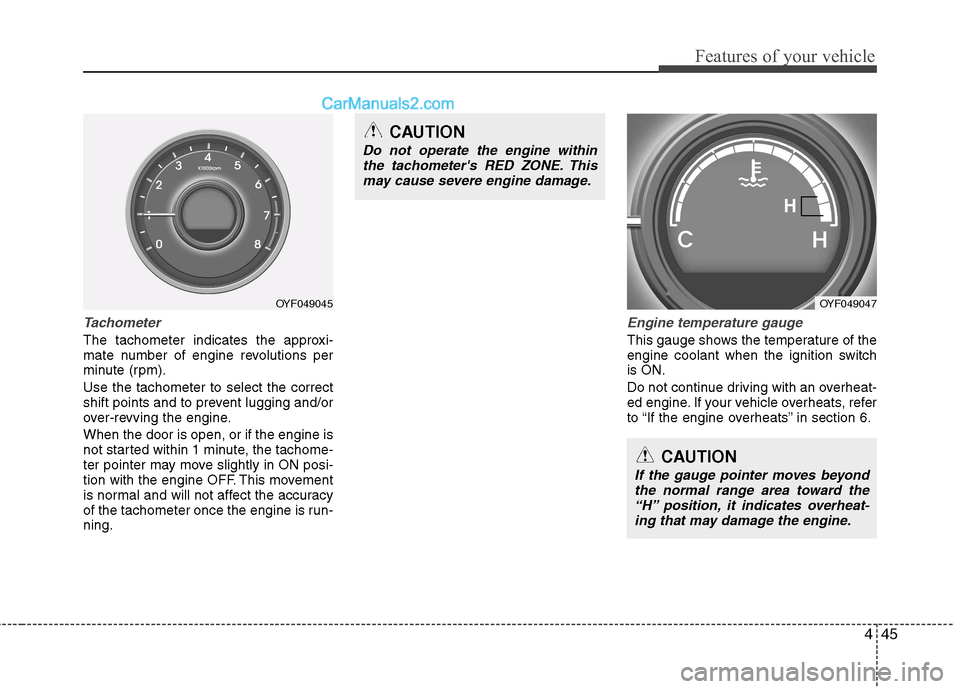
Tachometer
The tachometer indicates the approxi-
mate number of engine revolutions per
minute (rpm). Use the tachometer to select the correct
shift points and to prevent lugging and/or
over-revving the engine. When the door is open, or if the engine is
not started within 1 minute, the tachome-
ter pointer may move slightly in ON posi-
tion with the engine OFF. This movement
is normal and will not affect the accuracy
of the tachometer once the engine is run-ning.
Engine temperature gauge
This gauge shows the temperature of the
engine coolant when the ignition switchis ON.
Do not continue driving with an overheat-
ed engine. If your vehicle overheats, refer
to “If the engine overheats” in section 6.
CAUTION
If the gauge pointer moves beyondthe normal range area toward the“H” position, it indicates overheat-ing that may damage the engine.
CAUTION
Do not operate the engine within the tachometer's RED ZONE. This
may cause severe engine damage.
OYF049045OYF049047
H