Seat Hyundai Sonata 2009 Service Manual
[x] Cancel search | Manufacturer: HYUNDAI, Model Year: 2009, Model line: Sonata, Model: Hyundai Sonata 2009Pages: 286, PDF Size: 9.58 MB
Page 62 of 286

1
FEATURES OF YOUR HYUNDAI
49
1. Tachometer
2. Low Tire Pressure Telltale
3. TPMS (Tire Pressure Monitoring System) Malfunction Telltale
4. Door Ajar Warning Light
5. Seat Belt Warning Light (Driver's side)
6. High Beam Indicator Light
7. Turn Signal Indicator Lights
8. Speedometer
9. Electronic Stability Control (ESC) Indicator Lights
(If Installed)
10. Front Fog Light Indicator Light (If Installed)
11. ABS Service Reminder Indicator (SRI) (If Installed)
12. Coolant Temperature Gauge13. Fuel Gauge
14. Parking Brake/Low Brake Fluid Level Warning Light
15. Low Oil Pressure Warning Light
16. Charging System Warning Light
17. Low Windshield Washer Fluid Level Warning Light
18. Check Engine - Malfunction Indicator Light (MIL)
19. SRS (Airbag) Warning Light
20. Automatic Transaxle Position Indicator Light (If Installed)
21. Odometer/ Trip Odometer/ Trip Computer (If Installed)
22. CRUISE Indicator Light
23. Cruise SET Indicator Light
24. Trunk Lid Open Warning Light
25. Low Fuel Warning Light
Page 63 of 286
1FEATURES OF YOUR HYUNDAI50
WARNING AND INDICATOR
LIGHTSB260B01JM-AAT
SRS (Airbag) Warning Light
The SRS warning light comes on for about
6 seconds after the key is turned to the "ON"
position or after the engine is started, after
which it will go out.
This light also comes on when the SRS is
not working properly. If the airbag warning
light does not come on, or continuously
remains on after operating for about 6
seconds when you turned the ignition key
to the "ON" position or started the engine,
or if it comes on while driving, have the
SRS inspected by an authorized Hyundai
dealer.B260D01A-AAT
Turn Signal Indicator Lights
The blinking green arrows on the
instrument panel show the direction
indicated by the turn signals. If the arrow
comes on but does not blink, blinks more
rapidly than normal, or does not illuminate
at all, a malfunction in the turn signal system
is indicated. Your dealer should be
consulted for repairs.
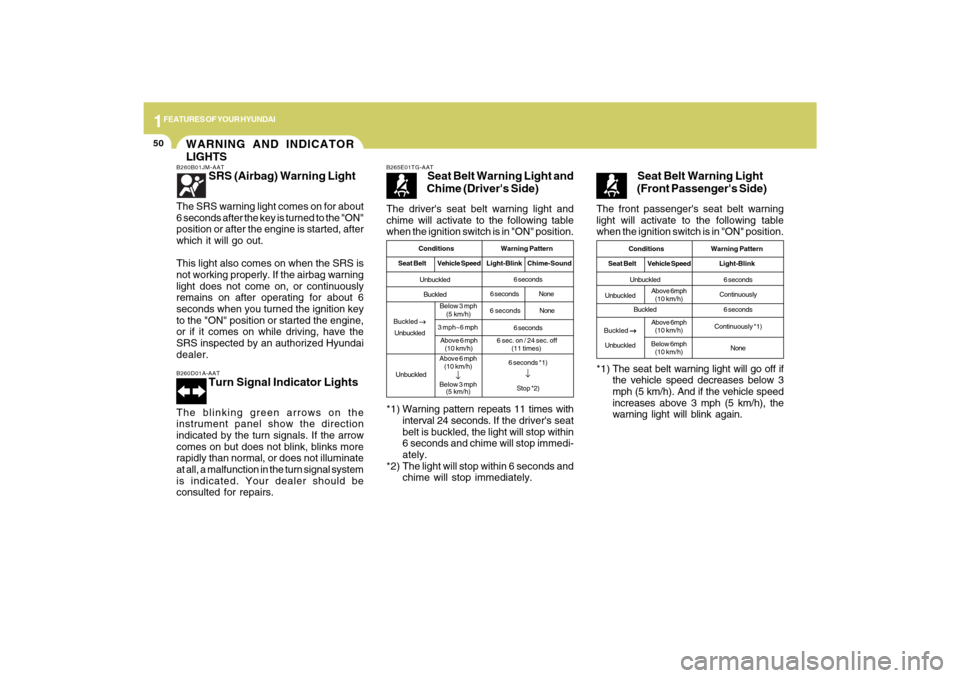
The driver's seat belt warning light and
chime will activate to the following table
when the ignition switch is in "ON" position.B265E01TG-AAT
Seat Belt Warning Light and
Chime (Driver's Side)
*1) Warning pattern repeats 11 times with
interval 24 seconds. If the driver's seat
belt is buckled, the light will stop within
6 seconds and chime will stop immedi-
ately.
*2) The light will stop within 6 seconds and
chime will stop immediately.
Conditions Warning Pattern
Seat BeltVehicle SpeedLight-Blink Chime-SoundUnbuckled
Buckled
UnbuckledAbove 6 mph
(10 km/h)
↓
Below 3 mph
(5 km/h)6 seconds
6 secondsNone
6 seconds
6 seconds *1)
↓Stop *2)
6 secondsNone
The front passenger's seat belt warning
light will activate to the following table
when the ignition switch is in "ON" position.
Seat Belt Warning Light
(Front Passenger's Side)
*1) The seat belt warning light will go off if
the vehicle speed decreases below 3
mph (5 km/h). And if the vehicle speed
increases above 3 mph (5 km/h), the
warning light will blink again.
Conditions Warning Pattern
Seat BeltVehicle SpeedLight-BlinkUnbuckled
Buckled6 seconds
Continuously
6 seconds
Continuously *1)
None
UnbuckledAbove 6mph
(10 km/h)
Buckled
→ →→ →
→
UnbuckledAbove 6mph
(10 km/h)
Below 6mph
(10 km/h)
Buckled
→ →→ →
→
UnbuckledBelow 3 mph
(5 km/h)
3 mph~6 mph
Above 6 mph
(10 km/h)
6 sec. on / 24 sec. off
(11 times)
Page 64 of 286
1
FEATURES OF YOUR HYUNDAI
51
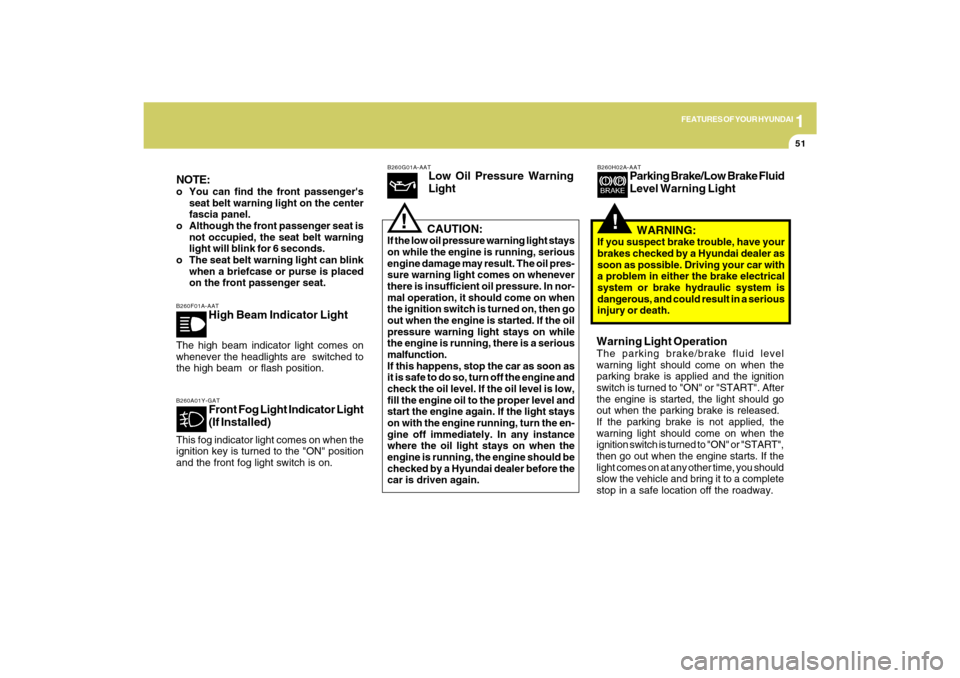
B260F01A-AAT
High Beam Indicator Light
The high beam indicator light comes on
whenever the headlights are switched to
the high beam or flash position.
B260G01A-AAT
Low Oil Pressure Warning
Light
CAUTION:
If the low oil pressure warning light stays
on while the engine is running, serious
engine damage may result. The oil pres-
sure warning light comes on whenever
there is insufficient oil pressure. In nor-
mal operation, it should come on when
the ignition switch is turned on, then go
out when the engine is started. If the oil
pressure warning light stays on while
the engine is running, there is a serious
malfunction.
If this happens, stop the car as soon as
it is safe to do so, turn off the engine and
check the oil level. If the oil level is low,
fill the engine oil to the proper level and
start the engine again. If the light stays
on with the engine running, turn the en-
gine off immediately. In any instance
where the oil light stays on when the
engine is running, the engine should be
checked by a Hyundai dealer before the
car is driven again.
!
B260A01Y-GAT
Front Fog Light Indicator Light
(If Installed)
This fog indicator light comes on when the
ignition key is turned to the "ON" position
and the front fog light switch is on.NOTE:o You can find the front passenger's
seat belt warning light on the center
fascia panel.
o Although the front passenger seat is
not occupied, the seat belt warning
light will blink for 6 seconds.
o The seat belt warning light can blink
when a briefcase or purse is placed
on the front passenger seat.
!
B260H02A-AAT
Parking Brake/Low Brake Fluid
Level Warning Light
WARNING:
If you suspect brake trouble, have your
brakes checked by a Hyundai dealer as
soon as possible. Driving your car with
a problem in either the brake electrical
system or brake hydraulic system is
dangerous, and could result in a serious
injury or death.Warning Light OperationThe parking brake/brake fluid level
warning light should come on when the
parking brake is applied and the ignition
switch is turned to "ON" or "START". After
the engine is started, the light should go
out when the parking brake is released.
If the parking brake is not applied, the
warning light should come on when the
ignition switch is turned to "ON" or "START",
then go out when the engine starts. If the
light comes on at any other time, you should
slow the vehicle and bring it to a complete
stop in a safe location off the roadway.
Page 81 of 286
1FEATURES OF YOUR HYUNDAI68
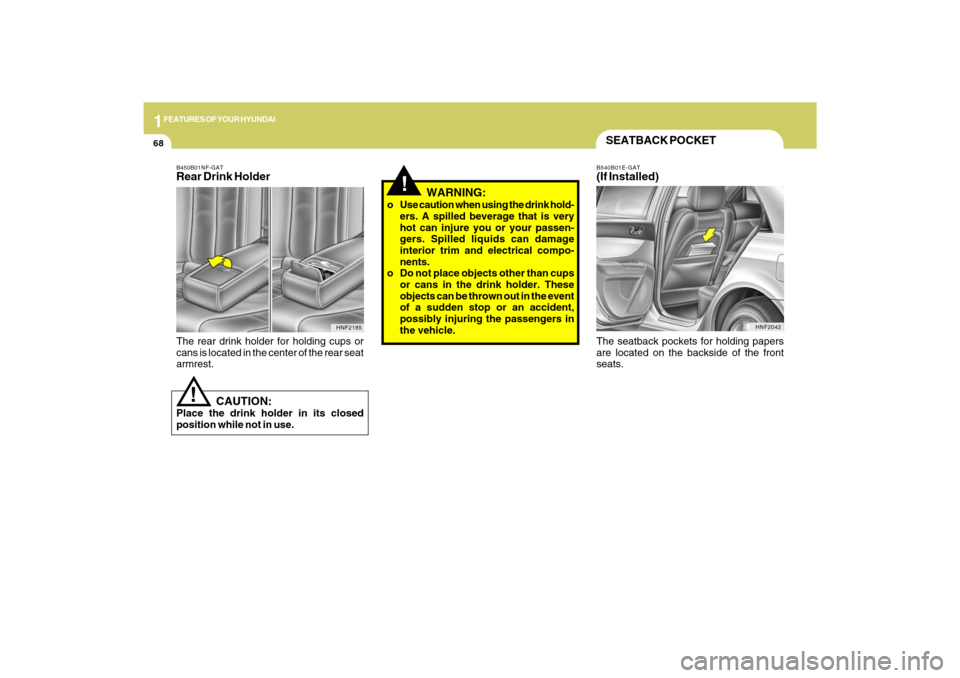
SEATBACK POCKETB540B01E-GAT(If Installed)
HNF2042
The seatback pockets for holding papers
are located on the backside of the front
seats.
!
CAUTION:
Place the drink holder in its closed
position while not in use.
HNF2185
B450B01NF-GATRear Drink HolderThe rear drink holder for holding cups or
cans is located in the center of the rear seat
armrest.
!
WARNING:
o Use caution when using the drink hold-
ers. A spilled beverage that is very
hot can injure you or your passen-
gers. Spilled liquids can damage
interior trim and electrical compo-
nents.
o Do not place objects other than cups
or cans in the drink holder. These
objects can be thrown out in the event
of a sudden stop or an accident,
possibly injuring the passengers in
the vehicle.
Page 104 of 286
1
FEATURES OF YOUR HYUNDAI
91
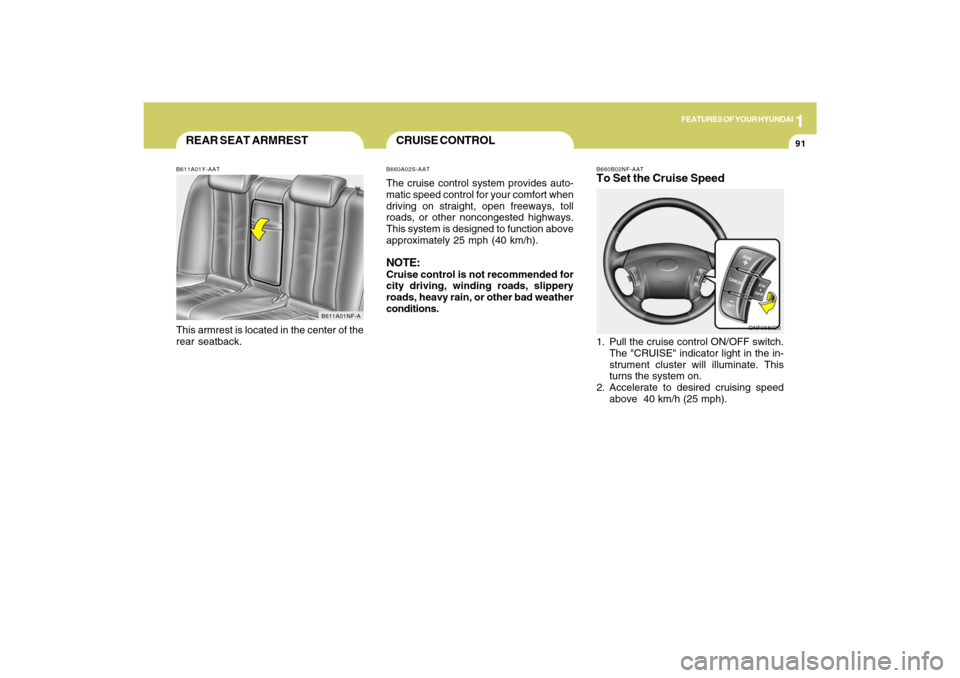
B660B02NF-AATTo Set the Cruise Speed1. Pull the cruise control ON/OFF switch.
The "CRUISE" indicator light in the in-
strument cluster will illuminate. This
turns the system on.
2. Accelerate to desired cruising speed
above 40 km/h (25 mph).
ONF058020
REAR SEAT ARMRESTB611A01Y-AATThis armrest is located in the center of the
rear seatback.
B611A01NF-A
CRUISE CONTROLB660A02S-AATThe cruise control system provides auto-
matic speed control for your comfort when
driving on straight, open freeways, toll
roads, or other noncongested highways.
This system is designed to function above
approximately 25 mph (40 km/h).NOTE:Cruise control is not recommended for
city driving, winding roads, slippery
roads, heavy rain, or other bad weather
conditions.
Page 136 of 286
1
FEATURES OF YOUR HYUNDAI
123
PA710SF01NF-AATIf a USB device is connected to the multiple
terminal inside the console on the right
hand side of the driver’s seat, the ‘USB’
icon will be displayed on the top right
corner of the display screen.1.AUX Selection ButtonIf USB is connected, it switches to the USB
mode from the CD mode to play the song
files stored in the USB.
If there is no CD and USB mode from the
Radio mode, it displays ‘NO MEDIA’.2. Track Moving Buttono Press the [SEEK
] button for less than
0.8 seconds to play from the beginning
of the song currently played.
Press the button for less than 0.8 sec-
onds and press it again within 1 second
to move and play the previous track.
Press the button for 0.8 seconds or
longer to play the song in reverse direc-
tion in fast speed.
o Press the [SEEK ] button for less than
0.8 seconds to move to the next track.
Press the button for 0.8 seconds or
longer to play the song in forward direc-
tion in fast speed.
3. INFO ButtonDisplays the information of the file cur-
rently played in the order of FILE NAME
➟TITLE➟ARTIST➟ALBUM➟FOLDER➟TOTAL
FILE➟normal display➟FILE NAME➟…
(Displays no information if the file has no
song information.)4. Folder moving Buttono Moves [FLDR
] button to the child
folder of the current folder and displays
the first song in the folder. Press ENT/
TUNE button to move to the folder dis-
played. It will play the first song in the
folder.
o Moves [FLDR ] button to the parent
folder and displays the first song in the
folder. Press ENT/TUNE button to move
to the folder displayed. It will play the
first song in the folder.
5. TUNE/ENTER ButtonTurn this button clockwise to display the
songs next to the currently played song.
Turn the button counterclockwise to dis-
play the songs before the currently played
song.
Press the button to skip and play the se-
lected song.Pressing the button changes the BASS,
MIDDLE, TREBLE, FADER and BALANCE
TUNE mode.
The mode selected is shown on the dis-
play.
After selecting each mode, rotate the Au-
dio control knob clockwise or counter-
clockwise.
o BASS Control
To increase the BASS, rotate the knob
clockwise, while to decrease the BASS,
rotate the knob counterclockwise.
o MIDDLE Control
To increase the MIDDLE, rotate the knob
clockwise, while to decrease the MIDDLE,
rotate the knob counterclockwise.
o TREBLE Control
To increase the TREBLE, rotate the knob
clockwise, while to decrease the TREBLE,
rotate the knob counterclockwise.
o FADER Control
Turn the control knob clockwise to empha-
size rear speaker sound (front speaker
sound will be attenuated). When the con-
trol knob is turned counterclockwise, front
speaker sound will be emphasized (rear
speaker sound will be attenuated).
Page 139 of 286
1FEATURES OF YOUR HYUNDAI
126
PA710SH01NF-AATIf the i-Pod exclusive cable (if installed) is
connected to the multiple terminal inside
the console on the right hand side of the
driver’s seat, the ‘i-Pod’ icon will be dis-
played on the top right corner of the display
screen.1. i-Pod Selection ButtonIf i-Pod is connected, it switches to the i-
Pod mode from the CD mode to play the
song files stored in the i-Pod.
If there is no CD and AUX mode from the
Radio mode, it displays ‘NO MEDIA’.2. Track Moving Buttono Press the [SEEK
] button for less than
0.8 seconds to play from the beginning
of the song currently played.
Press the button for less than 0.8 sec-
onds and press it again within 1 second
to move and play the previous track.
Press the button for 0.8 seconds or
longer to play the song in reverse direc-
tion in fast speed.
o Press the [SEEK ] button for less than
0.8 seconds to move to the next track.
Press the button for 0.8 seconds or
longer to play the song in forward direc-
tion in fast speed.
3. INFO ButtonDisplays the information of the file cur-
rently played in the order of FILE NAME
➟TITLE➟ARTIST➟ALBUM➟normal dis-
play ➟FILE NAME➟…
.
(Displays no information if the file has no
song information.)4. Category Selection ButtonMoves to the upper category from currently
played category of the i-Pod.
To move to (play) the category (song)
displayed, press MENU(Preset6).
You will be able to search through the
lower category of the selected category.
The order of i-Pod’s category is SONG,
ALBUMS, ARTISTS, GENRES, and i-Pod.5. TUNE/ENTER ButtonWhen you turn the button clockwise, it will
display the songs (category) next to the
song currently played (category in the same
level).
Also, when you turn the button counter-
clockwise, it will display the songs (cat-
egory) before the song currently played
(category in the same level).
If you want to listen to the song displayed
in the song category, press the button, then
it will skip to the selected song and play.Pressing the button changes the BASS,
MIDDLE, TREBLE, FADER and BALANCE
TUNE mode.
The mode selected is shown on the dis-
play.
After selecting each mode, rotate the Au-
dio control knob clockwise or counter-
clockwise.
o BASS Control
To increase the BASS, rotate the knob
clockwise, while to decrease the BASS,
rotate the knob counterclockwise.
o MIDDLE Control
To increase the MIDDLE, rotate the knob
clockwise, while to decrease the MIDDLE,
rotate the knob counterclockwise.
o TREBLE Control
To increase the TREBLE, rotate the knob
clockwise, while to decrease the TREBLE,
rotate the knob counterclockwise.
o FADER Control
Turn the control knob clockwise to empha-
size rear speaker sound (front speaker
sound will be attenuated). When the con-
trol knob is turned counterclockwise, front
speaker sound will be emphasized (rear
speaker sound will be attenuated).
Page 149 of 286
1FEATURES OF YOUR HYUNDAI
136
PA760SF01NF-AATIf a USB is connected to the multiple termi-
nal inside the console on the right hand
side of the driver’s seat, the ‘USB’ icon will
be displayed on the top right corner of the
display screen.1.AUX Selection ButtonIf a USB device is connected, it switches to
the USB mode from the CD mode to play
the song files stored in the USB device.
If there is no CD and USB mode from the
Radio mode, it displays ‘NO MEDIA’.2. Track Moving Buttono Press the [SEEK
] button for less than
0.8 seconds to play from the beginning
of the song currently played.
Press the button for less than 0.8 sec-
onds and press it again within 1 second
to move and play the previous track.
Press the button for 0.8 seconds or
longer to play the song in reverse direc-
tion in fast speed.
o Press the [SEEK ] button for less than
0.8 seconds to move to the next track.
Press the button for 0.8 seconds or
longer to play the song in forward direc-
tion in fast speed.
3. INFO ButtonDisplays the information of the file cur-
rently played in the order of FILE NAME
➟TITLE➟ARTIST➟ALBUM➟FOLDER➟TOTAL
FILE➟normal display➟FILE NAME➟…
(Displays no information if the file has no
song information.)4. Folder moving Buttono Moves [FLDR
] button child folder of
the current folder and displays the first
song in the folder. Press ENT/TUNE
button to move to the folder displayed.
It will play the first song in the folder.
o Moves [FLDR ] button parent folder
and displays the first song in the folder.
Press ENT/TUNE button to move to the
folder displayed. It will play the first song
in the folder.
5. TUNE/ENTER ButtonTurn this button clockwise to display the
songs next to the currently played song.
Turn the button counterclockwise to dis-
play the songs before the currently played
song.
Press the button to skip and play the se-
lected song.Pressing the button changes the BASS,
MIDDLE, TREBLE, FADER and BALANCE
TUNE mode.
The mode selected is shown on the dis-
play.
After selecting each mode, rotate the Au-
dio control knob clockwise or counter-
clockwise.
o BASS Control
To increase the BASS, rotate the knob
clockwise, while to decrease the BASS,
rotate the knob counterclockwise.
o MIDDLE Control
To increase the MIDDLE, rotate the knob
clockwise, while to decrease the MIDDLE,
rotate the knob counterclockwise.
o TREBLE Control
To increase the TREBLE, rotate the knob
clockwise, while to decrease the TREBLE,
rotate the knob counterclockwise.
o FADER Control
Turn the control knob clockwise to empha-
size rear speaker sound (front speaker
sound will be attenuated). When the con-
trol knob is turned counterclockwise, front
speaker sound will be emphasized (rear
speaker sound will be attenuated).
Page 152 of 286
1
FEATURES OF YOUR HYUNDAI
139
PA760SH01NF-AATIn case the i-Pod exclusive cable (if in-
stalled) is connected to the multiple termi-
nal inside the consol on the right hand side
of the driver’s seat. When the i-Pod is
connected, the ‘i-Pod’ icon will be dis-
played on the top right corner of the display
screen.1. i-Pod Selection ButtonIf i-Pod is connected, it switches to the i-
Pod mode from the CD mode to play the
song files stored in the i-Pod.
If there are no CD and AUX mode from the
Radio mode, it displays ‘NO MEDIA’.2. Track Moving Buttono Press the [SEEK
] button for less than
0.8 seconds to play from the beginning
of the song currently played.
Press the button for less than 0.8 sec-
onds and press it again within 1 second
to move and play the previous track.
Press the button for 0.8 seconds or
longer to play the song in reverse direc-
tion in fast speed.
o Press the [SEEK ] button for less than
0.8 seconds to move to the next track.
Press the button for 0.8 seconds or
longer to play the song in forward direc-
tion in fast speed.
3. INFO ButtonDisplays the information of the file cur-
rently played in the order of FILE NAME
➟TITLE➟ARTIST➟ALBUM➟normal dis-
play ➟FILE NAME➟…
.
(Displays no information if the file has no
song information.)4. Category Selection ButtonMoves to the upper category from currently
played category of the i-Pod.
To move to (play) the category (song)
displayed, press MENU(preset6)
You will be able to search through the
lower category of the selected category.
The order of i-Pod’s category is SONG,
ALBUMES, ARTISTS, GENRES, and i-
Pod.5. TUNE/ENTER ButtonWhen you turn the button clockwise, it will
display the songs (category) next to the
song currently played (category in the same
level).
Also, when you turn the button counter-
clockwise, it will display the songs (cat-
egory) before the song currently played
(category in the same level).
If you want to listen to the song displayed
in the song category, press the button, then
it will skip to the selected song and play.Pressing the button changes the BASS,
MIDDLE, TREBLE, FADER and BALANCE
TUNE mode.
The mode selected is shown on the dis-
play.
After selecting each mode, rotate the Au-
dio control knob clockwise or counter-
clockwise.
o BASS Control
To increase the BASS, rotate the knob
clockwise, while to decrease the BASS,
rotate the knob counterclockwise.
o MIDDLE Control
To increase the MIDDLE, rotate the knob
clockwise, while to decrease the MIDDLE,
rotate the knob counterclockwise.
o TREBLE Control
To increase the TREBLE, rotate the knob
clockwise, while to decrease the TREBLE,
rotate the knob counterclockwise.
o FADER Control
Turn the control knob clockwise to empha-
size rear speaker sound (front speaker
sound will be attenuated). When the con-
trol knob is turned counterclockwise, front
speaker sound will be emphasized (rear
speaker sound will be attenuated).
Page 156 of 286
2
DRIVING YOUR HYUNDAI
3
!
BEFORE STARTING
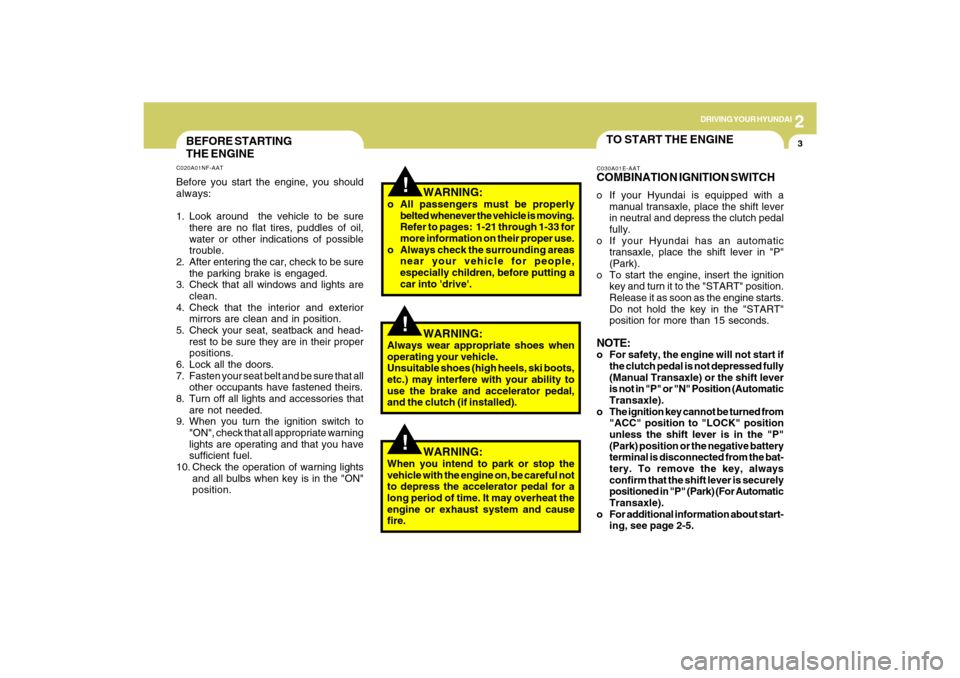
THE ENGINEC020A01NF-AATBefore you start the engine, you should
always:
1. Look around the vehicle to be sure
there are no flat tires, puddles of oil,
water or other indications of possible
trouble.
2. After entering the car, check to be sure
the parking brake is engaged.
3. Check that all windows and lights are
clean.
4. Check that the interior and exterior
mirrors are clean and in position.
5. Check your seat, seatback and head-
rest to be sure they are in their proper
positions.
6. Lock all the doors.
7. Fasten your seat belt and be sure that all
other occupants have fastened theirs.
8. Turn off all lights and accessories that
are not needed.
9. When you turn the ignition switch to
"ON", check that all appropriate warning
lights are operating and that you have
sufficient fuel.
10. Check the operation of warning lights
and all bulbs when key is in the "ON"
position.
TO START THE ENGINEC030A01E-AATCOMBINATION IGNITION SWITCHo If your Hyundai is equipped with a
manual transaxle, place the shift lever
in neutral and depress the clutch pedal
fully.
o If your Hyundai has an automatic
transaxle, place the shift lever in "P"
(Park).
o To start the engine, insert the ignition
key and turn it to the "START" position.
Release it as soon as the engine starts.
Do not hold the key in the "START"
position for more than 15 seconds.NOTE:o For safety, the engine will not start if
the clutch pedal is not depressed fully
(Manual Transaxle) or the shift lever
is not in "P" or "N" Position (Automatic
Transaxle).
o The ignition key cannot be turned from
"ACC" position to "LOCK" position
unless the shift lever is in the "P"
(Park) position or the negative battery
terminal is disconnected from the bat-
tery. To remove the key, always
confirm that the shift lever is securely
positioned in "P" (Park) (For Automatic
Transaxle).
o For additional information about start-
ing, see page 2-5.
WARNING:
o All passengers must be properly
belted whenever the vehicle is moving.
Refer to pages: 1-21 through 1-33 for
more information on their proper use.
o Always check the surrounding areas
near your vehicle for people,
especially children, before putting a
car into 'drive'.
!
WARNING:
Always wear appropriate shoes when
operating your vehicle.
Unsuitable shoes (high heels, ski boots,
etc.) may interfere with your ability to
use the brake and accelerator pedal,
and the clutch (if installed).
!
WARNING:
When you intend to park or stop the
vehicle with the engine on, be careful not
to depress the accelerator pedal for a
long period of time. It may overheat the
engine or exhaust system and cause
fire.