sound Hyundai Sonata 2013 User Guide
[x] Cancel search | Manufacturer: HYUNDAI, Model Year: 2013, Model line: Sonata, Model: Hyundai Sonata 2013Pages: 410, PDF Size: 35.93 MB
Page 98 of 410
417
Features of your vehicle
Disarmed stageUsing the smart keyThe system will be disarmed when the
doors are unlocked by pressing the
unlock button on the smart key or press-
ing the lock/unlock button of the front out-
side door handle with the smart key in
your possession.
After unlocking the doors, the hazard
warning lights and chime will operate
twice to indicate that the system is dis-
armed.
After unlocking the doors, if any door is
not opened within 30 seconds, the sys-
tem will be rearmed.Using the transmitterThe system will be disarmed when the
doors are unlocked with by pressing the
unlock button on the transmitter.
After unlocking the doors, the hazard
warning lights will blink twice to indicate
that the system is disarmed.
After unlocking the doors, if any door is
not opened within 30 seconds, the sys-
tem will be rearmed.
Using the mechanical keyThe system will be disarmed when the
doors are unlocked with the mechanical
key.✽ ✽
NOTICEIf you lock or unlock the doors by
using the mechanical key, the hazard
warning light and chime sound won't
operate.✽ ✽
NOTICE -
Non-immobilizer
system
• Avoid trying to start the engine while
the alarm is activated. The vehicle
starting motor is disabled during the
theft-alarm stage.
If the system is not disarmed with the
transmitter, insert the key into the
ignition switch, turn the ignition
switch to the ON position and wait for
30 seconds. Then the system will be
disarmed.
• If you lose your keys, consult your
authorized HYUNDAI dealer.
✽ ✽
NOTICE
- Immobilizer system
or smart key system
• If the system is not disarmed with the
transmitter or smart key, insert the
key into the ignition switch and start
the engine or start the engine with the
smart key. Then the system will be
disarmed.
• If you lose your keys, consult your
authorized HYUNDAI dealer.
CAUTION
Do not change, alter or adjust the
theft-alarm system because it could
cause the theft-alarm system to
malfunction and should only be
serviced by an authorized HYUNDAI
dealer.
Malfunctions caused by improper
alterations, adjustments or modifi-
cations to the theft-alarm system
are not covered by your vehicle
manufacturer warranty.
YF HMA 4a-111.qxp 1/16/2012 6:28 PM Page 17
Page 110 of 410
429
Features of your vehicle
Opening the fuel filler lidThe fuel filler lid must be opened from
inside the vehicle by pushing the fuel
filler lid opener button.✽ ✽
NOTICEIf the fuel filler lid will not open because
ice has formed around it, tap lightly or
push on the lid to break the ice and
release the lid. Do not pry on the lid. If
necessary, spray around the lid with an
approved de-icer fluid (do not use radi-
ator anti-freeze) or move the vehicle to a
warm place and allow the ice to melt.
1. Stop the engine.
2. To open the fuel filler lid, push the fuel
filler lid opener button.
3. Pull the fuel filler lid (1) out to fully
open.
4. To remove the cap, turn the fuel tank
cap (2) counterclockwise.
5. Refuel as needed.
Closing the fuel filler lid1. To install the cap, turn it clockwise until
it “click” one time. This indicates that
the cap is securely tightened.
2. Close the fuel filler lid and push it in
lightly making sure that it is securely
closed.
FUEL FILLER LID
OYF049020
OYF049021
WARNING
- Refueling
If pressurized fuel sprays out, it
can cover your clothes or skin
and thus subject you to the risk
of fire and burns. Always remove
the fuel cap carefully and slowly.
If the cap is venting fuel or if you
hear a hissing sound, wait until
the condition stops before com-
pletely removing the cap.
Do not "top off" after the nozzle
automatically shuts off when
refueling.
Tighten the cap until it clicks one
time, otherwise the Malfunction
Indicator Light will illuminate.
Always check that the fuel cap is
installed securely to prevent fuel
spillage in the event of an acci-
dent.
YF HMA 4a-111.qxp 1/16/2012 6:29 PM Page 29
Page 121 of 410
Features of your vehicle40 4Tilt steering Tilt steering allows you to adjust the
steering wheel before you drive. You can
also raise it to give your legs more room
when you exit and enter the vehicle.
The steering wheel should be positioned
so that it is comfortable for you to drive,
while permitting you to see the instru-
ment panel warning lights and gauges.
To change the steering wheel angle, pull
down the lock release lever (1), adjust
the steering wheel to the desired angle
(2) and height (if equipped) (3), then pull
up the lock-release lever to lock the
steering wheel in place. Be sure to adjust
the steering wheel to the desired position
before driving.
HornTo sound the horn, press the horn sym-
bol on your steering wheel.
Check the horn regularly to be sure it
operates properly.✽ ✽
NOTICETo sound the horn, press the area indi-
cated by the horn symbol on your steer-
ing wheel (see illustration). The horn
will operate only when this area is
pressed.
OYF049026N
OYF049027
CAUTION
Do not strike the horn severely to
operate it, or hit it with your fist. Do
not press on the horn with a sharp-
pointed object.
WARNING
Never adjust the angle of the
steering wheel while driving. You
may lose steering control and
cause severe personal injury,
death or accidents.
After adjusting, push the steering
wheel both up and down to be
certain it is locked in position.
YF HMA 4a-111.qxp 1/16/2012 6:30 PM Page 40
Page 139 of 410
Features of your vehicle58 4Two-press unlockDriver Door 1st Press- The driver's
door will unlock when pressing the
unlock button on the transmitter or smart
key, pressing the button of the driver's
outside door handle with the smart key,
or inserting the key into the key hole of
the driver's outside door and turning the
key toward the rear of the vehicle. All
doors will unlock when pressing the
unlock button on the transmitter or smart
key, pressing the button of the driver's
outside door handle with the smart key,
or inserting the key into the key hole of
the driver's outside door and turning the
key toward the rear of the vehicle within
4 seconds.
All Doors 1st Press- All doors will
unlock when pressing the unlock button
on the transmitter or smart key, pressing
the button of the driver's outside door
handle with the smart key, or inserting
the key into the key hole of the driver's
outside door and turning the key toward
the rear of the vehicle.
Headlamp delayOn- If you turn the ignition switch to the
ACC or OFF position with the head-
lamp ON, the headlamps remain on
for about 20 minutes. Also, the
headlamp welcome operation will
be activated. Refer to the [LIGHT-
ING] section in this chapter.
Off- The headlamp delay and headlamp
welcome operation will be can-
celed.Horn feedback (if equipped)On- After locking the door by pressing
the lock button on the transmitter, if
you press the lock button again
within 4 seconds, the warning
sound will operate once to indicate
that all doors are locked.
Off- The Horn feedback operation will
be canceled.
Warnings and indicatorsAll warning lights are checked by turning
the ignition switch ON (do not start the
engine). Any light that does not illuminate
should be checked by an authorized
HYUNDAI dealer.
After starting the engine, check to make
sure that all warning lights are off. If any
are still on, this indicates a situation that
needs attention. When releasing the
parking brake, the brake system warning
light should go off. The fuel warning light
will stay on if the fuel level is low.
YF HMA 4a-111.qxp 1/16/2012 6:31 PM Page 58
Page 142 of 410
461
Features of your vehicle
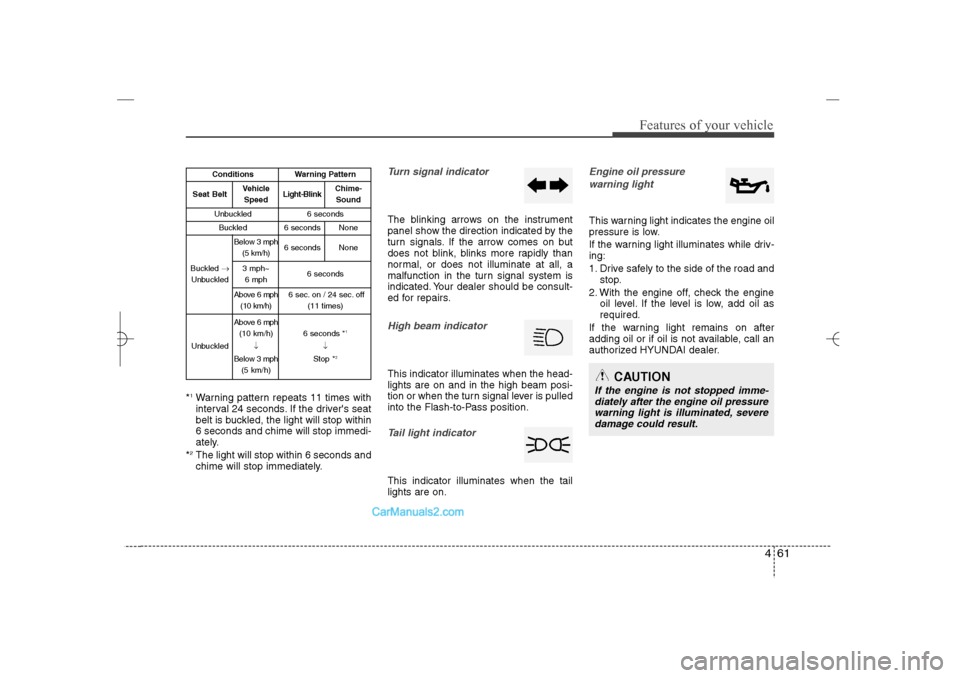
*1Warning pattern repeats 11 times with
interval 24 seconds. If the driver's seat
belt is buckled, the light will stop within
6 seconds and chime will stop immedi-
ately.
*2The light will stop within 6 seconds and
chime will stop immediately.
Turn signal indicatorThe blinking arrows on the instrument
panel show the direction indicated by the
turn signals. If the arrow comes on but
does not blink, blinks more rapidly than
normal, or does not illuminate at all, a
malfunction in the turn signal system is
indicated. Your dealer should be consult-
ed for repairs.High beam indicator This indicator illuminates when the head-
lights are on and in the high beam posi-
tion or when the turn signal lever is pulled
into the Flash-to-Pass position.Tail light indicator This indicator illuminates when the tail
lights are on.
Engine oil pressure
warning lightThis warning light indicates the engine oil
pressure is low.
If the warning light illuminates while driv-
ing:
1. Drive safely to the side of the road and
stop.
2. With the engine off, check the engine
oil level. If the level is low, add oil as
required.
If the warning light remains on after
adding oil or if oil is not available, call an
authorized HYUNDAI dealer.
CAUTION
If the engine is not stopped imme-
diately after the engine oil pressure
warning light is illuminated, severe
damage could result.
Conditions
Warning Pattern
Seat Belt
Vehicle
Speed
Light-Blink
Chime-
Sound
Unbuckled
6 seconds
Buckled
6 seconds
None
Buckled →
Unbuckled
Below 3 mph
(5 km/h)
6 seconds
None
3 mph~
6 mph
6 seconds
Above 6 mph
(10 km/h)
6 sec. on / 24 sec. off
(11 times)
Unbuckled
Above 6 mph
(10 km/h)
↓
Below 3 mph
(5 km/h)
6 seconds *
1
↓
Stop *
2
YF HMA 4a-111.qxp 1/16/2012 6:31 PM Page 61
Page 148 of 410
467
Features of your vehicle
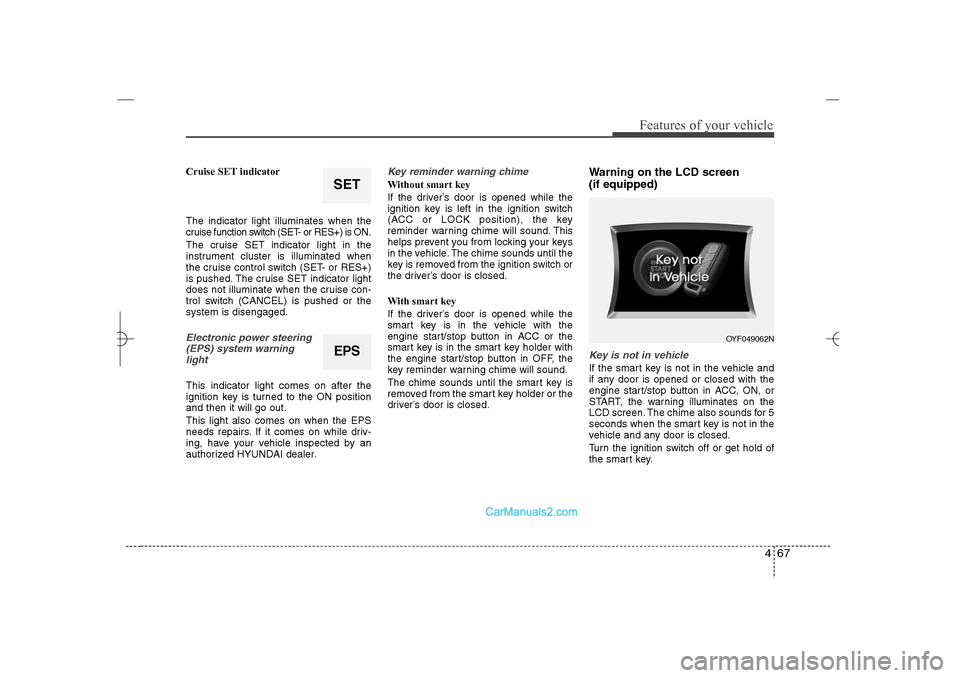
Cruise SET indicator
The indicator light illuminates when the
cruise function switch (SET- or RES+) is ON.
The cruise SET indicator light in the
instrument cluster is illuminated when
the cruise control switch (SET- or RES+)
is pushed. The cruise SET indicator light
does not illuminate when the cruise con-
trol switch (CANCEL) is pushed or the
system is disengaged.Electronic power steering
(EPS) system warning
light This indicator light comes on after the
ignition key is turned to the ON position
and then it will go out.
This light also comes on when the EPS
needs repairs. If it comes on while driv-
ing, have your vehicle inspected by an
authorized HYUNDAI dealer.
Key reminder warning chime Without smart key
If the driver’s door is opened while the
ignition key is left in the ignition switch
(ACC or LOCK position), the key
reminder warning chime will sound. This
helps prevent you from locking your keys
in the vehicle. The chime sounds until the
key is removed from the ignition switch or
the driver’s door is closed.
With smart key
If the driver’s door is opened while the
smart key is in the vehicle with the
engine start/stop button in ACC or the
smart key is in the smart key holder with
the engine start/stop button in OFF, the
key reminder warning chime will sound.
The chime sounds until the smart key is
removed from the smart key holder or the
driver’s door is closed.
Warning on the LCD screen
(if equipped)Key is not in vehicleIf the smart key is not in the vehicle and
if any door is opened or closed with the
engine start/stop button in ACC, ON, or
START, the warning illuminates on the
LCD screen. The chime also sounds for 5
seconds when the smart key is not in the
vehicle and any door is closed.
Turn the ignition switch off or get hold of
the smart key.
EPS
OYF049062N
SET
YF HMA 4a-111.qxp 1/16/2012 6:31 PM Page 67
Page 197 of 410
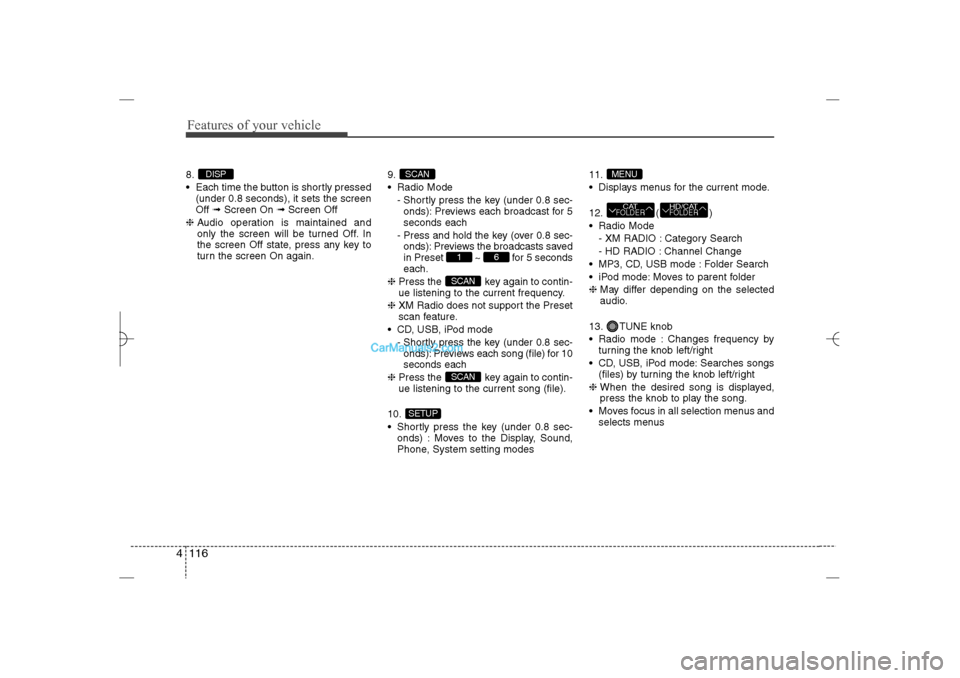
Features of your vehicle116 48.
Each time the button is shortly pressed
(under 0.8 seconds), it sets the screen
Off ➟Screen On ➟Screen Off
❈Audio operation is maintained and
only the screen will be turned Off. In
the screen Off state, press any key to
turn the screen On again.9.
Radio Mode
- Shortly press the key (under 0.8 sec-
onds): Previews each broadcast for 5
seconds each
- Press and hold the key (over 0.8 sec-
onds): Previews the broadcasts saved
in Preset ~ for 5 seconds
each.
❈Press the key again to contin-
ue listening to the current frequency.
❈XM Radio does not support the Preset
scan feature.
CD, USB, iPod mode
- Shortly press the key (under 0.8 sec-
onds): Previews each song (file) for 10
seconds each
❈Press the key again to contin-
ue listening to the current song (file).
10.
Shortly press the key (under 0.8 sec-
onds) : Moves to the Display, Sound,
Phone, System setting modes11.
Displays menus for the current mode.
12. ( )
Radio Mode
- XM RADIO : Category Search
- HD RADIO : Channel Change
MP3, CD, USB mode : Folder Search
iPod mode: Moves to parent folder
❈May differ depending on the selected
audio.
13. TUNE knob
Radio mode : Changes frequency by
turning the knob left/right
CD, USB, iPod mode: Searches songs
(files) by turning the knob left/right
❈ When the desired song is displayed,
press the knob to play the song.
Moves focus in all selection menus and
selects menus
HD/CATFOLDER
CATFOLDERMENU
SETUP
SCANSCAN
6
1
SCAN
DISP
YF HMA 4b-112~(Audio).qxp 3/5/2012 4:24 PM Page 116
Page 199 of 410
![Hyundai Sonata 2013 User Guide Features of your vehicle118 4SOUND SETTINGSPress the key Select [Sound]
through TUNE knob or key
Select menu through TUNE knobSound SettingsThis menu allows you to set the ‘Bass,
Middle, Trebleâ](/img/35/16808/w960_16808-198.png "Hyundai Sonata 2013 User Guide Features of your vehicle118 4SOUND SETTINGSPress the key Select [Sound]
through TUNE knob or key
Select menu through TUNE knobSound SettingsThis menu allows you to set the ‘Bass,
Middle, Trebleâ")
Features of your vehicle118 4SOUND SETTINGSPress the key Select [Sound]
through TUNE knob or key
Select menu through TUNE knobSound SettingsThis menu allows you to set the ‘Bass,
Middle, Treble’ and the Sound Fader and
Balance.
Select [Sound Settings] Select menu
through
TUNE knob
Tu r n
TUNE
knob
left/right to set
Bass, Middle, Treble : Selects the
sound tone.
Fader, Balance : Moves the sound
fader and balance.
Default : Restores default settings.
❈ Back : While adjusting values, re-
pressing the TUNE knob will
restore the parent menu.
Variable EQ (Audio with external
amplifier only)This is a premium sound system feature in
which the acoustical mode can be select-
ed according to musical preferences.
Select [Variable EQ] Set menu through
TUNE
knob
Innocente(Normal) : Natural sound,
sound optimized for driver.
Forza(Dynamic) : Powerful sound
emphasizing bass, stereo sound.
Concerto(Concert) : Sound similar to a
concert or live hall
❈May differ depending on the selected
audio.
2
SETUP
YF HMA 4b-112~(Audio).qxp 3/5/2012 4:24 PM Page 118
Page 207 of 410
Features of your vehicle126 4Automatic switching between dig-
ital and analog broadcastingIf the reception of the digital signal is lost,
the system switches automatically to the
analog signal. As soon as the digital sig-
nal is available again, it will switch back.
Due to the fact that sub channels are
only broadcasted digital, the system
mutes playback if you have tuned to a
sub channel and the digital signal is lost.
The main line will shows the message No
HD signal in place of station name.
After approximately one minute with the
digital signal lost, the system will auto-
matically tune to the analog signal of the
corresponding frequency.Text based informationHD Radio
TM
stations are able to broad-
cast text based information, e.g. station
name, song title and artist name. The
Driver Information System is able to dis-
play this information. Digital, CD-quality sound. HD Radio
Technology enables local radio stations
to broadcast a clean digital signal. AM
sounds like today’s FM and FM sounds
like a CD.
Program Service Data : Contributes to
the superior user experience of HD
Radio Technology. Presents song
name, artist, station IDs, HD2/HD3
Channel Guide, and other relevant data
stream.
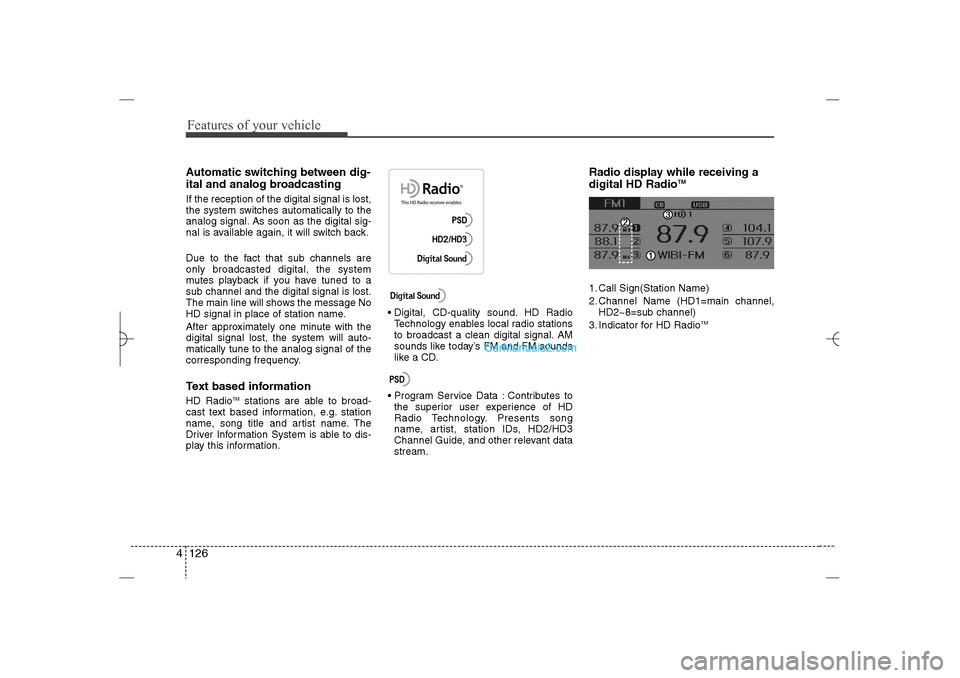
Radio display while receiving a
digital HD Radio
TM
1. Call Sign(Station Name)
2. Channel Name (HD1=main channel,
HD2~8=sub channel)
3. Indicator for HD Radio
TM
YF HMA 4b-112~(Audio).qxp 3/5/2012 4:24 PM Page 126
Page 208 of 410
4 127
Features of your vehicle
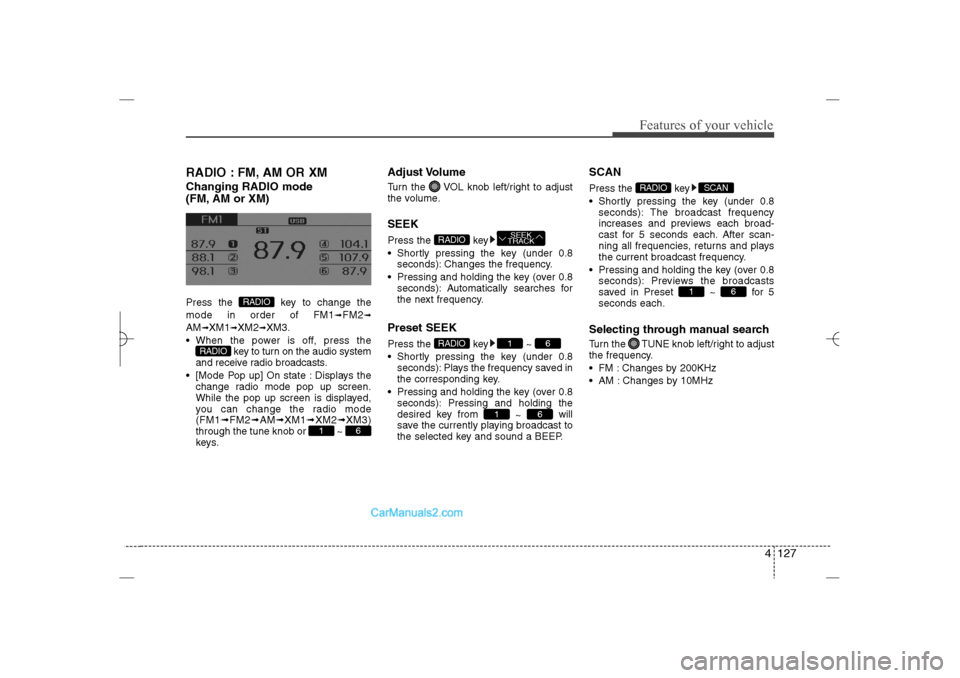
RADIO : FM, AM OR XMChanging RADIO mode
(FM, AM or XM)Press the key to change the
mode in order of FM1
➟FM2
➟
AM
➟XM1
➟XM2
➟XM3.
When the power is off, press the
key to turn on the audio system
and receive radio broadcasts.
[Mode Pop up] On state : Displays the
change radio mode pop up screen.
While the pop up screen is displayed,
you can change the radio mode
(FM1➟FM2➟AM➟XM1➟XM2➟XM3)
through the tune knob or ~
keys.
Adjust VolumeTurn the VOL knob left/right to adjust
the volume.SEEKPress the key
Shortly pressing the key (under 0.8
seconds): Changes the frequency.
Pressing and holding the key (over 0.8
seconds): Automatically searches for
the next frequency.Preset SEEKPress the key ~
Shortly pressing the key (under 0.8
seconds): Plays the frequency saved in
the corresponding key.
Pressing and holding the key (over 0.8
seconds): Pressing and holding the
desired key from
~ will
save the currently playing broadcast to
the selected key and sound a BEEP.
SCANPress the key
Shortly pressing the key (under 0.8
seconds): The broadcast frequency
increases and previews each broad-
cast for 5 seconds each. After scan-
ning all frequencies, returns and plays
the current broadcast frequency.
Pressing and holding the key (over 0.8
seconds): Previews the broadcasts
saved in Preset ~ for 5
seconds each.Selecting through manual searchTurn the TUNE knob left/right to adjust
the frequency.
FM : Changes by 200KHz
AM : Changes by 10MHz
6
1
SCAN
RADIO
6
1
6
1
RADIO
SEEK
TRACK
RADIO
6
1
RADIO
RADIO
YF HMA 4b-112~(Audio).qxp 3/5/2012 4:24 PM Page 127