ECO mode Hyundai Sonata 2013 Owner's Guide
[x] Cancel search | Manufacturer: HYUNDAI, Model Year: 2013, Model line: Sonata, Model: Hyundai Sonata 2013Pages: 410, PDF Size: 35.93 MB
Page 224 of 410
4 143
Features of your vehicle
✽ ✽
NOTICE FOR USING THE
iPod
®DEVICE
• Some iPod models may not support
communication protocol and files may
not properly play.
Supported iPod models:
- iPod Mini
- iPod 4th(Photo) ~ 6th(Classic)
generation
- iPod Nano 1st~4th generation
- iPod Touch 1st~2nd generation
• The order of search or playback of
songs in the iPod can be different
from the order searched in the audio
system.
• If the iPod disabled due to its own
malfunction, reset the iPod. (Reset:
Refer to iPod manual)
• An iPod may not operate normally on
low battery.
• Some iPod devices, such as the
iPhone, can be connected through the
Bluetooth
®Wireless Technology inter-
face. The device must have audio
Bluetooth®Wireless Technology capa-
bility (such as for stereo headphone
Bluetooth®Wireless Technology). The
device can play, but it will not be con-
trolled by the audio system.
(Continued)
(Continued)
Some USB flash memory readers
(such as CF, SD, micro SD, etc.) or
external-HDD type devices can be
unrecognizable.
Music files protected by DRM
(DIGITAL RIGHTS MANAGE-
MENT) are not recognizable.
The data in the USB memory may
be lost while using this audio.
Always back up important data on
a personal storage device.
Please avoid using USB memory
products which can be used as key
chains or cellular phone acces-
sories as they could cause dam-
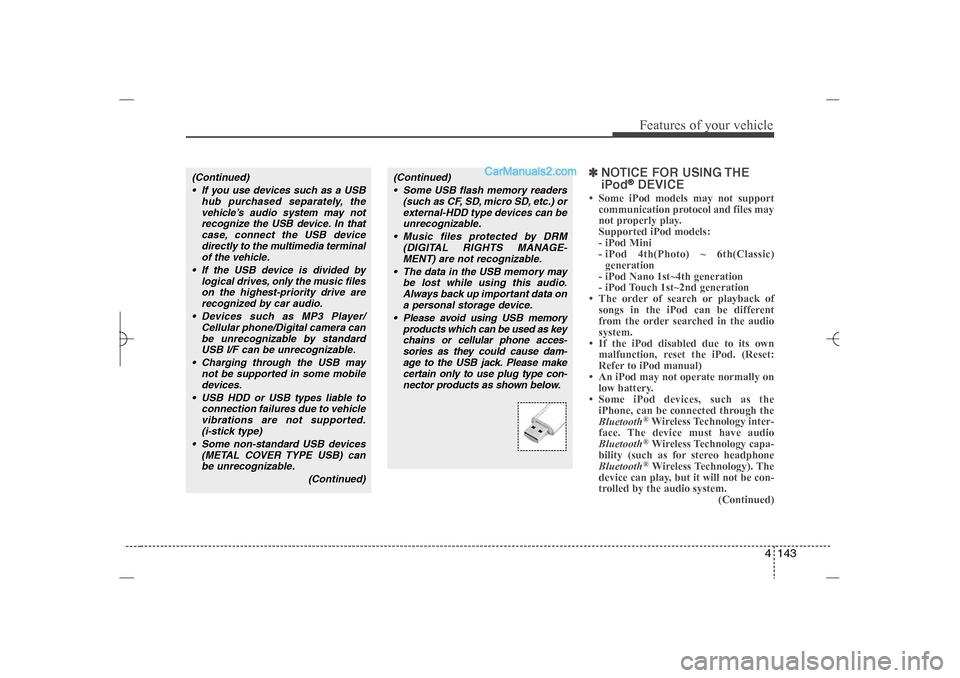
age to the USB jack. Please make
certain only to use plug type con-
nector products as shown below.
(Continued)
If you use devices such as a USB
hub purchased separately, the
vehicle’s audio system may not
recognize the USB device. In that
case, connect the USB device
directly to the multimedia terminal
of the vehicle.
If the USB device is divided by
logical drives, only the music files
on the highest-priority drive are
recognized by car audio.
Devices such as MP3 Player/
Cellular phone/Digital camera can
be unrecognizable by standard
USB I/F can be unrecognizable.
Charging through the USB may
not be supported in some mobile
devices.
USB HDD or USB types liable to
connection failures due to vehicle
vibrations are not supported.
(i-stick type)
Some non-standard USB devices
(METAL COVER TYPE USB) can
be unrecognizable.
(Continued)
YF HMA 4b-112~(Audio).qxp 3/5/2012 4:24 PM Page 143
Page 227 of 410
Features of your vehicle146 4PhoneBefore using the
Bluetooth
®
Wireless
Technology enabled phone features
In order to use
Bluetooth
®
Wireless
Technology phone, you must first pair
and connect the
Bluetooth
®Wireless
Technology mobile phone.
If the mobile phone is not paired or
connected, it is not possible to enter
Phone mode. Once a phone is paired
or connected, the guidance screen will
be displayed.
If Priority is set upon vehicle ignition
(IGN/ACC ON), the
Bluetooth
®
Wireless Technology enabled phone
will be automatically connected. Even if
you are outside, the
Bluetooth
®
Wireless Technology enabled phone
will be automatically connected once
you are in the vicinity of the vehicle. If
you do not want automatic
Bluetooth
®
Wireless Technology enabled phone
connection, set the
Bluetooth
®
Wireless Technology power to OFF.
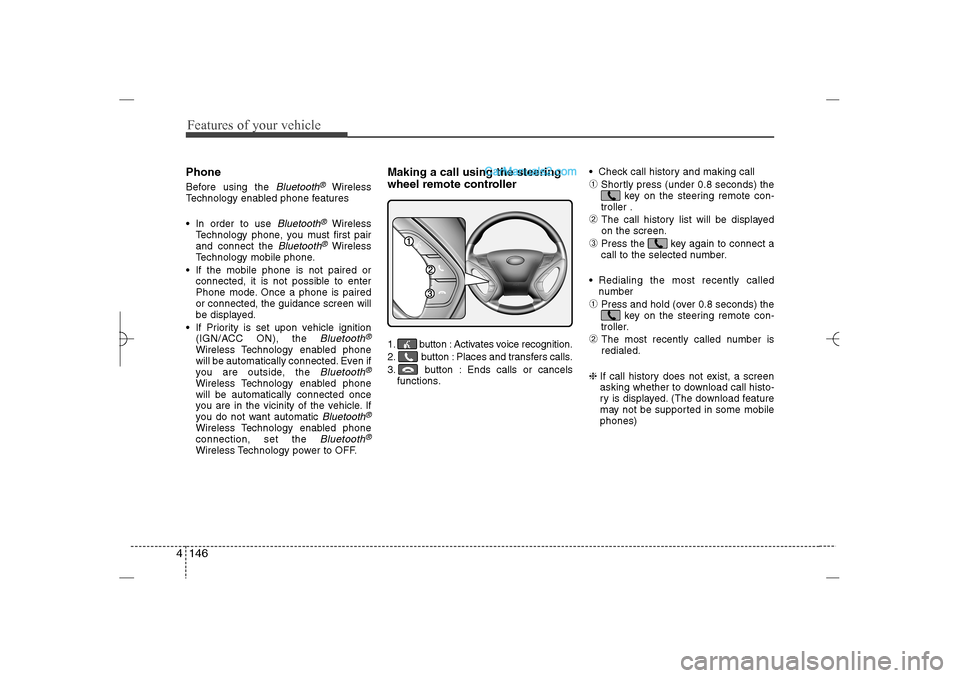
Making a call using the steering
wheel remote controller1. button : Activates voice recognition.
2. button : Places and transfers calls.
3. button : Ends calls or cancels
functions. Check call history and making call
➀
Shortly press (under 0.8 seconds) the
key on the steering remote con-
troller .
➁
The call history list will be displayed
on the screen.
➂
Press the key again to connect a
call to the selected number.
Redialing the most recently called
number
➀
Press and hold (over 0.8 seconds) the
key on the steering remote con-
troller.
➁
The most recently called number is
redialed.
❈ If call history does not exist, a screen
asking whether to download call histo-
ry is displayed. (The download feature
may not be supported in some mobile
phones)
YF HMA 4b-112~(Audio).qxp 3/5/2012 4:24 PM Page 146
Page 231 of 410
![Hyundai Sonata 2013 Owners Guide Features of your vehicle150 4VOICE COMMANDStarting Voice Command To start voice command, shortly press
the key on the steering wheel
remote controller.
If voice command is in [Normal Mode],
then](/img/35/16808/w960_16808-230.png "Hyundai Sonata 2013 Owners Guide Features of your vehicle150 4VOICE COMMANDStarting Voice Command To start voice command, shortly press
the key on the steering wheel
remote controller.
If voice command is in [Normal Mode],
then")
Features of your vehicle150 4VOICE COMMANDStarting Voice Command To start voice command, shortly press
the key on the steering wheel
remote controller.
If voice command is in [Normal Mode],
then the system will say “Please say a
command. Beep”
❈If voice command is in [Expert Mode],
then the system will only say a “Beep-”
❈Setting Voice command [Normal
Mode]/[Expert Mode]:
Press the key Select [System]
through the TUNE knob or
key Select [Voice Command Mode]
through the TUNE knob Set [Normal
Mode]/[Expert Mode]
Say the voice command.
Skipping the Guidance MessageWhile the guidance message is being
stated, shortly press the key (under
0.8 seconds) to discontinue the guidance
message and sound the “beep”.
After the “beep”, say the voice command.
Ending Voice Command While using voice command, press and
hold the key (over 0.8 seconds) to
end voice command.
While using voice command, pressing
the steering wheel remote controller or
a different key will end voice command.
In a state where the system is waiting
for your voice command, say “cancel”
or “end” to end voice command.
In a state where the system is waiting
for your voice command, shortly press
the key (under 0.8 seconds) to
end voice command.
5
SETUP
CAUTION
For proper voice recognition, say the
voice command after the guidance
message and the “Beep” sound.
YF HMA 4b-112~(Audio).qxp 3/5/2012 4:24 PM Page 150
Page 240 of 410
4 159
Features of your vehicle
Blue Link
®
Hyundai aims to offer differentiated cus-
tomer values through a ‘Connected Car
Life,’ which is to provide consumers with
fast and reliable IT technology. As con-
sumers’ lifestyles become more and
more mobile in thanks to remarkable
advances in smart phones, tablet PCs
and overall wireless telecommunication,
new lifestyle patterns demand seamless
connection between one’s office, home,
outdoors and automobiles.
Automobile companies are now faced with
the task of shifting their paradigm from
vehicle-centered services to customer
value-centered services, with the ultimate
goal of securing global leadership in the
field of vehicle IT and telematics.
Hyundai Motor plans to achieve this by
realizing a terminal platform flexible to
changes in IT technology, cooperating with
global IT companies, creating an eco-sys-
tem and providing the latest contents &
services based on an open environment.
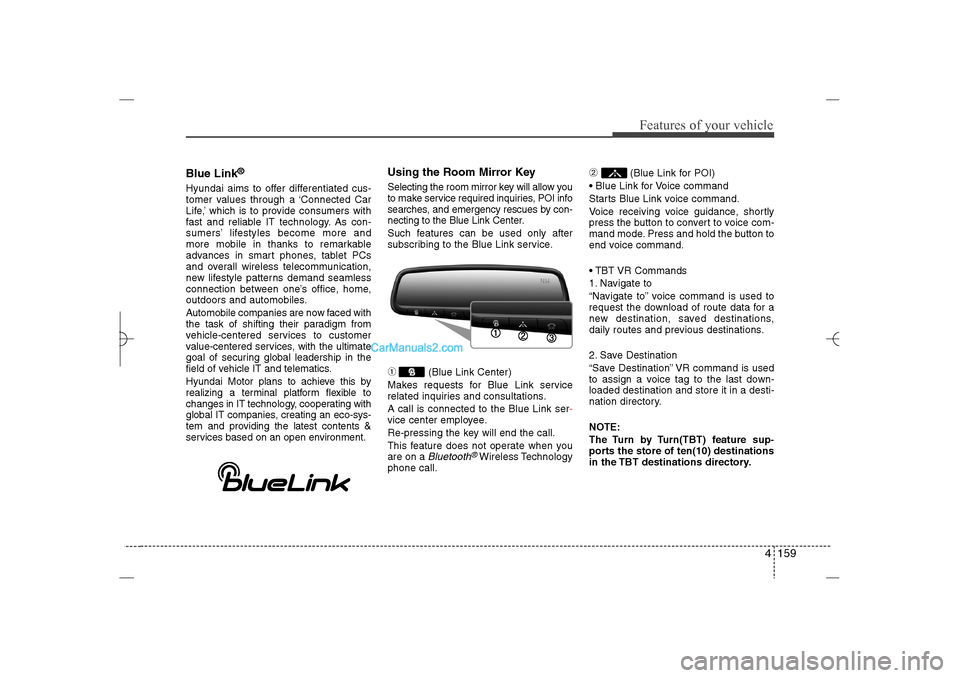
Using the Room Mirror KeySelecting the room mirror key will allow you
to make service required inquiries, POI info
searches, and emergency rescues by con-
necting to the Blue Link Center.
Such features can be used only after
subscribing to the Blue Link service.➀
(Blue Link Center)
Makes requests for Blue Link service
related inquiries and consultations.
A call is connected to the Blue Link ser-
vice center employee.
Re-pressing the key will end the call.
This feature does not operate when you
are on a Bluetooth
®Wireless Technology
phone call.
➁
(Blue Link for POI)
Blue Link for Voice command
Starts Blue Link voice command.
Voice receiving voice guidance, shortly
press the button to convert to voice com-
mand mode. Press and hold the button to
end voice command.
TBT VR Commands
1. Navigate to
“Navigate to” voice command is used to
request the download of route data for a
new destination, saved destinations,
daily routes and previous destinations.
2. Save Destination
“Save Destination” VR command is used
to assign a voice tag to the last down-
loaded destination and store it in a desti-
nation directory.
NOTE:
The Turn by Turn(TBT) feature sup-
ports the store of ten(10) destinations
in the TBT destinations directory.
YF HMA 4b-112~(Audio).qxp 3/5/2012 4:24 PM Page 159
Page 242 of 410
4 161
Features of your vehicle
Eco Coach What is Eco Coach?
Every 2.5 minutes, Eco Coach compares
your fuel economy against the govern-
ment tested average (EPA) or other simi-
lar Hyundai models (community), based
on your preference. Each month, or after
every tank fill up, Eco Coach rates your
extended average and gives you a
reward star if you best the average.
See your My Hyundai web page for more
information.
What does the bar graph and horizon-
tal line mean?
The horizontal line is adjusted once per
month or at each tank full, based on your
preference; it represents the EPA com-
bined average or community average
fuel economy target. What is My Eco MPG?
Your actual fuel economy average over
2.5 minutes.
This value is also shown in bar graph as
your “now” rating.
What are Eco Rewards?
If you beat the average (the EPA or com-
munity), you will receive an Eco Reward
point.
See your my Hyundai web page for more
information.
[Eco Driving] will not operate if the vehi-
cle ignition is not turned on. Please oper-
ate with the ignition turned on.
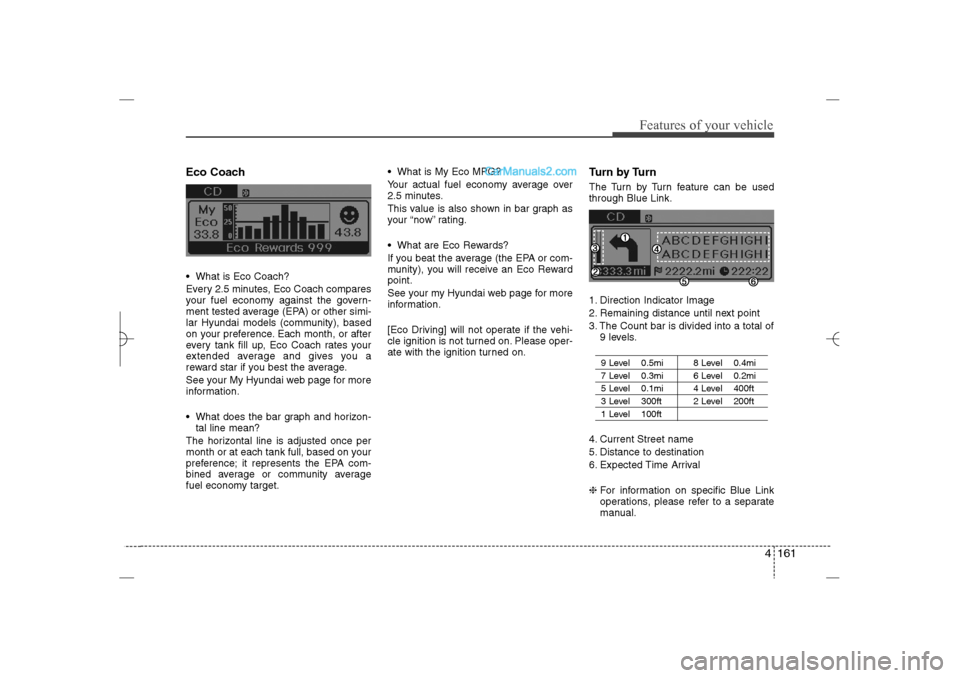
Turn by TurnThe Turn by Turn feature can be used
through Blue Link.
1. Direction Indicator Image
2. Remaining distance until next point
3. The Count bar is divided into a total of
9 levels.
9 Level 0.5mi 8 Level 0.4mi7 Level 0.3mi 6 Level 0.2mi5 Level 0.1mi 4 Level 400ft 3 Level 300ft 2 Level 200ft1 Level 100ft
4. Current Street name
5. Distance to destination
6. Expected Time Arrival
❈For information on specific Blue Link
operations, please refer to a separate
manual.
YF HMA 4b-112~(Audio).qxp 3/5/2012 4:24 PM Page 161
Page 252 of 410
Driving your vehicle10 5✽
✽
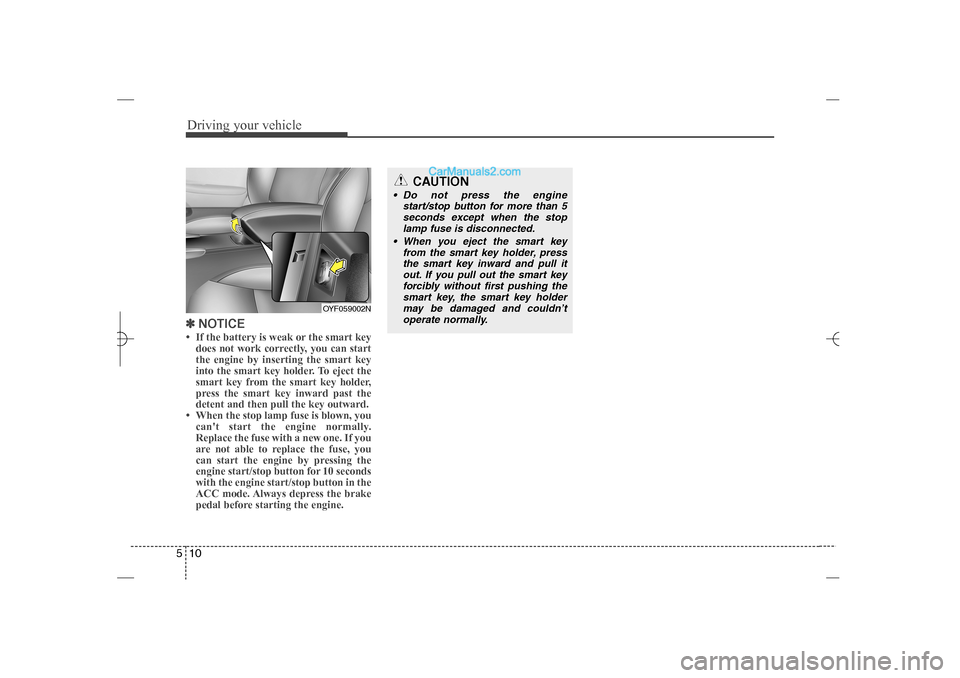
NOTICE• If the battery is weak or the smart key
does not work correctly, you can start
the engine by inserting the smart key
into the smart key holder. To eject the
smart key from the smart key holder,
press the smart key inward past the
detent and then pull the key outward.
• When the stop lamp fuse is blown, you
can't start the engine normally.
Replace the fuse with a new one. If you
are not able to replace the fuse, you
can start the engine by pressing the
engine start/stop button for 10 seconds
with the engine start/stop button in the
ACC mode. Always depress the brake
pedal before starting the engine.
OYF059002N
CAUTION
Do not press the engine
start/stop button for more than 5
seconds except when the stop
lamp fuse is disconnected.
When you eject the smart key
from the smart key holder, press
the smart key inward and pull it
out. If you pull out the smart key
forcibly without first pushing the
smart key, the smart key holder
may be damaged and couldn’t
operate normally.
YF HMA 5.qxp 1/16/2012 6:23 PM Page 10
Page 260 of 410
![Hyundai Sonata 2013 Owners Guide Driving your vehicle18 5With the shift lever in the D position
The paddle shifter can operate when the
vehicle speed is more than 10km/h.
Pull the [+] or [-] paddle shifter once to
shift up or down o](/img/35/16808/w960_16808-259.png "Hyundai Sonata 2013 Owners Guide Driving your vehicle18 5With the shift lever in the D position
The paddle shifter can operate when the
vehicle speed is more than 10km/h.
Pull the [+] or [-] paddle shifter once to
shift up or down o")
Driving your vehicle18 5With the shift lever in the D position
The paddle shifter can operate when the
vehicle speed is more than 10km/h.
Pull the [+] or [-] paddle shifter once to
shift up or down one gear and the system
changes from automatic mode to manual
mode.
If the vehicle speed is lower than 10km/h,
if you depress the accelerator pedal for
more than 7 seconds or if you shift the
shift lever from D to sport mode and shift
it from sport mode to D again, the system
will change from manual mode to auto-
matic mode.
With the shift lever in the sport mode
Pull the [+] or [-] paddle shifter once to
shift up or down one gear.✽ ✽
NOTICEIf you pull the [+] and [-] paddle shifters
at the same time, you can't shift the gear.
Shift lock system For your safety, the automatic transaxle
has a shift lock system which prevents
shifting the transaxle from P (Park) or N
(Neutral) into R (Reverse) unless the
brake pedal is depressed.
To shift the transaxle from P (Park) or N
(Neutral) into R (Reverse):
1. Depress and hold the brake pedal.
2. Start the engine or turn the ignition
switch to the ON position.
3. Move the shift lever.
If the brake pedal is repeatedly
depressed and released with the shift
lever in the P (Park) position, a chattering
noise near the shift lever may be heard.
This is a normal condition.Shift-lock override
If the shift lever cannot be moved from
the P (Park) or N (Neutral) position into R
(Reverse) position with the brake pedal
depressed, continue depressing the
brake, then do the following:
1. Carefully remove the cap (1) covering
the shift-lock access hole.
2. Insert a key (or screwdriver) into the
access hole and press down on the
key (or screwdriver).
3. Move the shift lever.
4. Have your vehicle inspected by an
authorized HYUNDAI dealer immedi-
ately.
OYF059011N
WARNING
Always fully depress the brake
pedal before and while shifting out
of the P (Park) position into anoth-
er position to avoid inadvertent
motion of the vehicle which could
injure persons in or around the car.
YF HMA 5.qxp 1/16/2012 6:23 PM Page 18
Page 277 of 410
535
Driving your vehicle
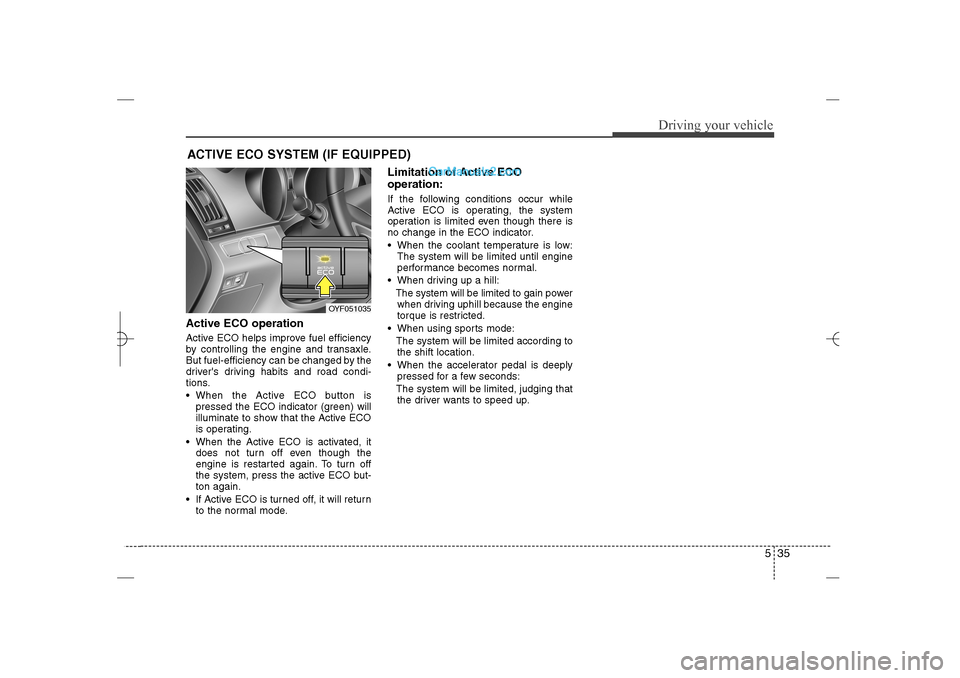
Active ECO operation Active ECO helps improve fuel efficiency
by controlling the engine and transaxle.
But fuel-efficiency can be changed by the
driver's driving habits and road condi-
tions.
When the Active ECO button is
pressed the ECO indicator (green) will
illuminate to show that the Active ECO
is operating.
When the Active ECO is activated, it
does not turn off even though the
engine is restarted again. To turn off
the system, press the active ECO but-
ton again.
If Active ECO is turned off, it will return
to the normal mode.
Limitation of Active ECO
operation:If the following conditions occur while
Active ECO is operating, the system
operation is limited even though there is
no change in the ECO indicator.
When the coolant temperature is low:
The system will be limited until engine
performance becomes normal.
When driving up a hill:
The system will be limited to gain power
when driving uphill because the engine
torque is restricted.
When using sports mode:
The system will be limited according to
the shift location.
When the accelerator pedal is deeply
pressed for a few seconds:
The system will be limited, judging that
the driver wants to speed up.
ACTIVE ECO SYSTEM (IF EQUIPPED)
OYF051035
YF HMA 5.qxp 1/16/2012 6:24 PM Page 35
Page 278 of 410
Driving your vehicle36 5Your vehicle's fuel economy depends
mainly on your style of driving, where you
drive and when you drive.
Each of these factors affects how many
miles (kilometers) you can get from a gal-
lon (liter) of fuel. To operate your vehicle
as economically as possible, use the fol-
lowing driving suggestions to help save
money in both fuel and repairs:
Drive smoothly. Accelerate at a moder-
ate rate. Don't make "jack-rabbit" starts
or full-throttle shifts and maintain a
steady cruising speed. Don't race
between stoplights. Try to adjust your
speed to that of the other traffic so you
don't have to change speeds unneces-
sarily. Avoid heavy traffic whenever
possible. Always maintain a safe dis-
tance from other vehicles so you can
avoid unnecessary braking. This also
reduces brake wear.
Drive at a moderate speed. The faster
you drive, the more fuel your car uses.
Driving at a moderate speed, especial-
ly on the highway, is one of the most
effective ways to reduce fuel consump-
tion. Don't "ride" the brake pedal. This can
increase fuel consumption and also
increase wear on these components.
In addition, driving with your foot rest-
ing on the brake pedal may cause the
brakes to overheat, which reduces
their effectiveness and may lead to
more serious consequences.
Take care of your tires. Keep them
inflated to the recommended pressure.
Incorrect inflation, either too much or
too little, results in unnecessary tire
wear. Check the tire pressures at least
once a month.
Be sure that the wheels are aligned
correctly. Improper alignment can
result from hitting curbs or driving too
fast over irregular surfaces. Poor align-
ment causes faster tire wear and may
also result in other problems as well as
greater fuel consumption. Keep your car in good condition. For
better fuel economy and reduced
maintenance costs, maintain your car
in accordance with the maintenance
schedule in section 7. If you drive your
car in severe conditions, more frequent
maintenance is required (see section 7
for details).
Keep your car clean. For maximum
service, your vehicle should be kept
clean and free of corrosive materials. It
is especially important that mud, dirt,
ice, etc. not be allowed to accumulate
on the underside of the car. This extra
weight can result in increased fuel con-
sumption and also contribute to corro-
sion.
Travel lightly. Don't carry unnecessary
weight in your car. Weight reduces fuel
economy.
Don't let the engine idle longer than
necessary. If you are waiting (and not
in traffic), turn off your engine and
restart only when you're ready to go.ECONOMICAL OPERATION
YF HMA 5.qxp 1/16/2012 6:24 PM Page 36
Page 362 of 410
747
Maintenance
Cold Tire Pressure: The amount of
air pressure in a tire, measured in
pounds per square inch (psi) or kilo-
pascals (kPa) before a tire has built
up heat from driving.
Curb Weight: This means the weight
of a motor vehicle with standard and
optional equipment including the
maximum capacity of fuel, oil and
coolant, but without passengers and
cargo.
DOT Markings: A code molded into
the sidewall of a tire signifying that
the tire is in compliance with the U.S.
Department of Transportation motor
vehicle safety standards. The DOT
code includes the Tire Identification
Number (TIN), an alphanumeric des-
ignator which can also identify the
tire manufacturer, production plant,
brand and date of production.
GVWR: Gross Vehicle Weight Rating
GAWR FRT: Gross Axle Weight
Rating for the Front Axle.
GAWR RR: Gross Axle Weight
Rating for the Rear axle.Intended Outboard Sidewall: The
side of an asymmetrical tire, that
must always face outward when
mounted on a vehicle.
Kilopascal (kPa): The metric unit for
air pressure.
Load Index: An assigned number
ranging from 1 to 279 that corre-
sponds to the load carrying capacity
of a tire.
Maximum Inflation Pressure: The
maximum air pressure to which a
cold tire may be inflated. The maxi-
mum air pressure is molded onto the
sidewall.
Maximum Load Rating: The load
rating for a tire at the maximum per-
missible inflation pressure for that
tire.
Maximum Loaded Vehicle Weight:
The sum of curb weight; accessory
weight; vehicle capacity weight; and
production options weight.
Normal Occupant Weight: The
number of occupants a vehicle is
designed to seat multiplied by 150
pounds (68 kg).Occupant Distribution: Designated
seating positions.
Outward Facing Sidewall:The side
of a asymmetrical tire that has a par-
ticular side that faces outward when
mounted on a vehicle. The outward
facing sidewall bears white lettering
or bears manufacturer, brand, and/or
model name molding that is higher or
deeper than the same moldings on
the inner facing sidewall.
Passenger (P-Metric) Tire: A tire
used on passenger cars and some
light duty trucks and multipurpose
vehicles.
Recommended Inflation Pressure:
Vehicle manufacturer's recommend-
ed tire inflation pressure and shown
on the tire placard.
Radial Ply Tire: A pneumatic tire in
which the ply cords that extend to the
beads are laid at 90 degrees to the
centerline of the tread.
Rim: A metal support for a tire and
upon which the tire beads are seat-
ed.
Sidewall: The portion of a tire
between the tread and the bead.
YF HMA 7.qxp 1/16/2012 6:19 PM Page 47