start Hyundai Sonata 2013 Owner's Guide
[x] Cancel search | Manufacturer: HYUNDAI, Model Year: 2013, Model line: Sonata, Model: Hyundai Sonata 2013Pages: 410, PDF Size: 35.93 MB
Page 165 of 410
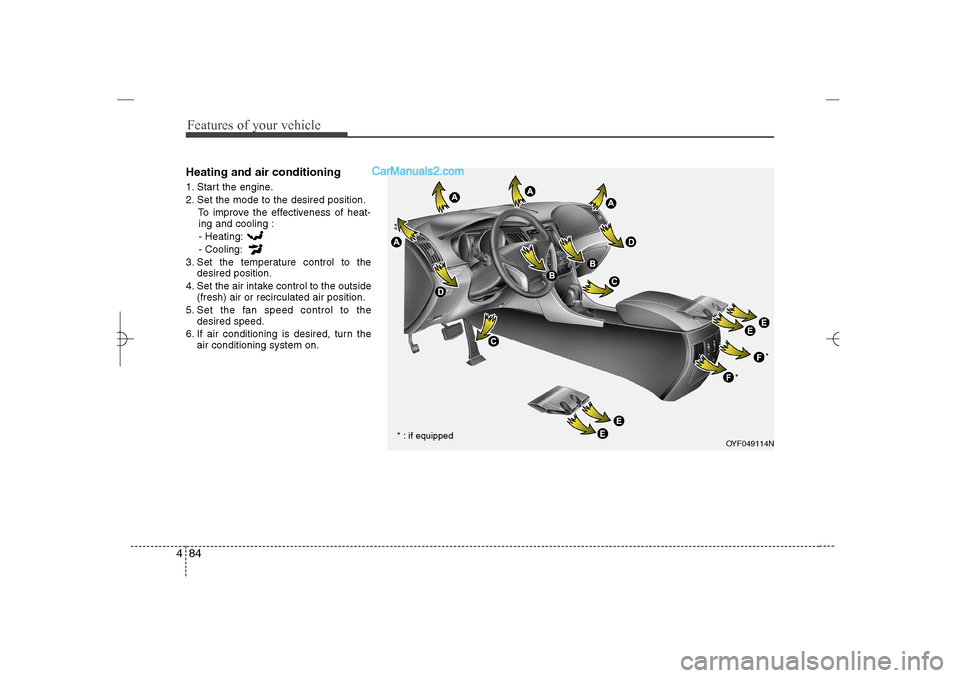
Features of your vehicle84 4Heating and air conditioning1. Start the engine.
2. Set the mode to the desired position.
To improve the effectiveness of heat-
ing and cooling :
- Heating:
- Cooling:
3. Set the temperature control to the
desired position.
4. Set the air intake control to the outside
(fresh) air or recirculated air position.
5. Set the fan speed control to the
desired speed.
6. If air conditioning is desired, turn the
air conditioning system on.
OYF049114N
* : if equipped**
YF HMA 4a-111.qxp 1/16/2012 6:33 PM Page 84
Page 171 of 410
Features of your vehicle90 4System operationVentilation1. Set the mode to the position.
2. Set the air intake control to the outside
(fresh) air position.
3. Set the temperature control to the
desired position.
4. Set the fan speed control to the
desired speed.Heating1. Set the mode to the position.
2. Set the air intake control to the outside
(fresh) air position.
3. Set the temperature control to the
desired position.
4. Set the fan speed control to the
desired speed.
5. If dehumidified heating is desired, turn
the air conditioning system (if
equipped) on.
If the windshield fogs up, set the mode
to the
,
position.Operation Tips
To prevent dust or unpleasant fumes
from entering the vehicle through the
ventilation system, temporarily set the
air intake control to the recirculated air
position. Be sure to return the control
to the fresh air position when the irrita-
tion has passed to keep fresh air in the
vehicle. This will help keep the driver
alert and comfortable.
Air for the heating/cooling system is
drawn in through the grilles just ahead
of the windshield. Care should be
taken that these are not blocked by
leaves, snow, ice or other obstructions.
To prevent interior fog on the wind-
shield, set the air intake control to the
fresh air position and fan speed to the
desired position, turn on the air condi-
tioning system, and adjust the temper-
ature control to desired temperature.
Air conditioningAll HYUNDAI Air Conditioning Systems
are filled with environmentally friendly
R-134a refrigerant which does not dam-
age the ozone layer.
1. Start the engine. Push the air condi-
tioning button.
2. Set the mode to the position.
3. Set the air intake control to the recir-
culated air position. However, pro-
longed operation of the reticulated air
position will excessively dry the air. In
this case, change the air position.
4. Adjust the fan speed control and tem-
perature control to maintain maximum
comfort.
When maximum cooling is desired, set
the temperature control to the extreme
left position then set the fan speed
control to the highest speed.
YF HMA 4a-111.qxp 1/16/2012 6:33 PM Page 90
Page 176 of 410
495
Features of your vehicle
Manual heating and air condition-
ingThe heating and cooling system can be
controlled manually by pressing buttons
or turning knob(s) other than the AUTO
button. In this case, the system works
sequentially according to the order of
buttons or knob(s) selected.
1. Start the engine.
2. Set the mode to the desired position.
For improving the effectiveness of
heating and cooling;
- Heating:
- Cooling:
3. Set the temperature control to the
desired position.
4. Set the air intake control to the outside
(fresh) air position.
5. Set the fan speed control to the
desired speed.
6. If air conditioning is desired, turn the
air conditioning system on.
Press the AUTO button in order to con-
vert to full automatic control of the sys-
tem.
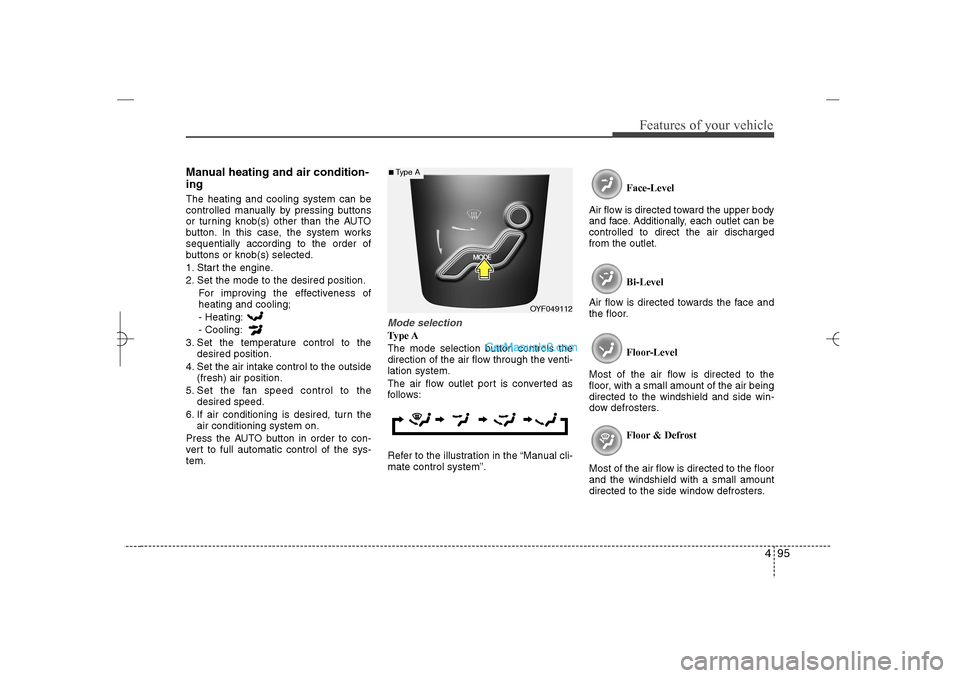
Mode selectionType A
The mode selection button controls the
direction of the air flow through the venti-
lation system.
The air flow outlet port is converted as
follows:
Refer to the illustration in the “Manual cli-
mate control system”.Face-Level
Air flow is directed toward the upper body
and face. Additionally, each outlet can be
controlled to direct the air discharged
from the outlet.
Bi-Level
Air flow is directed towards the face and
the floor.
Floor-Level
Most of the air flow is directed to the
floor, with a small amount of the air being
directed to the windshield and side win-
dow defrosters.
Floor & Defrost
Most of the air flow is directed to the floor
and the windshield with a small amount
directed to the side window defrosters.
OYF049112
■Type A
YF HMA 4a-111.qxp 1/16/2012 6:34 PM Page 95
Page 193 of 410
Features of your vehicle112 4✽
✽
NOTICEIf you install an after market HID head
lamp, your vehicle's audio and electron-
ic device may malfunction.
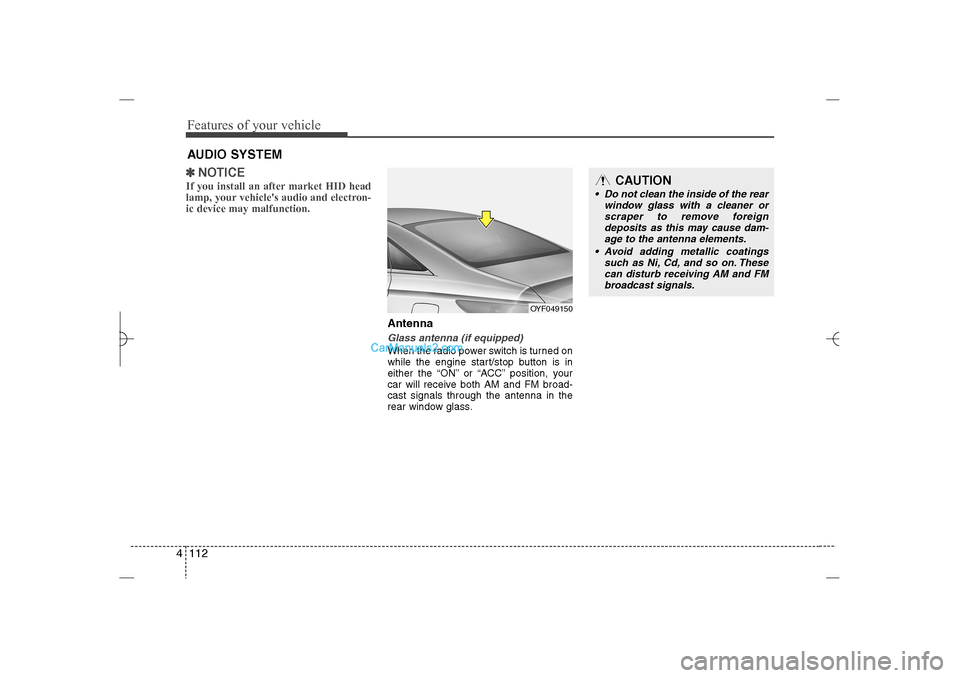
AntennaGlass antenna (if equipped)When the radio power switch is turned on
while the engine start/stop button is in
either the “ON” or “ACC” position, your
car will receive both AM and FM broad-
cast signals through the antenna in the
rear window glass.
AUDIO SYSTEM
OYF049150
CAUTION
• Do not clean the inside of the rear
window glass with a cleaner or
scraper to remove foreign
deposits as this may cause dam-
age to the antenna elements.
Avoid adding metallic coatings
such as Ni, Cd, and so on. These
can disturb receiving AM and FM
broadcast signals.
YF HMA 4b-112~(Audio).qxp 3/5/2012 4:24 PM Page 112
Page 203 of 410
![Hyundai Sonata 2013 Owners Guide Features of your vehicle122 4 DeleteSelect [Phone List] Select mobile phone
through TUNE knob Select [Delete]➀Select the desired mobile phone.
➁Delete the selected mobile phone.
➂Deletion comp](/img/35/16808/w960_16808-202.png "Hyundai Sonata 2013 Owners Guide Features of your vehicle122 4 DeleteSelect [Phone List] Select mobile phone
through TUNE knob Select [Delete]➀Select the desired mobile phone.
➁Delete the selected mobile phone.
➂Deletion comp")
Features of your vehicle122 4 DeleteSelect [Phone List] Select mobile phone
through TUNE knob Select [Delete]➀Select the desired mobile phone.
➁Delete the selected mobile phone.
➂Deletion completion is displayed.
❈When attempting to delete a currently
connected phone, the phone is first
disconnected.
Contacts DownloadThis feature is used to download con-
tacts and call histories into the audio sys-
tem.
Select [Contacts Download] Select
through
TUNE
knob
Auto DownloadWhen connecting a mobile phone, it is
possible to automatically download new
Contacts and Call Histories.Select [Auto Download] Set
/
through TUNE knob
Audio StreamingSongs (files) saved in your
Bluetooth
®
Wireless Technology enabled mobile
phone can be played through the audio
system.Select [Audio Streaming] Set /
through TUNE knobOutgoing VolumeThis is used to set the volume of your
voice as heard by the other party while
on a
Bluetooth
®
Wireless Technology
enabled handsfree call.
Select [Outgoing Volume] Set volume
through
TUNE
knob
❈ Even while on a call, the volume can
be changed by using the
key.
SEEK
TRACK
Off
On
Off
On
CAUTION
The download feature may not be
supported in some mobile phones.
If a different operation is per-
formed while Contacts are being
downloaded, downloading will be
discontinued. Contacts already
downloaded will be saved.
When downloading new Contacts,
delete all previously saved
Contacts before starting down-
load.
CAUTION
The Bluetooth
®
Wireless
Technology audio streaming fea-
ture may not be supported in some
mobile phones.
CAUTION
When you delete a mobile phone,
the mobile phone contacts will
also be erased.
For stable Bluetooth
®
Wireless
Technology communication,
delete the mobile phone from the
audio and also delete the audio
from your mobile phone.
YF HMA 4b-112~(Audio).qxp 3/5/2012 4:24 PM Page 122
Page 206 of 410
4 125
Features of your vehicle
HD RADIO
TM
INFORMATION
Licensing informationHD Radio
TM
Technology Manufactured
Under License From iBiquity Digital
Corporation. U.S. and Foreign Patents.
HD Radio
TM
and the HD and HD Radio
logos are proprietary trademarks of
iBiquity Digital Corporation.
Availability informationHD Radio
TM reception is available in the
United States, including Alaska and
Hawaii.
What is HD Radio
TM
technology?
The vehicle audio system (if equipped) is
able to receive standard analog FM/AM
radio broadcasting as well as digital HD
Radio
TMFM/AM broadcasting.
HD RadioTM
technology provides digital
and analog reception using existing FM
and AM broadcasting frequencies.
Currently, radio stations broadcasting an
HD Radio
TM
signal are operating in a
hybrid mode of both, analog and digital, in
order to reach both receivers. In both
modes, analog and digital, the broadcast-
ed program contents is the same(except
of multicasting, see below).
Eventually, as analog receivers are
replaced by digital ones, radio stations
may be able to turn off their analog broad-
casting and use only digital broadcasting.
MulticastingHD Radio
TMFM stations are able to broad-
cast multiple digital program streams(chan-
nels) over a single FM frequency. For
example, a HD Radio
TMFM station can run
a main channel of music and a sub chan-
nel of news(or even two different music
channels) at one frequency.
But only the program content of the main
channel is broadcasted in analog.
HD Radio
TM
signal delay
To overcome the delay that digital sys-
tems inherently produce, HD Radio
TM
technology first uses the audio signal of
the analog broadcasting when you tune
to an AM station or to the main channel
of a FM station. After that, the system will
blend from analog to digital signal.
Normally, this blending is very smooth. If
you experience a skip in program content
of several seconds, the radio station has
not implemented HD Radio
TMbroadcast-
ing correctly. This is not a problem with
your audio system.
Due to the fact that sub channels are only
broadcasting digital, blending from ana-
log to digital signal is not possible if you
tune to a sub channel. In this case play-
back of the sub channel starts after sev-
eral seconds, this is a normal function.
YF HMA 4b-112~(Audio).qxp 3/5/2012 4:24 PM Page 125
Page 217 of 410
Features of your vehicle136 4Changing Song/FileWhile song (file) is playing key Shortly pressing the key (under 0.8
seconds): Plays the current song from
the beginning.
❈ If the key is pressed again
within 1 second, the previous song is
played.
Pressing and holding the key (over 0.8
seconds): Rewinds the song.While song (file) is playing key Shortly pressing the key (under 0.8
seconds): Plays the next song.
Pressing and holding the key (over 0.8
seconds): Fast forwards the song.
ScanWhile song (file) is playing keyScans all songs for 10 seconds starting
from the next song.
❈ Press the key again to turn off.
❈ The SCAN function is not supported in
iPod mode.Folder Search : MP3 CD, USB
ModeWhile file is playing
( ) (Folder Up) key Searches the next folder.While file is playing
( ) (Folder Down) key Searches the previous folder.
❈ If a folder is selected by pressing the
TUNE knob, the first file within the
selected folder will be played.
❈ In iPod mode, moves to the Parent
Folder.
Searching Songs (File) Turning TUNE knob : Searches for
songs (files)
Pressing TUNE knob : Plays select-
ed song (file).
HD/CAT
FOLDER
CAT
FOLDER
HD/CAT
FOLDER
CAT
FOLDER
SCAN
SCAN
SEEK
TRACK
SEEK
TRACK
SEEK
TRACK
YF HMA 4b-112~(Audio).qxp 3/5/2012 4:24 PM Page 136
Page 221 of 410
![Hyundai Sonata 2013 Owners Guide Features of your vehicle140 4InformationPress the key Set [ Info]
through the
TUNE
knob or key.
Displays information of the current song.
❈ Press the key to turn off info
display.
DeletePress th](/img/35/16808/w960_16808-220.png "Hyundai Sonata 2013 Owners Guide Features of your vehicle140 4InformationPress the key Set [ Info]
through the
TUNE
knob or key.
Displays information of the current song.
❈ Press the key to turn off info
display.
DeletePress th")
Features of your vehicle140 4InformationPress the key Set [ Info]
through the
TUNE
knob or key.
Displays information of the current song.
❈ Press the key to turn off info
display.
DeletePress the key Set [ Delete]
through the TUNEknob or key. Deletes currently playing file
In the play screen, pressing delete will
delete the currently playing song.
Deletes file from list➀
Select the file you wish to delete by
using the TUNE knob.
➁
Press the key and select the
delete menu to delete the selected file.
Delete AllPress the key Set [ Del.All]
through the TUNEknob or key.Deletes all songs of My Music.Delete SelectionPress the key Set [ Del.Sel]
through the TUNEknob or key.Songs within My Music are selected and
deleted.➀
Select the songs you wish to delete
from the list.
➁
After selecting, press the key
and select the delete menu.
AUXAUX is used to play external MEDIA cur-
rently connected with the AUX terminal.
AUX mode will automatically start when
an external device is connected to the
AUX terminal.
If an external device is connected, you
can also press the key to change
to AUX mode.
❈AUX mode cannot be started unless
there is an external device connected
to the AUX terminal.
MEDIA
MENU6
MENU
5
MENU
MENU
4
MENUMENU
3
MENU
YF HMA 4b-112~(Audio).qxp 3/5/2012 4:24 PM Page 140
Page 223 of 410
Features of your vehicle142 4
CAUTION IN USING
USB DEVICE
To use an external USB device,
make sure the device is not con-
nected when starting up the vehi-
cle. Connect the device after
starting up.
If you start the engine when the
USB device is connected, it may
damage the USB device. (USB
flashdrives are very sensitive to
electric shock.)
If the engine is started up or
turned off while the external USB
device is connected, the external
USB device may not work.
The System may not play inau-
thentic MP3 or WMA files.
1) It can only play MP3 files with
the compression rate between
8Kbps~320Kbps.
2) It can only play WMA music
files with the compression rate
between 8Kbps~320Kbps.
Take precautions for static elec-
tricity when connecting or discon-
necting the external USB device.
(Continued)
(Continued)
An encrypted MP3 PLAYER is not
recognizable.
Depending on the condition of
the external USB device, the con-
nected external USB device can
be unrecognizable.
When the formatted byte/sector
setting of External USB device is
not either 512BYTE or 2048BYTE,
then the device will not be recog-
nized.
Use only a USB device formatted
to FAT 12/16/32.
USB devices without USB I/F
authentication may not be recog-
nizable.
Make sure the USB connection
terminal does not come in con-
tact with the human body or other
objects.
If you repeatedly connect or dis-
connect the USB device in a short
period of time, it may break the
device.
You may hear a strange noise
when connecting or disconnect-
ing a USB device.
(Continued)
(Continued)
If you disconnect the external USB
device during playback in USB
mode, the external USB device can
be damaged or may malfunction.
Therefore, disconnect the external
USB device when the audio is
turned off or in another mode. (e.g,
Radio, XM or CD)
Depending on the type and
capacity of the external USB
device or the type of the files
stored in the device, there is a dif-
ference in the time taken for
recognition of the device.
Do not use the USB device for
purposes other than playing
music files.
Playing videos through the USB
is not supported.
Use of USB accessories such as
rechargers or heaters using USB
I/F may lower performance or
cause trouble.
(Continued)
YF HMA 4b-112~(Audio).qxp 3/5/2012 4:24 PM Page 142
Page 226 of 410
4 145
Features of your vehicle
Bluetooth
®Wireless Technology
AUDIO
What is
Bluetooth
®Wireless
Technology?
Bluetooth
®
Wireless Technology is a
wireless technology that allows multiple
devices to be connected in a short range,
low-powered devices like hands-free,
stereo headset, wireless remote con-
troller, etc. For more information, visit the
Bluetooth
®Wireless Technology website
at www
.Bluetooth.com
Before using
Bluetooth
®
Wireless
Technology audio features
Bluetooth
®Wireless Technology audio
may not be supported depending on
the compatibility of your
Bluetooth
®
Wireless Technology mobile phone.
In order to use
Bluetooth
®
Wireless
Technology audio, you must first pair
and connect the
Bluetooth
®Wireless
Technology mobile phone.
Bluetooth
®Wireless Technology audio
can be used only when the [Audio
Streaming] of Phone is turned .
❈Setting Bluetooth
®
Wireless
Technology Audio Streaming : Press
the key Select [Phone]
through the tune knob or key
Select [Audio Streaming] through the
TUNE knob Set
/
Starting
Bluetooth
®Wireless
Technology Audio
Press the key to change the
mode in order of CD➟USB➟AUX➟My
Music➟BT Audio.
If BT Audio is selected,
Bluetooth
®
Wireless Technology audio will start
playing.
❈Audio may not automatically start playing
in some mobile phones.
Using the
Bluetooth
®Wireless
Technology audio features
Play / Stop
Press the TUNE knob to play and
pause the current song.
❈The play / pause functions may not be
supported in some mobile phones.
MEDIA
Off
On
3
SETUP
On
YF HMA 4b-112~(Audio).qxp 3/5/2012 4:24 PM Page 145