change time Hyundai Sonata 2013
[x] Cancel search | Manufacturer: HYUNDAI, Model Year: 2013, Model line: Sonata, Model: Hyundai Sonata 2013Pages: 410, PDF Size: 35.93 MB
Page 173 of 410
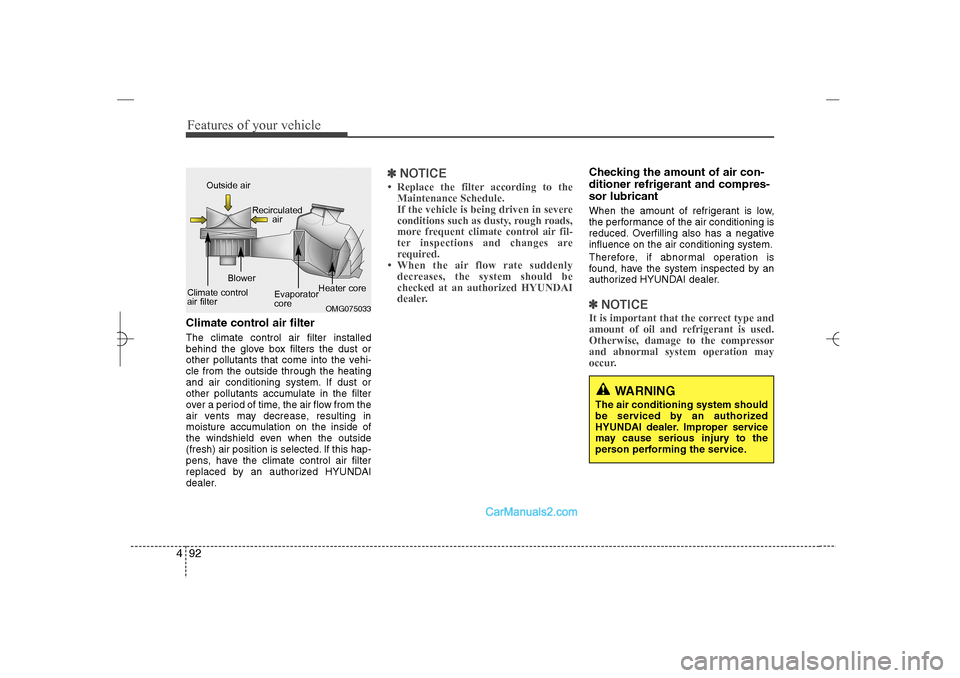
Features of your vehicle92 4Climate control air filterThe climate control air filter installed
behind the glove box filters the dust or
other pollutants that come into the vehi-
cle from the outside through the heating
and air conditioning system. If dust or
other pollutants accumulate in the filter
over a period of time, the air flow from the
air vents may decrease, resulting in
moisture accumulation on the inside of
the windshield even when the outside
(fresh) air position is selected. If this hap-
pens, have the climate control air filter
replaced by an authorized HYUNDAI
dealer.
✽ ✽
NOTICE• Replace the filter according to the
Maintenance Schedule.
If the vehicle is being driven in severe
conditions such as dusty, rough roads,
more frequent climate control air fil-
ter inspections and changes are
required.
• When the air flow rate suddenly
decreases, the system should be
checked at an authorized HYUNDAI
dealer.
Checking the amount of air con-
ditioner refrigerant and compres-
sor lubricantWhen the amount of refrigerant is low,
the performance of the air conditioning is
reduced. Overfilling also has a negative
influence on the air conditioning system.
Therefore, if abnormal operation is
found, have the system inspected by an
authorized HYUNDAI dealer.✽ ✽
NOTICEIt is important that the correct type and
amount of oil and refrigerant is used.
Otherwise, damage to the compressor
and abnormal system operation may
occur.
OMG075033
Outside air
Recirculated
air
Climate control
air filterBlower
Evaporator
coreHeater core
WARNING
The air conditioning system should
be serviced by an authorized
HYUNDAI dealer. Improper service
may cause serious injury to the
person performing the service.
YF HMA 4a-111.qxp 1/16/2012 6:33 PM Page 92
Page 190 of 410
4 109
Features of your vehicle
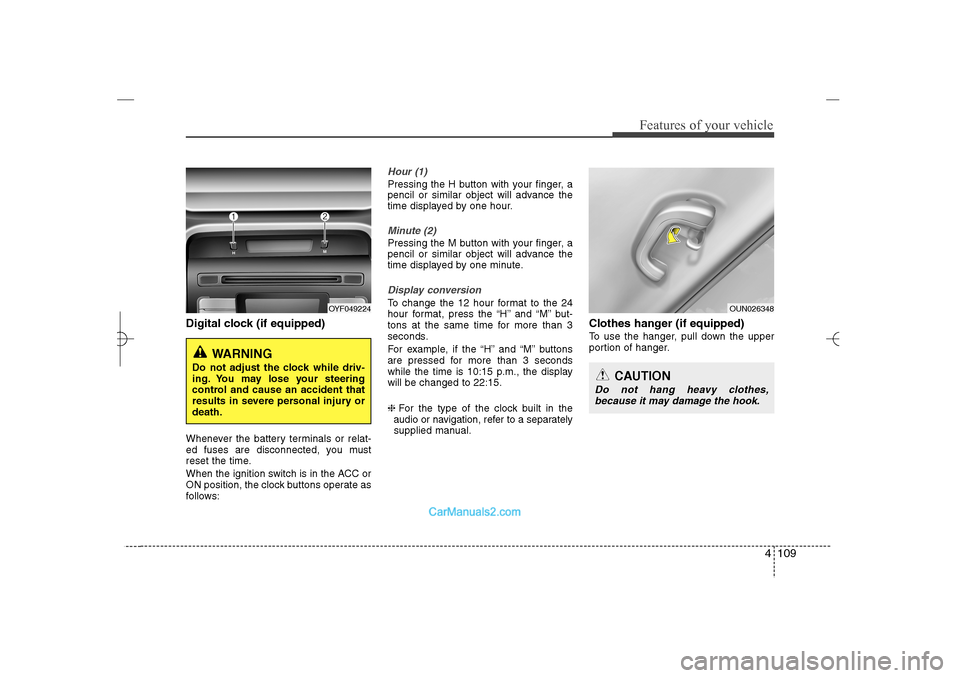
Digital clock (if equipped)Whenever the battery terminals or relat-
ed fuses are disconnected, you must
reset the time.
When the ignition switch is in the ACC or
ON position, the clock buttons operate as
follows:
Hour (1)Pressing the H button with your finger, a
pencil or similar object will advance the
time displayed by one hour.Minute (2)Pressing the M button with your finger, a
pencil or similar object will advance the
time displayed by one minute.Display conversionTo change the 12 hour format to the 24
hour format, press the “H” and “M” but-
tons at the same time for more than 3
seconds.
For example, if the “H” and “M” buttons
are pressed for more than 3 seconds
while the time is 10:15 p.m., the display
will be changed to 22:15.
❈For the type of the clock built in the
audio or navigation, refer to a separately
supplied manual.
Clothes hanger (if equipped)To use the hanger, pull down the upper
portion of hanger.
OYF049224
WARNING
Do not adjust the clock while driv-
ing. You may lose your steering
control and cause an accident that
results in severe personal injury or
death.
OUN026348
CAUTION
Do not hang heavy clothes,
because it may damage the hook.
YF HMA 4a-111.qxp 1/16/2012 6:35 PM Page 109
Page 196 of 410
4 115
Features of your vehicle
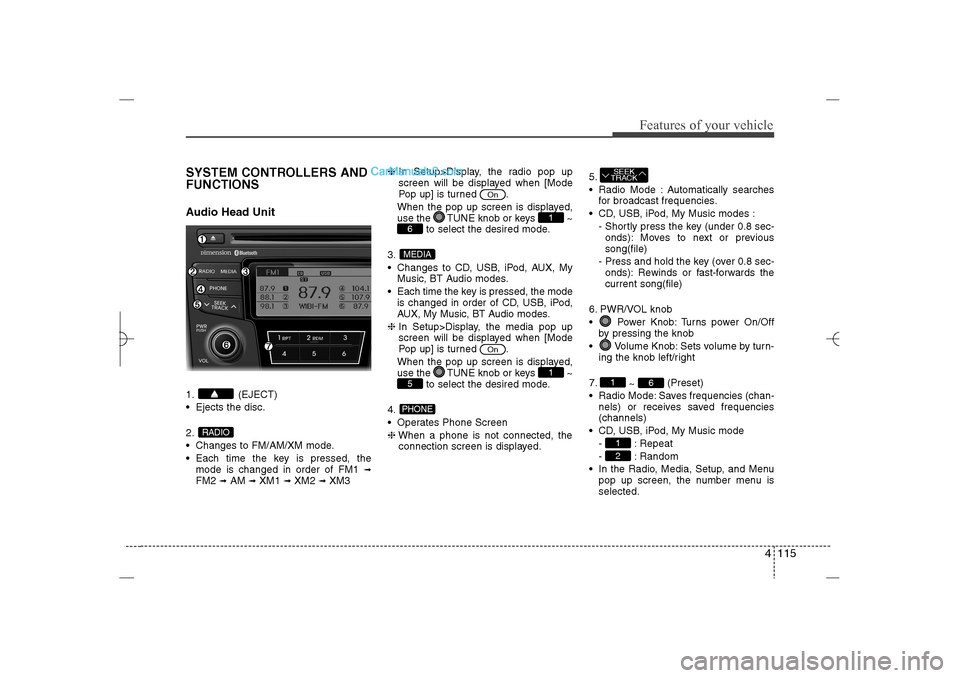
SYSTEM CONTROLLERS AND
FUNCTIONSAudio Head Unit1. (EJECT)
Ejects the disc.
2.
Changes to FM/AM/XM mode.
Each time the key is pressed, the
mode is changed in order of FM1
➟
FM2
➟AM
➟XM1
➟XM2
➟XM3❈In Setup>Display, the radio pop up
screen will be displayed when [Mode
Pop up] is turned .
When the pop up screen is displayed,
use the TUNE knob or keys ~
to select the desired mode.
3.
Changes to CD, USB, iPod, AUX, My
Music, BT Audio modes.
Each time the key is pressed, the mode
is changed in order of CD, USB, iPod,
AUX, My Music, BT Audio modes.
❈In Setup>Display, the media pop up
screen will be displayed when [Mode
Pop up] is turned .
When the pop up screen is displayed,
use the TUNE knob or keys ~
to select the desired mode.
4.
Operates Phone Screen
❈When a phone is not connected, the
connection screen is displayed.5.
Radio Mode : Automatically searches
for broadcast frequencies.
CD, USB, iPod, My Music modes :
- Shortly press the key (under 0.8 sec-
onds): Moves to next or previous
song(file)
- Press and hold the key (over 0.8 sec-
onds): Rewinds or fast-forwards the
current song(file)
6. PWR/VOL knob
Power Knob: Turns power On/Off
by pressing the knob
Volume Knob: Sets volume by turn-
ing the knob left/right
7.
~ (Preset)
Radio Mode: Saves frequencies (chan-
nels) or receives saved frequencies
(channels)
CD, USB, iPod, My Music mode
- : Repeat
- : Random
In the Radio, Media, Setup, and Menu
pop up screen, the number menu is
selected.
21
6
1SEEK
TRACK
PHONE5
1
On
MEDIA6
1
On
RADIO
YF HMA 4b-112~(Audio).qxp 3/5/2012 4:24 PM Page 115
Page 197 of 410
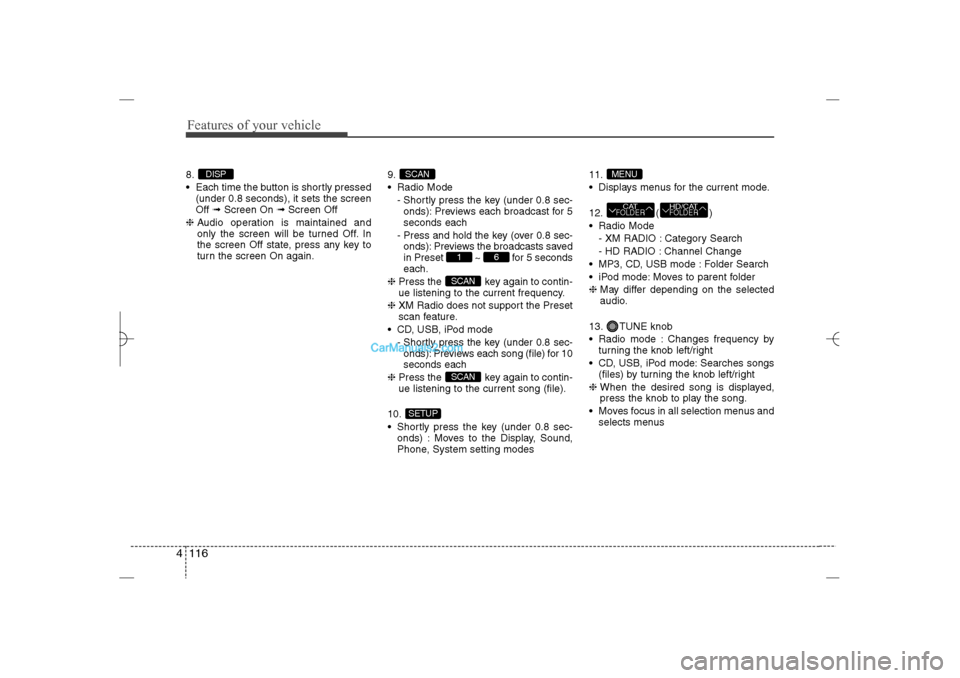
Features of your vehicle116 48.
Each time the button is shortly pressed
(under 0.8 seconds), it sets the screen
Off ➟Screen On ➟Screen Off
❈Audio operation is maintained and
only the screen will be turned Off. In
the screen Off state, press any key to
turn the screen On again.9.
Radio Mode
- Shortly press the key (under 0.8 sec-
onds): Previews each broadcast for 5
seconds each
- Press and hold the key (over 0.8 sec-
onds): Previews the broadcasts saved
in Preset ~ for 5 seconds
each.
❈Press the key again to contin-
ue listening to the current frequency.
❈XM Radio does not support the Preset
scan feature.
CD, USB, iPod mode
- Shortly press the key (under 0.8 sec-
onds): Previews each song (file) for 10
seconds each
❈Press the key again to contin-
ue listening to the current song (file).
10.
Shortly press the key (under 0.8 sec-
onds) : Moves to the Display, Sound,
Phone, System setting modes11.
Displays menus for the current mode.
12. ( )
Radio Mode
- XM RADIO : Category Search
- HD RADIO : Channel Change
MP3, CD, USB mode : Folder Search
iPod mode: Moves to parent folder
❈May differ depending on the selected
audio.
13. TUNE knob
Radio mode : Changes frequency by
turning the knob left/right
CD, USB, iPod mode: Searches songs
(files) by turning the knob left/right
❈ When the desired song is displayed,
press the knob to play the song.
Moves focus in all selection menus and
selects menus
HD/CATFOLDER
CATFOLDERMENU
SETUP
SCANSCAN
6
1
SCAN
DISP
YF HMA 4b-112~(Audio).qxp 3/5/2012 4:24 PM Page 116
Page 198 of 410
![Hyundai Sonata 2013 4 117
Features of your vehicle
DISPLAY SETTINGSPress the key Select [Display]
through TUNE knob or key
Select menu through TUNE knob
Mode Pop up[Mode Pop up] Changes
/
selection mode
During On](/img/35/16808/w960_16808-197.png "Hyundai Sonata 2013 4 117
Features of your vehicle
DISPLAY SETTINGSPress the key Select [Display]
through TUNE knob or key
Select menu through TUNE knob
Mode Pop up[Mode Pop up] Changes
/
selection mode
During On")
4 117
Features of your vehicle
DISPLAY SETTINGSPress the key Select [Display]
through TUNE knob or key
Select menu through TUNE knob
Mode Pop up[Mode Pop up] Changes
/
selection mode
During On state, press the or
key to display the mode
change pop up screen.Text Scroll[Text Scroll] Set /
: Maintains scroll
: Scrolls only one (1) time.Media DisplayWhen playing an MP3 file, select the
desired display info from ‘Folder/File’ or
‘Album/Artist/Song’.
OffOn
Off
On
MEDIA
RADIO
Off
On
1
SETUP
YF HMA 4b-112~(Audio).qxp 3/5/2012 4:24 PM Page 117
Page 225 of 410
Features of your vehicle144 4(Continued)
• To use iPod features within the audio,
use the cable provided upon purchas-
ing an iPod device.
• Skipping or improper operation may
occur depending on the characteris-
tics of your iPod/Phone device.
• If your iPhone is connected to both the
Bluetooth
®
Wireless Technology and
USB, the sound may not be properly
played. In your iPhone, select the
Dock connector orBluetooth
®
Wireless Technology to change the
sound output (source).
✽ ✽
NOTICE FOR USING THE My
Music• Even if memory is available, a maxi-
mum of 6,000 songs can be stored.
• The same song can be copied up to
1,000 times.
• Memory info can be checked in the
System menu of Setup.✽ ✽
NOTICE FOR USING THE
AUXFully insert the AUX cable into the AUX
terminal for use.
CAUTION IN USING THE
iPod
®DEVICE
When connecting iPod with the
iPod Power Cable, insert the con-
nector to the multimedia socket
completely. If not inserted com-
pletely, communications between
iPod and audio may be interrupted.
When adjusting the sound effects
of the iPod and the audio system,
the sound effects of both devices
will overlap and might reduce or
distort the quality of the sound.
Deactivate (turn off) the equalizer
function of an iPod when adjust-
ing the audio system’s volume,
and turn off the equalizer of the
audio system when using the
equalizer of an iPod.
When not using iPod with car
audio, detach the iPod cable from
iPod. Otherwise, iPod may remain
in accessory mode, and may not
work properly.
YF HMA 4b-112~(Audio).qxp 3/5/2012 4:24 PM Page 144
Page 244 of 410
Driving your vehicle2 5
WARNING
- ENGINE EXHAUST CAN BE DANGEROUS!
Engine exhaust fumes can be extremely dangerous. If, at any time, you smell exhaust fumes inside the vehicle, open the win-
dows immediately.
• Do not inhale exhaust fumes.
Exhaust fumes contain carbon monoxide, a colorless, odorless gas that can cause unconsciousness and death by asphyxia-
tion.
Be sure the exhaust system does not leak.
The exhaust system should be checked whenever the vehicle is raised to change the oil or for any other purpose. If you hear
a change in the sound of the exhaust or if you drive over something that strikes the underneath side of the car, have the
exhaust system checked as soon as possible by an authorized HYUNDAI dealer.
Do not run the engine in an enclosed area.
Letting the engine idle in your garage, even with the garage door open, is a hazardous practice. Never run the engine in your
garage any longer than it takes to start the engine and back the car out.
Avoid idling the engine for prolonged periods with people inside the car.
If it is necessary to idle the engine for a prolonged period with people inside the car, be sure to do so only in an open area
with the air intake set at "Fresh" and fan operating at one of the higher speeds so fresh air is drawn into the interior.
If you must drive with the trunk lid open because you are carrying objects that make this necessary:
1. Close all windows.
2. Open side vents.
3. Set the air intake control at "Fresh", the air flow control at "Floor" or "Face" and the fan at one of the higher speeds.
To assure proper operation of the ventilation system, be sure the ventilation air intakes located just in front of the windshield are
kept clear of snow, ice, leaves or other obstructions.
YF HMA 5.qxp 1/16/2012 6:22 PM Page 2
Page 250 of 410
Driving your vehicle8 5ACC(Accessory)Press the engine start/stop button while it
is in the OFF position without depressing
the brake pedal.
The electrical accessories are operative.
If you leave the engine start/stop button
in the ACC position for more than 1 hour,
the battery power will turn off automati-
cally to prevent the battery from dis-
charging.ONPress the engine start/stop button while it
button is in the ACC position without
depressing the brake pedal.
The warning lights can be checked
before the engine is started. Do not leave
the ON position if the engine is not run-
ning to prevent battery discharge.STARTTo start the engine, press the brake
pedal and press the engine start/stop
button with the shift lever in the P(Park)
or the N(Neutral) position.
For your safety, start the engine with the
shift lever in the P(Park) position.
✽ ✽
NOTICE• If you press the engine start/stop but-
ton without depressing the brake
pedal, the engine does not start and
the engine start/stop button changes
as follows :
OFF→ →
ACC → →
ON → →
OFF
• If you leave the engine start/stop but-
ton in the ACC or the ON position for
a long time, the battery will be dis-
charged.
WARNING
Never press the engine start/stop
button while the vehicle is in
motion. This would result in loss
of directional control and braking
function, which could cause an
accident.
Before leaving the driver’s seat,
always make sure the shift lever
is engaged in P (Park), set the
parking brake fully and shut the
engine off. Unexpected and sud-
den vehicle movement may occur
if these precautions are not
taken.
Never reach for the engine
start/stop button, or any other
controls through the steering
wheel while the vehicle is in
motion. The presence of your
hand or arm in this area could
cause a loss of vehicle control,
an accident and serious bodily
injury or death.
Do not place any movable objects
around the driver’s seat as they
may move while driving, interfere
with the driver and lead to an
accident.
YF HMA 5.qxp 1/16/2012 6:23 PM Page 8
Page 260 of 410
![Hyundai Sonata 2013 Driving your vehicle18 5With the shift lever in the D position
The paddle shifter can operate when the
vehicle speed is more than 10km/h.
Pull the [+] or [-] paddle shifter once to
shift up or down o](/img/35/16808/w960_16808-259.png "Hyundai Sonata 2013 Driving your vehicle18 5With the shift lever in the D position
The paddle shifter can operate when the
vehicle speed is more than 10km/h.
Pull the [+] or [-] paddle shifter once to
shift up or down o")
Driving your vehicle18 5With the shift lever in the D position
The paddle shifter can operate when the
vehicle speed is more than 10km/h.
Pull the [+] or [-] paddle shifter once to
shift up or down one gear and the system
changes from automatic mode to manual
mode.
If the vehicle speed is lower than 10km/h,
if you depress the accelerator pedal for
more than 7 seconds or if you shift the
shift lever from D to sport mode and shift
it from sport mode to D again, the system
will change from manual mode to auto-
matic mode.
With the shift lever in the sport mode
Pull the [+] or [-] paddle shifter once to
shift up or down one gear.✽ ✽
NOTICEIf you pull the [+] and [-] paddle shifters
at the same time, you can't shift the gear.
Shift lock system For your safety, the automatic transaxle
has a shift lock system which prevents
shifting the transaxle from P (Park) or N
(Neutral) into R (Reverse) unless the
brake pedal is depressed.
To shift the transaxle from P (Park) or N
(Neutral) into R (Reverse):
1. Depress and hold the brake pedal.
2. Start the engine or turn the ignition
switch to the ON position.
3. Move the shift lever.
If the brake pedal is repeatedly
depressed and released with the shift
lever in the P (Park) position, a chattering
noise near the shift lever may be heard.
This is a normal condition.Shift-lock override
If the shift lever cannot be moved from
the P (Park) or N (Neutral) position into R
(Reverse) position with the brake pedal
depressed, continue depressing the
brake, then do the following:
1. Carefully remove the cap (1) covering
the shift-lock access hole.
2. Insert a key (or screwdriver) into the
access hole and press down on the
key (or screwdriver).
3. Move the shift lever.
4. Have your vehicle inspected by an
authorized HYUNDAI dealer immedi-
ately.
OYF059011N
WARNING
Always fully depress the brake
pedal before and while shifting out
of the P (Park) position into anoth-
er position to avoid inadvertent
motion of the vehicle which could
injure persons in or around the car.
YF HMA 5.qxp 1/16/2012 6:23 PM Page 18
Page 275 of 410
533
Driving your vehicle
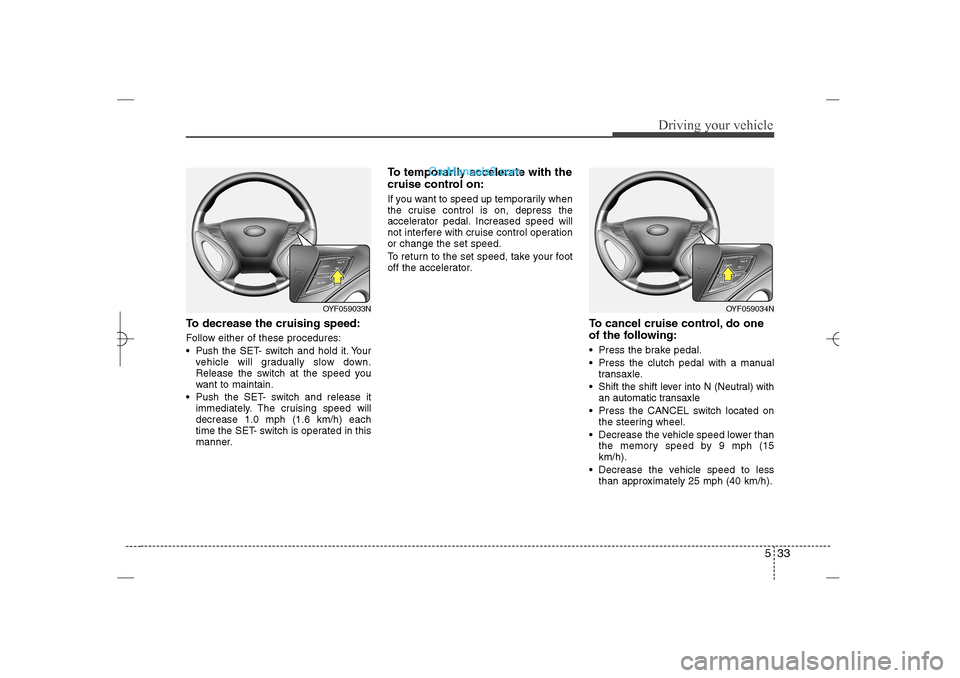
To decrease the cruising speed:Follow either of these procedures:
Pushthe SET- switch and hold it. Your
vehicle will gradually slow down.
Release the switch at the speed you
want to maintain.
Push the SET- switch and release it
immediately. The cruising speed will
decrease 1.0 mph (1.6 km/h) each
time the SET- switch is operated in this
manner.
To temporarily accelerate with the
cruise control on:If you want to speed up temporarily when
the cruise control is on, depress the
accelerator pedal. Increased speed will
not interfere with cruise control operation
or change the set speed.
To return to the set speed, take your foot
off the accelerator.
To cancel cruise control, do one
of the following: Press the brake pedal.
Press the clutch pedal with a manual
transaxle.
Shift the shift lever into N (Neutral) with
an automatic transaxle
Press the CANCEL switch located on
the steering wheel.
Decrease the vehicle speed lower than
the memory speed by 9 mph (15
km/h).
Decrease the vehicle speed to less
than approximately 25 mph (40 km/h).
OYF059034N
OYF059033N
YF HMA 5.qxp 1/16/2012 6:24 PM Page 33