door lock Hyundai Sonata 2013
[x] Cancel search | Manufacturer: HYUNDAI, Model Year: 2013, Model line: Sonata, Model: Hyundai Sonata 2013Pages: 410, PDF Size: 35.93 MB
Page 101 of 410
Features of your vehicle20 4 If the key is in the ignition switch and
front door is open, the doors will not
lock even though the front portion (1)
of central door lock switch is pressed.
If the smart key is in the vehicle and
any door is open, the doors will not
lock even though the front portion(1) of
central door lock switch is pressed.
Impact sensing door unlock system
(if equipped)All doors will be automatically unlocked
when the impact is delivered to impact
sensors while the ignition switch is ON.
However, the doors may not be unlocked
if mechanical problems occur with the
door lock system or battery.✽ ✽
NOTICEYou can activate or deactivate some auto
door lock/unlock features in the vehicle
setting as follows;
• Speed sensing auto door lock
• Auto door unlock by unlocking the
driver's door
• Auto door unlock when the ignition
key is removed from the ignition
switch or the smart key is removed
from the smart key holder.
• Auto door lock/unlock by shifting the
transmission shift lever out of P
(Park) or into P (Park)
If you want to activate or deactivate
some door lock/unlock feature, refer to
the “vehicle setting” in this chapter.
WARNING
- Unlocked
vehicles
Leaving your vehicle unlocked can
invite theft or possible harm to you
or others from someone hiding in
your vehicle while you are gone.
Always remove the ignition key,
engage the parking brake, close all
windows and lock all doors when
leaving your vehicle unattended.
WARNING
- Unattended
children
An enclosed vehicle can become
extremely hot, causing death or
severe injury to unattended chil-
dren or animals who cannot escape
the vehicle. Furthermore, children
might operate features of the vehi-
cle that could injure them, or they
could encounter other harm, possi-
bly from someone gaining entry to
the vehicle. Never leave children or
animals unattended in your vehicle.
WARNING -
Doors
The doors should always be fully
closed and locked while the vehi-
cle is in motion to prevent acci-
dental opening of the door.
Locked doors will also discour-
age potential intruders when the
vehicle stops or slows.
Be careful when opening doors
and watch for vehicles, motorcy-
cles, bicycles or pedestrians
approaching the vehicle in the
path of the door. Opening a door
when something is approaching
can cause damage or injury.
YF HMA 4a-111.qxp 1/16/2012 6:28 PM Page 20
Page 102 of 410
421
Features of your vehicle
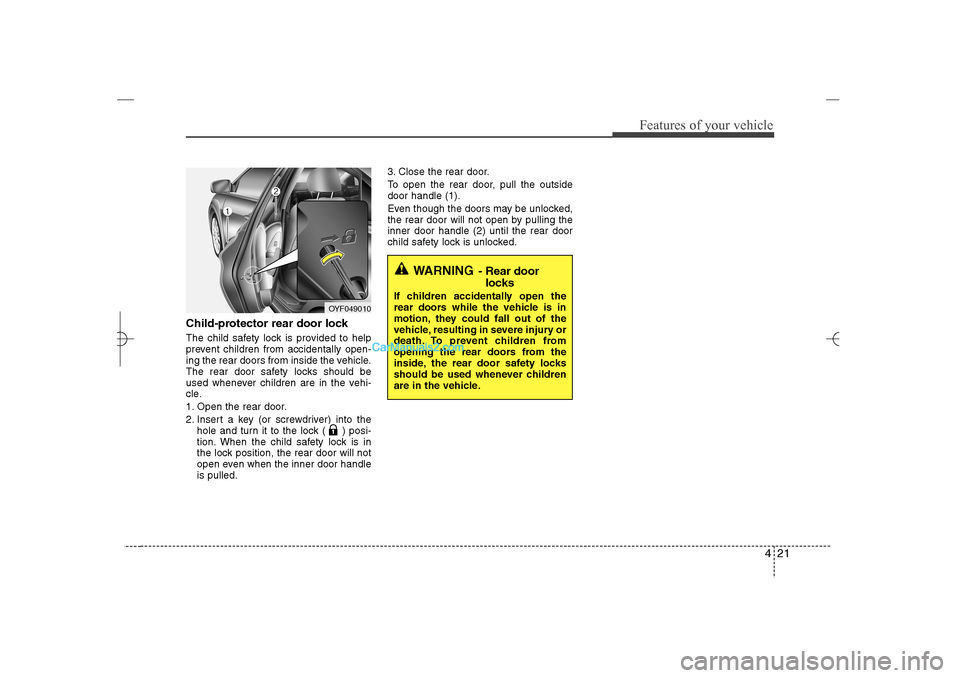
Child-protector rear door lockThe child safety lock is provided to help
prevent children from accidentally open-
ing the rear doors from inside the vehicle.
The rear door safety locks should be
used whenever children are in the vehi-
cle.
1. Open the rear door.
2. Insert a key (or screwdriver) into the
hole and turn it to the lock ( ) posi-
tion. When the child safety lock is in
the lock position, the rear door will not
open even when the inner door handle
is pulled.3. Close the rear door.
To open the rear door, pull the outside
door handle (1).
Even though the doors may be unlocked,
the rear door will not open by pulling the
inner door handle (2) until the rear door
child safety lock is unlocked.
OYF049010
WARNING
- Rear door
locks
If children accidentally open the
rear doors while the vehicle is in
motion, they could fall out of the
vehicle, resulting in severe injury or
death. To prevent children from
opening the rear doors from the
inside, the rear door safety locks
should be used whenever children
are in the vehicle.
YF HMA 4a-111.qxp 1/16/2012 6:28 PM Page 21
Page 103 of 410
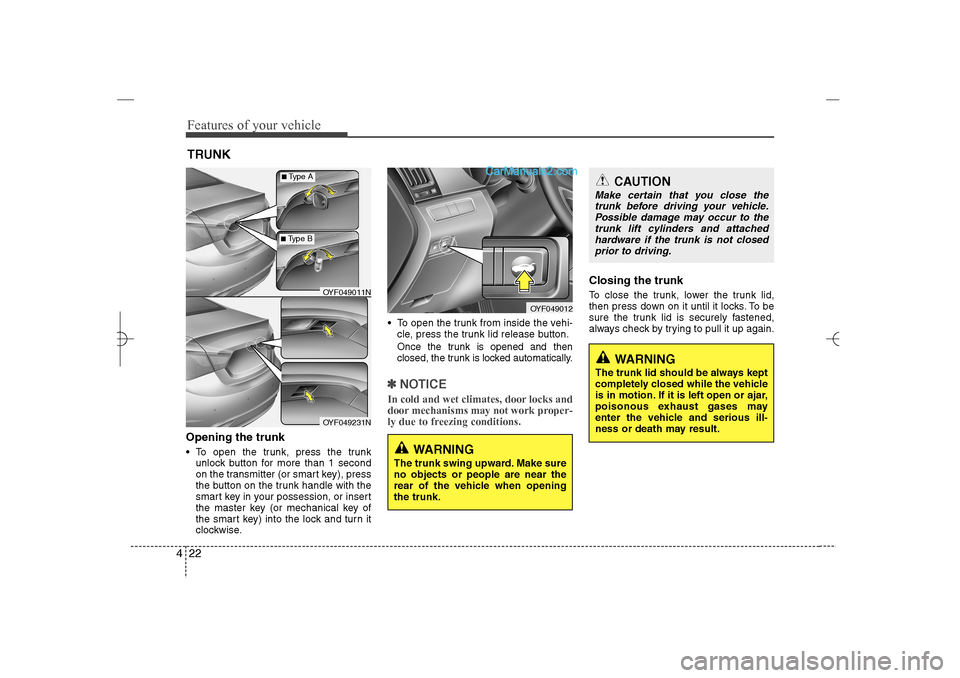
Features of your vehicle22 4Opening the trunk To open the trunk, press the trunk
unlock button for more than 1 second
on the transmitter (or smart key), press
the button on the trunk handle with the
smart key in your possession, or insert
the master key (or mechanical key of
the smart key) into the lock and turn it
clockwise. To open the trunk from inside the vehi-
cle, press the trunk lid release button.
Once the trunk is opened and then
closed, the trunk is locked automatically.✽ ✽
NOTICEIn cold and wet climates, door locks and
door mechanisms may not work proper-
ly due to freezing conditions.
Closing the trunkTo close the trunk, lower the trunk lid,
then press down on it until it locks. To be
sure the trunk lid is securely fastened,
always check by trying to pull it up again.
TRUNK
OYF049012
CAUTION
Make certain that you close the
trunk before driving your vehicle.
Possible damage may occur to the
trunk lift cylinders and attached
hardware if the trunk is not closed
prior to driving.
WARNING
The trunk swing upward. Make sure
no objects or people are near the
rear of the vehicle when opening
the trunk.
WARNING
The trunk lid should be always kept
completely closed while the vehicle
is in motion. If it is left open or ajar,
poisonous exhaust gases may
enter the vehicle and serious ill-
ness or death may result.
OYF049011NOYF049231N
■Type A■Type B
YF HMA 4a-111.qxp 1/16/2012 6:28 PM Page 22
Page 105 of 410
Features of your vehicle24 4
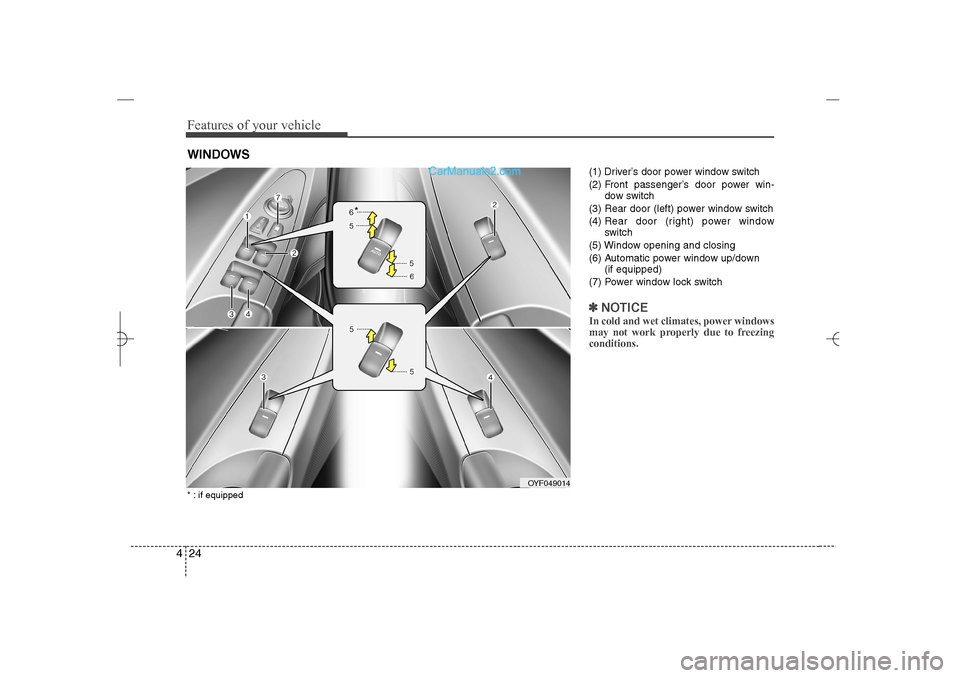
(1) Driver’s door power window switch
(2) Front passenger’s door power win-
dow switch
(3) Rear door (left) power window switch
(4) Rear door (right) power window
switch
(5) Window opening and closing
(6) Automatic power window up/down
(if equipped)
(7) Power window lock switch✽ ✽
NOTICEIn cold and wet climates, power windows
may not work properly due to freezing
conditions.
WINDOWS
OYF049014
*
* : if equipped
YF HMA 4a-111.qxp 1/16/2012 6:29 PM Page 24
Page 106 of 410
425
Features of your vehicle
Power windowsThe ignition switch must be in the ON
position for power windows to operate.
Each door has a power window switch
that controls the door's window. The driv-
er has a power window lock switch which
can block the operation of passenger
windows. The driver’s door has a master
power window switch that controls all the
windows in the vehicle. The power win-
dows can be operated for approximately
30 seconds after the ignition key is
removed or turned to the ACC or LOCK
position. However, if the front doors
open, the power windows cannot be
operated within the 30 second period
after ignition key removal.✽ ✽
NOTICEWhile driving with the rear windows
down or with the sunroof (if equipped) in
an open (or partially open) position, your
vehicle may demonstrate a wind buffet-
ing or pulsation noise. This noise is a
normal occurrence and can be reduced
or eliminated by taking the following
actions. If the noise occurs with one or
both of the rear windows down, partially
lower both front windows approximate-
ly one inch. If you experience the noise
with the sunroof open, slightly reduce the
size of the sunroof opening.
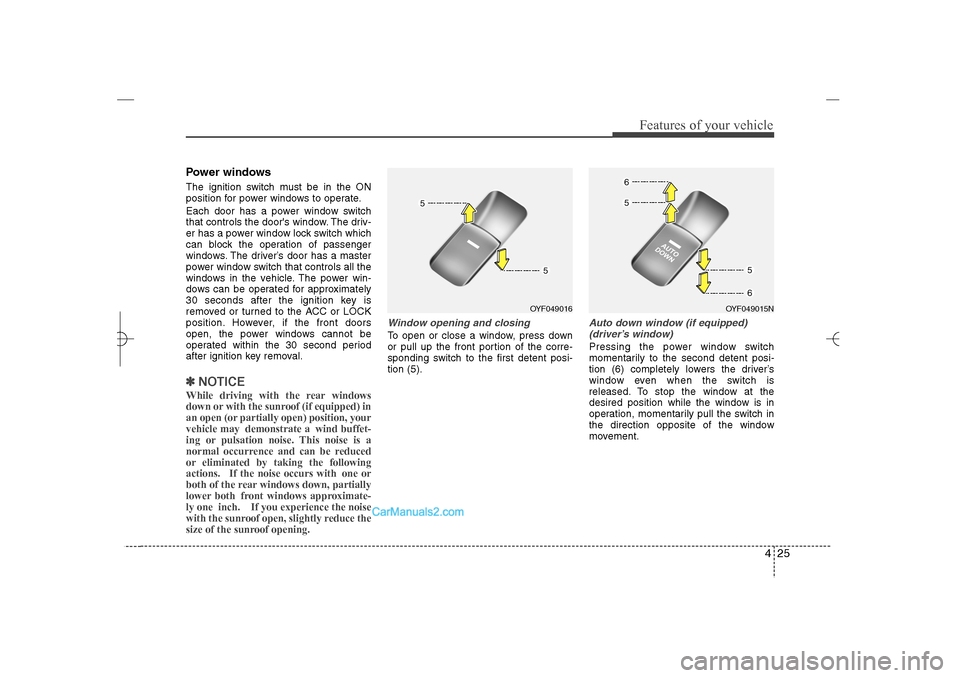
Window opening and closingTo open or close a window, press down
or pull up the front portion of the corre-
sponding switch to the first detent posi-
tion (5).
Auto down window (if equipped)
(driver’s window)Pressing the power window switch
momentarily to the second detent posi-
tion (6) completely lowers the driver’s
window even when the switch is
released. To stop the window at the
desired position while the window is in
operation, momentarily pull the switch in
the direction opposite of the window
movement.
OYF049016
OYF049015N
YF HMA 4a-111.qxp 1/16/2012 6:29 PM Page 25
Page 108 of 410
427
Features of your vehicle
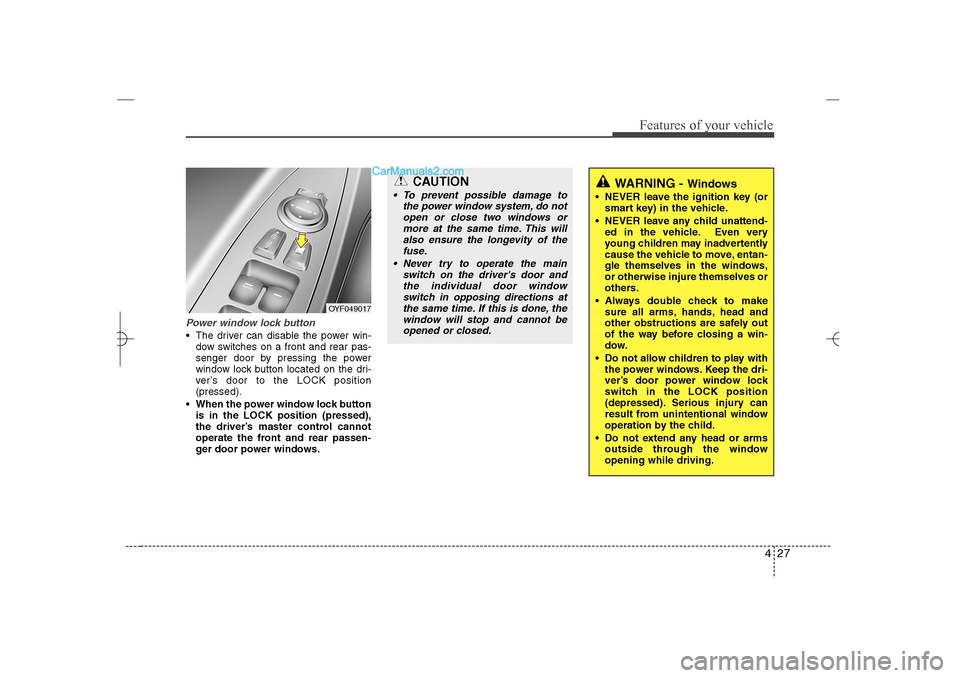
Power window lock button The driver can disable the power win-
dow switches on a front and rear pas-
senger door by pressing the power
window lock button located on the dri-
ver’s door to the LOCK position
(pressed).
When the power window lock button
is in the LOCK position (pressed),
the driver’s master control cannot
operate the front and rear passen-
ger door power windows.
OYF049017
CAUTION
To prevent possible damage to
the power window system, do not
open or close two windows or
more at the same time. This will
also ensure the longevity of the
fuse.
Never try to operate the main
switch on the driver's door and
the individual door window
switch in opposing directions at
the same time. If this is done, the
window will stop and cannot be
opened or closed.
WARNING -
Windows
NEVER leave the ignition key (or
smart key) in the vehicle.
NEVER leave any child unattend-
ed in the vehicle. Even very
young children may inadvertently
cause the vehicle to move, entan-
gle themselves in the windows,
or otherwise injure themselves or
others.
Always double check to make
sure all arms, hands, head and
other obstructions are safely out
of the way before closing a win-
dow.
Do not allow children to play with
the power windows. Keep the dri-
ver’s door power window lock
switch in the LOCK position
(depressed). Serious injury can
result from unintentional window
operation by the child.
Do not extend any head or arms
outside through the window
opening while driving.
YF HMA 4a-111.qxp 1/16/2012 6:29 PM Page 27
Page 125 of 410
Features of your vehicle44 4To adjust the Zone setting:
1. Determine the desired Zone Number
based upon your current location on
the Zone Map.
2. Press and hold the button for 6 sec-
onds, the current Zone Number will
appear on the display.
3. Pressing and holding the button
again will cause the numbers to incre-
ment (Note: they will repeat …13, 14,
15, 1, 2, …). Releasing the button
when the desired Zone Number
appears on the display will set the new
Zone.
4. Within about 5 seconds the compass
will start displaying a compass head-
ing again.
There are some conditions that can
cause changes to the vehicle magnets,
such as installing a ski rack or a CB
antenna. Body repair work on the vehicle
can also cause changes to the vehicle's
magnetic field. In these situations, the
compass will need to be re-calibrated to
quickly correct for these changes. To re-
calibrate the compass:1. Press and hold the button for more
than 9 seconds. When the compass
memory is cleared a "C" will appear in
the display.
2. To calibrate the compass, drive the
vehicle in 2 complete circles at less
than 5 mph (8 km/h).
Integrated HomeLink
®Wireless Control
System
The HomeLink
®Wireless Control System
provides a convenient way to replace up
to three hand-held radio-frequency (RF)
transmitters with a single built-in device.
This innovative feature will learn the
radio frequency codes of most current
transmitters to operate devices such as
gate operators, garage door openers,
entry door locks, security systems, even
home lighting. Both standard and rolling
code-equipped transmitters can be pro-
grammed by following the outlined proce-
dures. Additional HomeLink
®information
can be found at: www.homelink.com or
by calling 1-800-355-3515.Retain the original transmitter of the RF
device you are programming for use in
other vehicles as well as for future
HomeLink
®programming. It is also sug-
gested that upon the sale of the vehicle,
the programmed HomeLink
®buttons be
erased for security purposes.
WARNING
Before programming HomeLink
®to
a garage door opener or gate oper-
ator, make sure that people and
objects are out of the way of the
device to prevent potential harm or
damage. Do not use HomeLink®
with any garage door opener that
lacks the safety stop and reverse
features required by U.S. federal
safety standards (this includes any
garage door opener model manu-
factured before April 1, 1982). A
garage door that cannot detect an
object - signaling the door to stop
and reverse - does not meet current
U.S. federal safety standards. Using
a garage door opener without these
features increases the risk of seri-
ous injury or death.
YF HMA 4a-111.qxp 1/16/2012 6:30 PM Page 44
Page 127 of 410
Features of your vehicle46 4✽
✽
NOTICESome devices may require you to replace
this Programming step 3 with proce-
dures noted in the "Gate
Operator/Canadian Programming" sec-
tion. If the HomeLink
®indicator light
does not change to a rapidly blinking
light after performing these steps, con-
tact HomeLink
®at www.homelink.com.
4. Firmly press, hold for 5 seconds and
release the programmed HomeLink
®
button up to two separate times to acti-
vate the door. If the door does not acti-
vate, press and hold the just-trained
HomeLink
®button and observe the
indicator light.
If the indicator light stays on con-
stantly, programming is complete
and your device should activate
when the HomeLink
®
button is
pressed and released.
If the indicator light blinks rapidly for
2 seconds and then turns to
a constant light, continue with
"Programming" steps 5-7 to com-
plete the programming of a rolling
code equipped device (most com-
monly a garage door opener).5. At the garage door opener receiver
(motor-head unit) in the garage, locate
the "leam" or "smart" button. This can
usually be found where the hanging
antenna wire is attached to the motor-
head unit.
6. Firmly press and release the "leam" or
"smart" button. (The name and color of
the button vary by manufacturer).
There are 30 seconds to initiate step
7.
7. Return to the vehicle and firmly press,
hold for 2 seconds
and release the programmed
HomeLink
®
button. Repeat the
"press/hold/release" sequence a sec-
ond time, and, depending on the brand
of the garage door opener (or other
rolling code equipped device), repeat
this sequence a third time to complete
the programming process.
HomeLink
®should now activate your
rolling code equipped device.Gate operator & Canadian program-
ming
During programming, your handheld
transmitter may automatically stop trans-
mitting. Continue to press the Integrated
HomeLink
®Wireless Control System but-
ton (note steps 2 through 3 in the
Programming portion of this document)
while you press and re-press ("cycle")
your handheld transmitter every two sec-
onds until the frequency signal has been
learned. The indicator light will flash
slowly and then rapidly after several sec-
onds upon successful training.
Operating HomeLink
®
To operate, simply press and release the
programmed HomeLink
®
button.
Activation will now occur for the trained
device (i.e. garage door opener, gate
operator, security system, entry door
lock, home/office lighting, etc.). For con-
venience, the hand-held transmitter of
the device may also be used at any time.
YF HMA 4a-111.qxp 1/16/2012 6:30 PM Page 46
Page 138 of 410
457
Features of your vehicle
✽ ✽
NOTICE• If the vehicle is not on level ground or
the battery power has been interrupt-
ed, the “Distance to empty” function
may not operate correctly.
The trip computer may not register
additional fuel if less than 1.6 gallons (6
liters) of fuel are added to the vehicle.
• The fuel consumption and distance to
empty values may vary significantly
based on driving conditions, driving
habits, and condition of the vehicle.
• The distance to empty value is an esti-
mate of the available driving distance.
This value may differ from the actual
driving distance available.
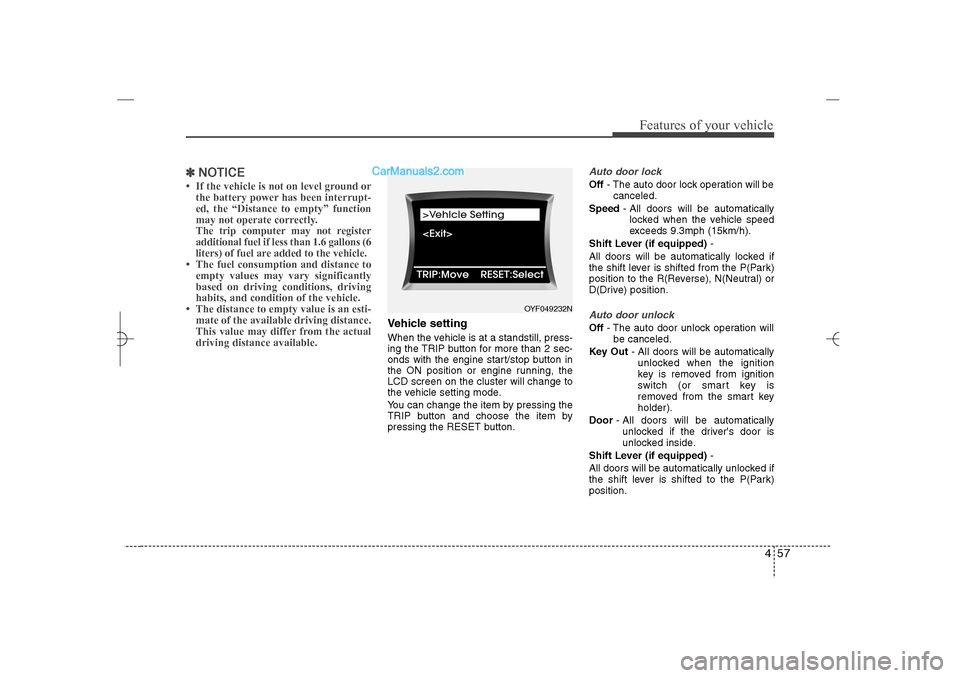
Vehicle settingWhen the vehicle is at a standstill, press-
ing the TRIP button for more than 2 sec-
onds with the engine start/stop button in
the ON position or engine running, the
LCD screen on the cluster will change to
the vehicle setting mode.
You can change the item by pressing the
TRIP button and choose the item by
pressing the RESET button.
Auto door lockOff- The auto door lock operation will be
canceled.
Speed- All doors will be automatically
locked when the vehicle speed
exceeds 9.3mph (15km/h).
Shift Lever (if equipped)-
All doors will be automatically locked if
the shift lever is shifted from the P(Park)
position to the R(Reverse), N(Neutral) or
D(Drive) position.Auto door unlockOff- The auto door unlock operation will
be canceled.
Key Out- All doors will be automatically
unlocked when the ignition
key is removed from ignition
switch (or smart key is
removed from the smart key
holder).
Door- All doors will be automatically
unlocked if the driver's door is
unlocked inside.
Shift Lever (if equipped)-
All doors will be automatically unlocked if
the shift lever is shifted to the P(Park)
position.
OYF049232N
YF HMA 4a-111.qxp 1/16/2012 6:31 PM Page 57
Page 139 of 410
Features of your vehicle58 4Two-press unlockDriver Door 1st Press- The driver's
door will unlock when pressing the
unlock button on the transmitter or smart
key, pressing the button of the driver's
outside door handle with the smart key,
or inserting the key into the key hole of
the driver's outside door and turning the
key toward the rear of the vehicle. All
doors will unlock when pressing the
unlock button on the transmitter or smart
key, pressing the button of the driver's
outside door handle with the smart key,
or inserting the key into the key hole of
the driver's outside door and turning the
key toward the rear of the vehicle within
4 seconds.
All Doors 1st Press- All doors will
unlock when pressing the unlock button
on the transmitter or smart key, pressing
the button of the driver's outside door
handle with the smart key, or inserting
the key into the key hole of the driver's
outside door and turning the key toward
the rear of the vehicle.
Headlamp delayOn- If you turn the ignition switch to the
ACC or OFF position with the head-
lamp ON, the headlamps remain on
for about 20 minutes. Also, the
headlamp welcome operation will
be activated. Refer to the [LIGHT-
ING] section in this chapter.
Off- The headlamp delay and headlamp
welcome operation will be can-
celed.Horn feedback (if equipped)On- After locking the door by pressing
the lock button on the transmitter, if
you press the lock button again
within 4 seconds, the warning
sound will operate once to indicate
that all doors are locked.
Off- The Horn feedback operation will
be canceled.
Warnings and indicatorsAll warning lights are checked by turning
the ignition switch ON (do not start the
engine). Any light that does not illuminate
should be checked by an authorized
HYUNDAI dealer.
After starting the engine, check to make
sure that all warning lights are off. If any
are still on, this indicates a situation that
needs attention. When releasing the
parking brake, the brake system warning
light should go off. The fuel warning light
will stay on if the fuel level is low.
YF HMA 4a-111.qxp 1/16/2012 6:31 PM Page 58