key Hyundai Sonata 2013
[x] Cancel search | Manufacturer: HYUNDAI, Model Year: 2013, Model line: Sonata, Model: Hyundai Sonata 2013Pages: 410, PDF Size: 35.93 MB
Page 149 of 410
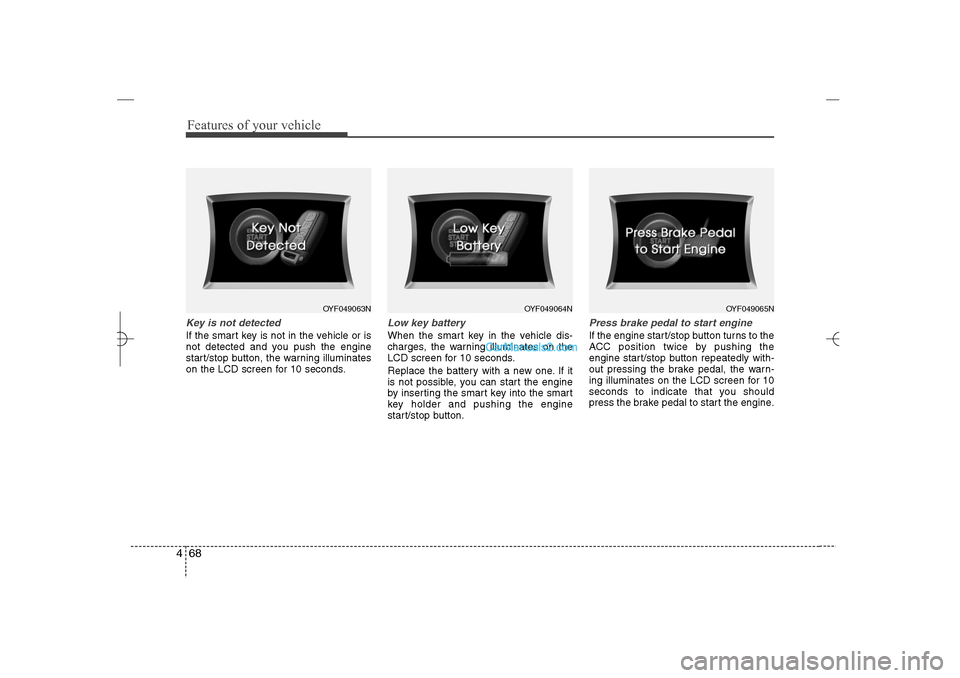
Features of your vehicle68 4Key is not detectedIf the smart key is not in the vehicle or is
not detected and you push the engine
start/stop button, the warning illuminates
on the LCD screen for 10 seconds.
Low key batteryWhen the smart key in the vehicle dis-
charges, the warning illuminates on the
LCD screen for 10 seconds.
Replace the battery with a new one. If it
is not possible, you can start the engine
by inserting the smart key into the smart
key holder and pushing the engine
start/stop button.
Press brake pedal to start engineIf the engine start/stop button turns to the
ACC position twice by pushing the
engine start/stop button repeatedly with-
out pressing the brake pedal, the warn-
ing illuminates on the LCD screen for 10
seconds to indicate that you should
press the brake pedal to start the engine.
OYF049063N
OYF049064N
OYF049065N
YF HMA 4a-111.qxp 1/16/2012 6:31 PM Page 68
Page 150 of 410
469
Features of your vehicle
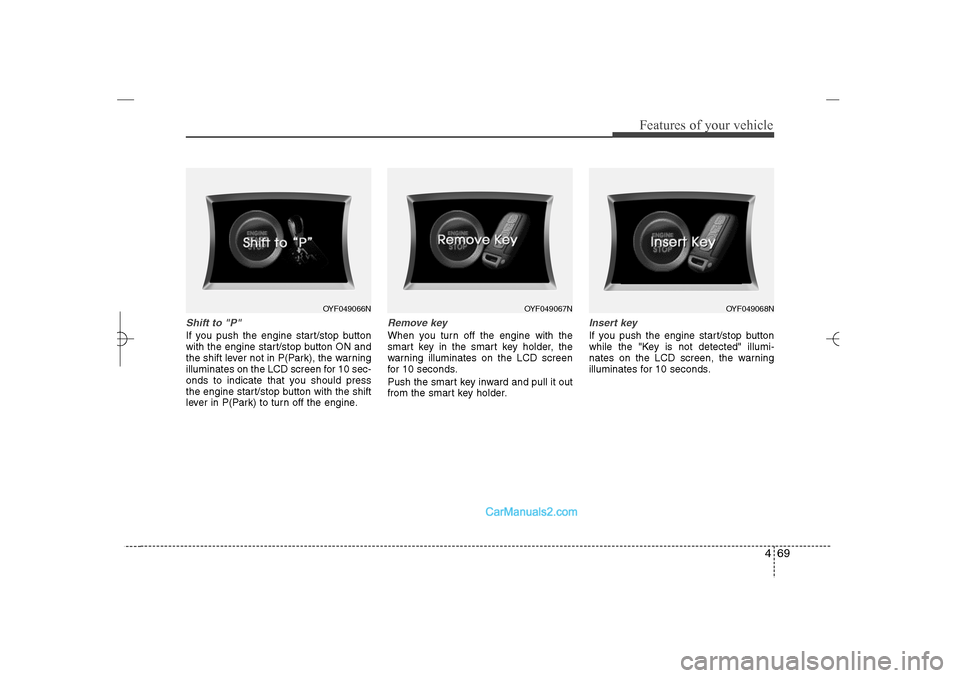
Shift to "P" If you push the engine start/stop button
with the engine start/stop button ON and
the shift lever not in P(Park), the warning
illuminates on the LCD screen for 10 sec-
onds to indicate that you should press
the engine start/stop button with the shift
lever in P(Park) to turn off the engine.
Remove keyWhen you turn off the engine with the
smart key in the smart key holder, the
warning illuminates on the LCD screen
for 10 seconds.
Push the smart key inward and pull it out
from the smart key holder.
Insert keyIf you push the engine start/stop button
while the "Key is not detected" illumi-
nates on the LCD screen, the warning
illuminates for 10 seconds.
OYF049066N
OYF049067N
OYF049068N
YF HMA 4a-111.qxp 1/16/2012 6:31 PM Page 69
Page 153 of 410
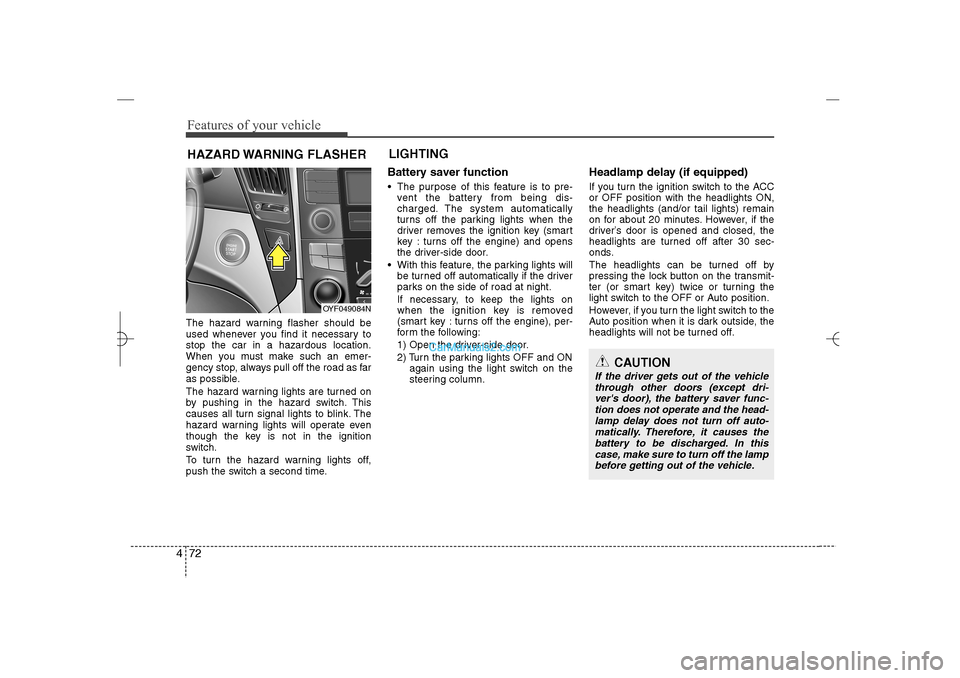
Features of your vehicle72 4The hazard warning flasher should be
used whenever you find it necessary to
stop the car in a hazardous location.
When you must make such an emer-
gency stop, always pull off the road as far
as possible.
The hazard warning lights are turned on
by pushing in the hazard switch. This
causes all turn signal lights to blink. The
hazard warning lights will operate even
though the key is not in the ignition
switch.
To turn the hazard warning lights off,
push the switch a second time.
Battery saver function The purpose of this feature is to pre-
vent the battery from being dis-
charged. The system automatically
turns off the parking lights when the
driver removes the ignition key (smart
key : turns off the engine) and opens
the driver-side door.
With this feature, the parking lights will
be turned off automatically if the driver
parks on the side of road at night.
If necessary, to keep the lights on
when the ignition key is removed
(smart key : turns off the engine), per-
form the following:
1) Open the driver-side door.
2) Turn the parking lights OFF and ON
again using the light switch on the
steering column.
Headlamp delay (if equipped)If you turn the ignition switch to the ACC
or OFF position with the headlights ON,
the headlights (and/or tail lights) remain
on for about 20 minutes. However, if the
driver’s door is opened and closed, the
headlights are turned off after 30 sec-
onds.
The headlights can be turned off by
pressing the lock button on the transmit-
ter (or smart key) twice or turning the
light switch to the OFF or Auto position.
However, if you turn the light switch to the
Auto position when it is dark outside, the
headlights will not be turned off.
HAZARD WARNING FLASHERLIGHTING
OYF049084N
CAUTION
If the driver gets out of the vehicle
through other doors (except dri-
ver's door), the battery saver func-
tion does not operate and the head-
lamp delay does not turn off auto-
matically. Therefore, it causes the
battery to be discharged. In this
case, make sure to turn off the lamp
before getting out of the vehicle.
YF HMA 4a-111.qxp 1/16/2012 6:31 PM Page 72
Page 154 of 410
473
Features of your vehicle
Headlamp welcome functionWhen the headlight switch is in the ON or
AUTO position and all doors (and trunk)
are closed and locked, if you press the
door unlock button on the transmitter (or
the smart key), the headlights will come
on for about 15 seconds. At this time, if
you press the door lock button on the
transmitter (or smart key) the headlights
will turn off immediately.Daytime running light
(if equipped)Daytime Running Lights (DRL) can make
it easier for others to see the front of your
vehicle during the day. DRL can be help-
ful in many different driving conditions,
and it is especially helpful after dawn and
before sunset.
The DRL system will make the head-
lights turn OFF when:
1. The headlight is ON.
2. Engine stops.
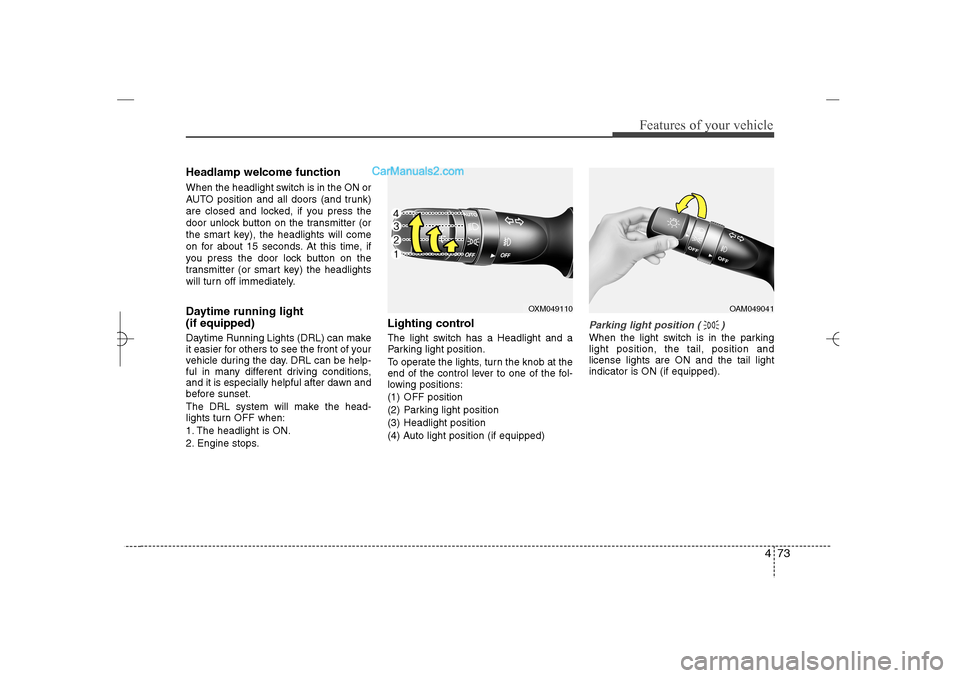
Lighting controlThe light switch has a Headlight and a
Parking light position.
To operate the lights, turn the knob at the
end of the control lever to one of the fol-
lowing positions:
(1) OFF position
(2) Parking light position
(3) Headlight position
(4) Auto light position (if equipped)
Parking light position ( )When the light switch is in the parking
light position, the tail, position and
license lights are ON and the tail light
indicator is ON (if equipped).
OXM049110
OAM049041
YF HMA 4a-111.qxp 1/16/2012 6:31 PM Page 73
Page 160 of 410
479
Features of your vehicle
Automatic turn off function (if
equipped) The interior lights automatically turn off
approximately 20 minutes after the igni-
tion switch is turned off.
If your vehicle is equipped with the theft
alarm system, the interior lights automat-
ically turns off approximately 5 seconds
after the system is armed stage.
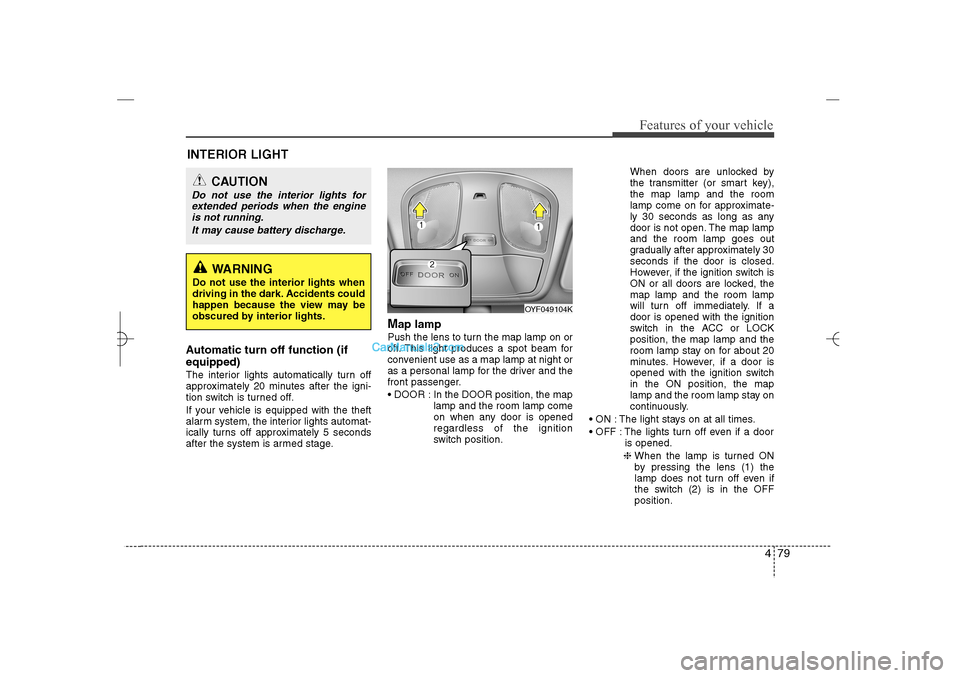
Map lamp Push the lens to turn the map lamp on or
off. This light produces a spot beam for
convenient use as a map lamp at night or
as a personal lamp for the driver and the
front passenger.
DOOR : In the DOOR position, the map
lamp and the room lamp come
on when any door is opened
regardless of the ignition
switch position.When doors are unlocked by
the transmitter (or smart key),
the map lamp and the room
lamp come on for approximate-
ly 30 seconds as long as any
door is not open. The map lamp
and the room lamp goes out
gradually after approximately 30
seconds if the door is closed.
However, if the ignition switch is
ON or all doors are locked, the
map lamp and the room lamp
will turn off immediately. If a
door is opened with the ignition
switch in the ACC or LOCK
position, the map lamp and the
room lamp stay on for about 20
minutes. However, if a door is
opened with the ignition switch
in the ON position, the map
lamp and the room lamp stay on
continuously.
ON : The light stays on at all times.
OFF : The lights turn off even if a door
is opened.
❈ When the lamp is turned ON
by pressing the lens (1) the
lamp does not turn off even if
the switch (2) is in the OFF
position.
OYF049104K
INTERIOR LIGHT
CAUTION
Do not use the interior lights for
extended periods when the engine
is not running.
It may cause battery discharge.
WARNING
Do not use the interior lights when
driving in the dark. Accidents could
happen because the view may be
obscured by interior lights.
YF HMA 4a-111.qxp 1/16/2012 6:32 PM Page 79
Page 186 of 410
4 105
Features of your vehicle
These compartments can be used to
store small items.
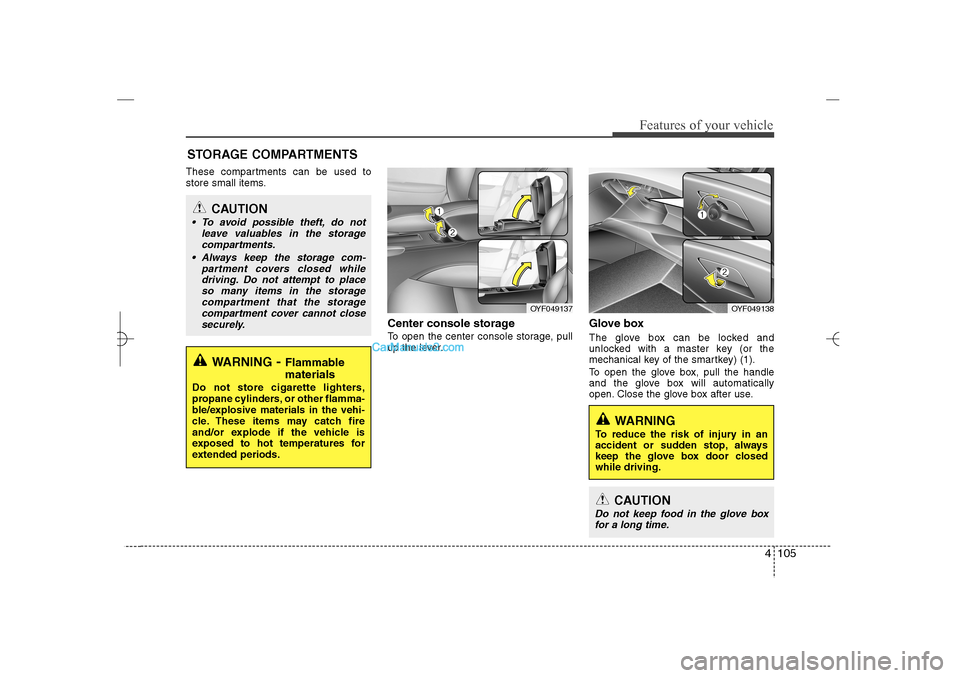
Center console storage To open the center console storage, pull
up the lever.
Glove boxThe glove box can be locked and
unlocked with a master key (or the
mechanical key of the smartkey) (1).
To open the glove box, pull the handle
and the glove box will automatically
open. Close the glove box after use.
STORAGE COMPARTMENTS
WARNING
- Flammable
materials
Do not store cigarette lighters,
propane cylinders, or other flamma-
ble/explosive materials in the vehi-
cle. These items may catch fire
and/or explode if the vehicle is
exposed to hot temperatures for
extended periods.
CAUTION
To avoid possible theft, do not
leave valuables in the storage
compartments.
Always keep the storage com-
partment covers closed while
driving. Do not attempt to place
so many items in the storage
compartment that the storage
compartment cover cannot close
securely.
OYF049138
OYF049137
WARNING
To reduce the risk of injury in an
accident or sudden stop, always
keep the glove box door closed
while driving.
CAUTION
Do not keep food in the glove box
for a long time.
YF HMA 4a-111.qxp 1/16/2012 6:35 PM Page 105
Page 196 of 410
4 115
Features of your vehicle
SYSTEM CONTROLLERS AND
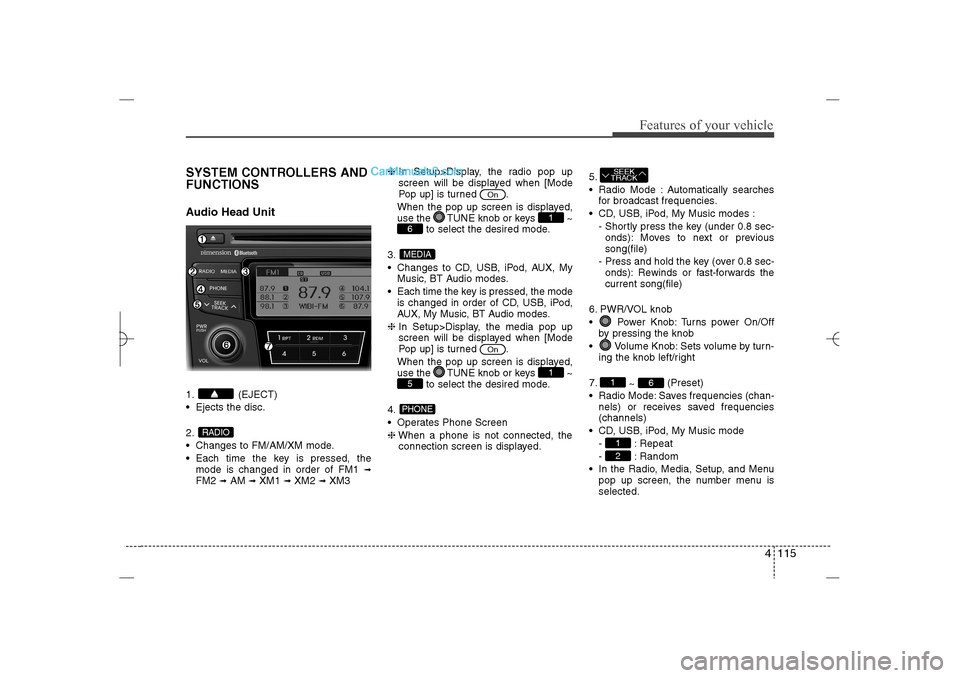
FUNCTIONSAudio Head Unit1. (EJECT)
Ejects the disc.
2.
Changes to FM/AM/XM mode.
Each time the key is pressed, the
mode is changed in order of FM1
➟
FM2
➟AM
➟XM1
➟XM2
➟XM3❈In Setup>Display, the radio pop up
screen will be displayed when [Mode
Pop up] is turned .
When the pop up screen is displayed,
use the TUNE knob or keys ~
to select the desired mode.
3.
Changes to CD, USB, iPod, AUX, My
Music, BT Audio modes.
Each time the key is pressed, the mode
is changed in order of CD, USB, iPod,
AUX, My Music, BT Audio modes.
❈In Setup>Display, the media pop up
screen will be displayed when [Mode
Pop up] is turned .
When the pop up screen is displayed,
use the TUNE knob or keys ~
to select the desired mode.
4.
Operates Phone Screen
❈When a phone is not connected, the
connection screen is displayed.5.
Radio Mode : Automatically searches
for broadcast frequencies.
CD, USB, iPod, My Music modes :
- Shortly press the key (under 0.8 sec-
onds): Moves to next or previous
song(file)
- Press and hold the key (over 0.8 sec-
onds): Rewinds or fast-forwards the
current song(file)
6. PWR/VOL knob
Power Knob: Turns power On/Off
by pressing the knob
Volume Knob: Sets volume by turn-
ing the knob left/right
7.
~ (Preset)
Radio Mode: Saves frequencies (chan-
nels) or receives saved frequencies
(channels)
CD, USB, iPod, My Music mode
- : Repeat
- : Random
In the Radio, Media, Setup, and Menu
pop up screen, the number menu is
selected.
21
6
1SEEK
TRACK
PHONE5
1
On
MEDIA6
1
On
RADIO
YF HMA 4b-112~(Audio).qxp 3/5/2012 4:24 PM Page 115
Page 197 of 410
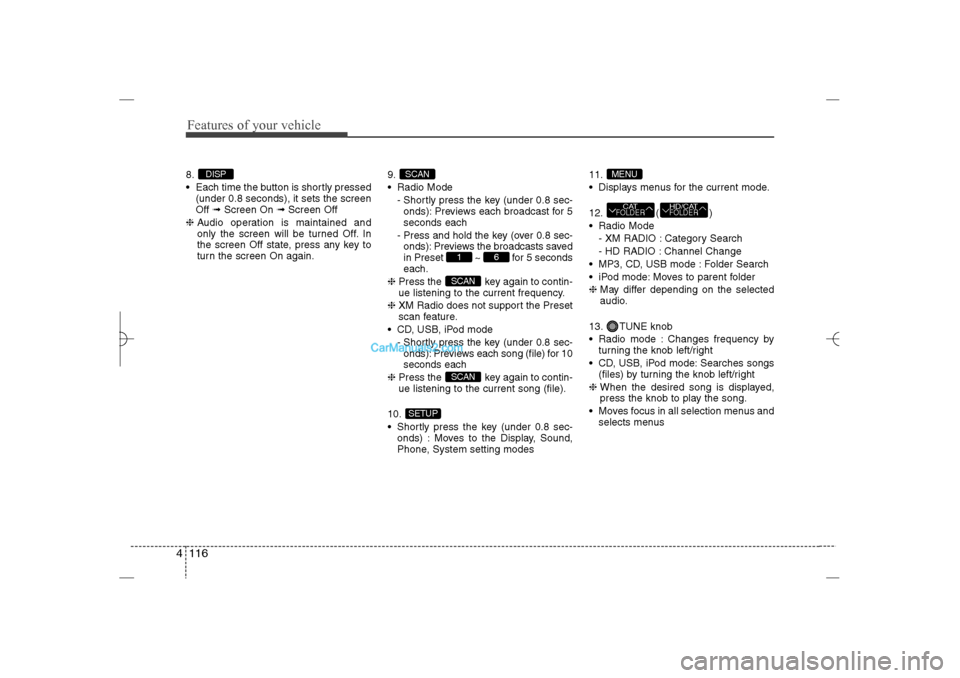
Features of your vehicle116 48.
Each time the button is shortly pressed
(under 0.8 seconds), it sets the screen
Off ➟Screen On ➟Screen Off
❈Audio operation is maintained and
only the screen will be turned Off. In
the screen Off state, press any key to
turn the screen On again.9.
Radio Mode
- Shortly press the key (under 0.8 sec-
onds): Previews each broadcast for 5
seconds each
- Press and hold the key (over 0.8 sec-
onds): Previews the broadcasts saved
in Preset ~ for 5 seconds
each.
❈Press the key again to contin-
ue listening to the current frequency.
❈XM Radio does not support the Preset
scan feature.
CD, USB, iPod mode
- Shortly press the key (under 0.8 sec-
onds): Previews each song (file) for 10
seconds each
❈Press the key again to contin-
ue listening to the current song (file).
10.
Shortly press the key (under 0.8 sec-
onds) : Moves to the Display, Sound,
Phone, System setting modes11.
Displays menus for the current mode.
12. ( )
Radio Mode
- XM RADIO : Category Search
- HD RADIO : Channel Change
MP3, CD, USB mode : Folder Search
iPod mode: Moves to parent folder
❈May differ depending on the selected
audio.
13. TUNE knob
Radio mode : Changes frequency by
turning the knob left/right
CD, USB, iPod mode: Searches songs
(files) by turning the knob left/right
❈ When the desired song is displayed,
press the knob to play the song.
Moves focus in all selection menus and
selects menus
HD/CATFOLDER
CATFOLDERMENU
SETUP
SCANSCAN
6
1
SCAN
DISP
YF HMA 4b-112~(Audio).qxp 3/5/2012 4:24 PM Page 116
Page 198 of 410
![Hyundai Sonata 2013 4 117
Features of your vehicle
DISPLAY SETTINGSPress the key Select [Display]
through TUNE knob or key
Select menu through TUNE knob
Mode Pop up[Mode Pop up] Changes
/
selection mode
During On](/img/35/16808/w960_16808-197.png "Hyundai Sonata 2013 4 117
Features of your vehicle
DISPLAY SETTINGSPress the key Select [Display]
through TUNE knob or key
Select menu through TUNE knob
Mode Pop up[Mode Pop up] Changes
/
selection mode
During On")
4 117
Features of your vehicle
DISPLAY SETTINGSPress the key Select [Display]
through TUNE knob or key
Select menu through TUNE knob
Mode Pop up[Mode Pop up] Changes
/
selection mode
During On state, press the or
key to display the mode
change pop up screen.Text Scroll[Text Scroll] Set /
: Maintains scroll
: Scrolls only one (1) time.Media DisplayWhen playing an MP3 file, select the
desired display info from ‘Folder/File’ or
‘Album/Artist/Song’.
OffOn
Off
On
MEDIA
RADIO
Off
On
1
SETUP
YF HMA 4b-112~(Audio).qxp 3/5/2012 4:24 PM Page 117
Page 199 of 410
![Hyundai Sonata 2013 Features of your vehicle118 4SOUND SETTINGSPress the key Select [Sound]
through TUNE knob or key
Select menu through TUNE knobSound SettingsThis menu allows you to set the ‘Bass,
Middle, Trebleâ](/img/35/16808/w960_16808-198.png "Hyundai Sonata 2013 Features of your vehicle118 4SOUND SETTINGSPress the key Select [Sound]
through TUNE knob or key
Select menu through TUNE knobSound SettingsThis menu allows you to set the ‘Bass,
Middle, Trebleâ")
Features of your vehicle118 4SOUND SETTINGSPress the key Select [Sound]
through TUNE knob or key
Select menu through TUNE knobSound SettingsThis menu allows you to set the ‘Bass,
Middle, Treble’ and the Sound Fader and
Balance.
Select [Sound Settings] Select menu
through
TUNE knob
Tu r n
TUNE
knob
left/right to set
Bass, Middle, Treble : Selects the
sound tone.
Fader, Balance : Moves the sound
fader and balance.
Default : Restores default settings.
❈ Back : While adjusting values, re-
pressing the TUNE knob will
restore the parent menu.
Variable EQ (Audio with external
amplifier only)This is a premium sound system feature in
which the acoustical mode can be select-
ed according to musical preferences.
Select [Variable EQ] Set menu through
TUNE
knob
Innocente(Normal) : Natural sound,
sound optimized for driver.
Forza(Dynamic) : Powerful sound
emphasizing bass, stereo sound.
Concerto(Concert) : Sound similar to a
concert or live hall
❈May differ depending on the selected
audio.
2
SETUP
YF HMA 4b-112~(Audio).qxp 3/5/2012 4:24 PM Page 118