audio Hyundai Sonata 2013
[x] Cancel search | Manufacturer: HYUNDAI, Model Year: 2013, Model line: Sonata, Model: Hyundai Sonata 2013Pages: 410, PDF Size: 35.93 MB
Page 237 of 410
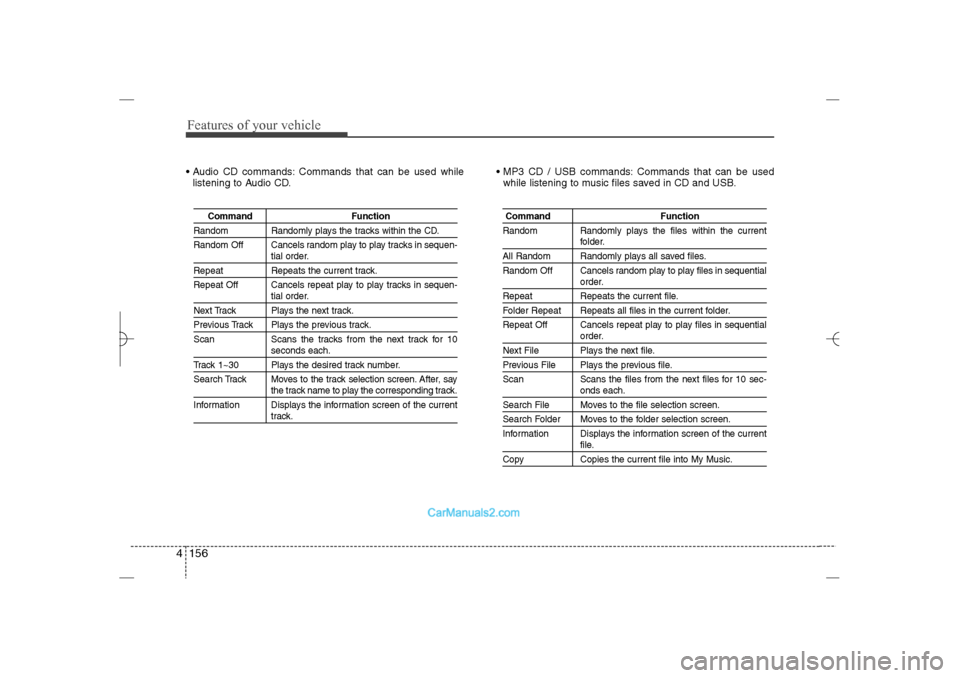
Features of your vehicle156 4 Audio CD commands: Commands that can be used while
listening to Audio CD. MP3 CD / USB commands: Commands that can be used
while listening to music files saved in CD and USB.
Command Function
Random Randomly plays the tracks within the CD.
Random Off Cancels random play to play tracks in sequen-
tial order.
Repeat Repeats the current track.
Repeat Off Cancels repeat play to play tracks in sequen-
tial order.
Next Track Plays the next track.Previous Track Plays the previous track.
Scan Scans the tracks from the next track for 10
seconds each.
Track 1~30 Plays the desired track number.
Search Track Moves to the track selection screen. After, say
the track name to play the corresponding track.
Information Displays the information screen of the currenttrack.
Command Function
Random Randomly plays the files within the current
folder.
All Random Randomly plays all saved files.
Random Off Cancels random play to play files in sequential
order.
Repeat Repeats the current file.Folder Repeat Repeats all files in the current folder.
Repeat Off Cancels repeat play to play files in sequential
order.
Next File Plays the next file.Previous File Plays the previous file.
Scan Scans the files from the next files for 10 sec-
onds each.
Search File Moves to the file selection screen.Search Folder Moves to the folder selection screen.
Information Displays the information screen of the current
file.
Copy Copies the current file into My Music.
YF HMA 4b-112~(Audio).qxp 3/5/2012 4:24 PM Page 156
Page 238 of 410
4 157
Features of your vehicle
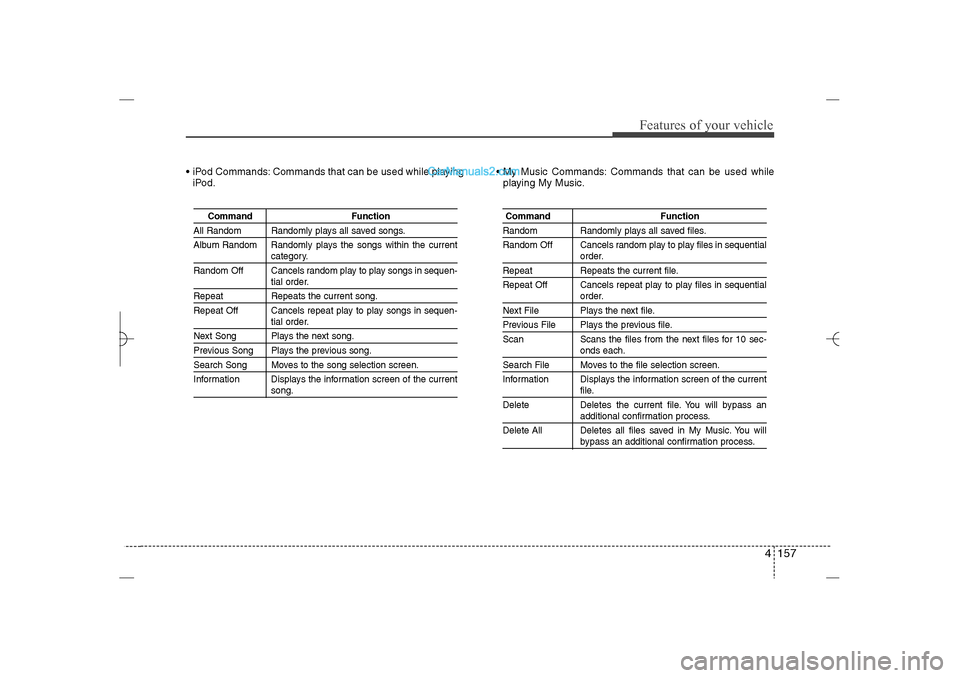
iPod Commands: Commands that can be used while playing
iPod. My Music Commands: Commands that can be used while
playing My Music.
Command Function
All Random Randomly plays all saved songs.
Album Random Randomly plays the songs within the current
category.
Random Off Cancels random play to play songs in sequen-tial order.
Repeat Repeats the current song.
Repeat Off Cancels repeat play to play songs in sequen-
tial order.
Next Song Plays the next song.Previous Song Plays the previous song.Search Song Moves to the song selection screen.
Information Displays the information screen of the current
song.
Command FunctionRandom Randomly plays all saved files.
Random Off Cancels random play to play files in sequential
order.
Repeat Repeats the current file.
Repeat Off Cancels repeat play to play files in sequential
order.
Next File Plays the next file.Previous File Plays the previous file.
Scan Scans the files from the next files for 10 sec-
onds each.
Search File Moves to the file selection screen.
Information Displays the information screen of the current
file.
Delete Deletes the current file. You will bypass anadditional confirmation process.
Delete All Deletes all files saved in My Music. You willbypass an additional confirmation process.
YF HMA 4b-112~(Audio).qxp 3/5/2012 4:24 PM Page 157
Page 239 of 410
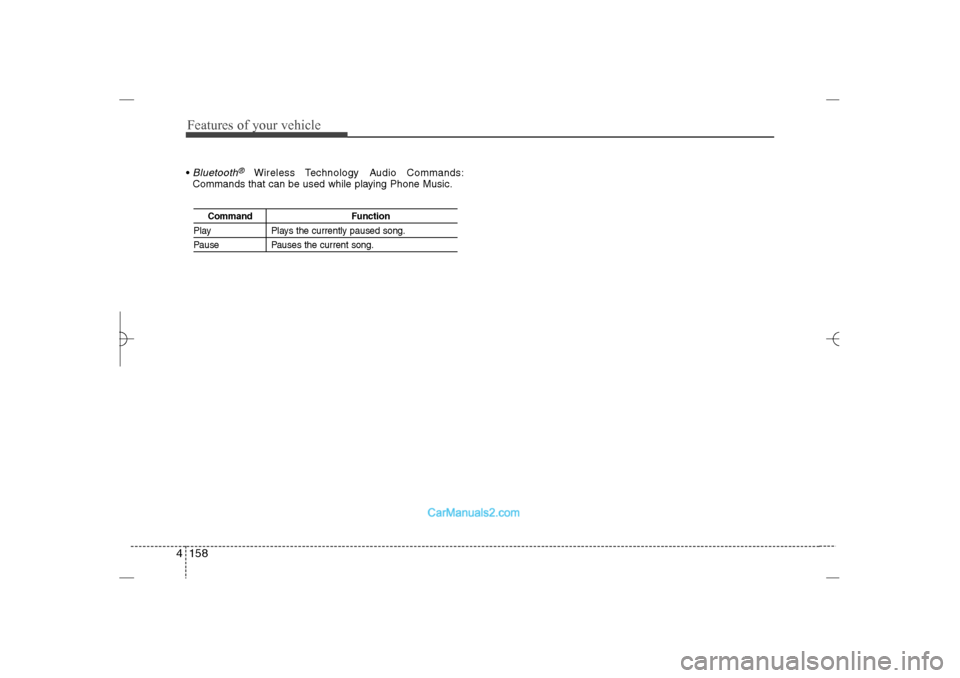
Features of your vehicle158 4 Bluetooth
®
Wireless Technology Audio Commands:
Commands that can be used while playing Phone Music.
Command Function
Play Plays the currently paused song.Pause Pauses the current song.
YF HMA 4b-112~(Audio).qxp 3/5/2012 4:24 PM Page 158
Page 240 of 410
4 159
Features of your vehicle
Blue Link
®
Hyundai aims to offer differentiated cus-
tomer values through a ‘Connected Car
Life,’ which is to provide consumers with
fast and reliable IT technology. As con-
sumers’ lifestyles become more and
more mobile in thanks to remarkable
advances in smart phones, tablet PCs
and overall wireless telecommunication,
new lifestyle patterns demand seamless
connection between one’s office, home,
outdoors and automobiles.
Automobile companies are now faced with
the task of shifting their paradigm from
vehicle-centered services to customer
value-centered services, with the ultimate
goal of securing global leadership in the
field of vehicle IT and telematics.
Hyundai Motor plans to achieve this by
realizing a terminal platform flexible to
changes in IT technology, cooperating with
global IT companies, creating an eco-sys-
tem and providing the latest contents &
services based on an open environment.
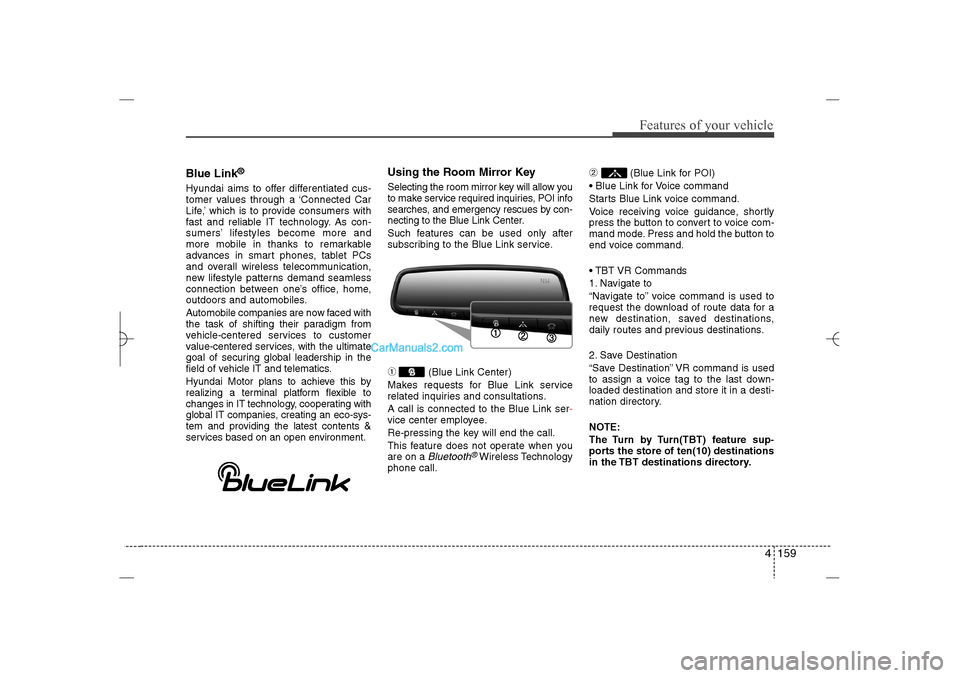
Using the Room Mirror KeySelecting the room mirror key will allow you
to make service required inquiries, POI info
searches, and emergency rescues by con-
necting to the Blue Link Center.
Such features can be used only after
subscribing to the Blue Link service.➀
(Blue Link Center)
Makes requests for Blue Link service
related inquiries and consultations.
A call is connected to the Blue Link ser-
vice center employee.
Re-pressing the key will end the call.
This feature does not operate when you
are on a Bluetooth
®Wireless Technology
phone call.
➁
(Blue Link for POI)
Blue Link for Voice command
Starts Blue Link voice command.
Voice receiving voice guidance, shortly
press the button to convert to voice com-
mand mode. Press and hold the button to
end voice command.
TBT VR Commands
1. Navigate to
“Navigate to” voice command is used to
request the download of route data for a
new destination, saved destinations,
daily routes and previous destinations.
2. Save Destination
“Save Destination” VR command is used
to assign a voice tag to the last down-
loaded destination and store it in a desti-
nation directory.
NOTE:
The Turn by Turn(TBT) feature sup-
ports the store of ten(10) destinations
in the TBT destinations directory.
YF HMA 4b-112~(Audio).qxp 3/5/2012 4:24 PM Page 159
Page 241 of 410
Features of your vehicle160 43. Route Preview
“Route Preview” VR command allows the
user to preview the route instructions
(upcoming maneuver instructions) at any
time during the route guidance.
4. Destinations List
“Destinations List” VR command allows
the user to preview and delete the stored
destinations with their associated voice
tags in the Turn by Turn destinations
directory.
5. Voice Guidance
“Voice Guidance” VR command allows
the user to mute/unmute the Turn by
Turn(TBT) direction announcements.
6. Suspend Route
“Suspend Route” VR command allows
the user to suspend and pause Turn by
Turn(TBT) route guidance while in the
guidance mode.
7. Resume Route
“Resume Route” VR command allows
the user to resume Turn by Turn(TBT)
route guidance.
➂
(Blue Link for SOS)
In the case of an emergency, requests for
help to the Blue Link center.
Call is connected to the Blue Link emer-
gency rescue center. Re-pressing the
key will end the call.
If already on a
Bluetooth
®
Wireless
Technology phone call, the call will end to
connect you to the Blue Link Emergency
Rescue Center.
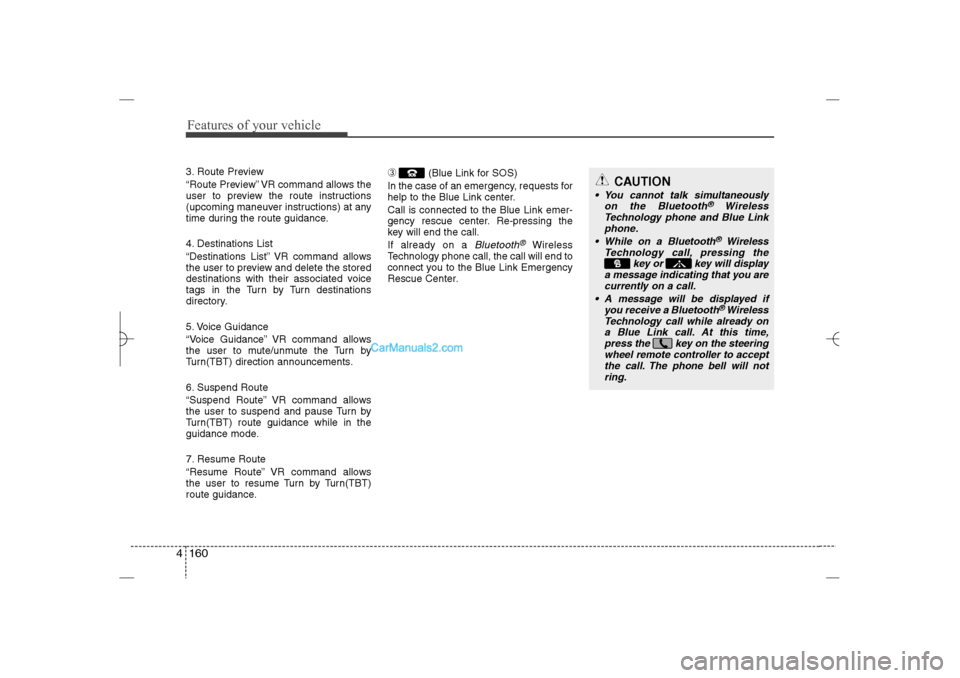
CAUTION
You cannot talk simultaneously
on the Bluetooth
®
Wireless
Technology phone and Blue Link
phone.
While on a Bluetooth®Wireless
Technology call, pressing the
key or key will display
a message indicating that you are
currently on a call.
A message will be displayed if
you receive a Bluetooth®Wireless
Technology call while already on
a Blue Link call. At this time,
press the key on the steering
wheel remote controller to accept
the call. The phone bell will not
ring.
YF HMA 4b-112~(Audio).qxp 3/5/2012 4:24 PM Page 160
Page 242 of 410
4 161
Features of your vehicle
Eco Coach What is Eco Coach?
Every 2.5 minutes, Eco Coach compares
your fuel economy against the govern-
ment tested average (EPA) or other simi-
lar Hyundai models (community), based
on your preference. Each month, or after
every tank fill up, Eco Coach rates your
extended average and gives you a
reward star if you best the average.
See your My Hyundai web page for more
information.
What does the bar graph and horizon-
tal line mean?
The horizontal line is adjusted once per
month or at each tank full, based on your
preference; it represents the EPA com-
bined average or community average
fuel economy target. What is My Eco MPG?
Your actual fuel economy average over
2.5 minutes.
This value is also shown in bar graph as
your “now” rating.
What are Eco Rewards?
If you beat the average (the EPA or com-
munity), you will receive an Eco Reward
point.
See your my Hyundai web page for more
information.
[Eco Driving] will not operate if the vehi-
cle ignition is not turned on. Please oper-
ate with the ignition turned on.
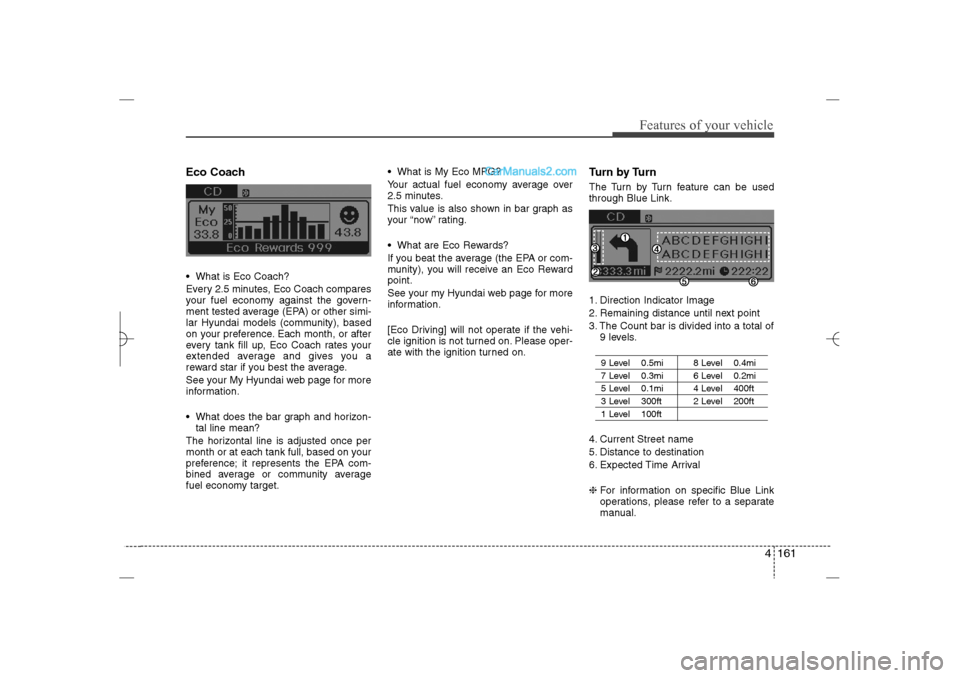
Turn by TurnThe Turn by Turn feature can be used
through Blue Link.
1. Direction Indicator Image
2. Remaining distance until next point
3. The Count bar is divided into a total of
9 levels.
9 Level 0.5mi 8 Level 0.4mi7 Level 0.3mi 6 Level 0.2mi5 Level 0.1mi 4 Level 400ft 3 Level 300ft 2 Level 200ft1 Level 100ft
4. Current Street name
5. Distance to destination
6. Expected Time Arrival
❈For information on specific Blue Link
operations, please refer to a separate
manual.
YF HMA 4b-112~(Audio).qxp 3/5/2012 4:24 PM Page 161
Page 246 of 410
Driving your vehicle4 5
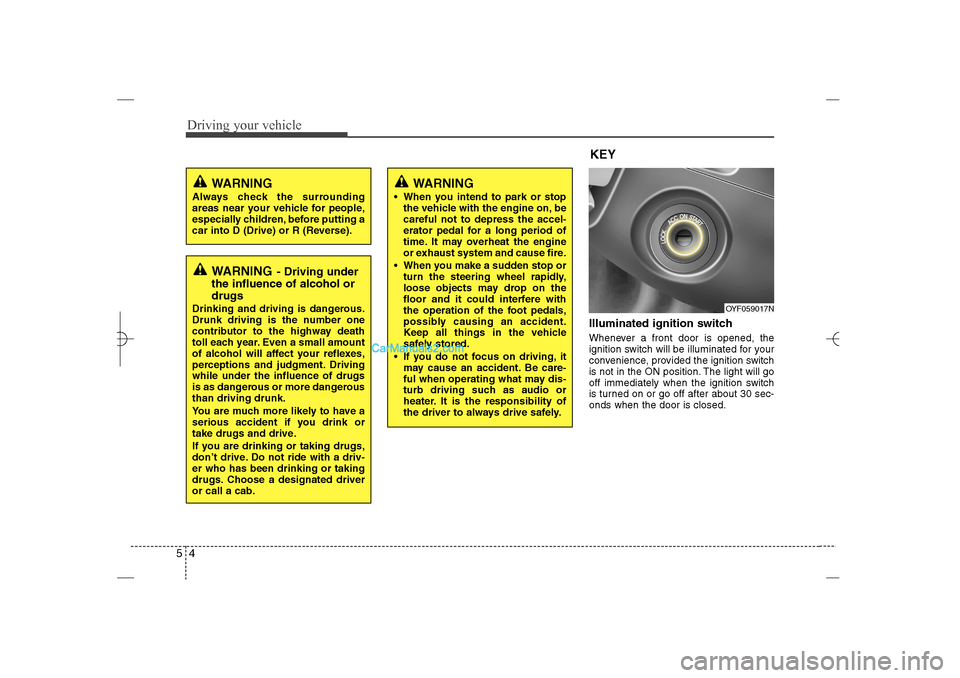
Illuminated ignition switch Whenever a front door is opened, the
ignition switch will be illuminated for your
convenience, provided the ignition switch
is not in the ON position. The light will go
off immediately when the ignition switch
is turned on or go off after about 30 sec-
onds when the door is closed.
OYF059017N
WARNING
Always check the surrounding
areas near your vehicle for people,
especially children, before putting a
car into D (Drive) or R (Reverse).
WARNING
- Driving under
the influence of alcohol or
drugs
Drinking and driving is dangerous.
Drunk driving is the number one
contributor to the highway death
toll each year. Even a small amount
of alcohol will affect your reflexes,
perceptions and judgment. Driving
while under the influence of drugs
is as dangerous or more dangerous
than driving drunk.
You are much more likely to have a
serious accident if you drink or
take drugs and drive.
If you are drinking or taking drugs,
don’t drive. Do not ride with a driv-
er who has been drinking or taking
drugs. Choose a designated driver
or call a cab.
KEY
WARNING
When you intend to park or stop
the vehicle with the engine on, be
careful not to depress the accel-
erator pedal for a long period of
time. It may overheat the engine
or exhaust system and cause fire.
When you make a sudden stop or
turn the steering wheel rapidly,
loose objects may drop on the
floor and it could interfere with
the operation of the foot pedals,
possibly causing an accident.
Keep all things in the vehicle
safely stored.
If you do not focus on driving, it
may cause an accident. Be care-
ful when operating what may dis-
turb driving such as audio or
heater. It is the responsibility of
the driver to always drive safely.
YF HMA 5.qxp 1/16/2012 6:22 PM Page 4
Page 351 of 410
Maintenance36 7
Reset itemsItems should be reset after the battery
has been discharged or the battery has
been disconnected.
Auto up/down window (See section 4)
Sunroof (See section 4)
Trip computer (See section 4)
Climate control system
(See section 4)
Clock (See section 4)
Audio (See section 4)
WARNING
Before performing maintenance
or recharging the battery, turn off
all accessories and stop the
engine.
The negative battery cable must
be removed first and installed
last when the battery is discon-
nected.
Operation related to the battery
should be done in an authorized
HYUNDAI dealer.
WARNING
- Recharging
battery
When recharging the battery,
observe the following precautions:
The battery must be removed
from the vehicle and placed in an
area with good ventilation.
Do not allow cigarettes, sparks,
or flame near the battery.
Watch the battery during charg-
ing, and stop or reduce the charg-
ing rate if the battery cells begin
gassing (boiling) violently or if
the temperature of the electrolyte
of any cell exceeds 120°F (49°C).
Wear eye protection when check-
ing the battery during charging.
Disconnect the battery charger in
the following order.
1. Turn off the battery charger main
switch.
2. Unhook the negative clamp from
the negative battery terminal.
3. Unhook the positive clamp from
the positive battery terminal.
YF HMA 7.qxp 1/16/2012 6:19 PM Page 36
Page 367 of 410
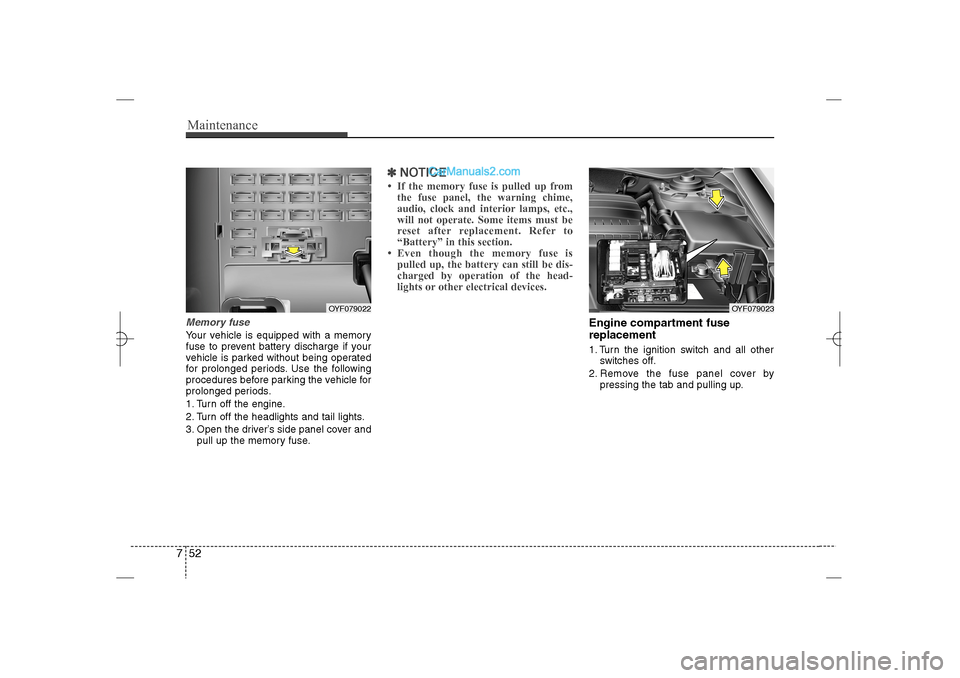
Maintenance52 7Memory fuseYour vehicle is equipped with a memory
fuse to prevent battery discharge if your
vehicle is parked without being operated
for prolonged periods. Use the following
procedures before parking the vehicle for
prolonged periods.
1. Turn off the engine.
2. Turn off the headlights and tail lights.
3. Open the driver’s side panel cover and
pull up the memory fuse.
✽ ✽
NOTICE• If the memory fuse is pulled up from
the fuse panel, the warning chime,
audio, clock and interior lamps, etc.,
will not operate. Some items must be
reset after replacement. Refer to
“Battery” in this section.
• Even though the memory fuse is
pulled up, the battery can still be dis-
charged by operation of the head-
lights or other electrical devices.
Engine compartment fuse
replacement1. Turn the ignition switch and all other
switches off.
2. Remove the fuse panel cover by
pressing the tab and pulling up.
OYF079022
OYF079023
YF HMA 7.qxp 1/16/2012 6:19 PM Page 52
Page 370 of 410
755
Maintenance
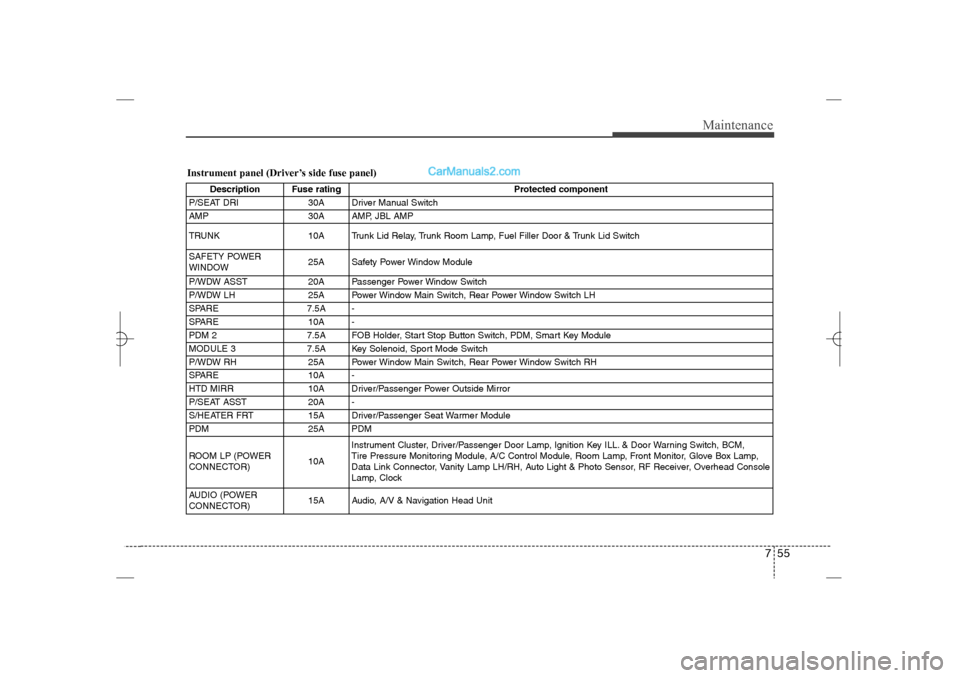
Instrument panel (Driver’s side fuse panel)
Description Fuse rating Protected component
P/SEAT DRI 30A Driver Manual Switch
AMP 30A AMP, JBL AMP
TRUNK 10A Trunk Lid Relay, Trunk Room Lamp, Fuel Filler Door & Trunk Lid Switch
SAFETY POWER
WINDOW25A Safety Power Window Module
P/WDW ASST 20A Passenger Power Window Switch
P/WDW LH 25A Power Window Main Switch, Rear Power Window Switch LH
SPARE 7.5A -
SPARE 10A -
PDM 2 7.5A FOB Holder, Start Stop Button Switch, PDM, Smart Key Module
MODULE 3 7.5A Key Solenoid, Sport Mode Switch
P/WDW RH 25A Power Window Main Switch, Rear Power Window Switch RH
SPARE 10A -
HTD MIRR 10A Driver/Passenger Power Outside Mirror
P/SEAT ASST 20A -
S/HEATER FRT 15A Driver/Passenger Seat Warmer Module
PDM 25A PDM
ROOM LP (POWER
CONNECTOR)10AInstrument Cluster, Driver/Passenger Door Lamp, Ignition Key ILL. & Door Warning Switch, BCM,
Tire Pressure Monitoring Module, A/C Control Module, Room Lamp, Front Monitor, Glove Box Lamp,
Data Link Connector, Vanity Lamp LH/RH, Auto Light & Photo Sensor, RF Receiver, Overhead Console
Lamp, Clock
AUDIO (POWER
CONNECTOR)15A Audio, A/V & Navigation Head Unit
YF HMA 7.qxp 1/16/2012 6:20 PM Page 55