USB Hyundai Sonata 2014 User Guide
[x] Cancel search | Manufacturer: HYUNDAI, Model Year: 2014, Model line: Sonata, Model: Hyundai Sonata 2014Pages: 665, PDF Size: 17.43 MB
Page 278 of 665
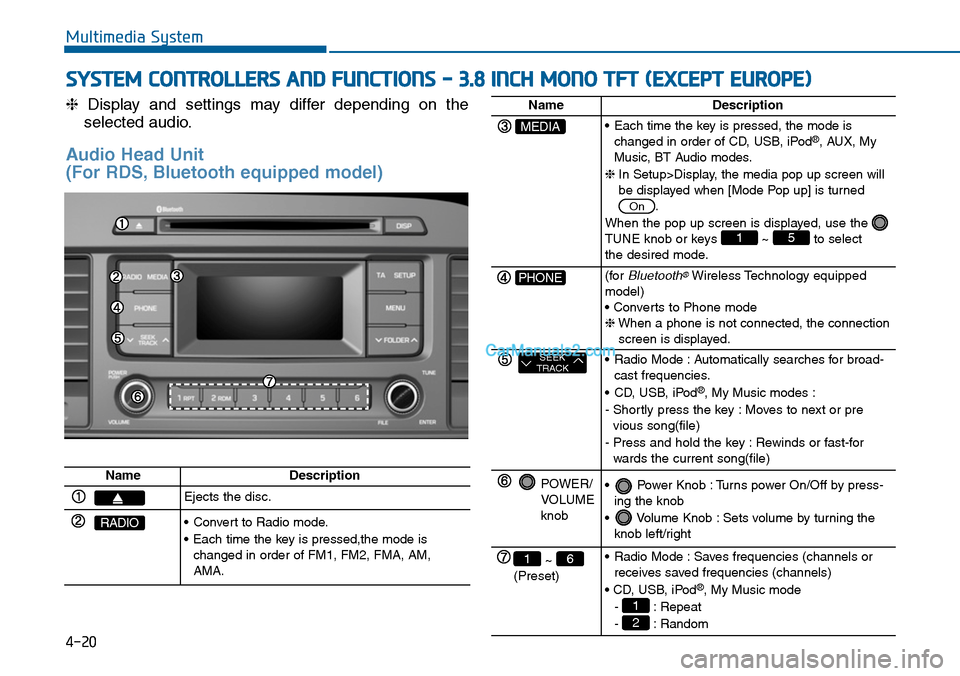
❈Display and settings may differ depending on the
selected audio.
Audio Head Unit
(For RDS, Bluetooth equipped model)
Multimedia System
SYSTEM CONTROLLERS AND FUNCTIONS - 3.8 INCH MONO TFT (EXCEPT EUROPE)
4-20
NameDescription
Ejects the disc.
RADIO•Convert to Radio mode.
•Each time the key is pressed,the mode ischanged in order of FM1, FM2, FMA, AM,AMA.
NameDescription
MEDIA•Each time the key is pressed, the mode ischanged in order of CD, USB, iPod®, AUX, MyMusic, BT Audio modes.
❈In Setup>Display, the media pop up screen willbe displayed when [Mode Pop up] is turned.
When the pop up screen is displayed, use the TUNE knob or keys ~ to selectthe desired mode.
51
On
PHONE(forBluetooth®Wireless Technology equippedmodel)• Converts to Phone mode❈When a phone is not connected, the connectionscreen is displayed.
SEEKTRACK•Radio Mode :Automatically searches for broad-cast frequencies.
•CD, USB, iPod®, My Music modes :
- Shortly press the key : Moves to next or previous song(file)
- Press and hold the key : Rewinds or fast-forwards the current song(file)
POWER/VOLUMEknob
•Power Knob :Turns power On/Off by press-ing the knob
•Volume Knob :Sets volume by turning theknob left/right
~ (Preset)
61•Radio Mode :Saves frequencies (channels orreceives saved frequencies (channels)
• CD, USB, iPod®, My Music mode
- : Repeat
- : Random2
1
Page 279 of 665
Multimedia System
4-21
4
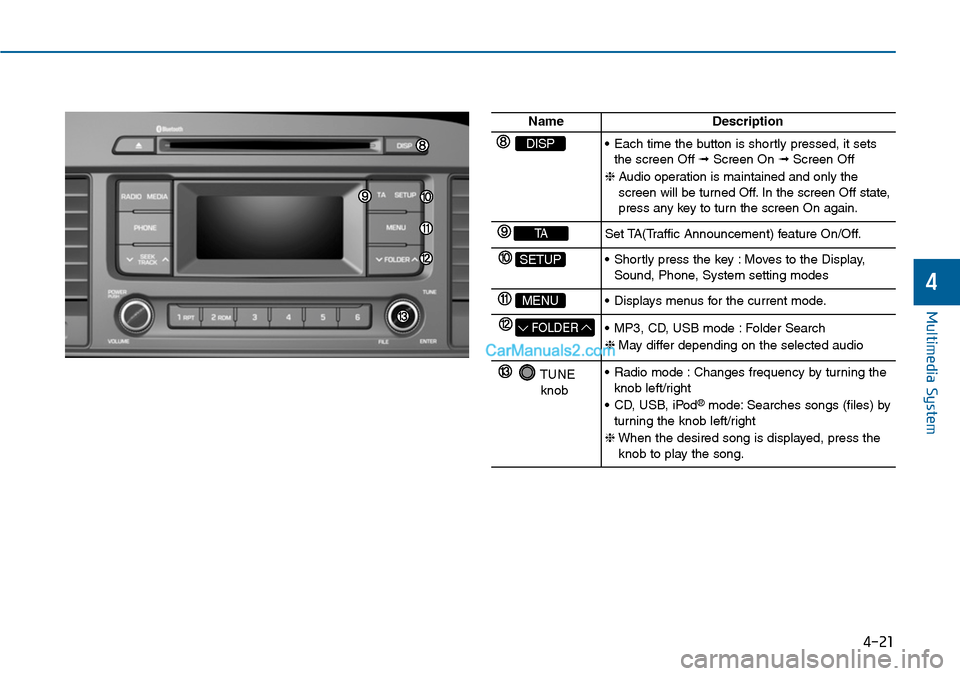
NameDescription
DISP•Each time the button is shortly pressed, it setsthe screen Off ➟Screen On ➟Screen Off
❈Audio operation is maintained and only thescreen will be turned Off. In the screen Off state,press any key to turn the screen On again.
TASet TA(Traffic Announcement) feature On/Off.
SETUP•Shortly press the key :Moves to the Display,Sound, Phone, System setting modes
MENU•Displays menus for the current mode.
FOLDER•MP3, CD, USB mode :Folder Search
❈May differ depending on the selected audio
TUNEknob
•Radio mode :Changes frequency by turning theknob left/right
•CD, USB, iPod®mode: Searches songs (files) byturning the knob left/right
❈When the desired song is displayed, press theknob to play the song.
Page 280 of 665
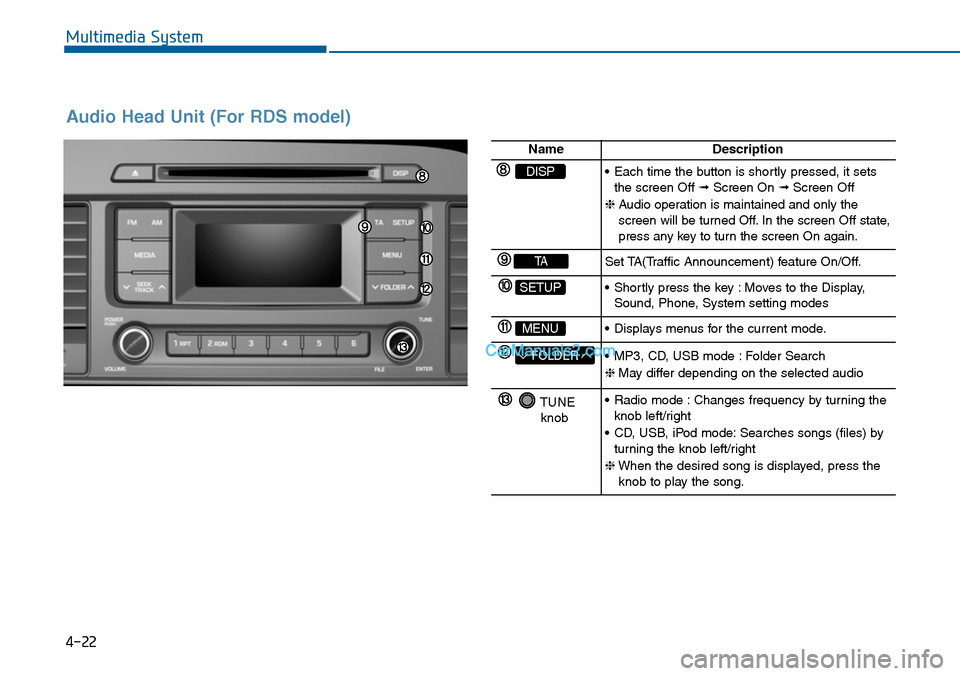
Audio Head Unit (For RDS model)
4-22
Multimedia System
NameDescription
DISP•Each time the button is shortly pressed, it setsthe screen Off ➟Screen On ➟Screen Off
❈Audio operation is maintained and only thescreen will be turned Off. In the screen Off state,press any key to turn the screen On again.
TASet TA(Traffic Announcement) feature On/Off.
SETUP•Shortly press the key :Moves to the Display,Sound, Phone, System setting modes
MENU•Displays menus for the current mode.
FOLDER•MP3, CD, USB mode :Folder Search
❈May differ depending on the selected audio
TUNEknob
•Radio mode :Changes frequency by turning theknob left/right
•CD, USB, iPod mode:Searches songs (files) byturning the knob left/right
❈When the desired song is displayed, press theknob to play the song.
Page 281 of 665
4-23
Multimedia System
4
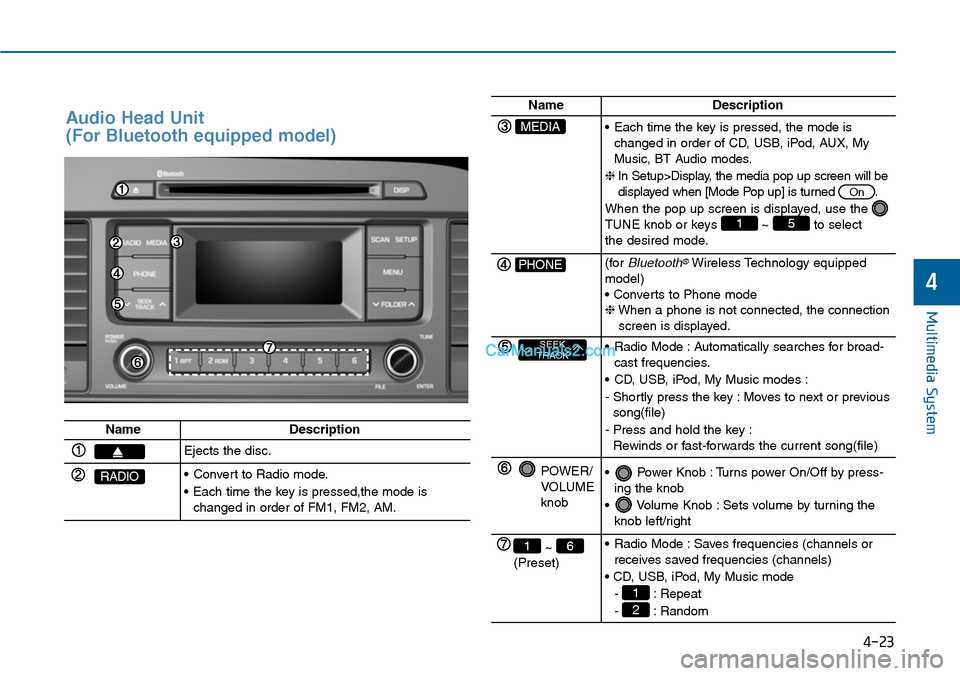
Audio Head Unit
(For Bluetooth equipped model)
NameDescription
Ejects the disc.
RADIO•Convert to Radio mode.
•Each time the key is pressed,the mode ischanged in order of FM1, FM2, AM.
NameDescription
MEDIA•Each time the key is pressed, the mode ischanged in order of CD, USB, iPod, AUX, MyMusic, BT Audio modes.
❈In Setup>Display, the media pop up screen will bedisplayed when [Mode Pop up] is turned .
When the pop up screen is displayed, use the TUNE knob or keys ~ to selectthe desired mode.
51
On
PHONE(forBluetooth®Wireless Technology equippedmodel)• Converts to Phone mode❈When a phone is not connected, the connectionscreen is displayed.
SEEKTRACK•Radio Mode :Automatically searches for broad-cast frequencies.
•CD, USB, iPod, My Music modes :
- Shortly press the key : Moves to next or previoussong(file)
- Press and hold the key :Rewinds or fast-forwards the current song(file)
POWER/VOLUMEknob
•Power Knob :Turns power On/Off by press-ing the knob
•Volume Knob :Sets volume by turning theknob left/right
~ (Preset)
61•Radio Mode :Saves frequencies (channels orreceives saved frequencies (channels)
• CD, USB, iPod, My Music mode
- : Repeat
- : Random2
1
Page 282 of 665
Multimedia System
4-24
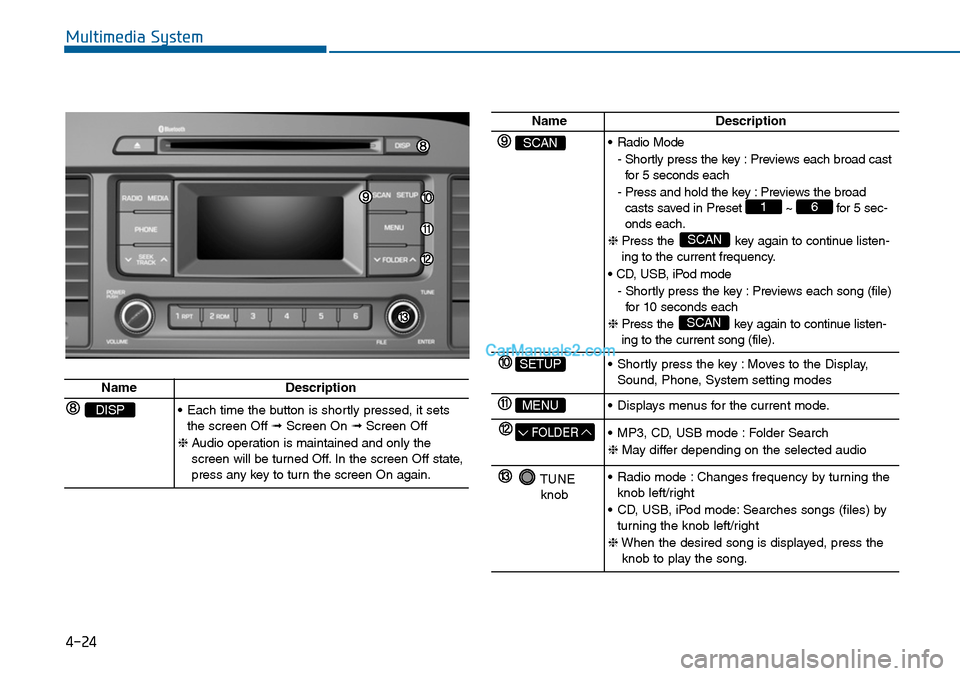
NameDescription
SCAN•Radio Mode
- Shortly press the key : Previews each broad castfor 5 seconds each
- Press and hold the key : Previews the broadcasts saved in Preset ~ for 5 sec-onds each.
❈ Press the key again to continue listen-ing to the current frequency.
• CD, USB, iPod mode
- Shortly press the key : Previews each song (file)for 10 seconds each
❈ Press the key again to continue listen-ing to the current song (file).
SCAN
SCAN
61
SETUP•Shortly press the key :Moves to the Display,Sound, Phone, System setting modes
MENU•Displays menus for the current mode.
FOLDER•MP3, CD, USB mode :Folder Search
❈May differ depending on the selected audio
TUNEknob
•Radio mode :Changes frequency by turning theknob left/right
•CD, USB, iPod mode:Searches songs (files) byturning the knob left/right
❈When the desired song is displayed, press theknob to play the song.
NameDescription
DISP•Each time the button is shortly pressed, it setsthe screen Off ➟Screen On ➟Screen Off
❈Audio operation is maintained and only thescreen will be turned Off. In the screen Off state,press any key to turn the screen On again.
Page 283 of 665
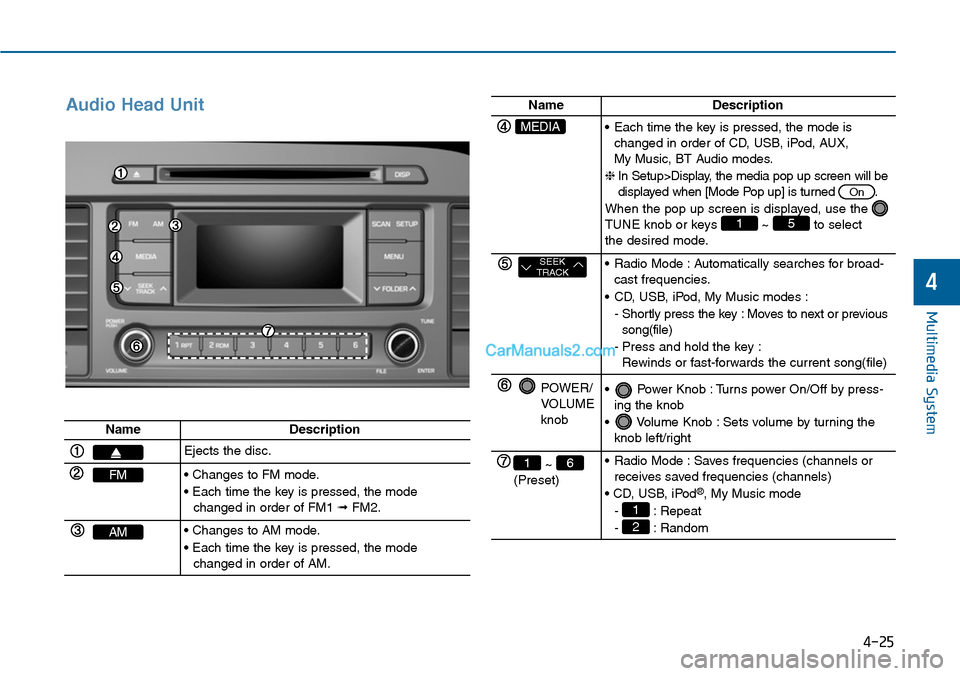
Audio Head Unit
Multimedia System
4-25
4
NameDescription
Ejects the disc.
FM• Changes to FM mode.
• Each time the key is pressed, the modechanged in order of FM1 ➟FM2.
AM• Changes to AM mode.
• Each time the key is pressed, the modechanged in order of AM.
NameDescription
MEDIA•Each time the key is pressed, the mode ischanged in order of CD, USB, iPod, AUX, My Music, BT Audio modes.
❈In Setup>Display, the media pop up screen will bedisplayed when [Mode Pop up] is turned .
When the pop up screen is displayed, use the TUNE knob or keys ~ to selectthe desired mode.
51
On
SEEKTRACK•Radio Mode :Automatically searches for broad-cast frequencies.
•CD, USB, iPod, My Music modes :
- Shortly press the key : Moves to next or previoussong(file)
-Press and hold the key :Rewinds or fast-forwards the current song(file)
POWER/VOLUMEknob
•Power Knob :Turns power On/Off by press-ing the knob
•Volume Knob :Sets volume by turning theknob left/right
~ (Preset)
61•Radio Mode :Saves frequencies (channels orreceives saved frequencies (channels)
• CD, USB, iPod®, My Music mode
- : Repeat
- : Random2
1
Page 301 of 665
![Hyundai Sonata 2014 User Guide 4-43
Multimedia System
4
MENU : Audio CD
In CD mode, press key.
Repeat
Set [ RPT] through the TUNE
knob or key to repeat the cur-
rent song.
❈Press RPT again to turn off.
Random
Set [ RDM](/img/35/16805/w960_16805-300.png "Hyundai Sonata 2014 User Guide 4-43
Multimedia System
4
MENU : Audio CD
In CD mode, press key.
Repeat
Set [ RPT] through the TUNE
knob or key to repeat the cur-
rent song.
❈Press RPT again to turn off.
Random
Set [ RDM")
4-43
Multimedia System
4
MENU : Audio CD
In CD mode, press key.
Repeat
Set [ RPT] through the TUNE
knob or key to repeat the cur-
rent song.
❈Press RPT again to turn off.
Random
Set [ RDM] through the TUNE
knob or key to randomly play
songs within the current folder.
❈Press RDM again to turn off.
Information
Set [ Info] through the TUNE
knob or key to display informa-
tion of the current song.
❈Press the key to turn off
info display.
MENU : MP3 CD / USB
In MP3 CD / USB mode, press
key.
Repeat
Set [ RPT] through the TUNE
knob or key to repeat the cur-
rent song.
❈Press RPT again to turn off.
Folder Random
Set [ F.RDM] through the TUNE
knob or key to randomly play
songs within the current folder.
❈Press F.RDM again to turn off.
2 RDM
1 RPT
MENU
MENU
3
2 RDM
1 RPT
MENU
Page 302 of 665
![Hyundai Sonata 2014 User Guide 4-44
Multimedia System
Folder Repeat
Set [ F.RPT] through the TUNE
knob or key to repeat songs
within the current folder.
❈Press F.RPT again to turn off.
All Random
Set [ A.RDM] through t](/img/35/16805/w960_16805-301.png "Hyundai Sonata 2014 User Guide 4-44
Multimedia System
Folder Repeat
Set [ F.RPT] through the TUNE
knob or key to repeat songs
within the current folder.
❈Press F.RPT again to turn off.
All Random
Set [ A.RDM] through t")
4-44
Multimedia System
Folder Repeat
Set [ F.RPT] through the TUNE
knob or key to repeat songs
within the current folder.
❈Press F.RPT again to turn off.
All Random
Set [ A.RDM] through the TUNE
knob or key to randomly play all
songs within the CD.
❈Press A.RDM again to turn off.
Information
Set [ Info] through the TUNE
knob or key to display informa-
tion of the current song.
❈Press the key to turn off
info display.
Copy
Set [ Copy] through the TUNE
knob or key.
❈This is used to copy the current
song into My Music. You can play
the copied Music in My Music
mode.
❈If another key is pressed while
copying is in progress, a pop up
asking you whether to cancel
copying is displayed.
❈If another media is connected or
inserted (USB, CD, iPod®, AUX)
while copying is in progress, copy-
ing is canceled.
❈Music will not be played while
copying is in progress.
MENU : iPod®
In iPod mode, press key.
Repeat
Set [ RPT] through the TUNE
knob or key to repeat the cur-
rent song.
❈ Press RPT again to turn repeat off.
Random
Set [ RDM] through the TUNE
knob or key.
Plays all songs within the currently
playing category in random order.
❈Press RDM again to turn off.
2 RDM
1 RPT
MENU
6
MENU
5
4
3
Page 305 of 665
4-47
Multimedia System
4
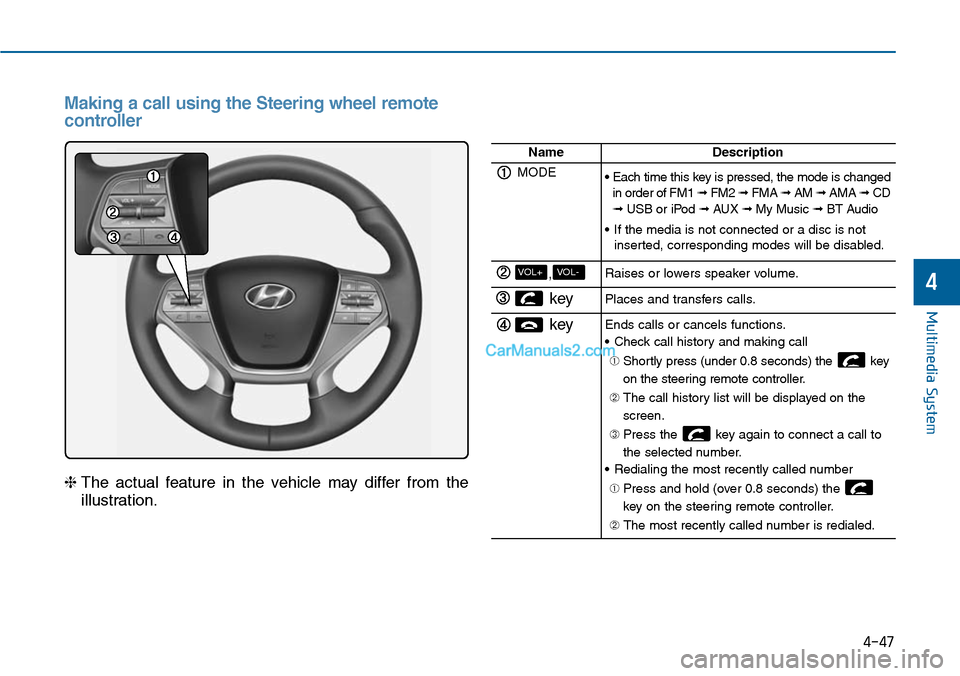
Making a call using the Steering wheel remote
controller
❈The actual feature in the vehicle may differ from the
illustration.
NameDescription
MODE• Each time this key is pressed, the mode is changedin order of FM1 ➟ FM2 ➟ FMA ➟ AM ➟ AMA➟ CD➟ USB or iPod ➟ AUX ➟ My Music ➟ BT Audio
•If the media is not connected or a disc is notinserted, corresponding modes will be disabled.
,VOL-VOL+Raises or lowers speaker volume.
key Places and transfers calls.
keyEnds calls or cancels functions.
•Check call history and making call
➀ Shortly press (under 0.8 seconds) the key
on the steering remote controller.
➁ The call history list will be displayed on the
screen.
➂ Press the key again to connect a call to
the selected number.
•Redialing the most recently called number
➀ Press and hold (over 0.8 seconds) the
key on the steering remote controller.
➁ The most recently called number is redialed.
Page 310 of 665
4-52
SYSTEM CONTROLLERS AND FUNCTIONS - 4.3 INCH COLOR TFT LCD (EXCEPT EUROPE)
Multimedia System
❈Display and settings may differ depending on the
selected audio
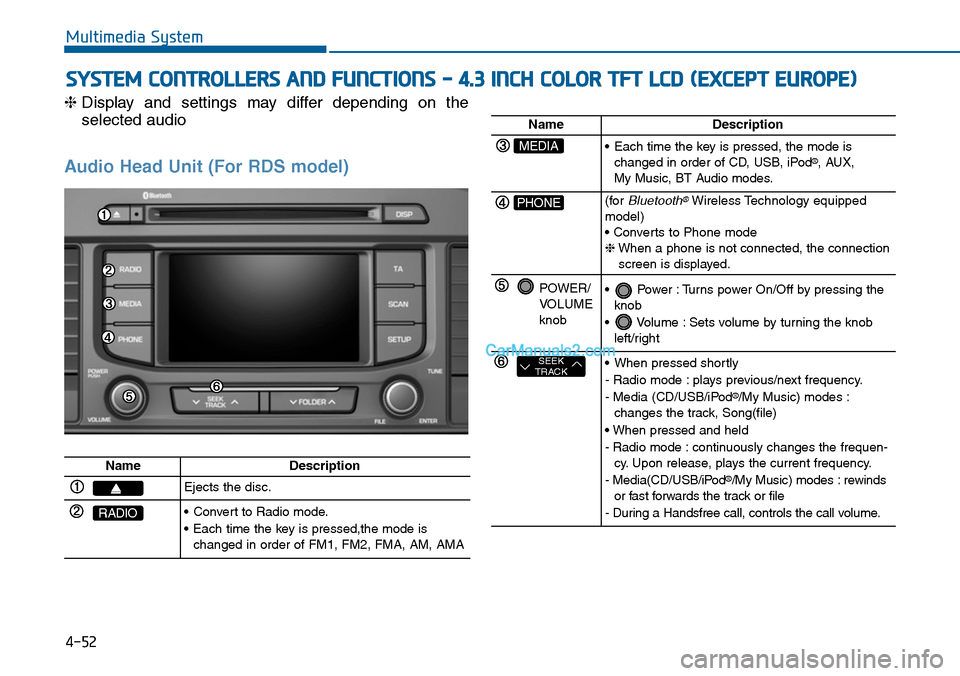
Audio Head Unit (For RDS model)
NameDescription
Ejects the disc.
RADIO•Convert to Radio mode.
•Each time the key is pressed,the mode ischanged in order of FM1, FM2, FMA, AM, AMA
NameDescription
MEDIA•Each time the key is pressed, the mode ischanged in order of CD, USB, iPod®, AUX, My Music, BT Audio modes.
PHONE(forBluetooth®Wireless Technology equippedmodel)• Converts to Phone mode❈When a phone is not connected, the connectionscreen is displayed.
POWER/VOLUMEknob
•Power :Turns power On/Off by pressing theknob
•Volume :Sets volume by turning the knobleft/right
SEEKTRACK•When pressed shortly
- Radio mode : plays previous/next frequency.
- Media (CD/USB/iPod®/My Music) modes :changes the track, Song(file)
• When pressed and held
- Radio mode : continuously changes the frequen-cy. Upon release, plays the current frequency.
- Media(CD/USB/iPod®/My Music) modes : rewindsor fast forwards the track or file
- During a Handsfree call, controls the call volume.