USB Hyundai Sonata 2014 Owner's Guide
[x] Cancel search | Manufacturer: HYUNDAI, Model Year: 2014, Model line: Sonata, Model: Hyundai Sonata 2014Pages: 665, PDF Size: 17.43 MB
Page 311 of 665
4-53
Multimedia System
4
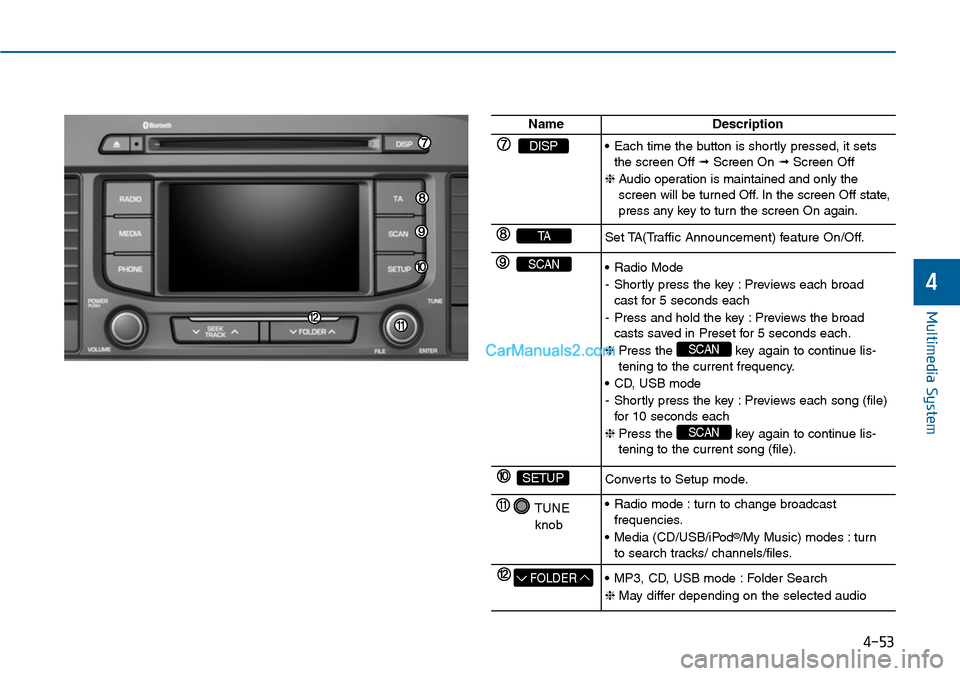
NameDescription
DISP•Each time the button is shortly pressed, it setsthe screen Off ➟Screen On ➟Screen Off
❈Audio operation is maintained and only thescreen will be turned Off. In the screen Off state,press any key to turn the screen On again.
TASet TA(Traffic Announcement) feature On/Off.
SCAN•Radio Mode
-Shortly press the key :Previews each broadcast for 5 seconds each
-Press and hold the key :Previews the broadcasts saved in Preset for 5 seconds each.
❈Press the key again to continue lis-tening to the current frequency.
•CD, USB mode
-Shortly press the key :Previews each song (file)for 10 seconds each
❈Press the key again to continue lis-tening to the current song (file).
SCAN
SCAN
SETUPConverts to Setup mode.
TUNE
knob
•Radio mode :turn to change broadcast frequencies.
•Media (CD/USB/iPod®/My Music) modes : turnto search tracks/ channels/files.
FOLDER•MP3, CD, USB mode :Folder Search
❈May differ depending on the selected audio
Page 312 of 665
4-54
Multimedia System
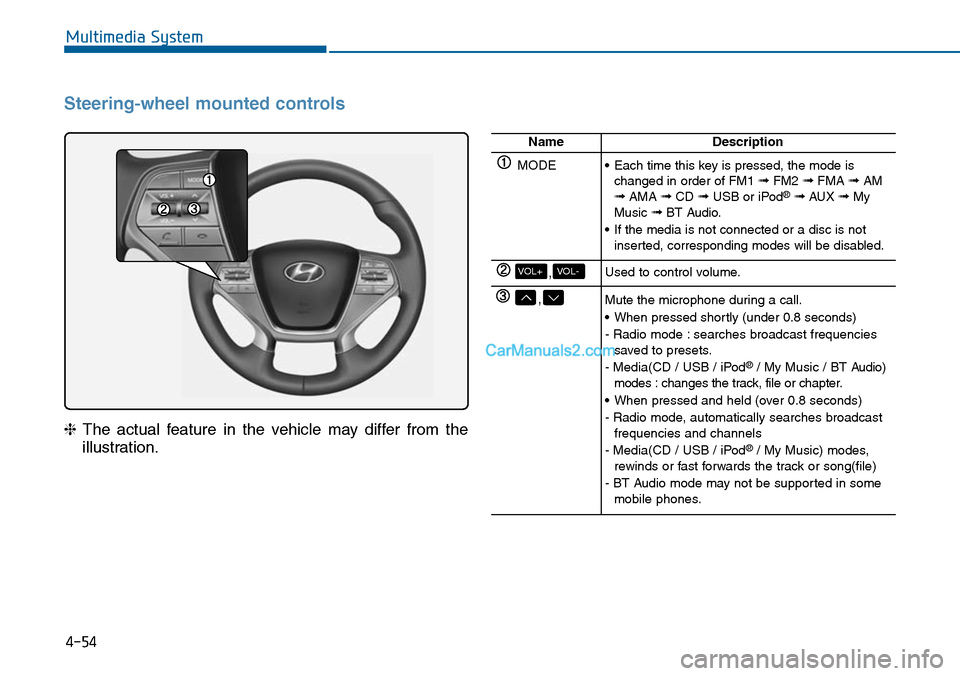
Steering-wheel mounted controls
❈The actual feature in the vehicle may differ from the
illustration.
NameDescription
MODE•Each time this key is pressed, the mode ischanged in order of FM1 ➟FM2 ➟FMA ➟AM➟AMA ➟CD ➟USB or iPod®➟ AUX ➟MyMusic ➟BT Audio.
•If the media is not connected or a disc is notinserted, corresponding modes will be disabled.
,VOL-VOL+Used to control volume.
,Mute the microphone during a call.
•When pressed shortly (under 0.8 seconds)
- Radio mode : searches broadcast frequenciessaved to presets.
- Media(CD / USB / iPod®/ My Music / BT Audio)modes : changes the track, file or chapter.
•When pressed and held (over 0.8 seconds)
- Radio mode, automatically searches broadcastfrequencies and channels
- Media(CD / USB / iPod®/ My Music) modes,rewinds or fast forwards the track or song(file)
- BT Audio mode may not be supported in somemobile phones.
Page 320 of 665
![Hyundai Sonata 2014 Owners Guide 4-62
Multimedia System
MEDIA MODE
Pressing the key will change
the operating mode in order of CD ➟
USB(iPod®) ➟ AUX ➟ My Music ➟BT
Audio.
If [Mode Pop up] is turned on within
[Display](/img/35/16805/w960_16805-319.png "Hyundai Sonata 2014 Owners Guide 4-62
Multimedia System
MEDIA MODE
Pressing the key will change
the operating mode in order of CD ➟
USB(iPod®) ➟ AUX ➟ My Music ➟BT
Audio.
If [Mode Pop up] is turned on within
[Display")
4-62
Multimedia System
MEDIA MODE
Pressing the key will change
the operating mode in order of CD ➟
USB(iPod®) ➟ AUX ➟ My Music ➟BT
Audio.
If [Mode Pop up] is turned on within
[Display], then pressing the
key will display the Media
Pop-up Mode screen.
Turn the TUNE knob to move the
focus. Press the knob to select.
Information
The media mode pop up screen can be
displayed only when there are two or
more media modes turned on.
Title Icon
When a Bluetooth®Wireless
Te c h n o l o g y, i P o d®, USB, or AUX
device is connected or a CD is
inserted, the corresponding mode
icon will be displayed.
Icon Title
Bluetooth®Wireless Technology
CD
iPod®
USB
AUX
i
MEDIA
SETUP
MEDIA
Page 327 of 665
4-69
Multimedia System
4
USB MODE
Using USB Mode
Playing/Pausing USB Files
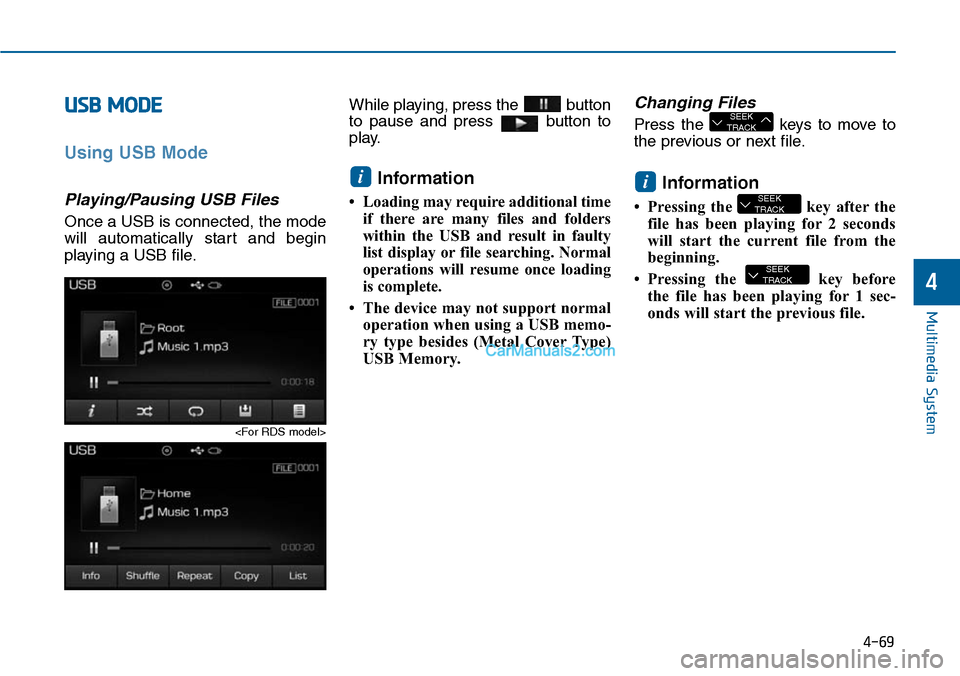
Once a USB is connected, the mode
will automatically start and begin
playing a USB file.
While playing, press the button
to pause and press button to
play.
Information
•Loading may require additional time
if there are many files and folders
within the USB and result in faulty
list display or file searching. Normal
operations will resume once loading
is complete.
• The device may not support normal
operation when using a USB memo-
ry type besides (Metal Cover Type)
USB Memory.
Changing Files
Press the keys to move to
the previous or next file.
Information
• Pressing the key after the
file has been playing for 2 seconds
will start the current file from the
beginning.
• Pressing the key before
the file has been playing for 1 sec-
onds will start the previous file.
SEEKTRACK
SEEKTRACK
i
SEEKTRACK
i
Page 328 of 665
4-70
Multimedia System
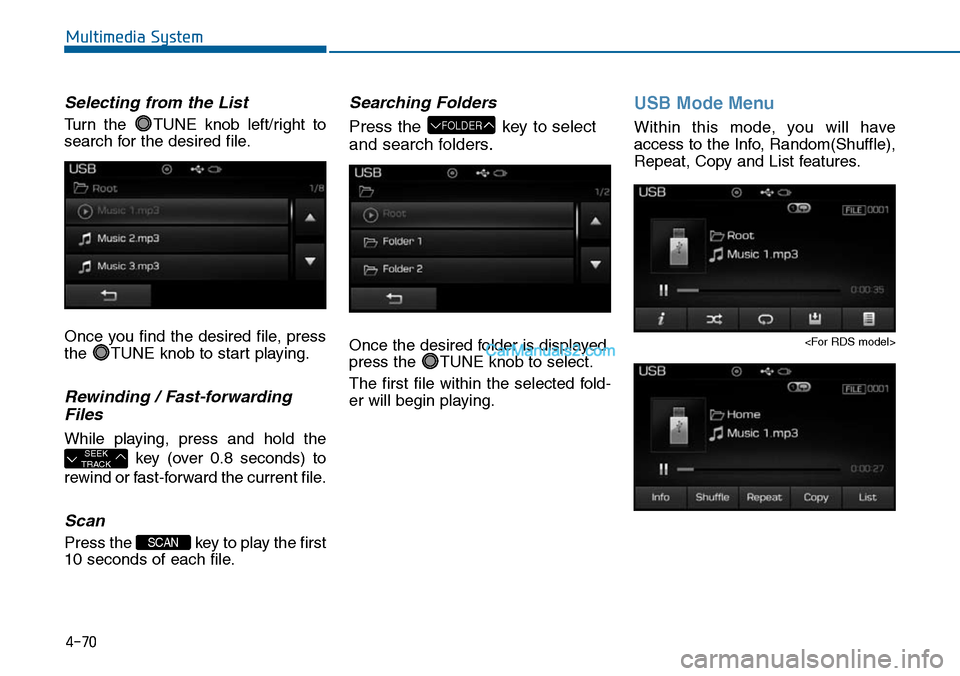
Selecting from the List
Turn the TUNE knob left/right to
search for the desired file.
Once you find the desired file, press
the TUNE knob to start playing.
Rewinding / Fast-forwarding
Files
While playing, press and hold the
key (over 0.8 seconds) to
rewind or fast-forward the current file.
Scan
Press the key to play the first
10 seconds of each file.
Searching Folders
Press the key to select
and search folders.
Once the desired folder is displayed,
press the TUNE knob to select.
The first file within the selected fold-
er will begin playing.
USB Mode Menu
Within this mode, you will have
access to the Info, Random(Shuffle),
Repeat, Copy and List features.
FOLDER
SCAN
SEEKTRACK
Page 361 of 665
4-103
Multimedia System
4
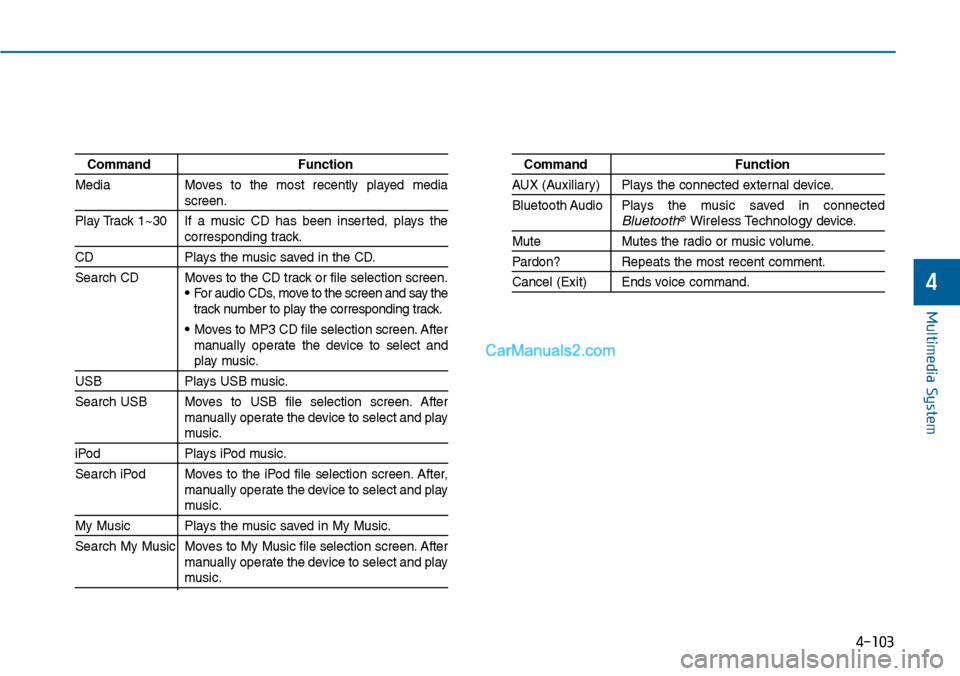
Command Function
Media Moves to the most recently played mediascreen.
Play Track 1~30 If a music CD has been inserted, plays thecorresponding track.
CD Plays the music saved in the CD.
Search CD Moves to the CD track or file selection screen.•For audio CDs, move to the screen and say thetrack number to play the corresponding track.
• Moves to MP3 CD file selection screen. Aftermanually operate the device to select andplay music.
USB Plays USB music.
Search USB Moves to USB file selection screen. Aftermanually operate the device to select and playmusic.
iPod Plays iPod music.
Search iPod Moves to the iPod file selection screen. After,manually operate the device to select and playmusic.
My Music Plays the music saved in My Music.
Search My Music Moves to My Music file selection screen. Aftermanually operate the device to select and playmusic.
Command Function
AUX (Auxiliar y) Plays the connected exter nal device.
Bluetooth Audio Plays the music saved in connectedBluetooth®Wireless Technologydevice.
Mute Mutes the radio or music volume.
Pardon? Repeats the most recent comment.
Cancel (Exit) Ends voice command.
Page 363 of 665
4-105
Multimedia System
4
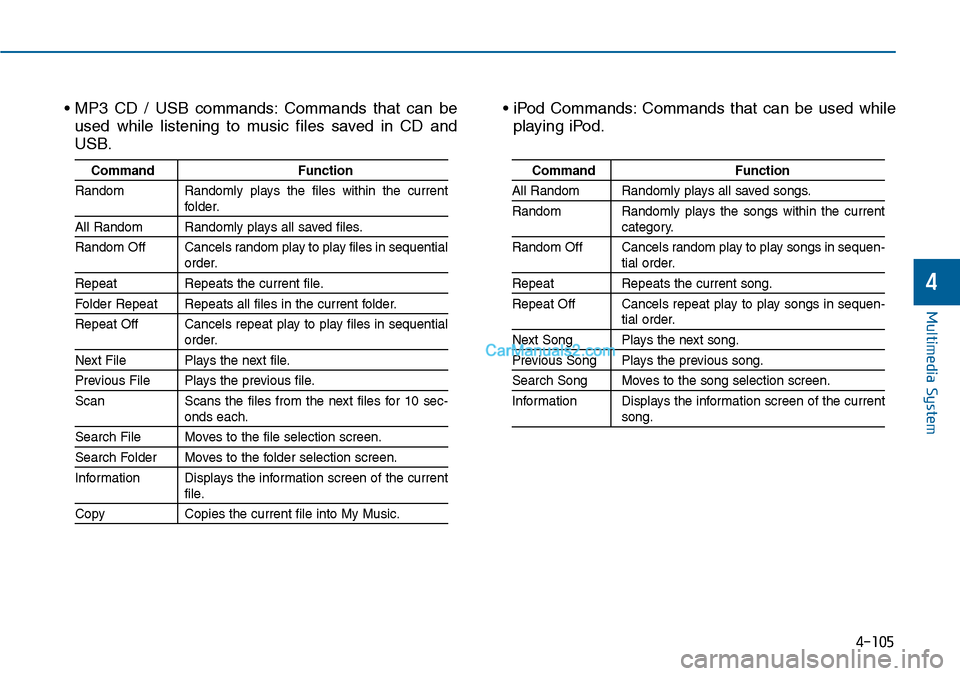
• MP3 CD / USB commands: Commands that can be
used while listening to music files saved in CD and
USB.
• iPod Commands: Commands that can be used while
playing iPod.
Command Function
Random Randomly plays the files within the currentfolder.
All Random Randomly plays all saved files.
Random Off Cancels random play to play files in sequentialorder.
Repeat Repeats the current file.
Folder Repeat Repeats all files in the current folder.
Repeat Off Cancels repeat play to play files in sequentialorder.
Next File Plays the next file.
Previous File Plays the previous file.
Scan Scans the files from the next files for 10 sec-onds each.
Search File Moves to the file selection screen.
Search Folder Moves to the folder selection screen.
Information Displays the information screen of the currentfile.
Copy Copies the current file into My Music.
Command Function
All Random Randomly plays all saved songs.
Random Randomly plays the songs within the currentcategory.
Random Off Cancels random play to play songs in sequen-tial order.
Repeat Repeats the current song.
Repeat Off Cancels repeat play to play songs in sequen-tial order.
Next Song Plays the next song.
Previous Song Plays the previous song.
Search Song Moves to the song selection screen.
Information Displays the information screen of the currentsong.
Page 366 of 665
![Hyundai Sonata 2014 Owners Guide 4-108
Multimedia System
Scroll Text
Press the key Select
[Display] Select [Scroll text]
This feature is used to scroll text dis-
played on the screen when it is too
long to be displayed at on](/img/35/16805/w960_16805-365.png "Hyundai Sonata 2014 Owners Guide 4-108
Multimedia System
Scroll Text
Press the key Select
[Display] Select [Scroll text]
This feature is used to scroll text dis-
played on the screen when it is too
long to be displayed at on")
4-108
Multimedia System
Scroll Text
Press the key Select
[Display] Select [Scroll text]
This feature is used to scroll text dis-
played on the screen when it is too
long to be displayed at once.
When turned on, the text is repeat-
edly scrolled. When turned off, the
text is scrolled just once.
MP3 Information Display
Press the key Select
[Display] Select [Song Info]
This feature is used to change the
information displayed within USB
and MP3 CD modes.
1) Folder File : Displays file name
and folder name
2) Album Ar tist Song : Displays
album name/artist name/song
Sound Settings
Audio Settings
Press the key Select
[Sound] Select [Audio Setting]
Use the , , , buttons to
adjust the Fader/Balance settings.
Use the , buttons to adjust the
Bass/Middle/Treble settings.
Press the button to reset.Default
SETUP
SETUP SETUP
Page 373 of 665
![Hyundai Sonata 2014 Owners Guide 4-115
Multimedia System
4
Mode Pop up
Press the key Select
[Display] Select [Mode Pop up]
This feature is used to display the
Mode Pop up screen when entering
radio and media modes.
When](/img/35/16805/w960_16805-372.png "Hyundai Sonata 2014 Owners Guide 4-115
Multimedia System
4
Mode Pop up
Press the key Select
[Display] Select [Mode Pop up]
This feature is used to display the
Mode Pop up screen when entering
radio and media modes.
When")
4-115
Multimedia System
4
Mode Pop up
Press the key Select
[Display] Select [Mode Pop up]
This feature is used to display the
Mode Pop up screen when entering
radio and media modes.
When this feature is turned on,
pressing the or key
will display the Mode Pop up screen.
Information
The media Mode Pop up screen can be
displayed only when two or more
media modes have been connected.
Text Scroll
Press the key Select
[Display] Select [Text Scroll]
This feature is used to scroll text dis-
played on the screen when it is too
long to be displayed at once.
When turned on, the text is repeat-
edly scrolled. When turned off, the
text is scrolled just once.
MP3 Information Display
Press the key Select
[Display] Select [Media Display]
This feature is used to change the
information displayed within USB
and MP3 CD modes.
1) Folder File : Displays file name
and folder name
2) Album Ar tist Song : Displays
album name/artist name/song
SETUP SETUP
i
MEDIA RADIO
SETUP
Page 379 of 665
4-121
Multimedia System
4
APPENDIX
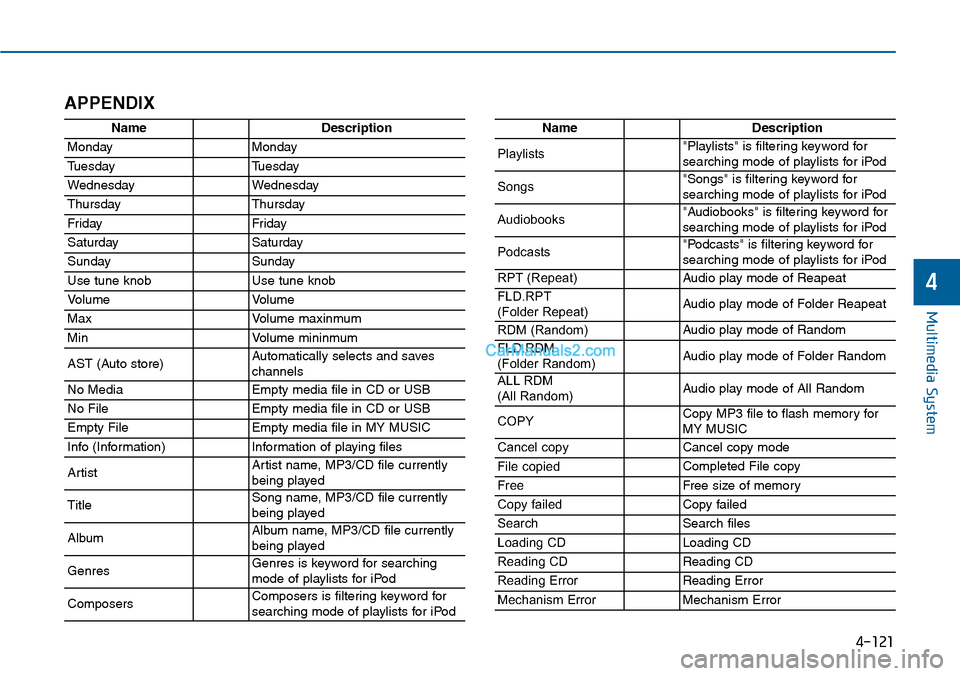
NameDescription
MondayMonday
TuesdayTuesday
WednesdayWednesday
ThursdayThursday
Fr idayFr iday
SaturdaySaturday
SundaySunday
Use tune knobUse tune knob
Vo l u m eVo l u m e
MaxVo l u m e m a x i n m u m
MinVo l u m e m i n i n m u m
AST (Auto store)Automatically selects and saves channels
No MediaEmpty media file in CD or USB
No FileEmpty media file in CD or USB
Empty FileEmpty media file in MY MUSIC
Info (Information)Information of playing files
ArtistArtist name, MP3/CD file currentlybeing played
TitleSong name, MP3/CD file currentlybeing played
AlbumAlbum name, MP3/CD file currentlybeing played
GenresGenres is keyword for searchingmode of playlists for iPod
ComposersComposers is filtering keyword forsearching mode of playlists for iPod
NameDescription
Playlists"Playlists" is filtering keyword forsearching mode of playlists for iPod
Songs"Songs" is filtering keyword for searching mode of playlists for iPod
Audiobooks"Audiobooks" is filtering keyword forsearching mode of playlists for iPod
Podcasts"Podcasts" is filtering keyword forsearching mode of playlists for iPod
RPT (Repeat)Audio play mode of Reapeat
FLD.RPT(Folder Repeat)Audio play mode of Folder Reapeat
RDM (Random)Audio play mode of Random
FLD.RDM (Folder Random)Audio play mode of Folder Random
ALL RDM(All Random)Audio play mode of All Random
COPYCopy MP3 file to flash memory for MY MUSIC
Cancel copyCancel copy mode
File copiedCompleted File copy
FreeFree size of memor y
Copy failedCopy failed
SearchSearch files
Loading CDLoading CD
Reading CDReading CD
Reading ErrorReading Error
Mechanism ErrorMechanism Error