warning light Hyundai Sonata 2014 User Guide
[x] Cancel search | Manufacturer: HYUNDAI, Model Year: 2014, Model line: Sonata, Model: Hyundai Sonata 2014Pages: 665, PDF Size: 17.43 MB
Page 98 of 665
A/V mode ..........................................................................3-68
Information mode ............................................................3-68
User settings mode.........................................................3-70
Warning messages ..........................................................3-75
Tr i p c o m p u t e r . . . . . . . . . . . . . . . . . . . . . . . . . . . . . . . . . . . . . . . . . . . . . . . . . . . . . . . 3 - 8 3
Overview............................................................................3-83
Tr i p m o d e s . . . . . . . . . . . . . . . . . . . . . . . . . . . . . . . . . . . . . . . . . . . . . . . . . . . . . . . . . . . . . . . . . . . . . . . . 3 - 8 3
Tr i p A / B . . . . . . . . . . . . . . . . . . . . . . . . . . . . . . . . . . . . . . . . . . . . . . . . . . . . . . . . . . . . . . . . . . . . . . . . . . . . . 3 - 8 3
Fuel economy ...................................................................3-84
Warning and indicator lights ..............................3-87
Warning lights ..................................................................3-87
Indicator lights .................................................................3-94
Light .......................................................................3-98
Exterior lights ..................................................................3-98
Welcome system ...........................................................3-105
Interior lights..................................................................3-106
Wipers and washers ..........................................3-111
Windshield wipers ........................................................3-111
Windshield washers ....................................................3-113
Driver assist system ..........................................3-115
Rear view camera .........................................................3-115
Rear parking assist system ........................................3-116
Parking assist system ..................................................3-119
Defroster .............................................................3-122
Rear window defroster ...............................................3-122
Manual climate control system........................3-124
Heating and air conditioning......................................3-125
System operation ..........................................................3-130
System maintenance ....................................................3-132
Checking the amount of air conditioner refrigerant and
compressor lubricant ...................................................3-133
Automatic climate control system ...................3-134
Automatic heating and air conditioning ..................3-135
Manual heating and air conditioning .......................3-136
System operation ..........................................................3-142
System maintenance ....................................................3-145
Checking the amount of air conditioner refrigerant and
compressor lubricant ...................................................3-145
Windshield defrosting and defogging ............3-146
Manual climate control system .................................3-146
Automatic climate control system ............................3-147
Defogging logic..............................................................3-148
Climate control additional features.................3-150
Cluster ionizer ................................................................3-150
Sunroof inside air recirculation.................................3-150
Storage compartment ........................................3-151
Center console storage ...............................................3-151
Glove box ........................................................................3-152
Sunglass holder .............................................................3-152
Multi box .........................................................................3-153
3
Page 100 of 665
3-4
Convenient features of your vehicle
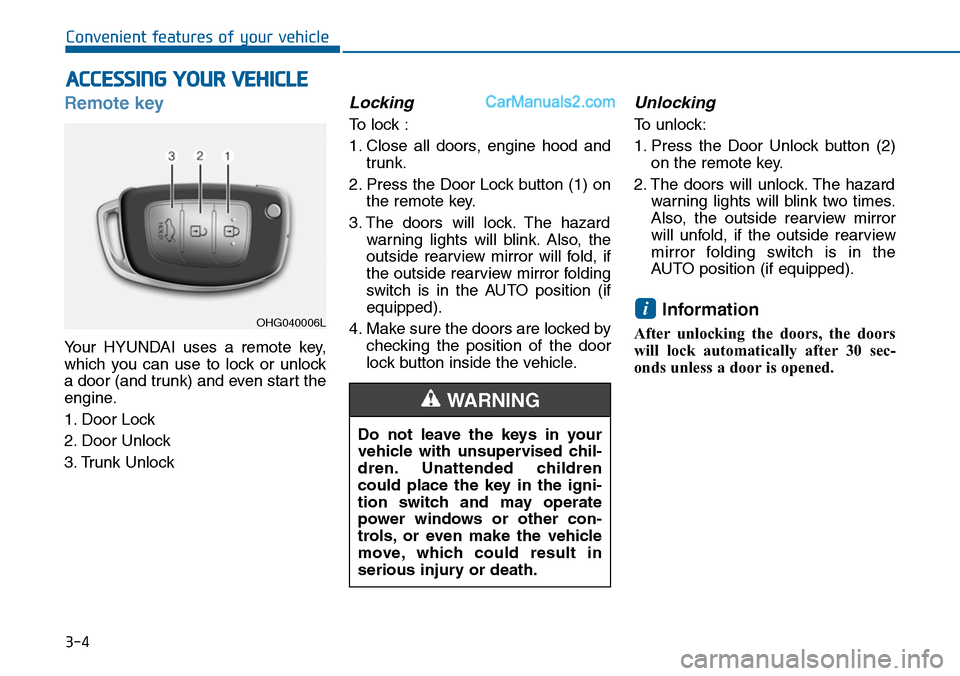
Remote key
Yo u r H Y U N D A I u s e s a r e m o t e k e y,
which you can use to lock or unlock
a door (and trunk) and even start the
engine.
1. Door Lock
2. Door Unlock
3. Trunk Unlock
Locking
To lock :
1. Close all doors, engine hood and
trunk.
2. Press the Door Lock button (1) on
the remote key.
3. The doors will lock. The hazard
warning lights will blink. Also, the
outside rearview mirror will fold, if
the outside rearview mirror folding
switch is in the AUTO position (if
equipped).
4. Make sure the doors are locked by
checking the position of the door
lock button inside the vehicle.
Unlocking
To unlock:
1. Press the Door Unlock button (2)
on the remote key.
2. The doors will unlock. The hazard
warning lights will blink two times.
Also, the outside rearview mirror
will unfold, if the outside rearview
mirror folding switch is in the
AUTO position (if equipped).
Information
After unlocking the doors, the doors
will lock automatically after 30 sec-
onds unless a door is opened.
i
ACCESSING YOUR VEHICLE
Do not leave the keys in your
vehicle with unsupervised chil-
dren. Unattended children
could place the key in the igni-
tion switch and may operate
power windows or other con-
trols, or even make the vehicle
move, which could result in
serious injury or death.
WARNING
OHG040006L
Page 101 of 665
3-5
Convenient features of your vehicle
Trunk unlocking
To unlock:
1. Press the Trunk Unlock button (3)
on the remote key for more than
one second.
2. The hazard warning lights will
blink two times. Once the trunk is
opened and then closed, the trunk
will lock automatically.
Information
• After unlocking the trunk, the trunk
will lock automatically.
• The word "HOLD" is written on the
button to inform you that you must
press and hold the button for more
than one second.
Start-up
For detailed infor mation refer to “Key
Ignition Switch” in chapter 5.
To prevent damaging the remote
key:
•Keep the remote key away from
water or any liquid. If the remote
key is inoperative due to expo-
sure to water or other liquids, it
will not be covered by your man-
ufacturer’s vehicle warranty.
•Avoid dropping or throwing the
remote key.
•Protect the remote key from
extreme temperatures.
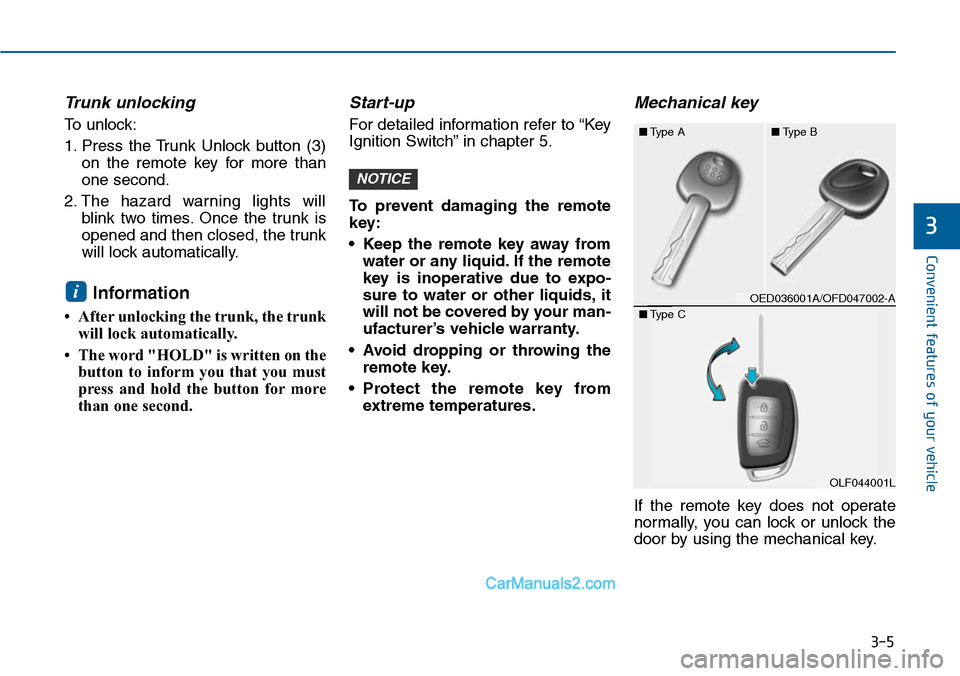
Mechanical key
If the remote key does not operate
normally, you can lock or unlock the
door by using the mechanical key.
NOTICE
i
3
OED036001A/OFD047002-A
■Type A■Type B
OLF044001L
■Type C
Page 104 of 665
3-8
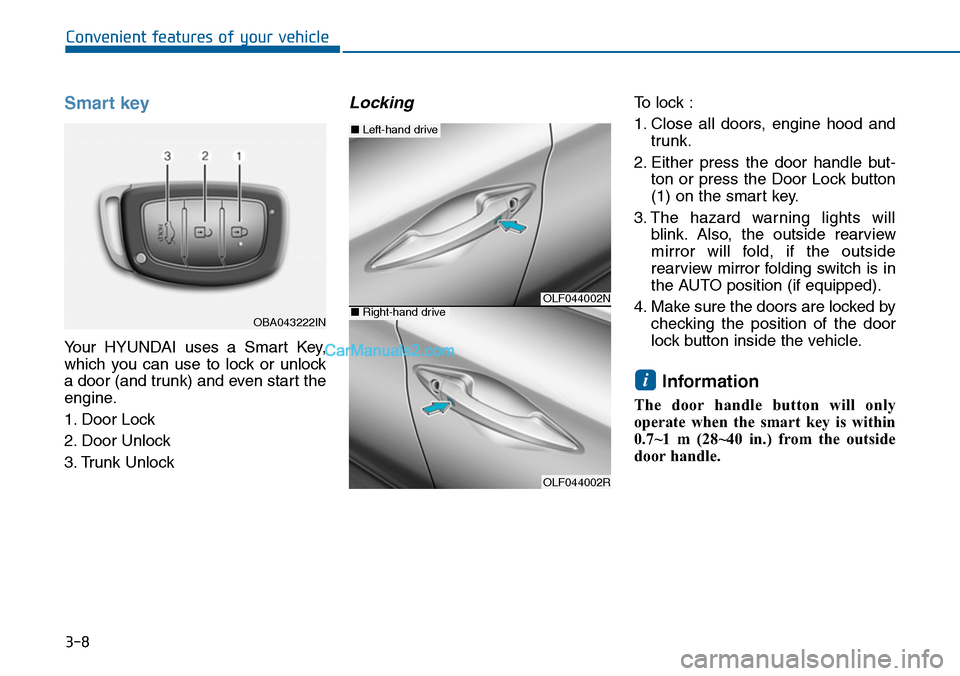
Smart key
Yo u r H Y U N D A I u s e s a S m a r t K e y,
which you can use to lock or unlock
a door (and trunk) and even start the
engine.
1. Door Lock
2. Door Unlock
3. Trunk Unlock
Locking To lock :
1. Close all doors, engine hood and
trunk.
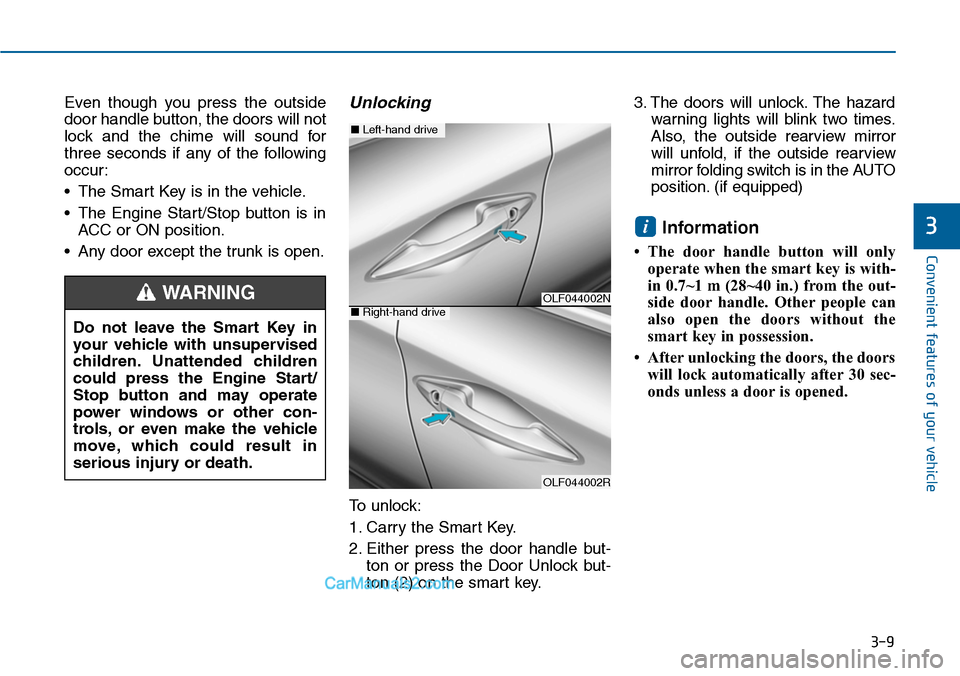
2. Either press the door handle but-
ton or press the Door Lock button
(1) on the smart key.
3. The hazard warning lights will
blink. Also, the outside rearview
mirror will fold, if the outside
rearview mirror folding switch is in
the AUTO position (if equipped).
4. Make sure the doors are locked by
checking the position of the door
lock button inside the vehicle.
Information
The door handle button will only
operate when the smart key is within
0.7~1 m (28~40 in.) from the outside
door handle.
i
Convenient features of your vehicle
OBA043222IN
OLF044002N
OLF044002R
■Left-hand drive
■Right-hand drive
Page 105 of 665
3-9
Convenient features of your vehicle
Even though you press the outside
door handle button, the doors will not
lock and the chime will sound for
three seconds if any of the following
occur:
•The Smart Key is in the vehicle.
•The Engine Start/Stop button is in
ACC or ON position.
•Any door except the trunk is open.
Unlocking
To unlock:
1. Carry the Smart Key.
2. Either press the door handle but-
ton or press the Door Unlock but-
ton (2) on the smart key.
3. The doors will unlock. The hazard
warning lights will blink two times.
Also, the outside rearview mirror
will unfold, if the outside rearview
mirror folding switch is in the AUTO
position. (if equipped)
Information
• The door handle button will only
operate when the smart key is with-
in 0.7~1 m (28~40 in.) from the out-
side door handle. Other people can
also open the doors without the
smart key in possession.
•Afterunlocking the doors, the doors
will lock automatically after 30 sec-
onds unless a door is opened.
i3
Do not leave the Smart Key in
your vehicle with unsupervised
children. Unattended children
could press the Engine Start/
Stop button and may operate
power windows or other con-
trols, or even make the vehicle
move, which could result in
serious injury or death.
WARNINGOLF044002N
OLF044002R
■Left-hand drive
■Right-hand drive
Page 106 of 665
3-10
Convenient features of your vehicle
Trunk unlocking
To unlock:
1. Carry the smart key.
2. Either press the trunk handle but-
ton or press the Trunk Unlock but-
ton (3) on the smart key for more
than one second.
3. The hazard warning lights will
blink two times.
Once the trunk is opened and then
closed, the trunk will lock automati-
cally.
Information
After unlocking the trunk, the trunk
will lock automatically after 30 sec-
onds unless the trunk is opened.
Start-up
Yo u c a n s t a r t t h e e n g i n e w i t h o u t
inserting the key.For detailed infor-
mation refer to the Engine
Start/Stop button in chapter 5.
To prevent damaging the smart
key:
•Keep the smart key away from
water or any liquid. If the smart
key is inoperative due to expo-
sure to water or other liquids, it
will not be covered by your man-
ufacturer’s vehicle warranty.
•Avoid dropping or throwing the
smart key.
•Protect the smart key from
extreme temperatures.
Mechanical key
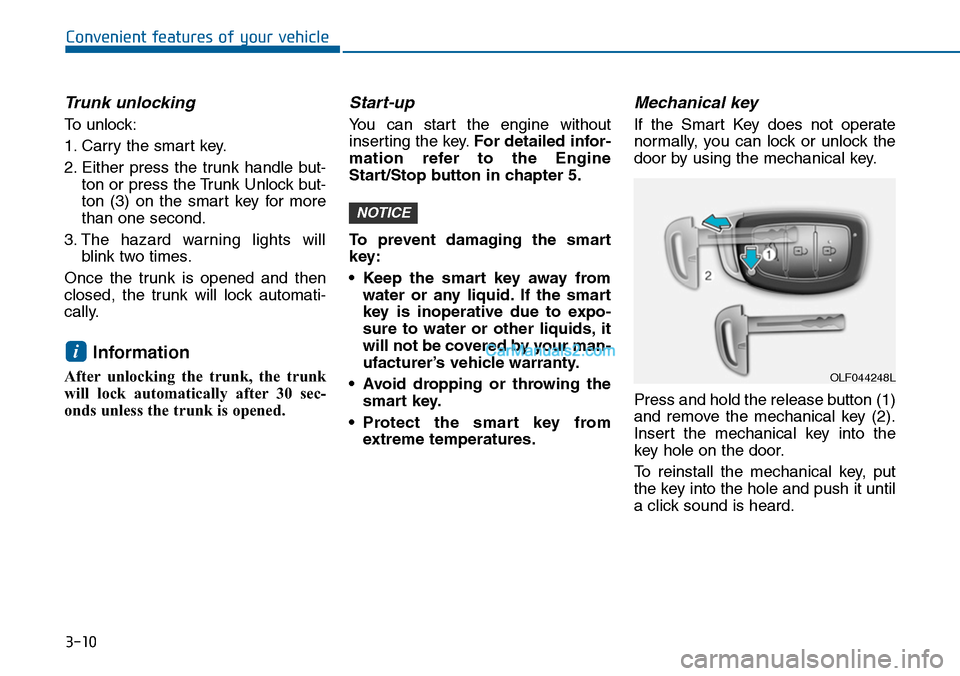
If the Smart Key does not operate
normally, you can lock or unlock the
door by using the mechanical key.
Press and hold the release button (1)
and remove the mechanical key (2).
Insert the mechanical key into the
key hole on the door.
To reinstall the mechanical key, put
the key into the hole and push it until
a click sound is heard.
NOTICE
i
OLF044248L
Page 116 of 665
3-20
Convenient features of your vehicle
This system helps to protect your
vehicle and valuables. The horn will
sound and the hazard warning lights
will blink continuously if any of the
following occurs:
-A door is opened without using the
remote key or smart key.
-The trunk is opened without using
the remote key or smart key.
-The engine hood is opened.
The alarm continues for 30 seconds,
then the system resets. To turn off
the alarm, unlock the doors with the
remote key or smart key.
The Theft Alarm System automati-
cally sets 30 seconds after you lock
the doors and the trunk. For the sys-
tem to activate, you must lock the
doors and the trunk from outside the
vehicle with the remote key or smar t
key or by pressing the button on the
outside of the door handles with the
smart key in your possession.
The hazard warning lights will blink
and the chime will sound once to
indicate the system is armed.
Once the security system is set, open-
ing any door, the trunk, or the hood
without using the remote key or smart
key will cause the alarm to activate.
The Theft Alarm System will not set if
the hood, the trunk, or any door is
not fully closed. If the system will not
set, check the hood, the trunk, or the
doors are fully closed.
Do not attempt to alter this system or
add other devices to it.
Information
• Do not lock the doors until all pas-
sengers have left the vehicle. If the
remaining passenger leaves the
vehicle when the system is armed,
the alarm will be activated.
• If the vehicle is not disarmed with
the remote key or smart key, open
the doors by using the mechanical
key and place the ignition switch in
the ON position (for remote key) or
start the engine (for smart key) and
wait for 30 seconds.
•When the system is disarmed but a
door or trunk is not opened within 30
seconds, the system will be rearmed.
Information
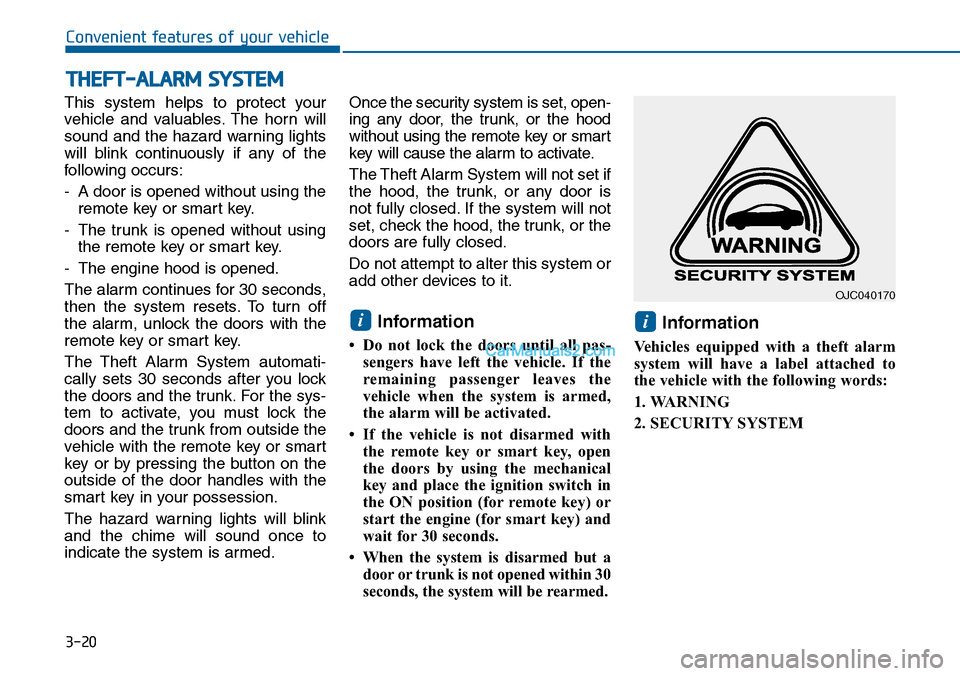
Vehicles equipped with a theft alarm
system will have a label attached to
the vehicle with the following words:
1. WARNING
2. SECURITY SYSTEM
ii
THEFT-ALARM SYSTEM
OJC040170
Page 118 of 665
3-22
Convenient features of your vehicle
Theft-alarm stage
The alarm will be activated if any of
the following occurs while the system
is armed.
Without the intrusion/tilt sensor
(or intrusion/tilt sensor off con-
dition (if equipped))
•A front or rear door is opened without
using the transmitter (or smart key).
•The trunk is opened without using
the transmitter (or smart key).
•The engine hood is opened.
The horn will sound and the hazard
warning lights will blink continuously
for 30 seconds, unless the system is
disarmed. To turn off the system,
unlock the doors with the transmitter
(or smart key).
Intrusion/tilt sensor on position
(if equipped)
•Someone or something moves in
the vehicle.
•The inclination of the vehicle is
changed to the certain degree.
•A front or rear door is opened with-
out using the transmitter (or smart
key).
•The trunk is opened without using
the transmitter (or smart key).
•The engine hood is opened.
The horn will sound and the hazard
warning lights will blink continuously
for 30 seconds, unless the system is
disarmed. To turn off the system,
unlock the doors with the transmitter
(or smart key).
Disarmed stage
The system will be disarmed when
the door unlock button is pressed.
After the doors are unlocked, the haz-
ard warning lights will blink twice to
indicate that the system is disarmed.
After pressing the unlock button, if
any door (or trunk) is not opened
within 30 seconds, the system will be
rearmed
-If the vehicle is equipped with the
remote window up/down system;
the windows are also closed.
Information
• If the system is not disarmed with
the transmitter, open the door with
the key and insert the key into the
ignition switch, turn the ignition
switch to the ON position and wait
for 30 seconds. Then the system will
be disarmed.
• If you lose your keys, we recom-
mend that you consult with an
authorized HYUNDAI dealer.
i
Page 119 of 665
3-23
Convenient features of your vehicle
3
Do not change, alter or adjust the
theft-alarm system because it
could cause the theft-alarm sys-
tem to malfunction and we recom-
mend that the system be serviced
by an authorized HYUNDAI dealer.
Malfunctions caused by improper
alterations, adjustments or modifi-
cations to the theft-alarm system
are not covered by your vehicle
manufacturer’s warranty.
Self-diagnosis (if equipped)
If the hazard warning light blink once
when you lock the doors by using the
transmitter, it means the intrusion/tilt
sensor is working normally.
If the hazard warning light blink and
the horn sounds 3 times when you
lock the doors by using the transmit-
ter, it means the intrusion/tilt sensor
is not working normally. We recom-
mend that you contact an authorized
HYUNDAI dealer.
NOTICE
Page 122 of 665
3-26
Convenient features of your vehicle
STEERING WHEEL
Electric power steering (EPS)
The system assists you with steering
the vehicle. If the engine is off or if
the power steering system becomes
inoperative, the vehicle may still be
steered, but it will require increased
steering effort.
Also, the steering effort becomes
heavier as the vehicle’s speed
increases and becomes lighter as
the vehicle’s speed decreases for
better control of the steering wheel.
Should you notice any change in the
effort required to steer during normal
vehicle operation, we recommend
that the system be checked by an
authorized HYUNDAI dealer.
If the Electric Power Steering
System does not operate normal-
ly, the warning light ( ) will illu-
minate on the instrument cluster.
The steering wheel may become
difficult to control or operate. Take
your vehicle to an authorized
HYUNDAI dealer and have the sys-
tem checked as soon as possible.
Information
The following symptoms may occur
during normal vehicle operation:
•The steering effort may be high
immediately after placing the igni-
tion switch or the Engine Start/Stop
button in the ON position.
This happens as the system per-
forms the EPS system diagnostics.
When the diagnostics is completed,
the steering wheel will return to its
normal condition.
(Continued)
(Continued)
•Aclick noise may be heard from the
EPS relay after the ignition switch is
placed to the ON or LOCK/OFF
position (Without Smart key system).
Aclick noise may be heard from the
EPS relay after the Engine Start/Stop
button is in the ON or OFF position.
(With Smart key system)
• Motor noise may be heard when the
vehicle is at stop or at a low driving
speed.
•When you operate the steering
wheel in low temperature, abnormal
noise may occur. If temperature
rises, the noise will disappear. This
is a normal condition.
• When the vehicle is stationary, if
you turn the steering wheel all the
way to the left or right continuously,
the steering wheel effort increases.
This is not a system malfunction. As
time passes, the steering wheel
effort will return to its normal con-
dition.
i
NOTICE