battery Hyundai Sonata 2014 Owner's Guide
[x] Cancel search | Manufacturer: HYUNDAI, Model Year: 2014, Model line: Sonata, Model: Hyundai Sonata 2014Pages: 665, PDF Size: 17.43 MB
Page 236 of 665
3-140
Convenient features of your vehicle
Temperature conversion
If the battery has been discharged or
disconnected, the temperature mode
display will reset to Centigrade.
This is a normal condition. You can
switch the temperature mode between
Centigrade to Fahrenheit as follows;
-Automatic climate control system
While pressing the OFF button,
press the AUTO button for 3 seconds
or more. The display will change from
Centigrade to Fahrenheit, or from
Fahrenheit to Centigrade.
-“User setting mode”in the cluster :
Yo u c a n c h a n g e t h e t e m p e r a t u r e
unit in the “Other features -
Temperature unit”
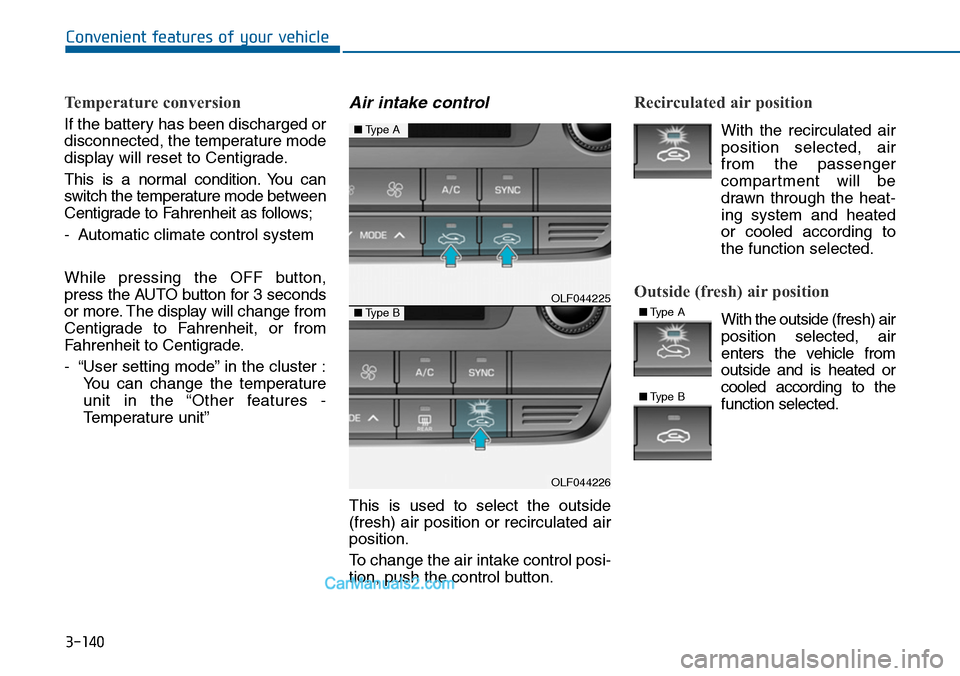
Air intake control
This is used to select the outside
(fresh) air position or recirculated air
position.
To change the air intake control posi-
tion, push the control button.
Recirculated air position
With the recirculated air
position selected, air
from the passenger
compartment will be
drawn through the heat-
ing system and heated
or cooled according to
the function selected.
Outside (fresh) air position
With the outside (fresh) air
position selected, air
enters the vehicle from
outside and is heated or
cooled according to the
function selected.
OLF044225
OLF044226
■Type A
■Type B■Type A
■Type B
Page 244 of 665
3-148
Convenient features of your vehicle
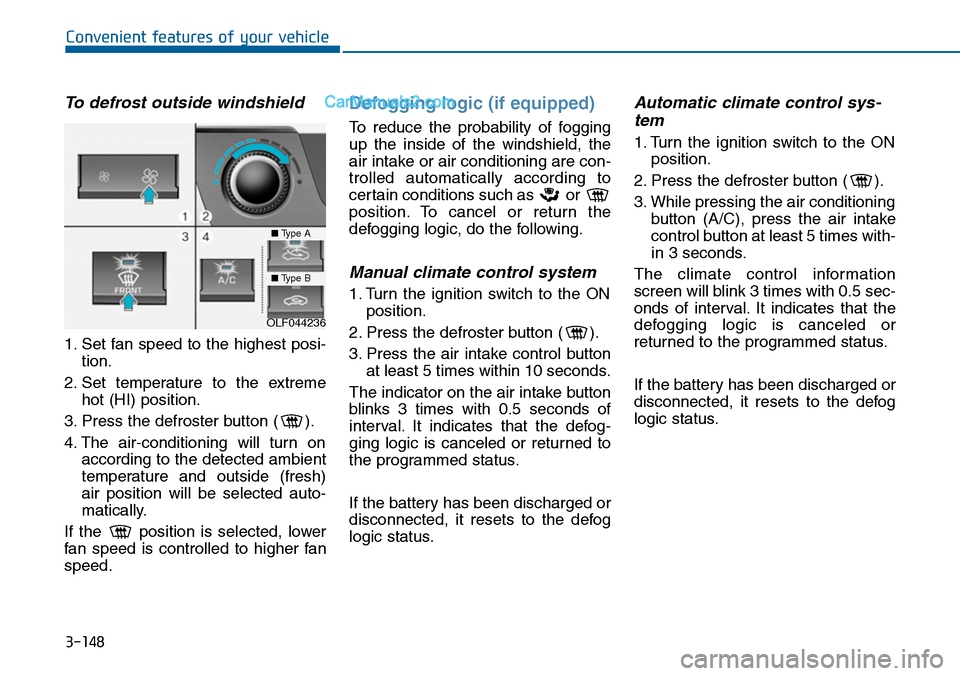
To defrost outside windshield
1. Set fan speed to the highest posi-
tion.
2. Set temperature to the extreme
hot (HI) position.
3. Press the defroster button ( ).
4. The air-conditioning will turn on
according to the detected ambient
temperature and outside (fresh)
air position will be selected auto-
matically.
If the position is selected, lower
fan speed is controlled to higher fan
speed.
Defogging logic (if equipped)
To reduce the probability of fogging
up the inside of the windshield, the
air intake or air conditioning are con-
trolled automatically according to
certain conditions such as or
position. To cancel or return the
defogging logic, do the following.
Manual climate control system
1. Turn the ignition switch to the ON
position.
2. Press the defroster button ( ).
3. Press the air intake control button
at least 5 times within 10 seconds.
The indicator on the air intake button
blinks 3 times with 0.5 seconds of
interval. It indicates that the defog-
ging logic is canceled or returned to
the programmed status.
If the battery has been discharged or
disconnected, it resets to the defog
logic status.
Automatic climate control sys-
tem
1. Turn the ignition switch to the ON
position.
2. Press the defroster button ( ).
3. While pressing the air conditioning
button (A/C), press the air intake
control button at least 5 times with-
in 3 seconds.
The climate control information
screen will blink 3 times with 0.5 sec-
onds of interval. It indicates that the
defogging logic is canceled or
returned to the programmed status.
If the battery has been discharged or
disconnected, it resets to the defog
logic status.
OLF044236
■Type A
■Type B
Page 253 of 665
3-157
Convenient features of your vehicle
3
To prevent damage to the Power
Outlets :
•Use the power outlet only when
the engine is running and
remove the accessory plug after
use. Using the accessory plug
for prolonged periods of time
with the engine off could cause
the battery to discharge.
•Only use 12V electric acces-
sories which are less than 180
W(Watt) in electric capacity.
•Adjust the air-conditioner or
heater to the lowest operating
level when using the power out-
let.
•Close the cover when not in use.
(Continued)
(Continued)
•Some electronic devices can
cause electronic interference
when plugged into a vehicle’s
power outlet. These devices may
cause excessive audio static
and malfunctions in other elec-
tronic systems or devices used
in your vehicle.
•Push the plug in as far as it will
go. If good contact is not made,
the plug may overheat and the
fuse may open.
•Plug in battery equipped electri-
cal/electronic devices with
reverse current protection. The
current from the battery may
flow into the vehicle's electri-
cal/electronic system and cause
system malfunction.
NOTICE
Avoid electrical shocks. Do not
place your fingers or foreign
objects (pin, etc.) into a power
outlet or touch the power outlet
with a wet hand.
WARNING
Page 255 of 665
3-159
Convenient features of your vehicle
3
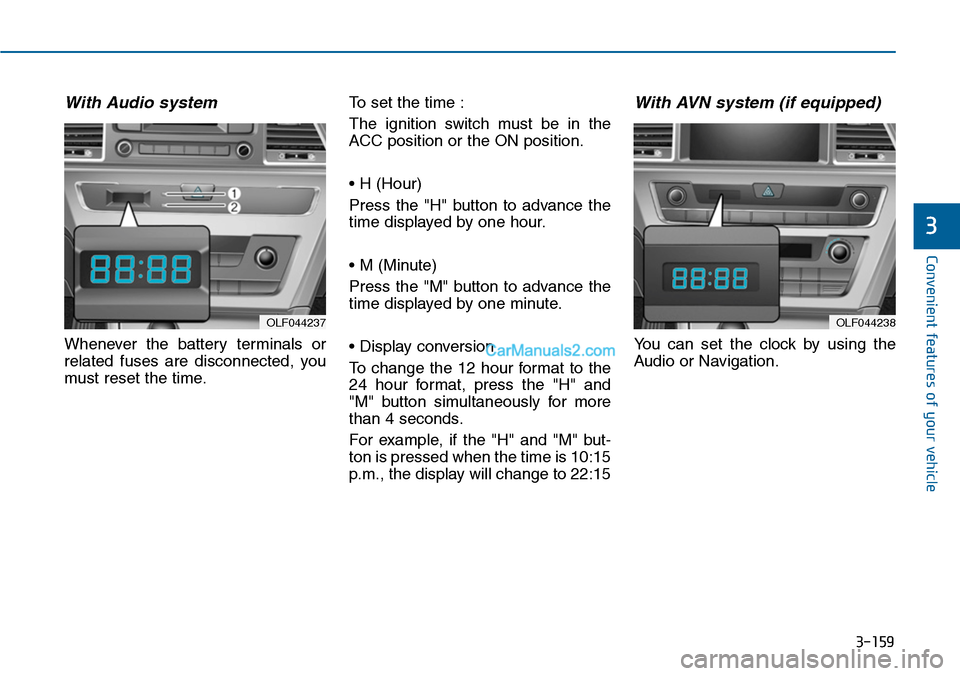
With Audio system
Whenever the battery terminals or
related fuses are disconnected, you
must reset the time.
To set the time :
The ignition switch must be in the
ACC position or the ON position.
• H (Hour)
Press the "H" button to advance the
time displayed by one hour.
• M (Minute)
Press the "M" button to advance the
time displayed by one minute.
• Display conversion
To change the 12 hour format to the
24 hour format, press the "H" and
"M" button simultaneously for more
than 4 seconds.
For example, if the "H" and "M" but-
ton is pressed when the time is 10:15
p.m., the display will change to 22:15
With AVN system (if equipped)
Yo u c a n s e t t h e c l o c k b y u s i n g t h e
Audio or Navigation.
OLF044237OLF044238
Page 274 of 665
4-16
Multimedia System
Information
-Using the iPod®device
•iPod®is a registered trademark of
Apple Inc.
• In order to use the iPod®while oper-
ating the keys, you must use a dedi-
cated iPod®cable. (the cable that is
supplied when purchasing iPod®
/iPhone®products)
• If the iPod®is connected to the vehi-
cle while it is playing, a high pitch
sound could occur for approximate-
ly 1-2 seconds immediately after
connecting. If possible, connect the
iPod to the vehicle with the iPod®
stopped/ paused.
• During ACC ON state, connecting
the iPod®through the iPod®cable
will charge the iPod®through the
car audio system.
•When connecting with the iPod®
cable, make sure to fully insert the
jack to prevent communication
interference.
(Continued)
(Continued)
• When the EQ features of an exter-
nal device, such as the iPod®, and
the audio system are both active, EQ
effects could overlap and cause
sound deterioration and distortion.
Whenever possible, turn off the EQ
feature within the external device
upon use by connecting with the
audio system.
•Noise may occurwhen an iPod®or
AUX device is connected. When
such devices are not being used, dis-
connect the device for storage.
•When the iPod®or AUX device
power is connected to the power
jack, playing the external device
may result in noise. In such cases,
disconnect the power connection
before use.
•Skipping or improper operation
may occur depending on the charac-
teristics of your iPod®/Phone®device.
(Continued)
(Continued)
•If youriPhone®is connected to both
the Bluetooth®Wireless Technology
and USB, the sound may not be
properly played. In your iPhone®,
select the Dock connector or
Bluetooth®Wireless Technology to
change the sound output (source).
• iPod mode cannot be operated when
the iPod®cannot be recognized due
to versions that do not support com-
munication protocols.
•For fifth generation iPod®Nano
devices, the iPod®may not be recog-
nized when the battery level is low.
Please charge the iPod®for use.
•Search/play orders shown within
the iPod®device may differ with the
orders shown within the audio sys-
tem.
•If the iPod®malfunctions due to an
iPod®device defect, reset the iPod®
and try again. (To learn more, refer to
your iPod®manual)
(Continued)
i
Page 277 of 665
(Continued)
• Park the vehicle when connecting
the head unit with the mobile phone.
•Bluetooth®connection may become
intermittently disconnected in some
mobile phones. Follow these steps to
try again.
1. Within the mobile phone, turn the
Bluetooth®function off/on and try
again.
2. Turn the mobile phone power
Off/On and try again.
3. Completely remove the mobile
phone battery, reboot, and then
again.
4. Reboot the Audio System and try
again.
5. Delete all paired devices, pair and
try again.
• Handsfree call quality and volume
may differ depending on the model
of your mobile phone.
Multimedia System
4-19
4
Page 289 of 665
![Hyundai Sonata 2014 Owners Guide Outgoing Volume
This is used to set the volume of your
voice as heard by the other par ty
while on a Bluetooth®Wireless
Technology enabled handsfree call.
Select [Outgoing Volume] Set vol-](/img/35/16805/w960_16805-288.png "Hyundai Sonata 2014 Owners Guide Outgoing Volume
This is used to set the volume of your
voice as heard by the other par ty
while on a Bluetooth®Wireless
Technology enabled handsfree call.
Select [Outgoing Volume] Set vol-")
Outgoing Volume
This is used to set the volume of your
voice as heard by the other par ty
while on a Bluetooth®Wireless
Technology enabled handsfree call.
Select [Outgoing Volume] Set vol-
ume through TUNE knob
❈ Even while on a call, the volume
can be changed by using the
key.
Bluetooth®Wireless
Technology System Off
This feature is used when you do not
wish to use the Bluetooth®Wireless
Technologysystem.
Select [Bluetooth System Off] Set
through TUNE knob
❈ If a phone is already connected,
disconnect the currently connected
phone and turn the Bluetooth®
Wireless Technologysystem off.
Using the Bluetooth®Wireless
Technology System
To u s e Bluetooth®Wireless Technology
when the system is currently off, fol-
low these next steps.
•Turning On Bluetooth®Wireless
Te c h n o l o g y t h r o u g h t h e
Key
Press the key Screen
Guidance
❈ Moves to the screen where
Bluetooth®Wireless Technology
functions can be used and displays
guidance.
• Turning On Bluetooth®Wireless
Te c h n o l o g y t h r o u g h t h e
Key
Press the key Select [Phone]
through TUNE knob or key
➀ A screen asking whether to turn
on Bluetooth®Wireless Technology
will be displayed.
➁ On the screen, select to turn
on Bluetooth®Wireless Technology
and display guidance.
❈ If the Bluetooth®Wireless Technologysystem is turned on, the system willautomatically try to connect themost recently connected Bluetooth®
Wireless Technologymobile phone.
•Bluetooth®Wireless Technology
connection may become inter-
mittently disconnected in some
mobile phones. Follow these
next steps to try again.
1) Turn the Bluetooth®Wireless
Technology function within the
mobile phone ON/OFF and try
to connect again.
2) Turn the mobile phone power
ON/OFF and try to connect
again.
3) Completely remove the mobile
phone battery, reboot, and then
try to connect again.
4) Reboot the audio system and
try to connect again
5) Delete all paired devices in your
mobile phone and the audio
system and pair again for use.
NOTICE
YES
3
SETUP
SETUP
PHONE
PHONE
SEEKTRACK
4-31
Multimedia System
4
Page 296 of 665
![Hyundai Sonata 2014 Owners Guide Bluetooth®Wireless
Technology System Off
This feature is used when you do not
wish to use the Bluetooth®Wireless
Technologysystem.
Select [Bluetooth System Off] Set
through TUNE knob
❈ If](/img/35/16805/w960_16805-295.png "Hyundai Sonata 2014 Owners Guide Bluetooth®Wireless
Technology System Off
This feature is used when you do not
wish to use the Bluetooth®Wireless
Technologysystem.
Select [Bluetooth System Off] Set
through TUNE knob
❈ If")
Bluetooth®Wireless
Technology System Off
This feature is used when you do not
wish to use the Bluetooth®Wireless
Technologysystem.
Select [Bluetooth System Off] Set
through TUNE knob
❈ If a phone is already connected,
disconnect the currently connect-
ed phone and turn the Bluetooth®
Wireless Technology system off.
Using the Bluetooth®Wireless
Technology System
To u s e Bluetooth®Wireless Technology
when the system is currently off, fol-
low these next steps.
• Turning On Bluetooth®Wireless
Te c h n o l o g y t h r o u g h t h e
Key
Press the key Screen
Guidance
❈ Moves to the screen where
Bluetooth®Wireless Technology
functions can be used and dis-
plays guidance.
•Turning On Bluetooth®Wireless
Te c h n o l o g y t h r o u g h t h e
key
Press the key Select [Phone]
through TUNE knob or key
➀ A screen asking whether to turn
on Bluetooth®Wireless Technology
will be displayed.
➁ On the screen, select to turn
on Bluetooth®Wireless Technology
and display guidance.
❈ If the Bluetooth®Wireless
Technology system is turned on,
the system will automatically try to
connect the most recently con-
nected Bluetooth®Wireless
Technology mobile phone.
•Bluetooth®Wireless Technology
connection may become inter-
mittently disconnected in some
mobile phones. Follow these
next steps to try again.
1) Turn the Bluetooth®Wireless
Technology function within the
mobile phone ON/OFF and try
to connect again.
2) Turn the mobile phone power
ON/OFF and try to connect
again.
3) Completely remove the mobile
phone battery, reboot, and then
try to connect again.
4) Reboot the audio system and
try to connect again
5) Delete all paired devices in your
mobile phone and the audio
system and pair again for use.
NOTICE
YES
3
SETUP
SETUP
PHONE
PHONE
4-38
Multimedia System
Page 339 of 665
4-81
(Continued)
• If you do not want to automatically
connect yourBluetooth®Wireless
Te c h n o l o g y p h o n e , t r y t h e f o l l o w i n g .
1. Turn off the Bluetooth®Wireless
Te c h n o l o g y f e a t u r e i n y o u r m o b i l e
phone.
- For more information on
Bluetooth®Wireless Technology fea-
tures within your mobile, refer to
your mobile phone user’s manual.
2. Turn off the Bluetooth®Wireless
Te c h n o l o g y f e a t u r e i n y o u r c a r
audio system.
- To turn off the Bluetooth®Wireless
Te c h n o l o g y f e a t u r e i n y o u r c a r
audio system, go to
[Phone] and [turn off] the
Bluetooth®Wireless Technology
feature.
•Park the vehicle when connecting the
car audio system with your mobile
phone.
(Continued)
(Continued)
•Bluetooth®Wireless Technology con-
nection may become intermittently
disconnected in some mobile phones.
Follow these steps to try again.
1. Turn the Bluetooth®Wireless
Te c h n o l o g y f u n c t i o n w i t h i n t h e
mobile phone off/on and try
again.
2. Turn the mobile phone power
Off/On and try again.
3 Completely remove the mobile
phone battery, reboot, and then
again.
4. Reboot the audio system and try
again.
5. Delete all paired devices, pair and
try again.
•The Handsfree call volume and
quality may differ depending on the
mobile phone.
(Continued)
(Continued)
•Bluetooth®Wireless Technology fea-
tures supported within the vehicle
are as follows. Some features may
not be supported depending on your
Bluetooth®Wireless Technologydevice.
- Answering and placing Bluetooth®
Wireless Technology Handsfree
calls
- Menu operation during call
(Switch to Private, Switch to call
waiting, Outgoing volume)
- Download Call History
- Download Mobile Phone book
- Phone book/Call History Auto
Download
-Bluetooth®Wireless Technology
device auto connection -
Bluetooth®Wireless Technology
Audio
•It is possible to pair up to five
Bluetooth®Wireless Technology
devices to the car system.
(Continued)
SETUP
Multimedia System
4
Page 380 of 665
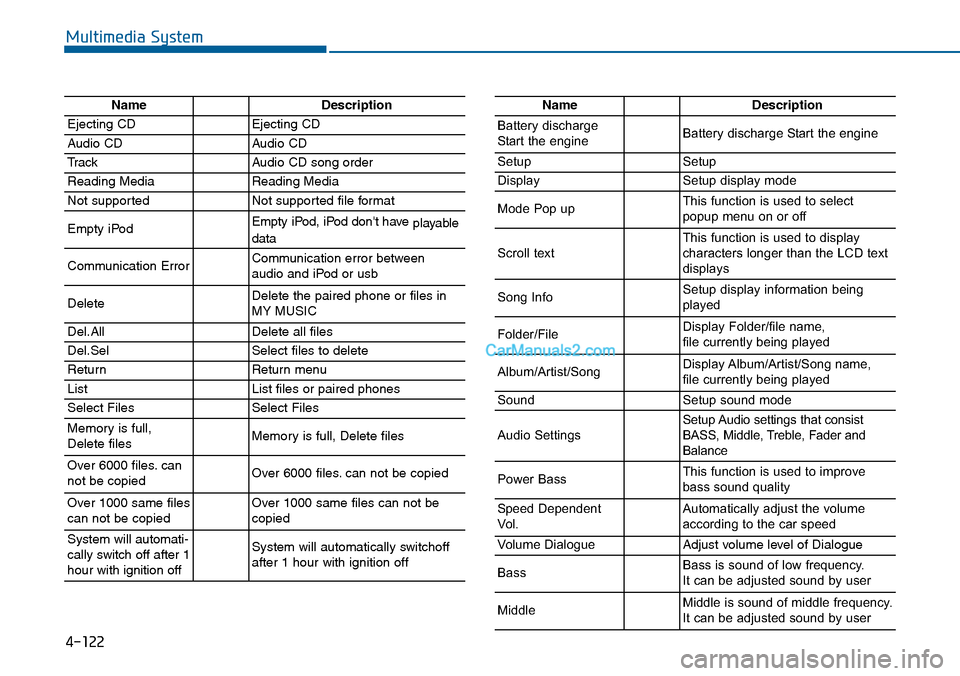
4-122
Multimedia System
NameDescription
Ejecting CDEjecting CD
Audio CDAudio CD
TrackAudio CD song order
Reading MediaReading Media
Not supportedNot supported file format
Empty iPodEmpty iPod, iPod don't have playabledata
Communication ErrorCommunication error between audio and iPod or usb
DeleteDelete the paired phone or files in MY MUSIC
Del.AllDelete all files
Del.SelSelect files to delete
ReturnReturn menu
ListList files or paired phones
Select FilesSelect Files
Memory is full,Delete files Memory is full, Delete files
Over 6000 files. cannot be copied Over 6000 files. can not be copied
Over 1000 same filescan not be copied Over 1000 same files can not becopied
System will automati-cally switch off after 1hour with ignition off
System will automatically switchoffafter 1 hour with ignition off
NameDescription
Battery dischargeStart the engineBattery discharge Start the engine
SetupSetup
DisplaySetup display mode
Mode Pop upThis function is used to selectpopup menu on or off
Scroll textThis function is used to display characters longer than the LCD textdisplays
Song InfoSetup display information beingplayed
Folder/FileDisplay Folder/file name, file currently being played
Album/Artist/SongDisplay Album/Artist/Song name, file currently being played
SoundSetup sound mode
Audio SettingsSetup Audio settings that consistBASS, Middle, Treble, Fader andBalance
Power BassThis function is used to improvebass sound quality
Speed DependentVo l .Automatically adjust the volume according to the car speed
Vo l u m e D i a l o g u eAdjust volume level of Dialogue
BassBass is sound of low frequency. It can be adjusted sound by user
MiddleMiddle is sound of middle frequency. It can be adjusted sound by user