battery Hyundai Sonata 2014 Owner's Guide
[x] Cancel search | Manufacturer: HYUNDAI, Model Year: 2014, Model line: Sonata, Model: Hyundai Sonata 2014Pages: 665, PDF Size: 17.43 MB
Page 420 of 665
4-162
Multimedia System
Information
- Using upon connecting
Bluetooth®Wireless
Technology phone
•Before connecting the caraudio sys-
tem with the mobile phone, check to
see that the mobile phone supports
Bluetooth®Wireless Technology fea-
tures.
•Even if the phone supports
Bluetooth®Wireless Technology, the
phone will not be found during
device searches if the phone has been
set to hidden state or the Bluetooth®
Wireless Technology power is turned
off. Disable the hidden state or turn
on the Bluetooth®Wireless
Te c h n o l o g y p o w e r p r i o r t o s e a r c h -
ing/connecting with the car audio
system.
(Continued)
(Continued)
• If you do not want to automatically
connect yourBluetooth®Wireless
Technology phone, try the following.
1. Turn off the Bluetooth®Wireless
Te c h n o l o g y f e a t u r e i n y o u r
mobile phone.
- For more information on
Bluetooth®Wireless Technology
features within your mobile, refer
to your mobile phone user’s man-
ual.
2. Turn off the Bluetooth®Wireless
Technology feature in your car
audio system.
- To turn off the Bluetooth®Wireless
Te c h n o l o g y f e a t u r e i n y o u r c a r
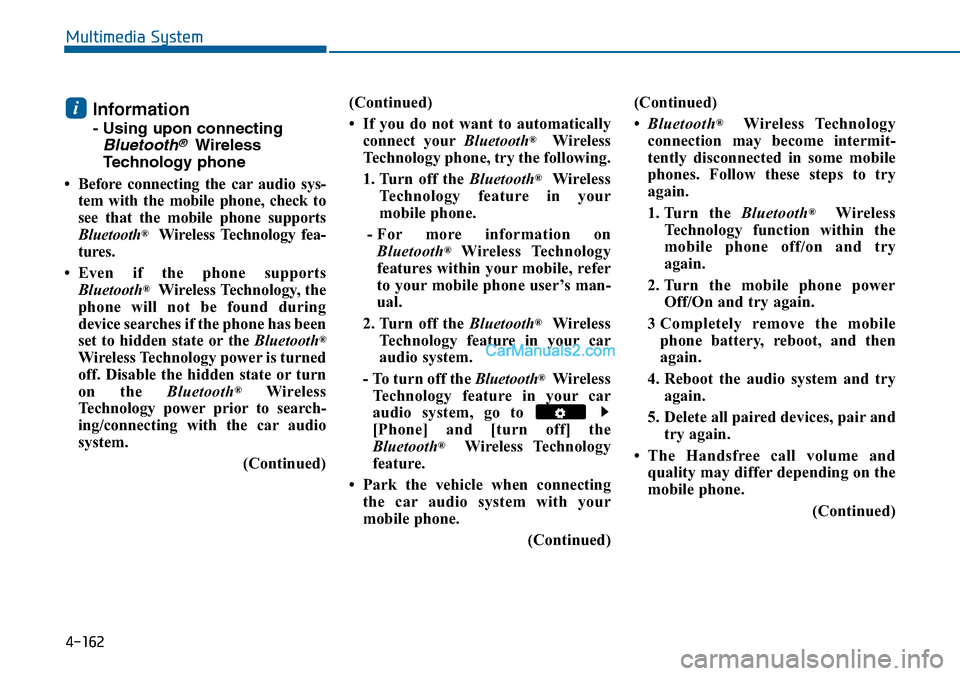
audio system, go to
[Phone] and [turn off] the
Bluetooth®Wireless Technology
feature.
• Park the vehicle when connecting
the car audio system with your
mobile phone.
(Continued)
(Continued)
•Bluetooth®Wireless Technology
connection may become intermit-
tently disconnected in some mobile
phones. Follow these steps to try
again.
1. Turn the Bluetooth®Wireless
Te c h n o l o g y f u n c t i o n w i t h i n t h e
mobile phone off/on and try
again.
2. Turn the mobile phone power
Off/On and try again.
3 Completely remove the mobile
phone battery, reboot, and then
again.
4. Reboot the audio system and try
again.
5. Delete all paired devices, pair and
try again.
•The Handsfree call volume and
quality may differ depending on the
mobile phone.
(Continued)
i
Page 446 of 665
4-188
Multimedia System
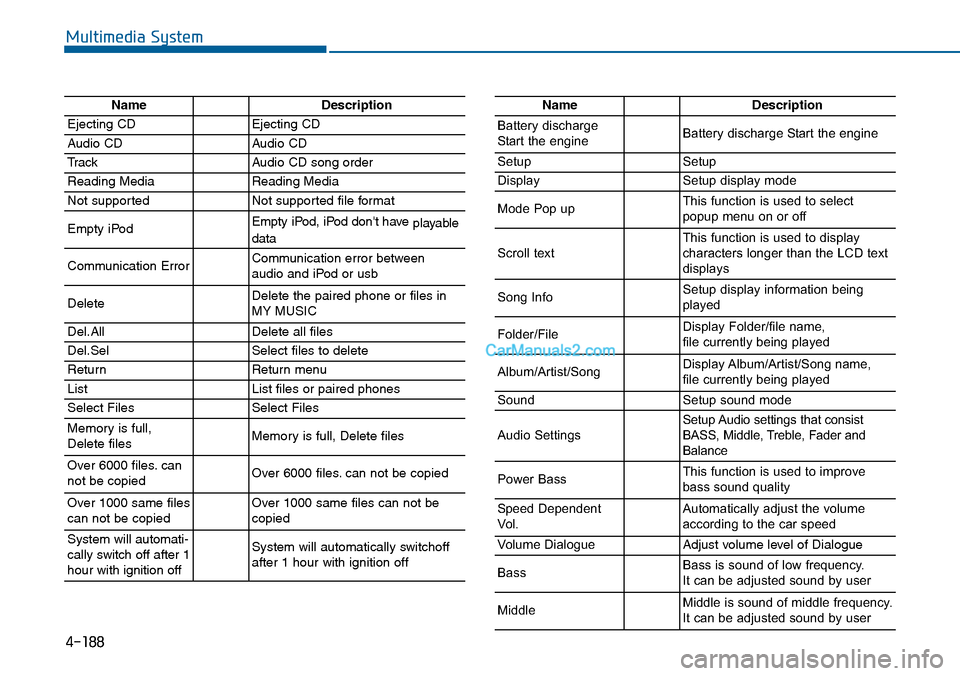
NameDescription
Ejecting CDEjecting CD
Audio CDAudio CD
TrackAudio CD song order
Reading MediaReading Media
Not supportedNot supported file format
Empty iPodEmpty iPod, iPod don't have playabledata
Communication ErrorCommunication error between audio and iPod or usb
DeleteDelete the paired phone or files in MY MUSIC
Del.AllDelete all files
Del.SelSelect files to delete
ReturnReturn menu
ListList files or paired phones
Select FilesSelect Files
Memory is full,Delete files Memory is full, Delete files
Over 6000 files. cannot be copied Over 6000 files. can not be copied
Over 1000 same filescan not be copied Over 1000 same files can not becopied
System will automati-cally switch off after 1hour with ignition off
System will automatically switchoffafter 1 hour with ignition off
NameDescription
Battery dischargeStart the engineBattery discharge Start the engine
SetupSetup
DisplaySetup display mode
Mode Pop upThis function is used to selectpopup menu on or off
Scroll textThis function is used to display characters longer than the LCD textdisplays
Song InfoSetup display information beingplayed
Folder/FileDisplay Folder/file name, file currently being played
Album/Artist/SongDisplay Album/Artist/Song name, file currently being played
SoundSetup sound mode
Audio SettingsSetup Audio settings that consistBASS, Middle, Treble, Fader andBalance
Power BassThis function is used to improvebass sound quality
Speed DependentVo l .Automatically adjust the volume according to the car speed
Vo l u m e D i a l o g u eAdjust volume level of Dialogue
BassBass is sound of low frequency. It can be adjusted sound by user
MiddleMiddle is sound of middle frequency. It can be adjusted sound by user
Page 455 of 665
5-6
Driving your vehicle
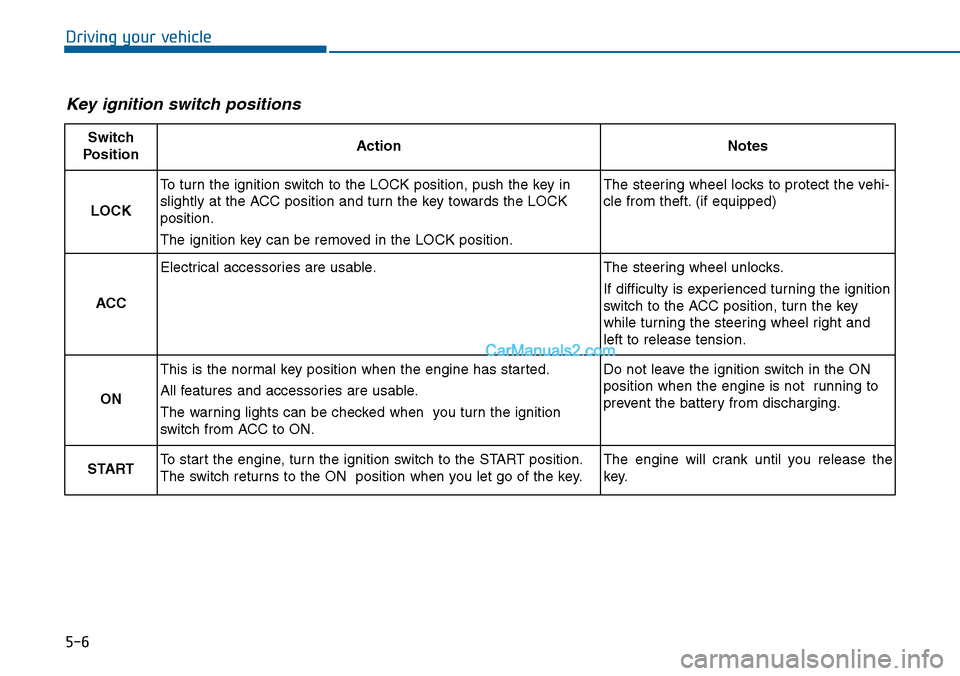
Key ignition switch positions
Switch
PositionActionNotes
LOCK
To turn the ignition switch to the LOCK position, push the key in
slightly at the ACC position and turn the key towards the LOCK
position.
The ignition key can be removed in the LOCK position.
The steering wheel locks to protect the vehi-
cle from theft. (if equipped)
ACC
Electrical accessories are usable.The steering wheel unlocks.
If difficulty is experienced turning the ignition
switch to the ACC position, tur n the key
while turning the steering wheel right and
left to release tension.
ON
This is the normal key position when the engine has started.
All features and accessories are usable.
The warning lights can be checked when you turn the ignition
switch from ACC to ON.
Do not leave the ignition switch in the ON
position when the engine is not running to
prevent the battery from discharging.
STARTTo start the engine, turn the ignition switch to the START position.
The switch returns to the ON position when you let go of the key.
The engine will crank until you release the
key.
Page 459 of 665
5-10
Driving your vehicle
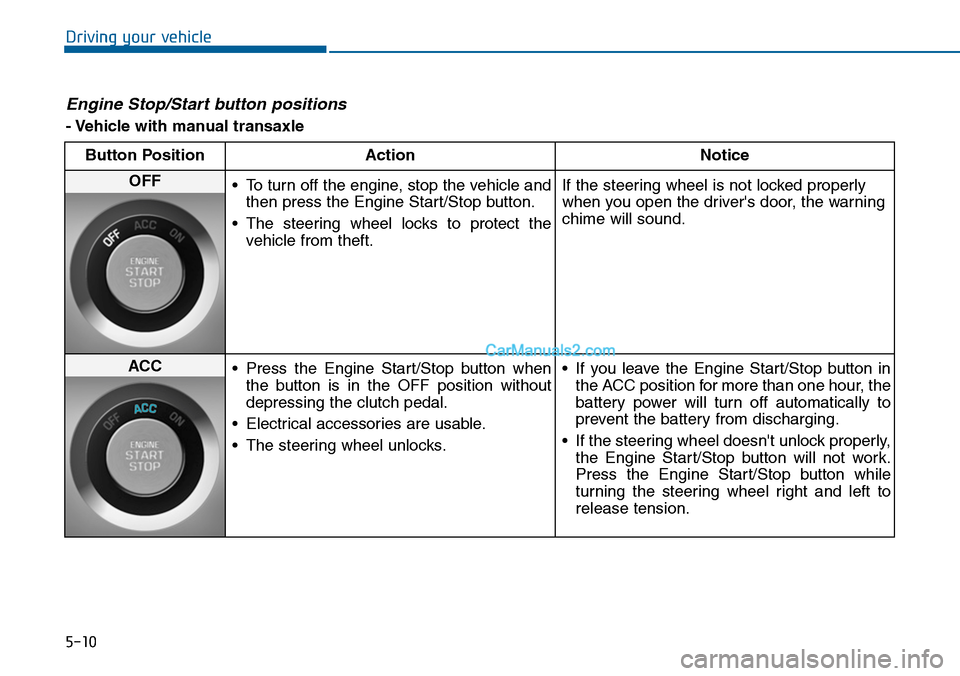
Engine Stop/Start button positions
- Vehicle with manual transaxle
Button Position Action Notice
OFF•To turn off the engine, stop the vehicle and
then press the Engine Start/Stop button.
•The steering wheel locks to protect the
vehicle from theft.
If the steering wheel is not locked properly
when you open the driver's door, the warning
chime will sound.
ACC•Press the Engine Start/Stop button when
the button is in the OFF position without
depressing the clutch pedal.
•Electrical accessories are usable.
•The steering wheel unlocks.
•If you leave the Engine Start/Stop button in
the ACC position for more than one hour, the
battery power will turn off automatically to
prevent the battery from discharging.
•If the steering wheel doesn't unlock properly,
the Engine Start/Stop button will not work.
Press the Engine Start/Stop button while
turning the steering wheel right and left to
release tension.
Page 460 of 665
5-11
Driving your vehicle
5
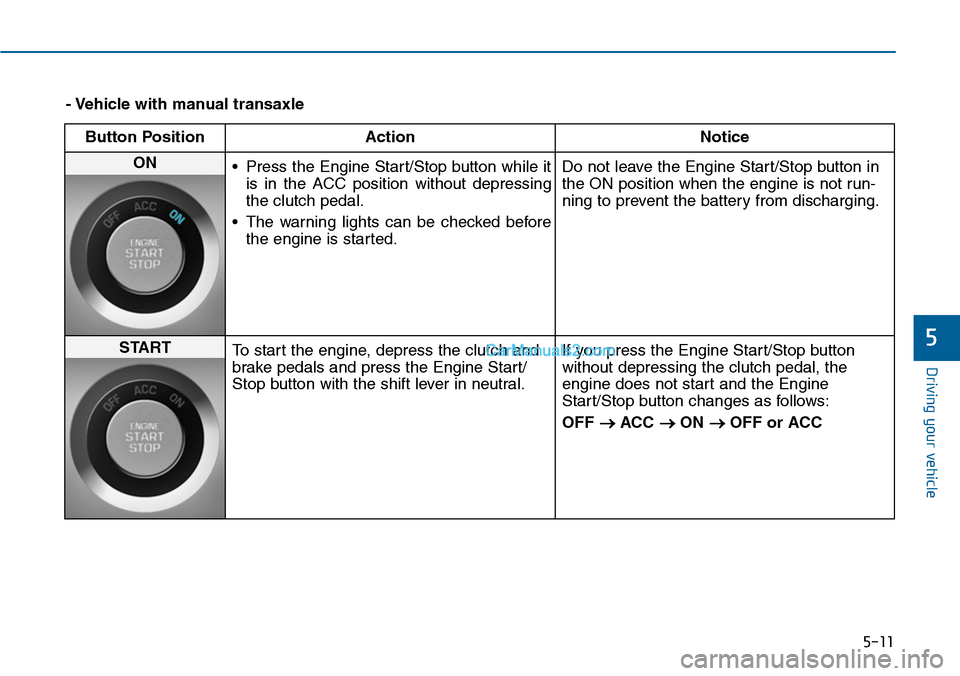
- Vehicle with manual transaxle
Button Position Action Notice
ON •Press the Engine Start/Stop button while it
is in the ACC position without depressing
the clutch pedal.
•The warning lights can be checked before
the engine is started.
Do not leave the Engine Start/Stop button in
the ON position when the engine is not run-
ning to prevent the battery from discharging.
STARTTo start the engine, depress the clutch and
brake pedals and press the Engine Start/
Stop button with the shift lever in neutral.
If you press the Engine Start/Stop button
without depressing the clutch pedal, the
engine does not start and the Engine
Start/Stop button changes as follows:
OFF →ACC →ON →OFF or ACC
Page 461 of 665
5-12
Driving your vehicle
Engine Stop/Start button positions
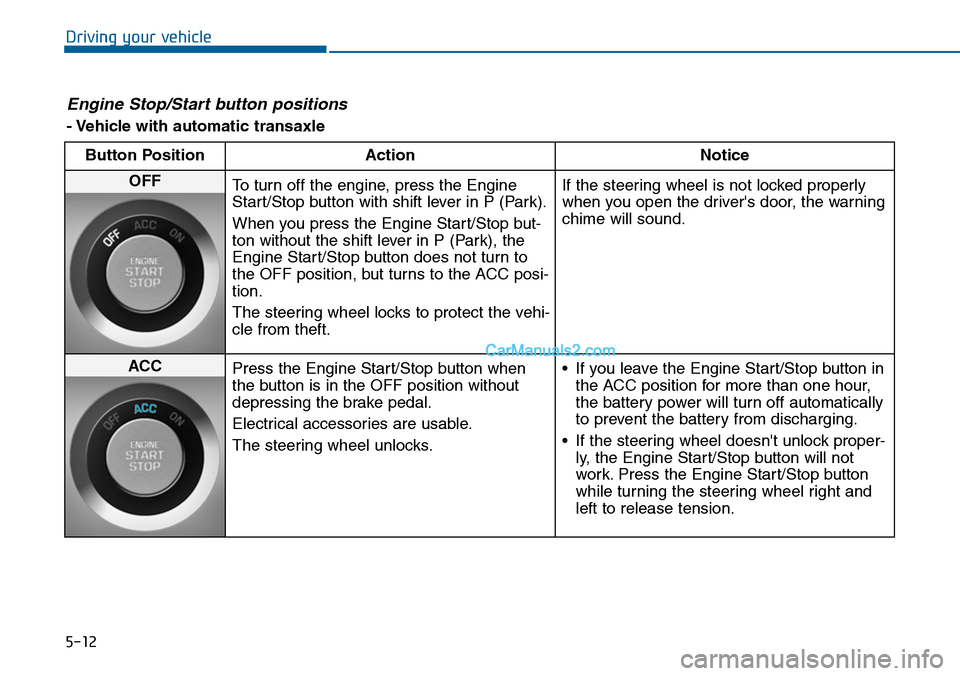
- Vehicle with automatic transaxle
Button Position Action Notice
OFFTo turn off the engine, press the Engine
Start/Stop button with shift lever in P (Park).
When you press the Engine Start/Stop but-
ton without the shift lever in P (Park), the
Engine Start/Stop button does not turn to
the OFF position, but turns to the ACC posi-
tion.
The steering wheel locks to protect the vehi-
cle from theft.
If the steering wheel is not locked properly
when you open the driver's door, the warning
chime will sound.
ACCPress the Engine Start/Stop button when
the button is in the OFF position without
depressing the brake pedal.
Electrical accessories are usable.
The steering wheel unlocks.
•If you leave the Engine Start/Stop button in
the ACC position for more than one hour,
the battery power will turn off automatically
to prevent the battery from discharging.
•If the steering wheel doesn't unlock proper-
ly, the Engine Start/Stop button will not
work. Press the Engine Start/Stop button
while turning the steering wheel right and
left to release tension.
Page 462 of 665
5-13
Driving your vehicle
5
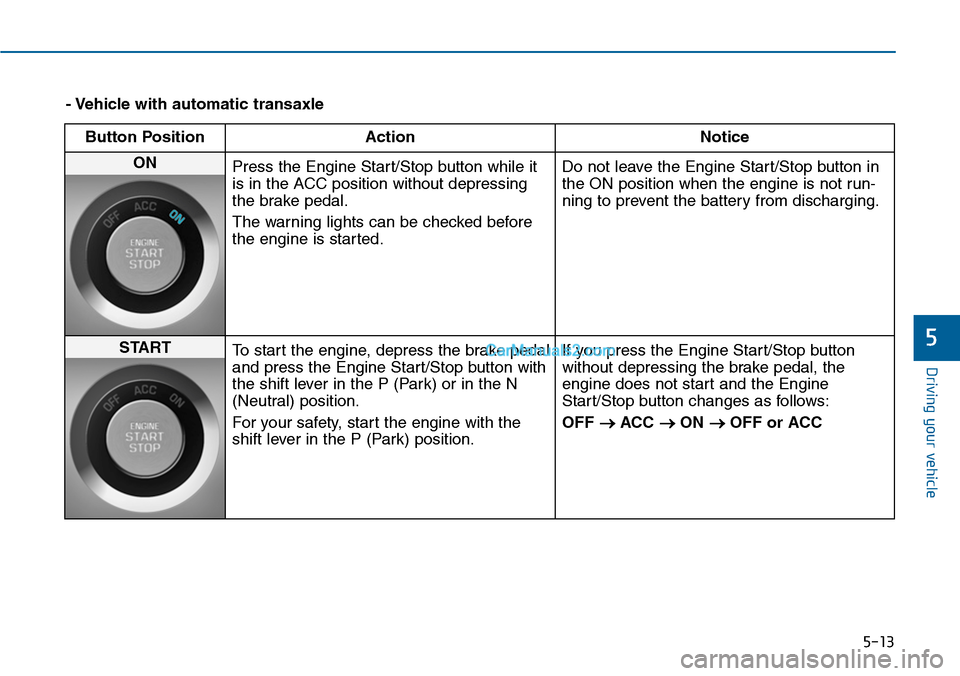
- Vehicle with automatic transaxle
Button Position Action Notice
ON Press the Engine Start/Stop button while it
is in the ACC position without depressing
the brake pedal.
The warning lights can be checked before
the engine is started.
Do not leave the Engine Start/Stop button in
the ON position when the engine is not run-
ning to prevent the battery from discharging.
STARTTo start the engine, depress the brake pedal
and press the Engine Start/Stop button with
the shift lever in the P (Park) or in the N
(Neutral) position.
For your safety, star t the engine with the
shift lever in the P (Park) position.
If you press the Engine Start/Stop button
without depressing the brake pedal, the
engine does not start and the Engine
Start/Stop button changes as follows:
OFF →ACC →ON →OFF or ACC
Page 465 of 665
5-16
Driving your vehicle
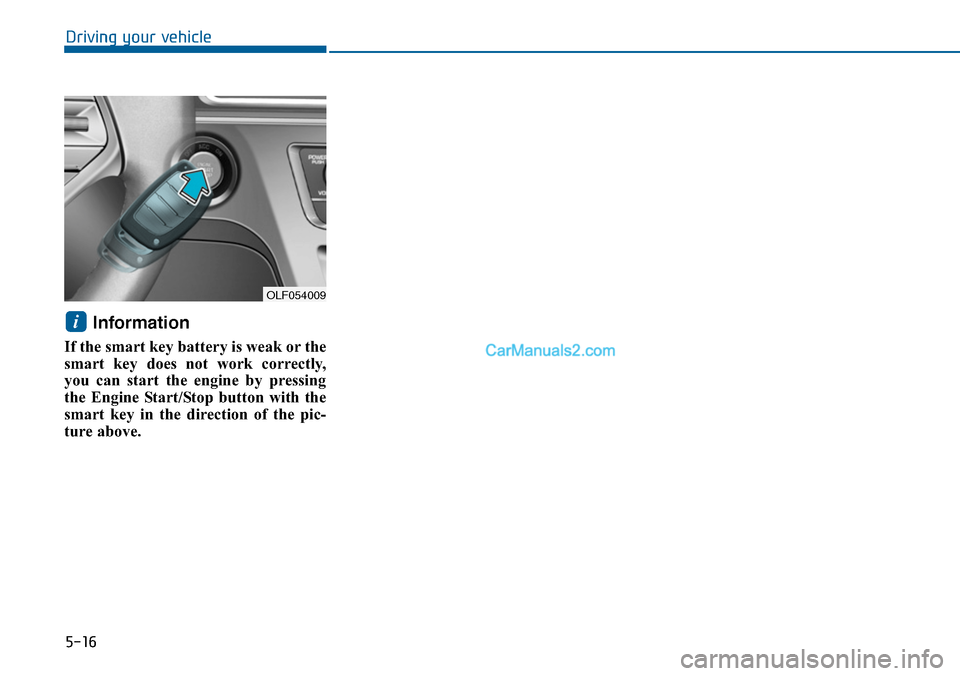
Information
If the smart key battery is weak or the
smart key does not work correctly,
you can start the engine by pressing
the Engine Start/Stop button with the
smart key in the direction of the pic-
ture above.
i
OLF054009
Page 493 of 665
5-44
Driving your vehicle
When you drive on a road having
poor traction, such as an icy road,
and apply your brakes continu-
ously, the ABS will be active con-
tinuously and the ABS warning
light ( ) may illuminate. Pull
your car over to a safe place and
turn the engine off.
Restart the engine. If the ABS
warning light is off, then your ABS
system is normal.
Otherwise, you may have a prob-
lem with your ABS system. We
recommend that you contact an
authorized HYUNDAI dealer as
soon as possible.
Information
When you jump start your vehicle
because of a drained battery, the ABS
warning light ( ) may turn on at the
same time. This happens because of
the low battery voltage. It does not
mean your ABS is malfunctioning.
Have the battery recharged before
driving the vehicle.
Electronic Stability Control
(ESC)
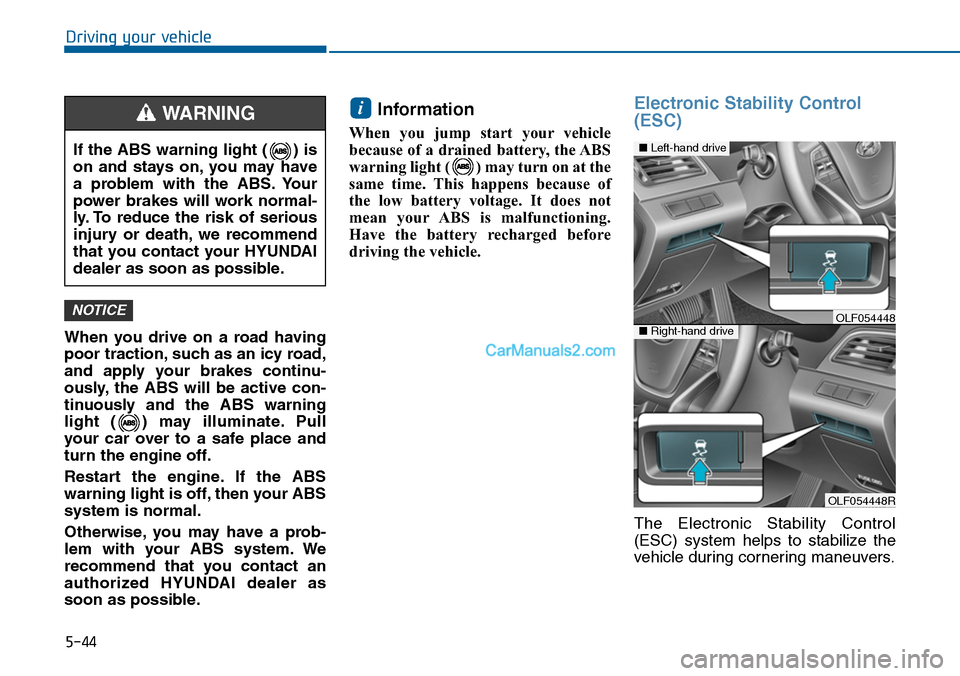
The Electronic Stability Control
(ESC) system helps to stabilize the
vehicle during cornering maneuvers.
i
NOTICE
If the ABS warning light ( ) is
on and stays on, you may have
a problem with the ABS. Your
power brakes will work normal-
ly. To reduce the risk of serious
injury or death, we recommend
that you contact your HYUNDAI
dealer as soon as possible.
WARNING
OLF054448R
■Left-hand drive
■Right-hand driveOLF054448
Page 523 of 665
5-74
Driving your vehicle
Check battery and cables
Winter puts additional burdens on
the battery system.Visually inspect
the battery and cables as
described in chapter 7.We recom-
mend that the level of charge in your
battery be checked by an authorized
HYUNDAI dealer.
Change to "winter weight" oil if
necessary
In some climates it is recommended
that a lower viscosity "winter weight"
oil be used during cold weather. See
section 8 for recommendations. If
you aren't sure what weight oil you
should use, we recommend that you
consult an authorized HYUNDAI
dealer.
Check spark plugs and ignition
system
Inspect your spark plugs as
described in section 7 and replace
them if necessary. Also check all
ignition wiring and components to be
sure they are not cracked, worn or
damaged in any way.
To keep locks from freezing
To k e e p t h e l o c k s f r o m f r e e z i n g ,
squirt an approved de-icer fluid or
glycerine into the key opening. If a
lock is covered with ice, squirt it with
an approved de-icing fluid to remove
the ice. If the lock is frozen internally,
you may be able to thaw it out by
using a heated key. Handle the heat-
ed key with care to avoid injury.
Use approved window washer
anti-freeze in system
To keep the water in the window
washer system from freezing, add an
approved window washer anti-freeze
solution in accordance with instruc-
tions on the container. Window wash-
er anti-freeze is available from an
authorized HYUNDAI dealer and
most auto parts outlets. Do not use
engine coolant or other types of anti-
freeze as these may damage the
paint finish.