Hyundai Sonata 2014 Owner's Guide
Sonata 2014
Hyundai
Hyundai
https://www.carmanualsonline.info/img/35/16805/w960_16805-0.png
Hyundai Sonata 2014 Owner's Guide
Page 417 of 665
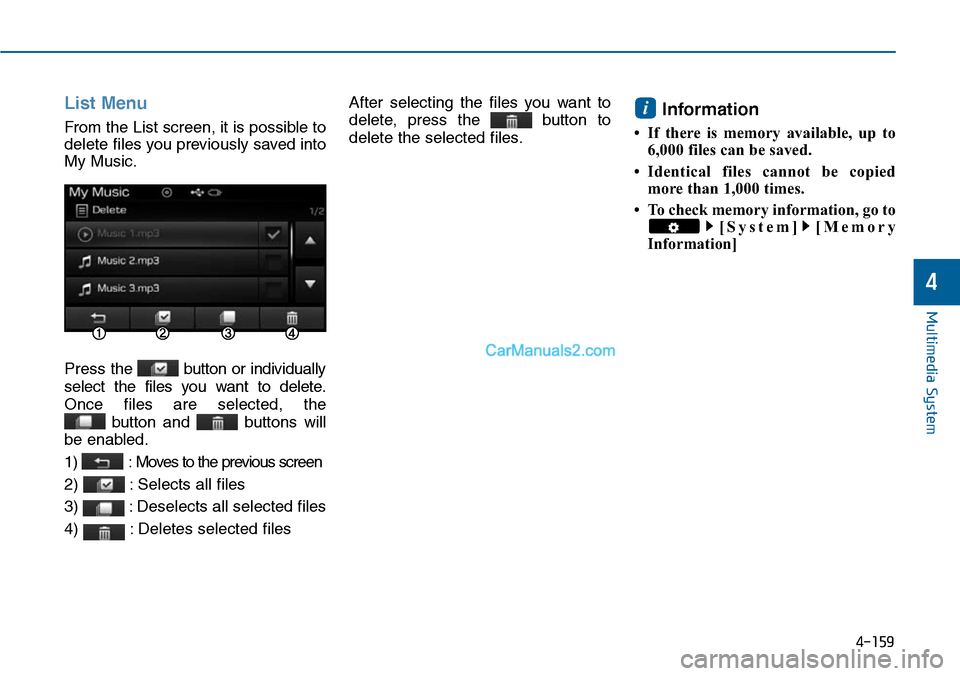
List Menu
From the List screen, it is possible to
delete files you previously saved into
My Music.
Press the button or individually
select the files you want to delete.
Once files are selected, the
button and buttons will
be enabled.
1) : Moves to the previous screen
2) : Selects all files
3) : Deselects all selected files
4) : Deletes selected files
After selecting the files you want to
delete, press the button to
delete the selected files.
Information
• If there is memory available, up to
6,000 files can be saved.
•Identical files cannot be copied
more than 1,000 times.
• To check memory information, go to
[System] [Memory
Information]
i
Multimedia System
4-159
4
Page 438 of 665
SETUP
(for Bluetooth®Wireless
Technology equipped model)
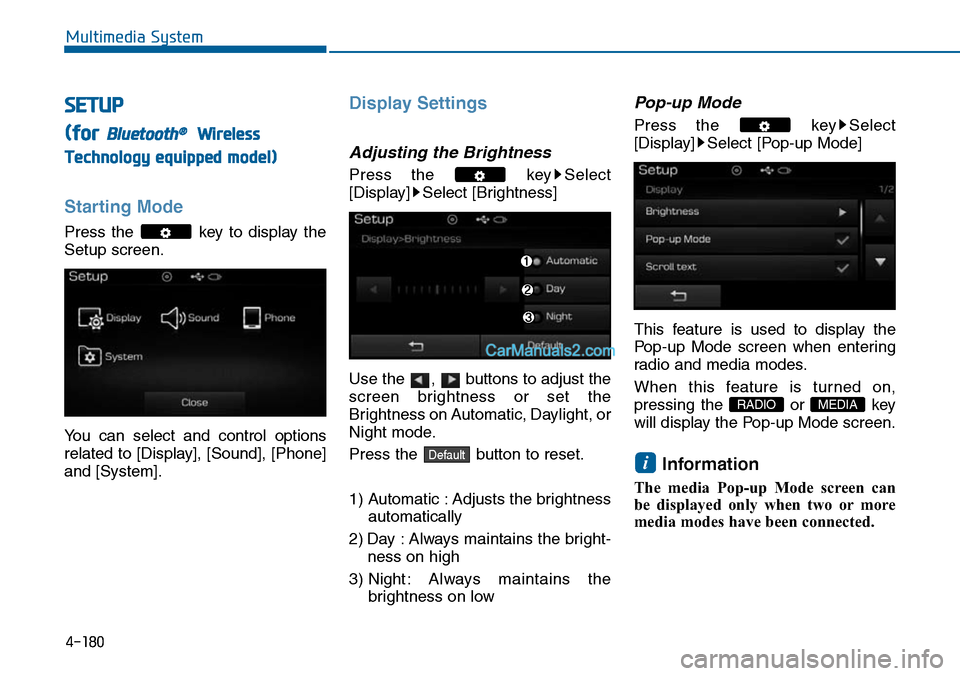
Starting Mode
Press the key to display the
Setup screen.
Yo u c a n s e l e c t a n d c o n t r o l o p t i o n s
related to [Display], [Sound], [Phone]
and [System].
Display Settings
Adjusting the Brightness
Press the key Select
[Display] Select [Brightness]
Use the , buttons to adjust the
screen brightness or set the
Brightness on Automatic, Daylight, or
Night mode.
Press the button to reset.
1) Automatic : Adjusts the brightness
automatically
2) Day : Always maintains the bright-
ness on high
3) Night : Always maintains the
brightness on low
Pop-up Mode
Press the key Select
[Display] Select [Pop-up Mode]
This feature is used to display the
Pop-up Mode screen when enter ing
radio and media modes.
When this feature is turned on,
pressing the or key
will display the Pop-up Mode screen.
Information
The media Pop-up Mode screen can
be displayed only when two or more
media modes have been connected.
i
MEDIA RADIO
Default
4-180
Multimedia System
Page 439 of 665
Scroll text
Press the key Select
[Display] Select [Scroll text]
This feature is used to scroll text dis-
played on the screen when it is too
long to be displayed at once.
When turned on, the text is repeat-
edly scrolled. When turned off, the
text is scrolled just once.
MP3 Information Display
Press the key Select
[Display] Select [Song Info]
This feature is used to change the
information displayed within USB
and MP3 CD modes.
1) Folder File : Displays file name
and folder name
2) Album Ar tist Song : Displays
album name/artist name/song
Sound Settings
Audio Settings
Press the key Select
[Sound] Select [Audio Setting]
Use the , , , buttons to
adjust the Fader/Balance settings.
Use the , buttons to adjust the
Bass/Middle/Treble settings.
Press the button to reset.Default
4-181
Multimedia System
4
Page 443 of 665
Outgoing Volume
Press the key Select
[Phone] Select [Outgoing Volume]
Use the , buttons to adjust the
outgoing volume level.
Turning Bluetooth System Off
Press the key Select
[Phone] Select [Bluetooth System
Off]
Once Bluetooth®Wireless Technology
is turned off, Bluetooth®Wireless
Te c h n o l o g y r e l a t e d f e a t u r e s w i l l n o t b e
supported within the audio system.
Information
To t u r n Bluetooth®Wireless
Technology back on, go to
[Phone] and press “Yes”.
System Setting
Memory Information
Press the key Select
[System] Select [Memory Information]
This feature displays information
related to system memory.
1) Using : Displays capacity currently
in use
2) Capacity : Displays total capacity
i
4-185
Multimedia System
4
![Hyundai Sonata 2014 Owners Guide Scroll text
Press the key Select
[Display] Select [Scroll text]
This feature is used to scroll text dis-
played on the screen when it is too
long to be displayed at once.
When turned on, t](/img/35/16805/w960_16805-438.png "Hyundai Sonata 2014 Owners Guide Scroll text
Press the key Select
[Display] Select [Scroll text]
This feature is used to scroll text dis-
played on the screen when it is too
long to be displayed at once.
When turned on, t")
![Hyundai Sonata 2014 Owners Guide Outgoing Volume
Press the key Select
[Phone] Select [Outgoing Volume]
Use the , buttons to adjust the
outgoing volume level.
Turning Bluetooth System Off
Press the key Select
[Phone] Select [Blu](/img/35/16805/w960_16805-442.png "Hyundai Sonata 2014 Owners Guide Outgoing Volume
Press the key Select
[Phone] Select [Outgoing Volume]
Use the , buttons to adjust the
outgoing volume level.
Turning Bluetooth System Off
Press the key Select
[Phone] Select [Blu")