mirror Hyundai Sonata 2014 Owner's Guide
[x] Cancel search | Manufacturer: HYUNDAI, Model Year: 2014, Model line: Sonata, Model: Hyundai Sonata 2014Pages: 665, PDF Size: 17.43 MB
Page 249 of 665
3-153
Convenient features of your vehicle
3
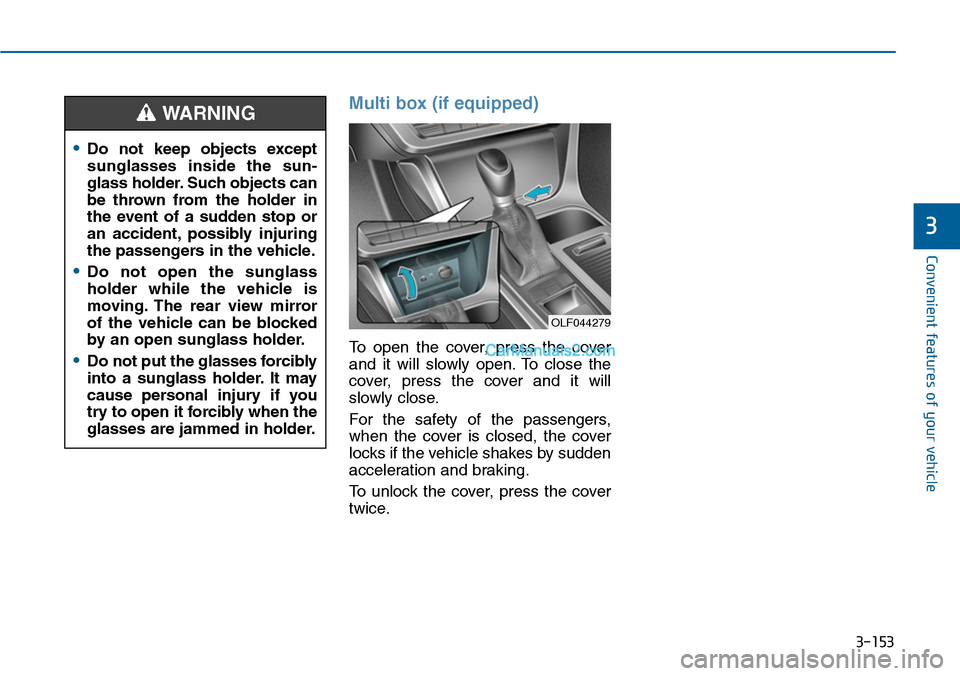
Multi box (if equipped)
To open the cover, press the cover
and it will slowly open. To close the
cover, press the cover and it will
slowly close.
For the safety of the passengers,
when the cover is closed, the cover
locks if the vehicle shakes by sudden
acceleration and braking.
To unlock the cover, press the cover
twice.
•Do not keep objects except
sunglasses inside the sun-
glass holder. Such objects can
be thrown from the holder in
the event of a sudden stop or
an accident, possibly injuring
the passengers in the vehicle.
•Do not open the sunglass
holder while the vehicle is
moving. The rear view mirror
of the vehicle can be blocked
by an open sunglass holder.
•Do not put the glasses forcibly
into a sunglass holder. It may
cause personal injury if you
try to open it forcibly when the
glasses are jammed in holder.
WARNING
OLF044279
Page 252 of 665
3-156
Convenient features of your vehicle
Sunvisor
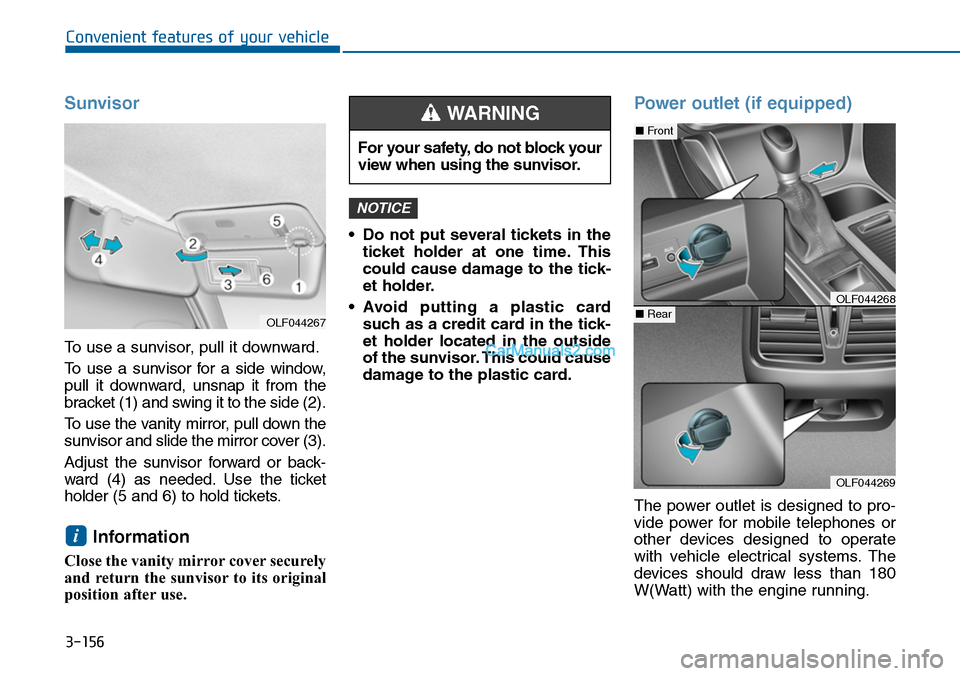
To use a sunvisor, pull it downward.
To u s e a s u n v i s o r f o r a s i d e w i n d o w ,
pull it downward, unsnap it from the
bracket (1) and swing it to the side (2).
To u s e t h e v a n i t y m i r r o r , p u l l d o w n t h e
sunvisor and slide the mirror cover (3).
Adjust the sunvisor forward or back-
ward (4) as needed. Use the ticket
holder (5 and 6) to hold tickets.
Information
Close the vanity mirror cover securely
and return the sunvisor to its original
position after use.
•Do not put several tickets in the
ticket holder at one time. This
could cause damage to the tick-
et holder.
•Avoid putting a plastic card
such as a credit card in the tick-
et holder located in the outside
of the sunvisor. This could cause
damage to the plastic card.
Power outlet (if equipped)
The power outlet is designed to pro-
vide power for mobile telephones or
other devices designed to operate
with vehicle electrical systems. The
devices should draw less than 180
W(Watt) with the engine running.
NOTICE
i
For your safety, do not block your
view when using the sunvisor.
WARNING
OLF044269
■Front
■RearOLF044268
OLF044267
Page 452 of 665
5-3
Driving your vehicle
5
Before entering the vehicle
•Be sure all windows, outside mir-
ror(s), and outside lights are clean
and unobstructed.
•Remove frost, snow, or ice.
•Visually check the tires for uneven
wear and damage.
•Check under the vehicle for any
sign of leaks.
•Be sure there are no obstacles
behind you if you intend to back up.
Before starting
•Make sure the hood, the trunk, and
the doors are securely closed and
locked.
•Adjust the position of the seat and
steering wheel.
•Adjust the inside and outside
rearview mirrors.
•Verify all the lights work.
•Fasten your seatbelt.Check that all
passengers have fastened their
seatbelts.
•Check the gauges and indicators in
the instrument panel and the mes-
sages on the instrument display
when the ignition switch is in the
ON position.
•Check that any items you are car-
rying are stored properly or fas-
tened down securely.
BEFORE DRIVING
To reduce the risk of SERIOUS
INJURY or DEATH, take the fol-
lowing precautions:
•ALWAYS wear your seat belt.
All passengers must be prop-
erly belted whenever the vehi-
cle is moving. For more infor-
mation, refer to “Seat Belts” in
chapter 2.
•Always drive defensively.
Assume other drivers or
pedestrians may be careless
and make mistakes.
•Stay focused on the task of
driving. Driver distraction can
cause accidents.
•Leave plenty of space
between you and the vehicle
in front of you.
WARNING
Page 510 of 665
5-61
Driving your vehicle
5
BSD (Blind Spot Detection) /
LCA (Lane Change Assist)
Operating conditions
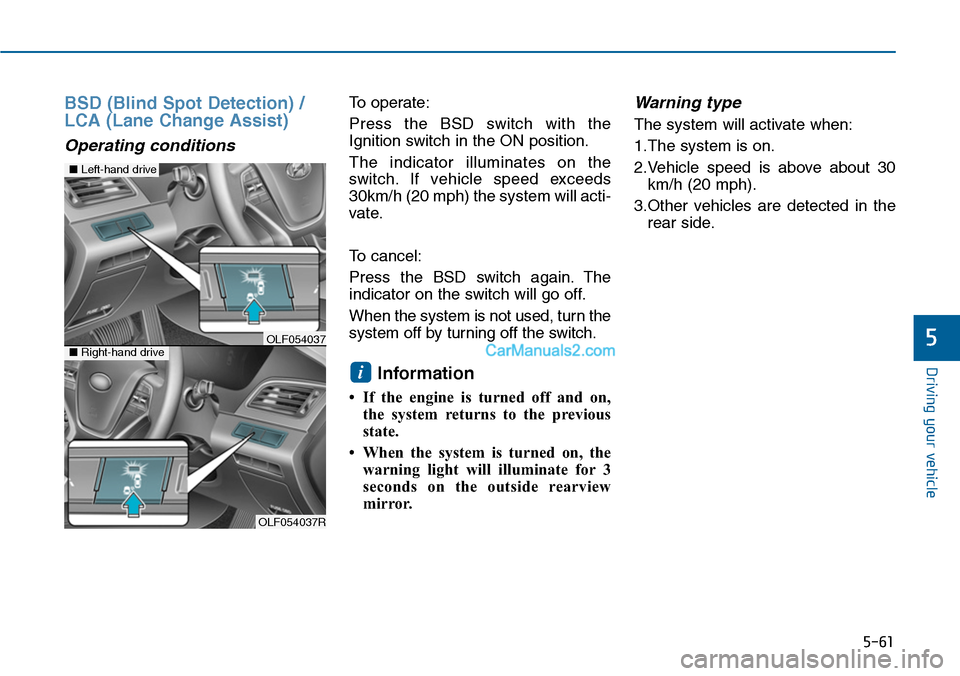
To operate:
Press the BSD switch with the
Ignition switch in the ON position.
The indicator illuminates on the
switch. If vehicle speed exceeds
30km/h (20 mph) the system will acti-
vate.
To cancel:
Press the BSD switch again. The
indicator on the switch will go off.
When the system is not used, turn the
system off by turning off the switch.
Information
• If the engine is turned off and on,
the system returns to the previous
state.
• When the system is turned on, the
warning light will illuminate for 3
seconds on the outside rearview
mirror.
Warning type
The system will activate when:
1.The system is on.
2.Vehicle speed is above about 30
km/h (20 mph).
3.Other vehicles are detected in the
rear side.
i
OLF054037R
■Left-hand drive
■Right-hand driveOLF054037
Page 511 of 665
5-62
Driving your vehicle
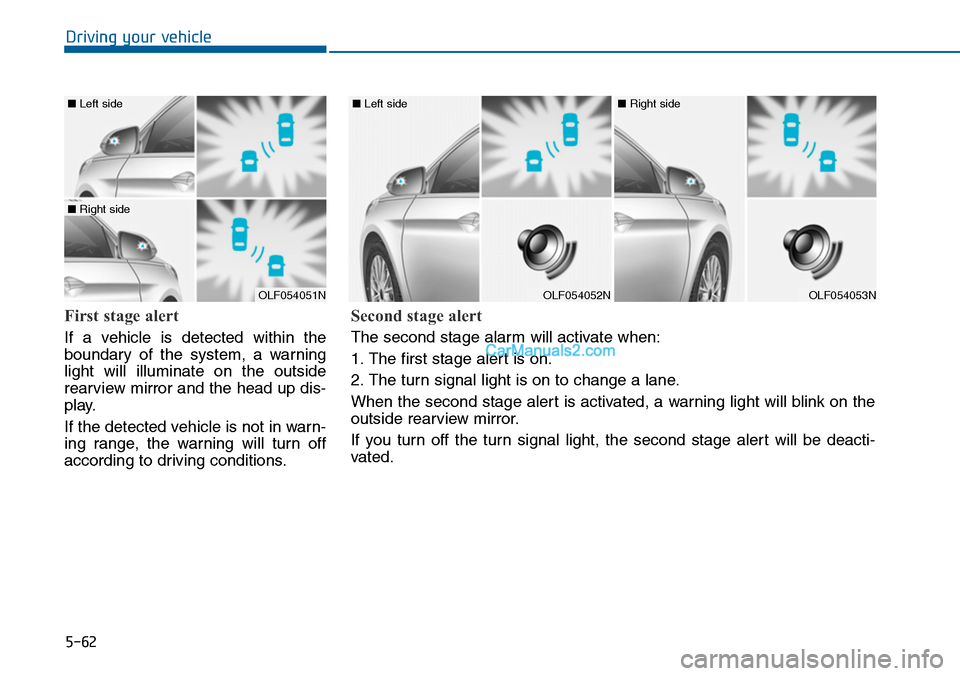
First stage alert
If a vehicle is detected within the
boundary of the system, a warning
light will illuminate on the outside
rearview mirror and the head up dis-
play.
If the detected vehicle is not in warn-
ing range, the warning will turn off
according to driving conditions.
OLF054051N
■ Left side
■ Right side
OLF054052N
■ Left side
OLF054053N
■ Right side
Second stage alert
The second stage alarm will activate when:
1. The first stage alert is on.
2. The turn signal light is on to change a lane.
When the second stage alert is activated, a warning light will blink on the
outside rearview mirror.
If you turn off the turn signal light, the second stage alert will be deacti-
vated.
Page 513 of 665
5-64
Driving your vehicle
RCTA (Rear Cross Traffic Alert)
Operating conditions
To operate:
Go to the User Settings Mode
(Driving Assist) and select RCTA
(Rear Cross Traffic Alert) on the LCD
display (For more details, refer to
"LCD Display" in chapter 3.).The
system will turn on and standby to
activate. The system will activate
when vehicle speed is below 10km/h
(6.2mph) with the shift lever in R
(Reverse).
Information
The RCTA (Rear Cross Traffic Alert)
detecting range is about 0.5m ~ 20m.
A vehicle will be detected if the vehicle
speed is 4km/h ~ 36km/h within the
detecting range. However, the detect-
ing range may change under different
conditions. Always pay attention to
the surroundings.
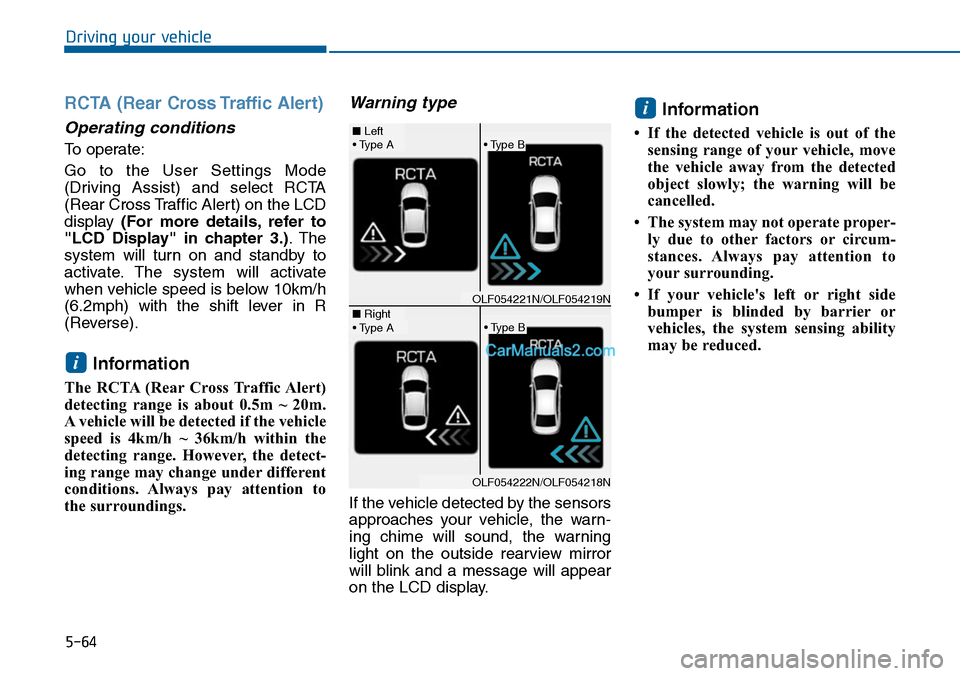
Warning type
If the vehicle detected by the sensors
approaches your vehicle, the warn-
ing chime will sound, the warning
light on the outside rearview mirror
will blink and a message will appear
on the LCD display.
Information
• If the detected vehicle is out of the
sensing range of your vehicle, move
the vehicle away from the detected
object slowly; the warning will be
cancelled.
• The system may not operate proper-
ly due to other factors or circum-
stances. Always pay attention to
your surrounding.
• If your vehicle's left or right side
bumper is blinded by barrier or
vehicles, the system sensing ability
may be reduced.
i
i
• Type A■ Left
■ Right
• Type B
• Type A• Type B
OLF054221N/OLF054219N
OLF054222N/OLF054218N
Page 514 of 665
5-65
Driving your vehicle
5
•The system may not work prop-
erly if the bumper has been
replaced or if repair work has
been done near the sensor.
•The detection area differs
according to the roads width. If
the road is narrow the system
may detect other vehicles in the
next lane. In addition, if the road
is very wide the system may not
detect other vehicles.
•The system may turn off due to
strong electromagnetic waves.
NOTICE
•The warning light on the out-
side rearview mirror will illu-
minate whenever a vehicle is
detected at the rear side by
the system.
To a vo i d a c c i d e n t s , d o n o t
focus only on the warning
light and neglect to see the
surrounding of the vehicle.
•Drive safely even though the
vehicle is equipped with a
Blind Spot Detection System
(BSD) and Rear Cross Traffic
Alert (RCTA). Do not solely
rely on the system but check
your surrounding before
changing lanes or backing the
vehicle up.
The system may not alert the
driver in some conditions so
always check the surround-
ings while driving.
(Continued)
(Continued)
•The Blind Spot Detection
System (BSD) and Rear Cross
Traffic Alert (RCTA) are not a
substitute for proper and safe
driving practices. Always
drive safely and use caution
when changing lanes or back-
ing the vehicles up. The Blind
Spot Detection System (BSD)
may not detect every object
alongside the vehicle.
WARNING
Page 515 of 665
5-66
Driving your vehicle
Non-operating condition
Outside rearview mirror may not
alert the driver when:
- The outside rearview mirror hous-
ing is damaged or covered with
debris.
- The window is covered with debris.
- The windows are severely tinted.
DRIVER'S ATTENTION
The driver must be cautious in the
below situations for the system
may not detect other vehicles or
objects in certain circumstances.
- Curved roads, tollgates, etc.
- The surrounding of the sensor is
polluted with rain, snow, mud,
etc
- The rear bumper near the sensor
is covered or hidden with a for-
eign matter such as a sticker,
bumper guard, bicycle stand etc.
- The rear bumper is damaged or
the sensor is out of place.
- The height of the vehicle is
altered such as when the trunk is
loaded with heavy objects, or
there is low tire pressure etc.
- Bad weather such as heavy rain
or snow.
- A fixed object is near such as a
guardrail, tunnel, human and ani-
mal etc.
(Continued)
(Continued)
- Metal substances are near the
vehicles such as in a construc-
tion area.
- A big vehicle is near such as a
bus or truck.
- A motorcycle or bicycle is near.
- A flat trailer is near.
- If the vehicle has started at the
same time as the vehicle next to
you and has accelerated.
- When the other vehicle passes
by at a higher rate of speed.
- When changing lanes.
- When going down or up a steep
road where the height of the lane
is different.
- When the other vehicle drives
very close.
- When a trailer or carrier is
installed.
- When the temperature of the rear
bumper is high.
- When the sensors are covered
by a wall or a pillar of a parking
lot.
(Continued)
Page 518 of 665
5-69
Driving your vehicle
5
If you are still stuck after rocking
the vehicle a few times, have the
vehicle pulled out by a tow vehicle
to avoid engine overheating, pos-
sible damage to the transaxle, and
tire damage. See “Towing” in
chapter 6.
To p r e v e n t d a m a g e t o t h e
transaxle, turn OFF the ESC prior
to rocking the vehicle.
Smooth cornering
Avoid braking or gear changing in
corners, especially when roads are
wet. Ideally, corners should always
be taken under gentle acceleration.
Driving at night
Night driving presents more hazards
than driving in the daylight. Here are
some important tips to remember:
•Slow down and keep more dis-
tance between you and other vehi-
cles, as it may be more difficult to
see at night, especially in areas
where there may not be any street
lights.
•Adjust your mirrors to reduce the
glare from other driver's head-
lamps.
•Keep your headlamps clean and
properly aimed. Dirty or improperly
aimed headlamps will make it
much more difficult to see at night.
•Avoid staring directly at the head-
lamps of oncoming vehicles. You
could be temporarily blinded, and it
will take several seconds for your
eyes to readjust to the darkness.
NOTICE
Page 623 of 665
7-66
Maintenance
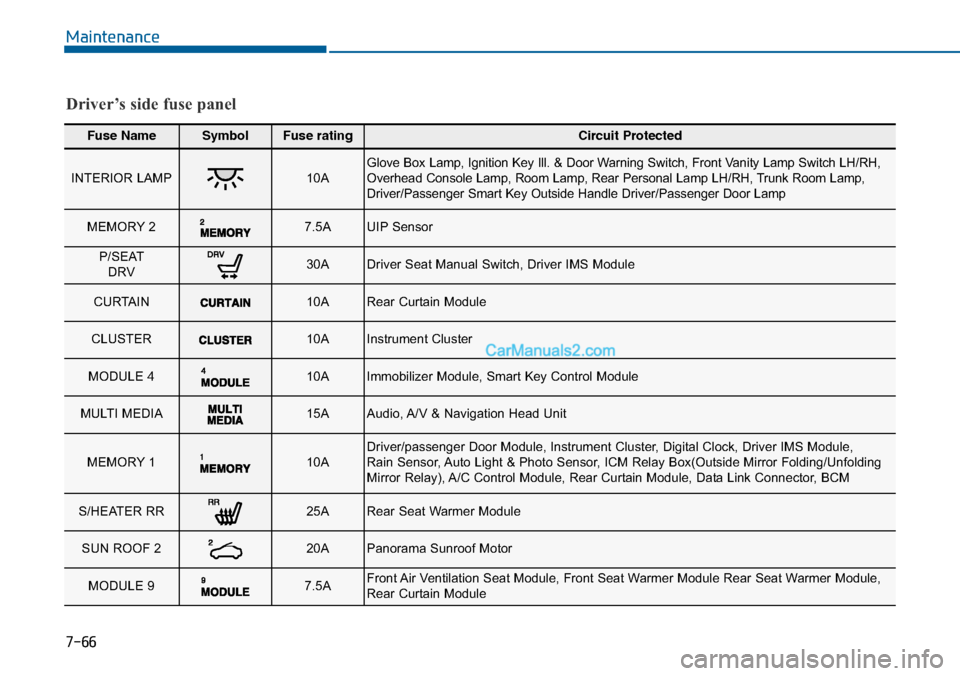
Fuse NameSymbolFuse ratingCircuit Protected
INTERIOR LAMP10AGlove Box Lamp, Ignition Key Ill. & Door Warning Switch, Front Vanity Lamp Switch LH/RH,Overhead Console Lamp, Room Lamp, Rear Personal Lamp LH/RH, Trunk Room Lamp,Driver/Passenger Smart Key Outside Handle Driver/Passenger Door Lamp
MEMORY 2 7.5AUIP Sensor
P/SEATDRV 30ADriver Seat Manual Switch, Driver IMS Module
CURTAIN 10ARear Curtain Module
CLUSTER 10AInstrument Cluster
MODULE 4 10AImmobilizer Module, Smart Key Control Module
MULTI MEDIA15AAudio, A/V & Navigation Head Unit
MEMORY 1 10ADriver/passenger Door Module, Instrument Cluster, Digital Clock, Driver IMS Module,Rain Sensor, Auto Light & Photo Sensor, ICM Relay Box(Outside Mirror Folding/UnfoldingMirror Relay), A/C Control Module, Rear Curtain Module, Data Link Connector, BCM
S/HEATER RR 25ARear Seat Warmer Module
SUN ROOF 2 20APanorama Sunroof Motor
MODULE 9 7.5AFront Air Ventilation Seat Module, Front Seat Warmer Module Rear Seat Warmer Module,Rear Curtain Module
Driver’s side fuse panel