mirror Hyundai Sonata 2014 User Guide
[x] Cancel search | Manufacturer: HYUNDAI, Model Year: 2014, Model line: Sonata, Model: Hyundai Sonata 2014Pages: 665, PDF Size: 17.43 MB
Page 125 of 665
3-29
Convenient features of your vehicle
3
MIRRORS
Inside rearview mirror
Before you start driving, adjust the
rearview mirror to the center on the
view through the rear window.
When cleaning the mirror, use a
paper towel or similar material
dampened with glass cleaner. Do
not spray glass cleaner directly on
the mirror as that may cause the
liquid cleaner to enter the mirror
housing.
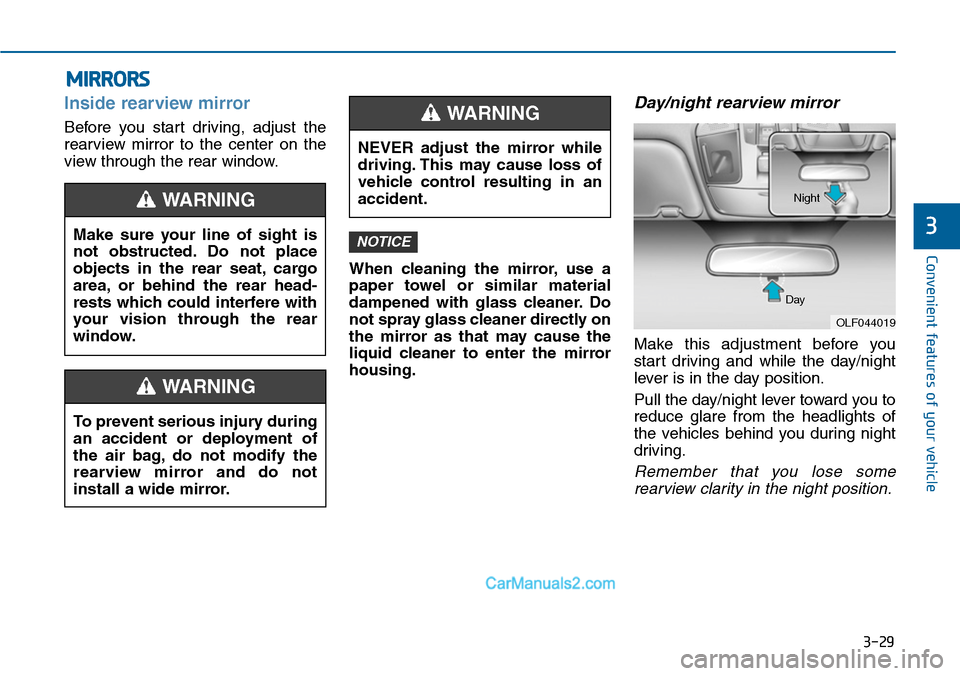
Day/night rearview mirror
Make this adjustment before you
start driving and while the day/night
lever is in the day position.
Pull the day/night lever toward you to
reduce glare from the headlights of
the vehicles behind you during night
driving.
Remember that you lose some
rearview clarity in the night position.
NOTICEMake sure your line of sight is
not obstructed. Do not place
objects in the rear seat, cargo
area, or behind the rear head-
rests which could interfere with
your vision through the rear
window.
WARNING
To prevent serious injury during
an accident or deployment of
the air bag, do not modify the
rearview mirror and do not
install a wide mirror.
WARNING
NEVER adjust the mirror while
driving. This may cause loss of
vehicle control resulting in an
accident.
WARNING
OLF044019
Day
Night
Page 126 of 665
3-30
Convenient features of your vehicle
Electric Chromic Mirror (ECM)
(if equipped)
The electric rearview mirror automati-
cally controls the glare from the head-
lamp of the car behind you in night-
time or low light driving conditions.
When the engine is running, the
glare is automatically controlled by
the sensor mounted in the rearview
mirror. The sensor detects the light
level around the vehicle, and auto-
matically adjusts to control the head-
lamp glare from vehicles behind you.
Whenever the shift lever is placed in
R (Reverse), the mirror will automat-
ically go to the brightest setting in
order to improve the drivers view
behind the vehicle.
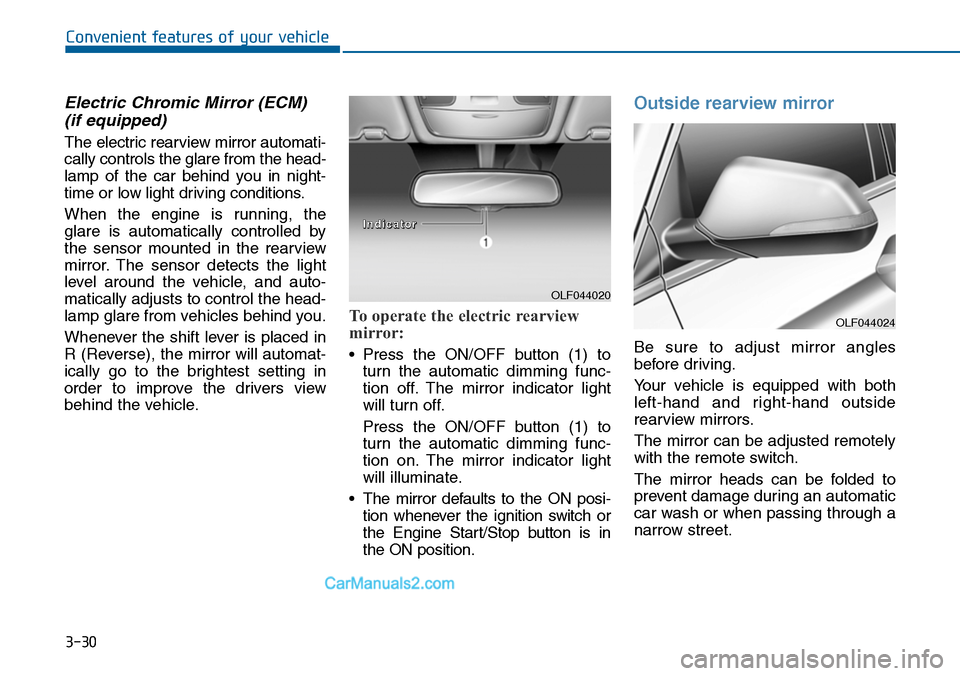
To operate the electric rearview
mirror:
•Press the ON/OFF button (1) to
turn the automatic dimming func-
tion off. The mirror indicator light
will turn off.
Press the ON/OFF button (1) to
turn the automatic dimming func-
tion on. The mirror indicator light
will illuminate.
•The mirror defaults to the ON posi-
tion whenever the ignition switch or
the Engine Start/Stop button is in
the ON position.
Outside rearview mirror
Be sure to adjust mirror angles
before driving.
Yo u r v e h i c l e i s e q u i p p e d w i t h b o t h
left-hand and right-hand outside
rearview mirrors.
The mirror can be adjusted remotely
with the remote switch.
The mirror heads can be folded to
prevent damage during an automatic
car wash or when passing through a
narrow street.
OLF044020
IInnddiiccaattoorr
OLF044024
Page 127 of 665
3-31
Convenient features of your vehicle
3
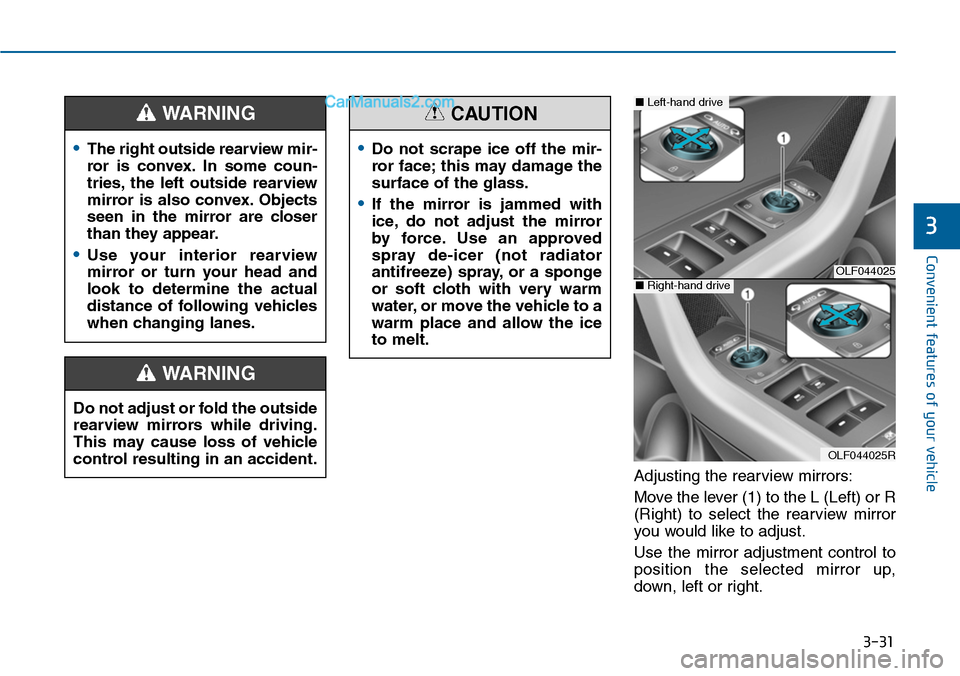
Adjusting the rearview mirrors:
Move the lever (1) to the L (Left) or R
(Right) to select the rearview mirror
you would like to adjust.
Use the mirror adjustment control to
position the selected mirror up,
down, left or right.
•The right outside rearview mir-
ror is convex. In some coun-
tries, the left outside rearview
mirror is also convex. Objects
seen in the mirror are closer
than they appear.
•Use your interior rearview
mirror or turn your head and
look to determine the actual
distance of following vehicles
when changing lanes.
WARNING
Do not adjust or fold the outside
rearview mirrors while driving.
This may cause loss of vehicle
control resulting in an accident.
WARNING
•Do not scrape ice off the mir-
ror face; this may damage the
surface of the glass.
•If the mirror is jammed with
ice, do not adjust the mirror
by force. Use an approved
spray de-icer (not radiator
antifreeze) spray, or a sponge
or soft cloth with very warm
water, or move the vehicle to a
warm place and allow the ice
to melt.
CAUTION
OLF044025
OLF044025R
■Left-hand drive
■Right-hand drive
Page 128 of 665
3-32
Convenient features of your vehicle
After adjustment, move the lever (1)
to the middle to prevent inadvertent
adjustment.
•The mirrors stop moving when
they reach the maximum adjust-
ing angles, but the motor contin-
ues to operate while the switch
is pressed. Do not press the
switch longer than necessary,
the motor may be damaged.
•Do not attempt to adjust the out-
side rearview mirror by hand or
the motor may be damaged.
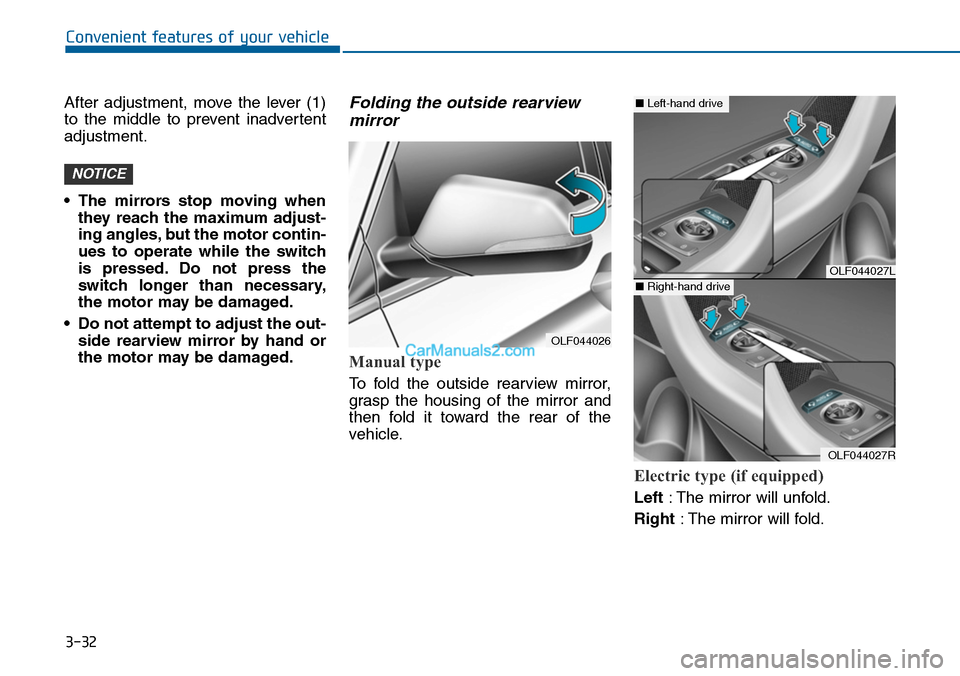
Folding the outside rearview
mirror
Manual type
To fold the outside rearview mirror,
grasp the housing of the mirror and
then fold it toward the rear of the
vehicle.
Electric type (if equipped)
Left:The mirror will unfold.
Right:The mirror will fold.
NOTICE
OLF044026
OLF044027L
OLF044027R
■Left-hand drive
■Right-hand drive
Page 129 of 665
3-33
Convenient features of your vehicle
3
Center (AUTO):
The mirror will fold or unfold auto-
matically as follows:
•Without smart key system
- The mirror will fold or unfold when
the door is locked or unlocked by
the transmitter.
•With smart key system
- The mirror will fold or unfold when
the door is locked or unlocked by
the smart key.
- The mirror will fold or unfold when
the door is locked or unlocked by
the button on the outside door
handle.
- The mirror will unfold when you
approach the vehicle (all doors
closed and locked) with a smart
key in possession. (if equipped)
The electric type outside rearview
mirror operates even though the
ignition switch is in the OFF posi-
tion. However, to prevent unnec-
essary battery discharge, do not
adjust the mirrors longer than
necessary while the engine is not
running.
Do not fold the electric type out-
side rearview mirror by hand. It
could cause motor failure.
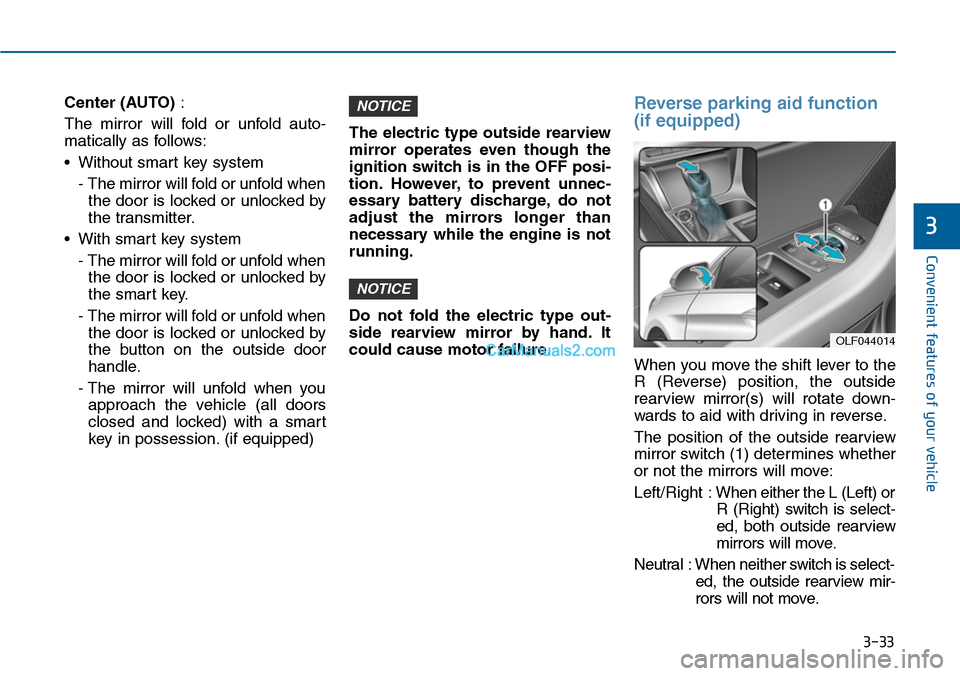
Reverse parking aid function
(if equipped)
When you move the shift lever to the
R (Reverse) position, the outside
rearview mirror(s) will rotate down-
wards to aid with driving in reverse.
The position of the outside rearview
mirror switch (1) determines whether
or not the mirrors will move:
Left/Right :When either the L (Left) or
R (Right) switch is select-
ed, both outside rearview
mirrors will move.
Neutral : When neither switch is select-
ed, the outside rearview mir-
rors will not move.
NOTICE
NOTICE
OLF044014
Page 130 of 665
3-34
Convenient features of your vehicle
The outside rearview mirrors will
automatically revert to their original
positions if any of the following occur:
The ignition switch is pressed to
either the LOCK/OFF position or the
ACC position.
•The shift lever is moved to any
position except R (Reverse).
•The remote control outside rearview
mirror switch is not selected.
Page 201 of 665
3-105
Convenient features of your vehicle
3
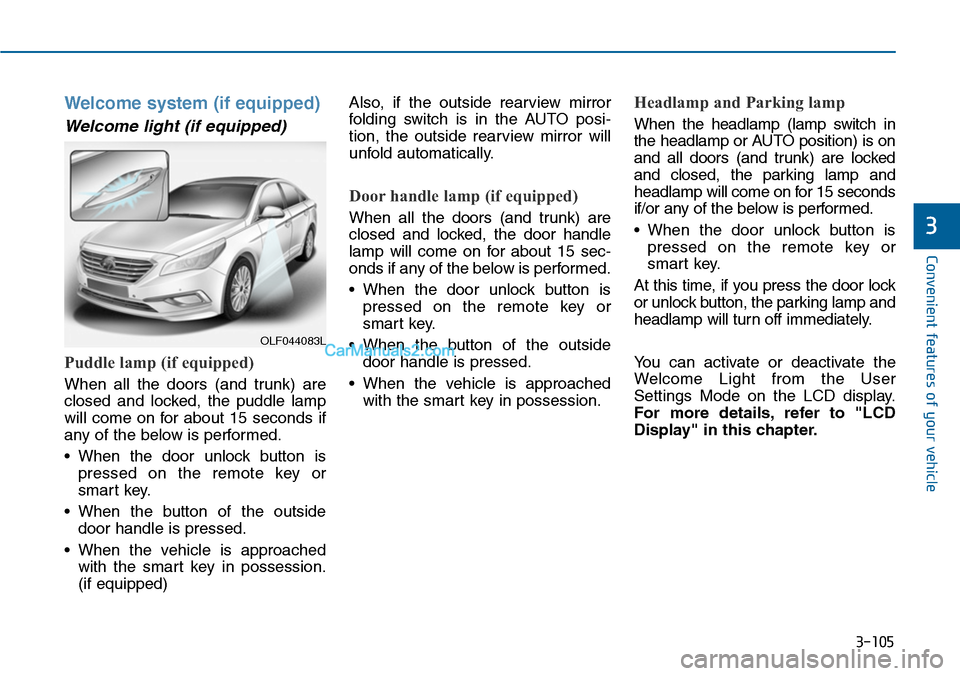
Welcome system (if equipped)
Welcome light (if equipped)
Puddle lamp (if equipped)
When all the doors (and trunk) are
closed and locked, the puddle lamp
will come on for about 15 seconds if
any of the below is performed.
•When the door unlock button is
pressed on the remote key or
smart key.
•When the button of the outside
door handle is pressed.
•When the vehicle is approached
with the smart key in possession.
(if equipped)
Also, if the outside rearview mirror
folding switch is in the AUTO posi-
tion, the outside rearview mirror will
unfold automatically.
Door handle lamp (if equipped)
When all the doors (and trunk) are
closed and locked, the door handle
lamp will come on for about 15 sec-
onds if any of the below is performed.
•When the door unlock button is
pressed on the remote key or
smart key.
•When the button of the outside
door handle is pressed.
•When the vehicle is approached
with the smart key in possession.
Headlamp and Parking lamp
When the headlamp (lamp switch in
the headlamp or AUTO position) is on
and all doors (and trunk) are locked
and closed, the parking lamp and
headlamp will come on for 15 seconds
if/or any of the below is performed.
•When the door unlock button is
pressed on the remote key or
smart key.
At this time, if you press the door lock
or unlock button, the parking lamp and
headlamp will turn off immediately.
Yo u c a n a c t i v a t e o r d e a c t i v a t e t h e
Welcome Light from the User
Settings Mode on the LCD display.
For more details, refer to "LCD
Display" in this chapter.
OLF044083L
Page 205 of 665
3-109
Convenient features of your vehicle
3
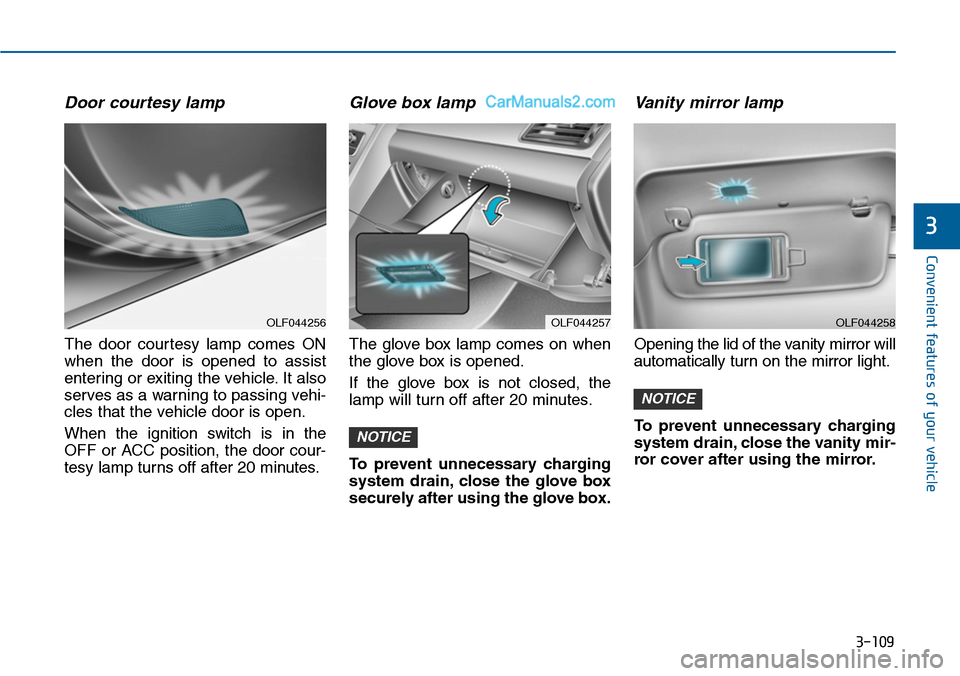
Door courtesy lamp
The door courtesy lamp comes ON
when the door is opened to assist
entering or exiting the vehicle. It also
serves as a warning to passing vehi-
cles that the vehicle door is open.
When the ignition switch is in the
OFF or ACC position, the door cour-
tesy lamp turns off after 20 minutes.
Glove box lamp
The glove box lamp comes on when
the glove box is opened.
If the glove box is not closed, the
lamp will turn off after 20 minutes.
To prevent unnecessary charging
system drain, close the glove box
securely after using the glove box.
Va n i t y m i r ro r l a m p
Opening the lid of the vanity mirror will
automatically turn on the mirror light.
To prevent unnecessary charging
system drain, close the vanity mir-
ror cover after using the mirror.
NOTICE
NOTICE
OLF044257OLF044256OLF044258
Page 219 of 665
3-123
Convenient features of your vehicle
3
Outside mirror defroster
(if equipped)
If your vehicle is equipped with the
outside mirror defrosters, they will
operate at the same time you turn on
the rear window defroster.
Front wiper deicer (if equipped)
If your vehicle is equipped with the
wiper deicer, it will operate at the
same time you turn on the rear win-
dow defroster.
Page 242 of 665
3-146
Convenient features of your vehicle
•For maximum defrosting, set the
temperature control to the extreme
right/hot position and the fan speed
control to the highest speed.
•If warm air to the floor is desired
while defrosting or defogging, set the
mode to the floor-defrost position.
•Before driving, clear all snow and
ice from the windshield, rear win-
dow, outside rear view mirrors, and
all side windows.
•Clear all snow and ice from the
hood and air inlet in the cowl grill to
improve heater and defroster effi-
ciency and to reduce the probabili-
ty of fogging up inside of the wind-
shield.
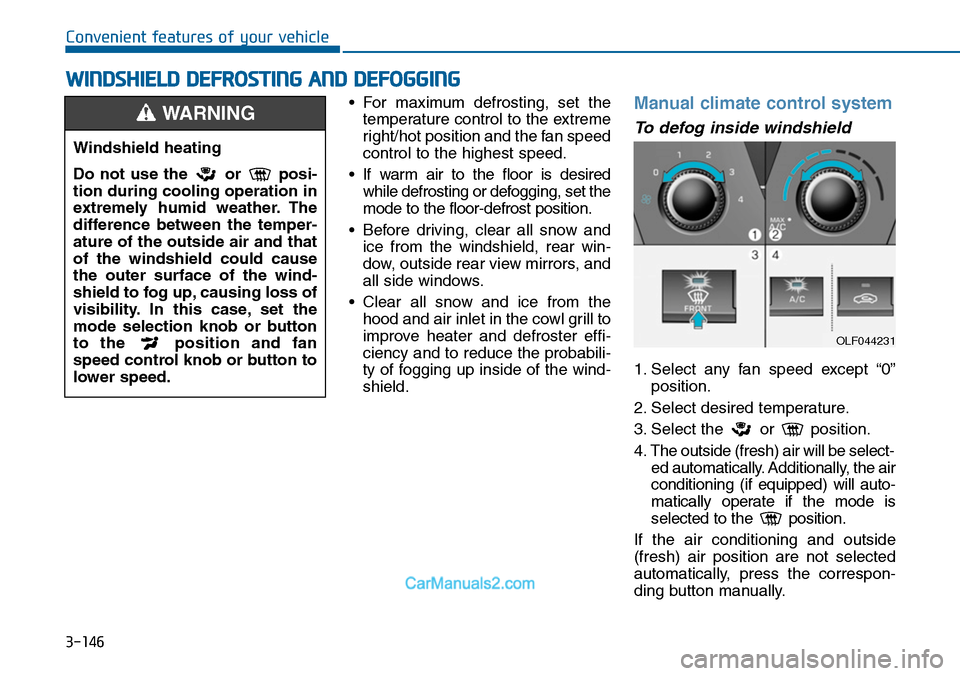
Manual climate control system
To defog inside windshield
1. Select any fan speed except “0”
position.
2. Select desired temperature.
3. Select the or position.
4. The outside (fresh) air will be select-
ed automatically. Additionally, the air
conditioning (if equipped) will auto-
matically operate if the mode is
selected to the position.
If the air conditioning and outside
(fresh) air position are not selected
automatically, press the correspon-
ding button manually.
WWINDSHIELD DEFROSTING AND DEFOGGING
Windshield heating
Do not use the or posi-
tion during cooling operation in
extremely humid weather. The
difference between the temper-
ature of the outside air and that
of the windshield could cause
the outer surface of the wind-
shield to fog up, causing loss of
visibility. In this case, set the
mode selection knob or button
to the position and fan
speed control knob or button to
lower speed.
WARNING
OLF044231