reset Hyundai Sonata 2014 Owner's Guide
[x] Cancel search | Manufacturer: HYUNDAI, Model Year: 2014, Model line: Sonata, Model: Hyundai Sonata 2014Pages: 665, PDF Size: 17.43 MB
Page 318 of 665
4-60
Multimedia System
RADIO MODE
Basic Mode Screen
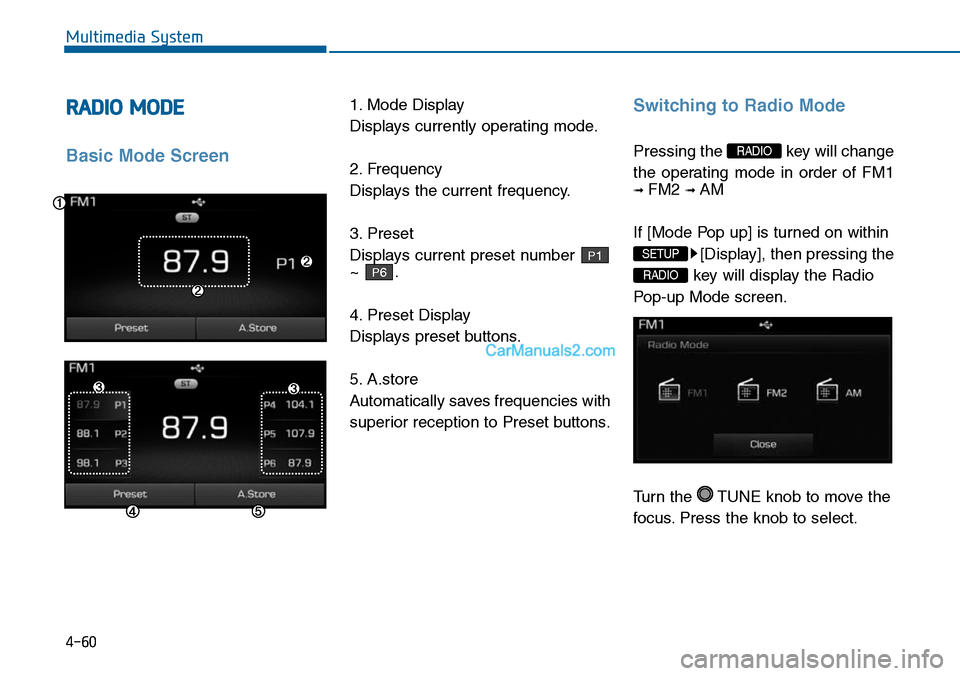
1. Mode Display
Displays currently operating mode.
2. Frequency
Displays the current frequency.
3. Preset
Displays current preset number
~ .
4. Preset Display
Displays preset buttons.
5. A.store
Automatically saves frequencies with
superior reception to Preset buttons.
Switching to Radio Mode
Pressing the key will change
the operating mode in order of FM1
➟ FM2 ➟ AM
If [Mode Pop up] is turned on within
[Display], then pressing the
key will display the Radio
Pop-up Mode screen.
Turn the TUNE knob to move the
focus. Press the knob to select.
RADIO
SETUP
RADIO
P6
P1
Page 319 of 665
4-61
Multimedia System
4
Searching Radio Frequencies
Using Seek
Press the key to play the
previous/next frequency.
Using TUNE
Turn the TUNE knob to select the
desired frequency.
• FM : Increases/decreased by
200kHz
• AM : Increases/decreased by
10kHz
Using Radio Mode
Selecting Presets/Saving Presets
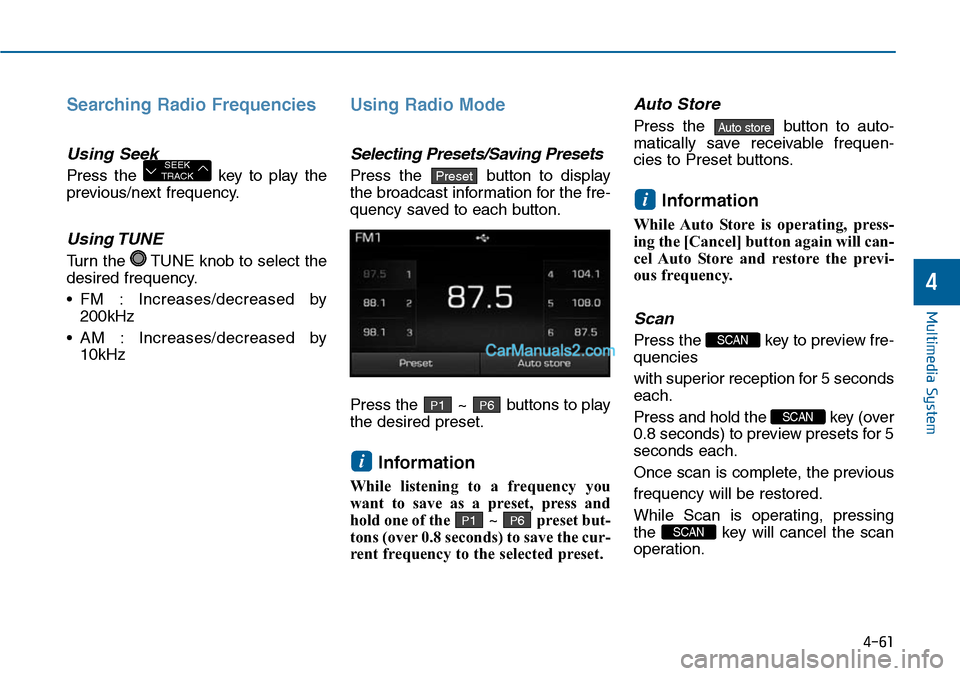
Press the button to display
the broadcast information for the fre-
quency saved to each button.
Press the ~ buttons to play
the desired preset.
Information
While listening to a frequency you
want to save as a preset, press and
hold one of the ~ preset but-
tons (over 0.8 seconds) to save the cur-
rent frequency to the selected preset.
Auto Store
Press the button to auto-
matically save receivable frequen-
cies to Preset buttons.
Information
While Auto Store is operating, press-
ing the [Cancel] button again will can-
cel Auto Store and restore the previ-
ous frequency.
Scan
Press the key to preview fre-
quencies
with superior reception for 5 seconds
each.
Press and hold the key (over
0.8 seconds) to preview presets for 5
seconds each.
Once scan is complete, the previous
frequency will be restored.
While Scan is operating, pressing
the key will cancel the scan
operation.
SCAN
SCAN
SCAN
i
Auto store
P6P1
i
P6P1
PresetSEEKTRACK
Page 360 of 665
4-102
Multimedia System
Command Function
More Help Provides guidance on commands that can beused anywhere in the system.
Help Provides guidance on commands that can beused within the current mode.
Call
Phone Provides guidance on Phone related com-mands. After saying this command, say “CallHistory”, “Phone book”, “Dial Number” to exe-cute corresponding functions.
Call History Displays the Call History screen.
Phone bookDisplays the phone bookscreen. After sayingthis command, say the name of a phone booksaved in the phone bookto automatically con-nect the call.
Dial Number Display the Dial number screen. After sayingthis command, you can say the number whatyou want to call.
Redial Connects the most recently called number.
Radio• When listening to the radio, displays the nextradio screen. (FM1➟FM2➟FMA ➟ AM ➟AMA)
• When listening to a different mode, displaysthe most recently played radio screen.
Command Function
FM• When currently listening to the FM radio,maintains the current state.
• When listening to a different mode, displaysthe most recently played FM screen.
FM1(FM One) Displays the FM1 screen.
FM2(FM Two) Displays the FM2 screen.
FMA Displays the FMA screen.
AM Displays the AM screen.
AMA Displays the AMA screen.
FM Preset 1~6 Plays the most recently played broadcastsaved in FM Preset 1~6.
AM Preset 1~6 Plays the broadcast saved in AM Preset 1~6.
FM 87.5~107.9 Plays the FM broadcast of the correspondingfrequency.
AM 530~1710 Plays the AM broadcast of the correspondingfrequency.
TA on Enable Traffic Announcement
TA off Disable Traffic Announcement
News on Enable RDS News feature
News off Disable RDS News feature
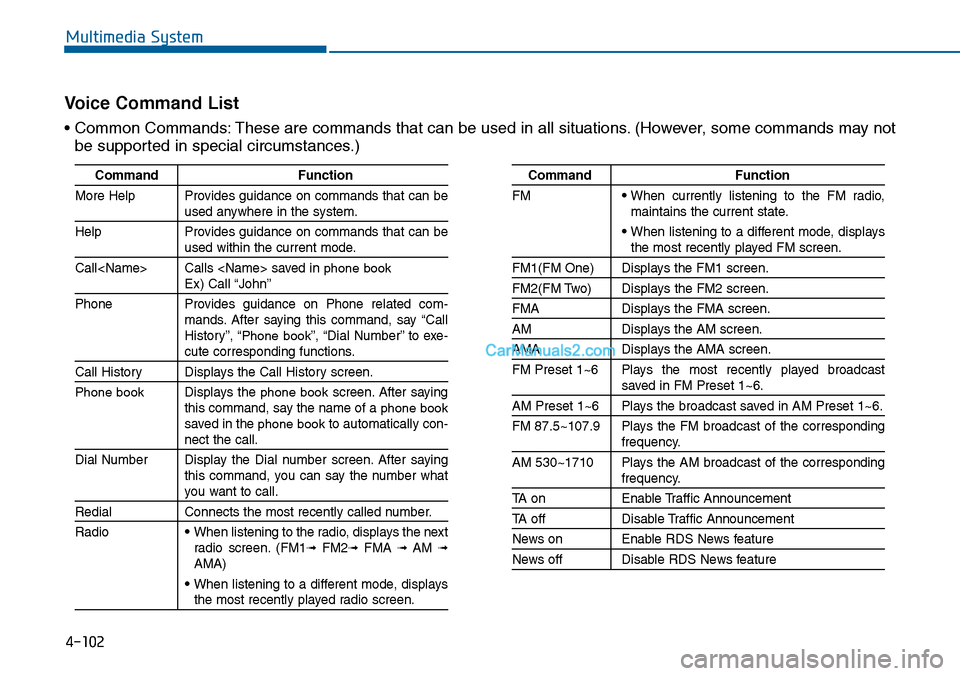
Vo i c e C o m m a n d L i s t
• Common Commands: These are commands that can be used in all situations. (However, some commands may not
be supported in special circumstances.)
Page 362 of 665
4-104
Multimedia System
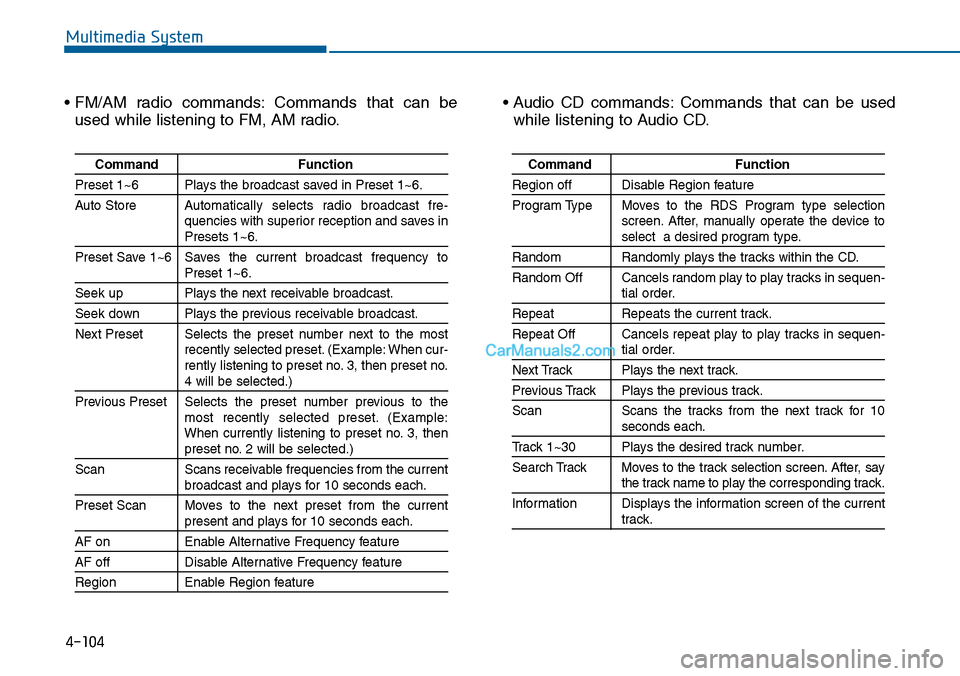
• FM/AM radio commands: Commands that can be
used while listening to FM, AM radio.
• Audio CD commands: Commands that can be used
while listening to Audio CD.
Command Function
Preset 1~6 Plays the broadcast saved in Preset 1~6.
Auto StoreAutomatically selects radio broadcast fre-quencies with superior reception and saves inPresets 1~6.
Preset Save 1~6 Saves the current broadcast frequency toPreset 1~6.
Seek up Plays the next receivable broadcast.
Seek down Plays the previous receivable broadcast.
Next Preset Selects the preset number next to the mostrecently selected preset. (Example: When cur-rently listening to preset no. 3, then preset no.4 will be selected.)
Previous Preset Selects the preset number previous to themost recently selected preset. (Example:When currently listening to preset no. 3, thenpreset no. 2 will be selected.)
Scan Scans receivable frequencies from the currentbroadcast and plays for 10 seconds each.
Preset Scan Moves to the next preset from the currentpresent and plays for 10 seconds each.
AF on Enable Alternative Frequency feature
AF off Disable Alternative Frequency feature
Region Enable Region feature
Command Function
Region off Disable Region feature
Program Type Moves to the RDS Program type selectionscreen. After, manually operate the device toselect a desired program type.
Random Randomly plays the tracks within the CD.
Random Off Cancels random play to play tracks in sequen-tial order.
Repeat Repeats the current track.
Repeat Off Cancels repeat play to play tracks in sequen-tial order.
Next Track Plays the next track.
Previous Track Plays the previous track.
Scan Scans the tracks from the next track for 10seconds each.
Track 1~30 Plays the desired track number.
Search Track Moves to the track selection screen. After, saythe track name to play the corresponding track.
Information Displays the information screen of the currenttrack.
Page 365 of 665
4-107
Multimedia System
4
SETUP
(for RDS, Bluetooth®Wireless
Technology equipped model)
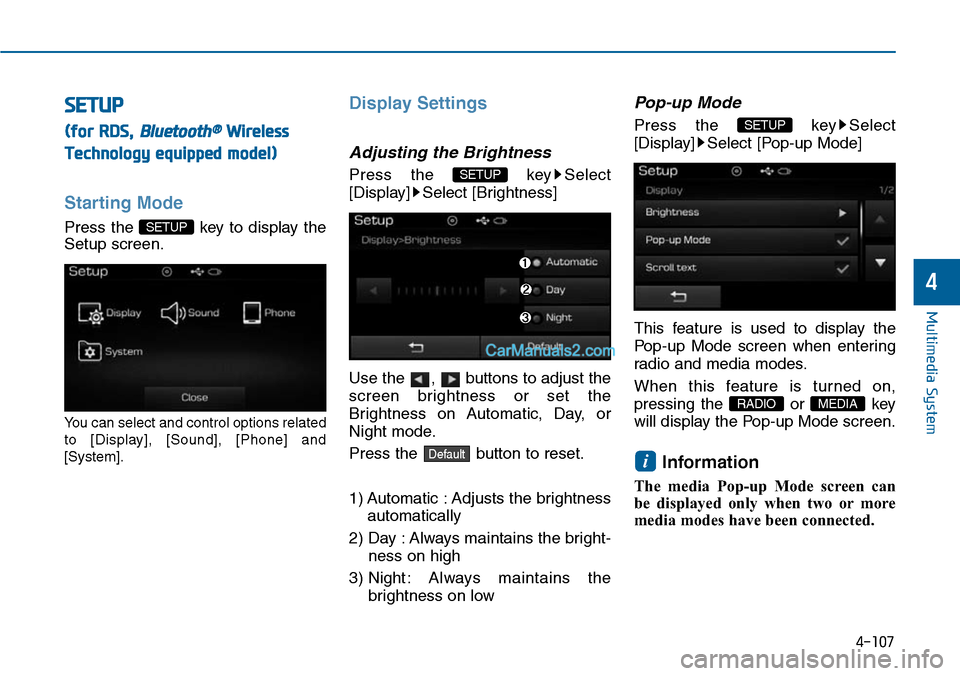
Starting Mode
Press the key to display the
Setup screen.
Yo u c a n s e l e c t a n d c o n t r o l o p t i o n s r e l a t e d
to [Display], [Sound], [Phone] and
[System].
Display Settings
Adjusting the Brightness
Press the key Select
[Display] Select [Brightness]
Use the , buttons to adjust the
screen brightness or set the
Brightness on Automatic, Day, or
Night mode.
Press the button to reset.
1) Automatic : Adjusts the brightness
automatically
2) Day : Always maintains the bright-
ness on high
3) Night : Always maintains the
brightness on low
Pop-up Mode
Press the key Select
[Display] Select [Pop-up Mode]
This feature is used to display the
Pop-up Mode screen when enter ing
radio and media modes.
When this feature is turned on,
pressing the or key
will display the Pop-up Mode screen.
Information
The media Pop-up Mode screen can
be displayed only when two or more
media modes have been connected.
i
MEDIA RADIO
SETUP
Default
SETUP
SETUP
Page 366 of 665
![Hyundai Sonata 2014 Owners Guide 4-108
Multimedia System
Scroll Text
Press the key Select
[Display] Select [Scroll text]
This feature is used to scroll text dis-
played on the screen when it is too
long to be displayed at on](/img/35/16805/w960_16805-365.png "Hyundai Sonata 2014 Owners Guide 4-108
Multimedia System
Scroll Text
Press the key Select
[Display] Select [Scroll text]
This feature is used to scroll text dis-
played on the screen when it is too
long to be displayed at on")
4-108
Multimedia System
Scroll Text
Press the key Select
[Display] Select [Scroll text]
This feature is used to scroll text dis-
played on the screen when it is too
long to be displayed at once.
When turned on, the text is repeat-
edly scrolled. When turned off, the
text is scrolled just once.
MP3 Information Display
Press the key Select
[Display] Select [Song Info]
This feature is used to change the
information displayed within USB
and MP3 CD modes.
1) Folder File : Displays file name
and folder name
2) Album Ar tist Song : Displays
album name/artist name/song
Sound Settings
Audio Settings
Press the key Select
[Sound] Select [Audio Setting]
Use the , , , buttons to
adjust the Fader/Balance settings.
Use the , buttons to adjust the
Bass/Middle/Treble settings.
Press the button to reset.Default
SETUP
SETUP SETUP
Page 372 of 665
4-114
Multimedia System
SETUP
(for Bluetooth®Wireless
Technology equipped model)
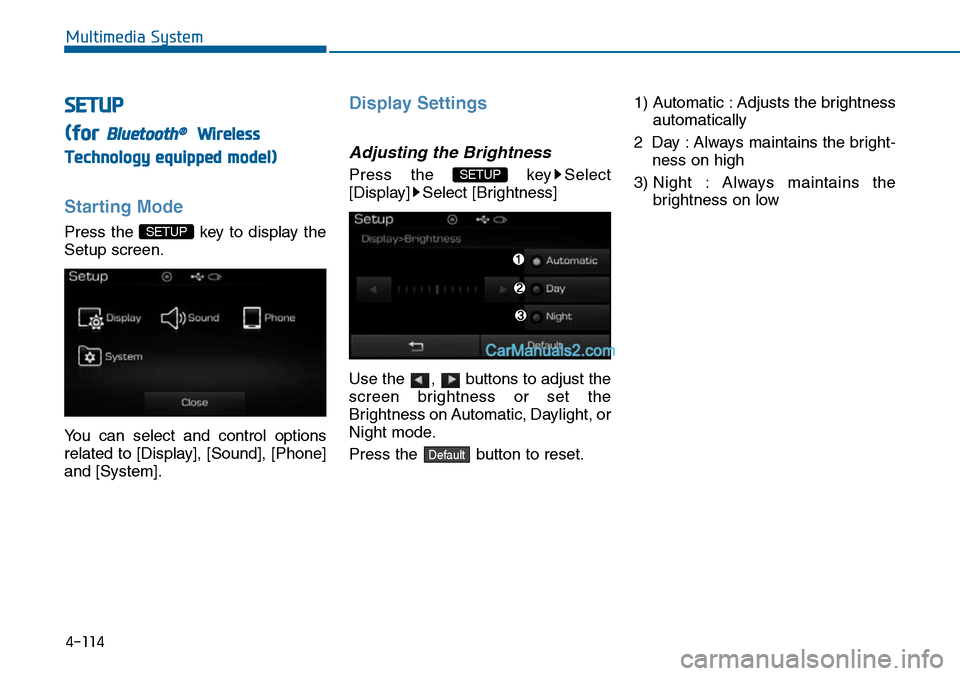
Starting Mode
Press the key to display the
Setup screen.
Yo u c a n s e l e c t a n d c o n t r o l o p t i o n s
related to [Display], [Sound], [Phone]
and [System].
Display Settings
Adjusting the Brightness
Press the key Select
[Display] Select [Brightness]
Use the , buttons to adjust the
screen brightness or set the
Brightness on Automatic, Daylight, or
Night mode.
Press the button to reset.
1) Automatic : Adjusts the brightness
automatically
2 Day : Always maintains the bright-
ness on high
3) Night : Always maintains the
brightness on low
Default
SETUP
SETUP
Page 374 of 665
![Hyundai Sonata 2014 Owners Guide 4-116
Multimedia System
Sound Settings
Sound Settings
Press the key Select
[Sound] Select [Sound Setting]
Use the , , , buttons to
adjust the Fader/Balance settings.
Use the , buttons to adj](/img/35/16805/w960_16805-373.png "Hyundai Sonata 2014 Owners Guide 4-116
Multimedia System
Sound Settings
Sound Settings
Press the key Select
[Sound] Select [Sound Setting]
Use the , , , buttons to
adjust the Fader/Balance settings.
Use the , buttons to adj")
4-116
Multimedia System
Sound Settings
Sound Settings
Press the key Select
[Sound] Select [Sound Setting]
Use the , , , buttons to
adjust the Fader/Balance settings.
Use the , buttons to adjust the
Bass/Middle/Treble settings.
Press the button to reset.
SDVC (Speed Dependent
Vo l u m e C o n t r o l )
Press the key Select
[Sound] Select [Speed Dependent
Vo l . ]
The volume level is controlled auto-
matically according to the vehicle
speed. SDVC can be set by selecting
from On/Off.
Touch Screen Beep
Press the key Select
[Sound] Select [Touch Screen Beep]
SETUP
SETUP
DefaultSETUP
Page 384 of 665
4-126
SYSTEM CONTROLLERS AND FUNCTIONS - 3.8 INCH MONO TFT (FOR EUROPE)
Multimedia System
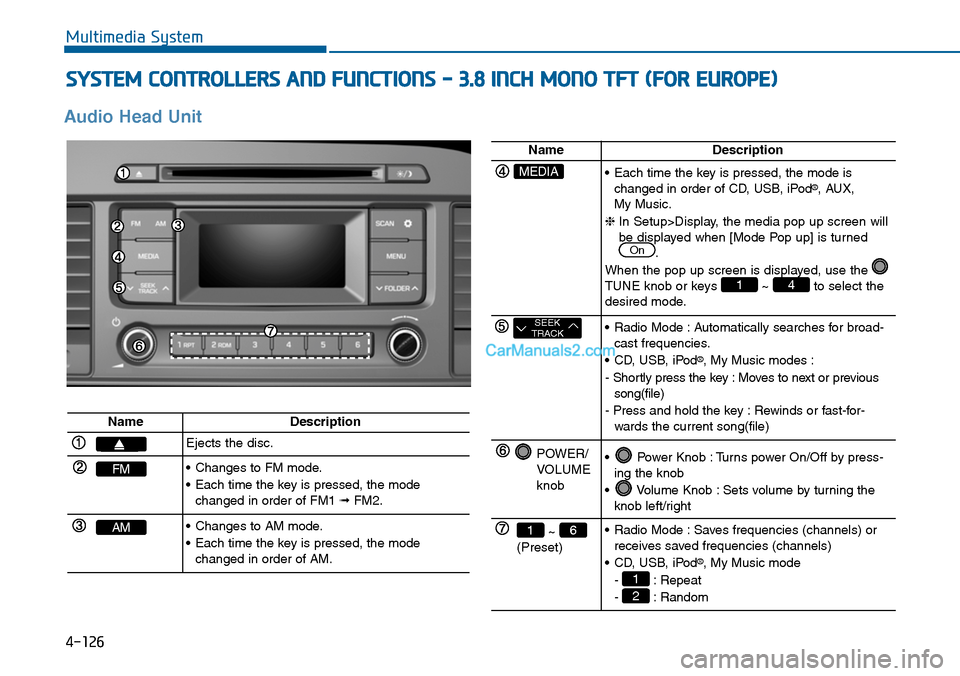
Audio Head Unit
NameDescription
Ejects the disc.
FM•Changes to FM mode.
•Each time the key is pressed, the modechanged in order of FM1 ➟FM2.
AM•Changes to AM mode.
•Each time the key is pressed, the modechanged in order of AM.
NameDescription
MEDIA•Each time the key is pressed, the mode ischanged in order of CD, USB, iPod®, AUX, My Music.
❈In Setup>Display, the media pop up screen willbe displayed when [Mode Pop up] is turned.
When the pop up screen is displayed, use the TUNE knob or keys ~ to select thedesired mode.
41
On
SEEKTRACK•Radio Mode :Automatically searches for broad-cast frequencies.
•CD, USB, iPod®, My Music modes :
- Shortly press the key : Moves to next or previoussong(file)
- Press and hold the key : Rewinds or fast-for-wards the current song(file)
POWER/VOLUMEknob
•Power Knob :Turns power On/Off by press-ing the knob
•Volume Knob :Sets volume by turning theknob left/right
~ (Preset)
61•Radio Mode :Saves frequencies (channels) orreceives saved frequencies (channels)
•CD, USB, iPod®, My Music mode
- : Repeat
- : Random2
1
Page 385 of 665
4-127
Multimedia System
4
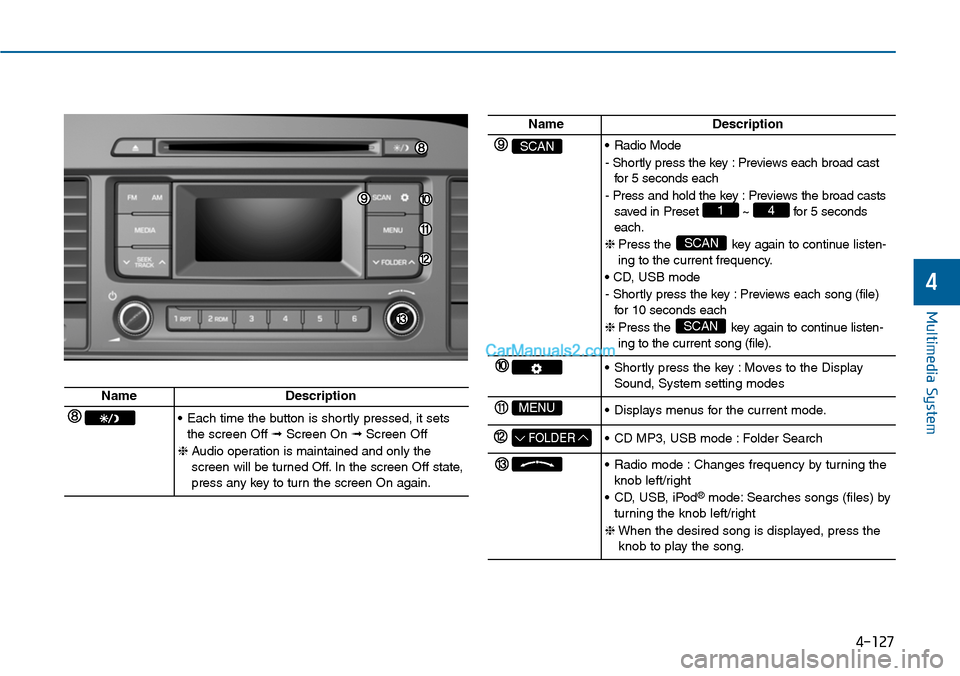
NameDescription
SCAN•Radio Mode
- Shortly press the key : Previews each broad castfor 5 seconds each
- Press and hold the key : Previews the broad castssaved in Preset ~ for 5 secondseach.
❈ Press the key again to continue listen-ing to the current frequency.
• CD, USB mode
- Shortly press the key : Previews each song (file)for 10 seconds each
❈ Press the key again to continue listen-ing to the current song (file).
SCAN
SCAN
41
•Shortly press the key :Moves to the DisplaySound, System setting modes
MENU•Displays menus for the current mode.
FOLDER•CD MP3, USB mode :Folder Search
•Radio mode :Changes frequency by turning theknob left/right
•CD, USB, iPod®mode: Searches songs (files) byturning the knob left/right
❈When the desired song is displayed, press theknob to play the song.
NameDescription
•Each time the button is shortly pressed, it setsthe screen Off ➟Screen On ➟Screen Off
❈Audio operation is maintained and only thescreen will be turned Off. In the screen Off state,press any key to turn the screen On again.