steering Hyundai Sonata 2014 Owner's Guide
[x] Cancel search | Manufacturer: HYUNDAI, Model Year: 2014, Model line: Sonata, Model: Hyundai Sonata 2014Pages: 665, PDF Size: 17.43 MB
Page 312 of 665
4-54
Multimedia System
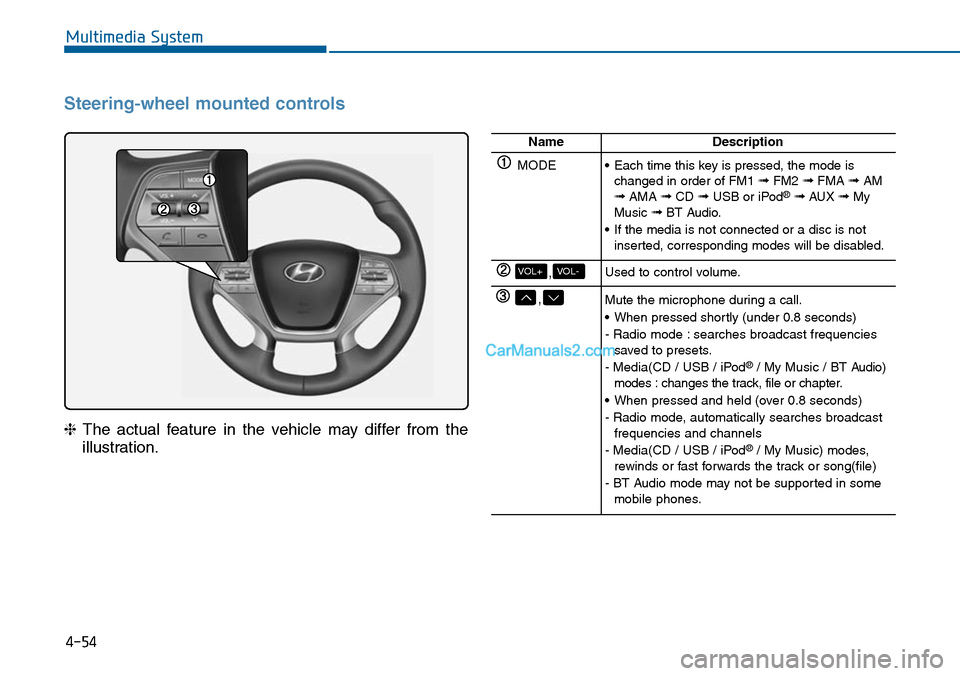
Steering-wheel mounted controls
❈The actual feature in the vehicle may differ from the
illustration.
NameDescription
MODE•Each time this key is pressed, the mode ischanged in order of FM1 ➟FM2 ➟FMA ➟AM➟AMA ➟CD ➟USB or iPod®➟ AUX ➟MyMusic ➟BT Audio.
•If the media is not connected or a disc is notinserted, corresponding modes will be disabled.
,VOL-VOL+Used to control volume.
,Mute the microphone during a call.
•When pressed shortly (under 0.8 seconds)
- Radio mode : searches broadcast frequenciessaved to presets.
- Media(CD / USB / iPod®/ My Music / BT Audio)modes : changes the track, file or chapter.
•When pressed and held (over 0.8 seconds)
- Radio mode, automatically searches broadcastfrequencies and channels
- Media(CD / USB / iPod®/ My Music) modes,rewinds or fast forwards the track or song(file)
- BT Audio mode may not be supported in somemobile phones.
Page 341 of 665
Pairing a Bluetooth®Wireless
Technology wireless technolo-
gy Device
What is Bluetooth®Wireless
Technology Pairing?
Pair ing refers to the process of syn-
chronizing your Bluetooth®Wireless
Technology phone or device with the
car audio system for connection.
Pair ing is necessar y to connect and
use the Bluetooth®Wireless
Technology feature.
Pairing Key / Key
on the Steering Remote
Controller
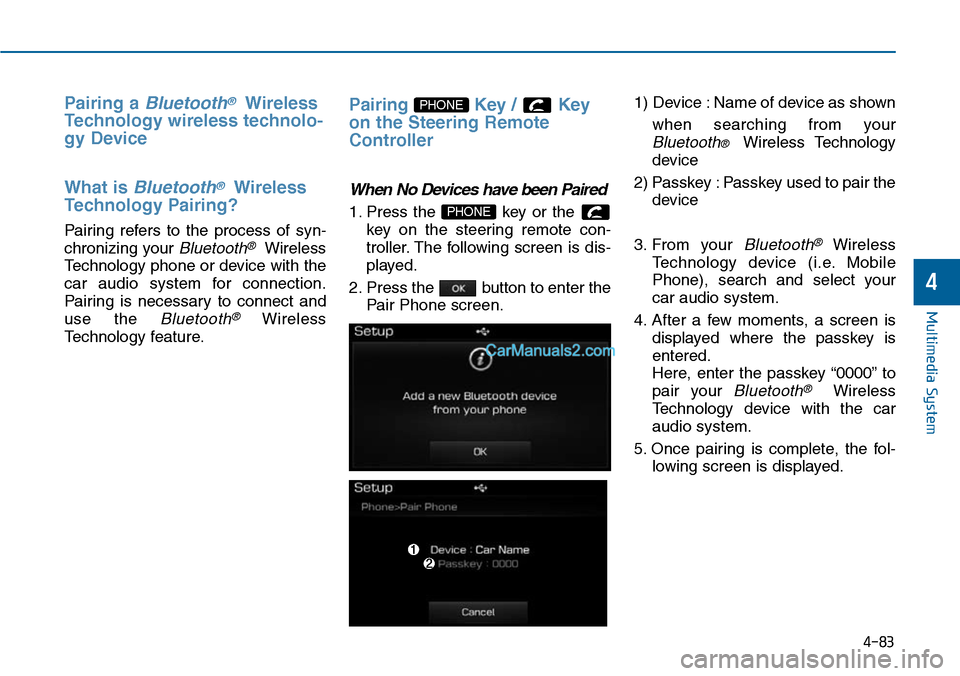
When No Devices have been Paired
1. Press the key or the
key on the steering remote con-
troller. The following screen is dis-
played.
2. Press the button to enter the
Pair Phone screen.
1) Device : Name of device as shown
when searching from your
Bluetooth® Wireless Technology
device
2) Passkey : Passkey used to pair the
device
3. From your Bluetooth®Wireless
Te c h n o l o g y d e v i c e ( i . e . M o b i l e
Phone), search and select your
car audio system.
4. After a few moments, a screen is
displayed where the passkey is
entered.
Here, enter the passkey “0000” to
pair your Bluetooth®Wireless
Technology device with the car
audio system.
5. Once pairing is complete, the fol-
lowing screen is displayed.
PHONE
PHONE
4-83
Multimedia System
4
Page 342 of 665
4-84
Multimedia System
Information
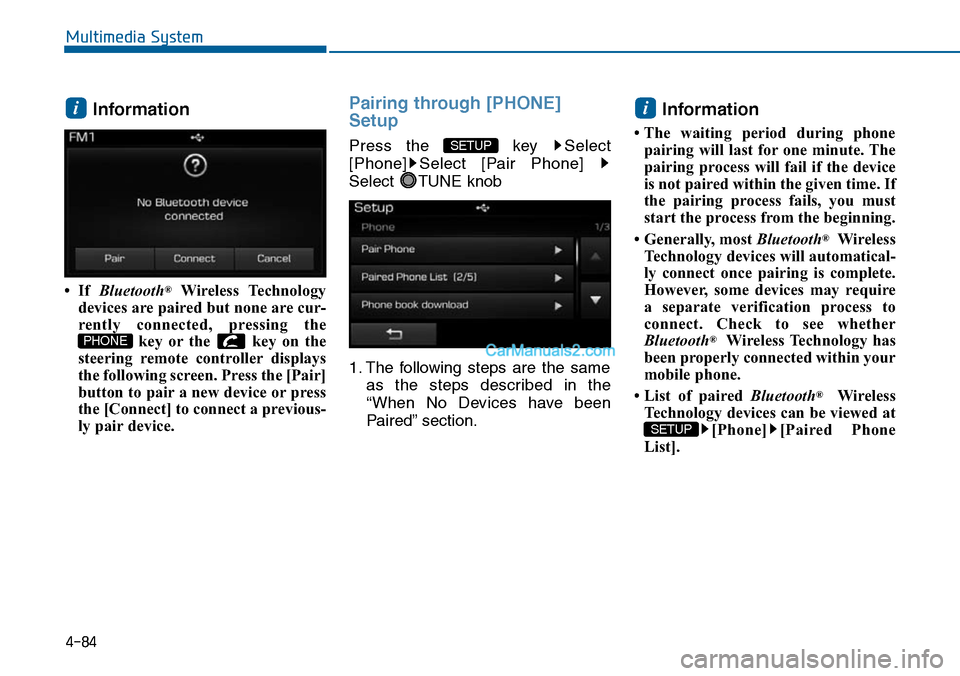
• If Bluetooth®Wireless Technology
devices are paired but none are cur-
rently connected, pressing the
key or the key on the
steering remote controller displays
the following screen. Press the [Pair]
button to pair a new device or press
the [Connect] to connect a previous-
ly pair device.
Pairing through [PHONE]
Setup
Press the key Select
[Phone] Select [Pair Phone]
Select TUNE knob
1. The following steps are the same
as the steps described in the
“When No Devices have been
Paired” section.
Information
• The waiting period during phone
pairing will last for one minute. The
pairing process will fail if the device
is not paired within the given time. If
the pairing process fails, you must
start the process from the beginning.
• Generally, most Bluetooth®Wireless
Technology devices will automatical-
ly connect once pairing is complete.
However, some devices may require
a separate verification process to
connect. Check to see whether
Bluetooth®Wireless Technology has
been properly connected within your
mobile phone.
• List of paired Bluetooth®Wireless
Technology devices can be viewed at
[Phone] [Paired Phone
List].
SETUP
i
SETUP
PHONE
i
Page 349 of 665
Bluetooth® Wireless Technology
(for Bluetooth®Wireless
Te ch n o l o g yequipped model)
Pairing a Bluetooth®Wireless
Technology wireless technolo-
gy Device
What is Bluetooth®Wireless
Technology Pairing?
Pair ing refers to the process of syn-
chronizing your Bluetooth®Wireless
Technology phone or device with the
car audio system for connection.
Pair ing is necessar y to connect and
use the Bluetooth®Wireless
Technology feature.
Pairing Key / Key on
the Steering Remote Controller
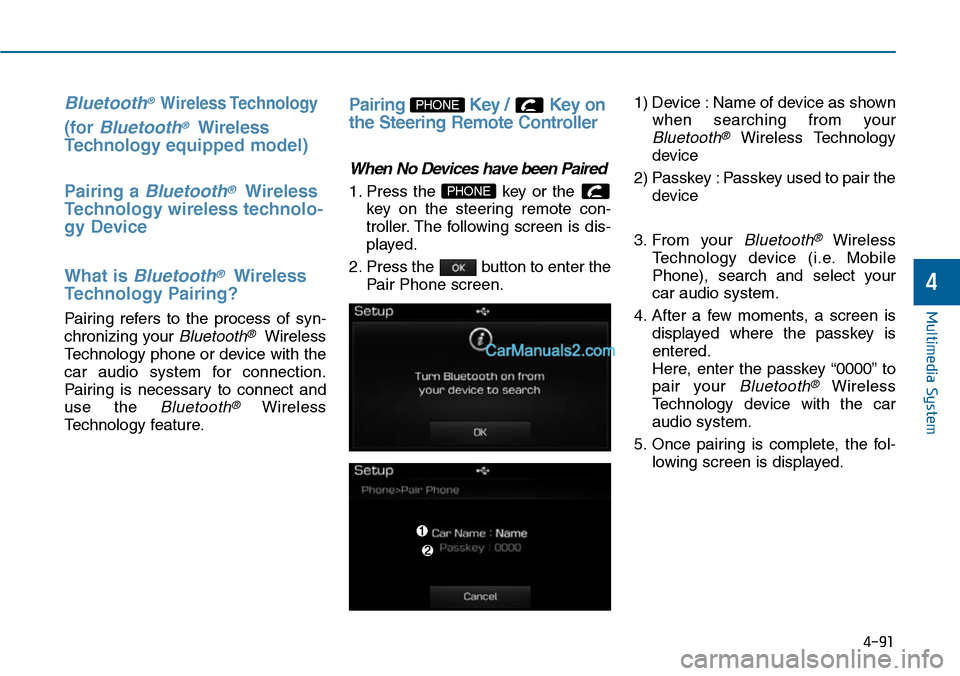
When No Devices have been Paired
1. Press the key or the
key on the steering remote con-
troller. The following screen is dis-
played.
2. Press the button to enter the
Pair Phone screen.
1) Device : Name of device as shown
when searching from your
Bluetooth®Wireless Technology
device
2) Passkey : Passkey used to pair the
device
3. From your Bluetooth®Wireless
Te c h n o l o g y d e v i c e ( i . e . M o b i l e
Phone), search and select your
car audio system.
4. After a few moments, a screen is
displayed where the passkey is
entered.
Here, enter the passkey “0000” to
pair your Bluetooth®Wireless
Technology device with the car
audio system.
5. Once pairing is complete, the fol-
lowing screen is displayed.
PHONE
PHONE
4-91
Multimedia System
4
Page 350 of 665
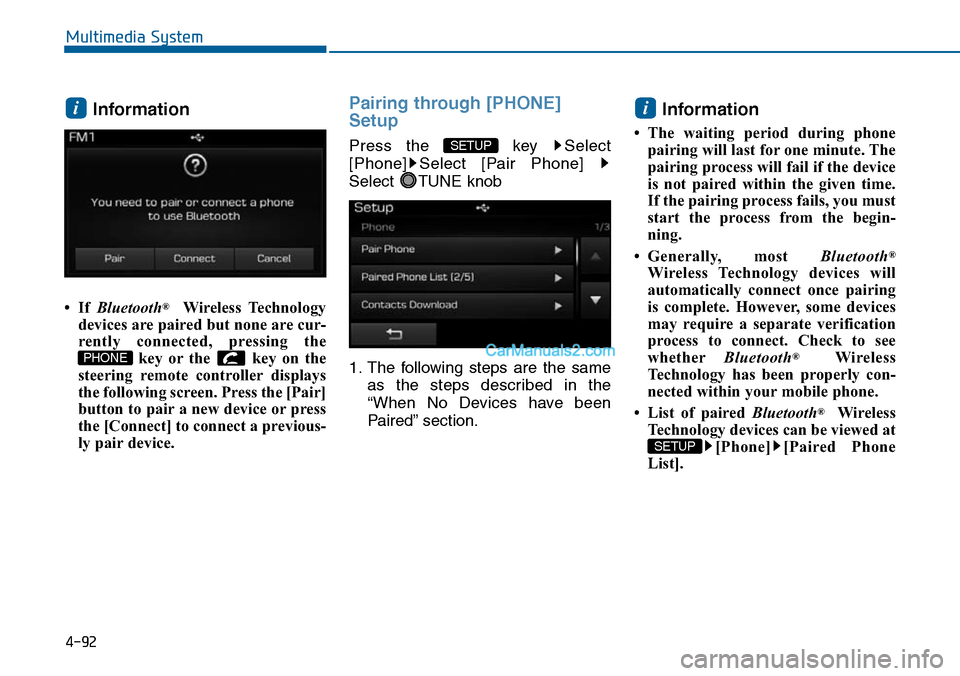
Information
• If Bluetooth®Wireless Technology
devices are paired but none are cur-
rently connected, pressing the
key or the key on the
steering remote controller displays
the following screen. Press the [Pair]
button to pair a new device or press
the [Connect] to connect a previous-
ly pair device.
Pairing through [PHONE]
Setup
Press the key Select
[Phone] Select [Pair Phone]
Select TUNE knob
1. The following steps are the same
as the steps described in the
“When No Devices have been
Paired” section.
Information
• The waiting period during phone
pairing will last for one minute. The
pairing process will fail if the device
is not paired within the given time.
If the pairing process fails, you must
start the process from the begin-
ning.
•Generally, most Bluetooth®
Wireless Technology devices will
automatically connect once pairing
is complete. However, some devices
may require a separate verification
process to connect. Check to see
whetherBluetooth®Wireless
Technology has been properly con-
nected within your mobile phone.
• List of paired Bluetooth®Wireless
Technology devices can be viewed at
[Phone] [Paired Phone
List].
SETUP
i
SETUP
PHONE
i
4-92
Multimedia System
Page 357 of 665
4-99
Multimedia System
4
VOICE RECOGNITION
(if equipped)
Using Voice Recognition
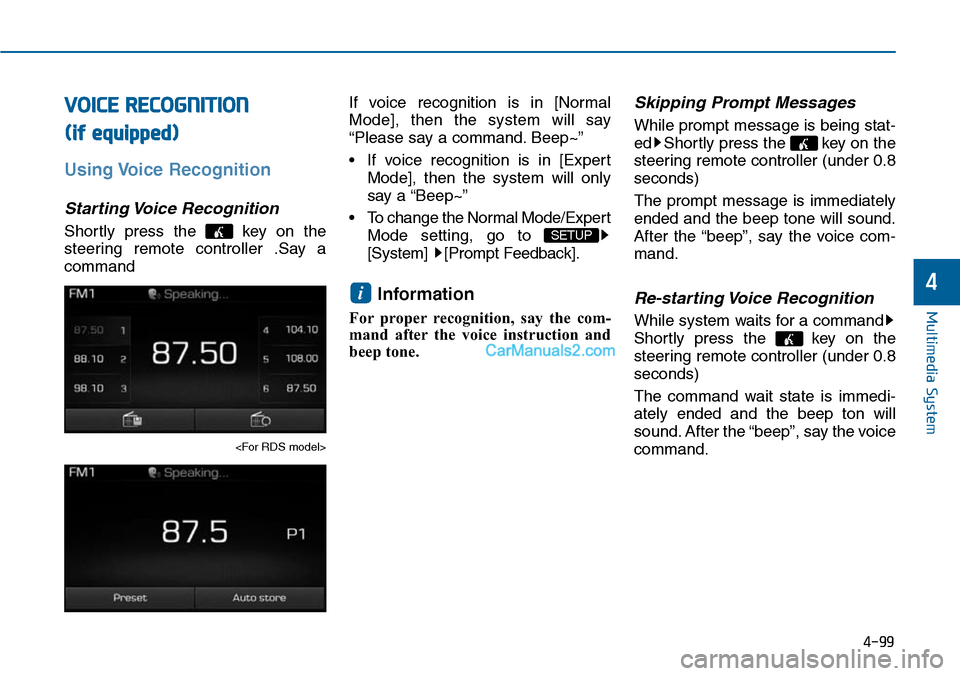
Starting Voice Recognition
Shortly press the key on the
steering remote controller .Say a
command
If voice recognition is in [Normal
Mode], then the system will say
“Please say a command. Beep~”
• If voice recognition is in [Expert
Mode], then the system will only
say a “Beep~”
•To change the Normal Mode/Expert
Mode setting, go to
[System] [Prompt Feedback].
Information
For proper recognition, say the com-
mand after the voice instruction and
beep tone.
Skipping Prompt Messages
While prompt message is being stat-
ed Shortly press the key on the
steering remote controller (under 0.8
seconds)
The prompt message is immediately
ended and the beep tone will sound.
After the “beep”, say the voice com-
mand.
Re-starting Voice Recognition
While system waits for a command
Shortly press the key on the
steering remote controller (under 0.8
seconds)
The command wait state is immedi-
ately ended and the beep ton will
sound. After the “beep”, say the voice
command.
i
SETUP
Page 358 of 665
4-100
Multimedia System
ENDING VOICE RECOGNITION
While Voice Recognition is operating
Press and hold the key on the
steering remote controller (over 0.8
seconds)
Information
• While using voice command, press-
ing a steering wheel remote control
or a different key will end voice
command.
•In a state where the system is waiting
for a voice command, say “cancel”
or “end” to end voice command.
• In a state where the system is wait-
ing for a voice command, press and
hold the key on the steering
remote controller to end voice com-
mand.
i
Page 382 of 665
Multimedia System
NameDescription
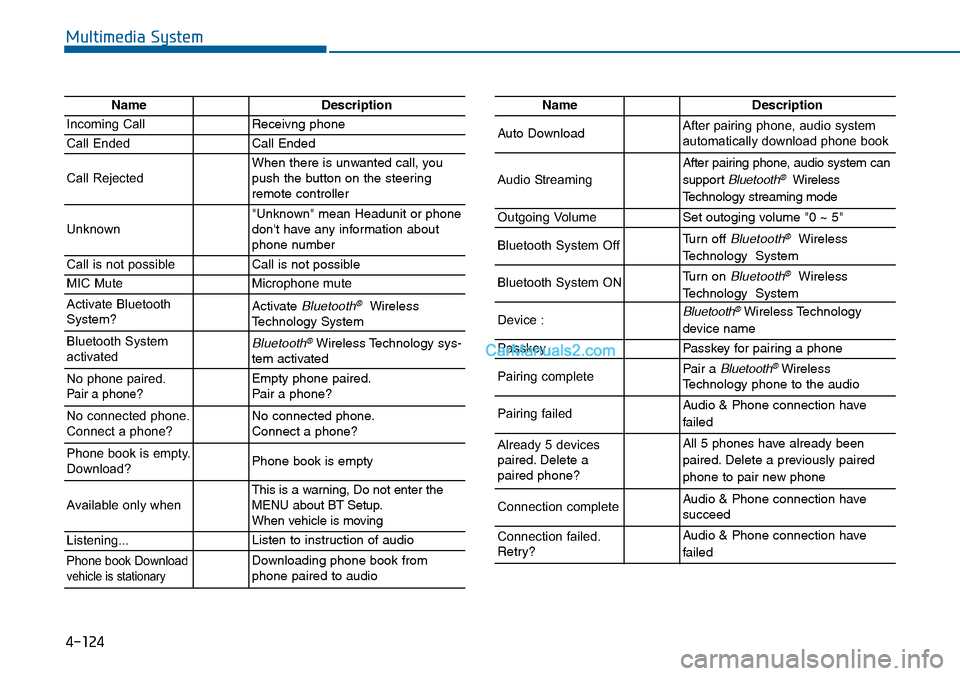
Incoming CallReceivng phone
Call EndedCall Ended
Call RejectedWhen there is unwanted call, youpush the button on the steeringremote controller
Unknown"Unknown" mean Headunit or phonedon't have any information aboutphone number
Call is not possibleCall is not possible
MIC MuteMicrophone mute
Activate BluetoothSystem?Activate Bluetooth®WirelessTechnology System
Bluetooth SystemactivatedBluetooth®Wireless Technology sys-tem activated
No phone paired. Pair a phone?Empty phone paired.Pair a phone?
No connected phone.Connect a phone?No connected phone.Connect a phone?
Phone book is empty.Download?Phone book is empty
Available only when This is a warning, Do not enter theMENU about BT Setup.When vehicle is moving
Listening...Listen to instruction of audio
Phone book Downloadvehicle is stationaryDownloading phone book fromphone paired to audio
NameDescription
Auto DownloadAfter pairing phone, audio systemautomatically download phone book
Audio Streaming
After pairing phone, audio system can
support Bluetooth®Wireless
Te c h n o l o g y s t r e a m i n g m o d e
Outgoing VolumeSet outoging volume "0 ~ 5"
Bluetooth System OffTurn off Bluetooth®Wireless
Technology System
Bluetooth System ONTurn on Bluetooth®Wireless
Technology System
Device : Bluetooth®Wireless Technology
device name
PasskeyPasskey for pair ing a phone
Pairing completePair a Bluetooth®WirelessTechnology phone to the audio
Pairing failedAudio & Phone connection have
failed
Already 5 devicespaired. Delete apaired phone?
All 5 phones have already been
paired. Delete a previously paired
phone to pair new phone
Connection completeAudio & Phone connection have succeed
Connection failed.Retry?
Audio & Phone connection have
failed
4-124
Page 396 of 665
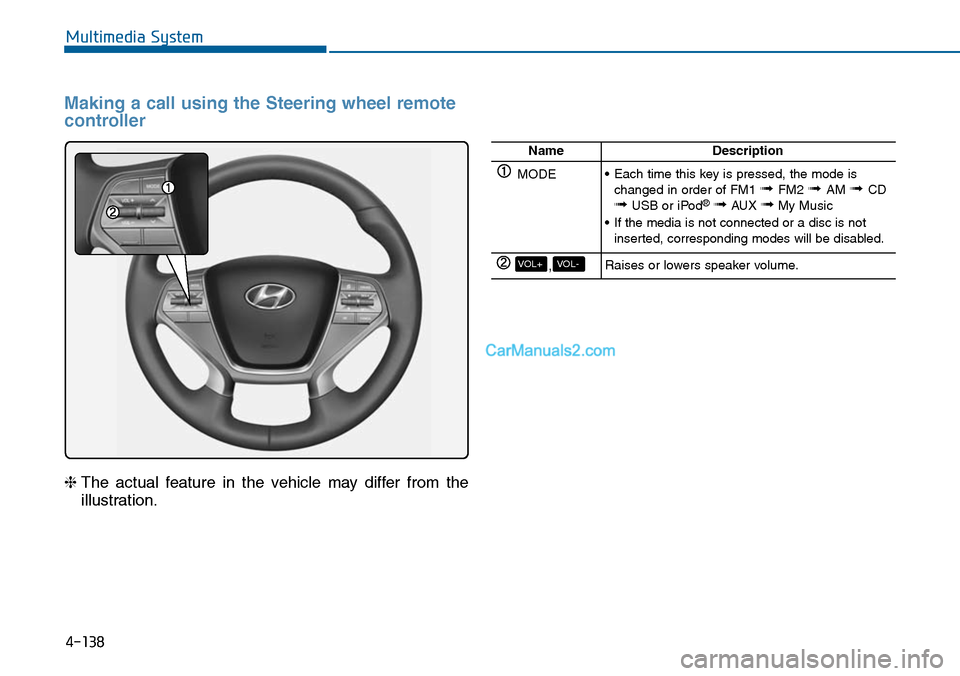
4-138
Multimedia System
Making a call using the Steering wheel remote
controller
❈The actual feature in the vehicle may differ from the
illustration.
NameDescription
MODE•Each time this key is pressed, the mode ischanged in order of FM1 ➟ FM2 ➟ AM ➟CD➟USB or iPod®➟AUX ➟My Music
•If the media is not connected or a disc is notinserted, corresponding modes will be disabled.
,VOL-VOL+Raises or lowers speaker volume.
Page 399 of 665
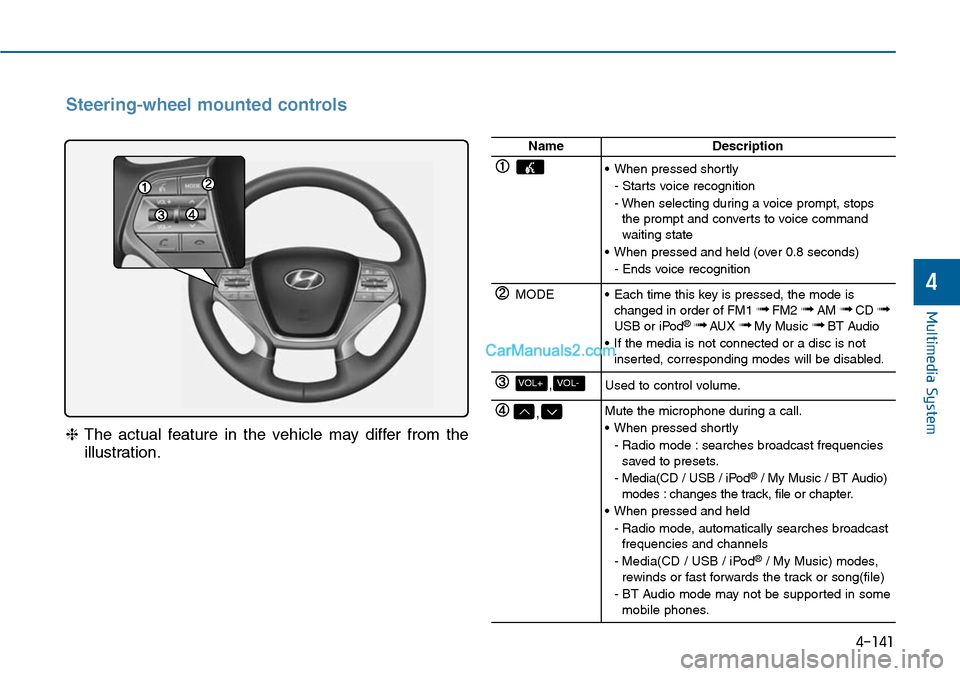
4-141
Multimedia System
4
Steering-wheel mounted controls
❈The actual feature in the vehicle may differ from the
illustration.
NameDescription
•When pressed shortly
- Starts voice recognition
- When selecting during a voice prompt, stopsthe prompt and converts to voice commandwaiting state
•When pressed and held (over 0.8 seconds)
- Ends voice recognition
MODE•Each time this key is pressed, the mode ischanged in order of FM1 ➟FM2 ➟AM ➟CD ➟USB or iPod®➟ AUX ➟My Music ➟BT Audio
•If the media is not connected or a disc is notinserted, corresponding modes will be disabled.
,VOL-VOL+Used to control volume.
,Mute the microphone during a call.
•When pressed shortly
- Radio mode : searches broadcast frequenciessaved to presets.
- Media(CD / USB / iPod®/ My Music / BT Audio)modes : changes the track, file or chapter.
•When pressed and held
- Radio mode, automatically searches broadcastfrequencies and channels
- Media(CD / USB / iPod®/ My Music) modes,rewinds or fast forwards the track or song(file)
- BT Audio mode may not be supported in somemobile phones.