ignition Hyundai Sonata 2014 Repair Manual
[x] Cancel search | Manufacturer: HYUNDAI, Model Year: 2014, Model line: Sonata, Model: Hyundai Sonata 2014Pages: 665, PDF Size: 17.43 MB
Page 238 of 665
3-142
Convenient features of your vehicle
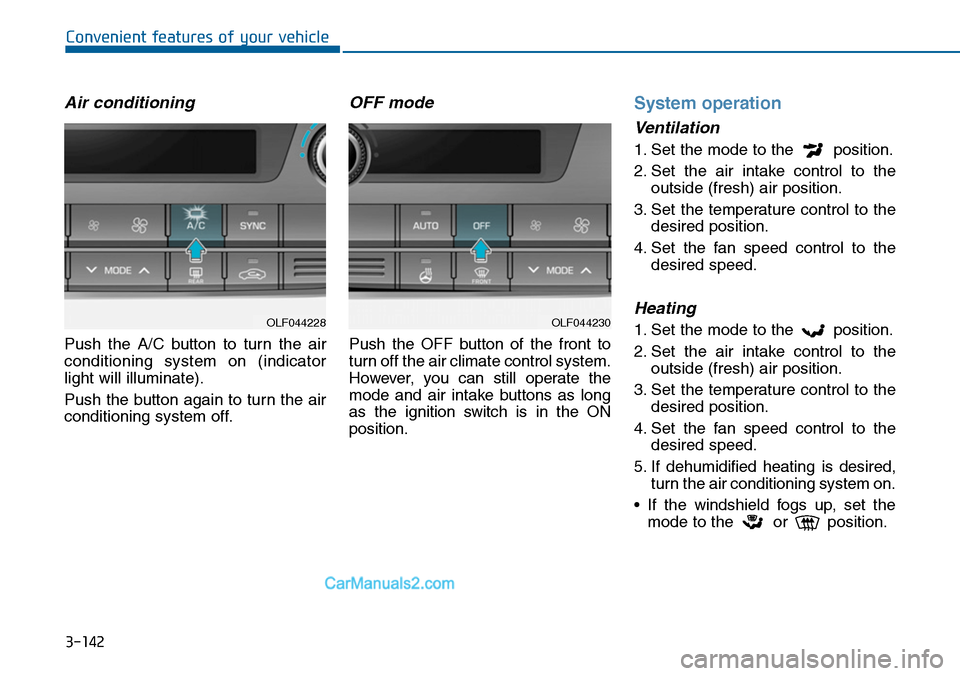
Air conditioning
Push the A/C button to turn the air
conditioning system on (indicator
light will illuminate).
Push the button again to turn the air
conditioning system off.
OFF mode
Push the OFF button of the front to
turn off the air climate control system.
However, you can still operate the
mode and air intake buttons as long
as the ignition switch is in the ON
position.
System operation
Ventilation
1. Set the mode to the position.
2. Set the air intake control to the
outside (fresh) air position.
3. Set the temperature control to the
desired position.
4. Set the fan speed control to the
desired speed.
Heating
1. Set the mode to the position.
2. Set the air intake control to the
outside (fresh) air position.
3. Set the temperature control to the
desired position.
4. Set the fan speed control to the
desired speed.
5. If dehumidified heating is desired,
turn the air conditioning system on.
•If the windshield fogs up, set the
mode to the or position.
OLF044230OLF044228
Page 244 of 665
3-148
Convenient features of your vehicle
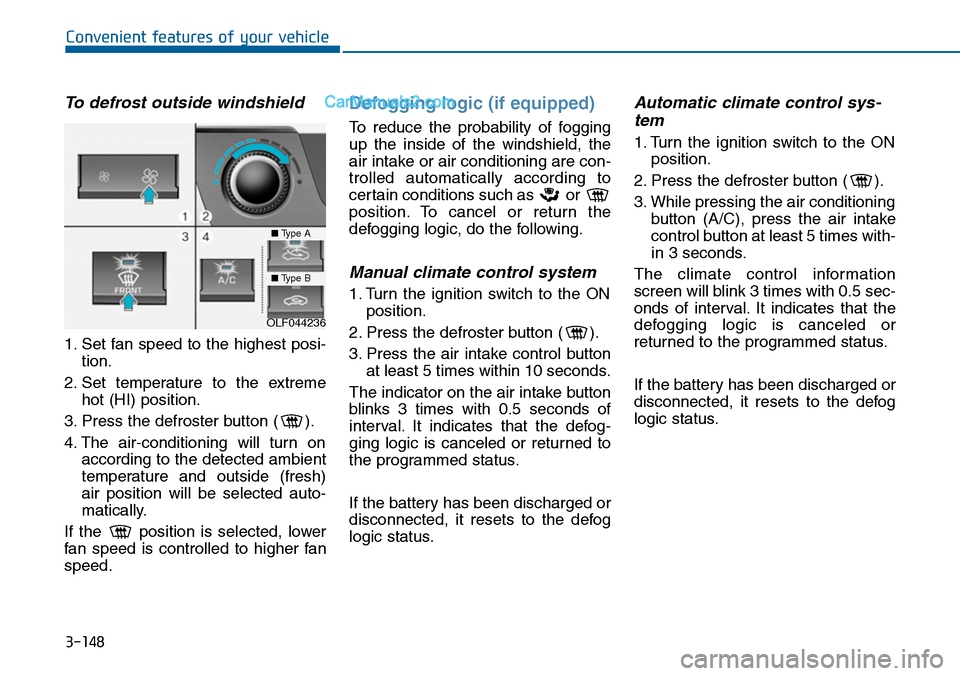
To defrost outside windshield
1. Set fan speed to the highest posi-
tion.
2. Set temperature to the extreme
hot (HI) position.
3. Press the defroster button ( ).
4. The air-conditioning will turn on
according to the detected ambient
temperature and outside (fresh)
air position will be selected auto-
matically.
If the position is selected, lower
fan speed is controlled to higher fan
speed.
Defogging logic (if equipped)
To reduce the probability of fogging
up the inside of the windshield, the
air intake or air conditioning are con-
trolled automatically according to
certain conditions such as or
position. To cancel or return the
defogging logic, do the following.
Manual climate control system
1. Turn the ignition switch to the ON
position.
2. Press the defroster button ( ).
3. Press the air intake control button
at least 5 times within 10 seconds.
The indicator on the air intake button
blinks 3 times with 0.5 seconds of
interval. It indicates that the defog-
ging logic is canceled or returned to
the programmed status.
If the battery has been discharged or
disconnected, it resets to the defog
logic status.
Automatic climate control sys-
tem
1. Turn the ignition switch to the ON
position.
2. Press the defroster button ( ).
3. While pressing the air conditioning
button (A/C), press the air intake
control button at least 5 times with-
in 3 seconds.
The climate control information
screen will blink 3 times with 0.5 sec-
onds of interval. It indicates that the
defogging logic is canceled or
returned to the programmed status.
If the battery has been discharged or
disconnected, it resets to the defog
logic status.
OLF044236
■Type A
■Type B
Page 246 of 665
3-150
Convenient features of your vehicle
CLIMATE CONTROL ADDITIONAL FEATURES
Cluster ionizer (if equipped)
When the ignition switch is in the ON
position, the clean air function turns
on automatically.
Also, the clean air function turns off
automatically, when the ignition
switch is in the OFF position.
Sunroof inside air recirculation
(if equipped)
If the sunroof opens while the heater
or Air Conditioning system operates,
the outside (fresh) air will be select-
ed automatically for ventilating the
car. Then, if you select the recirculat-
ed air position, the outside (fresh) air
will be selected automatically after 3
minutes.
If you close the sunroof, the intake
mode will be changed to the previous
selected mode.
Page 255 of 665
3-159
Convenient features of your vehicle
3
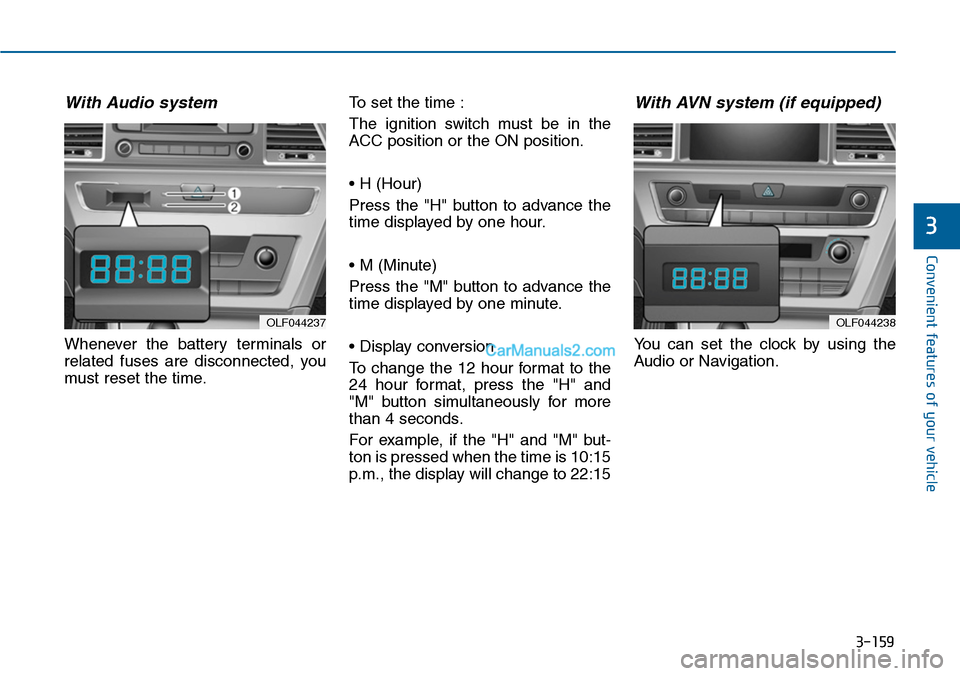
With Audio system
Whenever the battery terminals or
related fuses are disconnected, you
must reset the time.
To set the time :
The ignition switch must be in the
ACC position or the ON position.
• H (Hour)
Press the "H" button to advance the
time displayed by one hour.
• M (Minute)
Press the "M" button to advance the
time displayed by one minute.
• Display conversion
To change the 12 hour format to the
24 hour format, press the "H" and
"M" button simultaneously for more
than 4 seconds.
For example, if the "H" and "M" but-
ton is pressed when the time is 10:15
p.m., the display will change to 22:15
With AVN system (if equipped)
Yo u c a n s e t t h e c l o c k b y u s i n g t h e
Audio or Navigation.
OLF044237OLF044238
Page 272 of 665
Information
-Using the USB device
• Connect the USB device after turn-
ing on the engine. The USB device
may become damaged if it is already
connected when the ignition is
turned on.The USB device may not
operate properly if the car ignition
is turned on or off with the USB
device connected.
•Heed caution to static electricity
when connecting/disconnecting USB
devices.
• Encoded MP3 Players will not be
recognized when connected as an
external device.
• When connecting an external USB
device, the device may not properly
recognize the USB is in some states.
(Continued)
(Continued)
•Only products formatted with
byte/sectors under 64Kbyte will be
recognized.
• This device recognizes USB devices
formatted in FAT 12/16/32 file for-
mats. This device does not recognize
files in NTFS file format.
• Some USB devices may not be sup-
ported due to compatibility issues.
• Avoid contact between the USB con-
nector with bodily parts or foreign
objects.
•Repeated connecting/disconnecting
of USB devices within short periods
of time may result in product mal-
function.
• A strange noise may occur when dis-
connecting the USB.
•Make sure to connect/disconnect
external USB devices with the audio
power turned off.
(Continued)
(Continued)
• The amount of time required to rec-
ognize the USB device may differ
depending on the type, size or file
formats stored in the USB. Such dif-
ferences in time are not indications
of malfunctions.
•The device only supports USB
devices used to play music files.
•USB images and videos are not sup-
ported.
• Do not use the USB I/F to charge
batteries or USB accessories that
generate heat. Such acts may lead to
worsened performance or damage
to the device.
• The device may not recognize the
USB device if separately purchased
USB hubs and extension cables are
being used. Connect the USB direct-
ly with the multimedia terminal of
the vehicle.
(Continued)
i
4-14
Multimedia System
Page 276 of 665
Information
-Before using the Bluetooth®
handsfree
What is Bluetooth®?
•Bluetooth®refers to a short-distance
wireless networking technology
which uses a 2.4GHz ~ 2.48GHz fre-
quency to connect various devices
within a certain distance.
• Supported within PCs, external
devices, Bluetooth®phones, PDAs,
various electronic devices, and auto-
motive environments, Bluetooth®
allows data to be transmitted at high
speeds without having to use a con-
nector cable.
•Bluetooth®Handsfree refers to a
device which allows the user to con-
veniently make phone calls with
Bluetooth®mobile phones through
the audio system.
•Bluetooth®Handsfree may not be sup-
ported in some mobile phones. To learn
more about mobile device compatibility.
Information
-Precautions for safe driving
•Bluetooth®Handsfree is a feature
that enables drivers to practice safe
driving. Connecting the head unit
with a Bluetooth®phone allows the
user to conveniently make and
receive calls and use contacts.
Before using Bluetooth®, carefully
read the contents of this user’s man-
ual.
• Excessive use or operations while
driving may lead to negligent driv-
ing practices and result in accidents.
Refrain from excessive operations
while driving.
• Viewing the screen for prolonged
periods of time is dangerous and
may lead to accidents. When driv-
ing, view the screen only for short
periods of time.
Information
-When connecting a
Bluetooth®phone
•Before connecting the head unit
with the mobile phone, check to see
that the mobile phone supports
Bluetooth®features.
•Even if the phone supports
Bluetooth®, the phone will not be
found during device searches if the
phone has been set to hidden state
or the Bluetooth®power is turned
off. Disable the hidden state or turn
on the Bluetooth®power prior to
searching/connecting with the Head
unit.
•Bluetooth phone is automatically
connected when the ignition on.
• If you do not want automatic con-
nection with yourBluetooth®device,
turn off the Bluetooth®feature with-
in your mobile phone.
•The Handsfree call volume and
quality may differ depending on the
mobile phone.
(Continued)
iii
Multimedia System
4-18
Page 309 of 665
(Continued)
•The hands-free call volume and
quality may differ depending on the
mobile phone type.
•Bluetooth®Wireless Technology fea-
tures can be used only when the
mobile phone has been paired and
connected with the device. For more
information on pairing and connect-
ing Bluetooth®Wireless Technology
enabled mobile phones, refer to the
“Phone Setup” section.
•When a Bluetooth®Wireless
Te c h n o l o g y m o b i l e p h o n e i s c o n -
nected, a ( ) icon will appear at the
top of the screen. If a ( ) icon is not
displayed, this indicates that a
Bluetooth®Wireless Technology
enabled device has not been con-
nected. You must connect the device
before use. For more information on
Bluetooth®Wireless Technology
mobile phones, refer to the “Phone
Setup” section.
(Continued)
(Continued)
• Pairing and connecting a Bluetooth®
Wireless Technology enabled mobile
phone will work only when the
Bluetooth®Wireless Technology
option within your mobile phone
has been turned on. (Methods of
turning on the Bluetooth®Wireless
Te c h n o l o g y e n a b l e d f e a t u r e m a y
differ depending on the mobile
phone.)
• In some mobile phones, starting the
ignition while talking through
Bluetooth®Wireless Technology
enabled handsfree call will result in
the call becoming disconnected.
(Switch the call back to your mobile
phone when starting the ignition.)
• Some features may not be supported
in some Bluetooth®Wireless
Te c h n o l o g y m o b i l e p h o n e a n d
devices.
(Continued)
(Continued)
•Bluetooth®Wireless Technology
enabled operation may be unstable
depending on the communication
state.
• Placing the audio system within an
electromagnetic environment may
result in noise interference.
4-51
Multimedia System
4
Page 378 of 665
4-120
Multimedia System
REAR VIEW CAMERA
(if equipped)
• The system has been equipped
with a rear view camera for user
safety by allowing a wider rear
range of vision.
•The rear view camera will automat-
ically operate when the ignition key
is turned ON and the transmission
lever is set to R.
•The rear view camera will automat-
ically stop operating when set to a
different lever.
The rear view camera has been
equipped with an optical lens to
provide a wider range of vision and
may appear different from the actu-
al distance. For safety, directly
check the rear and left/right sides.
NOTICE
Page 380 of 665
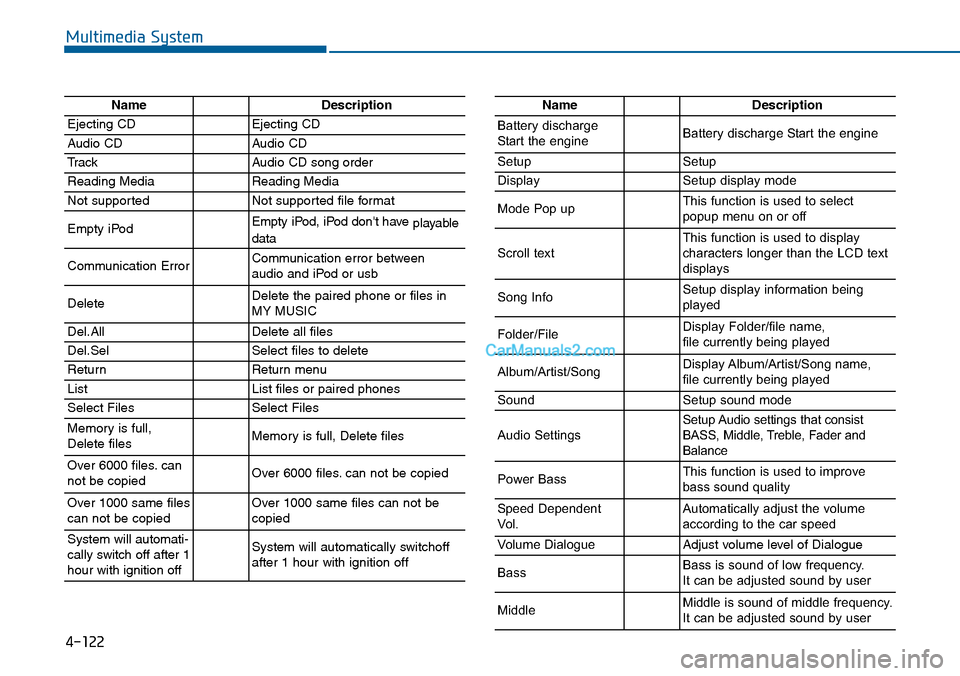
4-122
Multimedia System
NameDescription
Ejecting CDEjecting CD
Audio CDAudio CD
TrackAudio CD song order
Reading MediaReading Media
Not supportedNot supported file format
Empty iPodEmpty iPod, iPod don't have playabledata
Communication ErrorCommunication error between audio and iPod or usb
DeleteDelete the paired phone or files in MY MUSIC
Del.AllDelete all files
Del.SelSelect files to delete
ReturnReturn menu
ListList files or paired phones
Select FilesSelect Files
Memory is full,Delete files Memory is full, Delete files
Over 6000 files. cannot be copied Over 6000 files. can not be copied
Over 1000 same filescan not be copied Over 1000 same files can not becopied
System will automati-cally switch off after 1hour with ignition off
System will automatically switchoffafter 1 hour with ignition off
NameDescription
Battery dischargeStart the engineBattery discharge Start the engine
SetupSetup
DisplaySetup display mode
Mode Pop upThis function is used to selectpopup menu on or off
Scroll textThis function is used to display characters longer than the LCD textdisplays
Song InfoSetup display information beingplayed
Folder/FileDisplay Folder/file name, file currently being played
Album/Artist/SongDisplay Album/Artist/Song name, file currently being played
SoundSetup sound mode
Audio SettingsSetup Audio settings that consistBASS, Middle, Treble, Fader andBalance
Power BassThis function is used to improvebass sound quality
Speed DependentVo l .Automatically adjust the volume according to the car speed
Vo l u m e D i a l o g u eAdjust volume level of Dialogue
BassBass is sound of low frequency. It can be adjusted sound by user
MiddleMiddle is sound of middle frequency. It can be adjusted sound by user
Page 381 of 665
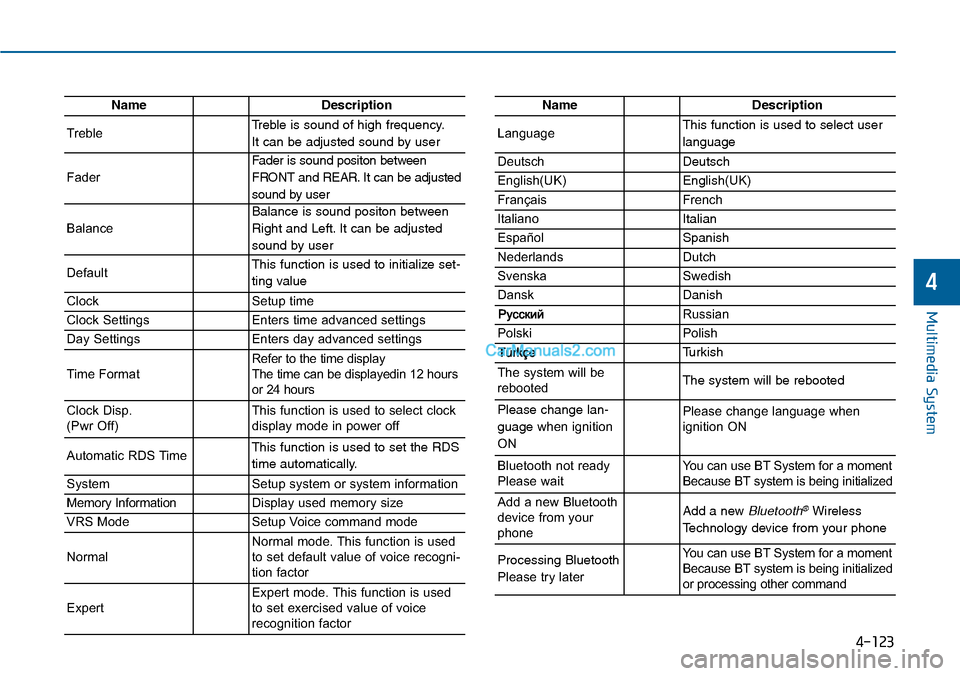
4-123
Multimedia System
4
NameDescription
TrebleTreble is sound of high frequency.
It can be adjusted sound by user
Fader
Fader is sound positon between
FRONT and REAR. It can be adjusted
sound by user
Balance
Balance is sound positon between
Right and Left. It can be adjusted
sound by user
DefaultThis function is used to initialize set-
ting value
ClockSetup time
Clock SettingsEnters time advanced settings
Day SettingsEnters day advanced settings
Time FormatRefer to the time display The time can be displayedin 12 hoursor 24 hours
Clock Disp.(Pwr Off)This function is used to select clockdisplay mode in power off
Automatic RDS TimeThis function is used to set the RDS
time automatically.
SystemSetup system or system information
Memory InformationDisplay used memory size
VRS ModeSetup Voice command mode
NormalNormal mode. This function is usedto set default value of voice recogni-tion factor
ExpertExpert mode. This function is usedto set exercised value of voicerecognition factor
NameDescription
LanguageThis function is used to select user
language
DeutschDeutsch
English(UK)English(UK)
FrançaisFrench
Italiano Italian
EspañolSpanish
NederlandsDutch
SvenskaSwedish
DanskDanish
Russian
PolskiPolish
Turkish
The system will berebootedThe system will be rebooted
Please change lan-
guage when ignition
ON
Please change language when ignition ON
Bluetooth not readyPlease waitYo u c a n u s e B T S y s t e m f o r a m o m e n tBecause BT system is being initialized
Add a new Bluetoothdevice from yourphone
Add a new Bluetooth®Wireless
Technology device from your phone
Processing Bluetooth
Please try later
Yo u c a n u s e B T S y s t e m f o r a m o m e n tBecause BT system is being initializedor processing other command