language Hyundai Sonata 2014 Owner's Manual
[x] Cancel search | Manufacturer: HYUNDAI, Model Year: 2014, Model line: Sonata, Model: Hyundai Sonata 2014Pages: 665, PDF Size: 17.43 MB
Page 170 of 665
3-74
Convenient features of your vehicle
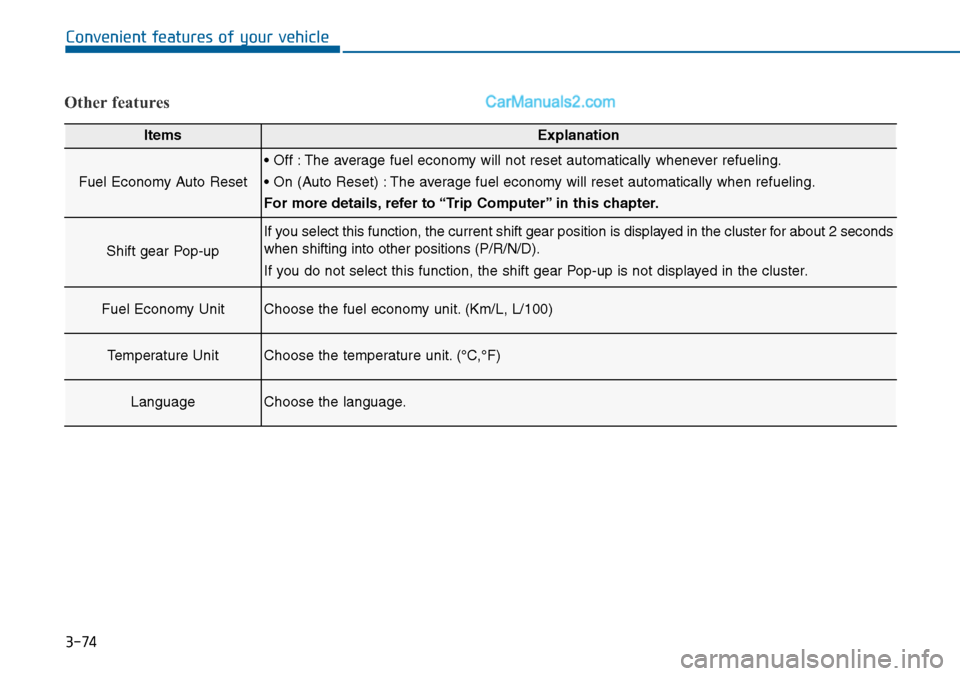
Other features
ItemsExplanation
Fuel Economy Auto Reset
• Off : The average fuel economy will not reset automatically whenever refueling.
• On (Auto Reset) : The average fuel economy will reset automatically when refueling.
For more details, refer to “Trip Computer” in this chapter.
Shift gear Pop-up
If you select this function, the current shift gear position is displayed in the cluster for about 2 seconds
when shifting into other positions (P/R/N/D).
If you do not select this function, the shift gear Pop-up is not displayed in the cluster.
Fuel Economy UnitChoose the fuel economy unit. (Km/L, L/100)
Temperature UnitChoose the temperature unit. (°C,°F)
LanguageChoose the language.
Page 267 of 665
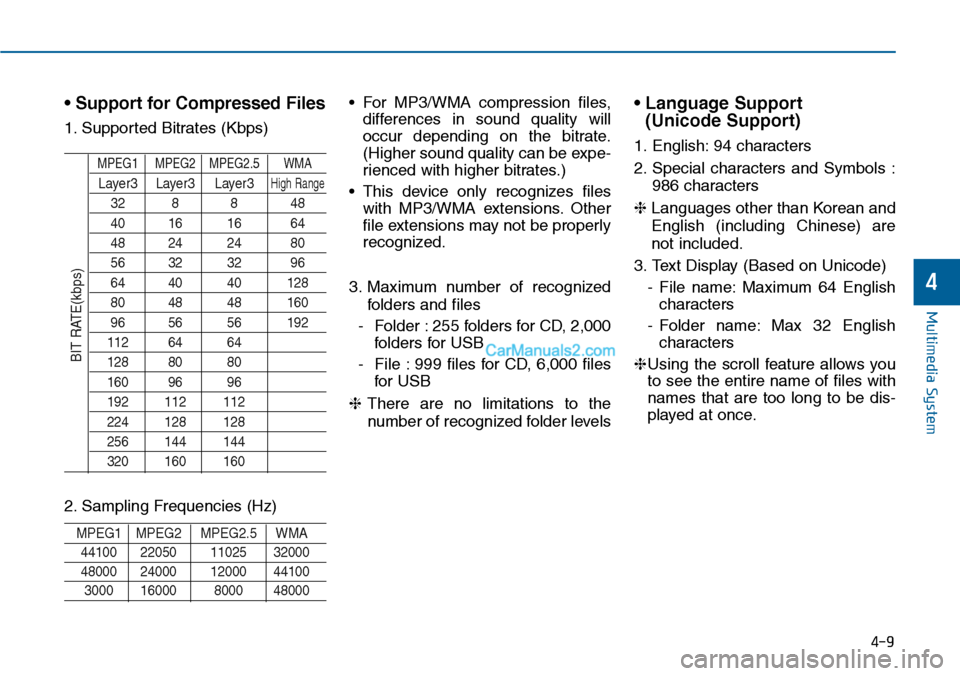
• Support for Compressed Files
1. Supported Bitrates (Kbps)
MPEG1 MPEG2 MPEG2.5 WMA
Layer3 Layer3 Layer3High Range
32 8 8 48
40 16 16 64
48 24 24 80
56 32 32 96
64 40 40 128
80 48 48 160
96 56 56 192
112 64 64
128 80 80
160 96 96
192 112 112
224 128 128
256 144 144
320 160 160
2. Sampling Frequencies (Hz)
MPEG1 MPEG2 MPEG2.5 WMA
44100 22050 11025 32000
48000 24000 12000 44100
3000 16000 8000 48000
• For MP3/WMA compression files,
differences in sound quality will
occur depending on the bitrate.
(Higher sound quality can be expe-
rienced with higher bitrates.)
• This device only recognizes files
with MP3/WMA extensions. Other
file extensions may not be properly
recognized.
3. Maximum number of recognized
folders and files
-Folder :255 folders for CD, 2,000
folders for USB
-File :999 files for CD, 6,000 files
for USB
❈There are no limitations to the
number of recognized folder levels
• Language Support
(Unicode Support)
1. English: 94 characters
2. Special characters and Symbols :
986 characters
❈ Languages other than Korean and
English (including Chinese) are
not included.
3. Text Display (Based on Unicode)
-File name:Maximum 64 English
characters
-Folder name: Max 32 English
characters
❈Using the scroll feature allows you
to see the entire name of files with
names that are too long to be dis-
played at once.
BIT RATE(kbps)
Multimedia System
4-9
4
Page 268 of 665
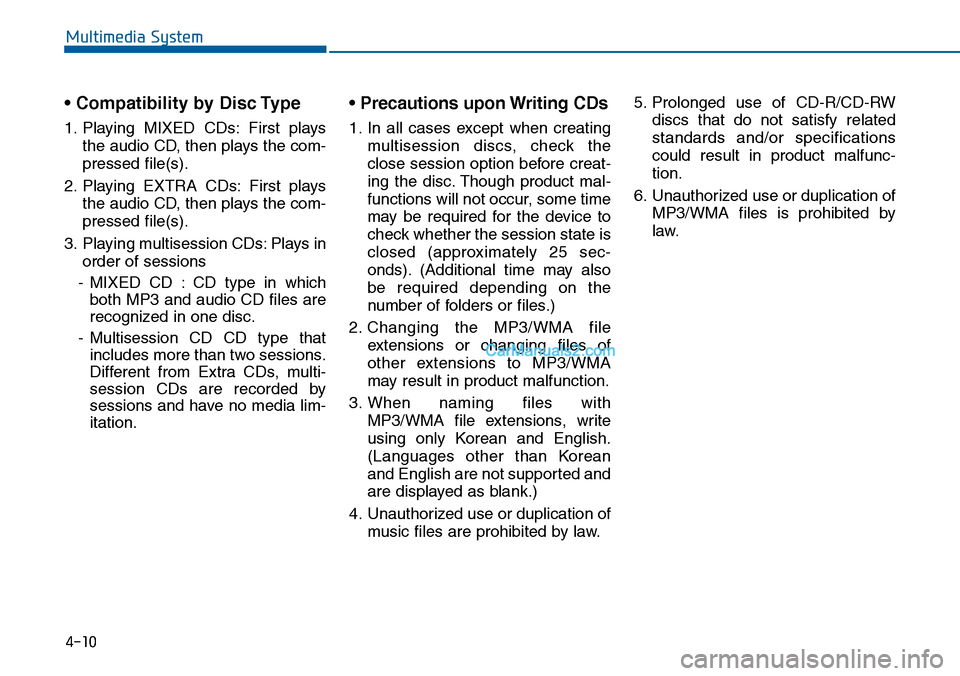
• Compatibility by Disc Type
1. Playing MIXED CDs: First plays
the audio CD, then plays the com-
pressed file(s).
2. Playing EXTRA CDs: First plays
the audio CD, then plays the com-
pressed file(s).
3. Playing multisession CDs: Plays in
order of sessions
-MIXED CD : CD type in which
both MP3 and audio CD files are
recognized in one disc.
-Multisession CD CD type that
includes more than two sessions.
Different from Extra CDs, multi-
session CDs are recorded by
sessions and have no media lim-
itation.
• Precautions upon Writing CDs
1. In all cases except when creating
multisession discs, check the
close session option before creat-
ing the disc. Though product mal-
functions will not occur, some time
may be required for the device to
check whether the session state is
closed (approximately 25 sec-
onds). (Additional time may also
be required depending on the
number of folders or files.)
2. Changing the MP3/WMA file
extensions or changing files of
other extensions to MP3/WMA
may result in product malfunction.
3. When naming files with
MP3/WMA file extensions, write
using only Korean and English.
(Languages other than Korean
and English are not supported and
are displayed as blank.)
4. Unauthorized use or duplication of
music files are prohibited by law.
5. Prolonged use of CD-R/CD-RW
discs that do not satisfy related
standards and/or specifications
could result in product malfunc-
tion.
6. Unauthorized use or duplication of
MP3/WMA files is prohibited by
law.
Multimedia System
4-10
Page 290 of 665
![Hyundai Sonata 2014 Owners Manual System Settings
Press the key Select [System]
through tune knob or key Select
menu through TUNE knob
Memory Information
(if equipped)
Displays currently used memory and
total system memory.
Select](/img/35/16805/w960_16805-289.png "Hyundai Sonata 2014 Owners Manual System Settings
Press the key Select [System]
through tune knob or key Select
menu through TUNE knob
Memory Information
(if equipped)
Displays currently used memory and
total system memory.
Select")
System Settings
Press the key Select [System]
through tune knob or key Select
menu through TUNE knob
Memory Information
(if equipped)
Displays currently used memory and
total system memory.
Select [Memory Information] OK
The currently used memory is dis-
played on the left side while the total
system memory is displayed on the
right side.
❈ May differ depending on the
selected audio.
Language
This menu is used to set the display
and voice recognition language.
Select [Language] Set through TUNE
knob
❈ The system will reboot after the
language is changed.
❈ Language support by region
-
5
SETUP
4-32
Multimedia System
Page 371 of 665
![Hyundai Sonata 2014 Owners Manual 4-113
Multimedia System
4
System Setting
Memory Information
Press the key Select
[System] Select [Memory Information]
This feature displays information
related to system memory.
1) Using : Displa](/img/35/16805/w960_16805-370.png "Hyundai Sonata 2014 Owners Manual 4-113
Multimedia System
4
System Setting
Memory Information
Press the key Select
[System] Select [Memory Information]
This feature displays information
related to system memory.
1) Using : Displa")
4-113
Multimedia System
4
System Setting
Memory Information
Press the key Select
[System] Select [Memory Information]
This feature displays information
related to system memory.
1) Using : Displays capacity currently
in use
2) Capacity : Displays total capacity
Language
Press the key Select
[System] Select [Language]
This feature is used to change the
system and voice recognition lan-
guage.
If the language is changed, the sys-
tem will restart and apply the select-
ed language.
SETUP
SETUP
Page 381 of 665
4-123
Multimedia System
4
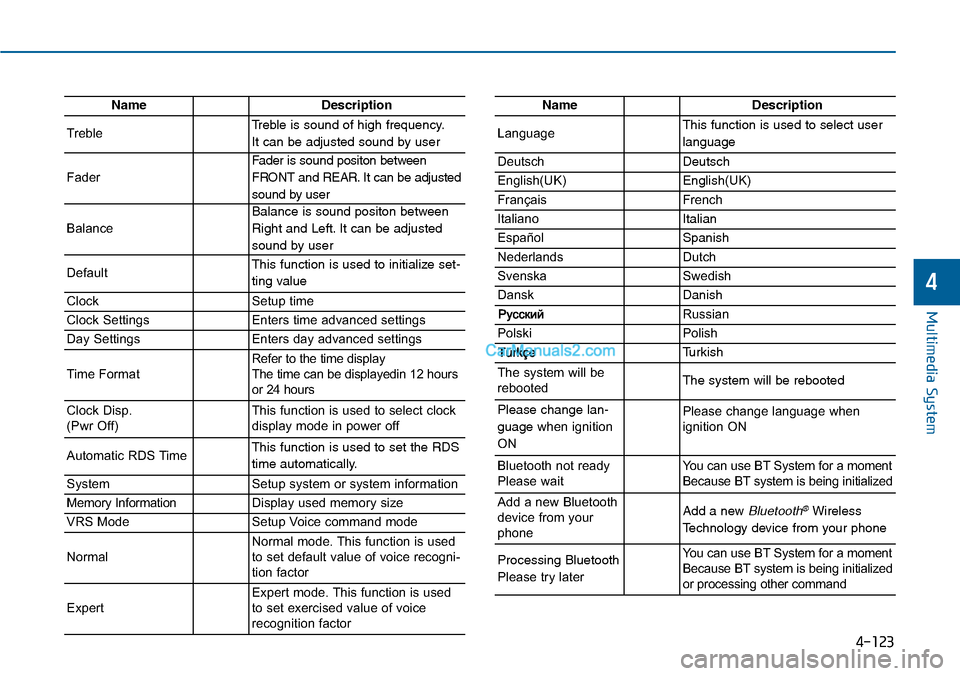
NameDescription
TrebleTreble is sound of high frequency.
It can be adjusted sound by user
Fader
Fader is sound positon between
FRONT and REAR. It can be adjusted
sound by user
Balance
Balance is sound positon between
Right and Left. It can be adjusted
sound by user
DefaultThis function is used to initialize set-
ting value
ClockSetup time
Clock SettingsEnters time advanced settings
Day SettingsEnters day advanced settings
Time FormatRefer to the time display The time can be displayedin 12 hoursor 24 hours
Clock Disp.(Pwr Off)This function is used to select clockdisplay mode in power off
Automatic RDS TimeThis function is used to set the RDS
time automatically.
SystemSetup system or system information
Memory InformationDisplay used memory size
VRS ModeSetup Voice command mode
NormalNormal mode. This function is usedto set default value of voice recogni-tion factor
ExpertExpert mode. This function is usedto set exercised value of voicerecognition factor
NameDescription
LanguageThis function is used to select user
language
DeutschDeutsch
English(UK)English(UK)
FrançaisFrench
Italiano Italian
EspañolSpanish
NederlandsDutch
SvenskaSwedish
DanskDanish
Russian
PolskiPolish
Turkish
The system will berebootedThe system will be rebooted
Please change lan-
guage when ignition
ON
Please change language when ignition ON
Bluetooth not readyPlease waitYo u c a n u s e B T S y s t e m f o r a m o m e n tBecause BT system is being initialized
Add a new Bluetoothdevice from yourphone
Add a new Bluetooth®Wireless
Technology device from your phone
Processing Bluetooth
Please try later
Yo u c a n u s e B T S y s t e m f o r a m o m e n tBecause BT system is being initializedor processing other command
Page 388 of 665
![Hyundai Sonata 2014 Owners Manual 4-130
Multimedia System
System Settings
Press the key Select [System]
through tune knob or key
Memory Information
Displays currently used memory and
total my music memory.
Select [Memory Information](/img/35/16805/w960_16805-387.png "Hyundai Sonata 2014 Owners Manual 4-130
Multimedia System
System Settings
Press the key Select [System]
through tune knob or key
Memory Information
Displays currently used memory and
total my music memory.
Select [Memory Information")
4-130
Multimedia System
System Settings
Press the key Select [System]
through tune knob or key
Memory Information
Displays currently used memory and
total my music memory.
Select [Memory Information] OK
The currently used memory is dis-
played on the left side while total my
music memory. is displayed on the
right side.
Language
This menu is used to set the display
and voice recognition language.
Select [Language] Set through TUNE
knob
❈The system will reboot after the
language is changed.
❈Language support by region
-
3
Page 444 of 665
![Hyundai Sonata 2014 Owners Manual 4-186
Multimedia System
Vo i c e R e c o g n i t i o n M o d e S e t t i n g
(if equipped)
Press the key Select
[System] Select [Voice Recognition
System]
This feature is used to select](/img/35/16805/w960_16805-443.png "Hyundai Sonata 2014 Owners Manual 4-186
Multimedia System
Vo i c e R e c o g n i t i o n M o d e S e t t i n g
(if equipped)
Press the key Select
[System] Select [Voice Recognition
System]
This feature is used to select")
4-186
Multimedia System
Vo i c e R e c o g n i t i o n M o d e S e t t i n g
(if equipped)
Press the key Select
[System] Select [Voice Recognition
System]
This feature is used to select the
desired prompt feedback option from
Normal and Expert.
1) Normal : When using voice recog-
nition, provides detailed guidance
prompts
2) Expert : When using voice recog-
nition, omits some guidance
prompts
Information
Voice Recognition is depend on the
Audio System.
Language
Press the key Select
[System] Select [Language]
This feature is used to change the
system and voice recognition lan-
guage.
If the language is changed, the sys-
tem will restart and apply the select-
ed language.
REAR VIEW CAMERA
(if equipped)
• The system has been equipped
with a rear view camera for user
safety by allowing a wider rear
range of vision.
•The rear view camera will automat-
ically operate when the ignition key
is turned ON and the transmission
lever is set to R.
•The rear view camera will automat-
ically stop operating when set to a
different lever.
The rear view camera has been
equipped with an optical lens to
provide a wider range of vision and
may appear different from the actu-
al distance. For safety, directly
check the rear and left/right sides.
NOTICE
i
Page 447 of 665
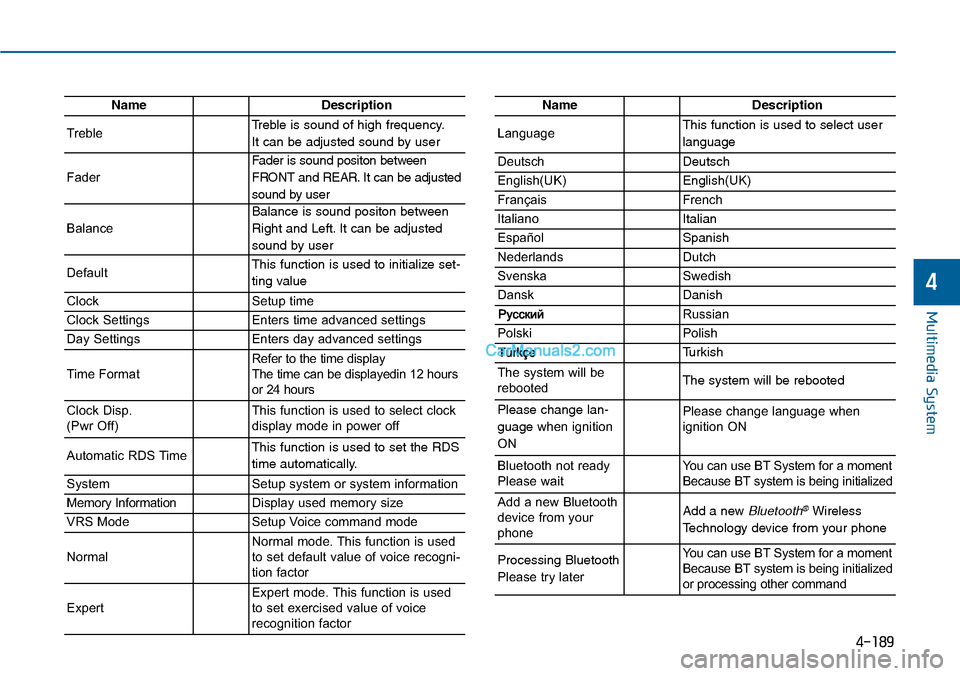
4-189
Multimedia System
4
NameDescription
TrebleTreble is sound of high frequency.
It can be adjusted sound by user
Fader
Fader is sound positon between
FRONT and REAR. It can be adjusted
sound by user
Balance
Balance is sound positon between
Right and Left. It can be adjusted
sound by user
DefaultThis function is used to initialize set-
ting value
ClockSetup time
Clock SettingsEnters time advanced settings
Day SettingsEnters day advanced settings
Time FormatRefer to the time display The time can be displayedin 12 hoursor 24 hours
Clock Disp.(Pwr Off)This function is used to select clockdisplay mode in power off
Automatic RDS TimeThis function is used to set the RDS
time automatically.
SystemSetup system or system information
Memory InformationDisplay used memory size
VRS ModeSetup Voice command mode
NormalNormal mode. This function is usedto set default value of voice recogni-tion factor
ExpertExpert mode. This function is usedto set exercised value of voicerecognition factor
NameDescription
LanguageThis function is used to select user
language
DeutschDeutsch
English(UK)English(UK)
FrançaisFrench
Italiano Italian
EspañolSpanish
NederlandsDutch
SvenskaSwedish
DanskDanish
Russian
PolskiPolish
Turkish
The system will berebootedThe system will be rebooted
Please change lan-
guage when ignition
ON
Please change language when ignition ON
Bluetooth not readyPlease waitYo u c a n u s e B T S y s t e m f o r a m o m e n tBecause BT system is being initialized
Add a new Bluetoothdevice from yourphone
Add a new Bluetooth®Wireless
Technology device from your phone
Processing Bluetooth
Please try later
Yo u c a n u s e B T S y s t e m f o r a m o m e n tBecause BT system is being initializedor processing other command