steering wheel Hyundai Sonata 2015 - RHD (UK, Australia) User Guide
[x] Cancel search | Manufacturer: HYUNDAI, Model Year: 2015, Model line: Sonata, Model: Hyundai Sonata 2015Pages: 504, PDF Size: 10.88 MB
Page 107 of 504
3-23
Convenient features of your vehicle
3
STEERING WHEEL
Electric power steering (EPS)
The system assists you with steering
the vehicle. If the engine is off or if
the power steering system becomes
inoperative, the vehicle may still be
steered, but it will require increased
steering effort.
Also, the steering effort becomes
heavier as the vehicle’s speed
increases and becomes lighter as
the vehicle’s speed decreases for
better control of the steering wheel.
Should you notice any change in the
effort required to steer during normal
vehicle operation, we recommend
that the system be checked by an
authorised HYUNDAI dealer.If the EPS System does not oper-
ate normally, the warning light
( ) will illuminate on the instru-
ment cluster. The steering wheel
may become difficult to control or
operate. Take your vehicle to an
authorised HYUNDAI dealer and
have the system checked as soon
as possible.
Information
The following symptoms may occur
during normal vehicle operation:
• The steering effort may be high
immediately after placing the igni-
tion switch or the Engine Start/Stop
button in the ON position.
This happens as the system per-
forms the EPS system diagnostics.
When the diagnostics is completed,
the steering wheel will return to its
normal condition.
(Continued)(Continued)
• A click noise may be heard from the
EPS relay after the ignition switch is
placed to the ON or LOCK/OFF
position (Without Smart key system).
A click noise may be heard from the
EPS relay after the Engine Start/Stop
button is in the ON or OFF position.
(With Smart key system)
• Motor noise may be heard when the
vehicle is stationary or driving slow-
ly.
• When you operate the steering
wheel when the temperature is low,
abnormal noise may occur. If the
temperature rises, the noise will dis-
appear. This is a normal condition.
• When the vehicle is stationary, if
you turn the steering wheel all the
way to the left or right continuously,
the steering wheel effort increases.
This is not a system malfunction. As
time passes, the steering wheel
effort will return to its normal con-
dition.
i
NOTICE
Page 108 of 504
3-24
Convenient features of your vehicle
Tilt steering / Telescope steering
Information
After adjustment, sometimes the lock-
release lever may not lock the steering
wheel.
It is not a malfunction. This occurs
when two gears engage. In this case,
adjust the steering wheel again and
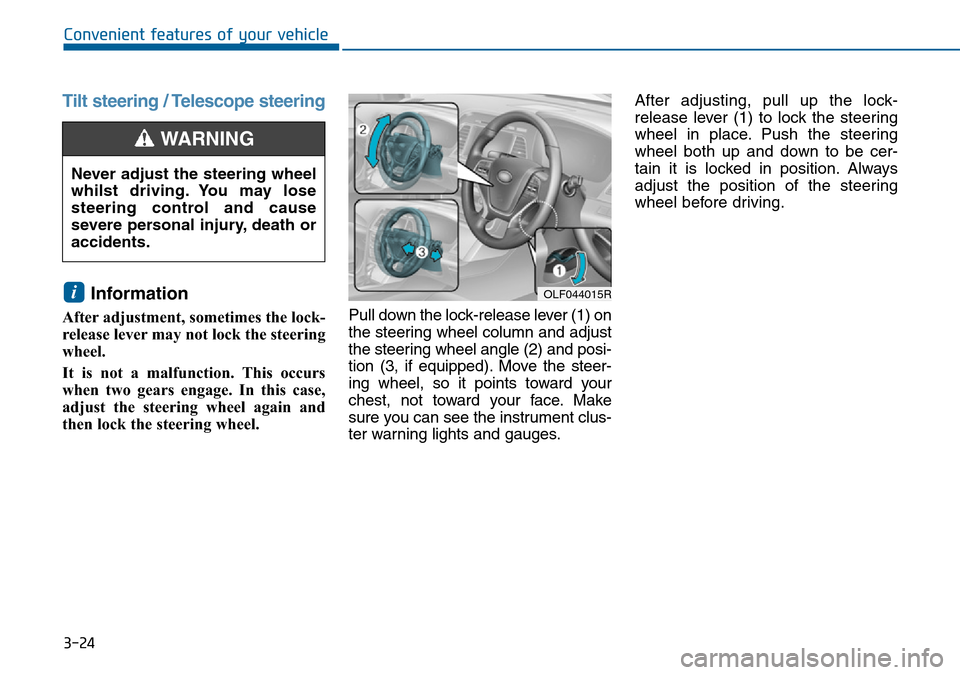
then lock the steering wheel.Pull down the lock-release lever (1) on
the steering wheel column and adjust
the steering wheel angle (2) and posi-
tion (3, if equipped). Move the steer-
ing wheel, so it points toward your
chest, not toward your face. Make
sure you can see the instrument clus-
ter warning lights and gauges.After adjusting, pull up the lock-
release lever (1) to lock the steering
wheel in place. Push the steering
wheel both up and down to be cer-
tain it is locked in position. Always
adjust the position of the steering
wheel before driving.
i
Never adjust the steering wheel
whilst driving. You may lose
steering control and cause
severe personal injury, death or
accidents.
WARNING
OLF044015R
Page 109 of 504
3-25
Convenient features of your vehicle
3
Heated steering wheel
(if equipped)
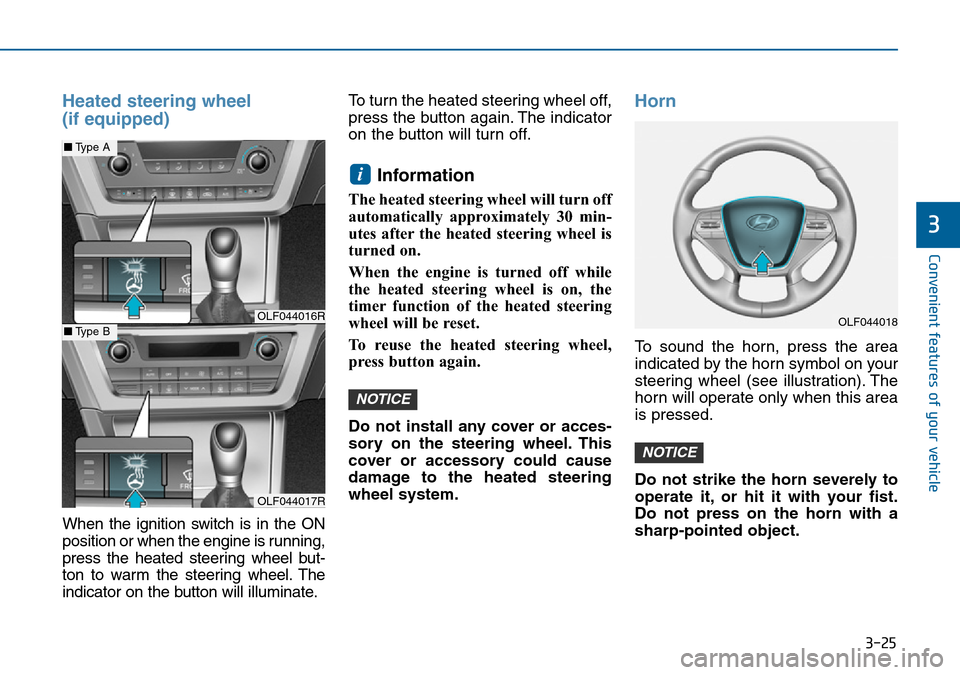
When the ignition switch is in the ON
position or when the engine is running,
press the heated steering wheel but-
ton to warm the steering wheel. The
indicator on the button will illuminate.To turn the heated steering wheel off,
press the button again. The indicator
on the button will turn off.
Information
The heated steering wheel will turn off
automatically approximately 30 min-
utes after the heated steering wheel is
turned on.
When the engine is turned off while
the heated steering wheel is on, the
timer function of the heated steering
wheel will be reset.
To reuse the heated steering wheel,
press button again.
Do not install any cover or acces-
sory on the steering wheel. This
cover or accessory could cause
damage to the heated steering
wheel system.
Horn
To sound the horn, press the area
indicated by the horn symbol on your
steering wheel (see illustration). The
horn will operate only when this area
is pressed.
Do not strike the horn severely to
operate it, or hit it with your fist.
Do not press on the horn with a
sharp-pointed object.
NOTICE
NOTICE
i
OLF044016R
OLF044017R
■Type A
■Type BOLF044018
Page 153 of 504
3-69
Convenient features of your vehicle
3
Warning messages (if equipped)
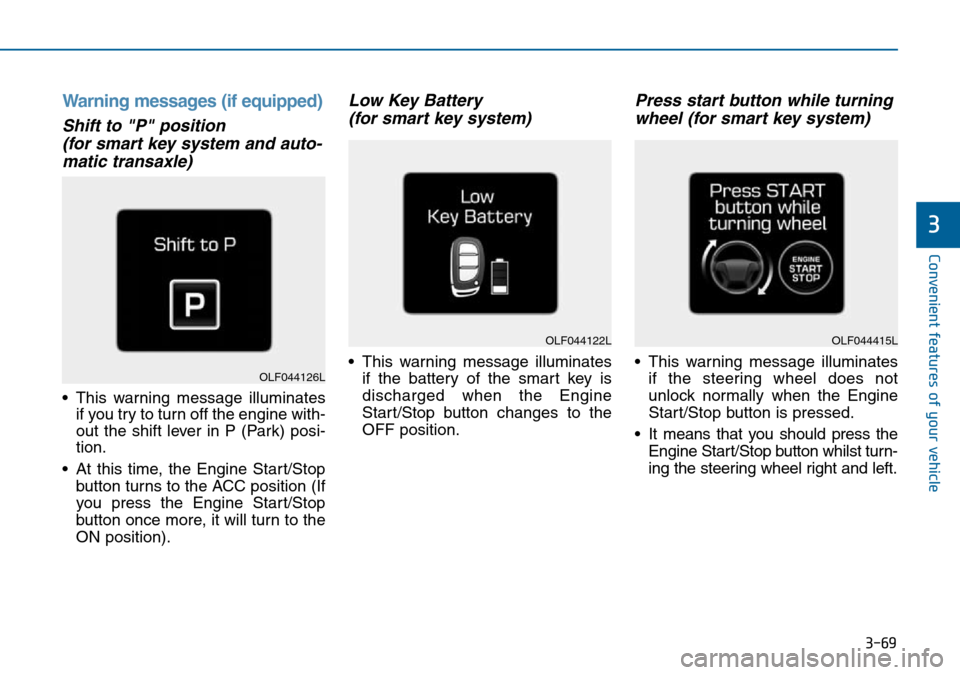
Shift to "P" position
(for smart key system and auto-
matic transaxle)
• This warning message illuminates
if you try to turn off the engine with-
out the shift lever in P (Park) posi-
tion.
• At this time, the Engine Start/Stop
button turns to the ACC position (If
you press the Engine Start/Stop
button once more, it will turn to the
ON position).
Low Key Battery
(for smart key system)
• This warning message illuminates
if the battery of the smart key is
discharged when the Engine
Start/Stop button changes to the
OFF position.
Press start button while turning
wheel (for smart key system)
• This warning message illuminates
if the steering wheel does not
unlock normally when the Engine
Start/Stop button is pressed.
• It means that you should press the
Engine Start/Stop button whilst turn-
ing the steering wheel right and left.
OLF044122L
OLF044126L
OLF044415L
Page 154 of 504
3-70
Convenient features of your vehicle
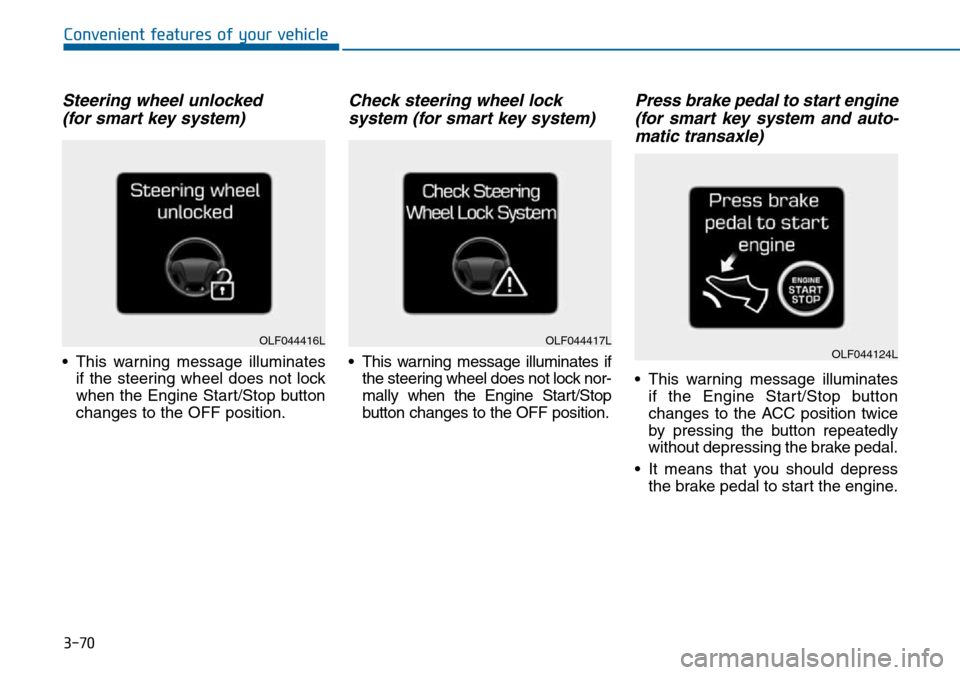
Steering wheel unlocked
(for smart key system)
• This warning message illuminates
if the steering wheel does not lock
when the Engine Start/Stop button
changes to the OFF position.
Check steering wheel lock
system (for smart key system)
• This warning message illuminates if
the steering wheel does not lock nor-
mally when the Engine Start/Stop
button changes to the OFF position.
Press brake pedal to start engine
(for smart key system and auto-
matic transaxle)
• This warning message illuminates
if the Engine Start/Stop button
changes to the ACC position twice
by pressing the button repeatedly
without depressing the brake pedal.
• It means that you should depress
the brake pedal to start the engine.
OLF044416LOLF044417LOLF044124L
Page 157 of 504
3-73
Convenient features of your vehicle
3
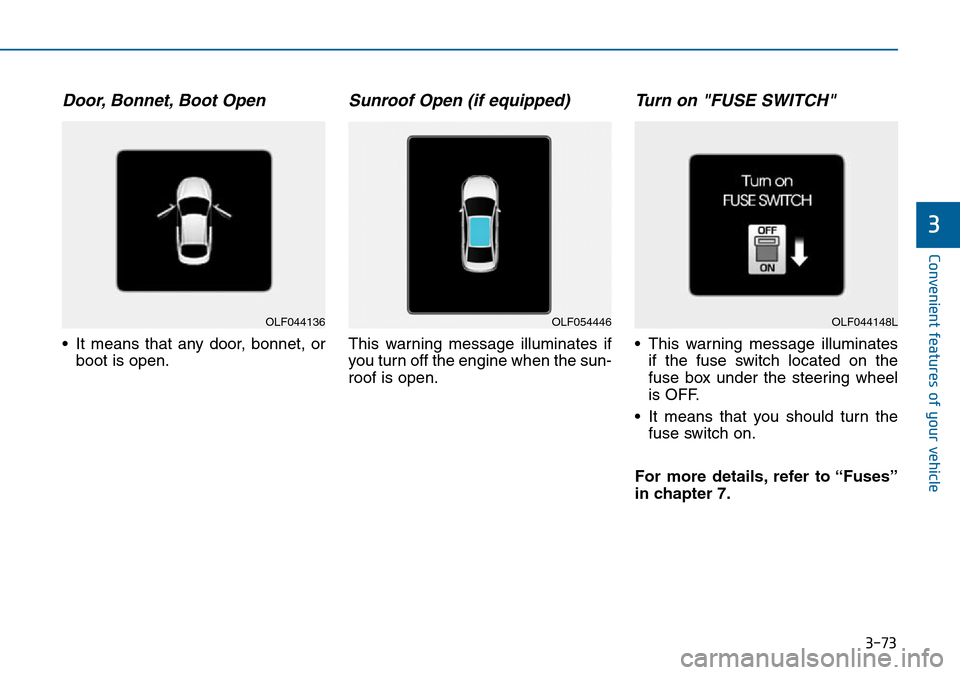
Door, Bonnet, Boot Open
• It means that any door, bonnet, or
boot is open.
Sunroof Open (if equipped)
This warning message illuminates if
you turn off the engine when the sun-
roof is open.
Turn on "FUSE SWITCH"
• This warning message illuminates
if the fuse switch located on the
fuse box under the steering wheel
is OFF.
• It means that you should turn the
fuse switch on.
For more details, refer to “Fuses”
in chapter 7.
OLF044136OLF054446OLF044148L
Page 158 of 504
3-74
Convenient features of your vehicle
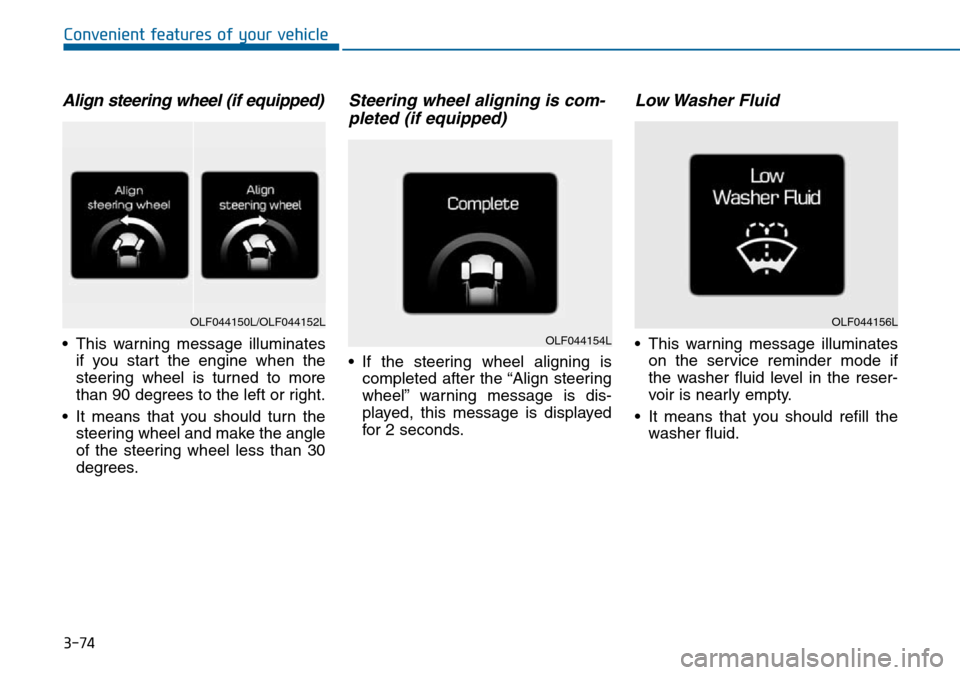
Align steering wheel (if equipped)
• This warning message illuminates
if you start the engine when the
steering wheel is turned to more
than 90 degrees to the left or right.
• It means that you should turn the
steering wheel and make the angle
of the steering wheel less than 30
degrees.
Steering wheel aligning is com-
pleted (if equipped)
• If the steering wheel aligning is
completed after the “Align steering
wheel” warning message is dis-
played, this message is displayed
for 2 seconds.
Low Washer Fluid
• This warning message illuminates
on the service reminder mode if
the washer fluid level in the reser-
voir is nearly empty.
• It means that you should refill the
washer fluid.
OLF044150L/OLF044152L
OLF044154L
OLF044156L
Page 161 of 504
3-77
Convenient features of your vehicle
3
Overview
Description
The Trip Computer is a microcomput-
er-controlled driver information sys-
tem that displays information related
to driving.
Information
Some driving information stored in
the Trip Computer (for example
Average Vehicle Speed) resets if the
battery is disconnected.
Trip modes
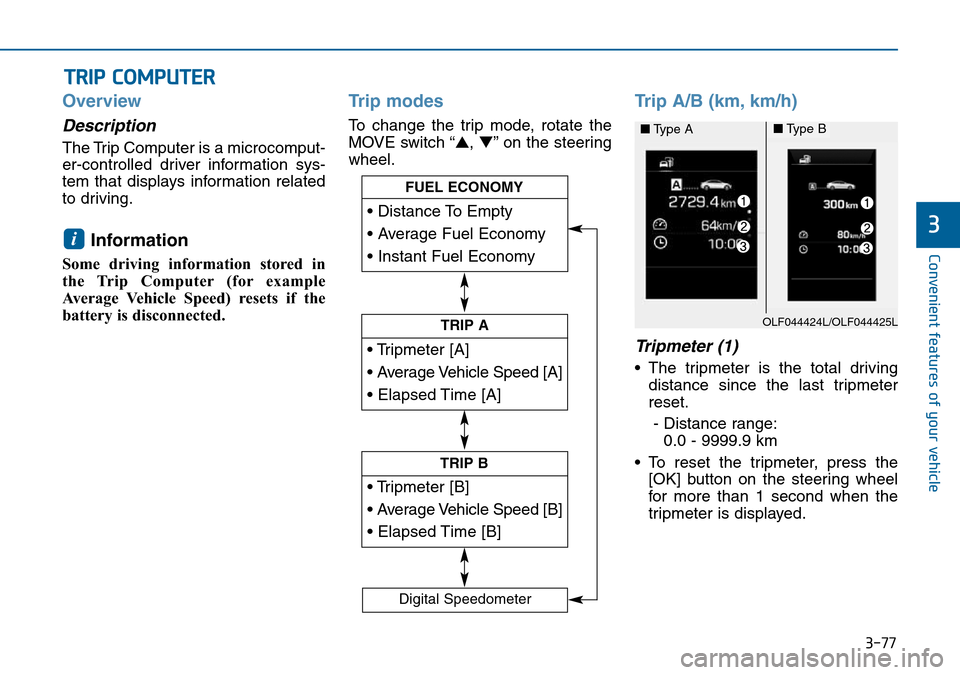
To change the trip mode, rotate the
MOVE switch “▲,▼” on the steering
wheel.
Trip A/B (km, km/h)
Tripmeter (1)
• The tripmeter is the total driving
distance since the last tripmeter
reset.
- Distance range:
0.0 - 9999.9 km
• To reset the tripmeter, press the
[OK] button on the steering wheel
for more than 1 second when the
tripmeter is displayed.
i
TRIP COMPUTER
• Tripmeter [A]
• Average Vehicle Speed [A]
• Elapsed Time [A]
TRIP A
• Tripmeter [B]
• Average Vehicle Speed [B]
• Elapsed Time [B]
TRIP B
• Distance To Empty
• Average Fuel Economy
• Instant Fuel Economy
FUEL ECONOMY
Digital Speedometer
OLF044424L/OLF044425L
■Type A■Type B
Page 162 of 504

3-78
Convenient features of your vehicle
Average Vehicle Speed (2)
• The average vehicle speed is cal-
culated from the total driving dis-
tance and driving time since the
last average vehicle speed reset.
- Speed range: 0 - 999 km/h
• To reset the average vehicle speed,
press the [OK] button on the steer-
ing wheel for more than 1 second
when the average vehicle speed is
displayed.
Information
• The average vehicle speed is not dis-
played if the driving distance is less
than 300 metres or the driving time is
less than 10 seconds since the ignition
switch or the Engine Start/Stop but-
ton is turned to ON.
• Even if the vehicle is not in motion,
the average vehicle speed keeps cal-
culating whilst the engine is run-
ning.
Elapsed Time (3)
• The elapsed time is the total driv-
ing time since the last elapsed time
reset.
- Time range (hh:mm): 00:00 - 99:59
• To reset the elapsed time, press
the [OK] button on the steering
wheel for more than 1 second
when the elapsed time is dis-
played.
Information
Even if the vehicle is not in motion, the
elapsed time keeps calculating whilst
the engine is running.
Fuel economy
(km, L/100km, km/L)
Distance To Empty (1)
• The distance to empty is the esti-
mated distance the vehicle can be
driven with the remaining fuel.
- Distance range: 1 - 9999 km
• If the estimated distance is below
1 km, the trip computer will display
“---” as distance to empty.
i
iOLF044422L/OLF044423L
■Type A■Type B
Page 163 of 504
3-79
Convenient features of your vehicle
3
Information
• If the vehicle is not on level ground
or the battery power has been inter-
rupted, the distance to empty func-
tion may not operate correctly.
• The distance to empty may differ
from the actual driving distance as
it is an estimate of the available
driving distance.
• The Trip Computer may not regis-
ter additional fuel if less than 6 litres
(1.6 gallons) of fuel are added to the
vehicle.
• The fuel economy and distance to
empty may vary significantly based
on driving conditions, driving
habits, and condition of the vehicle.
Average Fuel Economy (2)
• The average fuel economy is calcu-
lated from the total driving distance
and fuel consumption since the last
average fuel economy reset.
- Fuel economy range:
0.0 - 99.9 L/100km, km/L
• The average fuel economy can be
reset both manually and automati-
cally.
Manual reset
To clear the average fuel economy
manually, press the [OK] button on
the steering wheel for more than 1
second when the average fuel econo-
my is displayed.
Automatic reset
To adjust the average fuel economy
to reset automatically whenever refu-
elling, select the “Auto Reset” mode
in User Setting menu of the LCD dis-
play (Refer to “LCD Display”).
Under “Auto Reset” mode, the aver-
age fuel economy will be cleared to
zero (---) when the vehicle speed
exceeds 1 km/h after refuelling more
than 6 litres (1.6 gallons).
Information
The average fuel economy is not dis-
played if the vehicle has not been driv-
en for more than 10 seconds or 300
metres, since the ignition switch or the
Engine Start/Stop button was turned
on.
Instant Fuel Economy (3)
• This mode displays the instant fuel
economy during the last few sec-
onds when the vehicle speed is
more than 10 km/h.
- Fuel economy range:
0 - 30 L/100km, km/L
i
i