ESP Hyundai Sonata 2015 - RHD (UK, Australia) Owner's Guide
[x] Cancel search | Manufacturer: HYUNDAI, Model Year: 2015, Model line: Sonata, Model: Hyundai Sonata 2015Pages: 504, PDF Size: 10.88 MB
Page 224 of 504
3-140
Convenient features of your vehicle
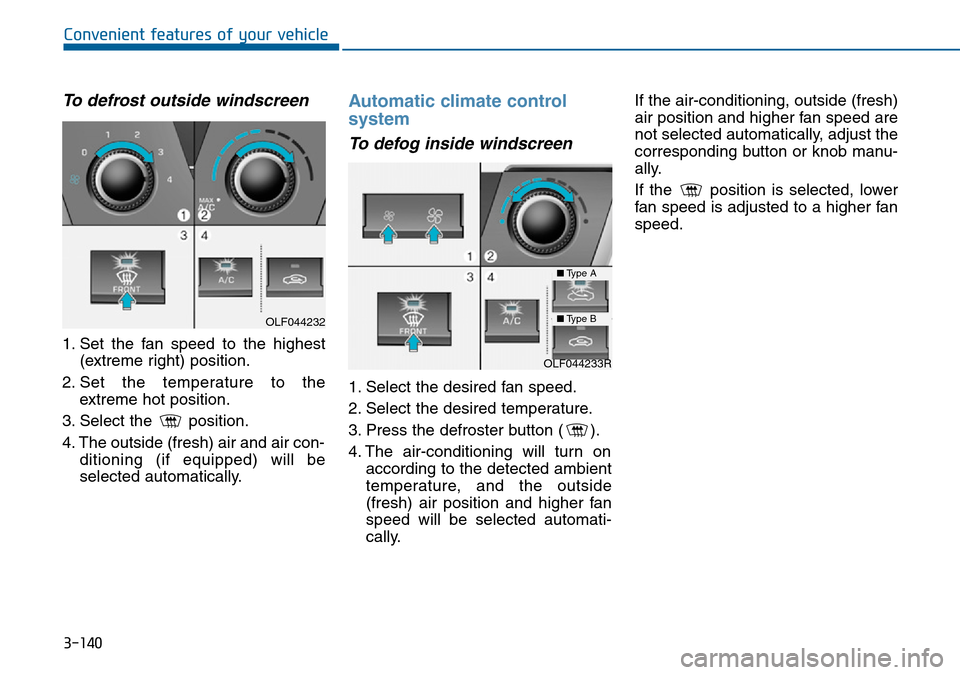
To defrost outside windscreen
1. Set the fan speed to the highest
(extreme right) position.
2. Set the temperature to the
extreme hot position.
3. Select the position.
4. The outside (fresh) air and air con-
ditioning (if equipped) will be
selected automatically.
Automatic climate control
system
To defog inside windscreen
1. Select the desired fan speed.
2. Select the desired temperature.
3. Press the defroster button ( ).
4. The air-conditioning will turn on
according to the detected ambient
temperature, and the outside
(fresh) air position and higher fan
speed will be selected automati-
cally.If the air-conditioning, outside (fresh)
air position and higher fan speed are
not selected automatically, adjust the
corresponding button or knob manu-
ally.
If the position is selected, lower
fan speed is adjusted to a higher fan
speed.
OLF044232
OLF044233R
■Type A
■Type B
Page 263 of 504
4-24
Multimedia System
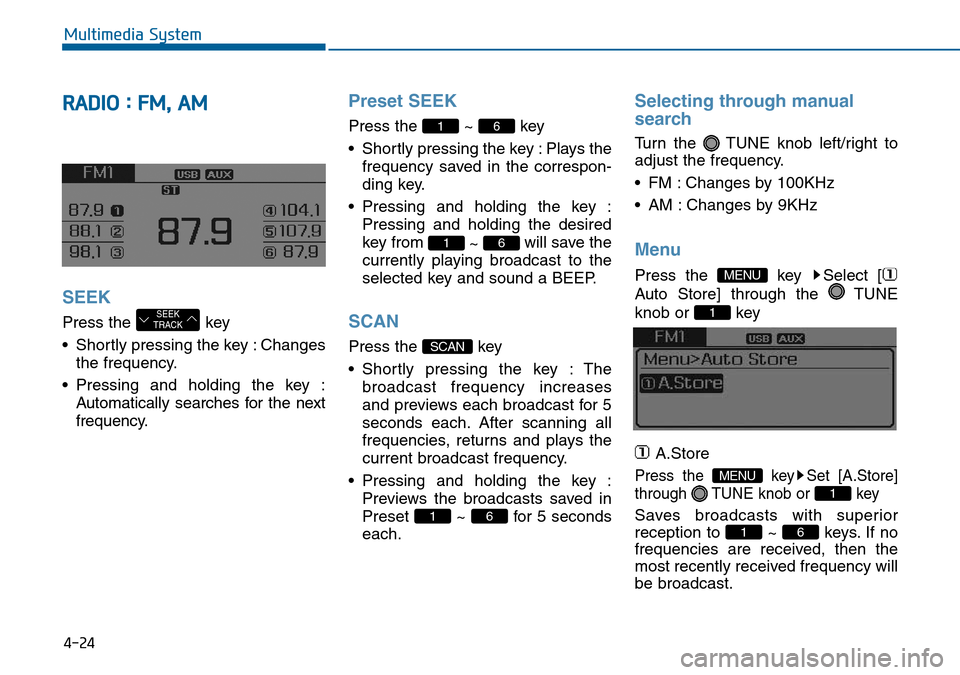
RADIO : FM, AM
SEEK
Press the key
• Shortly pressing the key : Changes
the frequency.
• Pressing and holding the key :
Automatically searches for the next
frequency.
Preset SEEK
Press the ~ key
• Shortly pressing the key : Plays the
frequency saved in the correspon-
ding key.
• Pressing and holding the key :
Pressing and holding the desired
key from
~ will save the
currently playing broadcast to the
selected key and sound a BEEP.
SCAN
Press the key
• Shortly pressing the key : The
broadcast frequency increases
and previews each broadcast for 5
seconds each. After scanning all
frequencies, returns and plays the
current broadcast frequency.
• Pressing and holding the key :
Previews the broadcasts saved in
Preset ~ for 5 seconds
each.
Selecting through manual
search
Turn the TUNE knob left/right to
adjust the frequency.
• FM : Changes by 100KHz
• AM : Changes by 9KHz
Menu
Press the key Select [
Auto Store] through the TUNE
knob or key
A.Store
Press the key Set [A.Store]
through TUNE knob or key
Saves broadcasts with superior
reception to ~ keys. If no
frequencies are received, then the
most recently received frequency will
be broadcast.61
1
MENU
1
MENU
61
SCAN
61
61
SEEK
TRACK
Page 268 of 504
4-29
Multimedia System
4
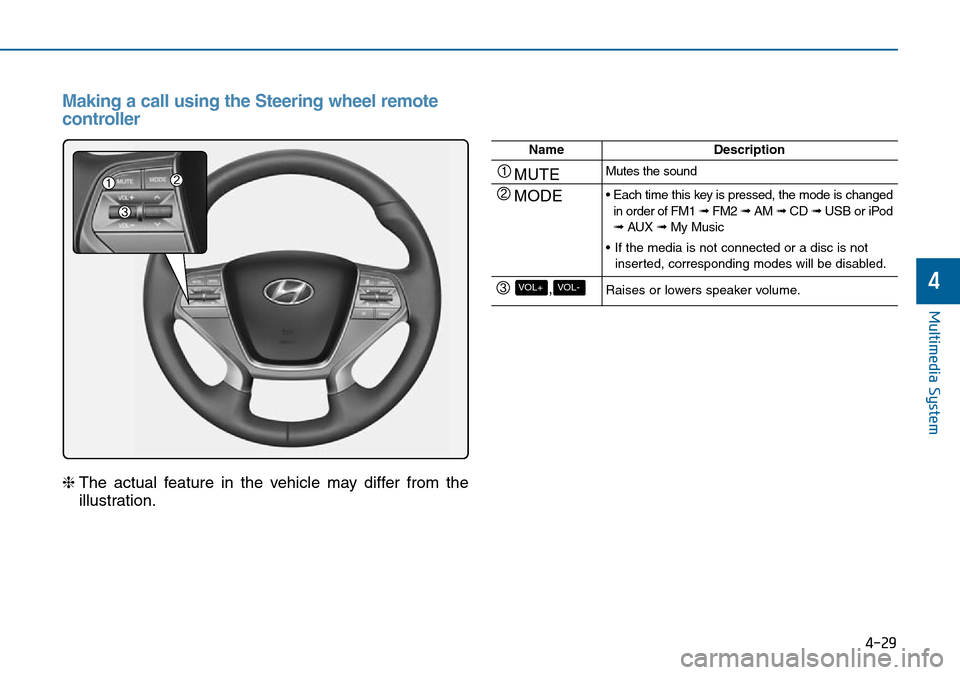
Making a call using the Steering wheel remote
controller
❈The actual feature in the vehicle may differ from the
illustration.
NameDescription
MUTEMutes the sound
MODE• Each time this key is pressed, the mode is changed
in order of FM1 ➟ FM2 ➟ AM➟ CD ➟ USB or iPod
➟ AUX ➟ My Music
• If the media is not connected or a disc is not
inserted, corresponding modes will be disabled.
,VOL-VOL+Raises or lowers speaker volume.
Page 271 of 504
4-32
Multimedia System
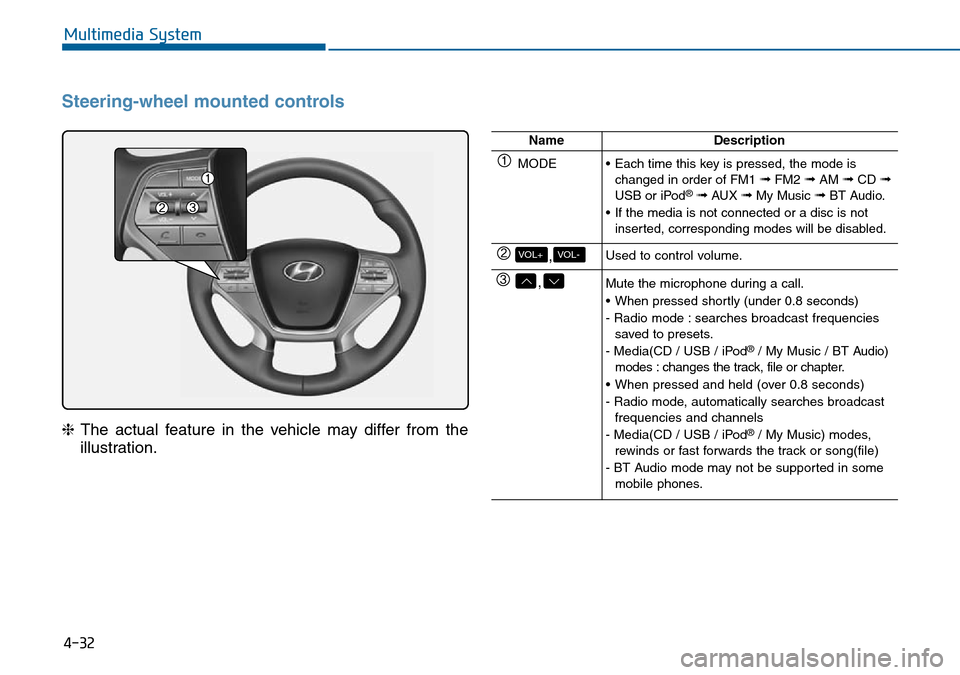
Steering-wheel mounted controls
❈The actual feature in the vehicle may differ from the
illustration.
NameDescription
MODE• Each time this key is pressed, the mode is
changed in order of FM1 ➟FM2 ➟AM ➟CD ➟USB or iPod®➟ AUX ➟My Music ➟BT Audio.
• If the media is not connected or a disc is not
inserted, corresponding modes will be disabled.
,VOL-VOL+Used to control volume.
,Mute the microphone during a call.
• When pressed shortly (under 0.8 seconds)
- Radio mode : searches broadcast frequencies
saved to presets.
- Media(CD / USB / iPod
®/ My Music / BT Audio)
modes : changes the track, file or chapter.
• When pressed and held (over 0.8 seconds)
- Radio mode, automatically searches broadcast
frequencies and channels
- Media(CD / USB / iPod
®/ My Music) modes,
rewinds or fast forwards the track or song(file)
- BT Audio mode may not be supported in some
mobile phones.
Page 275 of 504
![Hyundai Sonata 2015 - RHD (UK, Australia) Owners Guide 4-36
Multimedia System
MEDIA MODE
Pressing the key will change
the operating mode in order of CD
➟
USB(iPod®) ➟ AUX ➟ My Music ➟BT
Audio.
If [Mode Pop up] is turned on within
[Display], the](/img/35/16797/w960_16797-274.png "Hyundai Sonata 2015 - RHD (UK, Australia) Owners Guide 4-36
Multimedia System
MEDIA MODE
Pressing the key will change
the operating mode in order of CD
➟
USB(iPod®) ➟ AUX ➟ My Music ➟BT
Audio.
If [Mode Pop up] is turned on within
[Display], the")
4-36
Multimedia System
MEDIA MODE
Pressing the key will change
the operating mode in order of CD
➟
USB(iPod®) ➟ AUX ➟ My Music ➟BT
Audio.
If [Mode Pop up] is turned on within
[Display], then pressing the
key will display the Media
Pop-up Mode screen.
Turn the TUNE knob to move the
focus. Press the knob to select.
Information
The media mode pop up screen can be
displayed only when there are two or
more media modes turned on.
Title Icon
When a Bluetooth®Wireless
Technology, iPod®, USB, or AUX
device is connected or a CD is
inserted, the corresponding mode
icon will be displayed.
Icon Title
Bluetooth®Wireless Technology
CD
iPod®
USB
AUX
i
MEDIA
SETUP
MEDIA
Page 311 of 504
4-72
Multimedia System
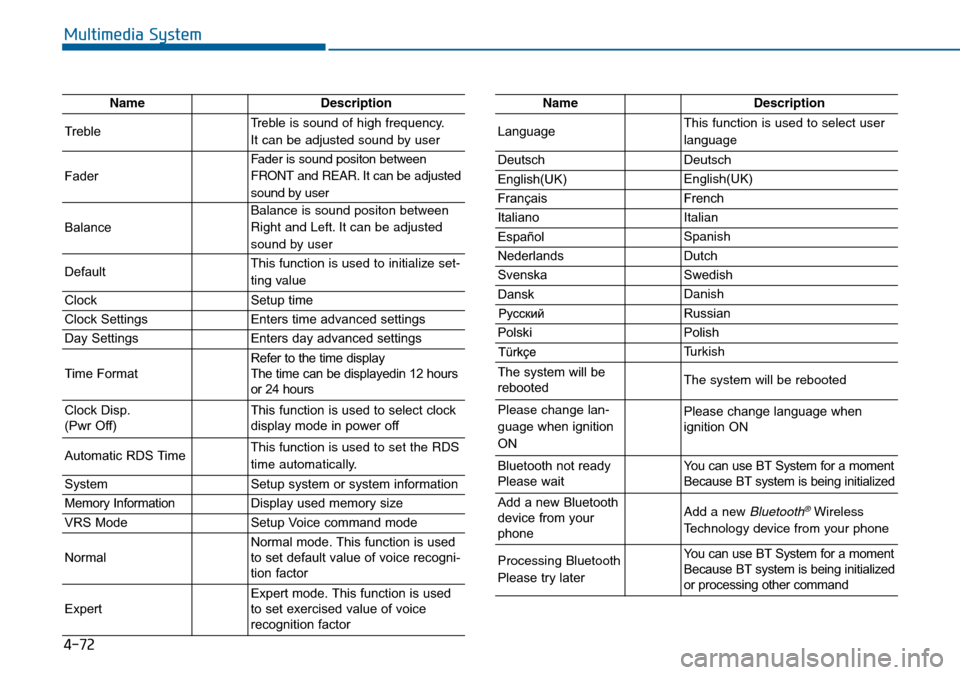
NameDescription
TrebleTreble is sound of high frequency.
It can be adjusted sound by user
Fader
Fader is sound positon between
FRONT and REAR. It can be adjusted
sound by user
Balance
Balance is sound positon between
Right and Left. It can be adjusted
sound by user
DefaultThis function is used to initialize set-
ting value
ClockSetup time
Clock SettingsEnters time advanced settings
Day SettingsEnters day advanced settings
Time FormatRefer to the time display
The time can be displayedin 12 hours
or 24 hours
Clock Disp.
(Pwr Off)This function is used to select clock
display mode in power off
Automatic RDS TimeThis function is used to set the RDS
time automatically.
SystemSetup system or system information
Memory InformationDisplay used memory size
VRS ModeSetup Voice command mode
NormalNormal mode. This function is used
to set default value of voice recogni-
tion factor
ExpertExpert mode. This function is used
to set exercised value of voice
recognition factor
NameDescription
LanguageThis function is used to select user
language
DeutschDeutsch
English(UK)English(UK)
FrançaisFrench
Italiano Italian
EspañolSpanish
NederlandsDutch
SvenskaSwedish
DanskDanish
Russian
PolskiPolish
Turkish
The system will be
rebootedThe system will be rebooted
Please change lan-
guage when ignition
ONPlease change language when
ignition ON
Bluetooth not ready
Please waitYou can use BT System for a moment
Because BT system is being initialized
Add a new Bluetooth
device from your
phoneAdd a new Bluetooth®Wireless
Technology device from your phone
Processing Bluetooth
Please try laterYou can use BT System for a moment
Because BT system is being initialized
or processing other command
Page 317 of 504
5-4
Driving your vehicle
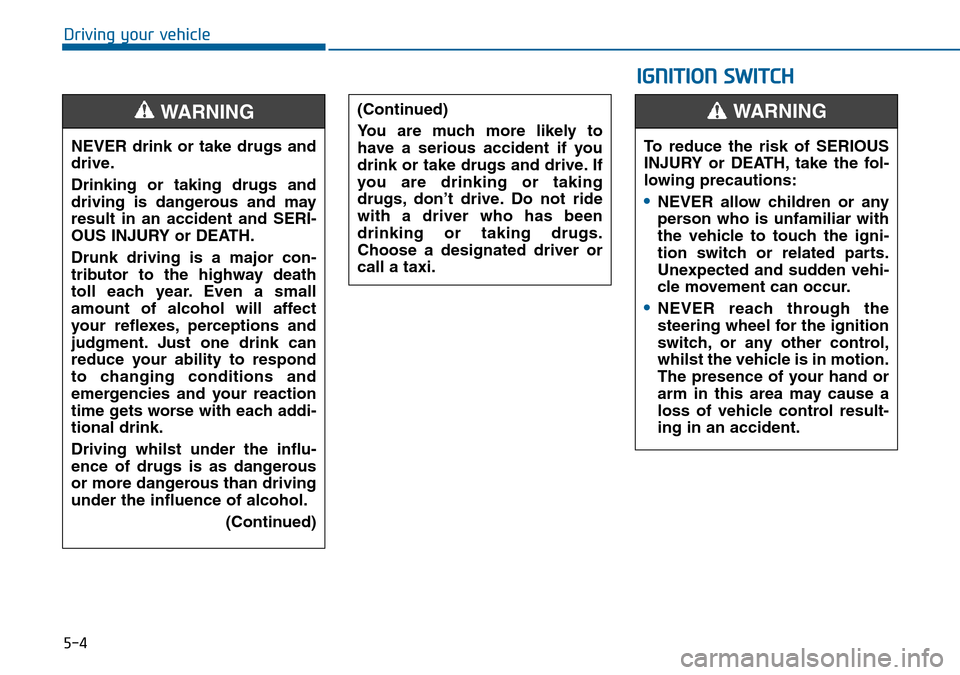
NEVER drink or take drugs and
drive.
Drinking or taking drugs and
driving is dangerous and may
result in an accident and SERI-
OUS INJURY or DEATH.
Drunk driving is a major con-
tributor to the highway death
toll each year. Even a small
amount of alcohol will affect
your reflexes, perceptions and
judgment. Just one drink can
reduce your ability to respond
to changing conditions and
emergencies and your reaction
time gets worse with each addi-
tional drink.
Driving whilst under the influ-
ence of drugs is as dangerous
or more dangerous than driving
under the influence of alcohol.
(Continued)
WARNING (Continued)
You are much more likely to
have a serious accident if you
drink or take drugs and drive. If
you are drinking or taking
drugs, don’t drive. Do not ride
with a driver who has been
drinking or taking drugs.
Choose a designated driver or
call a taxi.
IGNITION SWITCH
To reduce the risk of SERIOUS
INJURY or DEATH, take the fol-
lowing precautions:
Page 327 of 504
5-14
Driving your vehicle
Automatic transaxle operation
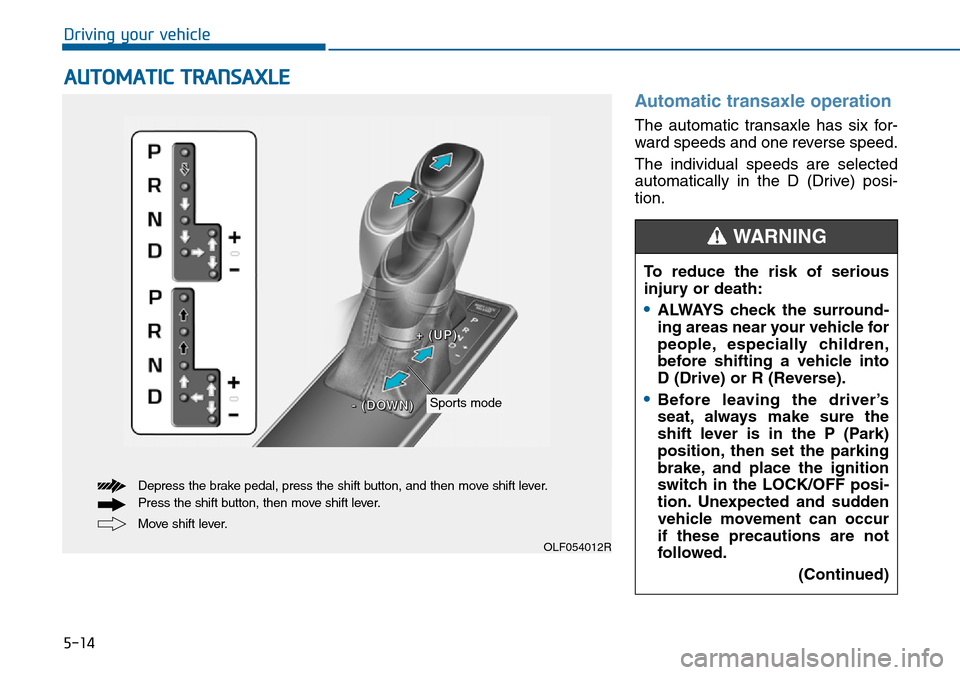
The automatic transaxle has six for-
ward speeds and one reverse speed.
The individual speeds are selected
automatically in the D (Drive) posi-
tion.
AUTOMATIC TRANSAXLE
OLF054012R
Move shift lever. Depress the brake pedal, press the shift button, and then move shift lever.
Press the shift button, then move shift lever.
Sports mode
+ +
( (
U U
P P
) )
- -
( (
D D
O O
W W
N N
) )
To reduce the risk of serious
injury or death:
•ALWAYS check the surround-
ing areas near your vehicle for
people, especially children,
before shifting a vehicle into
D (Drive) or R (Reverse).
•Before leaving the driver’s
seat, always make sure the
shift lever is in the P (Park)
position, then set the parking
brake, and place the ignition
switch in the LOCK/OFF posi-
tion. Unexpected and sudden
vehicle movement can occur
if these precautions are not
followed.
(Continued)
WARNING
Page 332 of 504
5-19
Driving your vehicle
5
Parking
Always come to a complete stop and
continue to depress the brake pedal.
Move the shift lever into the P (Park)
position, apply the parking brake,
and place the ignition switch in the
LOCK/OFF position. Take the key
with you when exiting the vehicle.
Good driving practices
• Never move the shift lever from P
(Park) or N (Neutral) to any other
position with the accelerator pedal
depressed.
• Never move the shift lever into P
(Park) when the vehicle is in
motion.
Ensure the vehicle is completely
stopped before you attempt to shift
into R (Reverse) or D (Drive).
• Do not move the shift lever to N
(Neutral) when driving. Doing so
may result in an accident because
of a loss of engine braking and the
transaxle could be damaged.
• Do not drive with your foot resting
on the brake pedal. Even light, but
consistent pedal pressure can
result in the brakes overheating,
brake wear and possibly even
brake failure.
• When driving in sports mode, slow
down before shifting to a lower
gear. Otherwise, the lower gear
may not be engaged if the engine
rpms are outside of the allowable
range.• Always apply the parking brake
when leaving the vehicle. Do not
depend on placing the transaxle in
P (Park) to keep the vehicle from
moving.
• Exercise extreme caution when
driving on a slippery surface. Be
especially careful when braking,
accelerating or shifting gears. On a
slippery surface, an abrupt change
in vehicle speed can cause the
drive wheels to lose traction and
may cause loss of vehicle control
resulting in an accident
• Optimum vehicle performance and
economy is obtained by smoothly
depressing and releasing the
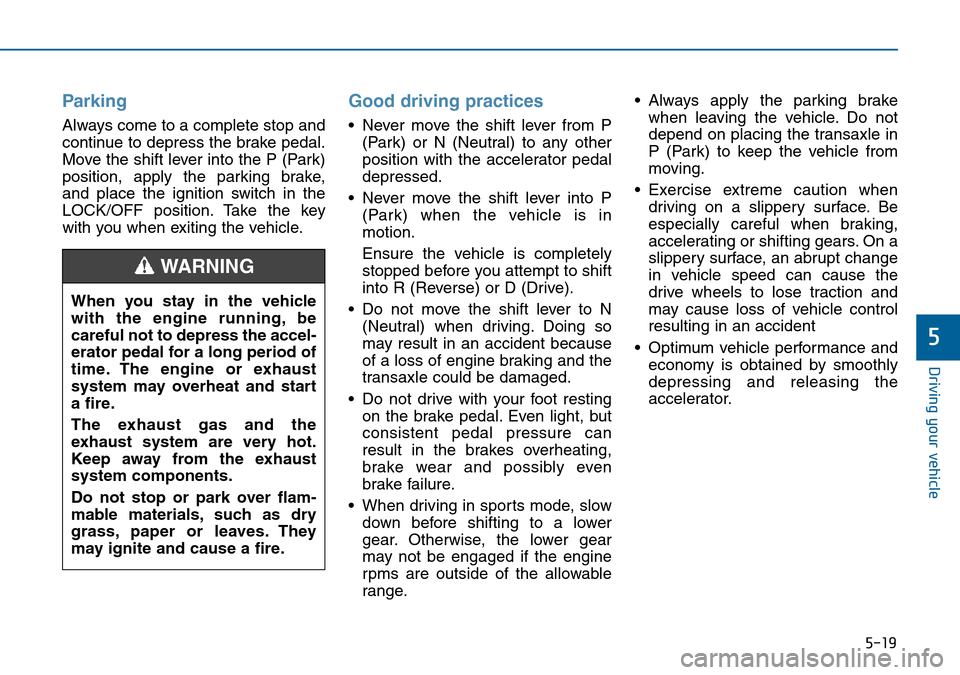
accelerator. When you stay in the vehicle
with the engine running, be
careful not to depress the accel-
erator pedal for a long period of
time. The engine or exhaust
system may overheat and start
a fire.
The exhaust gas and the
exhaust system are very hot.
Keep away from the exhaust
system components.
Do not stop or park over flam-
mable materials, such as dry
grass, paper or leaves. They
may ignite and cause a fire.
WARNING
Page 348 of 504
5-35
Driving your vehicle
5
Anti-lock Brake System (ABS)
ABS is an electronic braking system
that helps prevent a braking skid.
ABS allows the driver to steer and
brake at the same time.
Using ABS
To obtain the maximum benefit from
your ABS in an emergency situation,
do not attempt to modulate your
brake pressure and do not try to
pump your brakes. Depress your
brake pedal as hard as possible.
When you apply your brakes under
conditions which may lock the
wheels, you may hear sounds from
the brakes, or feel a corresponding
sensation in the brake pedal. This is
normal and it means your ABS is
active.
ABS does not reduce the time or dis-
tance it takes to stop the vehicle.
Always maintain a safe distance from
the vehicle in front of you.
ABS will not prevent a skid that
results from sudden changes in
direction, such as trying to take a
corner too fast or making a sudden
lane change. Always drive at a safe
speed for the road and weather con-
ditions. An Anti-lock Braking System
(ABS) or an Electronic Stability
Control (ESC) system will not
prevent accidents due to
improper or dangerous driving
manoeuvres. Even though vehi-
cle control is improved during
emergency braking, always
maintain a safe distance
between you and objects ahead
of you. Vehicle speeds should
always be reduced during
extreme road conditions. The
braking distance for vehicles
equipped with ABS or ESC may
be longer than for those without
these systems in particular
road conditions.
Drive your vehicle at reduced
speeds in the following condi-
tions:
•Rough, gravel or snow-cov-
ered roads.
(Continued)
WARNING
(Continued)
•On roads where the road sur-
face is pitted or uneven.
•Tyre chains are installed on
your vehicle.
The safety features of an ABS
or ESC equipped vehicle should
not be tested by high speed
driving or cornering. This could
endanger the safety of yourself
or others.