ad blue Hyundai Sonata 2015 - RHD (UK, Australia) Owner's Guide
[x] Cancel search | Manufacturer: HYUNDAI, Model Year: 2015, Model line: Sonata, Model: Hyundai Sonata 2015Pages: 504, PDF Size: 10.88 MB
Page 302 of 504
![Hyundai Sonata 2015 - RHD (UK, Australia) Owners Guide 4-63
Multimedia System
4
SETUP
(for
Bluetooth®Wireless
Technology equipped model)
Starting Mode
Press the key to display the
Setup screen.
You can select and control options
related to [Display], [](/img/35/16797/w960_16797-301.png "Hyundai Sonata 2015 - RHD (UK, Australia) Owners Guide 4-63
Multimedia System
4
SETUP
(for
Bluetooth®Wireless
Technology equipped model)
Starting Mode
Press the key to display the
Setup screen.
You can select and control options
related to [Display], [")
4-63
Multimedia System
4
SETUP
(for
Bluetooth®Wireless
Technology equipped model)
Starting Mode
Press the key to display the
Setup screen.
You can select and control options
related to [Display], [Sound], [Phone]
and [System].
Display Settings
Adjusting the Brightness
Press the key Select
[Display] Select [Brightness]
Use the , buttons to adjust the
screen brightness or set the
Brightness on Automatic, Daylight, or
Night mode.
Press the button to reset.1) Automatic : Adjusts the brightness
automatically
2 Day : Always maintains the bright-
ness on high
3) Night : Always maintains the
brightness on low
Default
SETUP
SETUP
Page 305 of 504
![Hyundai Sonata 2015 - RHD (UK, Australia) Owners Guide 4-66
Multimedia System
Bluetooth®Wireless
Technology Setting
Pairing a New Device
Press the key Select
[Phone] Select [Pair Phone]
Bluetooth®Wireless Technology
devices can be paired with the audio](/img/35/16797/w960_16797-304.png "Hyundai Sonata 2015 - RHD (UK, Australia) Owners Guide 4-66
Multimedia System
Bluetooth®Wireless
Technology Setting
Pairing a New Device
Press the key Select
[Phone] Select [Pair Phone]
Bluetooth®Wireless Technology
devices can be paired with the audio")
4-66
Multimedia System
Bluetooth®Wireless
Technology Setting
Pairing a New Device
Press the key Select
[Phone] Select [Pair Phone]
Bluetooth®Wireless Technology
devices can be paired with the audio
system.
For more information, refer to the
“Pairing through Phone Setup” sec-
tion within
Bluetooth®Wireless
Technology.
Viewing Paired Phone List
Press the key Select
[Phone] Select [Paired Phone List]
This feature is used to view mobile
phones that have been paired with
the audio system. Upon selecting a
paired phone, the setup menu is dis-
played.
For more information, refer to the
“Setting
Bluetooth®Wireless
Technology Connection” section with-
in
Bluetooth®Wireless Technology.1) : Moves to the previous
screen
2) Connect/Disconnect Phone :
Connect/disconnects currently
selected phone
3) Delete : Deletes the currently
selected phone
4) Change Priority : Sets currently
selected phone to highest connec-
tion priority
Information
- BEFORE DOWNLOADING
Contacts
• Only contacts within connected
phones can be downloaded. Also
check to see that your mobile phone
supports the download feature.
• To learn more about whether your
mobile phone supports contacts
downloads, refer to your mobile
phone user’s manual.
• The contacts for only the connected
phone can be downloaded. Before
downloading, check to see whether
your phone supports the download
feature.
i
SETUP
SETUP
Page 306 of 504
![Hyundai Sonata 2015 - RHD (UK, Australia) Owners Guide 4-67
Multimedia System
4
Downloading Contacts
Press the key Select
[Phone] Select [Contacts Download]
The contacts is downloaded from the
mobile phone and the download
progress is displayed.
Informat](/img/35/16797/w960_16797-305.png "Hyundai Sonata 2015 - RHD (UK, Australia) Owners Guide 4-67
Multimedia System
4
Downloading Contacts
Press the key Select
[Phone] Select [Contacts Download]
The contacts is downloaded from the
mobile phone and the download
progress is displayed.
Informat")
4-67
Multimedia System
4
Downloading Contacts
Press the key Select
[Phone] Select [Contacts Download]
The contacts is downloaded from the
mobile phone and the download
progress is displayed.
Information
• Up to 1,000 contacts entries can be
copied into car contacts.
• Up to 1,000 contacts entries can be
saved for each paired device.
• Upon downloading contacts data,
previously saved contacts data will
be deleted. However, contacts
entries saved to other paired phones
are not deleted.
Auto Download (Contacts)
Press the key Select
[Phone] Select [Auto Download]
This feature is used to automatically
download mobile contacts entries
once a
Bluetooth®Wireless
Technology phone is connected.
Information
• The Auto Download feature will
download mobile contacts entries
every time the phone is connected.
The download time may differ
depending on the number of saved
contacts entries and the communi-
cation state.
• When downloading a contacts, first
check to see that your mobile phone
supports the contacts download fea-
ture.
Streaming Audio
Press the key Select
[Phone] Select [Streaming Audio]
When Streaming Audio is turned on,
you can play music files saved in
your
Bluetooth®Wireless Technology
device from the car.
SETUP
i
SETUP
i
SETUP
Page 307 of 504
![Hyundai Sonata 2015 - RHD (UK, Australia) Owners Guide 4-68
Multimedia System
Outgoing Volume
Press the key Select
[Phone] Select [Outgoing Volume]
Use the , buttons to adjust the
outgoing volume level.
Turning Bluetooth System Off
Press the key Select](/img/35/16797/w960_16797-306.png "Hyundai Sonata 2015 - RHD (UK, Australia) Owners Guide 4-68
Multimedia System
Outgoing Volume
Press the key Select
[Phone] Select [Outgoing Volume]
Use the , buttons to adjust the
outgoing volume level.
Turning Bluetooth System Off
Press the key Select")
4-68
Multimedia System
Outgoing Volume
Press the key Select
[Phone] Select [Outgoing Volume]
Use the , buttons to adjust the
outgoing volume level.
Turning Bluetooth System Off
Press the key Select
[Phone] Select [Bluetooth System
Off]
Once
Bluetooth®Wireless Technology
is turned off,
Bluetooth®Wireless
Technology related features will not be
supported within the audio system.
Information
To t u r n Bluetooth®Wireless
Technology back on, go to
[Phone] and press “Yes”.
System Setting
Memory Information
Press the key Select
[System] Select [Memory Information]
This feature displays information
related to system memory.
1) Using : Displays capacity currently
in use
2) Capacity : Displays total capacity
SETUP
SETUP
i
SETUP
SETUP
Page 311 of 504
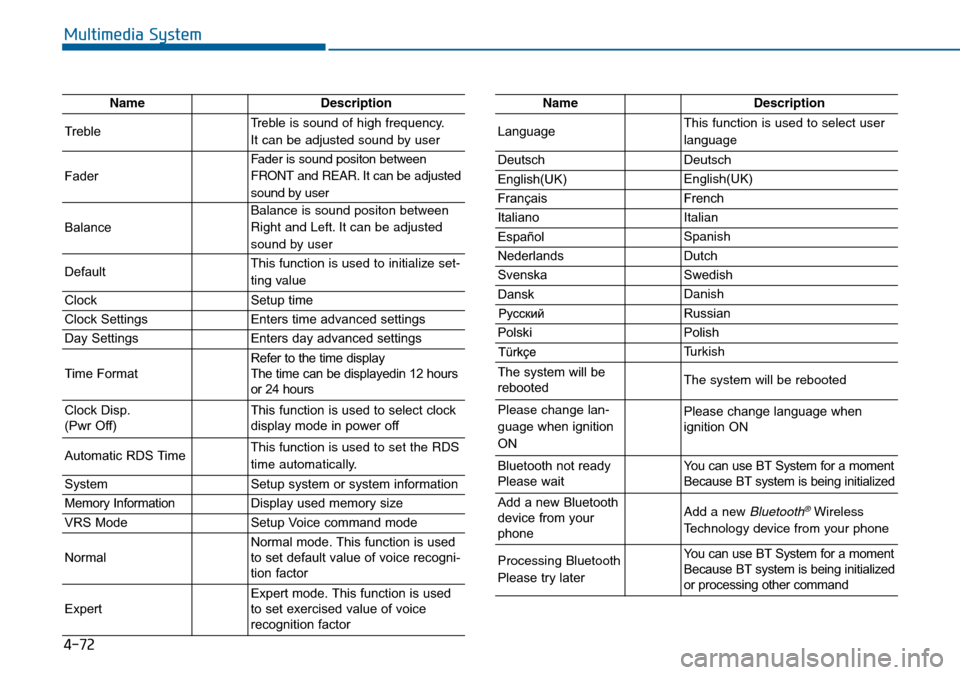
4-72
Multimedia System
NameDescription
TrebleTreble is sound of high frequency.
It can be adjusted sound by user
Fader
Fader is sound positon between
FRONT and REAR. It can be adjusted
sound by user
Balance
Balance is sound positon between
Right and Left. It can be adjusted
sound by user
DefaultThis function is used to initialize set-
ting value
ClockSetup time
Clock SettingsEnters time advanced settings
Day SettingsEnters day advanced settings
Time FormatRefer to the time display
The time can be displayedin 12 hours
or 24 hours
Clock Disp.
(Pwr Off)This function is used to select clock
display mode in power off
Automatic RDS TimeThis function is used to set the RDS
time automatically.
SystemSetup system or system information
Memory InformationDisplay used memory size
VRS ModeSetup Voice command mode
NormalNormal mode. This function is used
to set default value of voice recogni-
tion factor
ExpertExpert mode. This function is used
to set exercised value of voice
recognition factor
NameDescription
LanguageThis function is used to select user
language
DeutschDeutsch
English(UK)English(UK)
FrançaisFrench
Italiano Italian
EspañolSpanish
NederlandsDutch
SvenskaSwedish
DanskDanish
Russian
PolskiPolish
Turkish
The system will be
rebootedThe system will be rebooted
Please change lan-
guage when ignition
ONPlease change language when
ignition ON
Bluetooth not ready
Please waitYou can use BT System for a moment
Because BT system is being initialized
Add a new Bluetooth
device from your
phoneAdd a new Bluetooth®Wireless
Technology device from your phone
Processing Bluetooth
Please try laterYou can use BT System for a moment
Because BT system is being initialized
or processing other command
Page 312 of 504
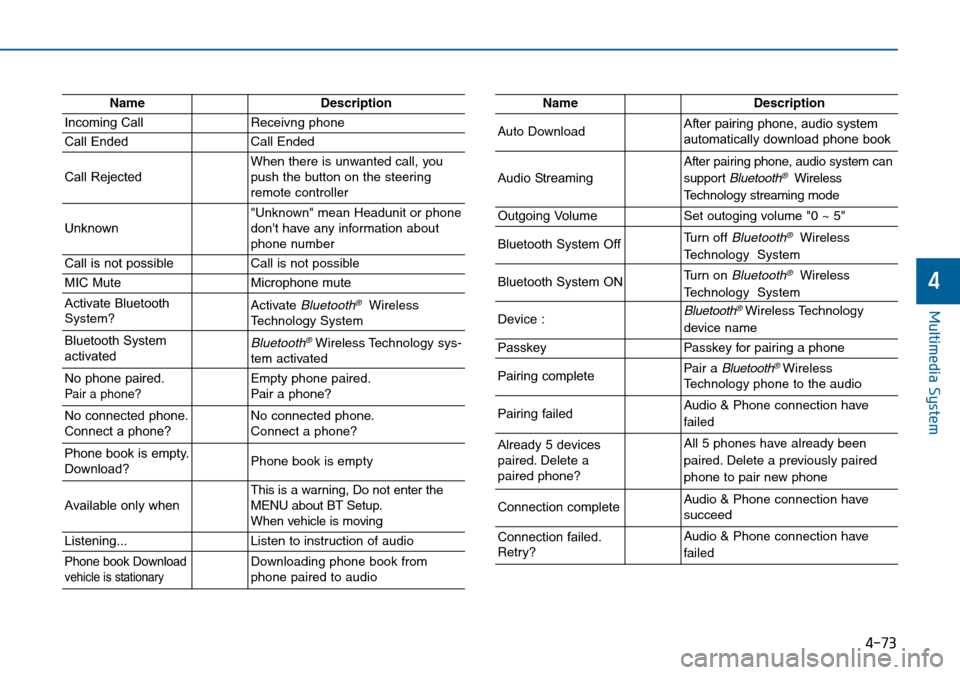
4-73
Multimedia System
4
NameDescription
Incoming CallReceivng phone
Call EndedCall Ended
Call RejectedWhen there is unwanted call, you
push the button on the steering
remote controller
Unknown"Unknown" mean Headunit or phone
don't have any information about
phone number
Call is not possibleCall is not possible
MIC MuteMicrophone mute
Activate Bluetooth
System?Activate Bluetooth®Wireless
Technology System
Bluetooth System
activatedBluetooth®Wireless Technology sys-
tem activated
No phone paired. Pair a phone?Empty phone paired.
Pair a phone?
No connected phone.
Connect a phone?No connected phone.
Connect a phone?
Phone book is empty.
Download?Phone book is empty
Available only when This is a warning, Do not enter the
MENU about BT Setup.
When vehicle is moving
Listening...Listen to instruction of audio
Phone book Downloadvehicle is stationaryDownloading phone book from
phone paired to audio
NameDescription
Auto DownloadAfter pairing phone, audio system
automatically download phone book
Audio Streaming
After pairing phone, audio system can
support
Bluetooth®Wireless
Technology streaming mode
Outgoing VolumeSet outoging volume "0 ~ 5"
Bluetooth System OffTurn off Bluetooth®Wireless
Technology System
Bluetooth System ONTurn on Bluetooth®Wireless
Technology System
Device : Bluetooth®Wireless Technology
device name
PasskeyPasskey for pairing a phone
Pairing completePair a Bluetooth®Wireless
Technology phone to the audio
Pairing failedAudio & Phone connection have
failed
Already 5 devices
paired. Delete a
paired phone?All 5 phones have already been
paired. Delete a previously paired
phone to pair new phone
Connection completeAudio & Phone connection have
succeed
Connection failed.
Retry?Audio & Phone connection have
failed
Page 313 of 504
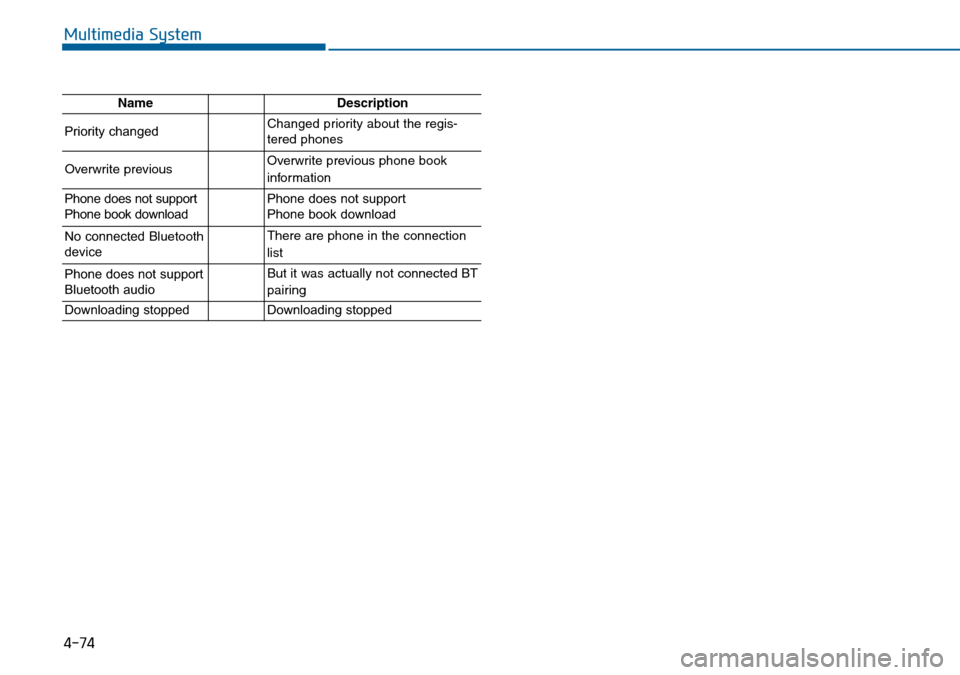
4-74
Multimedia System
NameDescription
Priority changedChanged priority about the regis-
tered phones
Overwrite previous Overwrite previous phone book
information
Phone does not support
Phone book downloadPhone does not support
Phone book download
No connected Bluetooth
deviceThere are phone in the connection
list
Phone does not support
Bluetooth audioBut it was actually not connected BT
pairing
Downloading stoppedDownloading stopped