reset Hyundai Sonata 2015 - RHD (UK, Australia) Owner's Guide
[x] Cancel search | Manufacturer: HYUNDAI, Model Year: 2015, Model line: Sonata, Model: Hyundai Sonata 2015Pages: 504, PDF Size: 10.88 MB
Page 270 of 504
4-31
Multimedia System
4
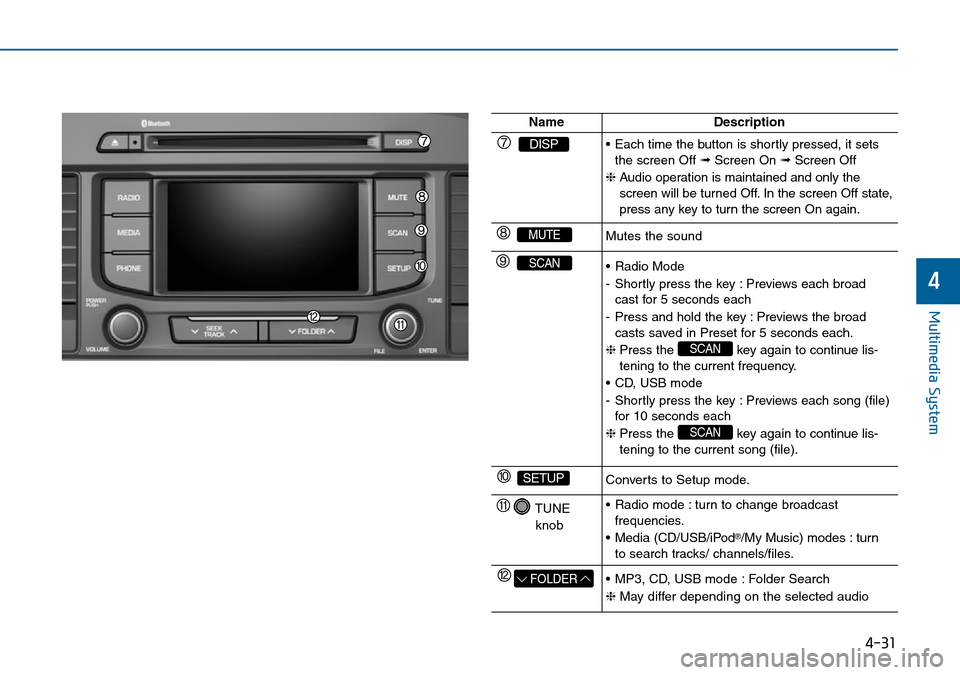
NameDescription
DISP• Each time the button is shortly pressed, it sets
the screen Off ➟Screen On ➟Screen Off
❈Audio operation is maintained and only the
screen will be turned Off. In the screen Off state,
press any key to turn the screen On again.
MUTEMutes the sound
SCAN• Radio Mode
- Shortly press the key : Previews each broad
cast for 5 seconds each
- Press and hold the key : Previews the broad
casts saved in Preset for 5 seconds each.
❈Press the key again to continue lis-
tening to the current frequency.
• CD, USB mode
- Shortly press the key : Previews each song (file)
for 10 seconds each
❈Press the key again to continue lis-
tening to the current song (file).
SCAN
SCAN
SETUPConverts to Setup mode.
TUNE
knob• Radio mode : turn to change broadcast
frequencies.
• Media (CD/USB/iPod
®/My Music) modes : turn
to search tracks/ channels/files.
FOLDER• MP3, CD, USB mode : Folder Search
❈May differ depending on the selected audio
Page 271 of 504
4-32
Multimedia System
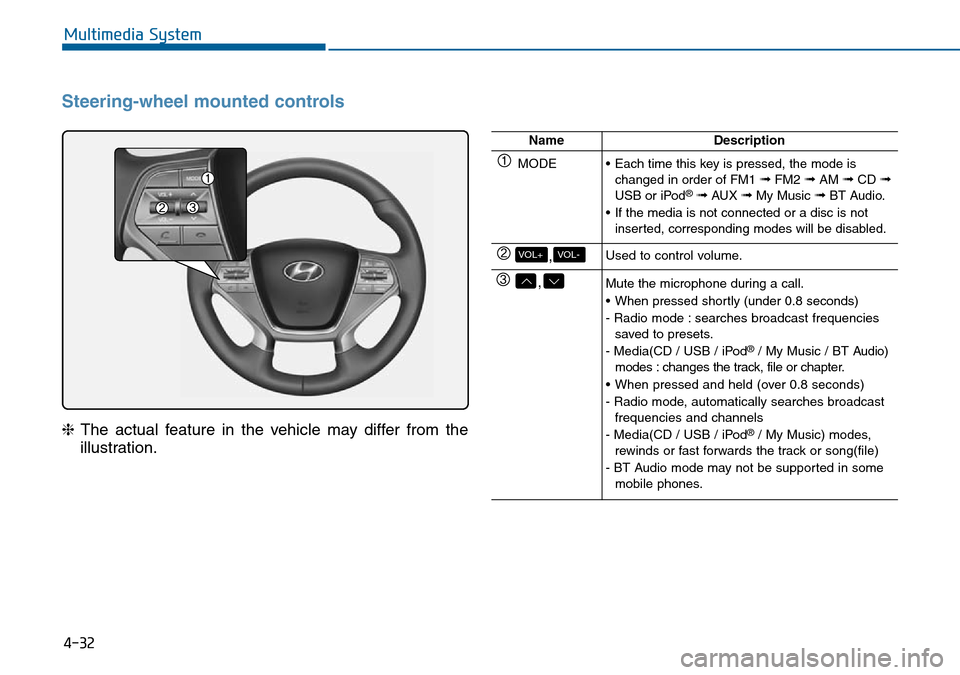
Steering-wheel mounted controls
❈The actual feature in the vehicle may differ from the
illustration.
NameDescription
MODE• Each time this key is pressed, the mode is
changed in order of FM1 ➟FM2 ➟AM ➟CD ➟USB or iPod®➟ AUX ➟My Music ➟BT Audio.
• If the media is not connected or a disc is not
inserted, corresponding modes will be disabled.
,VOL-VOL+Used to control volume.
,Mute the microphone during a call.
• When pressed shortly (under 0.8 seconds)
- Radio mode : searches broadcast frequencies
saved to presets.
- Media(CD / USB / iPod
®/ My Music / BT Audio)
modes : changes the track, file or chapter.
• When pressed and held (over 0.8 seconds)
- Radio mode, automatically searches broadcast
frequencies and channels
- Media(CD / USB / iPod
®/ My Music) modes,
rewinds or fast forwards the track or song(file)
- BT Audio mode may not be supported in some
mobile phones.
Page 273 of 504
4-34
Multimedia System
RADIO MODE
Basic Mode Screen
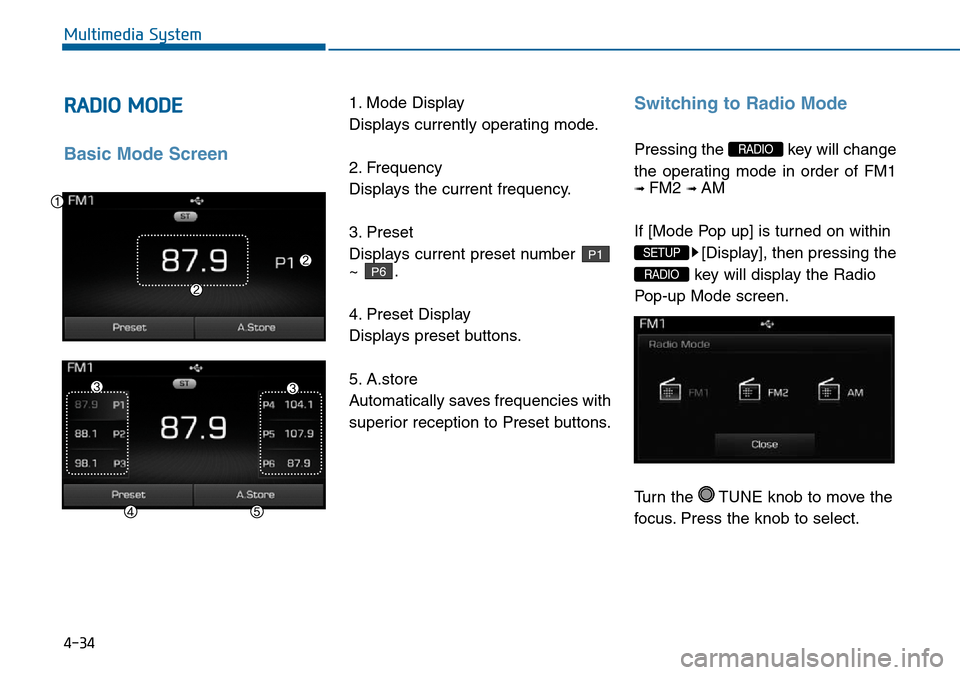
1. Mode Display
Displays currently operating mode.
2. Frequency
Displays the current frequency.
3. Preset
Displays current preset number
~ .
4. Preset Display
Displays preset buttons.
5. A.store
Automatically saves frequencies with
superior reception to Preset buttons.Switching to Radio Mode
Pressing the key will change
the operating mode in order of FM1
➟ FM2 ➟ AM
If [Mode Pop up] is turned on within
[Display], then pressing the
key will display the Radio
Pop-up Mode screen.
Turn the TUNE knob to move the
focus. Press the knob to select.
RADIO
SETUP
RADIO
P6
P1
Page 274 of 504
4-35
Multimedia System
4
Searching Radio Frequencies
Using Seek
Press the key to play the
previous/next frequency.
Using TUNE
Turn the TUNE knob to select the
desired frequency.
• FM : Increases/decreased by
100kHz
• AM : Increases/decreased by 9kHz
Using Radio Mode
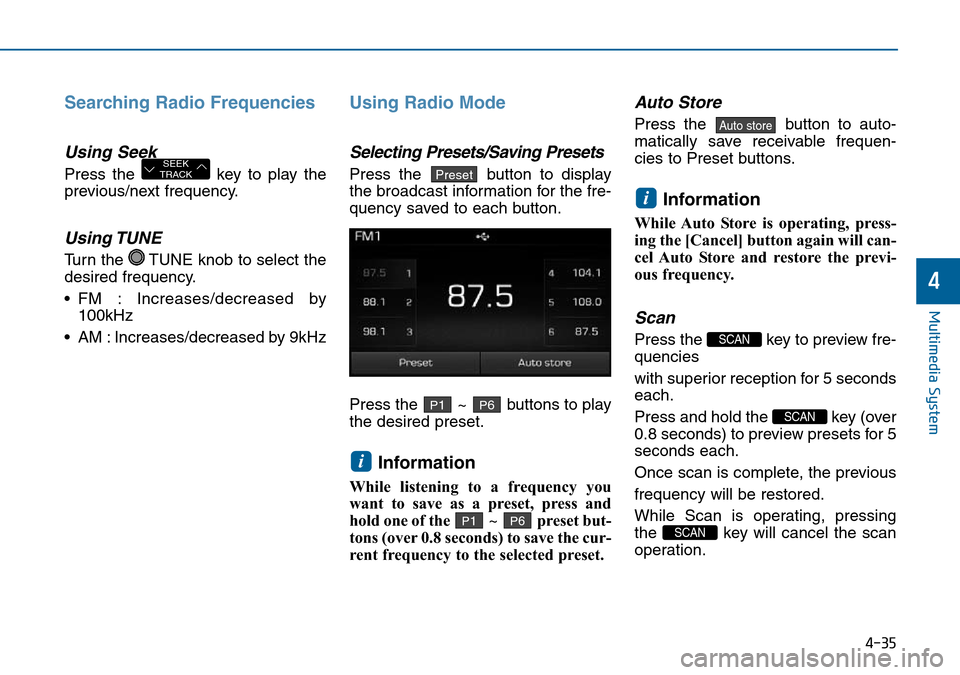
Selecting Presets/Saving Presets
Press the button to display
the broadcast information for the fre-
quency saved to each button.
Press the ~ buttons to play
the desired preset.
Information
While listening to a frequency you
want to save as a preset, press and
hold one of the ~ preset but-
tons (over 0.8 seconds) to save the cur-
rent frequency to the selected preset.
Auto Store
Press the button to auto-
matically save receivable frequen-
cies to Preset buttons.
Information
While Auto Store is operating, press-
ing the [Cancel] button again will can-
cel Auto Store and restore the previ-
ous frequency.
Scan
Press the key to preview fre-
quencies
with superior reception for 5 seconds
each.
Press and hold the key (over
0.8 seconds) to preview presets for 5
seconds each.
Once scan is complete, the previous
frequency will be restored.
While Scan is operating, pressing
the key will cancel the scan
operation.
SCAN
SCAN
SCAN
i
Auto store
P6P1
i
P6P1
PresetSEEK
TRACK
Page 302 of 504
![Hyundai Sonata 2015 - RHD (UK, Australia) Owners Guide 4-63
Multimedia System
4
SETUP
(for
Bluetooth®Wireless
Technology equipped model)
Starting Mode
Press the key to display the
Setup screen.
You can select and control options
related to [Display], [](/img/35/16797/w960_16797-301.png "Hyundai Sonata 2015 - RHD (UK, Australia) Owners Guide 4-63
Multimedia System
4
SETUP
(for
Bluetooth®Wireless
Technology equipped model)
Starting Mode
Press the key to display the
Setup screen.
You can select and control options
related to [Display], [")
4-63
Multimedia System
4
SETUP
(for
Bluetooth®Wireless
Technology equipped model)
Starting Mode
Press the key to display the
Setup screen.
You can select and control options
related to [Display], [Sound], [Phone]
and [System].
Display Settings
Adjusting the Brightness
Press the key Select
[Display] Select [Brightness]
Use the , buttons to adjust the
screen brightness or set the
Brightness on Automatic, Daylight, or
Night mode.
Press the button to reset.1) Automatic : Adjusts the brightness
automatically
2 Day : Always maintains the bright-
ness on high
3) Night : Always maintains the
brightness on low
Default
SETUP
SETUP
Page 304 of 504
![Hyundai Sonata 2015 - RHD (UK, Australia) Owners Guide 4-65
Multimedia System
4
Sound Settings
Sound Settings
Press the key Select
[Sound] Select [Sound Setting]Use the , , , buttons to
adjust the Fader/Balance settings.
Use the , buttons to adjust th](/img/35/16797/w960_16797-303.png "Hyundai Sonata 2015 - RHD (UK, Australia) Owners Guide 4-65
Multimedia System
4
Sound Settings
Sound Settings
Press the key Select
[Sound] Select [Sound Setting]Use the , , , buttons to
adjust the Fader/Balance settings.
Use the , buttons to adjust th")
4-65
Multimedia System
4
Sound Settings
Sound Settings
Press the key Select
[Sound] Select [Sound Setting]Use the , , , buttons to
adjust the Fader/Balance settings.
Use the , buttons to adjust the
Bass/Middle/Treble settings.
Press the button to reset.
SDVC (Speed Dependent
Volume Control)
Press the key Select
[Sound] Select [Speed Dependent
Vol.]
The volume level is controlled auto-
matically according to the vehicle
speed. SDVC can be set by selecting
from On/Off.
Touch Screen Beep
Press the key Select
[Sound] Select [Touch Screen Beep]SETUP
SETUP
DefaultSETUP
Page 364 of 504
5-51
Driving your vehicle
5
Information
Each of the above actions will cancel
Cruise Control operation (the SET
indicator light in the instrument clus-
ter will go off), but only pressing the
CRUISE button will turn the system
off. If you wish to resume Cruise
Control operation, push the lever up
(RES+) located on your steering
wheel. You will return to your previ-
ously preset speed, unless the system
was turned off using the CRUISE but-
ton.
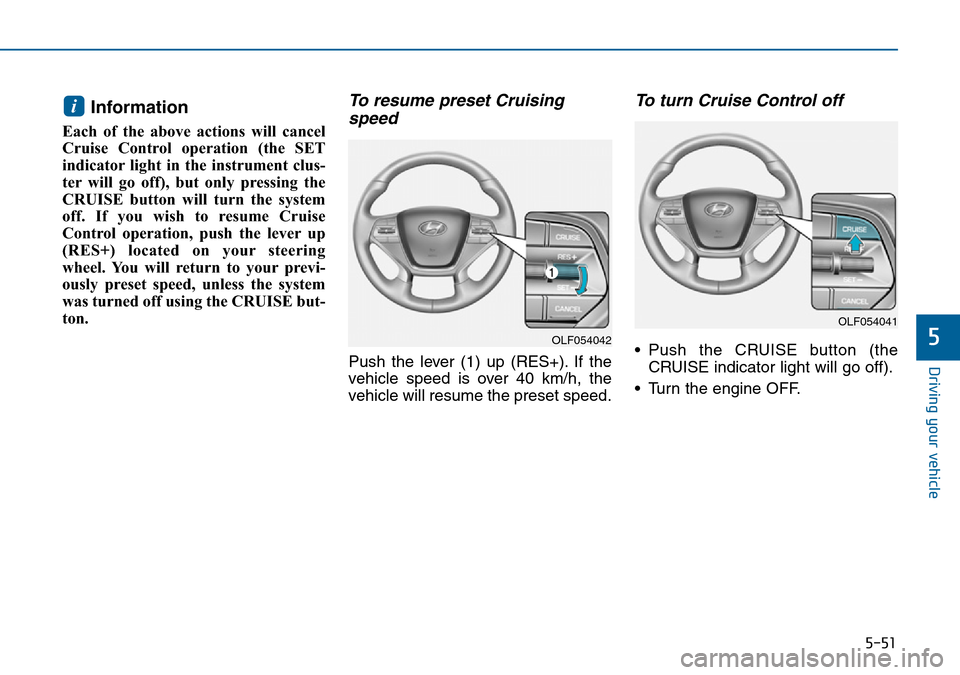
To resume preset Cruising
speed
Push the lever (1) up (RES+). If the
vehicle speed is over 40 km/h, the
vehicle will resume the preset speed.
To turn Cruise Control off
• Push the CRUISE button (the
CRUISE indicator light will go off).
• Turn the engine OFF.
i
OLF054042
OLF054041
Page 412 of 504
7
Maintenance
7
Maintenance
Engine compartment .............................................7-3
Maintenance services ...........................................7-5
Owner's responsibility ......................................................7-5
Owner maintenance precautions ..................................7-5
Owner maintenance ...............................................7-6
Owner maintenance schedule ........................................7-7
Scheduled maintenance services.........................7-9
Normal maintenance schedule.....................................7-10
Maintenance under severe usage conditions ..........7-14
Explanation of scheduled maintenance items ..7-16
Engine oil ..............................................................7-20
Checking the engine oil level ....................................7-20
Checking the engine oil and filter ..............................7-21
Engine coolant......................................................7-22
Checking the coolant level ...........................................7-22
Changing the coolant .....................................................7-24
Brake fluid ...........................................................7-25
Checking the brake fluid level .....................................7-25
Washer fluid .........................................................7-27
Checking the washer fluid level ...............................7-27
Parking brake .......................................................7-27
Checking the parking brake .........................................7-27
Air cleaner ............................................................7-28
Filter replacement ...........................................................7-28
Climate control air filter .....................................7-30
Filter inspection ...............................................................7-30
Filter replacement ...........................................................7-30
Wiper blades .........................................................7-31
Blade inspection ..............................................................7-31
Blade replacement ..........................................................7-31
Battery...................................................................7-33
For best battery service................................................7-33
Battery capacity label ...................................................7-34
Battery recharging .......................................................7-35
Reset items .......................................................................7-36
Tyres and wheels .................................................7-37
Tyre care ...........................................................................7-37
Recommended cold tyre inflation pressures ...........7-37
Checking tyre inflation pressure.................................7-39
Tyre rotation ...................................................................7-40
Wheel alignment and tyre balance.............................7-41
Tyre replacement ............................................................7-41
Wheel replacement ........................................................7-43
Tyre traction .....................................................................7-43
Tyre maintenance ..........................................................7-43
Tyre sidewall labelling ....................................................7-43
Low aspect ratio tyre.....................................................7-48
Fuses ......................................................................7-49
Fuse/Relay panel description ......................................7-55
7
Page 447 of 504
7-36
Maintenance
Reset items
Items should be reset after the bat-
tery has been discharged or the bat-
tery has been disconnected.
• Auto up/down window
(See chapter 3)
• Sunroof (See chapter 3)
• Trip computer (See chapter 3)
• Climate control system
(See chapter 3)
Page 452 of 504
7-41
7
Maintenance
Wheel alignment and tyre bal-
ance
The wheels on your vehicle were
aligned and balanced carefully at the
factory to give you the longest tyre
life and best overall performance.
In most cases, you will not need to
have your wheels aligned again.
However, if you notice unusual tyre
wear or your vehicle pulling one way
or the other, the alignment may need
to be reset.
If you notice your vehicle vibrating
when driving on a smooth road, your
wheels may need to be rebalanced.
Improper wheel weights can
damage your vehicle's aluminium
wheels. Use only approved wheel
weights.
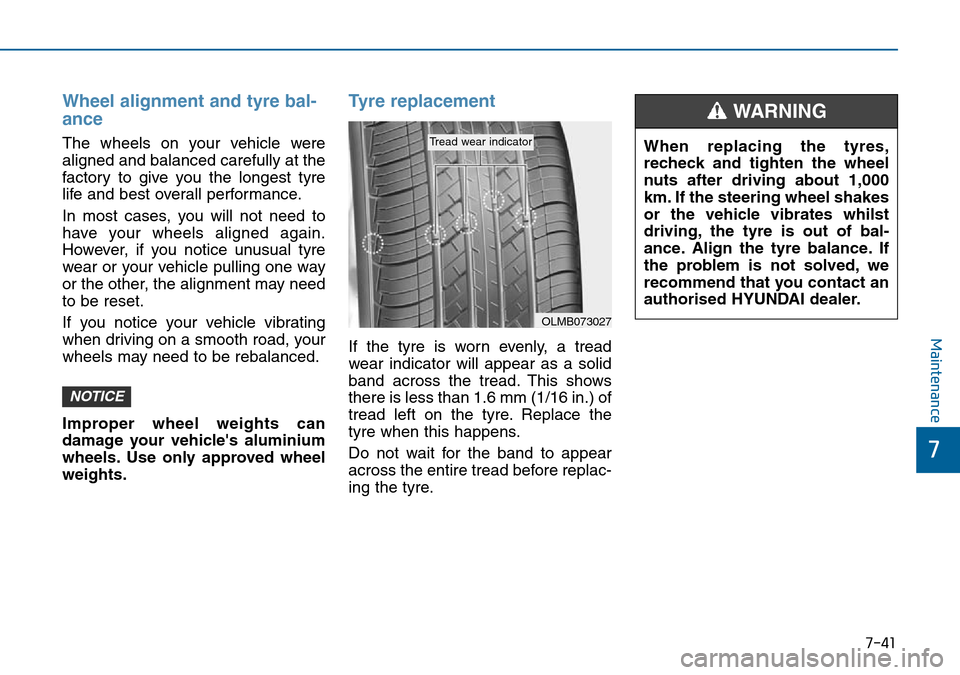
Tyre replacement
If the tyre is worn evenly, a tread
wear indicator will appear as a solid
band across the tread. This shows
there is less than 1.6 mm (1/16 in.) of
tread left on the tyre. Replace the
tyre when this happens.
Do not wait for the band to appear
across the entire tread before replac-
ing the tyre.
NOTICE
OLMB073027
Tread wear indicatorWhen replacing the tyres,
recheck and tighten the wheel
nuts after driving about 1,000
km. If the steering wheel shakes
or the vehicle vibrates whilst
driving, the tyre is out of bal-
ance. Align the tyre balance. If
the problem is not solved, we
recommend that you contact an
authorised HYUNDAI dealer.
WARNING