window Hyundai Sonata 2015 - RHD (UK, Australia) Owner's Guide
[x] Cancel search | Manufacturer: HYUNDAI, Model Year: 2015, Model line: Sonata, Model: Hyundai Sonata 2015Pages: 504, PDF Size: 10.88 MB
Page 233 of 504
3-149
Convenient features of your vehicle
3
Sunvisor
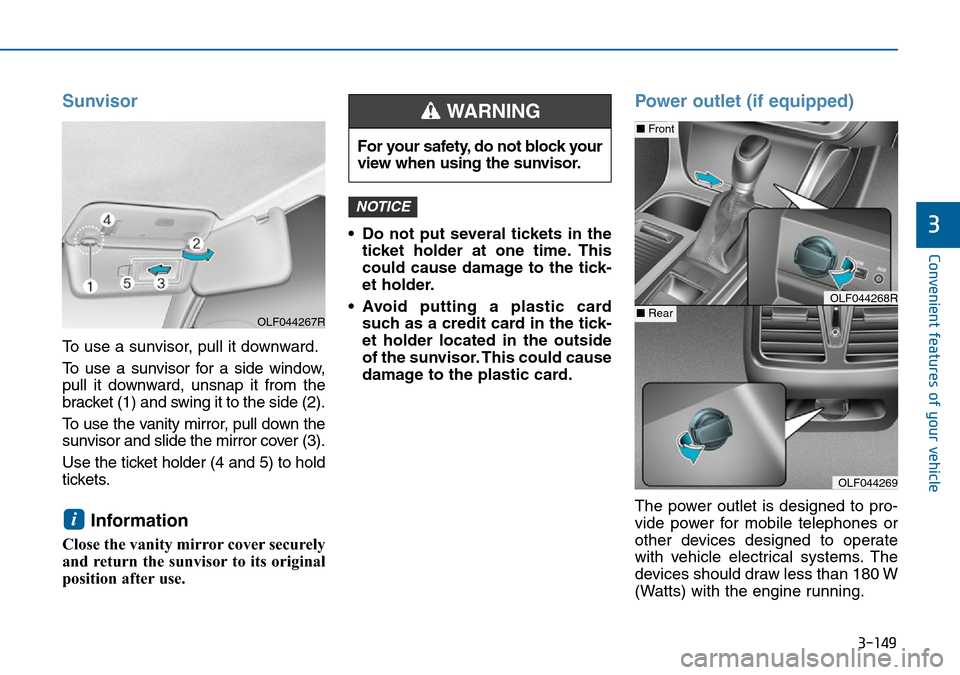
To use a sunvisor, pull it downward.
To use a sunvisor for a side window,
pull it downward, unsnap it from the
bracket (1) and swing it to the side (2).
To use the vanity mirror, pull down the
sunvisor and slide the mirror cover (3).
Use the ticket holder (4 and 5) to hold
tickets.
Information
Close the vanity mirror cover securely
and return the sunvisor to its original
position after use.• Do not put several tickets in the
ticket holder at one time. This
could cause damage to the tick-
et holder.
• Avoid putting a plastic card
such as a credit card in the tick-
et holder located in the outside
of the sunvisor. This could cause
damage to the plastic card.
Power outlet (if equipped)
The power outlet is designed to pro-
vide power for mobile telephones or
other devices designed to operate
with vehicle electrical systems. The
devices should draw less than 180 W
(Watts) with the engine running.
NOTICE
i
For your safety, do not block your
view when using the sunvisor.
WARNING
OLF044269
■Front
■RearOLF044268R
OLF044267R
Page 242 of 504
Antenna
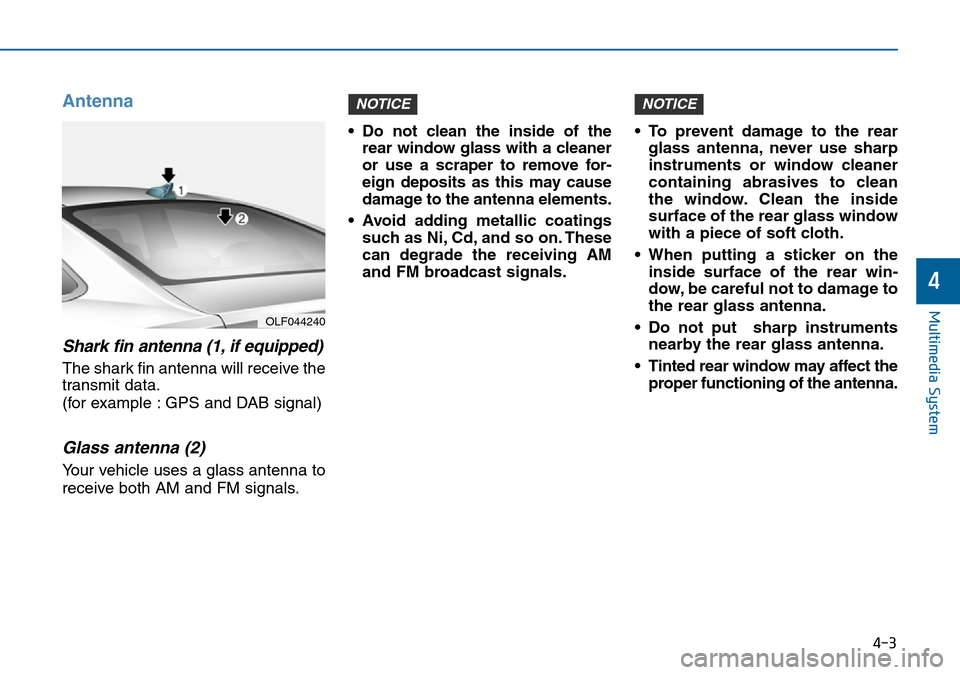
Shark fin antenna (1, if equipped)
The shark fin antenna will receive the
transmit data.
(for example : GPS and DAB signal)
Glass antenna (2)
Your vehicle uses a glass antenna to
receive both AM and FM signals.• Do not clean the inside of the
rear window glass with a cleaner
or use a scraper to remove for-
eign deposits as this may cause
damage to the antenna elements.
• Avoid adding metallic coatings
such as Ni, Cd, and so on. These
can degrade the receiving AM
and FM broadcast signals.• To prevent damage to the rear
glass antenna, never use sharp
instruments or window cleaner
containing abrasives to clean
the window. Clean the inside
surface of the rear glass window
with a piece of soft cloth.
• When putting a sticker on the
inside surface of the rear win-
dow, be careful not to damage to
the rear glass antenna.
• Do not put sharp instruments
nearby the rear glass antenna.
• Tinted rear window may affect the
proper functioning of the antenna.
NOTICENOTICE
4-3
Multimedia System
4
OLF044240
Page 247 of 504
4-8
Multimedia System
Caring for disc
• If the temperature inside the car is too
high, open the car windows to venti-
late before using the system.
• It is illegal to copy and use
MP3/WMA files without permission.
Use CDs that are created only by
lawful means.
• Do not apply volatile agents, such
as benzene and thinner, normal
cleaners and magnetic sprays
made for analogue disc onto CDs.
• To prevent the disc surface from
getting damaged, hold CDs by the
edges or the center hole only.
• Clean the disc surface with a piece
of soft cloth before playback (wipe
it from the center to the outside
edge).
• Do not damage the disc surface or
attach pieces of sticky tape or
paper.
• Make certain only CDs are insert-
ed into the CD player (Do not insert
more than one CD at a time).
• Keep CDs in their cases after use to
protect them from scratches or dirt.• Depending on the type of CD-
R/CD-RW CDs, certain CDs may
not operate normally according to
the manufacturing companies. In
such circumstances, continued
use may cause malfunctions to
your audio system.
Information
-
Playing an Incompatible
Copy Protected Audio CD
Some copy protected CDs, which do
not comply with international audio
CD standards (Red Book), may not
play on your car audio. Please note
that inabilities to properly play a copy
protected CD may indicate that the
CD is defective, not the CD player.
MP3 File Information
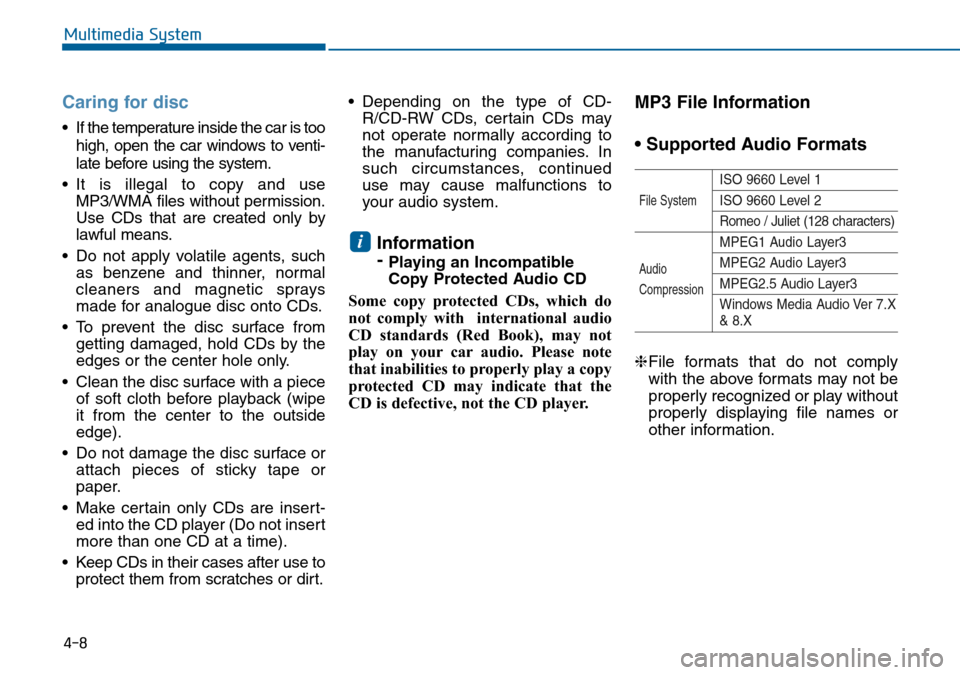
• Supported Audio Formats
ISO 9660 Level 1
ISO 9660 Level 2
Romeo / Juliet (128 characters)
MPEG1 Audio Layer3
MPEG2 Audio Layer3
MPEG2.5 Audio Layer3
Windows Media Audio Ver 7.X
& 8.X
❈File formats that do not comply
with the above formats may not be
properly recognized or play without
properly displaying file names or
other information.
i
File System
Audio
Compression
Page 315 of 504
5-2
Driving your vehicle
Carbon monoxide (CO) gas is toxic. Breathing CO can cause unconsciousness and death.
Engine exhaust contains carbon monoxide which cannot be seen or smelled.
Do not inhale engine exhaust.
If at any time you smell engine exhaust inside the vehicle, open the windows immediately. Exposure to CO can cause
unconsciousness and death by asphyxiation.
Ensure the exhaust system does not leak.
The exhaust system should be checked whenever the vehicle is raised to change the oil or for any other purpose. If
you hear a change in the sound of the exhaust or if you drive over something that strikes the underneath side of the
vehicle, we recommend that the exhaust system be checked as soon as possible by an authorised HYUNDAI dealer.
Do not run the engine in an enclosed area.
Letting the engine idle in your garage, even with the garage door open, is a hazardous practice. Run the engine only
long enough to start the engine and to move the vehicle out of the garage.
Avoid idling the engine for prolonged periods with people inside the vehicle.
If it is necessary to idle the engine for a prolonged period with people inside the vehicle, be sure to do so only in an
open area with the air intake set at "Fresh" and fan control set to high so fresh air is drawn into the interior.
Keep the air intakes clear.
To ensure proper operation of the ventilation system, keep the ventilation air intakes located in front of the windscreen
clear of snow, ice, leaves, or other obstructions.
If you must drive with the boot open:
Close all windows.
Open instrument panel air vents.
Set the air intake control at "Fresh", the air flow control at "Floor" or "Face", and the fan control set to high.
WARNING
Page 316 of 504
5-3
Driving your vehicle
5
Before entering the vehicle
• Ensure all windows, outside mir-
ror(s), and outside lights are clean
and unobstructed.
• Remove frost, snow, or ice.
• Visually check the tyres for uneven
wear and damage.
• Check under the vehicle for any
sign of leaks.
• Ensure there are no obstacles
behind you if you intend to reverse.
Before starting
• Ensure the bonnet, the boot, and
the doors are securely closed and
locked.
• Adjust the position of the seat and
steering wheel.
• Adjust the inside and outside
rearview mirrors.
• Verify all the lights work.
• Fasten your seat belt. Check that
all passengers have fastened their
seat belts.
• Check the gauges and indicators in
the instrument cluster and the
messages on the LCD display
when the ignition switch is in the
ON position.
• Check that any items you are car-
rying are stored properly or fas-
tened down securely.
BEFORE DRIVING
To reduce the risk of SERIOUS
INJURY or DEATH, take the fol-
lowing precautions:
•ALWAYS wear your seat belt.
All passengers must be prop-
erly restrained whenever the
vehicle is moving. For more
information, refer to “Seat
Belts” in chapter 2.
•Always drive defensively.
Assume other drivers or
pedestrians may be careless
and make mistakes.
•Stay focused on the task of
driving. Driver distraction can
cause accidents.
•Leave plenty of space
between you and the vehicle
in front of you.
WARNING
Page 371 of 504
5-58
Driving your vehicle
Non-operating condition
Outside rearview mirror may not
alert the driver when:
- The outside rearview mirror hous-
ing is damaged or covered with
debris.
- The window is covered with debris.
- The windows are severely tinted.
DRIVER'S ATTENTION
The driver must be cautious in the
below situations for the system
may not detect other vehicles or
objects in certain circumstances.
- Curved roads, tollgates, etc.
- The surrounding of the sensor is
polluted with rain, snow, mud,
etc
- The rear bumper near the sensor
is covered or hidden with foreign
matter such as a sticker, bumper
guard, bicycle stand etc.
- The rear bumper is damaged or
the sensor is out of place.
- The height of the vehicle is
altered such as when the boot is
loaded with heavy objects, or
there is low tyre pressure etc.
- Bad weather such as heavy rain
or snow.
- A fixed object is near such as a
guardrail, tunnel, person, animal
etc.
(Continued)(Continued)
- Metal substances are near the
vehicle such as in a construction
area.
- A big vehicle is near such as a
bus or truck.
- A motorcycle or bicycle is near.
- A flat trailer is near.
- If the vehicle has started at the
same time as the vehicle next to
you and has accelerated.
- When the other vehicle passes
by at a higher rate of speed.
- When changing lanes.
- When going down or up a steep
road where the height of the lane
is different.
- When the other vehicle drives
very close.
- When a trailer or carrier is
installed.
- When the temperature of the rear
bumper is high.
- When the sensors are covered
by a wall or a pillar of a parking
lot.
(Continued)
Page 376 of 504
5-63
Driving your vehicle
5
Snow or icy conditions
You need to keep sufficient distance
between your vehicle and the vehicle
in front of you.
Apply the brakes gently. Speeding,
rapid acceleration, sudden brake
applications, and sharp turns are
potentially very hazardous practices.
During deceleration, use engine
braking to the fullest extent. Sudden
brake applications on snowy or icy
roads may cause skids to occur.
To drive your vehicle in deep snow, it
may be necessary to use snow tyres
or to install tyre chains on your tyres.
Always carry emergency equipment.
Some of the items you may want to
carry include tyre chains, tow straps
or chains, a flashlight, emergency
flares, sand, a shovel, jumper cables,
a window scraper, gloves, ground
cloth, coveralls, a blanket, etc.
Snow tyresIf you mount snow tyres on your vehi-
cle, make sure to use radial tyres of
the same size and load range as the
original tyres. Mount snow tyres on
all four wheels to balance your vehi-
cle’s handling in all weather condi-
tions. The traction provided by snow
tyres on dry roads may not be as
high as your vehicle's original equip-
ment tyres. Check with the tyre deal-
er for maximum speed recommenda-
tions.
Information
Do not install studded tyres without
first checking local and municipal reg-
ulations for possible restrictions
against their use.
i
WINTER DRIVING
Snow tyres should be equiva-
lent in size and type to the vehi-
cle's standard tyres. Otherwise,
the safety and handling of your
vehicle may be adversely affect-
ed.
WARNING
Page 379 of 504
5-66
Driving your vehicle
Check battery and cables
Winter puts additional burdens on
the battery system.Visually inspect
the battery and cables as
described in chapter 7.We recom-
mend that the level of charge in your
battery be checked by an authorised
HYUNDAI dealer.
Change to "winter weight" oil if
necessary
In some climates it is recommended
that a lower viscosity "winter weight"
oil be used during cold weather. See
section 8 for recommendations. If
you aren't sure what weight oil you
should use, we recommend that you
consult an authorised HYUNDAI
dealer.Check spark plugs and ignition
system
Inspect your spark plugs as
described in section 7 and replace
them if necessary. Also check all
ignition wiring and components to be
sure they are not cracked, worn or
damaged in any way.
To keep locks from freezing
To keep the locks from freezing,
squirt an approved de-icer fluid or
glycerine into the key opening. If a
lock is covered with ice, squirt it with
an approved de-icing fluid to remove
the ice. If the lock is frozen internally,
you may be able to thaw it out by
using a heated key. Handle the heat-
ed key with care to avoid injury.Use approved window washer
anti-freeze in system
To keep the water in the window
washer system from freezing, add an
approved window washer anti-freeze
solution in accordance with instruc-
tions on the container. Window wash-
er anti-freeze is available from an
authorised HYUNDAI dealer and
most auto parts outlets. Do not use
engine coolant or other types of anti-
freeze as these may damage the
paint finish.
Page 380 of 504
5-67
Driving your vehicle
5
Don't let your parking brake freeze
Under some conditions your parking
brake can freeze in the engaged
position. This is most likely to hap-
pen when there is an accumulation
of snow or ice around or near the
rear brakes or if the brakes are wet.
If there is a risk the parking brake
may freeze, apply it only temporarily
whilst you put the shift lever in P
(automatic transaxle) or in first or
reverse gear (manual transaxle) and
block the rear wheels so the vehicle
cannot roll. Then release the parking
brake.Don't let ice and snow accumulate
underneath
Under some conditions, snow and
ice can build up under the fenders
and interfere with the steering. When
driving in severe winter conditions
where this may happen, you should
periodically check underneath the
vehicle to be sure the movement of
the front wheels and the steering
components is not obstructed.
Carry emergency equipment
Depending on the severity of the
weather, you should carry appropri-
ate emergency equipment. Some of
the items you may want to carry
include tyre chains, tow straps or
chains, flashlight, emergency flares,
sand, shovel, jumper cables, window
scraper, gloves, ground cloth, cover-
alls, blanket, etc.Don't place foreign objects or
materials in the engine compart-
ment
Placement of foreign object or mate-
rials which prevent cooling of the
engine, in the engine compartment,
may cause a failure or combustion.
The manufacturer is not responsible
for the damage caused by such
placement.
Page 447 of 504
7-36
Maintenance
Reset items
Items should be reset after the bat-
tery has been discharged or the bat-
tery has been disconnected.
• Auto up/down window
(See chapter 3)
• Sunroof (See chapter 3)
• Trip computer (See chapter 3)
• Climate control system
(See chapter 3)