trip computer Hyundai Sonata 2015 Owner's Manual - RHD (UK, Australia)
[x] Cancel search | Manufacturer: HYUNDAI, Model Year: 2015, Model line: Sonata, Model: Hyundai Sonata 2015Pages: 504, PDF Size: 10.88 MB
Page 85 of 504
Convenient features of your vehicle
Accessing your vehicle .........................................3-4
Remote key .......................................................................3-4
Remote key precautions..................................................3-6
Smart key ...........................................................................3-8
Smart key precautions...................................................3-11
Battery replacement .....................................................3-12
Immobiliser system .........................................................3-13
Door locks .............................................................3-14
Operating door locks from outside the vehicle .....3-14
Operating door locks from inside the vehicle ........3-16
Auto door lock/unlock features ................................3-18
Child-protector rear door locks ..................................3-19
Theft-alarm system.............................................3-20
Driver position memory system .........................3-21
Storing memory positions .............................................3-21
Easy access function .....................................................3-22
Steering wheel......................................................3-23
Electric power steering (EPS) ......................................3-23
Tilt steering / Telescope steering...............................3-24
Heated steering wheel ...................................................3-25
Horn ....................................................................................3-25
Mirrors ...................................................................3-26
Inside rearview mirror....................................................3-26
Outside rearview mirror ................................................3-27
Reverse parking aid function.......................................3-30
Windows ................................................................3-32
Power windows ................................................................3-32
Panorama sunroof ...............................................3-37
Sunshade ...........................................................................3-38
Sliding the sunroof ........................................................3-38
Tilting the sunroof ........................................................3-39
Closing the sunroof ........................................................3-39
Resetting the sunroof ....................................................3-41
Exterior features .................................................3-42
Bonnet................................................................................3-42
Boot ....................................................................................3-43
Emergency boot safety release ..................................3-44
Boot lid control switch...................................................3-45
Smart boot ........................................................................3-46
Fuel filler door .................................................................3-49
Emergency fuel filler lid release .................................3-52
Instrument cluster................................................3-53
Instrument panel control ...............................................3-54
LCD display control.........................................................3-55
Gauges ...............................................................................3-55
LCD display ...........................................................3-60
LCD modes ........................................................................3-60
Trip computer mode .......................................................3-61
Turn By Turn (TBT) mode .............................................3-62
A/V mode ..........................................................................3-62
3
Page 86 of 504
Information mode ............................................................3-62
User settings mode.........................................................3-64
Warning messages ..........................................................3-69
Trip computer .......................................................3-77
Overview............................................................................3-77
Trip modes ........................................................................3-77
Trip A/B .............................................................................3-77
Fuel economy ...................................................................3-78
Warning and indicator lights ..............................3-81
Warning lights ..................................................................3-81
Indicator lights .................................................................3-88
Light .......................................................................3-92
Exterior lights ..................................................................3-92
Welcome system..............................................................3-97
Interior lights ....................................................................3-99
Wipers and washers ..........................................3-104
Windscreen wipers ......................................................3-104
Windscreen washers ...................................................3-106
Driver assist system ..........................................3-108
Rearview camera...........................................................3-108
Rear parking assist system ........................................3-109
Parking assist system ..................................................3-112
Defroster .............................................................3-115
Rear window defroster ...............................................3-115
Manual climate control system........................3-117
Heating and air conditioning......................................3-118
System operation ..........................................................3-123
System maintenance ....................................................3-125
Checking the amount of air conditioner refrigerant
and compressor lubricant ...........................................3-126
Automatic climate control system ...................3-127
Automatic heating and air conditioning ..................3-128
Manual heating and air conditioning .......................3-129
System operation ..........................................................3-135
System maintenance ....................................................3-138
Checking the amount of air conditioner refrigerant
and compressor lubricant ...........................................3-138
Windscreen defrosting and defogging ...........3-139
Manual climate control system .................................3-139
Automatic climate control system ............................3-140
Defogging logic..............................................................3-141
Climate control additional features.................3-143
Automatic ventilation ...................................................3-143
Sunroof inside air recirculation.................................3-143
Storage compartment ........................................3-144
Centre console storage ...............................................3-144
Glove box ........................................................................3-145
Sunglasses holder .........................................................3-145
Multi box .........................................................................3-146
3
Page 137 of 504
3-53
Convenient features of your vehicle
3
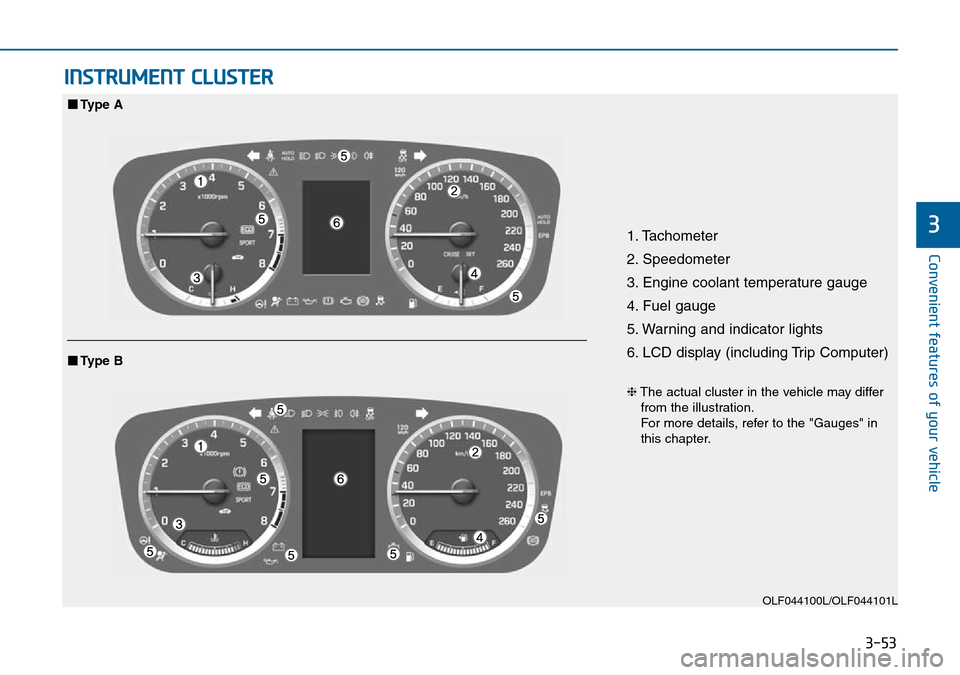
INSTRUMENT CLUSTER
1. Tachometer
2. Speedometer
3. Engine coolant temperature gauge
4. Fuel gauge
5. Warning and indicator lights
6. LCD display (including Trip Computer)
OLF044100L/OLF044101L
■Type A
❈The actual cluster in the vehicle may differ
from the illustration.
For more details, refer to the "Gauges" in
this chapter.
■Type B
Page 144 of 504
3-60
Convenient features of your vehicle
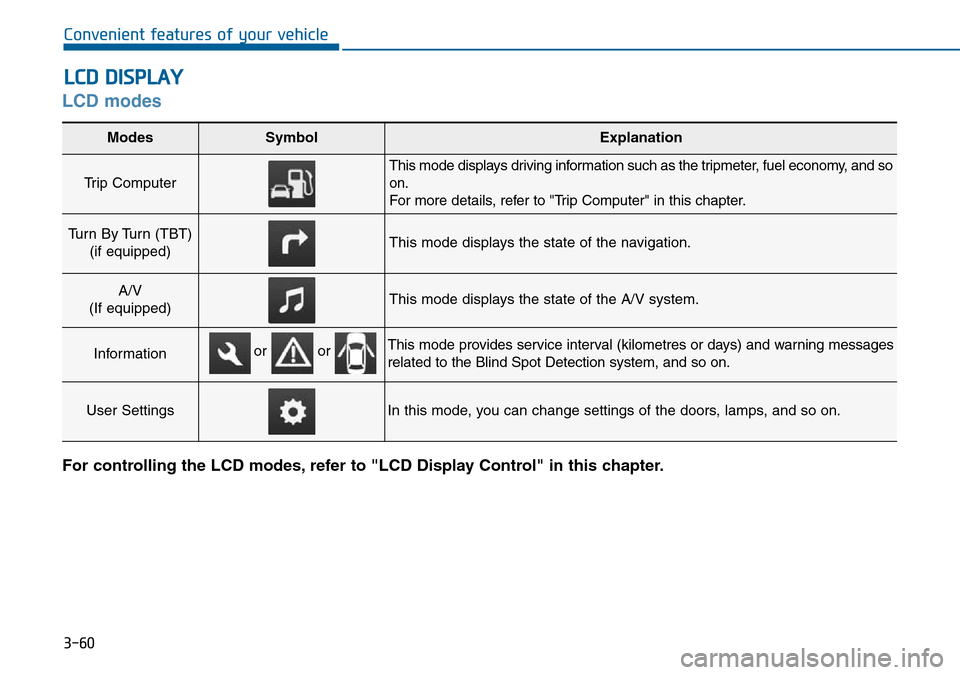
LCD modes
For controlling the LCD modes, refer to "LCD Display Control" in this chapter.
LCD DISPLAY
Modes SymbolExplanation
Trip Computer
This mode displays driving information such as the tripmeter, fuel economy, and so
on.
For more details, refer to "Trip Computer" in this chapter.
Turn By Turn (TBT)
(if equipped)This mode displays the state of the navigation.
A/V
(If equipped)This mode displays the state of the A/V system.
InformationThis mode provides service interval (kilometres or days) and warning messages
related to the Blind Spot Detection system, and so on.
User SettingsIn this mode, you can change settings of the doors, lamps, and so on.
or or
Page 145 of 504
3-61
Convenient features of your vehicle
3
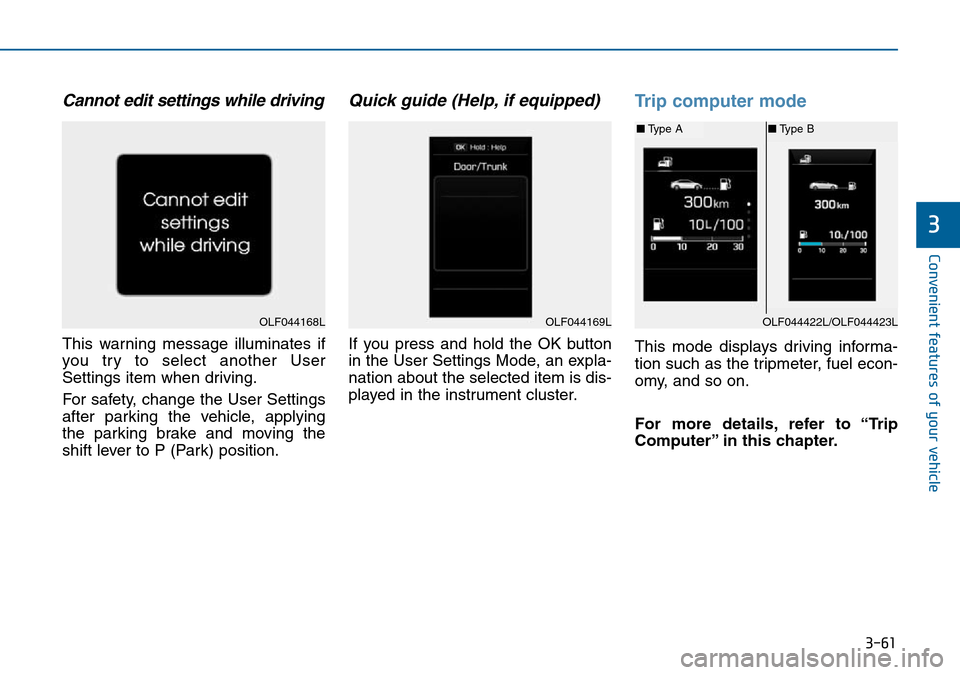
Cannot edit settings while driving
This warning message illuminates if
you try to select another User
Settings item when driving.
For safety, change the User Settings
after parking the vehicle, applying
the parking brake and moving the
shift lever to P (Park) position.
Quick guide (Help, if equipped)
If you press and hold the OK button
in the User Settings Mode, an expla-
nation about the selected item is dis-
played in the instrument cluster.
Trip computer mode
This mode displays driving informa-
tion such as the tripmeter, fuel econ-
omy, and so on.
For more details, refer to “Trip
Computer” in this chapter.
OLF044168LOLF044169LOLF044422L/OLF044423L
■Type A■Type B
Page 152 of 504
3-68
Convenient features of your vehicle
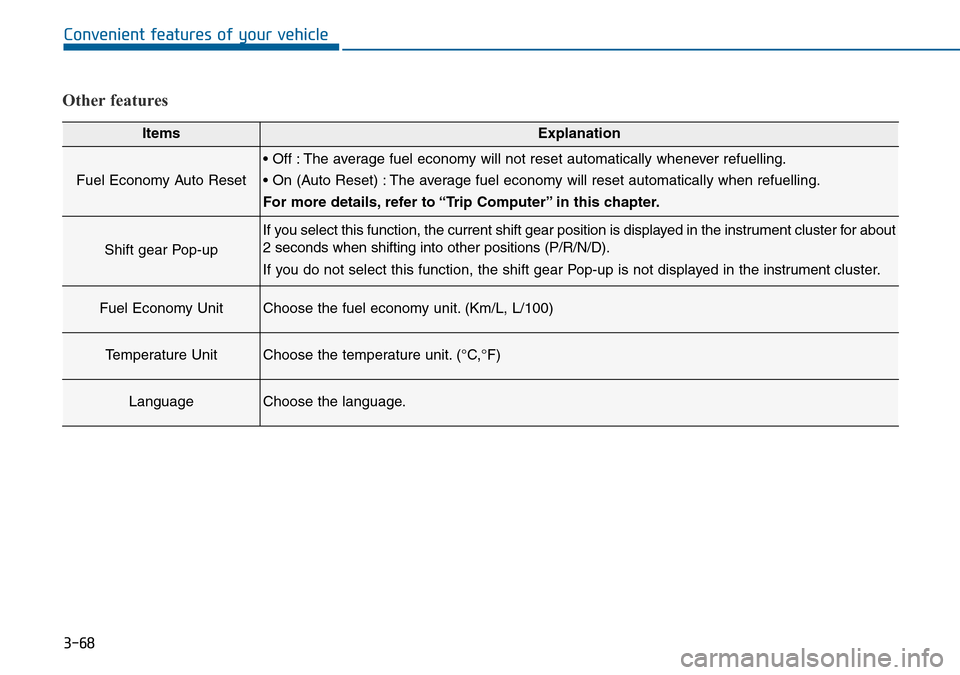
Other features
ItemsExplanation
Fuel Economy Auto Reset
• Off : The average fuel economy will not reset automatically whenever refuelling.
• On (Auto Reset) : The average fuel economy will reset automatically when refuelling.
For more details, refer to “Trip Computer” in this chapter.
Shift gear Pop-up
If you select this function, the current shift gear position is displayed in the instrument cluster for about
2 seconds when shifting into other positions (P/R/N/D).
If you do not select this function, the shift gear Pop-up is not displayed in the instrument cluster.
Fuel Economy UnitChoose the fuel economy unit. (Km/L, L/100)
Temperature UnitChoose the temperature unit. (°C,°F)
LanguageChoose the language.
Page 159 of 504
3-75
Convenient features of your vehicle
3
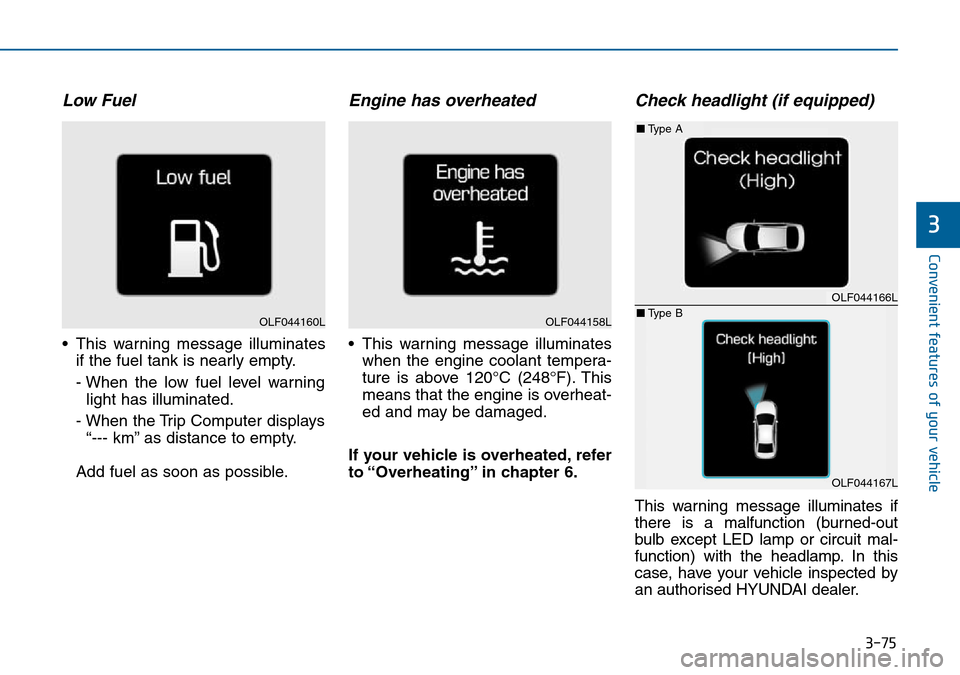
Low Fuel
• This warning message illuminates
if the fuel tank is nearly empty.
- When the low fuel level warning
light has illuminated.
- When the Trip Computer displays
“--- km” as distance to empty.
Add fuel as soon as possible.
Engine has overheated
• This warning message illuminates
when the engine coolant tempera-
ture is above 120°C (248°F). This
means that the engine is overheat-
ed and may be damaged.
If your vehicle is overheated, refer
to “Overheating” in chapter 6.
Check headlight (if equipped)
This warning message illuminates if
there is a malfunction (burned-out
bulb except LED lamp or circuit mal-
function) with the headlamp. In this
case, have your vehicle inspected by
an authorised HYUNDAI dealer.
OLF044160LOLF044158L
OLF044166L
OLF044167L
■Type A
■Type B
Page 161 of 504
3-77
Convenient features of your vehicle
3
Overview
Description
The Trip Computer is a microcomput-
er-controlled driver information sys-
tem that displays information related
to driving.
Information
Some driving information stored in
the Trip Computer (for example
Average Vehicle Speed) resets if the
battery is disconnected.
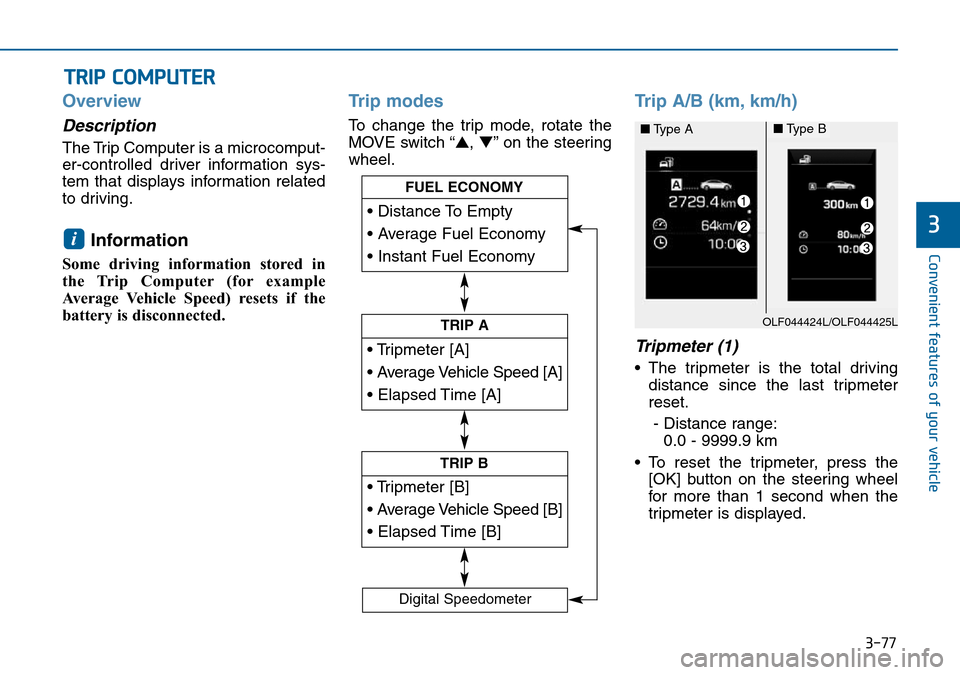
Trip modes
To change the trip mode, rotate the
MOVE switch “▲,▼” on the steering
wheel.
Trip A/B (km, km/h)
Tripmeter (1)
• The tripmeter is the total driving
distance since the last tripmeter
reset.
- Distance range:
0.0 - 9999.9 km
• To reset the tripmeter, press the
[OK] button on the steering wheel
for more than 1 second when the
tripmeter is displayed.
i
TRIP COMPUTER
• Tripmeter [A]
• Average Vehicle Speed [A]
• Elapsed Time [A]
TRIP A
• Tripmeter [B]
• Average Vehicle Speed [B]
• Elapsed Time [B]
TRIP B
• Distance To Empty
• Average Fuel Economy
• Instant Fuel Economy
FUEL ECONOMY
Digital Speedometer
OLF044424L/OLF044425L
■Type A■Type B
Page 162 of 504

3-78
Convenient features of your vehicle
Average Vehicle Speed (2)
• The average vehicle speed is cal-
culated from the total driving dis-
tance and driving time since the
last average vehicle speed reset.
- Speed range: 0 - 999 km/h
• To reset the average vehicle speed,
press the [OK] button on the steer-
ing wheel for more than 1 second
when the average vehicle speed is
displayed.
Information
• The average vehicle speed is not dis-
played if the driving distance is less
than 300 metres or the driving time is
less than 10 seconds since the ignition
switch or the Engine Start/Stop but-
ton is turned to ON.
• Even if the vehicle is not in motion,
the average vehicle speed keeps cal-
culating whilst the engine is run-
ning.
Elapsed Time (3)
• The elapsed time is the total driv-
ing time since the last elapsed time
reset.
- Time range (hh:mm): 00:00 - 99:59
• To reset the elapsed time, press
the [OK] button on the steering
wheel for more than 1 second
when the elapsed time is dis-
played.
Information
Even if the vehicle is not in motion, the
elapsed time keeps calculating whilst
the engine is running.
Fuel economy
(km, L/100km, km/L)
Distance To Empty (1)
• The distance to empty is the esti-
mated distance the vehicle can be
driven with the remaining fuel.
- Distance range: 1 - 9999 km
• If the estimated distance is below
1 km, the trip computer will display
“---” as distance to empty.
i
iOLF044422L/OLF044423L
■Type A■Type B
Page 163 of 504
3-79
Convenient features of your vehicle
3
Information
• If the vehicle is not on level ground
or the battery power has been inter-
rupted, the distance to empty func-
tion may not operate correctly.
• The distance to empty may differ
from the actual driving distance as
it is an estimate of the available
driving distance.
• The Trip Computer may not regis-
ter additional fuel if less than 6 litres
(1.6 gallons) of fuel are added to the
vehicle.
• The fuel economy and distance to
empty may vary significantly based
on driving conditions, driving
habits, and condition of the vehicle.
Average Fuel Economy (2)
• The average fuel economy is calcu-
lated from the total driving distance
and fuel consumption since the last
average fuel economy reset.
- Fuel economy range:
0.0 - 99.9 L/100km, km/L
• The average fuel economy can be
reset both manually and automati-
cally.
Manual reset
To clear the average fuel economy
manually, press the [OK] button on
the steering wheel for more than 1
second when the average fuel econo-
my is displayed.
Automatic reset
To adjust the average fuel economy
to reset automatically whenever refu-
elling, select the “Auto Reset” mode
in User Setting menu of the LCD dis-
play (Refer to “LCD Display”).
Under “Auto Reset” mode, the aver-
age fuel economy will be cleared to
zero (---) when the vehicle speed
exceeds 1 km/h after refuelling more
than 6 litres (1.6 gallons).
Information
The average fuel economy is not dis-
played if the vehicle has not been driv-
en for more than 10 seconds or 300
metres, since the ignition switch or the
Engine Start/Stop button was turned
on.
Instant Fuel Economy (3)
• This mode displays the instant fuel
economy during the last few sec-
onds when the vehicle speed is
more than 10 km/h.
- Fuel economy range:
0 - 30 L/100km, km/L
i
i