Service in Hyundai Sonata 2015 User Guide
[x] Cancel search | Manufacturer: HYUNDAI, Model Year: 2015, Model line: Sonata, Model: Hyundai Sonata 2015Pages: 603, PDF Size: 14.7 MB
Page 174 of 603
3-79
Convenient features of your vehicle
3
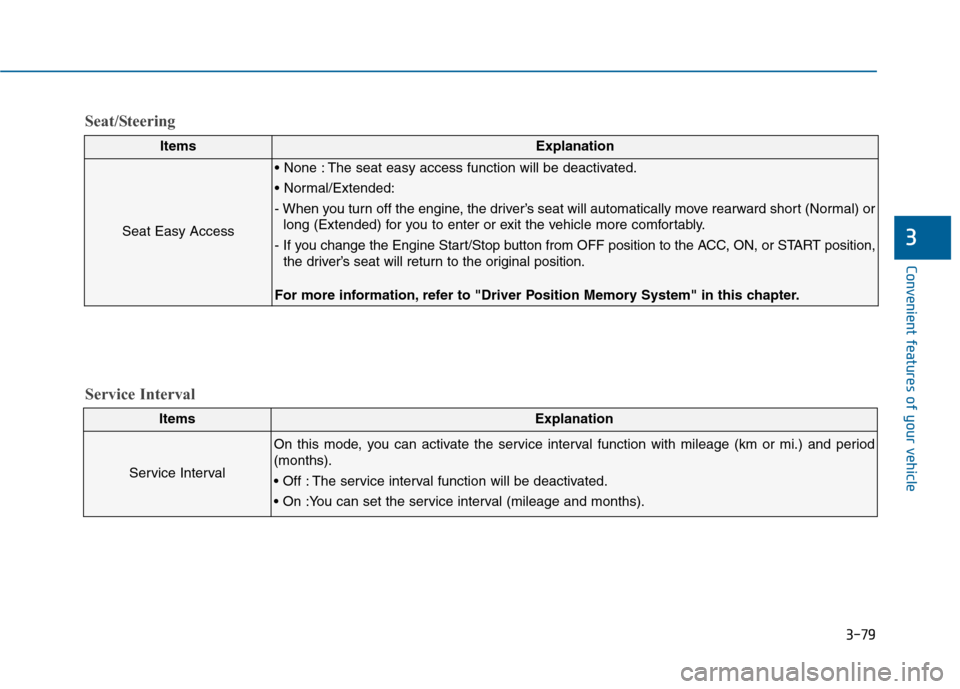
ItemsExplanation
Seat Easy Access
The seat easy access function will be deactivated.
- When you turn off the engine, the driver’s seat will automatically move rearward short (Normal) orlong (Extended) for you to enter or exit the vehicle more comfortably.
- If you change the Engine Start/Stop button from OFF position to the ACC, ON, or START position, the driver’s seat will return to the original position.
For more information, refer to "Driver Position Memory System" in this chapter.
ItemsExplanation
Service Interval
On this mode, you can activate the service interval function with mileage (km or mi.) and period
(months).
The service interval function will be deactivated.
Service Interval
Seat/Steering
Page 181 of 603
3-86
Convenient features of your vehicle
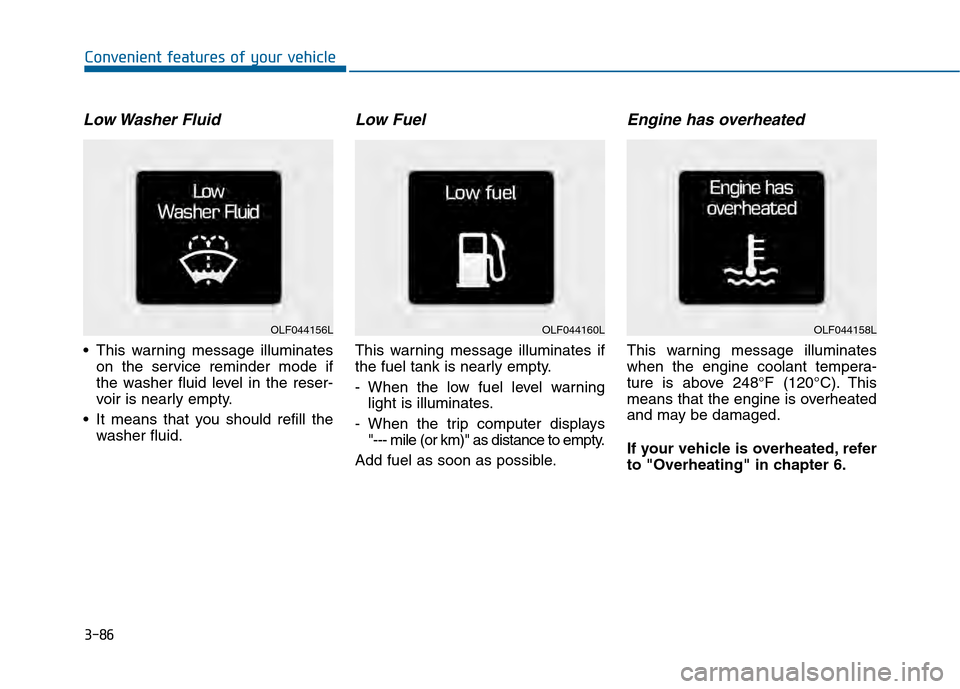
Low Washer Fluid
This warning message illuminateson the service reminder mode if
the washer fluid level in the reser-
voir is nearly empty.
It means that you should refill the washer fluid.
Low Fuel
This warning message illuminates if
the fuel tank is nearly empty.
- When the low fuel level warninglight is illuminates.
- When the trip computer displays "--- mile (or km)" as distance to empty.
Add fuel as soon as possible.
Engine has overheated
This warning message illuminates
when the engine coolant tempera-
ture is above 248°F (120°C). This
means that the engine is overheated
and may be damaged.
If your vehicle is overheated, refer
to "Overheating" in chapter 6.
OLF044156LOLF044160LOLF044158L
Page 228 of 603
3-133
Convenient features of your vehicle
3
System Maintenance
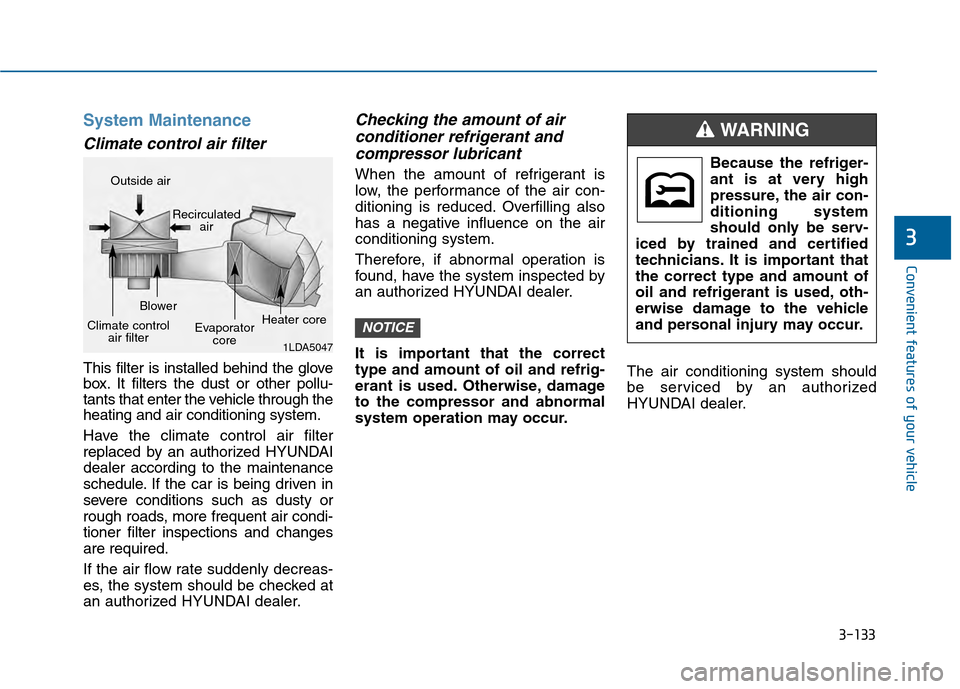
Climate control air filter
This filter is installed behind the glove
box. It filters the dust or other pollu-
tants that enter the vehicle through the
heating and air conditioning system.
Have the climate control air filter
replaced by an authorized HYUNDAI
dealer according to the maintenance
schedule. If the car is being driven in
severe conditions such as dusty or
rough roads, more frequent air condi-
tioner filter inspections and changes
are required.
If the air flow rate suddenly decreas-
es, the system should be checked at
an authorized HYUNDAI dealer.
Checking the amount of air conditioner refrigerant andcompressor lubricant
When the amount of refrigerant is
low, the performance of the air con-
ditioning is reduced. Overfilling also
has a negative influence on the air
conditioning system.
Therefore, if abnormal operation is
found, have the system inspected by
an authorized HYUNDAI dealer.
It is important that the correct
type and amount of oil and refrig-
erant is used. Otherwise, damage
to the compressor and abnormal
system operation may occur. The air conditioning system should
be serviced by an authorized
HYUNDAI dealer.
NOTICE
Because the refriger-
ant is at very high
pressure, the air con-
ditioning system
should only be serv-
iced by trained and certified
technicians. It is important that
the correct type and amount of
oil and refrigerant is used, oth-
erwise damage to the vehicle
and personal injury may occur.
WARNING
1LDA5047
Outside air
Recirculatedair
Climate control air filter Blower
Evaporatorcore Heater core
Page 241 of 603
3-146
Convenient features of your vehicle
The air conditioning system should
be serviced by an authorized
HYUNDAI dealer.
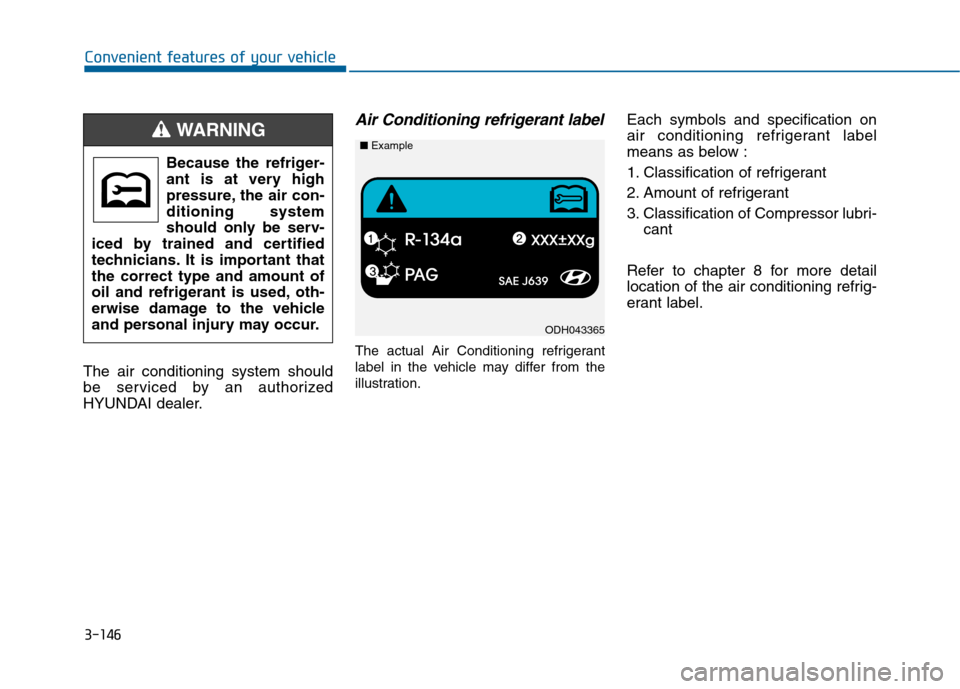
Air Conditioning refrigerant label
The actual Air Conditioning refrigerant
label in the vehicle may differ from the
illustration.
Each symbols and specification on
air conditioning refrigerant label
means as below :
1. Classification of refrigerant
2. Amount of refrigerant
3. Classification of Compressor lubri- cant
Refer to chapter 8 for more detail
location of the air conditioning refrig-
erant label.
Because the refriger-
ant is at very high
pressure, the air con-
ditioning system
should only be serv-
iced by trained and certified
technicians. It is important that
the correct type and amount of
oil and refrigerant is used, oth-
erwise damage to the vehicle
and personal injury may occur.WARNING
ODH043365
■ Example
Page 263 of 603
4-10
Multimedia System
Do not place beverages close tothe audio system. Spilling bever-
ages may lead to system mal-
function.
In case of product malfunction, please contact your place of pur-
chase or After Service center.
Placing the audio system within an electromagnetic environment
may result in noise interference.
Prevent caustic solutions such as perfume and cosmetic oil
from contacting the dashboard
because they may cause dam-
age or discoloration.
Information - Using the discs
• This device has been manufactured to be compatible with software
bearing the following logo marks.
• Do not clean discs with chemical solutions, such as record sprays,
antistatic sprays, antistatic liquids,
benzene, or thinners.
• After using a disc, put the disc back in its original case to prevent disc
scratches.
• Hold discs by their edges or within the center hole to prevent damages
to disc surfaces.
• Do not introduce foreign substances into the disc insert/eject slot.
Introducing foreign substances
could damage the device interior.
• Do not insert two discs simultane- ously.
• When using CD-R/CD-RW discs, differences in disc reading and play-
ing times may occur depending on
the disc manufacturer, production
method and the recording method
as used by the user.
(Continued)iNOTICE
Operating the device while
driving could lead to accidents
due to a lack of attention to
external surroundings. First
park the vehicle before operat-
ing the device.
Adjust the volume to levels that
allow the driver to hear sounds
from outside of the vehicle.
Driving in a state where exter-
nal sounds cannot be heard
may lead to accidents.
Pay attention to the volume
setting when turning the
device on. A sudden output of
extreme volume upon turning
the device on could lead to
hearing impairment. (Adjust
the volume to a suitable level
before turning off the device.)(Continued)
CAUTION
Page 349 of 603
4-96
Multimedia System
Information
SiriusXM™ service requires a sub-
scription, sold separately, after 3-
month trial included with vehicle pur-
chase. If you decide to continue your
SiriusXM™ service at the end of your
trial subscription, the plan you choose
will automatically renew and bill at
then-current rates until you call us at
1-866-635-2349 to cancel. See our
Customer Agreement for complete
terms at www.siriusxm.com. Other
fees and taxes apply. All fees and pro-
gramming are subject to change.
Sirius satellite service is available only
to those at least 18 and older in the 48
contiguous USA, D.C., and PR (with
coverage limitations). Our Internet
radio service is available throughout
our satellite service area and in AK
and HI. Certain channels are not
available on our Internet radio service
or on mobile devices. SiriusXM™
Traffic available in select markets. See
siriusxm.com/traffic for more infor-
mation. © 2013 Sirius XM™ Radio
Inc. Sirius, XM™ and all related
marks and logos are trademarks of
Sirius XM™ Radio Inc. iPod
®is a
registered trademark of Apple Inc. iPod
®mobile digital device sold sepa-
rately. The Bluetooth®word mark and
logos are registered trademarks
owned by Bluetooth SIG, Inc. and any
use of such marks by Hyundai is
under license. A Bluetooth
®enabled
cell phone is required to use
Bluetooth
®wireless technology. All
rights reserved.
i
Page 355 of 603
4-102
Multimedia System
R
RE
EA
A R
R
V
V I
IE
E W
W
C
C A
A M
M E
ER
R A
A
(
(i if
f
e
e q
q u
u i
ip
p p
pe
ed
d )
)
• The system has been equipped
with a rear view camera for user
safety by allowing a wider rear
range of vision.
The rear view camera will automat- ically operate when the ignition key
is turned ON and the shift lever is
set to R (Reverse).
The rear view camera will automat- ically stop operating when set to a
different lever.
B BL
LU
U E
E
L
L I
IN
N K
K®
®(
(I
IF
F
E
E Q
Q U
UI
IP
P P
PE
ED
D )
)
Hyundai aims to offer differentiated
customer values through a
‘Connected Car Life,’ which is to pro-
vide consumers with fast and reliable
IT technology. As consumers’ lifestyles
become more and more mobile in
thanks to remarkable advances in
smart phones, tablet PCs and overall
wireless telecommunication, new
lifestyle patterns demand seamless
connection between one’s office,
home, outdoors and automobiles.
Automobile companies are now faced
with the task of shifting their paradigm
from vehicle-centered services to cus-
tomer value-centered services, with
the ultimate goal of securing global
leadership in the field of vehicle IT and
telematics. Hyundai Motor plans to achieve this
by realizing a terminal platform flexi-
ble to changes in IT technology,
cooperating with global IT compa-
nies, creating an eco-system and
providing the latest contents & servic-
es based on an open environment.
The rear view camera has been
equipped with an optical lens to
provide a wider range of vision
and may appear different from
the actual distance. For safety,
directly check the rear and
left/right sides.
CAUTION
Page 356 of 603
4-103
Multimedia System
4
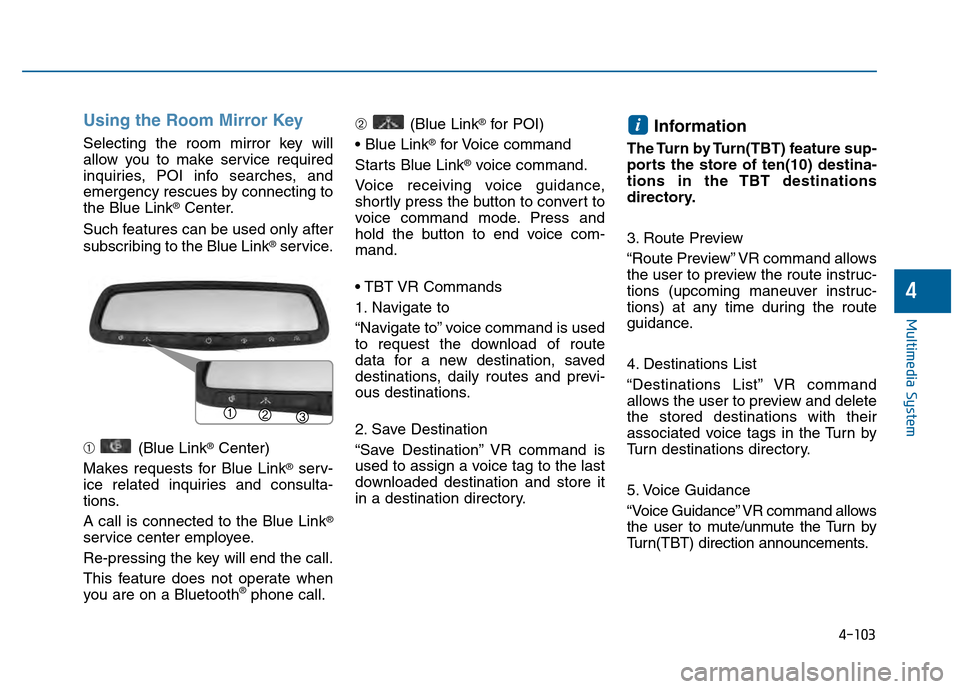
Using the Room Mirror Key
Selecting the room mirror key will
allow you to make service required
inquiries, POI info searches, and
emergency rescues by connecting to
the Blue Link
®Center.
Such features can be used only after
subscribing to the Blue Link
®service.
➀ (Blue Link
®Center)
Makes requests for Blue Link
®serv-
ice related inquiries and consulta-
tions.
A call is connected to the Blue Link
®
service center employee.
Re-pressing the key will end the call.
This feature does not operate when
you are on a Bluetooth
®phone call. ➁
(Blue Link
®for POI)
®for Voice command
Starts Blue Link
®voice command.
Voice receiving voice guidance,
shortly press the button to convert to
voice command mode. Press and
hold the button to end voice com-
mand.
1. Navigate to
“Navigate to” voice command is used
to request the download of route
data for a new destination, saved
destinations, daily routes and previ-
ous destinations.
2. Save Destination
“Save Destination” VR command is
used to assign a voice tag to the last
downloaded destination and store it
in a destination directory.
Information
The Turn by Turn(TBT) feature sup-
ports the store of ten(10) destina-
tions in the TBT destinations
directory.
3. Route Preview
“Route Preview” VR command allows
the user to preview the route instruc-
tions (upcoming maneuver instruc-
tions) at any time during the route
guidance.
4. Destinations List
“Destinations List” VR command
allows the user to preview and delete
the stored destinations with their
associated voice tags in the Turn by
Turn destinations directory.
5. Voice Guidance
“Voice Guidance” VR command allows
the user to mute/unmute the Turn by
Turn(TBT) direction announcements.
i
Page 447 of 603
5-89
Driving your vehicle
5
- When using tire chains:
Wrong size chains or improperlyinstalled chains can damage
your vehicle's brake lines, sus-
pension, body and wheels.
Use SAE “S” class or wire chains.
If you hear noise caused by chains contacting the body,
retighten the chain to prevent
contact with the vehicle body.
To prevent body damage, retighten the chains after driving
0.3~0.6 miles (0.5~1.0 km).
Do not use tire chains on vehi- cles equipped with aluminum
wheels. If unavoidable, use a
wire type chain.
Use wire chains less than 0.47 inch (12 mm) wide to prevent
damage to the chain’s connec-
tion.
Winter Precautions
Use high quality ethylene glycolcoolant
Your vehicle is delivered with high
quality ethylene glycol coolant in the
cooling system. It is the only type of
coolant that should be used because
it helps prevent corrosion in the cool-
ing system, lubricates the water
pump and prevents freezing. Be sure
to replace or replenish your coolant
in accordance with the maintenance
schedule in chapter 7. Before winter,
have your coolant tested to assure
that its freezing point is sufficient for
the temperatures anticipated during
the winter.
Change to "winter weight" oil ifnecessary
In some climates it is recommended
that a lower viscosity "winter weight"
oil be used during cold weather. See
chapter 8 for recommendations. If
you aren't sure what weight oil you
should use, consult an authorized
HYUNDAI dealer.
Check battery and cables
Winter puts additional burdens on
the battery system. Visually inspect
the battery and cables as described
in chapter 7. The level of charge in
your battery can be checked by an
authorized HYUNDAI dealer or a
service station.
NOTICE
Page 455 of 603
What to do in an emergency
6
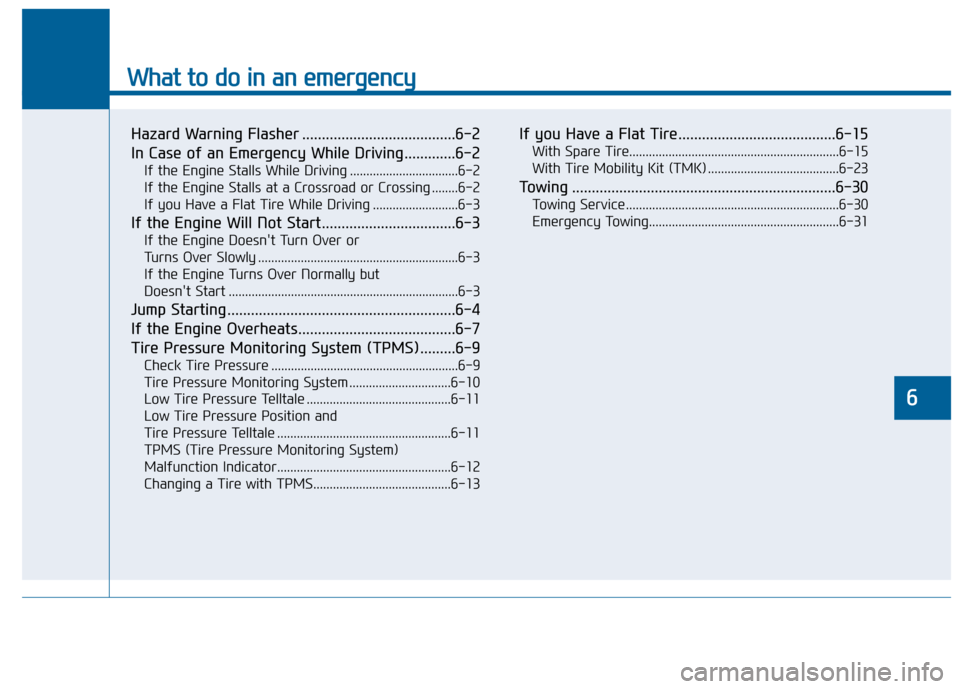
Hazard Warning Flasher .......................................6-2
In Case of an Emergency While Driving.............6-2
If the Engine Stalls While Driving .................................6-2
If the Engine Stalls at a Crossroad or Crossing ........6-2
If you Have a Flat Tire While Driving ..........................6-3
If the Engine Will Not Start..................................6-3
If the Engine Doesn't Turn Over or
Turns Over Slowly .............................................................6-3
If the Engine Turns Over Normally but
Doesn't Start ......................................................................6-\
3
Jump Starting ..........................................................6-4
If the Engine Overheats........................................6-7
Tire Pressure Monitoring System (TPMS).........6-9
Check Tire Pressure .........................................................6-9
Tire Pressure Monitoring System ...............................6-10
Low Tire Pressure Telltale ............................................6-11
Low Tire Pressure Position and
Tire Pressure Telltale .....................................................6-11
TPMS (Tire Pressure Monitoring System)
Malfunction Indicator.....................................................6-12
Changing a Tire with TPMS..........................................6-13
If you Have a Flat Tire........................................6-15
With Spare Tire................................................................6-15
With Tire Mobility Kit (TMK) ........................................6-23
Towing ...................................................................6-30
Towing Service .................................................................6-30
Emergency Towing..........................................................6-31