lock Hyundai Sonata 2015 Owner's Manual
[x] Cancel search | Manufacturer: HYUNDAI, Model Year: 2015, Model line: Sonata, Model: Hyundai Sonata 2015Pages: 603, PDF Size: 14.7 MB
Page 13 of 603

F13F13
Accessing your vehicle .........................................3-4
Remote Key........................................................................\
.3-4
Smart Key ........................................................................\
....3-8
Immobilizer System .........................................................3-12
Door locks .............................................................3-14
Outside the Vehicle.........................................................3-14
Inside the Vehicle ............................................................3-15
Auto Door Lock/Unlock Features ...............................3-17
Child-Protector Rear Door locks ................................3-18
Theft-alarm system.............................................3-19
Driver position memory system .........................3-20
Storing Positions into Memory ....................................3-20
Easy Access Function ....................................................3-21
Steering wheel......................................................3-22
Electric Power Steering (EPS) .....................................3-22
Tilt Steering / Telescope Steering ..............................3-23
Heated Steering Wheel ..................................................3-23
Horn ........................................................................\
............3-24
Mirrors ...................................................................3-25
Inside Rearview Mirror ..................................................3-25
Outside Rearview Mirror ...............................................3-40
Reverse Parking Aid Function......................................3-43
Windows ................................................................3-44
Power Windows ...............................................................3-45
Panoramic sunroof ..............................................3-48
Sunshade ........................................................................\
...3-48
Sliding the Sunroof .........................................................3-49
Tilting the Sunroof .........................................................3-49
Closing the Sunroof........................................................3-50
To Reset the Sunroof.....................................................3-51
Exterior features .................................................3-52
Hood ........................................................................\
...........3-52
Trunk ........................................................................\
..........3-53
Smart Trunk ......................................................................3-\
56
Fuel Filler Door ................................................................3-59
Instrument cluster................................................3-63
Instrument Cluster Control............................................3-65
LCD Display Control ........................................................3-66
3Convenient features of your vehicle
Page 15 of 603
F15F15
Storage compartment ........................................3-150
Center Console Storage ..............................................3-150
Glove Box ........................................................................\
3-150
Sunglass Holder.............................................................3-151
Multi box ........................................................................\
.3-151
Interior features.................................................3-152
Cup Holder ......................................................................3-\
152
Sunvisor ........................................................................\
...3-153
Power Outlet ..................................................................3-153
Clock ........................................................................\
.........3-155
Clothes Hanger ..............................................................3-156
Floor Mat Anchor(s).....................................................3-157
Side Curtain ....................................................................3-15\
8
Luggage Net Holder .....................................................3-158
Multimedia System.................................................4-2
AUX, USB and iPod®Port ...............................................4-2
Antenna ........................................................................\
.......4-2
Steering Wheel Audio Control........................................4-3
Audio / Video / Navigation System (AVN) ..................4-4
Bluetooth®Wireless Technology Hands-Free ...........4-4
How Vehicle Audio Works ...............................................4-5
Features of Your Vehicle.................................................4-7
System Controllers and Functions
- 3.8 Inch Mono TFT ...........................................4-17
Audio Head Unit ..............................................................4-17
Setup ........................................................................\
..........4-19
Radio : FM, AM ................................................................4-22
XM
TMRADIO ......................................................................4-\
23
Basic Method of Use : Audio CD / MP3 CD / USB /
iPod
®/ My Music ...........................................................4-25
Bluetooth®Wireless Technology Audio ....................4-31
Making a Call Using the Steering Wheel Remote
Controller........................................................................\
...4-32
Bluetooth®Wireless Technology ................................4-33
Voice Recognition ...........................................................4-45
Ending Voice Recognition .............................................4-46
4Multimedia system
Page 16 of 603
F16F16
System Controllers and Functions
- 5 Inch Color TFT LCD .......................................4-52
Audio Head Unit ..............................................................4-52
Steering-Wheel Mounted Controls ............................4-54
Radio Mode.......................................................................4\
-56
XM
TMRadio Mode ...........................................................4-58
Media Mode......................................................................4-\
60
Audio CD Mode ................................................................4-61
MP3 CD Mode ..................................................................4-63
USB Mode ........................................................................\
.4-66
iPod
®Mode ......................................................................4-\
69
AUX Mode ........................................................................\
.4-71
MY Music Mode ..............................................................4-72
Bluetooth®Wireless Technology Audio Mode ........4-75
Voice Recognition ...........................................................4-91
Setup ........................................................................\
..........4-97
Rear View Camera ........................................................4-102
Blue Link
®.......................................................................4\
-102
Before Driving ........................................................5-4
Before Entering the Vehicle ...........................................5-4
Before Starting ..................................................................5-4
Key Ignition Switch ...........................................................5-6
Ignition Switch ........................................................5-6
Engine Start/Stop Button................................................5-9
Transmission .........................................................5-14
Automatic Transmission .................................................5-14
Dual Clutch Transmission ..............................................5-18
Paddle Shifter .................................................................5-24
Shift-Lock System .........................................................5-25
Shift-Lock Override .......................................................5-25
Parking ........................................................................\
.......5-26
Good Driving Practices .................................................5-26
Braking System ....................................................5-28
Power Brakes ...................................................................5-28
Disc Brakes Wear Indicator ..........................................5-29
Foot Parking Brake.........................................................5-29
Electric Parking Brake (EPB) ......................................5-31
AUTO HOLD .....................................................................5-3\
7
5Driving your vehicle
Page 17 of 603
F17F17
Anti-lock Brake System (ABS) ....................................5-40
Electronic Stability Control (ESC)................................5-43
Hill-Start Assist Control (HAC) ...................................5-46
Good Braking Practices ................................................5-47
Drive Mode Integrated Control System ............5-48
Cruise Control .......................................................5-50
Cruise Control Operation...............................................5-50
Smart Cruise Control system ............................5-54
To Adjust the Sensitivity of Smart Cruise Control ...5-55
To Convert to Cruise Control Mode............................5-55
Smart Cruise Control Speed .........................................5-56
Smart Cruise Control Vehicle-to-Vehicle Distance...5-60
Radar to Detect Distance to the Vehicle Ahead .....5-63
Limitations of the System .............................................5-64
Lane Departure Warning System (LDWS) ......5-69
LDWS Operation ..............................................................5-70
Warning Light and Message.........................................5-71
Foward Collision Warning System (FCWS) ......5-73
FCWS Operation ..............................................................5-73
Limitations of the System .............................................5-74
Blind Spot Detection System (BSD) ..................5-76
BSD (Blind Spot Detection) /
LCA (Lane Change Assist) .............................................5-77
RCTA (Rear Cross Traffic Alert) ..................................5-80
Special Driving Conditions ..................................5-84
Hazardous Driving Conditions ......................................5-84
Rocking the Vehicle ........................................................5-84
Smooth Cornering ...........................................................5-85
Driving at Night................................................................5-85
Driving in the Rain ..........................................................5-86
Driving in Flooded Areas ...............................................5-86
Winter Driving ......................................................5-87
Snow or Icy Conditions ..................................................5-87
Winter Precautions .........................................................5-89
Vehicle Load Limit................................................5-91
Tire Loading Information Label ...................................5-92
Trailer Towing .......................................................5-96
Page 25 of 603
1-4
Your vehicle at a glance
I
IN
N T
TE
ER
R I
IO
O R
R
O
O V
VE
ER
R V
V I
IE
E W
W
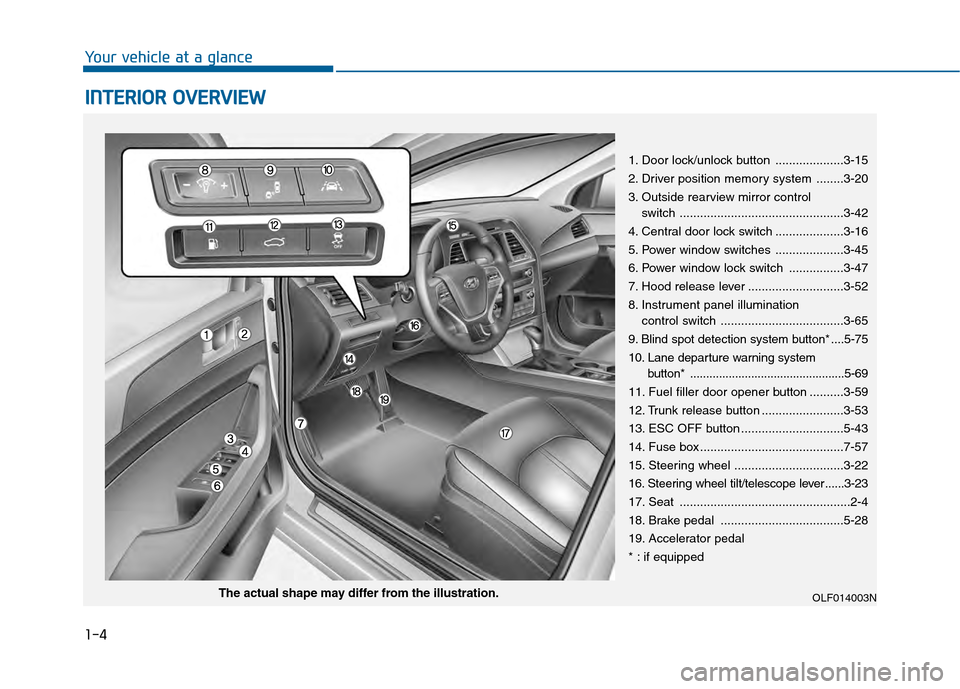
1. Door lock/unlock button ....................3-15
2. Driver position memory system ........3-20
3. Outside rearview mirror control
switch ................................................3-42
4. Central door lock switch ....................3-16
5. Power window switches ....................3-45
6. Power window lock switch ................3-47
7. Hood release lever ............................3-52
8. Instrument panel illumination control switch ....................................3-65
9. Blind spot detection system button* ....5-75
10. Lane departure warning system button* ................................................5-69
11. Fuel filler door opener button ..........3-59
12. Trunk release button ........................3-53
13. ESC OFF button ..............................5-43
14. Fuse box ..........................................7-57
15. Steering wheel ................................3-22
16. Steering wheel tilt/telescope lever ......3-23
17. Seat ..................................................2-4
18. Brake pedal ....................................5-28
19. Accelerator pedal
* : if equipped
OLF014003NThe actual shape may differ from the illustration.
Page 26 of 603
1-5
Your vehicle at a glance
1
I
IN
N S
ST
T R
R U
U M
M E
EN
N T
T
P
P A
A N
N E
EL
L
O
O V
VE
ER
R V
V I
IE
E W
W
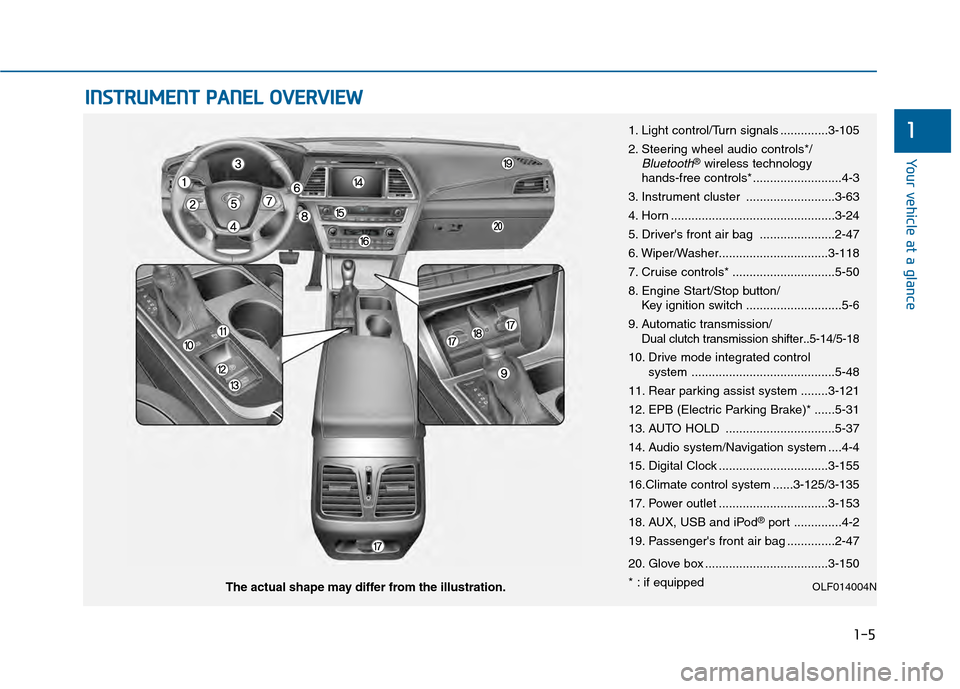
1. Light control/Turn signals ..............3-105
2. Steering wheel audio controls*/
Bluetooth®wireless technology
hands-free controls* ..........................4-3
3. Instrument cluster ..........................3-63
4. Horn ................................................3-24
5. Driver's front air bag ......................2-47
6. Wiper/Washer................................3-118
7. Cruise controls* ..............................5-50
8. Engine Start/Stop button/ Key ignition switch ............................5-6
9. Automatic transmission/
Dual clutch transmission shifter..5-14/5-18
10. Drive mode integrated control system ..........................................5-48
11. Rear parking assist system ........3-121
12. EPB (Electric Parking Brake)* ......5-31
13. AUTO HOLD ................................5-37
14. Audio system/Navigation system ....4-4
15. Digital Clock ................................3-155
16.Climate control system ......3-125/3-135
17. Power outlet ................................3-153
18. AUX, USB and iPod
®port ..............4-2
19. Passenger's front air bag ..............2-47
20. Glove box ....................................3-150
* : if equipped
OLF014004NThe actual shape may differ from the illustration.
Page 32 of 603
Safety Precautions
Adjusting the seats so that you are sit-
ting in a safe, comfortable position
plays an important role in driver and
passenger safety together with the
seat belts and air bags in an accident.
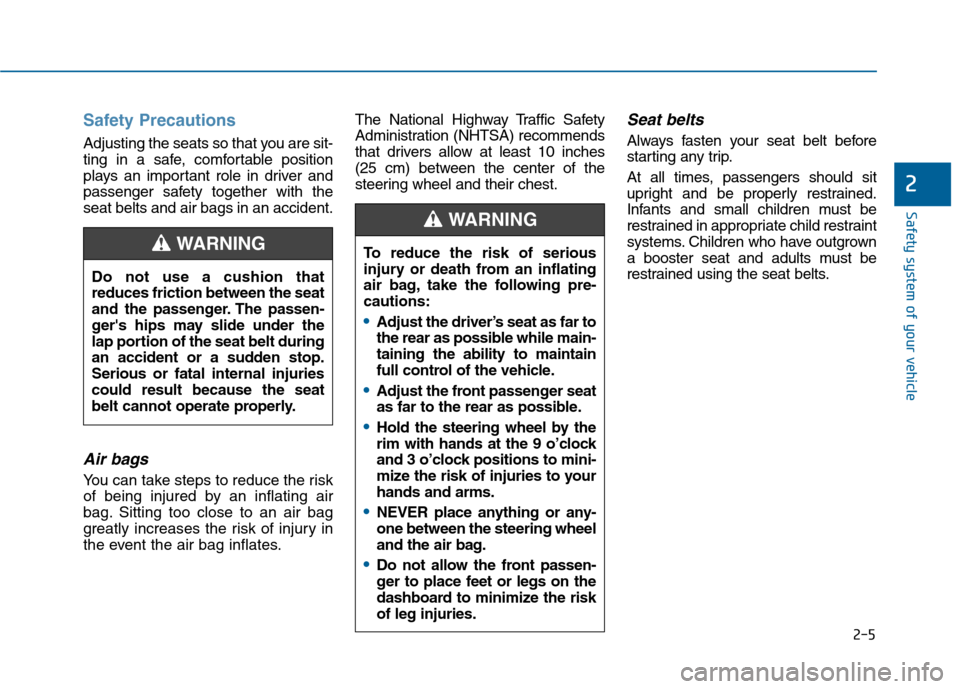
Air bags
You can take steps to reduce the risk
of being injured by an inflating air
bag. Sitting too close to an air bag
greatly increases the risk of injury in
the event the air bag inflates.The National Highway Traffic Safety
Administration (NHTSA) recommends
that drivers allow at least 10 inches
(25 cm) between the center of the
steering wheel and their chest.
Seat belts
Always fasten your seat belt before
starting any trip.
At all times, passengers should sit
upright and be properly restrained.
Infants and small children must be
restrained in appropriate child restraint
systems. Children who have outgrown
a booster seat and adults must be
restrained using the seat belts.
Do not use a cushion that
reduces friction between the seat
and the passenger. The passen-
ger's hips may slide under the
lap portion of the seat belt during
an accident or a sudden stop.
Serious or fatal internal injuries
could result because the seat
belt cannot operate properly.
WARNING To reduce the risk of serious
injury or death from an inflating
air bag, take the following pre-
cautions:
•Adjust the driver’s seat as far to
the rear as possible while main-
taining the ability to maintain
full control of the vehicle.
Adjust the front passenger seat
as far to the rear as possible.
Hold the steering wheel by the
rim with hands at the 9 o’clock
and 3 o’clock positions to mini-
mize the risk of injuries to your
hands and arms.
NEVER place anything or any-
one between the steering wheel
and the air bag.
Do not allow the front passen-
ger to place feet or legs on the
dashboard to minimize the risk
of leg injuries.
WARNING
2-5
Safety system of your vehicle
2
Page 33 of 603
2-6
Safety system of your vehicle
Front Seats
Take the following precautions
when adjusting your seat belt:
NEVER use one seat belt for
more than one occupant.
Always position the seatback
upright with the lap portion of
the seat belt snug and low
across the hips.
NEVER allow children or small
infants to ride in a passenger’s
lap.
Do not route the seat belt
across your neck, across sharp
edges, or reroute the shoulder
strap away from your body.
Do not allow the seat belt to
become caught or jammed.
WARNING
Take the following precautions
when adjusting your seat:
NEVER attempt to adjust the
seat while the vehicle is mov-
ing. The seat could respond
with unexpected movement
and may cause loss of vehicle
control resulting in an acci-
dent.
Do not place anything under
the front seats. Loose objects
in the driver’s foot area could
interfere with the operation of
the foot pedals, causing an
accident.
Do not allow anything to inter-
fere with the normal position
and proper locking of the seat-
back.
Do not place a cigarette lighter
on the floor or seat. When you
operate the seat, gas may exit
out of the lighter causing a fire.
WARNING To prevent injury:
Do not adjust your seat while
wearing your seat belt.
Moving the seat cushion for-
ward may cause strong pres-
sure on your abdomen.
Do not allow your hands or
fingers to get caught in the
seat mechanisms while the
seat is moving.
CAUTION
Page 34 of 603
2-7
Safety system of your vehicle
Manual adjustment
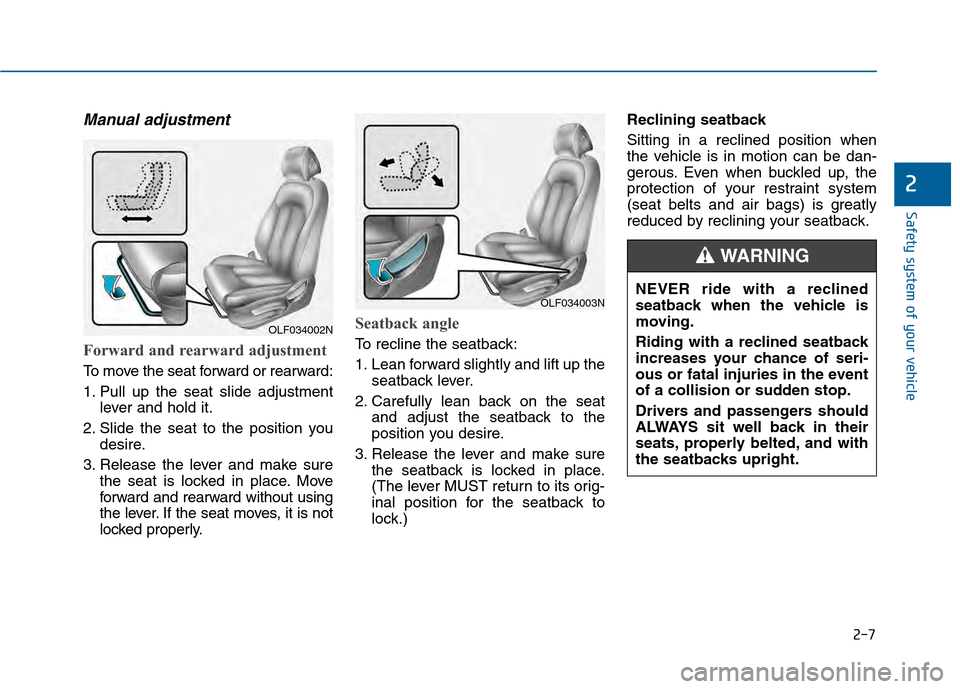
Forward and rearward adjustment
To move the seat forward or rearward:
1. Pull up the seat slide adjustmentlever and hold it.
2. Slide the seat to the position you desire.
3. Release the lever and make sure the seat is locked in place. Move
forward and rearward without using
the lever. If the seat moves, it is not
locked properly.
Seatback angle
To recline the seatback:
1. Lean forward slightly and lift up theseatback lever.
2. Carefully lean back on the seat and adjust the seatback to the
position you desire.
3. Release the lever and make sure the seatback is locked in place.
(The lever MUST return to its orig-
inal position for the seatback to
lock.) Reclining seatback
Sitting in a reclined position when
the vehicle is in motion can be dan-
gerous. Even when buckled up, the
protection of your restraint system
(seat belts and air bags) is greatly
reduced by reclining your seatback.
2
OLF034003N
OLF034002N
NEVER ride with a reclined
seatback when the vehicle is
moving.
Riding with a reclined seatback
increases your chance of seri-
ous or fatal injuries in the event
of a collision or sudden stop.
Drivers and passengers should
ALWAYS sit well back in their
seats, properly belted, and with
the seatbacks upright.
WARNING
Page 40 of 603
2-13
Safety system of your vehicle
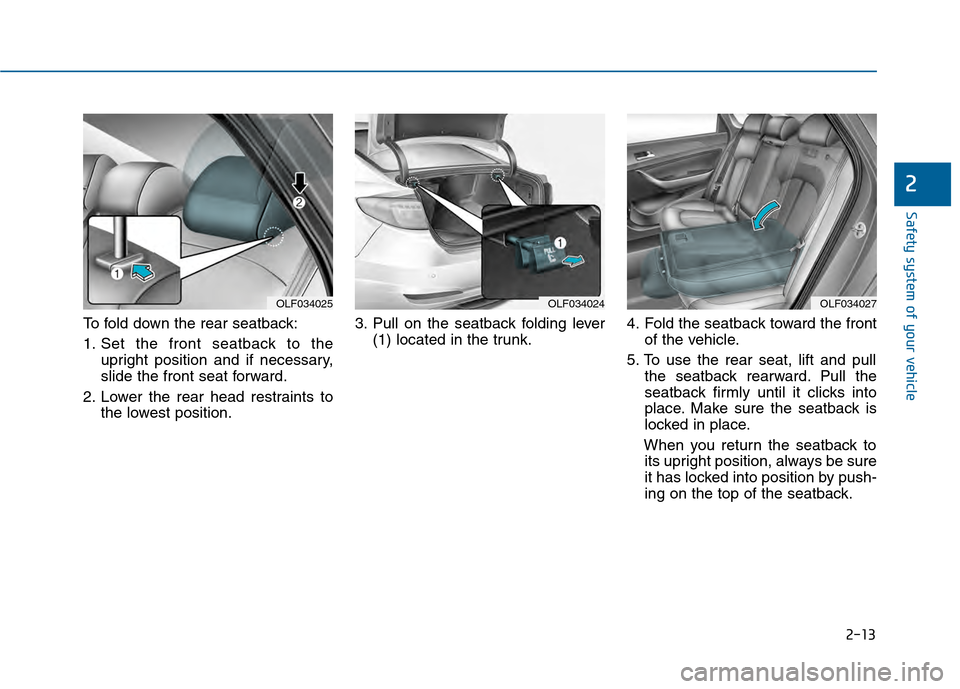
To fold down the rear seatback:
1. Set the front seatback to theupright position and if necessary,
slide the front seat forward.
2. Lower the rear head restraints to the lowest position. 3. Pull on the seatback folding lever
(1) located in the trunk. 4. Fold the seatback toward the front
of the vehicle.
5. To use the rear seat, lift and pull the seatback rearward. Pull the
seatback firmly until it clicks into
place. Make sure the seatback is
locked in place.
When you return the seatback to its upright position, always be sure
it has locked into position by push-
ing on the top of the seatback.
2
OLF034025OLF034024OLF034027