audio Hyundai Sonata 2016 - RHD (UK, Australia) Owner's Guide
[x] Cancel search | Manufacturer: HYUNDAI, Model Year: 2016, Model line: Sonata, Model: Hyundai Sonata 2016Pages: 504, PDF Size: 12.45 MB
Page 292 of 504
4-53
Multimedia System
4
Bluetooth®Wireless Technology
(Bluetooth®Wireless
Technologyequipped model)
Using
Bluetooth®Wireless
Technology Handsfree
• Bluetooth®Wireless Technology
refers to a short-distance wireless
networking technology which uses a
2.45GHz frequency to connect vari-
ous devices within a certain dis-
tance.
• Supported within PCs, external
devices,
Bluetooth®Wireless
Technology phones, PDAs, vari-
ous electronic devices, and auto-
motive environments,
Bluetooth®
Wireless Technology allows data to
be transmitted at high speeds with-
out having to use a connector
cable.
•
Bluetooth®Wireless Technology
Handsfree refers to a device which
allows the user to conveniently
make phone calls with
Bluetooth®
Wireless Technology mobile
phones through the audio system.•
Bluetooth®Wireless Technology
Handsfree is a feature that
enables drivers to practice safe
driving. Connecting the car
audio system with a
Bluetooth®
Wireless Technology phone
allows the user to conveniently
make calls, receive calls, and
manage the phone book. Before
using the
Bluetooth®Wireless
Technology , carefully read the
contents of this user’s manual.
• Excessive use or operations
while driving may lead to negli-
gent driving practices and be
the cause of accidents.
• Do not operate the device exces-
sively while driving.
• Viewing the screen for pro-
longed periods of time is dan-
gerous and may lead to acci-
dents. When driving, view the
screen only for short periods of
time.
Information
- Using upon connecting
Bluetooth®Wireless
Technology phone
• Before connecting the car audio sys-
tem with the mobile phone, check to
see that the mobile phone supports
Bluetooth
®Wireless Technology fea-
tures.
• Even if the phone supports
Bluetooth
®Wireless Technology, the
phone will not be found during
device searches if the phone has been
set to hidden state or the Bluetooth
®
Wireless Technology power is turned
off. Disable the hidden state or turn
on the Bluetooth
®Wireless
Technology power prior to search-
ing/connecting with the car audio
system.
(Continued)
iNOTICE
Page 293 of 504
4-54
Multimedia System
(Continued)
• If you do not want to automatically
connect yourBluetooth
®Wireless
Technology phone, try the following.
1. Turn off the Bluetooth
®Wireless
Technology feature in your mobile
phone.
- For more information on
Bluetooth
®Wireless Technology fea-
tures within your mobile, refer to
your mobile phone user’s manual.
2. Turn off the Bluetooth
®Wireless
Technology feature in your car
audio system.
- To turn off the Bluetooth
®Wireless
Technology feature in your car
audio system, go to
[Phone] and [turn off] the
Bluetooth
®Wireless Technology
feature.
• Park the vehicle when connecting the
car audio system with your mobile
phone.
(Continued)(Continued)
•Bluetooth
®Wireless Technology con-
nection may become intermittently
disconnected in some mobile phones.
Follow these steps to try again.
1. Turn the Bluetooth
®Wireless
Technology function within the
mobile phone off/on and try
again.
2. Turn the mobile phone power
Off/On and try again.
3 Completely remove the mobile
phone battery, reboot, and then
again.
4. Reboot the audio system and try
again.
5. Delete all paired devices, pair and
try again.
• The Handsfree call volume and
quality may differ depending on the
mobile phone.
(Continued)(Continued)
•Bluetooth
®Wireless Technology fea-
tures supported within the vehicle
are as follows. Some features may
not be supported depending on your
Bluetooth
®Wireless Technologydevice.
- Answering and placing Bluetooth
®
Wireless Technology Handsfree
calls
- Menu operation during call
(Switch to Private, Switch to call
waiting, Outgoing volume)
- Download Call History
- Download Mobile Phone book
- Phone book/Call History Auto
Download
-Bluetooth
®Wireless Technology
device auto connection -
Bluetooth
®Wireless Technology
Audio
• It is possible to pair up to five
Bluetooth
®Wireless Technology
devices to the car system.
(Continued)
SETUP
Page 294 of 504
4-55
Multimedia System
4
(Continued)
• Only one Bluetooth
®Wireless
Technology device can be connected
at a time.
• Other devices cannot be paired
while a Bluetooth
®Wireless
Technologydevice is already con-
nected.
• When a Bluetooth
®Wireless
Technology device is being connected,
the connection process cannot be can-
celed.
•Only Bluetooth
®Wireless Technology
Handsfree and Bluetooth®Wireless
Technology audio related features
will operate within this system.
• Normal operation is possible only
for devices that support Handsfree
or audio features, such as a
Bluetooth
®Wireless Technology
mobile phone or a Bluetooth®
Wireless Technology audio device.
(Continued)(Continued)
• Only one function can be used at a
time between the Bluetooth
®Wireless
Technology Handsfree and Bluetooth®
Wireless Technology audio. (While
playing Bluetooth®Wireless
Technology audio, streaming will end
upon entering the Bluetooth
®
Wireless Technology phone screen.)
• If a connected Bluetooth
®Wireless
Technology device becomes discon-
nected for various reasons, such as
being out of range, turning the
device OFF, or a Bluetooth
®
Wireless Technology communica-
tion error, Bluetooth®Wireless
Technology devices are automatical-
ly searched and connected.
(Continued)(Continued)
• Placing the audio system within an
electromagnetic environment may
result in noise interference.
Page 295 of 504
4-56
Multimedia System
Bluetooth® Wireless Technology
(for Bluetooth®Wireless
Technologyequipped model)
Pairing a
Bluetooth®Wireless
Technology wireless technolo-
gy Device
What is
Bluetooth®Wireless
Technology Pairing?
Pairing refers to the process of syn-
chronizing your
Bluetooth®Wireless
Technology phone or device with the
car audio system for connection.
Pairing is necessary to connect and
use the
Bluetooth®Wireless
Technology feature.
Pairing Key / Key on
the Steering Remote Controller
When No Devices have been Paired
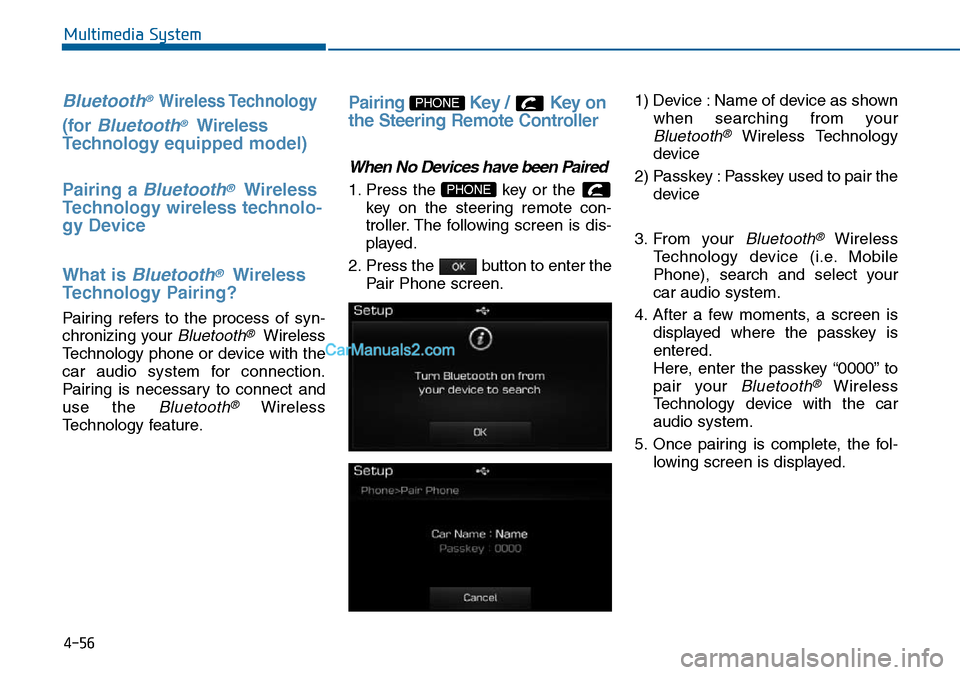
1. Press the key or the
key on the steering remote con-
troller. The following screen is dis-
played.
2. Press the button to enter the
Pair Phone screen.1) Device : Name of device as shown
when searching from your
Bluetooth®Wireless Technology
device
2) Passkey : Passkey used to pair the
device
3. From your
Bluetooth®Wireless
Technology device (i.e. Mobile
Phone), search and select your
car audio system.
4. After a few moments, a screen is
displayed where the passkey is
entered.
Here, enter the passkey “0000” to
pair your
Bluetooth®Wireless
Technology device with the car
audio system.
5. Once pairing is complete, the fol-
lowing screen is displayed.
PHONE
PHONE
Page 297 of 504
![Hyundai Sonata 2016 - RHD (UK, Australia) Owners Guide 4-58
Multimedia System
Connecting a Device
Press the key Select
[Phone] Select [Paired Phone List]
1) Connected Phone : Device that is
currently connected
2) Paired Phone : Device that is
paired but](/img/35/16787/w960_16787-296.png "Hyundai Sonata 2016 - RHD (UK, Australia) Owners Guide 4-58
Multimedia System
Connecting a Device
Press the key Select
[Phone] Select [Paired Phone List]
1) Connected Phone : Device that is
currently connected
2) Paired Phone : Device that is
paired but")
4-58
Multimedia System
Connecting a Device
Press the key Select
[Phone] Select [Paired Phone List]
1) Connected Phone : Device that is
currently connected
2) Paired Phone : Device that is
paired but not connectedFrom the paired phone list, select the
device you want to connect and
press the button.
Changing Priority
What is Priority?
It is possible to pair up to five
Bluetooth®Wireless Technology
devices with the car audio system.
As a result, the “Change Priority’ fea-
ture is used to set the connection pri-
ority of paired phones. However, the
most recently connected phone will
always be set as the highest priority.
Press the key Select
[Phone] Select [Paired Phone List]
SETUP
ConnectSETUP
Page 300 of 504
4-61
Multimedia System
4
Answering Calls
Answering a Call
Answering a call with a Bluetooth®
Wireless Technology device connect-
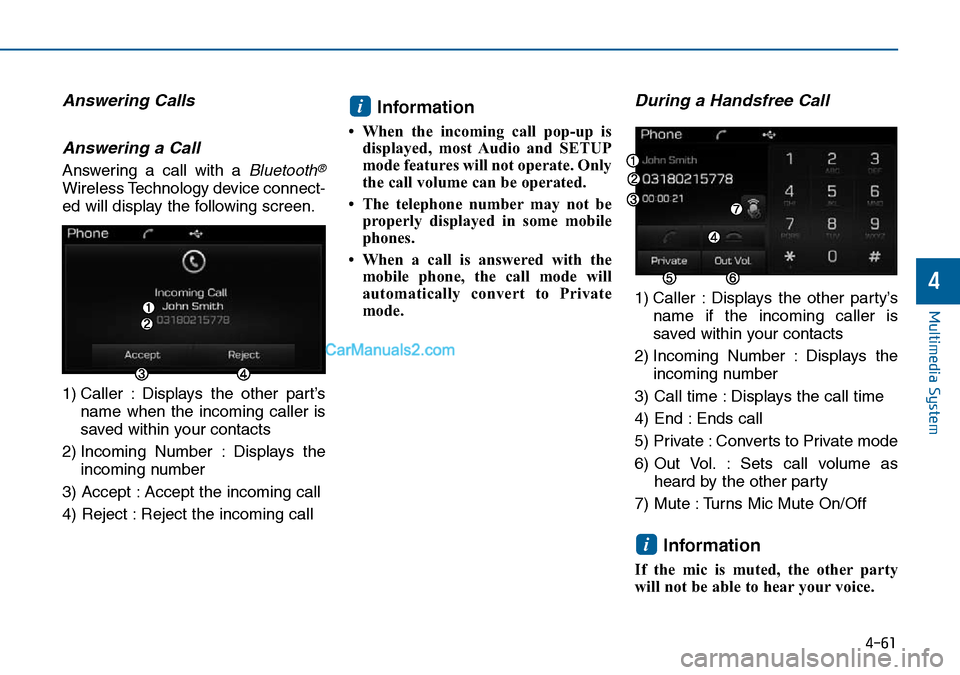
ed will display the following screen.
1) Caller : Displays the other part’s
name when the incoming caller is
saved within your contacts
2) Incoming Number : Displays the
incoming number
3) Accept : Accept the incoming call
4) Reject : Reject the incoming call
Information
• When the incoming call pop-up is
displayed, most Audio and SETUP
mode features will not operate. Only
the call volume can be operated.
• The telephone number may not be
properly displayed in some mobile
phones.
• When a call is answered with the
mobile phone, the call mode will
automatically convert to Private
mode.
During a Handsfree Call
1) Caller : Displays the other party’s
name if the incoming caller is
saved within your contacts
2) Incoming Number : Displays the
incoming number
3) Call time : Displays the call time
4) End : Ends call
5) Private : Converts to Private mode
6) Out Vol. : Sets call volume as
heard by the other party
7) Mute : Turns Mic Mute On/Off
Information
If the mic is muted, the other party
will not be able to hear your voice.
i
i
Page 305 of 504
![Hyundai Sonata 2016 - RHD (UK, Australia) Owners Guide 4-66
Multimedia System
Bluetooth®Wireless
Technology Setting
Pairing a New Device
Press the key Select
[Phone] Select [Pair Phone]
Bluetooth®Wireless Technology
devices can be paired with the audio](/img/35/16787/w960_16787-304.png "Hyundai Sonata 2016 - RHD (UK, Australia) Owners Guide 4-66
Multimedia System
Bluetooth®Wireless
Technology Setting
Pairing a New Device
Press the key Select
[Phone] Select [Pair Phone]
Bluetooth®Wireless Technology
devices can be paired with the audio")
4-66
Multimedia System
Bluetooth®Wireless
Technology Setting
Pairing a New Device
Press the key Select
[Phone] Select [Pair Phone]
Bluetooth®Wireless Technology
devices can be paired with the audio
system.
For more information, refer to the
“Pairing through Phone Setup” sec-
tion within
Bluetooth®Wireless
Technology.
Viewing Paired Phone List
Press the key Select
[Phone] Select [Paired Phone List]
This feature is used to view mobile
phones that have been paired with
the audio system. Upon selecting a
paired phone, the setup menu is dis-
played.
For more information, refer to the
“Setting
Bluetooth®Wireless
Technology Connection” section with-
in
Bluetooth®Wireless Technology.1) : Moves to the previous
screen
2) Connect/Disconnect Phone :
Connect/disconnects currently
selected phone
3) Delete : Deletes the currently
selected phone
4) Change Priority : Sets currently
selected phone to highest connec-
tion priority
Information
- BEFORE DOWNLOADING
Contacts
• Only contacts within connected
phones can be downloaded. Also
check to see that your mobile phone
supports the download feature.
• To learn more about whether your
mobile phone supports contacts
downloads, refer to your mobile
phone user’s manual.
• The contacts for only the connected
phone can be downloaded. Before
downloading, check to see whether
your phone supports the download
feature.
i
SETUP
SETUP
Page 306 of 504
![Hyundai Sonata 2016 - RHD (UK, Australia) Owners Guide 4-67
Multimedia System
4
Downloading Contacts
Press the key Select
[Phone] Select [Contacts Download]
The contacts is downloaded from the
mobile phone and the download
progress is displayed.
Informat](/img/35/16787/w960_16787-305.png "Hyundai Sonata 2016 - RHD (UK, Australia) Owners Guide 4-67
Multimedia System
4
Downloading Contacts
Press the key Select
[Phone] Select [Contacts Download]
The contacts is downloaded from the
mobile phone and the download
progress is displayed.
Informat")
4-67
Multimedia System
4
Downloading Contacts
Press the key Select
[Phone] Select [Contacts Download]
The contacts is downloaded from the
mobile phone and the download
progress is displayed.
Information
• Up to 1,000 contacts entries can be
copied into car contacts.
• Up to 1,000 contacts entries can be
saved for each paired device.
• Upon downloading contacts data,
previously saved contacts data will
be deleted. However, contacts
entries saved to other paired phones
are not deleted.
Auto Download (Contacts)
Press the key Select
[Phone] Select [Auto Download]
This feature is used to automatically
download mobile contacts entries
once a
Bluetooth®Wireless
Technology phone is connected.
Information
• The Auto Download feature will
download mobile contacts entries
every time the phone is connected.
The download time may differ
depending on the number of saved
contacts entries and the communi-
cation state.
• When downloading a contacts, first
check to see that your mobile phone
supports the contacts download fea-
ture.
Streaming Audio
Press the key Select
[Phone] Select [Streaming Audio]
When Streaming Audio is turned on,
you can play music files saved in
your
Bluetooth®Wireless Technology
device from the car.
SETUP
i
SETUP
i
SETUP
Page 307 of 504
![Hyundai Sonata 2016 - RHD (UK, Australia) Owners Guide 4-68
Multimedia System
Outgoing Volume
Press the key Select
[Phone] Select [Outgoing Volume]
Use the , buttons to adjust the
outgoing volume level.
Turning Bluetooth System Off
Press the key Select](/img/35/16787/w960_16787-306.png "Hyundai Sonata 2016 - RHD (UK, Australia) Owners Guide 4-68
Multimedia System
Outgoing Volume
Press the key Select
[Phone] Select [Outgoing Volume]
Use the , buttons to adjust the
outgoing volume level.
Turning Bluetooth System Off
Press the key Select")
4-68
Multimedia System
Outgoing Volume
Press the key Select
[Phone] Select [Outgoing Volume]
Use the , buttons to adjust the
outgoing volume level.
Turning Bluetooth System Off
Press the key Select
[Phone] Select [Bluetooth System
Off]
Once
Bluetooth®Wireless Technology
is turned off,
Bluetooth®Wireless
Technology related features will not be
supported within the audio system.
Information
To t u r n Bluetooth®Wireless
Technology back on, go to
[Phone] and press “Yes”.
System Setting
Memory Information
Press the key Select
[System] Select [Memory Information]
This feature displays information
related to system memory.
1) Using : Displays capacity currently
in use
2) Capacity : Displays total capacity
SETUP
SETUP
i
SETUP
SETUP
Page 309 of 504
4-70
Multimedia System
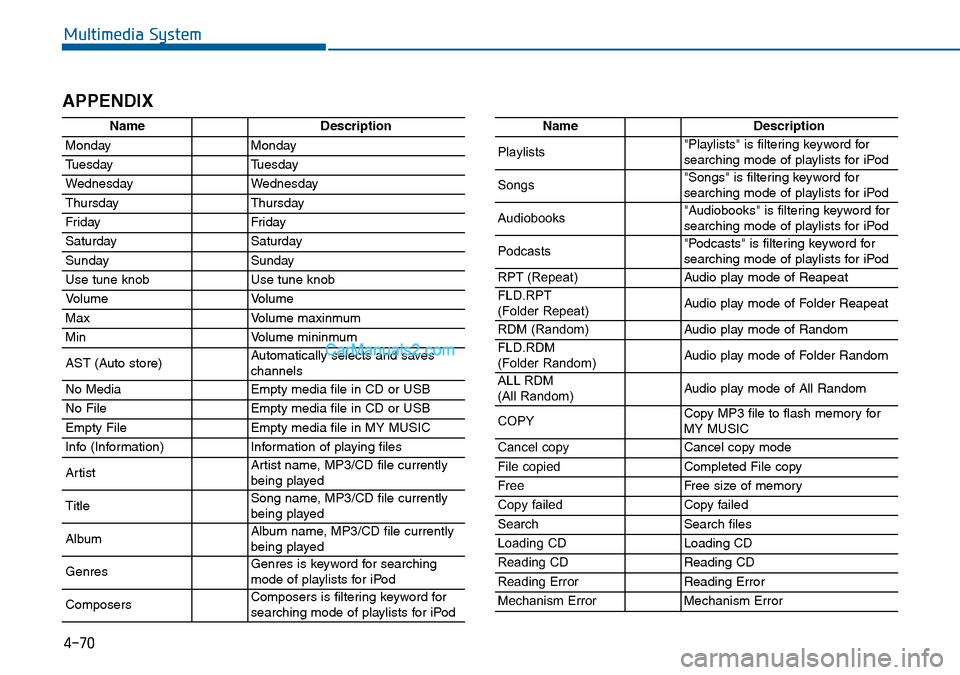
APPENDIX
NameDescription
MondayMonday
TuesdayTuesday
WednesdayWednesday
ThursdayThursday
FridayFriday
SaturdaySaturday
SundaySunday
Use tune knobUse tune knob
VolumeVolume
MaxVolume maxinmum
MinVolume mininmum
AST (Auto store)Automatically selects and saves
channels
No MediaEmpty media file in CD or USB
No FileEmpty media file in CD or USB
Empty FileEmpty media file in MY MUSIC
Info (Information)Information of playing files
ArtistArtist name, MP3/CD file currently
being played
TitleSong name, MP3/CD file currently
being played
AlbumAlbum name, MP3/CD file currently
being played
GenresGenres is keyword for searching
mode of playlists for iPod
ComposersComposers is filtering keyword for
searching mode of playlists for iPod
NameDescription
Playlists"Playlists" is filtering keyword for
searching mode of playlists for iPod
Songs"Songs" is filtering keyword for
searching mode of playlists for iPod
Audiobooks"Audiobooks" is filtering keyword for
searching mode of playlists for iPod
Podcasts"Podcasts" is filtering keyword for
searching mode of playlists for iPod
RPT (Repeat)Audio play mode of Reapeat
FLD.RPT
(Folder Repeat)Audio play mode of Folder Reapeat
RDM (Random)Audio play mode of Random
FLD.RDM
(Folder Random)Audio play mode of Folder Random
ALL RDM
(All Random)Audio play mode of All Random
COPYCopy MP3 file to flash memory for
MY MUSIC
Cancel copyCancel copy mode
File copiedCompleted File copy
FreeFree size of memory
Copy failedCopy failed
SearchSearch files
Loading CDLoading CD
Reading CDReading CD
Reading ErrorReading Error
Mechanism ErrorMechanism Error