boot Hyundai Sonata 2016 Owner's Manual - RHD (UK, Australia)
[x] Cancel search | Manufacturer: HYUNDAI, Model Year: 2016, Model line: Sonata, Model: Hyundai Sonata 2016Pages: 504, PDF Size: 12.45 MB
Page 14 of 504
1-3
Your vehicle at a glance
EXTERIOR OVERVIEW (II)
1
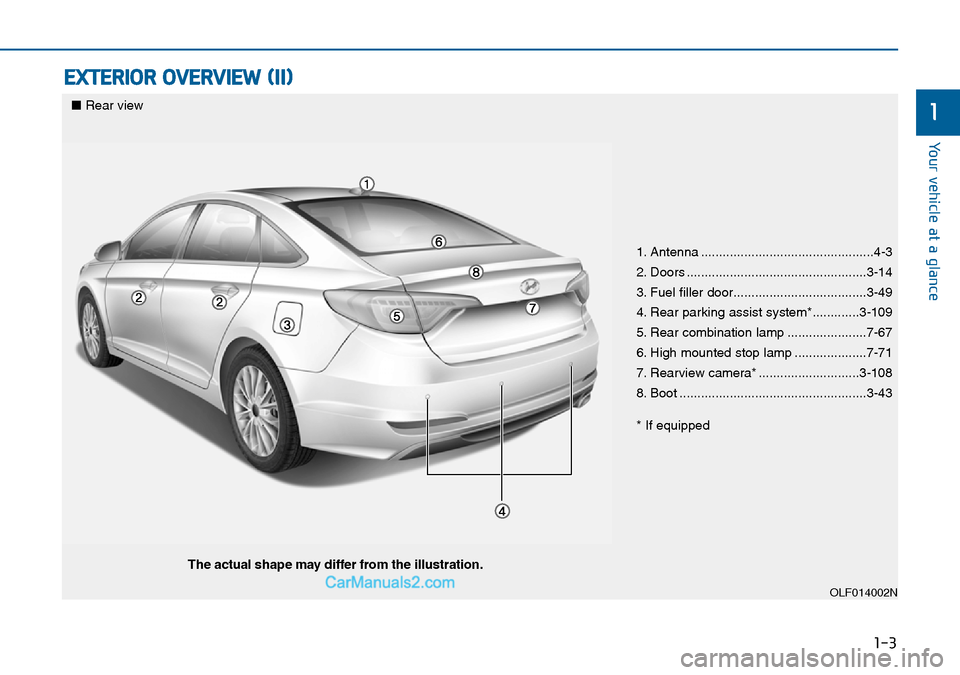
1. Antenna ................................................4-3
2. Doors ..................................................3-14
3. Fuel filler door.....................................3-49
4. Rear parking assist system*.............3-109
5. Rear combination lamp ......................7-67
6. High mounted stop lamp ....................7-71
7. Rearview camera* ............................3-108
8. Boot ....................................................3-43
* If equipped
OLF014002N
■Rear view
The actual shape may differ from the illustration.
Page 15 of 504
1-4
Your vehicle at a glance
INTERIOR OVERVIEW
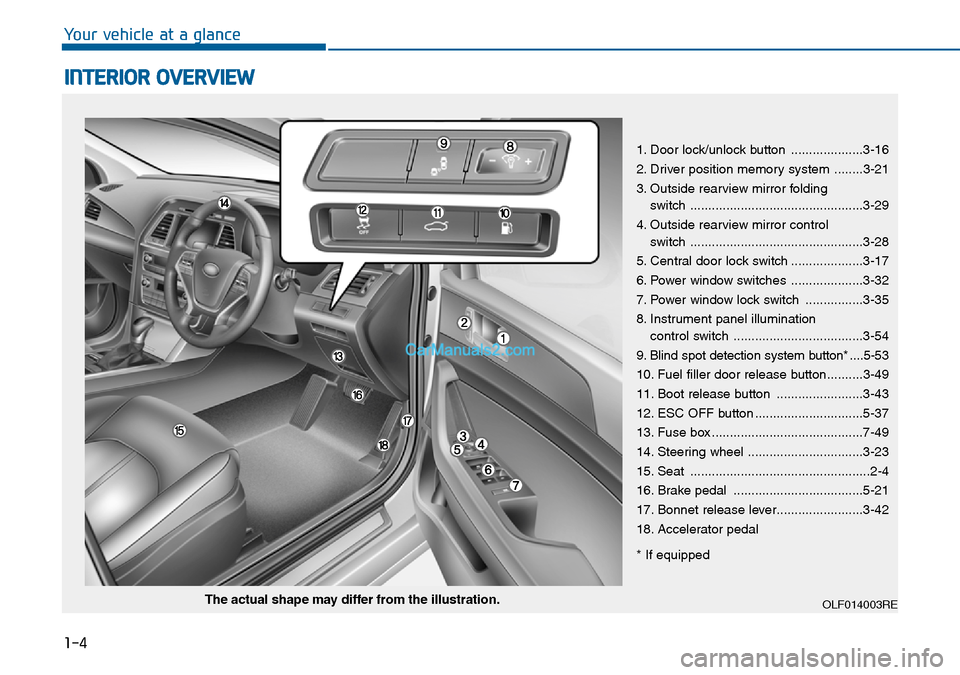
1. Door lock/unlock button ....................3-16
2. Driver position memory system ........3-21
3. Outside rearview mirror folding
switch ................................................3-29
4. Outside rearview mirror control
switch ................................................3-28
5. Central door lock switch ....................3-17
6. Power window switches ....................3-32
7. Power window lock switch ................3-35
8. Instrument panel illumination
control switch ....................................3-54
9. Blind spot detection system button* ....5-53
10. Fuel filler door release button..........3-49
11. Boot release button ........................3-43
12. ESC OFF button ..............................5-37
13. Fuse box ..........................................7-49
14. Steering wheel ................................3-23
15. Seat ..................................................2-4
16. Brake pedal ....................................5-21
17. Bonnet release lever........................3-42
18. Accelerator pedal
* If equipped
OLF014003REThe actual shape may differ from the illustration.
Page 30 of 504
2-13
Safety system of your vehicle
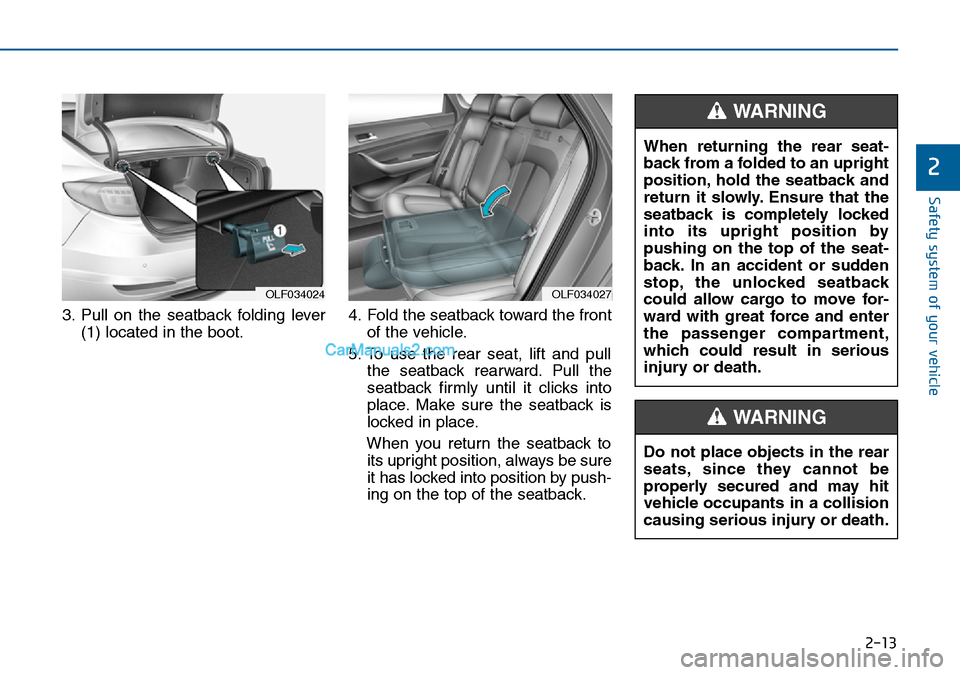
3. Pull on the seatback folding lever
(1) located in the boot.4. Fold the seatback toward the front
of the vehicle.
5. To use the rear seat, lift and pull
the seatback rearward. Pull the
seatback firmly until it clicks into
place. Make sure the seatback is
locked in place.
When you return the seatback to
its upright position, always be sure
it has locked into position by push-
ing on the top of the seatback.
2
OLF034024OLF034027
Do not place objects in the rear
seats, since they cannot be
properly secured and may hit
vehicle occupants in a collision
causing serious injury or death.
WARNING
When returning the rear seat-
back from a folded to an upright
position, hold the seatback and
return it slowly. Ensure that the
seatback is completely locked
into its upright position by
pushing on the top of the seat-
back. In an accident or sudden
stop, the unlocked seatback
could allow cargo to move for-
ward with great force and enter
the passenger compartment,
which could result in serious
injury or death.
WARNING
Page 85 of 504

Convenient features of your vehicle
Accessing your vehicle .........................................3-4
Remote key .......................................................................3-4
Remote key precautions..................................................3-6
Smart key ...........................................................................3-8
Smart key precautions...................................................3-11
Battery replacement .....................................................3-12
Immobiliser system .........................................................3-13
Door locks .............................................................3-14
Operating door locks from outside the vehicle .....3-14
Operating door locks from inside the vehicle ........3-16
Auto door lock/unlock features ................................3-18
Child-protector rear door locks ..................................3-19
Theft-alarm system.............................................3-20
Driver position memory system .........................3-21
Storing memory positions .............................................3-21
Easy access function .....................................................3-22
Steering wheel......................................................3-23
Electric power steering (EPS) ......................................3-23
Tilt steering / Telescope steering...............................3-24
Heated steering wheel ...................................................3-25
Horn ....................................................................................3-25
Mirrors ...................................................................3-26
Inside rearview mirror....................................................3-26
Outside rearview mirror ................................................3-27
Reverse parking aid function.......................................3-30
Windows ................................................................3-32
Power windows ................................................................3-32
Panorama sunroof ...............................................3-37
Sunshade ...........................................................................3-38
Sliding the sunroof ........................................................3-38
Tilting the sunroof ........................................................3-39
Closing the sunroof ........................................................3-39
Resetting the sunroof ....................................................3-41
Exterior features .................................................3-42
Bonnet................................................................................3-42
Boot ....................................................................................3-43
Emergency boot safety release ..................................3-44
Boot lid control switch...................................................3-45
Smart boot ........................................................................3-46
Fuel filler door .................................................................3-49
Emergency fuel filler lid release .................................3-52
Instrument cluster................................................3-53
Instrument panel control ...............................................3-54
LCD display control.........................................................3-55
Gauges ...............................................................................3-55
LCD display ...........................................................3-60
LCD modes ........................................................................3-60
Trip computer mode .......................................................3-61
Turn By Turn (TBT) mode .............................................3-62
A/V mode ..........................................................................3-62
3
Page 88 of 504

3-4
Convenient features of your vehicle
Remote key
Your HYUNDAI uses a remote key,
which you can use to lock or unlock
a door (and boot) and even start the
engine.
1. Door Lock
2. Door Unlock
3. Boot Unlock
Locking
To lock :
1. Close all doors, engine bonnet
and boot.
2. Press the Door Lock button (1) on
the remote key.
3. The doors will lock. The hazard
warning lights will blink. Also, the
outside rearview mirror will fold, if
the outside rearview mirror folding
switch is in the AUTO position (if
equipped).
4. Make sure the doors are locked by
checking the position of the door
lock button inside the vehicle.
Unlocking
To unlock:
1. Press the Door Unlock button (2)
on the remote key.
2. The doors will unlock. The hazard
warning lights will blink twice. Also,
the outside rearview mirror will
unfold, if the outside rearview mir-
ror folding switch is in the AUTO
position (if equipped).
Information
After unlocking the doors, the doors
will lock automatically after 30 sec-
onds unless a door is opened.
i
ACCESSING YOUR VEHICLE
Do not leave the keys in your
vehicle with unsupervised chil-
dren. Unattended children
could place the key in the igni-
tion switch and may operate
power windows or other con-
trols, or even make the vehicle
move, which could result in
serious injury or death.
WARNING
OHG040006L
Page 89 of 504
3-5
Convenient features of your vehicle
Boot unlocking
To unlock:
1. Press the Boot Unlock button (3)
on the remote key for more than
1 second.
2. The hazard warning lights will
blink twice. Once the boot is
opened and then closed, the boot
will lock automatically.
Information
• After unlocking the boot, the boot
will lock automatically.
• The word "HOLD" is written on the
button to inform you that you must
press and hold the button for more
than 1 second.
Start-up
For detailed information refer to “Key
Ignition Switch” in chapter 5.
To prevent damaging the remote
key:
• Keep the remote key away from
water or any liquid. If the remote
key is inoperative due to expo-
sure to water or other liquids, it
will not be covered by your man-
ufacturer’s vehicle warranty.
• Avoid dropping or throwing the
remote key.
• Protect the remote key from
extreme temperatures.
Mechanical key
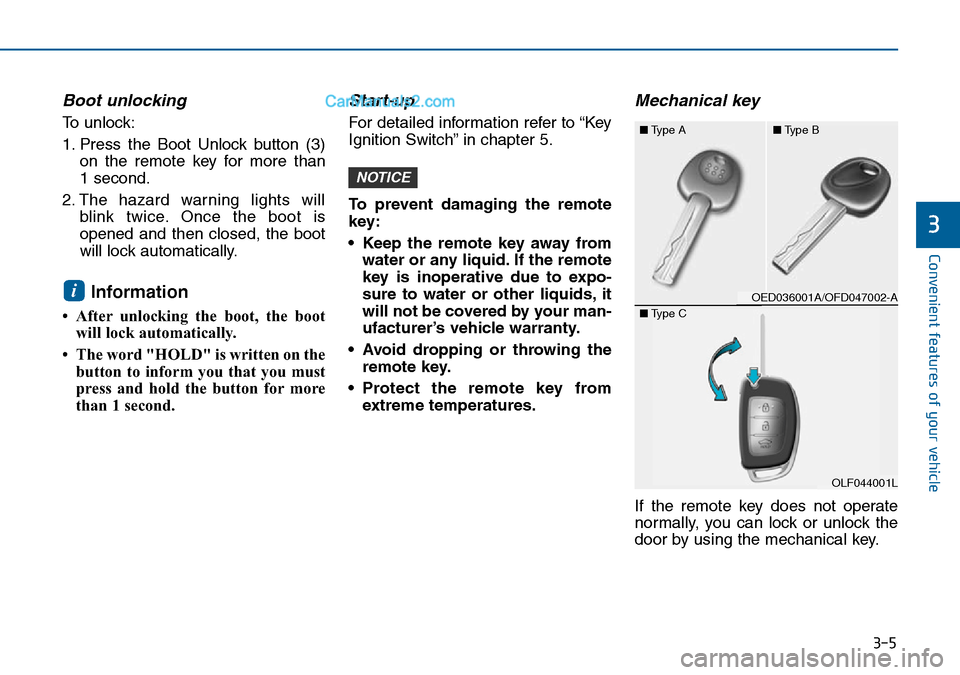
If the remote key does not operate
normally, you can lock or unlock the
door by using the mechanical key.
NOTICE
i
3
OED036001A/OFD047002-A ■Type A■Type B
OLF044001L
OLF044001L ■Type C
Page 92 of 504
3-8
Smart key
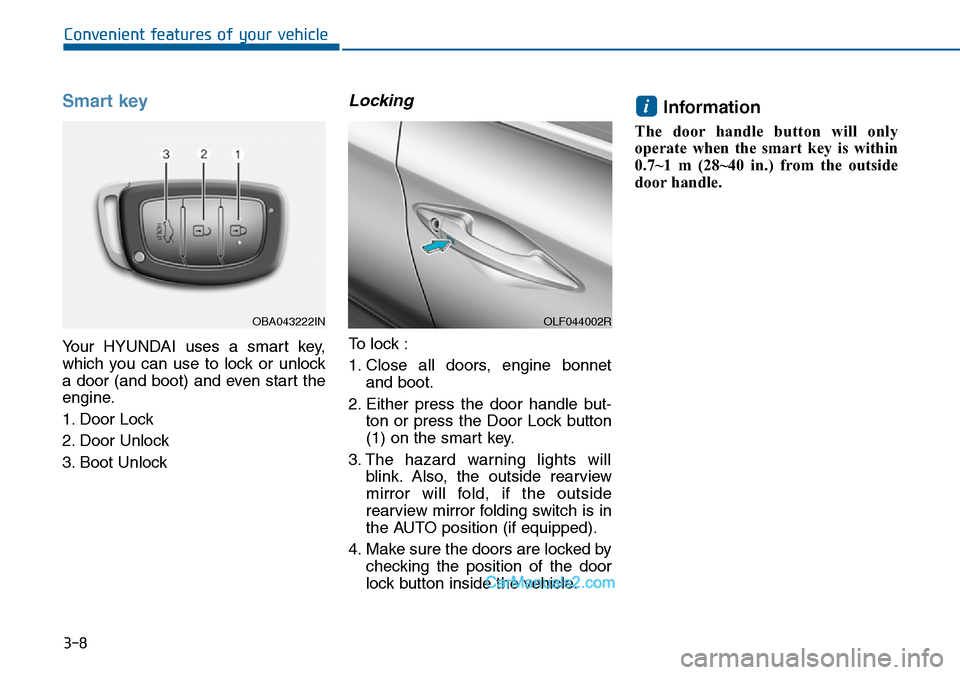
Your HYUNDAI uses a smart key,
which you can use to lock or unlock
a door (and boot) and even start the
engine.
1. Door Lock
2. Door Unlock
3. Boot Unlock
Locking
To lock :
1. Close all doors, engine bonnet
and boot.
2. Either press the door handle but-
ton or press the Door Lock button
(1) on the smart key.
3. The hazard warning lights will
blink. Also, the outside rearview
mirror will fold, if the outside
rearview mirror folding switch is in
the AUTO position (if equipped).
4. Make sure the doors are locked by
checking the position of the door
lock button inside the vehicle.
Information
The door handle button will only
operate when the smart key is within
0.7~1 m (28~40 in.) from the outside
door handle.
i
Convenient features of your vehicle
OBA043222INOLF044002R
Page 93 of 504
3-9
Convenient features of your vehicle
Even though you press the outside
door handle button, the doors will not
lock and the chime will sound for
3 seconds if any of the following
occur:
• The smart key is in the vehicle.
• The Engine Start/Stop button is in
ACC or ON position.
• Any door except the boot is open.Unlocking
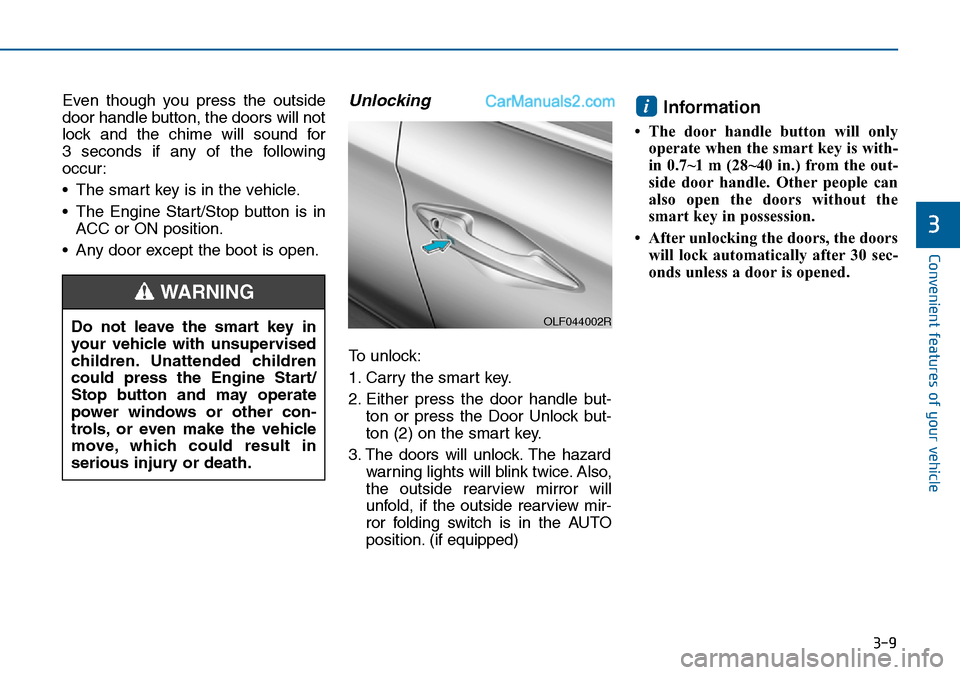
To unlock:
1. Carry the smart key.
2. Either press the door handle but-
ton or press the Door Unlock but-
ton (2) on the smart key.
3. The doors will unlock. The hazard
warning lights will blink twice. Also,
the outside rearview mirror will
unfold, if the outside rearview mir-
ror folding switch is in the AUTO
position. (if equipped)
Information
• The door handle button will only
operate when the smart key is with-
in 0.7~1 m (28~40 in.) from the out-
side door handle. Other people can
also open the doors without the
smart key in possession.
• After unlocking the doors, the doors
will lock automatically after 30 sec-
onds unless a door is opened.
i
3
Do not leave the smart key in
your vehicle with unsupervised
children. Unattended children
could press the Engine Start/
Stop button and may operate
power windows or other con-
trols, or even make the vehicle
move, which could result in
serious injury or death.
WARNING
OLF044002R
Page 94 of 504

3-10
Convenient features of your vehicle
Boot unlocking
To unlock:
1. Carry the smart key.
2. Either press the boot handle but-
ton or press the Boot Unlock but-
ton (3) on the smart key for more
than one second.
3. The hazard warning lights will
blink twice.
Once the boot is opened and then
closed, the boot will lock automati-
cally.
Information
After unlocking the boot, the boot will
lock automatically after 30 seconds
unless the boot is opened.
Start-up
You can start the engine without
inserting the key.For detailed infor-
mation refer to the Engine
Start/Stop button in chapter 5.
To prevent damaging the smart
key:
• Keep the smart key away from
water or any liquid. If the smart
key is inoperative due to expo-
sure to water or other liquids, it
will not be covered by your man-
ufacturer’s vehicle warranty.
• Avoid dropping or throwing the
smart key.
• Protect the smart key from
extreme temperatures.
Mechanical key
If the smart key does not operate
normally, you can lock or unlock the
door by using the mechanical key.
Press and hold the release button (1)
and remove the mechanical key (2).
Insert the mechanical key into the
key hole in the door.
To reinstall the mechanical key, put
the key into the hole and push it until
a click sound is heard.
NOTICE
i
OLF044248L
Page 104 of 504

3-20
Convenient features of your vehicle
This system helps to protect your
vehicle and valuables. The horn will
sound and the hazard warning lights
will blink continuously if any of the
following occurs:
- A door is opened without using the
remote key or smart key.
- The boot is opened without using
the remote key or smart key.
- The engine bonnet is opened.
The alarm continues for 30 seconds,
then the system resets. To turn off
the alarm, unlock the doors with the
remote key or smart key.
The Theft Alarm System automati-
cally sets 30 seconds after you lock
the doors and the boot. For the sys-
tem to activate, you must lock the
doors and the boot from outside the
vehicle with the remote key or smart
key or by pressing the button on the
outside of the door handles with the
smart key in your possession.
The hazard warning lights will blink
and the chime will sound once to
indicate the system is armed.Once the security system is set, open-
ing any door, the boot, or the bonnet
without using the remote key or smart
key will cause the alarm to activate.
The Theft Alarm System will not set if
the bonnet, the boot, or any door is
not fully closed. If the system will not
set, check the bonnet, the boot, or
the doors are fully closed.
Do not attempt to alter this system or
add other devices to it.
Information
• Do not lock the doors until all pas-
sengers have left the vehicle. If the
remaining passenger leaves the
vehicle when the system is armed,
the alarm will be activated.
• If the vehicle is not disarmed with
the remote key or smart key, open
the doors by using the mechanical
key and place the ignition switch in
the ON position (for remote key) or
start the engine (for smart key) and
wait for 30 seconds.
• When the system is disarmed but a
door or boot is not opened within 30
seconds, the system will be rearmed.
Information
Vehicles equipped with a theft alarm
system will have a label attached to
the vehicle with the following words:
1. WARNING
2. SECURITY SYSTEM
ii
THEFT-ALARM SYSTEM
OJC040170