change wheel Hyundai Sonata 2016 Owner's Manual - RHD (UK, Australia)
[x] Cancel search | Manufacturer: HYUNDAI, Model Year: 2016, Model line: Sonata, Model: Hyundai Sonata 2016Pages: 504, PDF Size: 12.45 MB
Page 26 of 504
2-9
Safety system of your vehicle
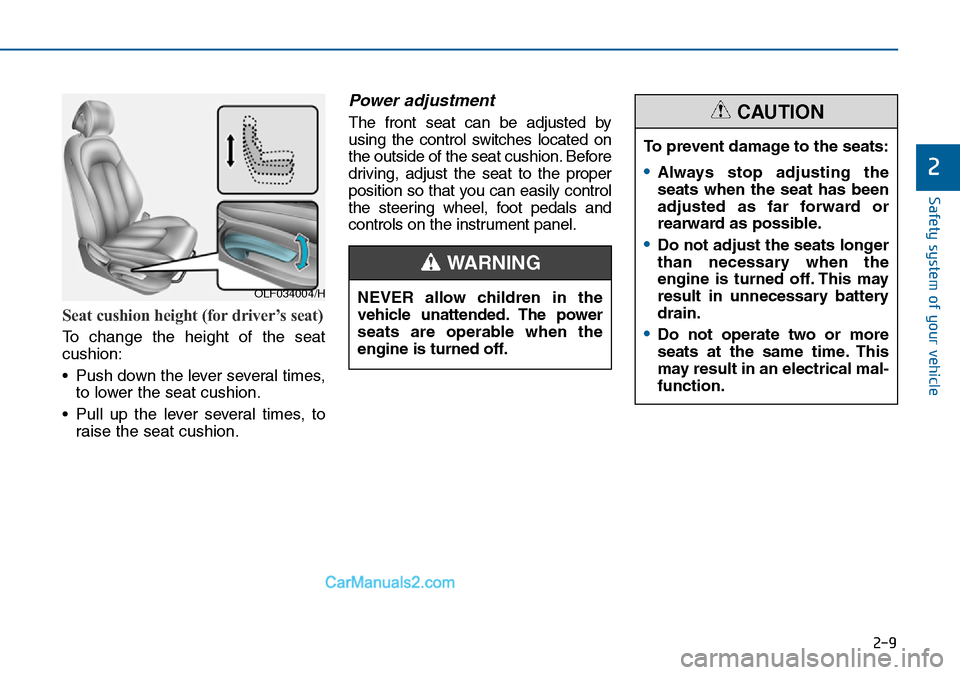
Seat cushion height (for driver’s seat)
To change the height of the seat
cushion:
• Push down the lever several times,
to lower the seat cushion.
• Pull up the lever several times, to
raise the seat cushion.
Power adjustment
The front seat can be adjusted by
using the control switches located on
the outside of the seat cushion. Before
driving, adjust the seat to the proper
position so that you can easily control
the steering wheel, foot pedals and
controls on the instrument panel.
2
OLF034004/H
To prevent damage to the seats:
•Always stop adjusting the
seats when the seat has been
adjusted as far forward or
rearward as possible.
•Do not adjust the seats longer
than necessary when the
engine is turned off. This may
result in unnecessary battery
drain.
•Do not operate two or more
seats at the same time. This
may result in an electrical mal-
function.
CAUTION
NEVER allow children in the
vehicle unattended. The power
seats are operable when the
engine is turned off.
WARNING
Page 107 of 504
3-23
Convenient features of your vehicle
3
STEERING WHEEL
Electric power steering (EPS)
The system assists you with steering
the vehicle. If the engine is off or if
the power steering system becomes
inoperative, the vehicle may still be
steered, but it will require increased
steering effort.
Also, the steering effort becomes
heavier as the vehicle’s speed
increases and becomes lighter as
the vehicle’s speed decreases for
better control of the steering wheel.
Should you notice any change in the
effort required to steer during normal
vehicle operation, we recommend
that the system be checked by an
authorised HYUNDAI dealer.If the EPS System does not oper-
ate normally, the warning light
( ) will illuminate on the instru-
ment cluster. The steering wheel
may become difficult to control or
operate. Take your vehicle to an
authorised HYUNDAI dealer and
have the system checked as soon
as possible.
Information
The following symptoms may occur
during normal vehicle operation:
• The steering effort may be high
immediately after placing the igni-
tion switch or the Engine Start/Stop
button in the ON position.
This happens as the system per-
forms the EPS system diagnostics.
When the diagnostics is completed,
the steering wheel will return to its
normal condition.
(Continued)(Continued)
• A click noise may be heard from the
EPS relay after the ignition switch is
placed to the ON or LOCK/OFF
position (Without Smart key system).
A click noise may be heard from the
EPS relay after the Engine Start/Stop
button is in the ON or OFF position.
(With Smart key system)
• Motor noise may be heard when the
vehicle is stationary or driving slow-
ly.
• When you operate the steering
wheel when the temperature is low,
abnormal noise may occur. If the
temperature rises, the noise will dis-
appear. This is a normal condition.
• When the vehicle is stationary, if
you turn the steering wheel all the
way to the left or right continuously,
the steering wheel effort increases.
This is not a system malfunction. As
time passes, the steering wheel
effort will return to its normal con-
dition.
i
NOTICE
Page 153 of 504
3-69
Convenient features of your vehicle
3
Warning messages (if equipped)
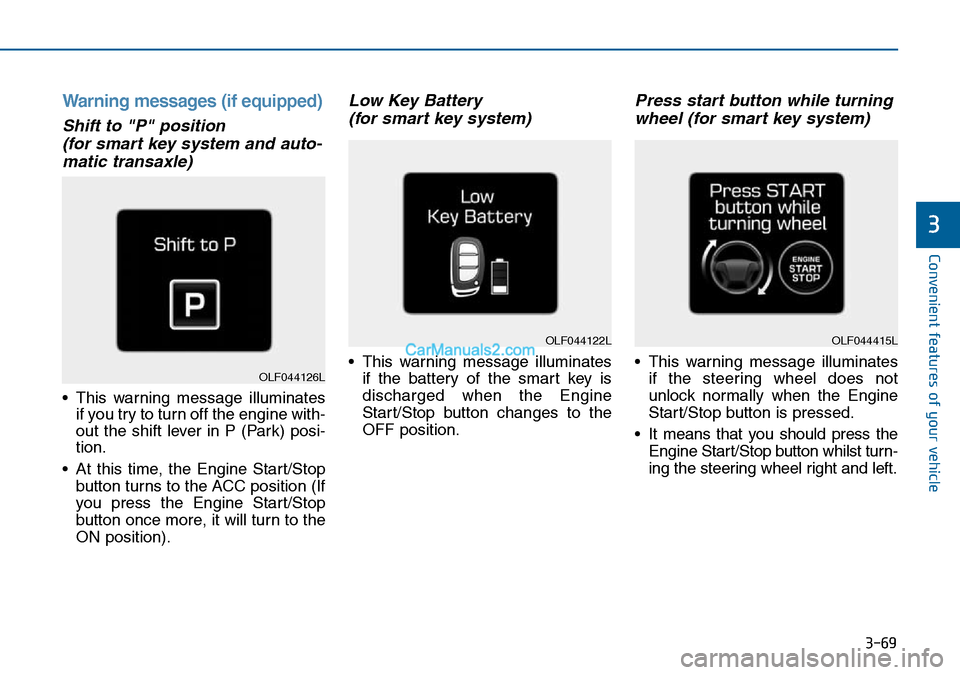
Shift to "P" position
(for smart key system and auto-
matic transaxle)
• This warning message illuminates
if you try to turn off the engine with-
out the shift lever in P (Park) posi-
tion.
• At this time, the Engine Start/Stop
button turns to the ACC position (If
you press the Engine Start/Stop
button once more, it will turn to the
ON position).
Low Key Battery
(for smart key system)
• This warning message illuminates
if the battery of the smart key is
discharged when the Engine
Start/Stop button changes to the
OFF position.
Press start button while turning
wheel (for smart key system)
• This warning message illuminates
if the steering wheel does not
unlock normally when the Engine
Start/Stop button is pressed.
• It means that you should press the
Engine Start/Stop button whilst turn-
ing the steering wheel right and left.
OLF044122L
OLF044126L
OLF044415L
Page 154 of 504
3-70
Convenient features of your vehicle
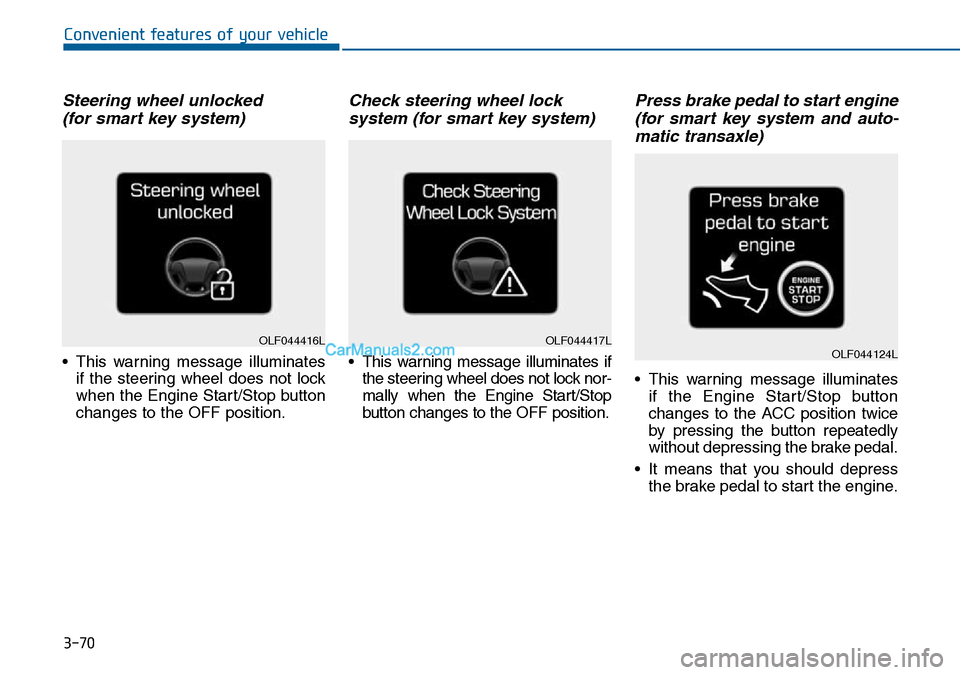
Steering wheel unlocked
(for smart key system)
• This warning message illuminates
if the steering wheel does not lock
when the Engine Start/Stop button
changes to the OFF position.
Check steering wheel lock
system (for smart key system)
• This warning message illuminates if
the steering wheel does not lock nor-
mally when the Engine Start/Stop
button changes to the OFF position.
Press brake pedal to start engine
(for smart key system and auto-
matic transaxle)
• This warning message illuminates
if the Engine Start/Stop button
changes to the ACC position twice
by pressing the button repeatedly
without depressing the brake pedal.
• It means that you should depress
the brake pedal to start the engine.
OLF044416LOLF044417LOLF044124L
Page 161 of 504
3-77
Convenient features of your vehicle
3
Overview
Description
The Trip Computer is a microcomput-
er-controlled driver information sys-
tem that displays information related
to driving.
Information
Some driving information stored in
the Trip Computer (for example
Average Vehicle Speed) resets if the
battery is disconnected.
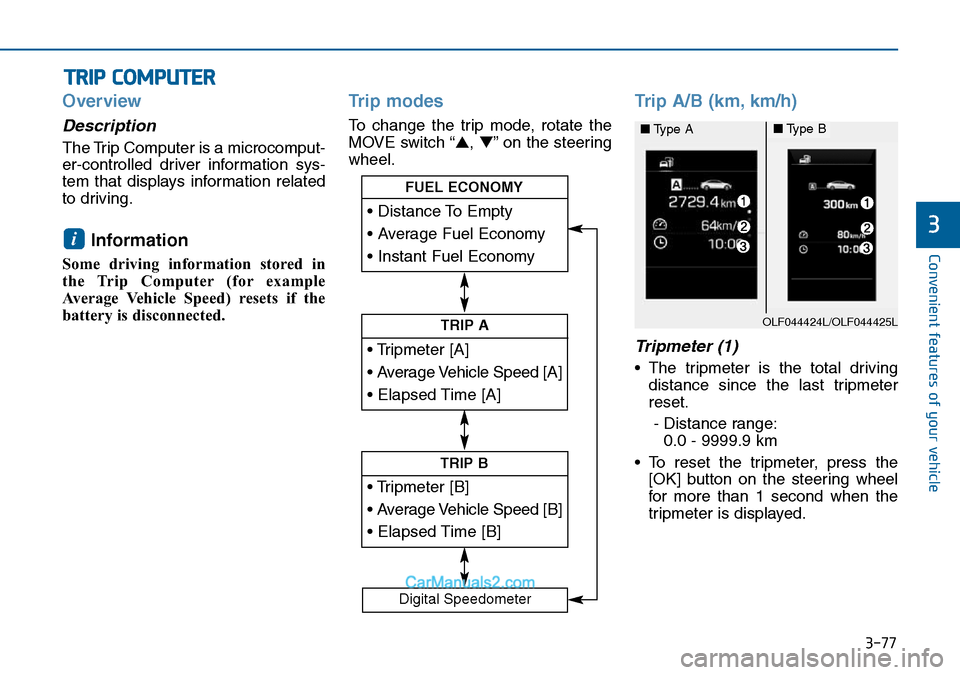
Trip modes
To change the trip mode, rotate the
MOVE switch “▲,▼” on the steering
wheel.
Trip A/B (km, km/h)
Tripmeter (1)
• The tripmeter is the total driving
distance since the last tripmeter
reset.
- Distance range:
0.0 - 9999.9 km
• To reset the tripmeter, press the
[OK] button on the steering wheel
for more than 1 second when the
tripmeter is displayed.
i
TRIP COMPUTER
• Tripmeter [A]
• Average Vehicle Speed [A]
• Elapsed Time [A]
TRIP A
• Tripmeter [B]
• Average Vehicle Speed [B]
• Elapsed Time [B]
TRIP B
• Distance To Empty
• Average Fuel Economy
• Instant Fuel Economy
FUEL ECONOMY
Digital Speedometer
OLF044424L/OLF044425L
■Type A■Type B
Page 204 of 504
3-120
Convenient features of your vehicle
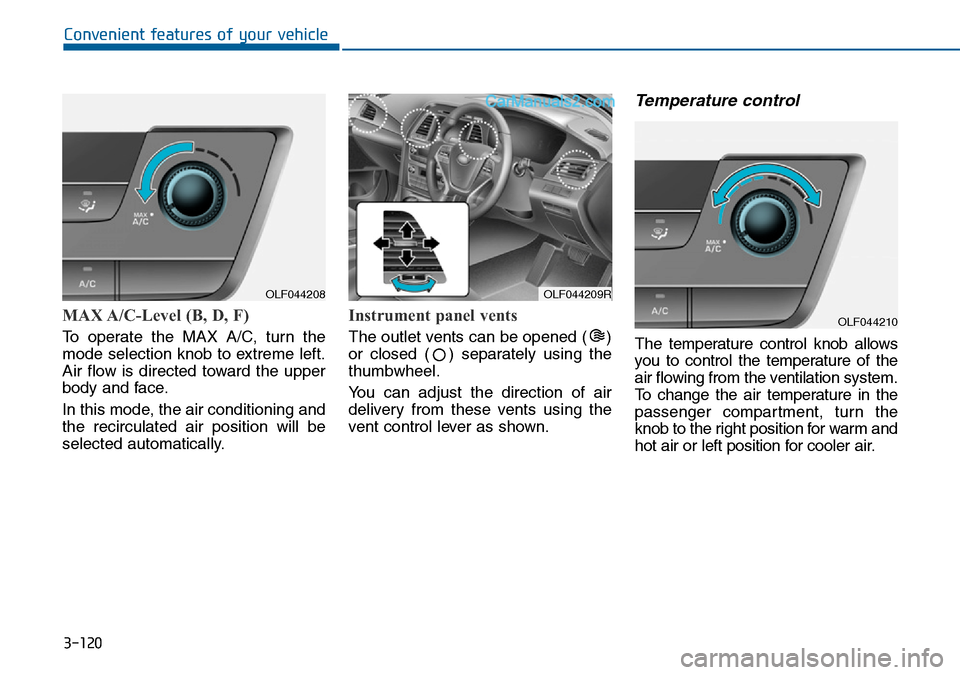
MAX A/C-Level (B, D, F)
To operate the MAX A/C, turn the
mode selection knob to extreme left.
Air flow is directed toward the upper
body and face.
In this mode, the air conditioning and
the recirculated air position will be
selected automatically.
Instrument panel vents
The outlet vents can be opened ( )
or closed ( ) separately using the
thumbwheel.
You can adjust the direction of air
delivery from these vents using the
vent control lever as shown.
Temperature control
The temperature control knob allows
you to control the temperature of the
air flowing from the ventilation system.
To change the air temperature in the
passenger compartment, turn the
knob to the right position for warm and
hot air or left position for cooler air.
OLF044208OLF044209R
OLF044210
Page 268 of 504
4-29
Multimedia System
4
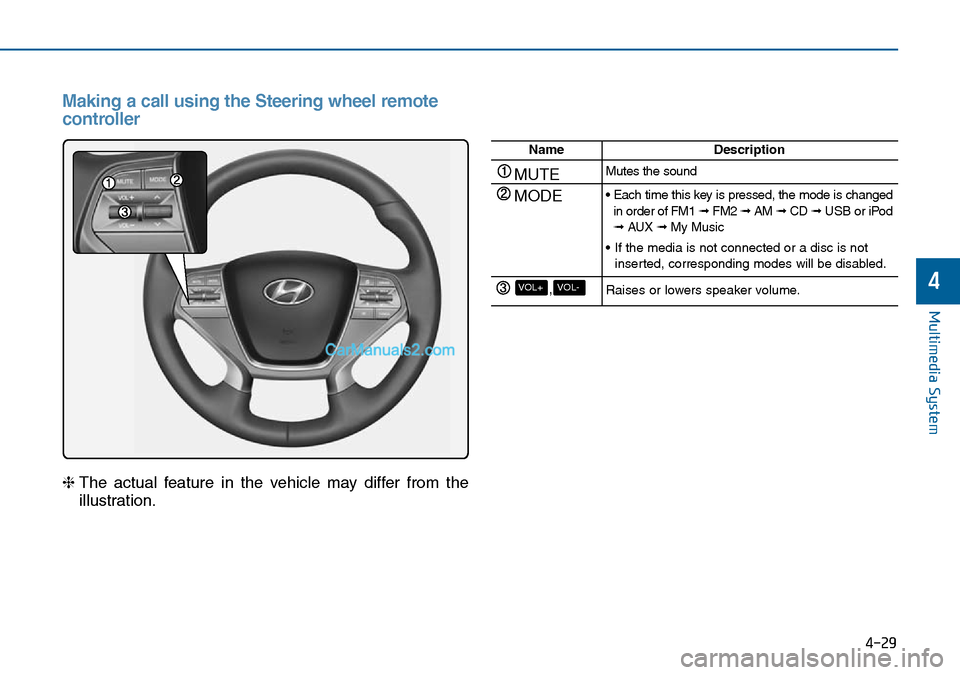
Making a call using the Steering wheel remote
controller
❈The actual feature in the vehicle may differ from the
illustration.
NameDescription
MUTEMutes the sound
MODE• Each time this key is pressed, the mode is changed
in order of FM1 ➟ FM2 ➟ AM➟ CD ➟ USB or iPod
➟ AUX ➟ My Music
• If the media is not connected or a disc is not
inserted, corresponding modes will be disabled.
,VOL-VOL+Raises or lowers speaker volume.
Page 271 of 504
4-32
Multimedia System
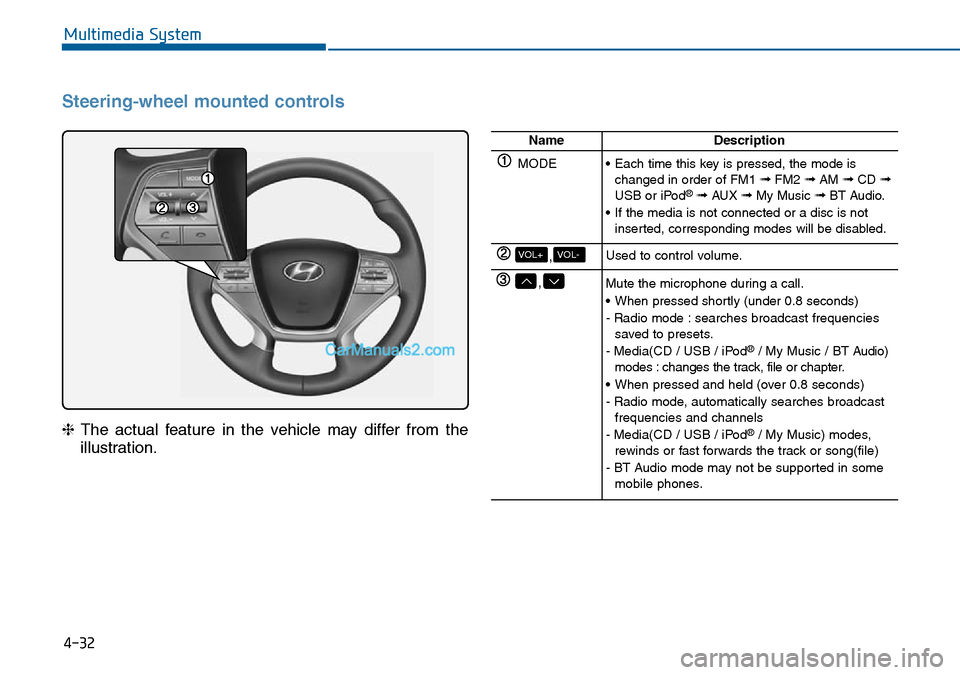
Steering-wheel mounted controls
❈The actual feature in the vehicle may differ from the
illustration.
NameDescription
MODE• Each time this key is pressed, the mode is
changed in order of FM1 ➟FM2 ➟AM ➟CD ➟USB or iPod®➟ AUX ➟My Music ➟BT Audio.
• If the media is not connected or a disc is not
inserted, corresponding modes will be disabled.
,VOL-VOL+Used to control volume.
,Mute the microphone during a call.
• When pressed shortly (under 0.8 seconds)
- Radio mode : searches broadcast frequencies
saved to presets.
- Media(CD / USB / iPod
®/ My Music / BT Audio)
modes : changes the track, file or chapter.
• When pressed and held (over 0.8 seconds)
- Radio mode, automatically searches broadcast
frequencies and channels
- Media(CD / USB / iPod
®/ My Music) modes,
rewinds or fast forwards the track or song(file)
- BT Audio mode may not be supported in some
mobile phones.
Page 332 of 504
5-19
Driving your vehicle
5
Parking
Always come to a complete stop and
continue to depress the brake pedal.
Move the shift lever into the P (Park)
position, apply the parking brake,
and place the ignition switch in the
LOCK/OFF position. Take the key
with you when exiting the vehicle.
Good driving practices
• Never move the shift lever from P
(Park) or N (Neutral) to any other
position with the accelerator pedal
depressed.
• Never move the shift lever into P
(Park) when the vehicle is in
motion.
Ensure the vehicle is completely
stopped before you attempt to shift
into R (Reverse) or D (Drive).
• Do not move the shift lever to N
(Neutral) when driving. Doing so
may result in an accident because
of a loss of engine braking and the
transaxle could be damaged.
• Do not drive with your foot resting
on the brake pedal. Even light, but
consistent pedal pressure can
result in the brakes overheating,
brake wear and possibly even
brake failure.
• When driving in sports mode, slow
down before shifting to a lower
gear. Otherwise, the lower gear
may not be engaged if the engine
rpms are outside of the allowable
range.• Always apply the parking brake
when leaving the vehicle. Do not
depend on placing the transaxle in
P (Park) to keep the vehicle from
moving.
• Exercise extreme caution when
driving on a slippery surface. Be
especially careful when braking,
accelerating or shifting gears. On a
slippery surface, an abrupt change
in vehicle speed can cause the
drive wheels to lose traction and
may cause loss of vehicle control
resulting in an accident
• Optimum vehicle performance and
economy is obtained by smoothly
depressing and releasing the
accelerator. When you stay in the vehicle
with the engine running, be
careful not to depress the accel-
erator pedal for a long period of
time. The engine or exhaust
system may overheat and start
a fire.
The exhaust gas and the
exhaust system are very hot.
Keep away from the exhaust
system components.
Do not stop or park over flam-
mable materials, such as dry
grass, paper or leaves. They
may ignite and cause a fire.
WARNING
Page 333 of 504
5-20
Driving your vehicle
Information - Kickdown
Mechanism
Use the kickdown mechanism for
maximum acceleration. Depress the
accelerator pedal beyond the pressure
point. The automatic transaxle will
shift to a lower gear depending on the
engine speed.i
To reduce the risk of SERIOUS
INJURY or DEATH:
•ALWAYS wear your seat belt.
In a collision, an unrestrained
occupant is significantly more
likely to be seriously injured
or killed than a properly
restrained occupant.
•Avoid high speeds when cor-
nering or turning.
•Do not make quick steering
wheel movements, such as
sharp lane changes or fast,
sharp turns.
•The risk of rollover is greatly
increased if you lose control
of your vehicle at highway
speeds.
•Loss of control often occurs if
two or more wheels drop off
the roadway and the driver
over steers to reenter the
roadway.
(Continued)
WARNING (Continued)
•In the event your vehicle
leaves the roadway, do not
steer sharply. Instead, slow
down before pulling back into
the travel lanes.
•HYUNDAI recommends you
follow all posted speed limits.