power steering Hyundai Sonata 2016 Owner's Manual - RHD (UK, Australia)
[x] Cancel search | Manufacturer: HYUNDAI, Model Year: 2016, Model line: Sonata, Model: Hyundai Sonata 2016Pages: 504, PDF Size: 12.45 MB
Page 15 of 504
1-4
Your vehicle at a glance
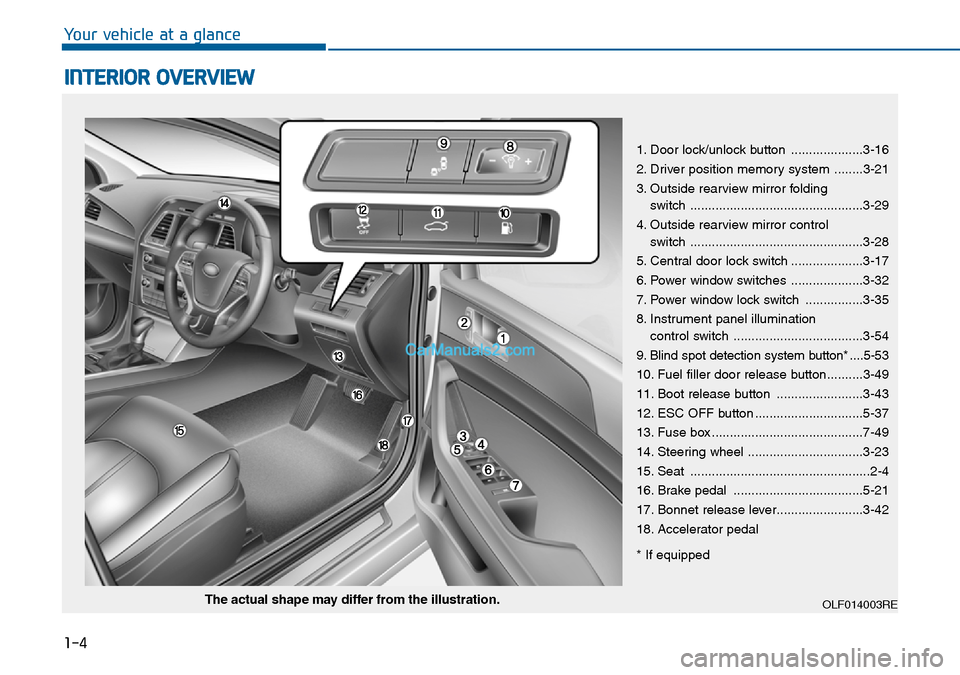
INTERIOR OVERVIEW
1. Door lock/unlock button ....................3-16
2. Driver position memory system ........3-21
3. Outside rearview mirror folding
switch ................................................3-29
4. Outside rearview mirror control
switch ................................................3-28
5. Central door lock switch ....................3-17
6. Power window switches ....................3-32
7. Power window lock switch ................3-35
8. Instrument panel illumination
control switch ....................................3-54
9. Blind spot detection system button* ....5-53
10. Fuel filler door release button..........3-49
11. Boot release button ........................3-43
12. ESC OFF button ..............................5-37
13. Fuse box ..........................................7-49
14. Steering wheel ................................3-23
15. Seat ..................................................2-4
16. Brake pedal ....................................5-21
17. Bonnet release lever........................3-42
18. Accelerator pedal
* If equipped
OLF014003REThe actual shape may differ from the illustration.
Page 16 of 504
1-5
Your vehicle at a glance
1
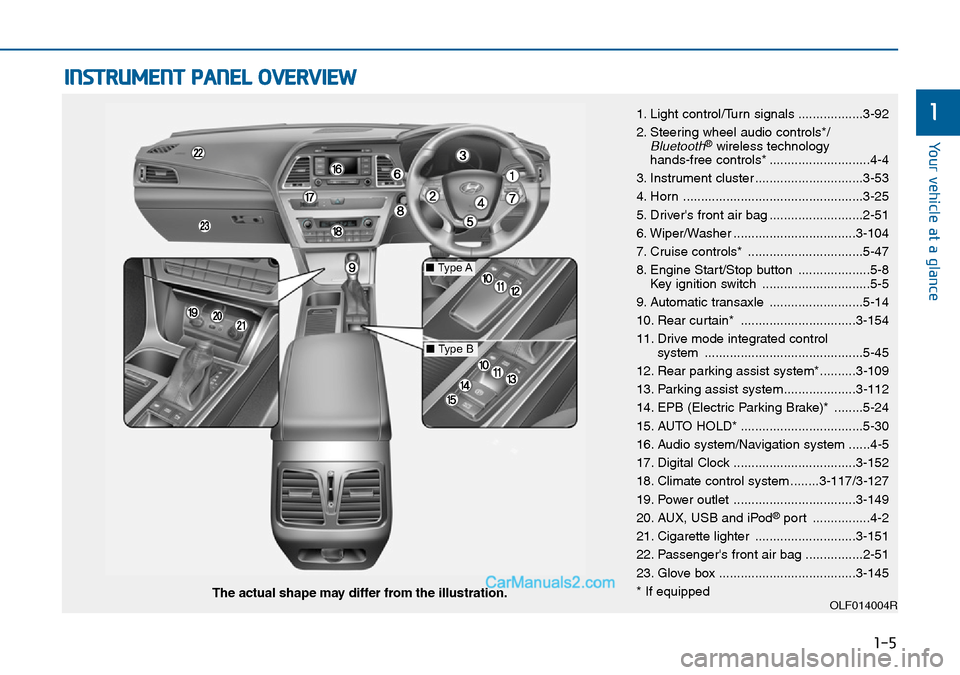
INSTRUMENT PANEL OVERVIEW
1. Light control/Turn signals ..................3-92
2. Steering wheel audio controls*/
Bluetooth®wireless technology
hands-free controls* ............................4-4
3. Instrument cluster ..............................3-53
4. Horn ..................................................3-25
5. Driver's front air bag ..........................2-51
6. Wiper/Washer ..................................3-104
7. Cruise controls* ................................5-47
8. Engine Start/Stop button ....................5-8
Key ignition switch ..............................5-5
9. Automatic transaxle ..........................5-14
10. Rear curtain* ................................3-154
11. Drive mode integrated control
system ............................................5-45
12. Rear parking assist system*..........3-109
13. Parking assist system....................3-112
14. EPB (Electric Parking Brake)* ........5-24
15. AUTO HOLD* ..................................5-30
16. Audio system/Navigation system ......4-5
17. Digital Clock ..................................3-152
18. Climate control system ........3-117/3-127
19. Power outlet ..................................3-149
20. AUX, USB and iPod
®port ................4-2
21. Cigarette lighter ............................3-151
22. Passenger's front air bag ................2-51
23. Glove box ......................................3-145
* If equipped
OLF014004RThe actual shape may differ from the illustration.
■Type A
■Type B
Page 26 of 504
2-9
Safety system of your vehicle
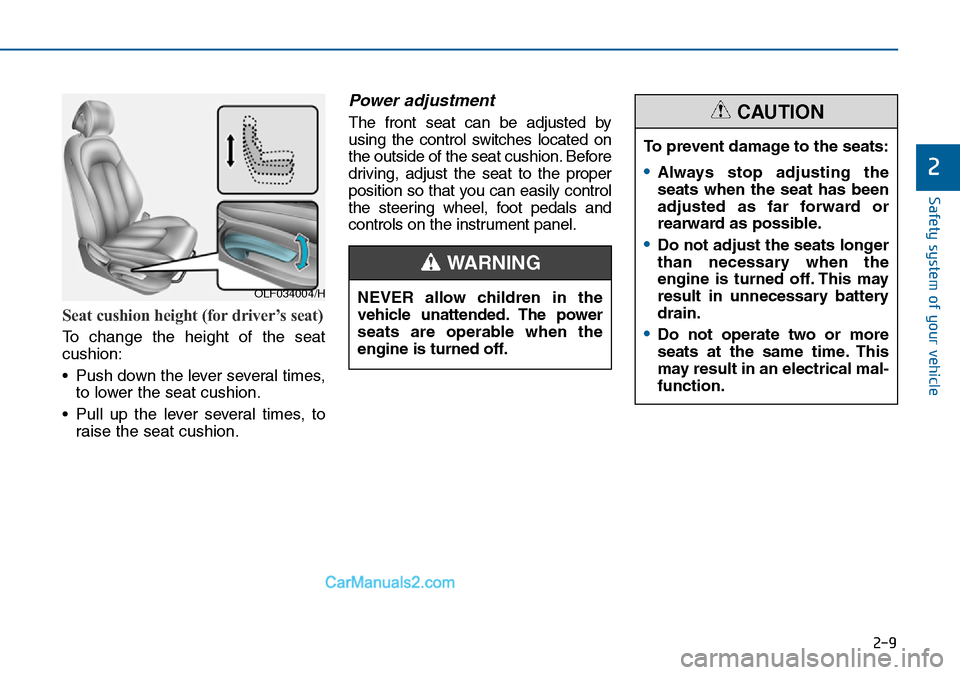
Seat cushion height (for driver’s seat)
To change the height of the seat
cushion:
• Push down the lever several times,
to lower the seat cushion.
• Pull up the lever several times, to
raise the seat cushion.
Power adjustment
The front seat can be adjusted by
using the control switches located on
the outside of the seat cushion. Before
driving, adjust the seat to the proper
position so that you can easily control
the steering wheel, foot pedals and
controls on the instrument panel.
2
OLF034004/H
To prevent damage to the seats:
•Always stop adjusting the
seats when the seat has been
adjusted as far forward or
rearward as possible.
•Do not adjust the seats longer
than necessary when the
engine is turned off. This may
result in unnecessary battery
drain.
•Do not operate two or more
seats at the same time. This
may result in an electrical mal-
function.
CAUTION
NEVER allow children in the
vehicle unattended. The power
seats are operable when the
engine is turned off.
WARNING
Page 85 of 504

Convenient features of your vehicle
Accessing your vehicle .........................................3-4
Remote key .......................................................................3-4
Remote key precautions..................................................3-6
Smart key ...........................................................................3-8
Smart key precautions...................................................3-11
Battery replacement .....................................................3-12
Immobiliser system .........................................................3-13
Door locks .............................................................3-14
Operating door locks from outside the vehicle .....3-14
Operating door locks from inside the vehicle ........3-16
Auto door lock/unlock features ................................3-18
Child-protector rear door locks ..................................3-19
Theft-alarm system.............................................3-20
Driver position memory system .........................3-21
Storing memory positions .............................................3-21
Easy access function .....................................................3-22
Steering wheel......................................................3-23
Electric power steering (EPS) ......................................3-23
Tilt steering / Telescope steering...............................3-24
Heated steering wheel ...................................................3-25
Horn ....................................................................................3-25
Mirrors ...................................................................3-26
Inside rearview mirror....................................................3-26
Outside rearview mirror ................................................3-27
Reverse parking aid function.......................................3-30
Windows ................................................................3-32
Power windows ................................................................3-32
Panorama sunroof ...............................................3-37
Sunshade ...........................................................................3-38
Sliding the sunroof ........................................................3-38
Tilting the sunroof ........................................................3-39
Closing the sunroof ........................................................3-39
Resetting the sunroof ....................................................3-41
Exterior features .................................................3-42
Bonnet................................................................................3-42
Boot ....................................................................................3-43
Emergency boot safety release ..................................3-44
Boot lid control switch...................................................3-45
Smart boot ........................................................................3-46
Fuel filler door .................................................................3-49
Emergency fuel filler lid release .................................3-52
Instrument cluster................................................3-53
Instrument panel control ...............................................3-54
LCD display control.........................................................3-55
Gauges ...............................................................................3-55
LCD display ...........................................................3-60
LCD modes ........................................................................3-60
Trip computer mode .......................................................3-61
Turn By Turn (TBT) mode .............................................3-62
A/V mode ..........................................................................3-62
3
Page 107 of 504
3-23
Convenient features of your vehicle
3
STEERING WHEEL
Electric power steering (EPS)
The system assists you with steering
the vehicle. If the engine is off or if
the power steering system becomes
inoperative, the vehicle may still be
steered, but it will require increased
steering effort.
Also, the steering effort becomes
heavier as the vehicle’s speed
increases and becomes lighter as
the vehicle’s speed decreases for
better control of the steering wheel.
Should you notice any change in the
effort required to steer during normal
vehicle operation, we recommend
that the system be checked by an
authorised HYUNDAI dealer.If the EPS System does not oper-
ate normally, the warning light
( ) will illuminate on the instru-
ment cluster. The steering wheel
may become difficult to control or
operate. Take your vehicle to an
authorised HYUNDAI dealer and
have the system checked as soon
as possible.
Information
The following symptoms may occur
during normal vehicle operation:
• The steering effort may be high
immediately after placing the igni-
tion switch or the Engine Start/Stop
button in the ON position.
This happens as the system per-
forms the EPS system diagnostics.
When the diagnostics is completed,
the steering wheel will return to its
normal condition.
(Continued)(Continued)
• A click noise may be heard from the
EPS relay after the ignition switch is
placed to the ON or LOCK/OFF
position (Without Smart key system).
A click noise may be heard from the
EPS relay after the Engine Start/Stop
button is in the ON or OFF position.
(With Smart key system)
• Motor noise may be heard when the
vehicle is stationary or driving slow-
ly.
• When you operate the steering
wheel when the temperature is low,
abnormal noise may occur. If the
temperature rises, the noise will dis-
appear. This is a normal condition.
• When the vehicle is stationary, if
you turn the steering wheel all the
way to the left or right continuously,
the steering wheel effort increases.
This is not a system malfunction. As
time passes, the steering wheel
effort will return to its normal con-
dition.
i
NOTICE
Page 163 of 504
3-79
Convenient features of your vehicle
3
Information
• If the vehicle is not on level ground
or the battery power has been inter-
rupted, the distance to empty func-
tion may not operate correctly.
• The distance to empty may differ
from the actual driving distance as
it is an estimate of the available
driving distance.
• The Trip Computer may not regis-
ter additional fuel if less than 6 litres
(1.6 gallons) of fuel are added to the
vehicle.
• The fuel economy and distance to
empty may vary significantly based
on driving conditions, driving
habits, and condition of the vehicle.
Average Fuel Economy (2)
• The average fuel economy is calcu-
lated from the total driving distance
and fuel consumption since the last
average fuel economy reset.
- Fuel economy range:
0.0 - 99.9 L/100km, km/L
• The average fuel economy can be
reset both manually and automati-
cally.
Manual reset
To clear the average fuel economy
manually, press the [OK] button on
the steering wheel for more than 1
second when the average fuel econo-
my is displayed.
Automatic reset
To adjust the average fuel economy
to reset automatically whenever refu-
elling, select the “Auto Reset” mode
in User Setting menu of the LCD dis-
play (Refer to “LCD Display”).
Under “Auto Reset” mode, the aver-
age fuel economy will be cleared to
zero (---) when the vehicle speed
exceeds 1 km/h after refuelling more
than 6 litres (1.6 gallons).
Information
The average fuel economy is not dis-
played if the vehicle has not been driv-
en for more than 10 seconds or 300
metres, since the ignition switch or the
Engine Start/Stop button was turned
on.
Instant Fuel Economy (3)
• This mode displays the instant fuel
economy during the last few sec-
onds when the vehicle speed is
more than 10 km/h.
- Fuel economy range:
0 - 30 L/100km, km/L
i
i
Page 169 of 504
3-85
Convenient features of your vehicle
3
Electric Power
Steering (EPS)
Warning Light
This warning light illuminates:
• Once you set the ignition switch or
the Engine Start/Stop button to the
ON position.
- This indicator light comes on after
the ignition key is turned to the
ON position and then goes out
after approximately 3 seconds.
• When there is a malfunction with
the EPS.
In this case, we recommend that
you have the vehicle inspected by
an authorised HYUNDAI dealer.
Malfunction Indicator
Lamp (MIL)
This warning light illuminates:
• Once you set the ignition switch or
the Engine Start/Stop button to the
ON position.
- It remains on until the engine is
started.
• When there is a malfunction with
the emission control system.
In this case, we recommend that
you have the vehicle inspected by
an authorised HYUNDAI dealer.
- Malfunction Indicator
Lamp (MIL)
Driving with the Malfunction
Indicator Lamp (MIL) on may cause
damage to the emission control
systems which could affect dri-
vability and/or fuel economy.- Petrol Engine
If the Malfunction Indicator Lamp
(MIL) illuminates, potential catalyt-
ic converter damage is possible
which could result in loss of
engine power.
In this case, we recommend that
you have the vehicle inspected by
an authorised HYUNDAI dealer as
soon as possible.
NOTICE
NOTICE
Page 179 of 504
3-95
Convenient features of your vehicle
3
One-touch turn signal function
(if equipped)
To activate a one-touch turn signal
function, move the turn signal lever
slightly and then release it. The lane
change signals will blink 3, 5 or 7
times.
You can activate/deactivate the One
Touch Turn Signal function or choose
the number of blinks (3, 5, or 7) from
the User Settings Mode on the LCD
display.For more details, refer to
"LCD Display" in this chapter.
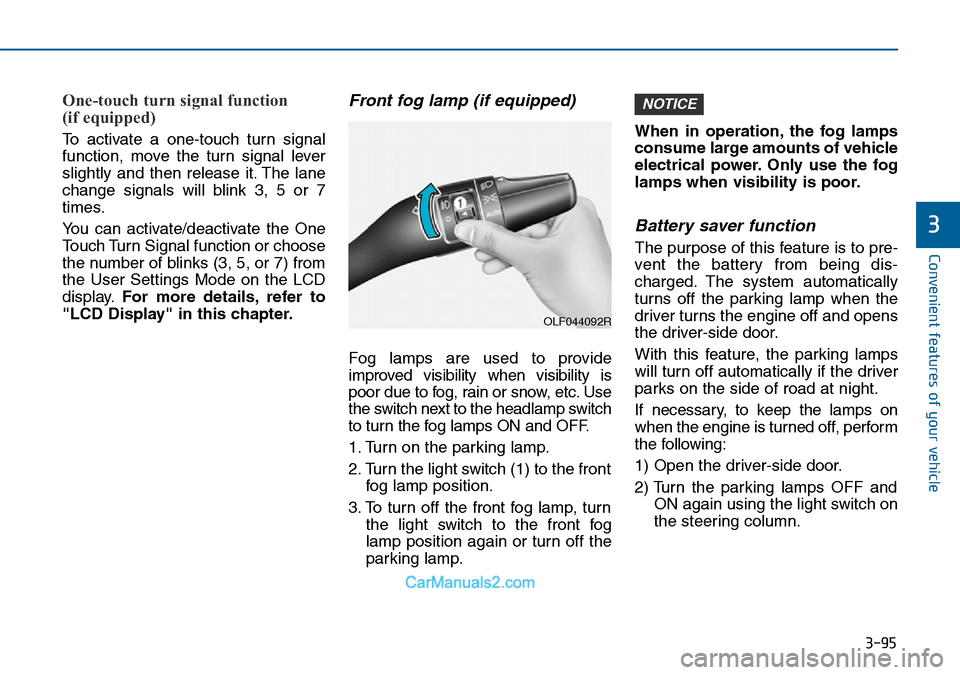
Front fog lamp (if equipped)
Fog lamps are used to provide
improved visibility when visibility is
poor due to fog, rain or snow, etc. Use
the switch next to the headlamp switch
to turn the fog lamps ON and OFF.
1. Turn on the parking lamp.
2. Turn the light switch (1) to the front
fog lamp position.
3. To turn off the front fog lamp, turn
the light switch to the front fog
lamp position again or turn off the
parking lamp.When in operation, the fog lamps
consume large amounts of vehicle
electrical power. Only use the fog
lamps when visibility is poor.
Battery saver function
The purpose of this feature is to pre-
vent the battery from being dis-
charged. The system automatically
turns off the parking lamp when the
driver turns the engine off and opens
the driver-side door.
With this feature, the parking lamps
will turn off automatically if the driver
parks on the side of road at night.
If necessary, to keep the lamps on
when the engine is turned off, perform
the following:
1) Open the driver-side door.
2) Turn the parking lamps OFF and
ON again using the light switch on
the steering column.
NOTICE
OLF044092R
Page 318 of 504
5-5
Driving your vehicle
5
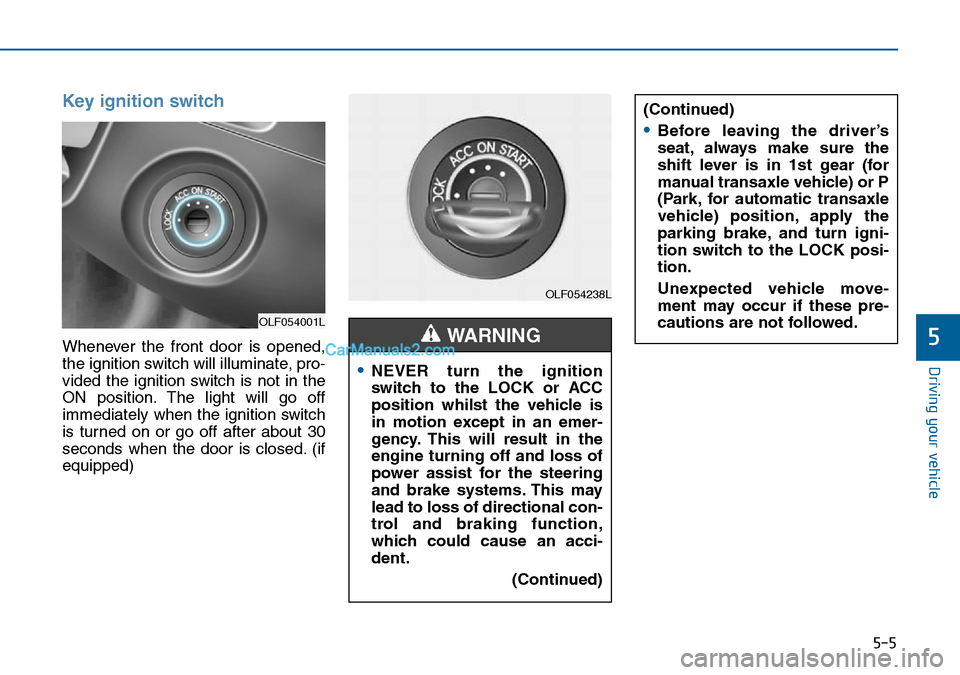
Key ignition switch
Whenever the front door is opened,
the ignition switch will illuminate, pro-
vided the ignition switch is not in the
ON position. The light will go off
immediately when the ignition switch
is turned on or go off after about 30
seconds when the door is closed. (if
equipped)
OLF054001L
OLF054238L
•NEVER turn the ignition
switch to the LOCK or ACC
position whilst the vehicle is
in motion except in an emer-
gency. This will result in the
engine turning off and loss of
power assist for the steering
and brake systems. This may
lead to loss of directional con-
trol and braking function,
which could cause an acci-
dent.
(Continued)
WARNING
(Continued)
•Before leaving the driver’s
seat, always make sure the
shift lever is in 1st gear (for
manual transaxle vehicle) or P
(Park, for automatic transaxle
vehicle) position, apply the
parking brake, and turn igni-
tion switch to the LOCK posi-
tion.
Unexpected vehicle move-
ment may occur if these pre-
cautions are not followed.
Page 321 of 504
5-8
Driving your vehicle
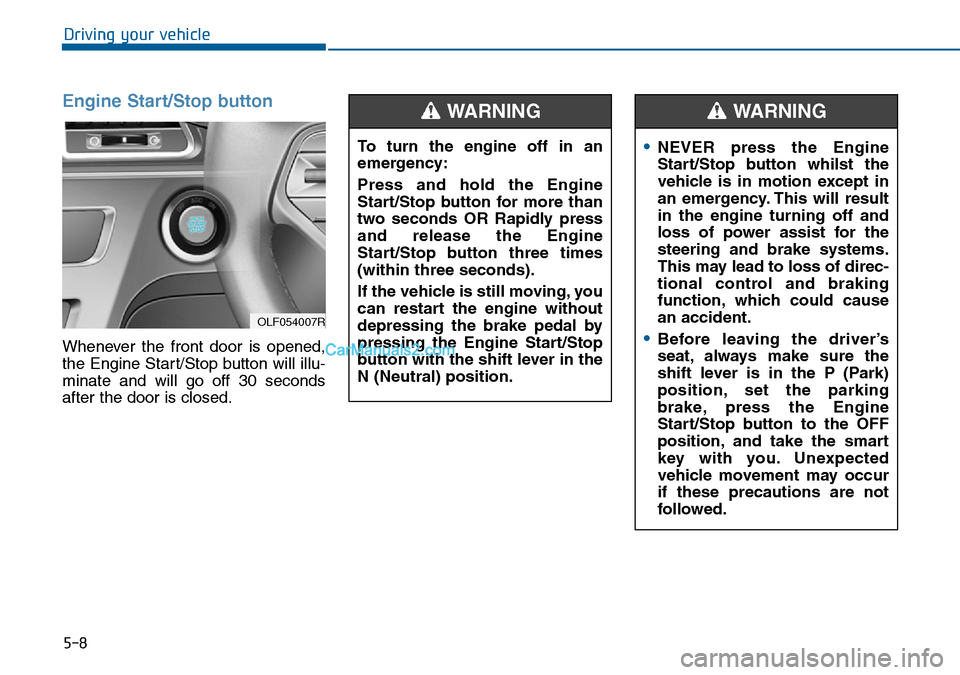
Engine Start/Stop button
Whenever the front door is opened,
the Engine Start/Stop button will illu-
minate and will go off 30 seconds
after the door is closed.
OLF054007R
To turn the engine off in an
emergency:
Press and hold the Engine
Start/Stop button for more than
two seconds OR Rapidly press
and release the Engine
Start/Stop button three times
(within three seconds).
If the vehicle is still moving, you
can restart the engine without
depressing the brake pedal by
pressing the Engine Start/Stop
button with the shift lever in the
N (Neutral) position.
WARNING
•NEVER press the Engine
Start/Stop button whilst the
vehicle is in motion except in
an emergency. This will result
in the engine turning off and
loss of power assist for the
steering and brake systems.
This may lead to loss of direc-
tional control and braking
function, which could cause
an accident.
•Before leaving the driver’s
seat, always make sure the
shift lever is in the P (Park)
position, set the parking
brake, press the Engine
Start/Stop button to the OFF
position, and take the smart
key with you. Unexpected
vehicle movement may occur
if these precautions are not
followed.
WARNING