steering Hyundai Sonata 2017 User Guide
[x] Cancel search | Manufacturer: HYUNDAI, Model Year: 2017, Model line: Sonata, Model: Hyundai Sonata 2017Pages: 563, PDF Size: 17.7 MB
Page 86 of 563

Convenient features of your vehicle
Accessing your vehicle .........................................3-4
Remote Key........................................................................\
.3-4
Smart Key ........................................................................\
....3-8
Immobilizer System .........................................................3-12
Door locks .............................................................3-14
Outside the Vehicle.........................................................3-14
Inside the Vehicle ............................................................3-15
Auto Door Lock/Unlock Features ...............................3-17
Child-Protector Rear Door locks ................................3-18
Theft-alarm system.............................................3-19
Driver position memory system .........................3-20
Storing Positions into Memory ....................................3-20
Easy Access Function ....................................................3-21
Steering wheel......................................................3-22
Electric Power Steering (EPS) .....................................3-22
Tilt Steering / Telescope Steering ..............................3-23
Heated Steering Wheel ..................................................3-23
Horn ........................................................................\
............3-24
Mirrors ...................................................................3-25
Inside Rearview Mirror ..................................................3-25
Side view Mirrors ............................................................3-40
Reverse Parking Aid Function......................................3-43
Windows ................................................................3-44
Power Windows ...............................................................3-45
Sunroof..................................................................3-48
Sunroof opening and closing .......................................3-48
Sliding the sunroof .........................................................3-49
Tilting the sunroof ..........................................................3-49
Sunshade ........................................................................\
...3-50
Resetting the sunroof ....................................................3-51
Panoramic sunroof ..............................................3-52
Sunshade ........................................................................\
...3-52
Sliding the Sunroof .........................................................3-53
Tilting the Sunroof .........................................................3-53
Closing the Sunroof........................................................3-54
To Reset the Sunroof.....................................................3-55
Exterior features .................................................3-56
Hood ........................................................................\
...........3-56
Trunk ........................................................................\
..........3-57
Smart Trunk ......................................................................3-\
60
Fuel Filler Door ................................................................3-63
Instrument cluster................................................3-67
Instrument Cluster Control............................................3-69
LCD Display Control ........................................................3-70
3
Page 107 of 563
3-22
Convenient features of your vehicle
S
ST
T E
EE
ER
R I
IN
N G
G
W
W H
HE
EE
EL
L
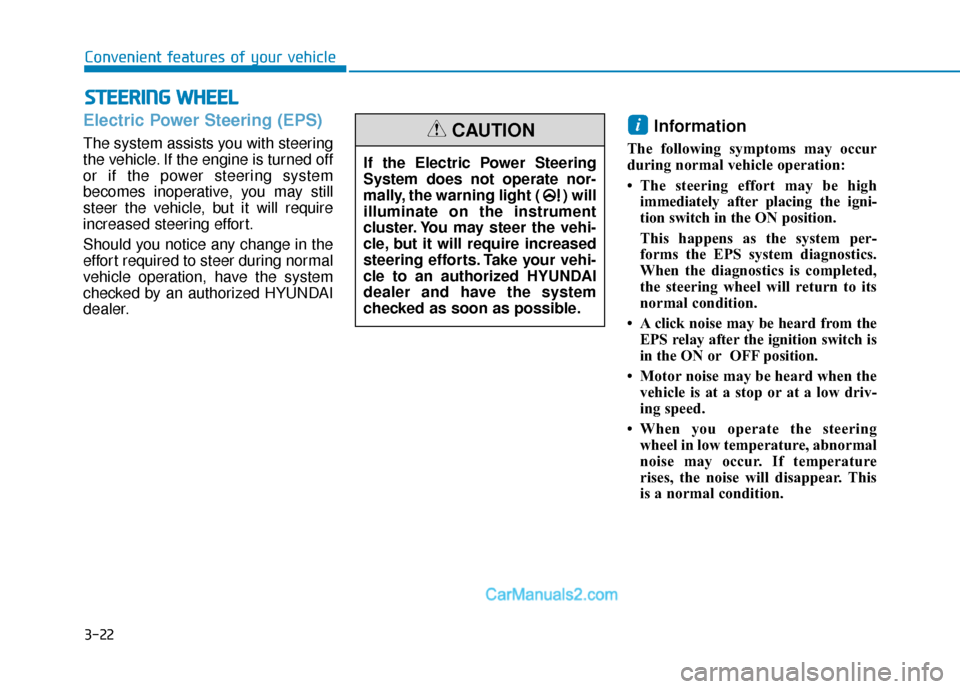
Electric Power Steering (EPS)
The system assists you with steering
the vehicle. If the engine is turned off
or if the power steering system
becomes inoperative, you may still
steer the vehicle, but it will require
increased steering effort.
Should you notice any change in the
effort required to steer during normal
vehicle operation, have the system
checked by an authorized HYUNDAI
dealer.
Information
The following symptoms may occur
during normal vehicle operation:
• The steering effort may be high
immediately after placing the igni-
tion switch in the ON position.
This happens as the system per-
forms the EPS system diagnostics.
When the diagnostics is completed,
the steering wheel will return to its
normal condition.
• A click noise may be heard from the EPS relay after the ignition switch is
in the ON or OFF position.
• Motor noise may be heard when the vehicle is at a stop or at a low driv-
ing speed.
• When you operate the steering wheel in low temperature, abnormal
noise may occur. If temperature
rises, the noise will disappear. This
is a normal condition.
i
If the Electric Power Steering
System does not operate nor-
mally, the warning light ( ) will
illuminate on the instrument
cluster. You may steer the vehi-
cle, but it will require increased
steering efforts. Take your vehi-
cle to an authorized HYUNDAI
dealer and have the system
checked as soon as possible.
CAUTION
Page 108 of 563
3-23
Convenient features of your vehicle
3
Tilt Steering / Telescope Steering
Adjust the steering wheel so it points
toward your chest, not toward your
face. Make sure you can see the
instrument panel warning lights and
gauges. After adjusting, push the
steering wheel both up and down to
be certain it is locked in position.
Always adjust the position of the
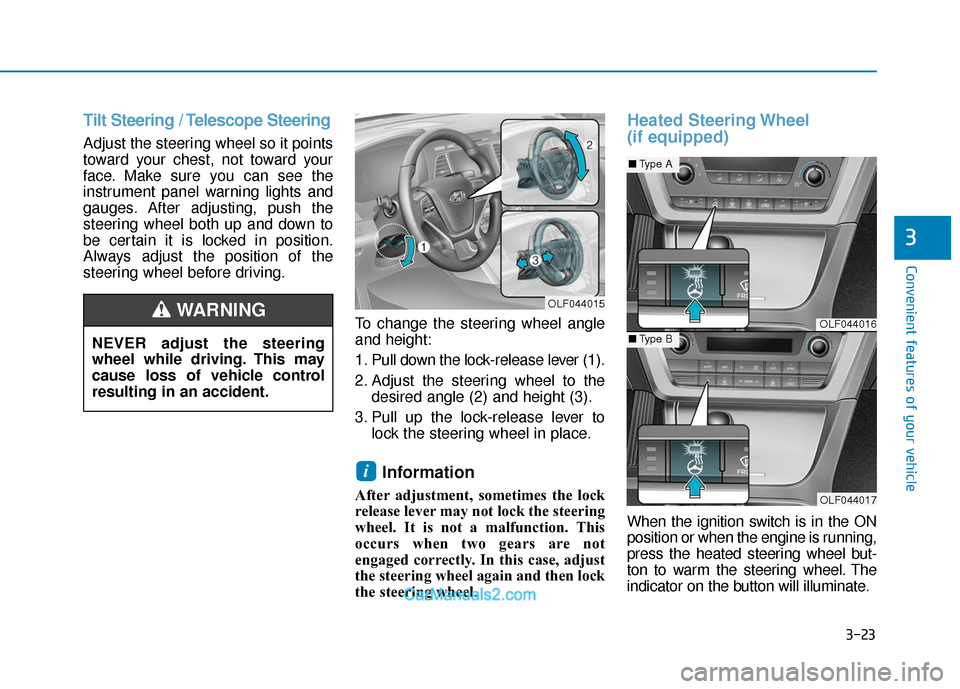
steering wheel before driving.To change the steering wheel angle
and height:
1. Pull down the lock-release lever (1).
2. Adjust the steering wheel to thedesired angle (2) and height (3).
3. Pull up the lock-release lever to lock the steering wheel in place.
Information
After adjustment, sometimes the lock
release lever may not lock the steering
wheel. It is not a malfunction. This
occurs when two gears are not
engaged correctly. In this case, adjust
the steering wheel again and then lock
the steering wheel.
Heated Steering Wheel
(if equipped)
When the ignition switch is in the ON
position or when the engine is running,
press the heated steering wheel but-
ton to warm the steering wheel. The
indicator on the button will illuminate.
i
OLF044015
OLF044016
OLF044017
■Type A
■Type BNEVER adjust the steering
wheel while driving. This may
cause loss of vehicle control
resulting in an accident.
WARNING
Page 109 of 563
3-24
Convenient features of your vehicle
To turn the heated steering wheel off,
press the button again. The indicator
on the button will turn off.
The heated steering wheel will auto-
matically turn off after approximately
30 minutes.
Do not install any cover or acces-
sory on the steering wheel. The
cover or accessory could cause
damage to the heated steering
wheel system.
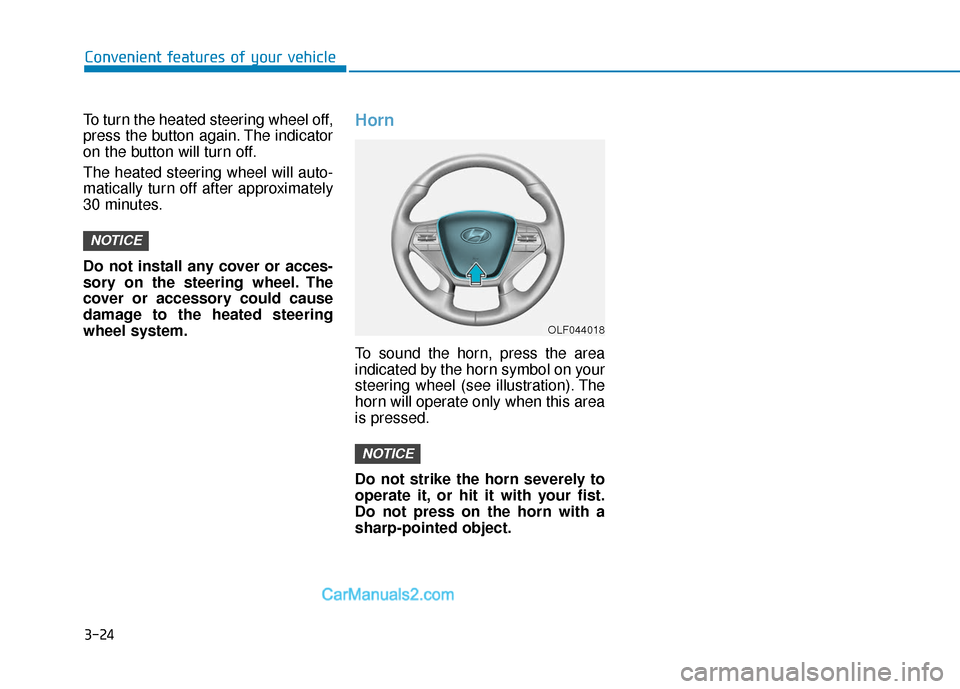
Horn
To sound the horn, press the area
indicated by the horn symbol on your
steering wheel (see illustration). The
horn will operate only when this area
is pressed.
Do not strike the horn severely to
operate it, or hit it with your fist.
Do not press on the horn with a
sharp-pointed object.
NOTICE
NOTICE
OLF044018
Page 155 of 563
3-70
Convenient features of your vehicle
LCD Display Control
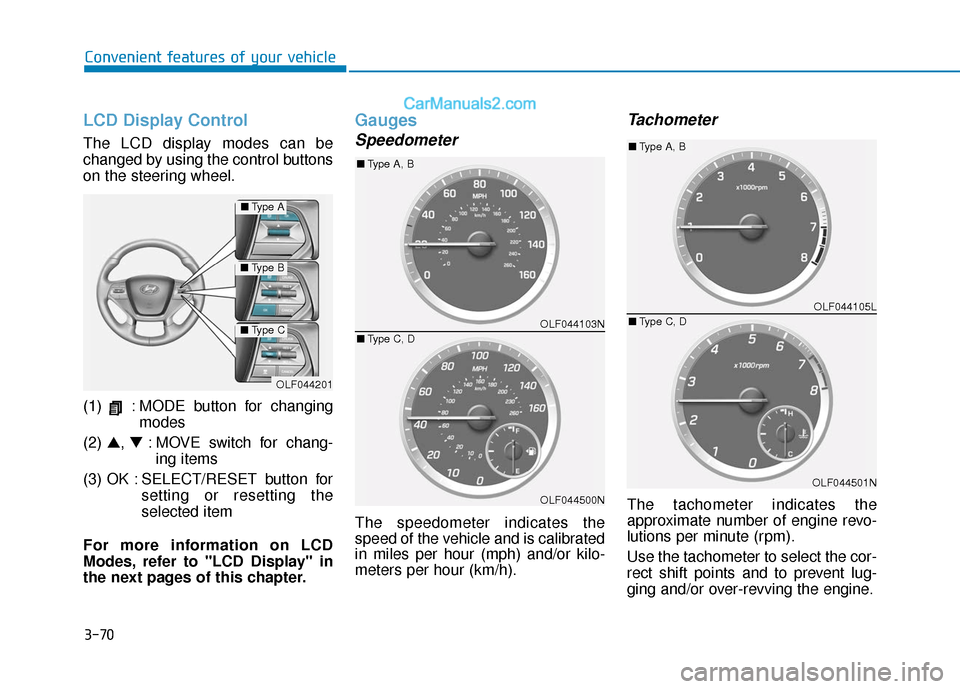
The LCD display modes can be
changed by using the control buttons
on the steering wheel.
(1) : MODE button for changingmodes
(2) ▲, ▼: MOVE switch for chang-
ing items
(3) OK : SELECT/RESET button for setting or resetting the
selected item
For more information on LCD
Modes, refer to "LCD Display" in
the next pages of this chapter.
Gauges
Speedometer
The speedometer indicates the
speed of the vehicle and is calibrated
in miles per hour (mph) and/or kilo-
meters per hour (km/h).
Tachometer
The tachometer indicates the
approximate number of engine revo-
lutions per minute (rpm).
Use the tachometer to select the cor-
rect shift points and to prevent lug-
ging and/or over-revving the engine.
OLF044201
■ Type A
■Type B
■Type COLF044103N
OLF044500N
■Type A, B
■ Type C, D
OLF044105L
OLF044501N
■Type A, B
■ Type C, D
Page 168 of 563
3-83
Convenient features of your vehicle
3
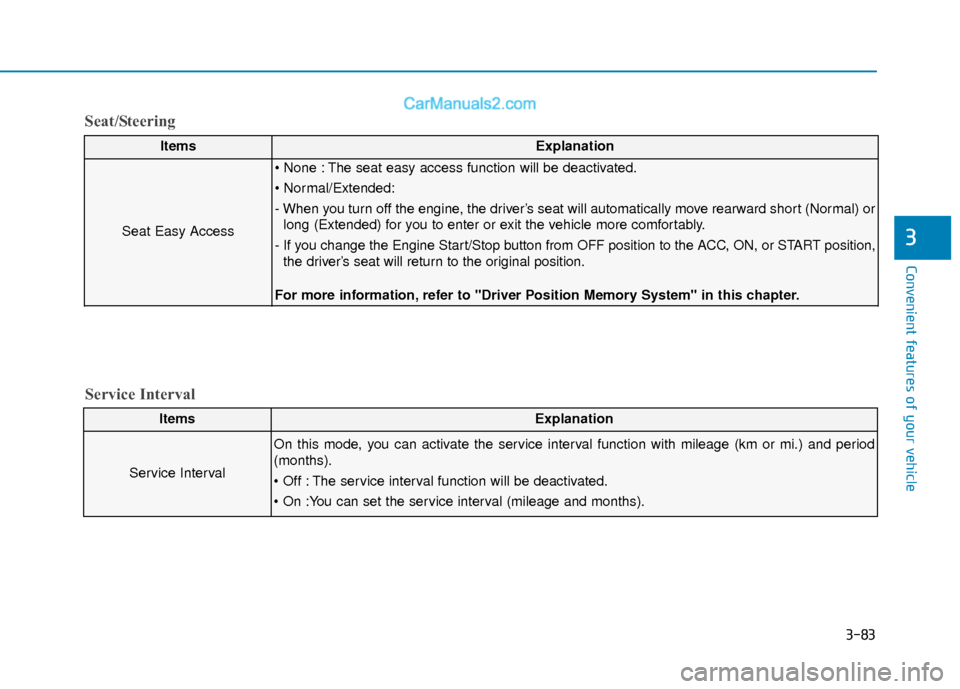
ItemsExplanation
Seat Easy Access
The seat easy access function will be deactivated.
- When you turn off the engine, the driver’s seat will automatically move rearward short (Normal) orlong (Extended) for you to enter or exit the vehicle more comfortably.
- If you change the Engine Start/Stop button from OFF position to the ACC, ON, or START position, the driver’s seat will return to the original position.
For more information, refer to "Driver Position Memory System" in this chapter.
ItemsExplanation
Service Interval
On this mode, you can activate the service interval function with mileage (km or mi.) and period
(months).
The service interval function will be deactivated.
Service Interval
Seat/Steering
Page 172 of 563
3-87
Convenient features of your vehicle
3
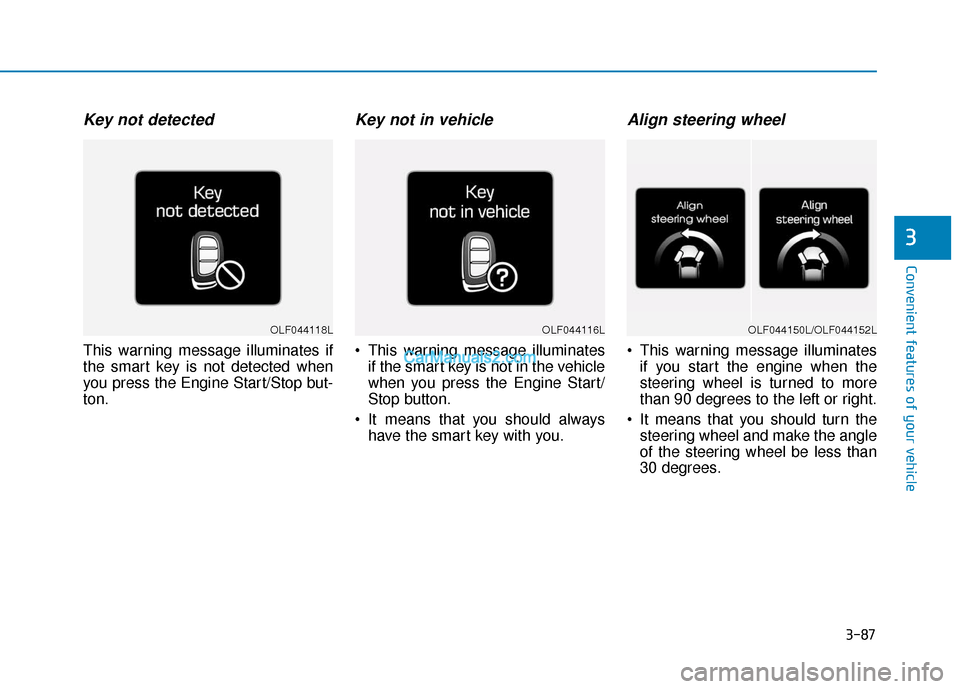
Key not detected
This warning message illuminates if
the smart key is not detected when
you press the Engine Start/Stop but-
ton.
Key not in vehicle
This warning message illuminatesif the smart key is not in the vehicle
when you press the Engine Start/
Stop button.
It means that you should always have the smart key with you.
Align steering wheel
This warning message illuminatesif you start the engine when the
steering wheel is turned to more
than 90 degrees to the left or right.
It means that you should turn the steering wheel and make the angle
of the steering wheel be less than
30 degrees.
OLF044116LOLF044118LOLF044150L/OLF044152L
Page 173 of 563
3-88
Convenient features of your vehicle
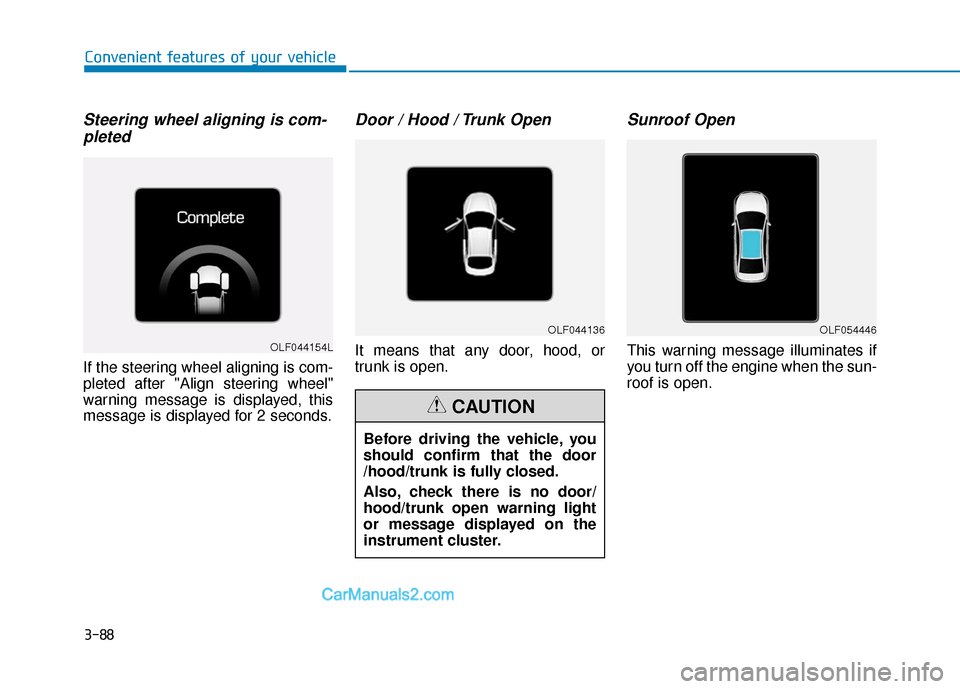
Steering wheel aligning is com-pleted
If the steering wheel aligning is com-
pleted after "Align steering wheel"
warning message is displayed, this
message is displayed for 2 seconds.
Door / Hood / Trunk Open
It means that any door, hood, or
trunk is open.
Sunroof Open
This warning message illuminates if
you turn off the engine when the sun-
roof is open.OLF044154L
OLF044136OLF054446
Before driving the vehicle, you
should confirm that the door
/hood/trunk is fully closed.
Also, check there is no door/
hood/trunk open warning light
or message displayed on the
instrument cluster.
CAUTION
Page 177 of 563
3-92
Convenient features of your vehicle
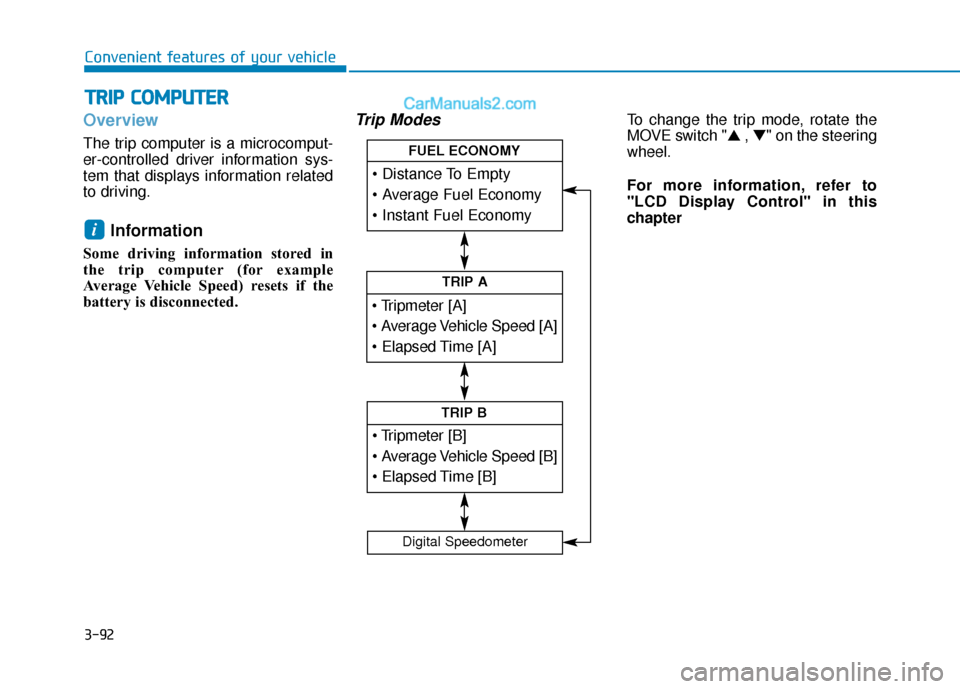
Overview
The trip computer is a microcomput-
er-controlled driver information sys-
tem that displays information related
to driving.
Information
Some driving information stored in
the trip computer (for example
Average Vehicle Speed) resets if the
battery is disconnected.
Trip ModesTo change the trip mode, rotate the
MOVE switch "▲ , ▼" on the steering
wheel.
For more information, refer to
"LCD Display Control" in this
chapter
i
T T R
R I
IP
P
C
C O
O M
M P
PU
U T
TE
ER
R
TRIP A
TRIP B
FUEL ECONOMY
Digital Speedometer
Page 178 of 563
3-93
Convenient features of your vehicle
3
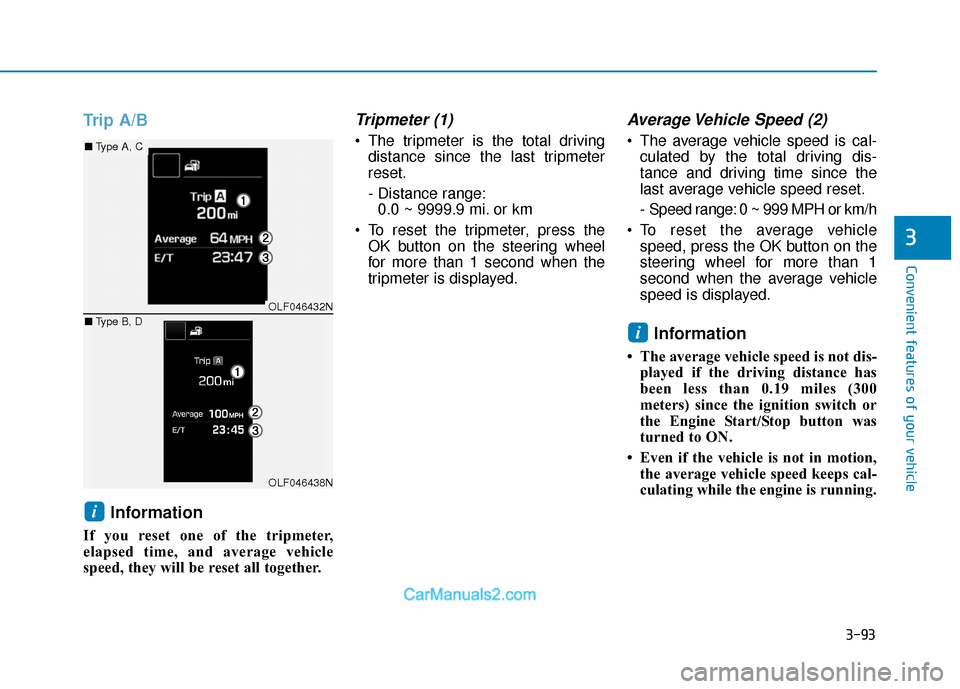
Trip A/BInformation
If you reset one of the tripmeter,
elapsed time, and average vehicle
speed, they will be reset all together.
Tripmeter (1)
The tripmeter is the total drivingdistance since the last tripmeter
reset.
- Distance range:0.0 ~ 9999.9 mi. or km
To reset the tripmeter, press the OK button on the steering wheel
for more than 1 second when the
tripmeter is displayed.
Average Vehicle Speed (2)
The average vehicle speed is cal-culated by the total driving dis-
tance and driving time since the
last average vehicle speed reset.
- Speed range: 0 ~ 999 MPH or km/h
To reset the average vehicle speed, press the OK button on the
steering wheel for more than 1
second when the average vehicle
speed is displayed.
Information
• The average vehicle speed is not dis-played if the driving distance has
been less than 0.19 miles (300
meters) since the ignition switch or
the Engine Start/Stop button was
turned to ON.
• Even if the vehicle is not in motion, the average vehicle speed keeps cal-
culating while the engine is running.
i
i
OLF046432N
OLF046438N
■ Type A, C
■ Type B, D