trunk Hyundai Sonata 2017 User Guide
[x] Cancel search | Manufacturer: HYUNDAI, Model Year: 2017, Model line: Sonata, Model: Hyundai Sonata 2017Pages: 563, PDF Size: 17.7 MB
Page 142 of 563
3-57
Convenient features of your vehicle
Trunk
Opening the trunk
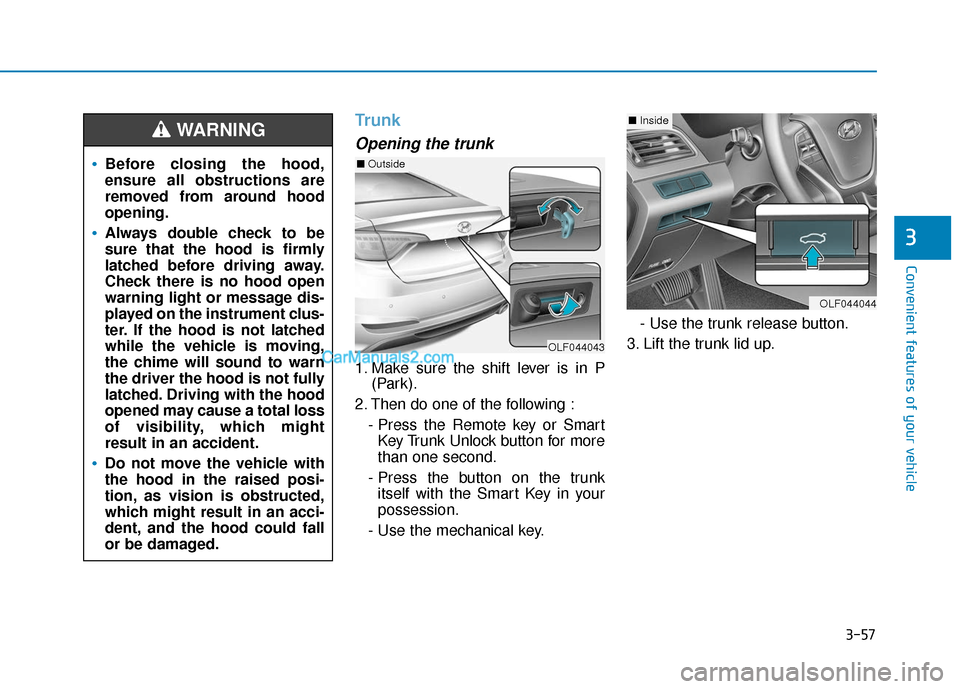
1. Make sure the shift lever is in P(Park).
2. Then do one of the following : - Press the Remote key or SmartKey Trunk Unlock button for more
than one second.
- Press the button on the trunk itself with the Smart Key in your
possession.
- Use the mechanical key. - Use the trunk release button.
3. Lift the trunk lid up.
3
Before closing the hood,
ensure all obstructions are
removed from around hood
opening.
Always double check to be
sure that the hood is firmly
latched before driving away.
Check there is no hood open
warning light or message dis-
played on the instrument clus-
ter. If the hood is not latched
while the vehicle is moving,
the chime will sound to warn
the driver the hood is not fully
latched. Driving with the hood
opened may cause a total loss
of visibility, which might
result in an accident.
Do not move the vehicle with
the hood in the raised posi-
tion, as vision is obstructed,
which might result in an acci-
dent, and the hood could fall
or be damaged.
WARNING
OLF044043
OLF044044
■ Inside
■Outside
Page 143 of 563
3-58
Convenient features of your vehicle
Closing the trunk
Lower the trunk lid and press down
until it locks.To prevent damage to the trunk lift
cylinders and the attached hard-
ware, always close the trunk
before driving.
Information
In cold and wet climates, trunk lock
and trunk mechanisms may not work
properly due to freezing conditions.
Emergency trunk safety release
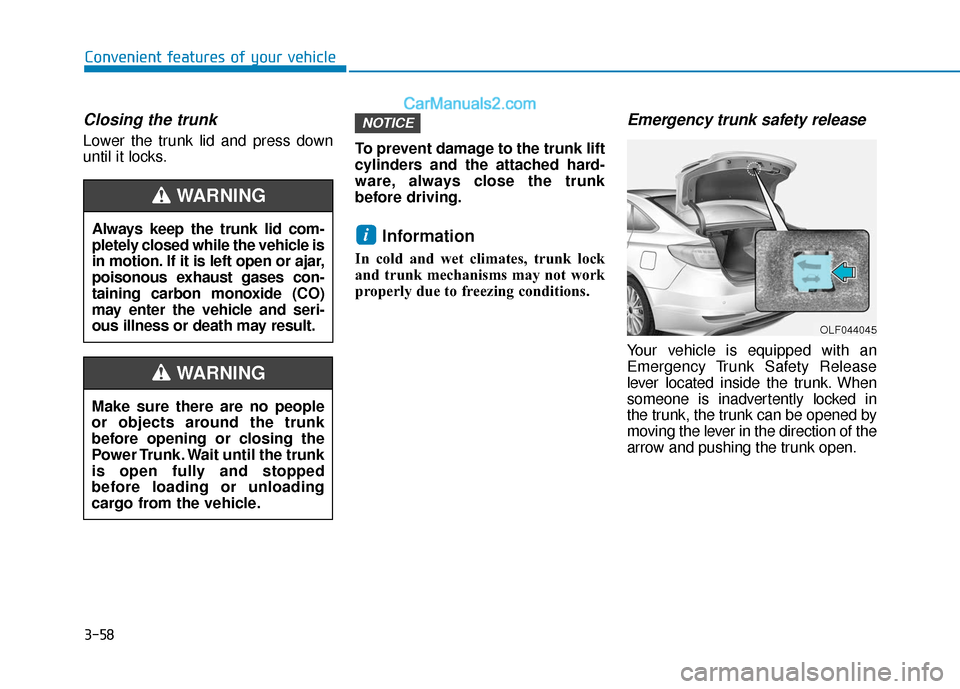
Your vehicle is equipped with an
Emergency Trunk Safety Release
lever located inside the trunk. When
someone is inadvertently locked in
the trunk, the trunk can be opened by
moving the lever in the direction of the
arrow and pushing the trunk open.
i
NOTICE
Make sure there are no people
or objects around the trunk
before opening or closing the
Power Trunk. Wait until the trunk
is open fully and stopped
before loading or unloading
cargo from the vehicle.
WARNING
Always keep the trunk lid com-
pletely closed while the vehicle is
in motion. If it is left open or ajar,
poisonous exhaust gases con-
taining carbon monoxide (CO)
may enter the vehicle and seri-
ous illness or death may result.
WARNING
OLF044045
Page 144 of 563
3-59
Convenient features of your vehicle
Trunk lid control switch
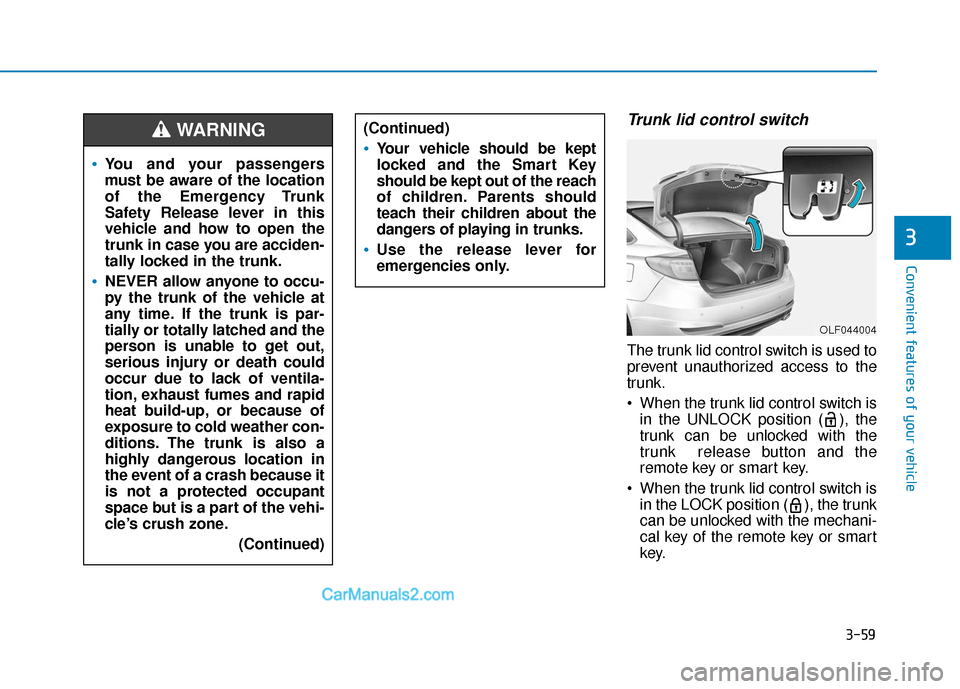
The trunk lid control switch is used to
prevent unauthorized access to the
trunk.
When the trunk lid control switch isin the UNLOCK position ( ), the
trunk can be unlocked with the
trunk release button and the
remote key or smart key.
When the trunk lid control switch is in the LOCK position ( ), the trunk
can be unlocked with the mechani-
cal key of the remote key or smart
key.
3
You and your passengers
must be aware of the location
of the Emergency Trunk
Safety Release lever in this
vehicle and how to open the
trunk in case you are acciden-
tally locked in the trunk.
NEVER allow anyone to occu-
py the trunk of the vehicle at
any time. If the trunk is par-
tially or totally latched and the
person is unable to get out,
serious injury or death could
occur due to lack of ventila-
tion, exhaust fumes and rapid
heat build-up, or because of
exposure to cold weather con-
ditions. The trunk is also a
highly dangerous location in
the event of a crash because it
is not a protected occupant
space but is a part of the vehi-
cle’s crush zone.
(Continued)
(Continued)
Your vehicle should be kept
locked and the Smart Key
should be kept out of the reach
of children. Parents should
teach their children about the
dangers of playing in trunks.
Use the release lever for
emergencies only.
WARNING
OLF044004
Page 145 of 563
3-60
Convenient features of your vehicle
Smart Trunk (if equipped)
On a vehicle equipped with a smart
key, the trunk can be opened using
the Smart Trunk system.
How to use the Smart Trunk
The trunk can be opened with no-
touch activation satisfying all the
conditions below.
After 15 seconds when all doorsare closed and locked
Positioned in the detecting area for more than 3 seconds.
Information
• The Smart Trunk does not operatewhen:
- The smart key is detected within15 seconds after the doors are
closed and locked, and is continu-
ously detected.
- The smart key is detected within 15 seconds after the doors are
closed and locked, and within 60
inches (1.5 m) from the front door
handles. (for vehicles equipped
with Welcome Light)
- A door is not locked or closed.
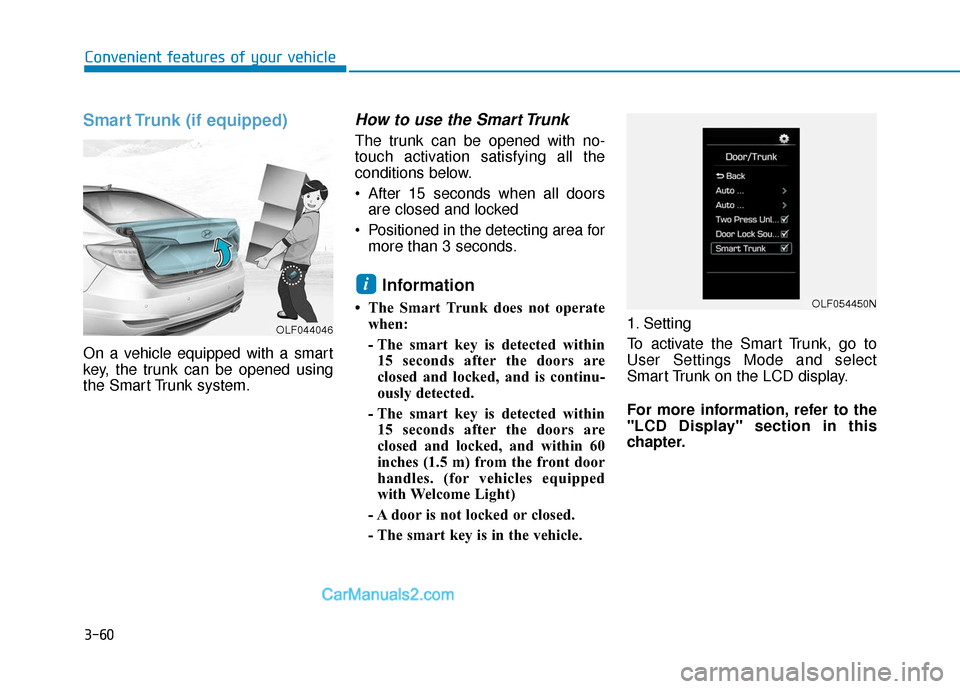
- The smart key is in the vehicle. 1. Setting
To activate the Smart Trunk, go to
User Settings Mode and select
Smart Trunk on the LCD display.
For more information, refer to the
"LCD Display" section in this
chapter.
i
OLF044046
OLF054450N
Page 146 of 563
3-61
Convenient features of your vehicle
3
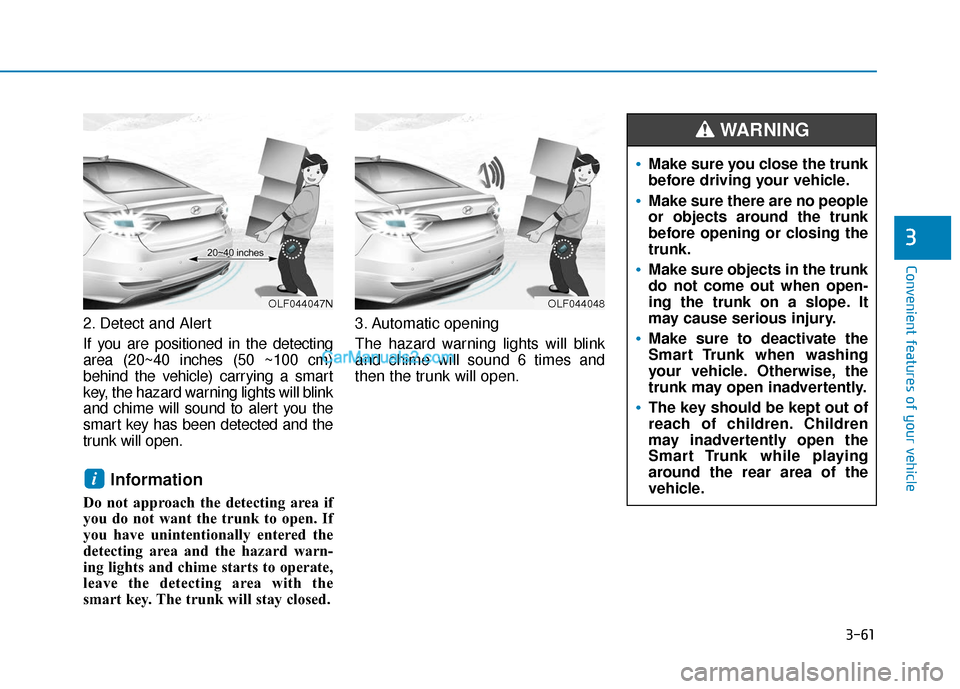
2. Detect and Alert
If you are positioned in the detecting
area (20~40 inches (50 ~100 cm)
behind the vehicle) carrying a smart
key, the hazard warning lights will blink
and chime will sound to alert you the
smart key has been detected and the
trunk will open.
Information
Do not approach the detecting area if
you do not want the trunk to open. If
you have unintentionally entered the
detecting area and the hazard warn-
ing lights and chime starts to operate,
leave the detecting area with the
smart key. The trunk will stay closed.3. Automatic opening
The hazard warning lights will blink
and chime will sound 6 times and
then the trunk will open.
i
OLF044047NOLF044048
Make sure you close the trunk
before driving your vehicle.
Make sure there are no people
or objects around the trunk
before opening or closing the
trunk.
Make sure objects in the trunk
do not come out when open-
ing the trunk on a slope. It
may cause serious injury.
Make sure to deactivate the
Smart Trunk when washing
your vehicle. Otherwise, the
trunk may open inadvertently.
The key should be kept out of
reach of children. Children
may inadvertently open the
Smart Trunk while playing
around the rear area of the
vehicle.
WARNING
Page 147 of 563
3-62
Convenient features of your vehicle
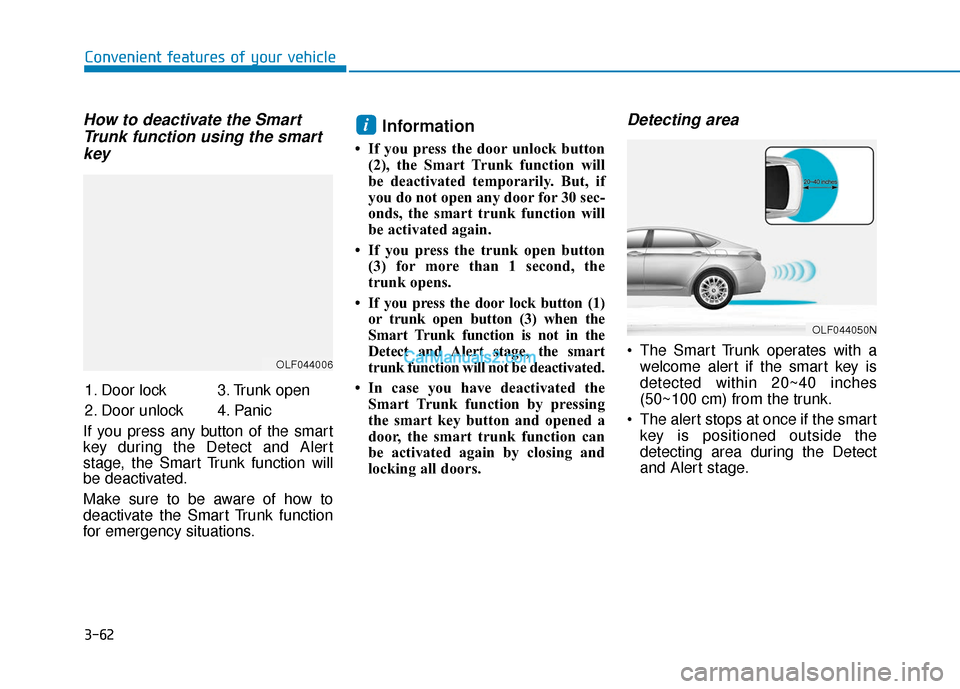
How to deactivate the SmartTrunk function using the smartkey
If you press any button of the smart
key during the Detect and Alert
stage, the Smart Trunk function will
be deactivated.
Make sure to be aware of how to
deactivate the Smart Trunk function
for emergency situations.
Information
• If you press the door unlock button
(2), the Smart Trunk function will
be deactivated temporarily. But, if
you do not open any door for 30 sec-
onds, the smart trunk function will
be activated again.
• If you press the trunk open button (3) for more than 1 second, the
trunk opens.
• If you press the door lock button (1) or trunk open button (3) when the
Smart Trunk function is not in the
Detect and Alert stage, the smart
trunk function will not be deactivated.
• In case you have deactivated the Smart Trunk function by pressing
the smart key button and opened a
door, the smart trunk function can
be activated again by closing and
locking all doors.
Detecting area
The Smart Trunk operates with awelcome alert if the smart key is
detected within 20~40 inches
(50~100 cm) from the trunk.
The alert stops at once if the smart key is positioned outside the
detecting area during the Detect
and Alert stage.
i
OLF044006
OLF044050N
1. Door lock
2. Door unlock 3. Trunk open
4. Panic
Page 148 of 563
3-63
Convenient features of your vehicle
3
Information
• The Smart Trunk function will notwork if any of the following occurs:
- The smart key is close to a radiotransmitter such as a radio station
or an airport which can interfere
with normal operation of the
transmitter.
- The smart key is near a mobile two way radio system or a cellular
phone.
- Another vehicle ’s smart key is being
operated close to your vehicle.
• The detecting range may decrease or increase when :
- One side of the tire is raised toreplace a tire or to inspect the vehi-
cle.
- The vehicle is parked on a slope or unpaved road, etc.
Fuel Filler Door
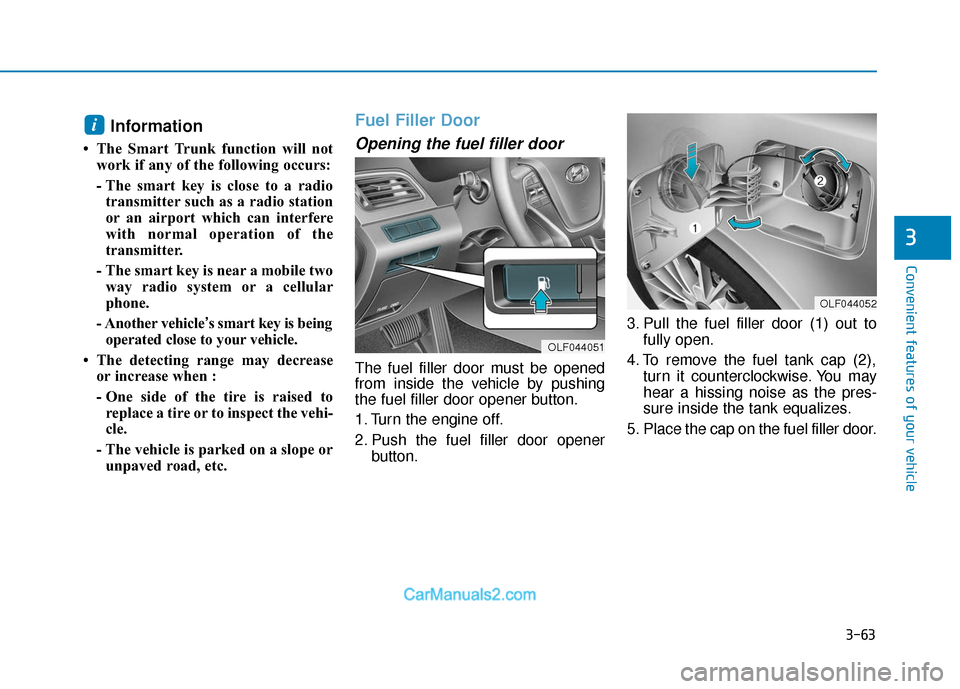
Opening the fuel filler door
The fuel filler door must be opened
from inside the vehicle by pushing
the fuel filler door opener button.
1. Turn the engine off.
2. Push the fuel filler door opener button. 3. Pull the fuel filler door (1) out to
fully open.
4. To remove the fuel tank cap (2), turn it counterclockwise. You may
hear a hissing noise as the pres-
sure inside the tank equalizes.
5. Place the cap on the fuel filler door.
i
OLF044052
OLF044051
Page 151 of 563
3-66
Convenient features of your vehicle
Information
Make sure to refuel your vehicle
according to the "Fuel Requirements"
suggested in the Introduction chapter.
Do not spill fuel on the exteriorsurfaces of the vehicle. Any type
of fuel spilled on painted sur-
faces may damage the paint.
If the fuel filler cap requires replacement, use only a genuine
HYUNDAI cap or the equivalent
specified for your vehicle. An
incorrect fuel filler cap can
result in a serious malfunction
of the fuel system or emission
control system.
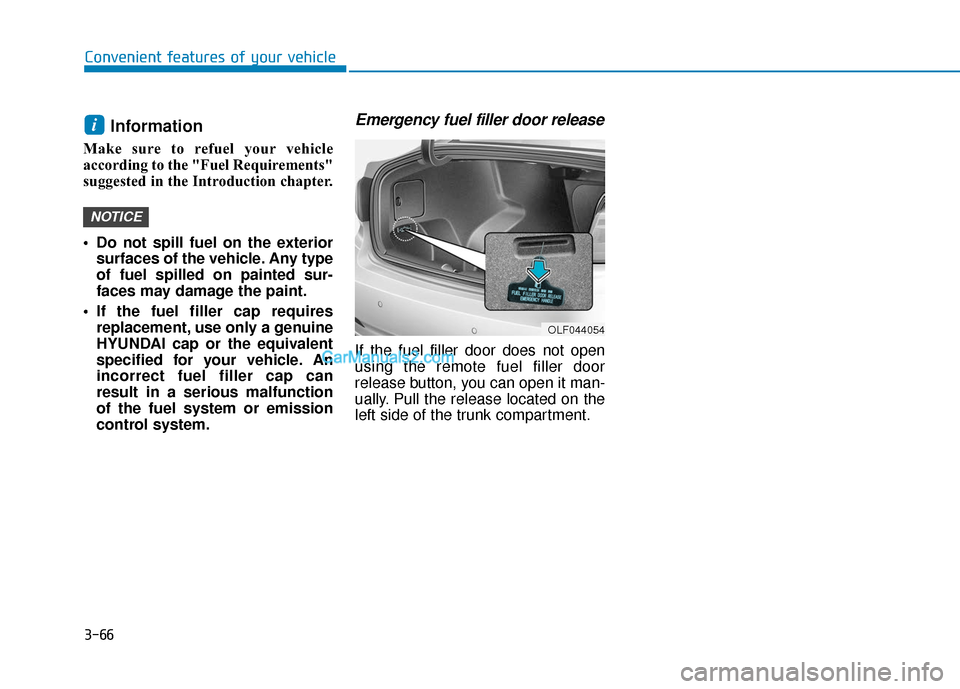
Emergency fuel filler door release
If the fuel filler door does not open
using the remote fuel filler door
release button, you can open it man-
ually. Pull the release located on the
left side of the trunk compartment.
NOTICE
i
OLF044054
Page 166 of 563
3-81
Convenient features of your vehicle
3
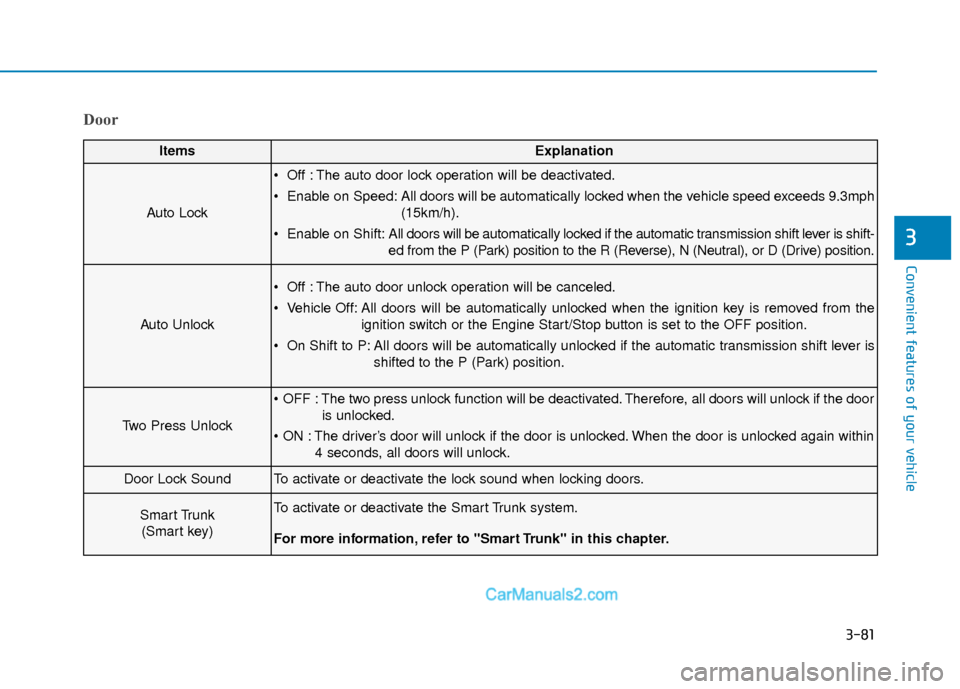
Door
ItemsExplanation
Auto Lock
Off : The auto door lock operation will be deactivated.
Enable on Speed: All doors will be automatically locked when the vehicle speed exceeds 9.3mph(15km/h).
Enable on Shift: All doors will be automatically locked if the automatic transmission shift lever is shift-
ed from the P (Park) position to the R (Reverse), N (Neutral), or D (Drive) position.
Auto Unlock
Off : The auto door unlock operation will be canceled.
Vehicle Off: All doors will be automatically unlocked when the ignition key is removed from the
ignition switch or the Engine Start/Stop button is set to the OFF position.
On Shift to P: All doors will be automatically unlocked if the automatic transmission shift lever is shifted to the P (Park) position.
Two Press Unlock
The two press unlock function will be deactivated. Therefore, all doors will unlock if the dooris unlocked.
The driver’s door will unlock if the door is unlocked. When the door is unlocked again within 4 seconds, all doors will unlock.
Door Lock SoundTo activate or deactivate the lock sound when locking doors.
Smart Trunk (Smart key)To activate or deactivate the Smart Trunk system.
For more information, refer to "Smart Trunk" in this chapter.
Page 173 of 563
3-88
Convenient features of your vehicle
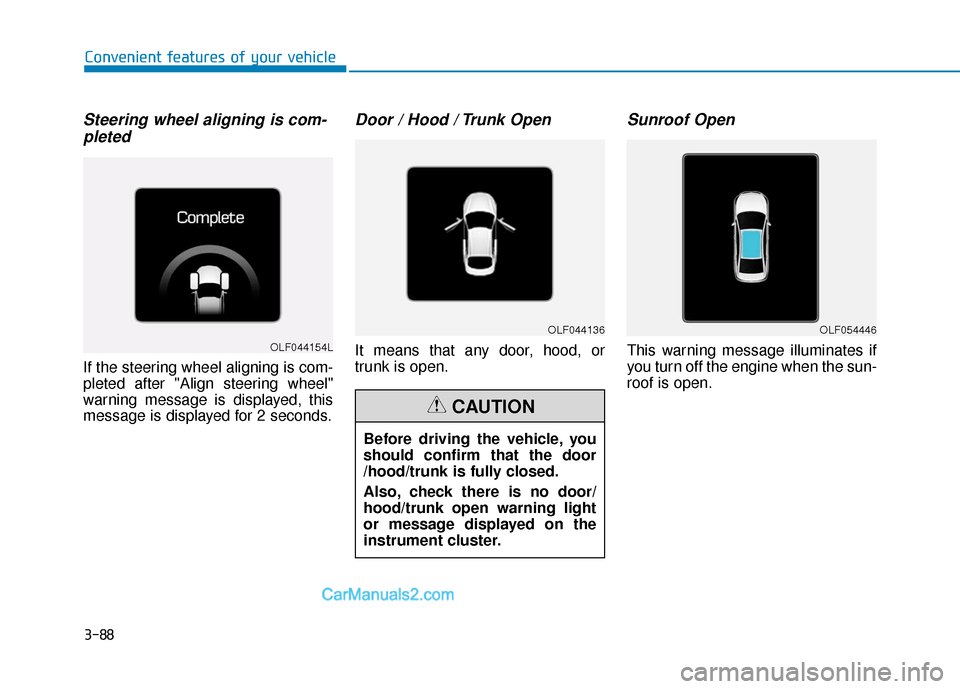
Steering wheel aligning is com-pleted
If the steering wheel aligning is com-
pleted after "Align steering wheel"
warning message is displayed, this
message is displayed for 2 seconds.
Door / Hood / Trunk Open
It means that any door, hood, or
trunk is open.
Sunroof Open
This warning message illuminates if
you turn off the engine when the sun-
roof is open.OLF044154L
OLF044136OLF054446
Before driving the vehicle, you
should confirm that the door
/hood/trunk is fully closed.
Also, check there is no door/
hood/trunk open warning light
or message displayed on the
instrument cluster.
CAUTION