Engine Hyundai Sonata 2017 Service Manual
[x] Cancel search | Manufacturer: HYUNDAI, Model Year: 2017, Model line: Sonata, Model: Hyundai Sonata 2017Pages: 563, PDF Size: 17.7 MB
Page 166 of 563
3-81
Convenient features of your vehicle
3
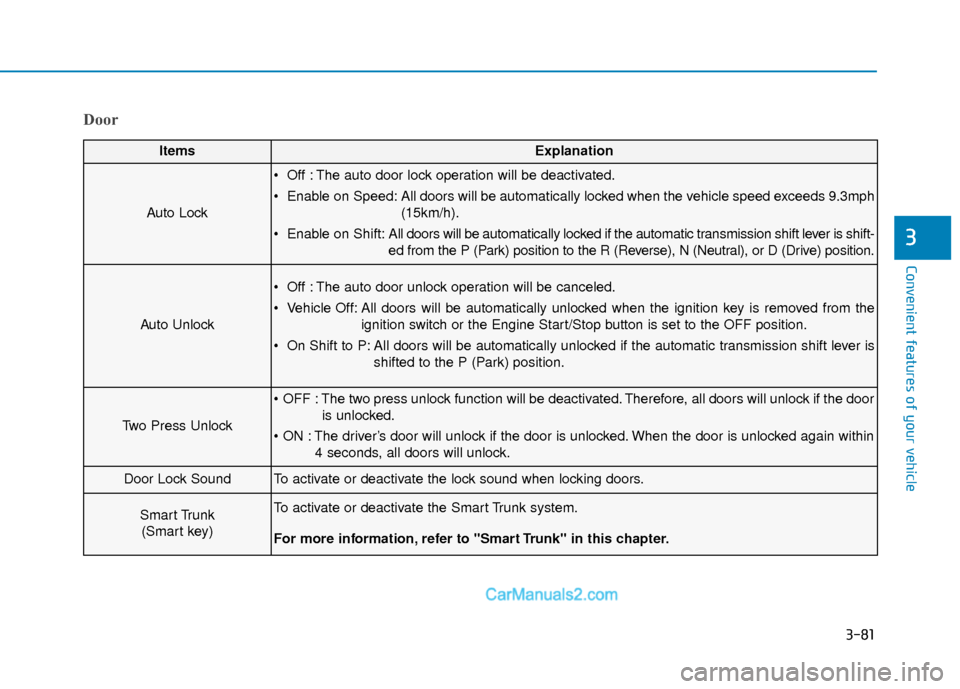
Door
ItemsExplanation
Auto Lock
Off : The auto door lock operation will be deactivated.
Enable on Speed: All doors will be automatically locked when the vehicle speed exceeds 9.3mph(15km/h).
Enable on Shift: All doors will be automatically locked if the automatic transmission shift lever is shift-
ed from the P (Park) position to the R (Reverse), N (Neutral), or D (Drive) position.
Auto Unlock
Off : The auto door unlock operation will be canceled.
Vehicle Off: All doors will be automatically unlocked when the ignition key is removed from the
ignition switch or the Engine Start/Stop button is set to the OFF position.
On Shift to P: All doors will be automatically unlocked if the automatic transmission shift lever is shifted to the P (Park) position.
Two Press Unlock
The two press unlock function will be deactivated. Therefore, all doors will unlock if the dooris unlocked.
The driver’s door will unlock if the door is unlocked. When the door is unlocked again within 4 seconds, all doors will unlock.
Door Lock SoundTo activate or deactivate the lock sound when locking doors.
Smart Trunk (Smart key)To activate or deactivate the Smart Trunk system.
For more information, refer to "Smart Trunk" in this chapter.
Page 168 of 563
3-83
Convenient features of your vehicle
3
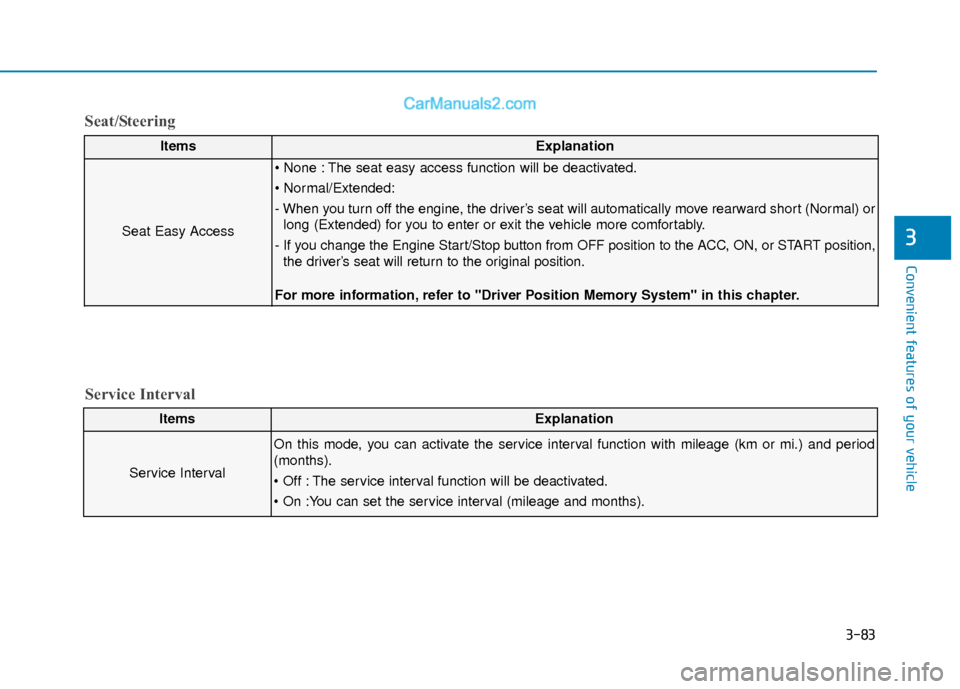
ItemsExplanation
Seat Easy Access
The seat easy access function will be deactivated.
- When you turn off the engine, the driver’s seat will automatically move rearward short (Normal) orlong (Extended) for you to enter or exit the vehicle more comfortably.
- If you change the Engine Start/Stop button from OFF position to the ACC, ON, or START position, the driver’s seat will return to the original position.
For more information, refer to "Driver Position Memory System" in this chapter.
ItemsExplanation
Service Interval
On this mode, you can activate the service interval function with mileage (km or mi.) and period
(months).
The service interval function will be deactivated.
Service Interval
Seat/Steering
Page 170 of 563
3-85
Convenient features of your vehicle
3
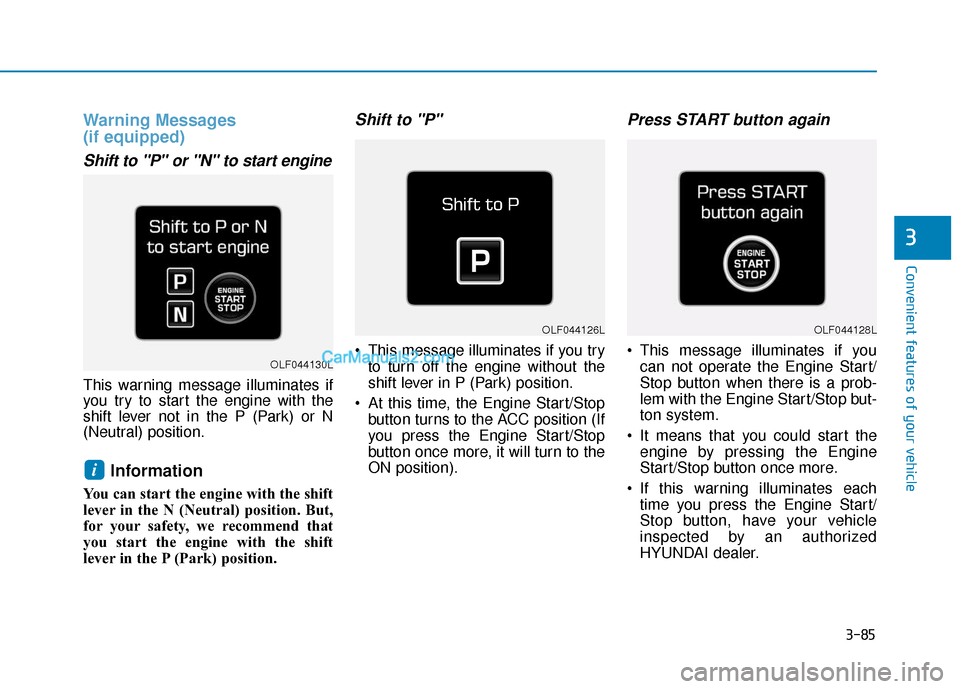
Warning Messages
(if equipped)
Shift to "P" or "N" to start engine
This warning message illuminates if
you try to start the engine with the
shift lever not in the P (Park) or N
(Neutral) position.
Information
You can start the engine with the shift
lever in the N (Neutral) position. But,
for your safety, we recommend that
you start the engine with the shift
lever in the P (Park) position.
Shift to "P"
This message illuminates if you tryto turn off the engine without the
shift lever in P (Park) position.
At this time, the Engine Start/Stop button turns to the ACC position (If
you press the Engine Start/Stop
button once more, it will turn to the
ON position).
Press START button again
This message illuminates if youcan not operate the Engine Start/
Stop button when there is a prob-
lem with the Engine Start/Stop but-
ton system.
It means that you could start the engine by pressing the Engine
Start/Stop button once more.
If this warning illuminates each time you press the Engine Start/
Stop button, have your vehicle
inspected by an authorized
HYUNDAI dealer.
i
OLF044126L
OLF044130L
OLF044128L
Page 171 of 563
3-86
Convenient features of your vehicle
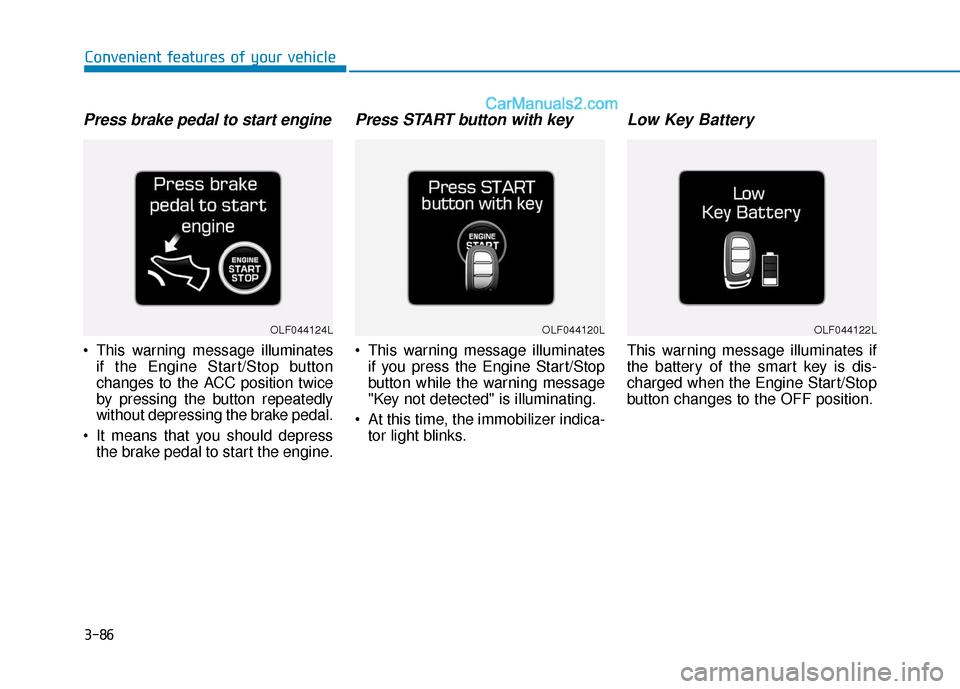
Press brake pedal to start engine
This warning message illuminatesif the Engine Start/Stop button
changes to the ACC position twice
by pressing the button repeatedly
without depressing the brake pedal.
It means that you should depress the brake pedal to start the engine.
Press START button with key
This warning message illuminatesif you press the Engine Start/Stop
button while the warning message
"Key not detected" is illuminating.
At this time, the immobilizer indica- tor light blinks.
Low Key Battery
This warning message illuminates if
the battery of the smart key is dis-
charged when the Engine Start/Stop
button changes to the OFF position.
OLF044124LOLF044120LOLF044122L
Page 172 of 563
3-87
Convenient features of your vehicle
3
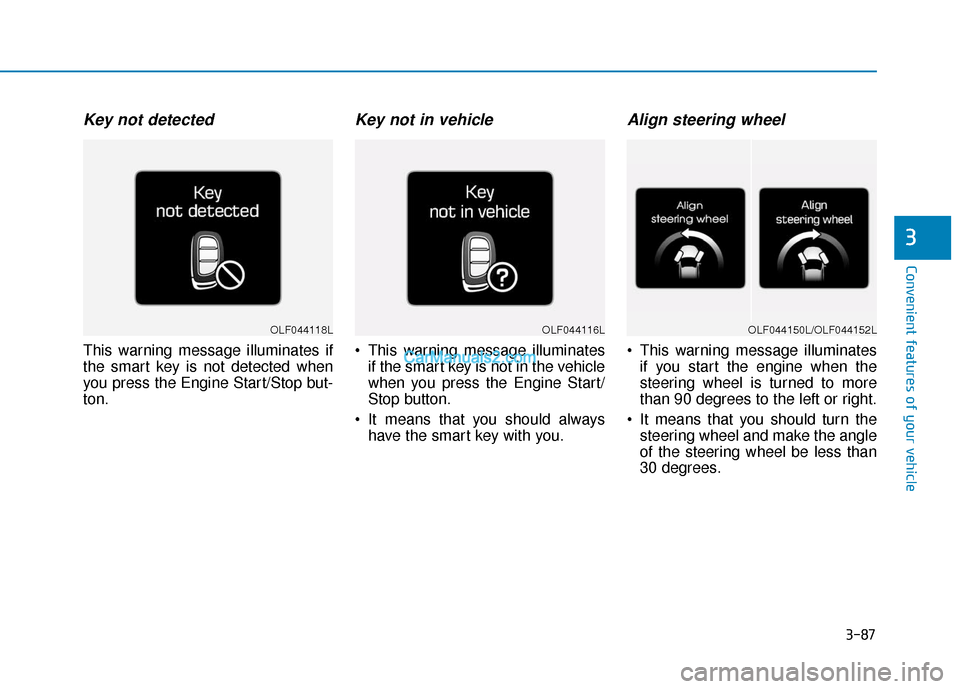
Key not detected
This warning message illuminates if
the smart key is not detected when
you press the Engine Start/Stop but-
ton.
Key not in vehicle
This warning message illuminatesif the smart key is not in the vehicle
when you press the Engine Start/
Stop button.
It means that you should always have the smart key with you.
Align steering wheel
This warning message illuminatesif you start the engine when the
steering wheel is turned to more
than 90 degrees to the left or right.
It means that you should turn the steering wheel and make the angle
of the steering wheel be less than
30 degrees.
OLF044116LOLF044118LOLF044150L/OLF044152L
Page 173 of 563
3-88
Convenient features of your vehicle
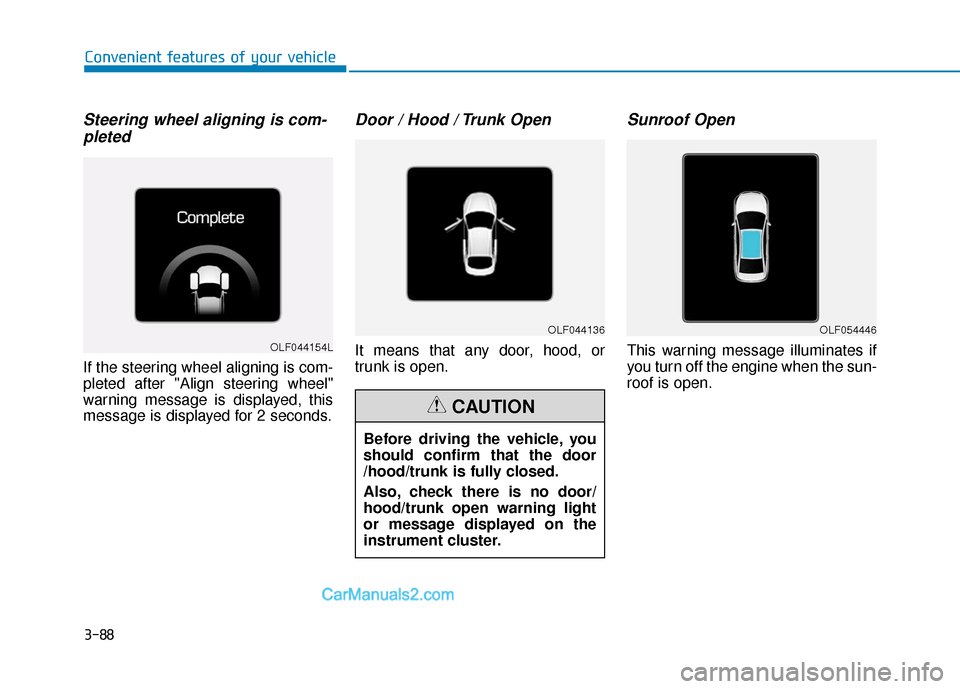
Steering wheel aligning is com-pleted
If the steering wheel aligning is com-
pleted after "Align steering wheel"
warning message is displayed, this
message is displayed for 2 seconds.
Door / Hood / Trunk Open
It means that any door, hood, or
trunk is open.
Sunroof Open
This warning message illuminates if
you turn off the engine when the sun-
roof is open.OLF044154L
OLF044136OLF054446
Before driving the vehicle, you
should confirm that the door
/hood/trunk is fully closed.
Also, check there is no door/
hood/trunk open warning light
or message displayed on the
instrument cluster.
CAUTION
Page 174 of 563
3-89
Convenient features of your vehicle
3
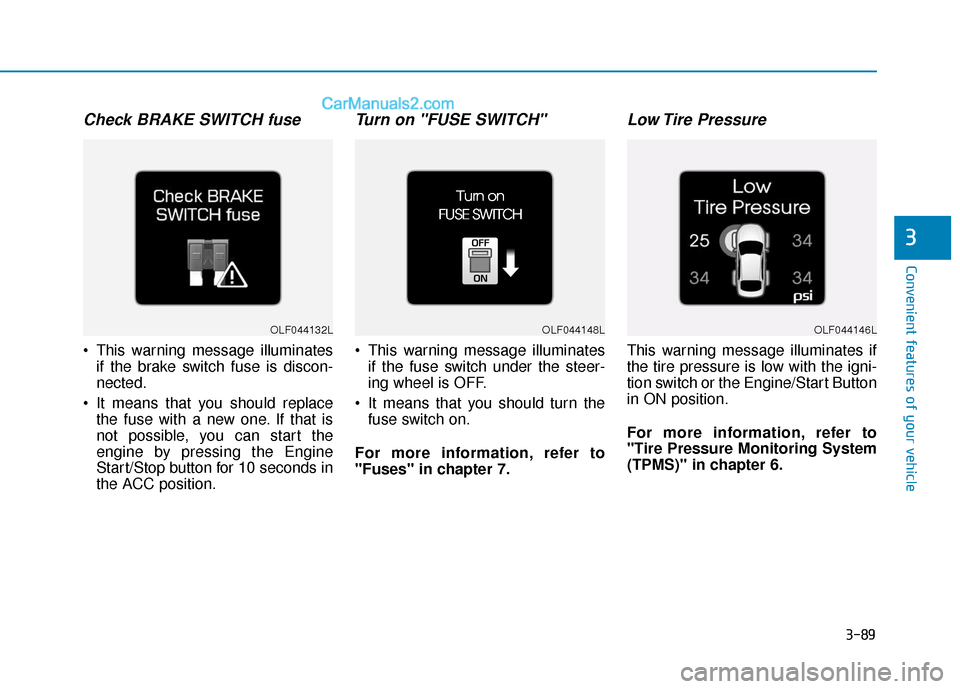
Check BRAKE SWITCH fuse
This warning message illuminatesif the brake switch fuse is discon-
nected.
It means that you should replace the fuse with a new one. If that is
not possible, you can start the
engine by pressing the Engine
Start/Stop button for 10 seconds in
the ACC position.
Turn on "FUSE SWITCH"
This warning message illuminatesif the fuse switch under the steer-
ing wheel is OFF.
It means that you should turn the fuse switch on.
For more information, refer to
"Fuses" in chapter 7.
Low Tire Pressure
This warning message illuminates if
the tire pressure is low with the igni-
tion switch or the Engine/Start Button
in ON position.
For more information, refer to
"Tire Pressure Monitoring System
(TPMS)" in chapter 6.
OLF044132LOLF044148LOLF044146L
Page 175 of 563
3-90
Convenient features of your vehicle
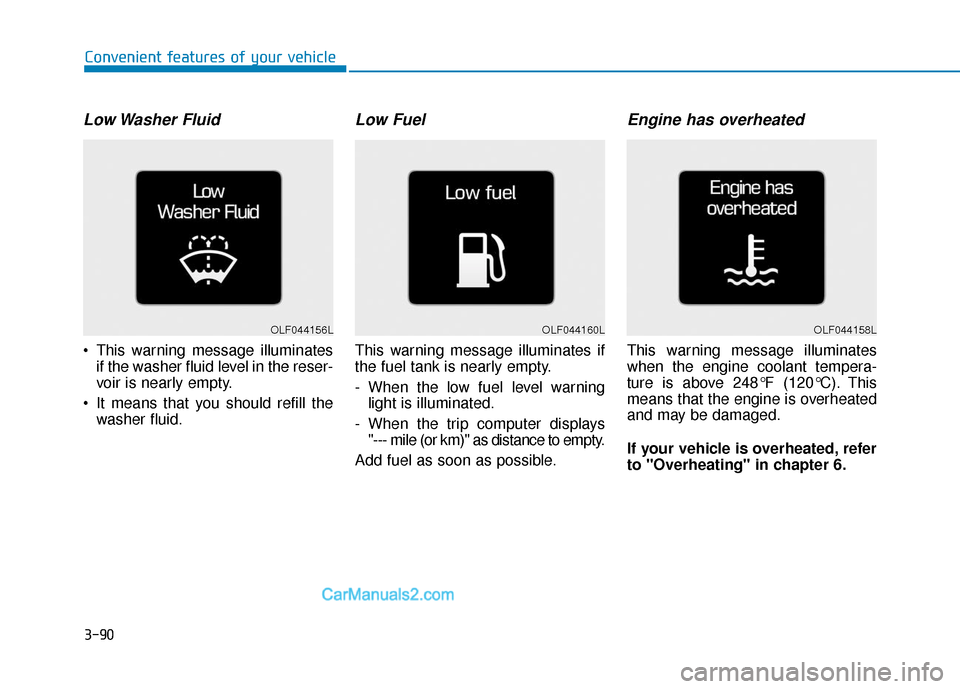
Low Washer Fluid
This warning message illuminatesif the washer fluid level in the reser-
voir is nearly empty.
It means that you should refill the washer fluid.
Low Fuel
This warning message illuminates if
the fuel tank is nearly empty.
- When the low fuel level warninglight is illuminated.
- When the trip computer displays "--- mile (or km)" as distance to empty.
Add fuel as soon as possible.
Engine has overheated
This warning message illuminates
when the engine coolant tempera-
ture is above 248°F (120°C). This
means that the engine is overheated
and may be damaged.
If your vehicle is overheated, refer
to "Overheating" in chapter 6.
OLF044156LOLF044160LOLF044158L
Page 178 of 563
3-93
Convenient features of your vehicle
3
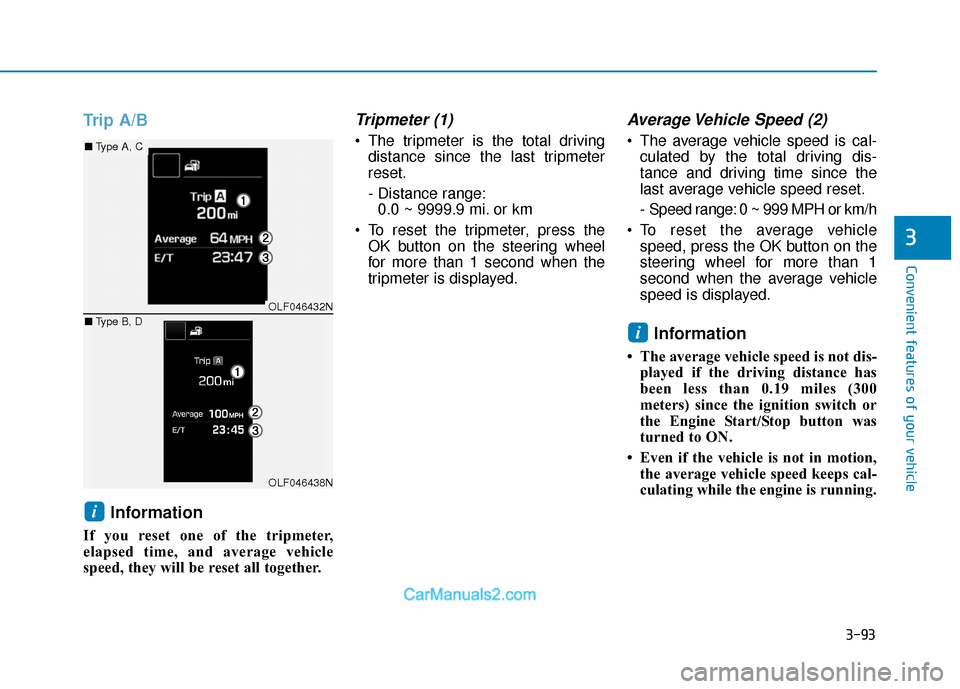
Trip A/BInformation
If you reset one of the tripmeter,
elapsed time, and average vehicle
speed, they will be reset all together.
Tripmeter (1)
The tripmeter is the total drivingdistance since the last tripmeter
reset.
- Distance range:0.0 ~ 9999.9 mi. or km
To reset the tripmeter, press the OK button on the steering wheel
for more than 1 second when the
tripmeter is displayed.
Average Vehicle Speed (2)
The average vehicle speed is cal-culated by the total driving dis-
tance and driving time since the
last average vehicle speed reset.
- Speed range: 0 ~ 999 MPH or km/h
To reset the average vehicle speed, press the OK button on the
steering wheel for more than 1
second when the average vehicle
speed is displayed.
Information
• The average vehicle speed is not dis-played if the driving distance has
been less than 0.19 miles (300
meters) since the ignition switch or
the Engine Start/Stop button was
turned to ON.
• Even if the vehicle is not in motion, the average vehicle speed keeps cal-
culating while the engine is running.
i
i
OLF046432N
OLF046438N
■ Type A, C
■ Type B, D
Page 179 of 563
3-94
Convenient features of your vehicle
Elapsed Time (3)
The elapsed time is the total driv-ing time since the last elapsed time
reset.
- Time range (hh:mm): 00:00 ~ 99:59
To reset the elapsed time, press the OK button on the steering wheel for
more than 1 second when the
elapsed time is displayed.
Information
Even if the vehicle is not in motion, the
elapsed time keeps running while the
engine is running.
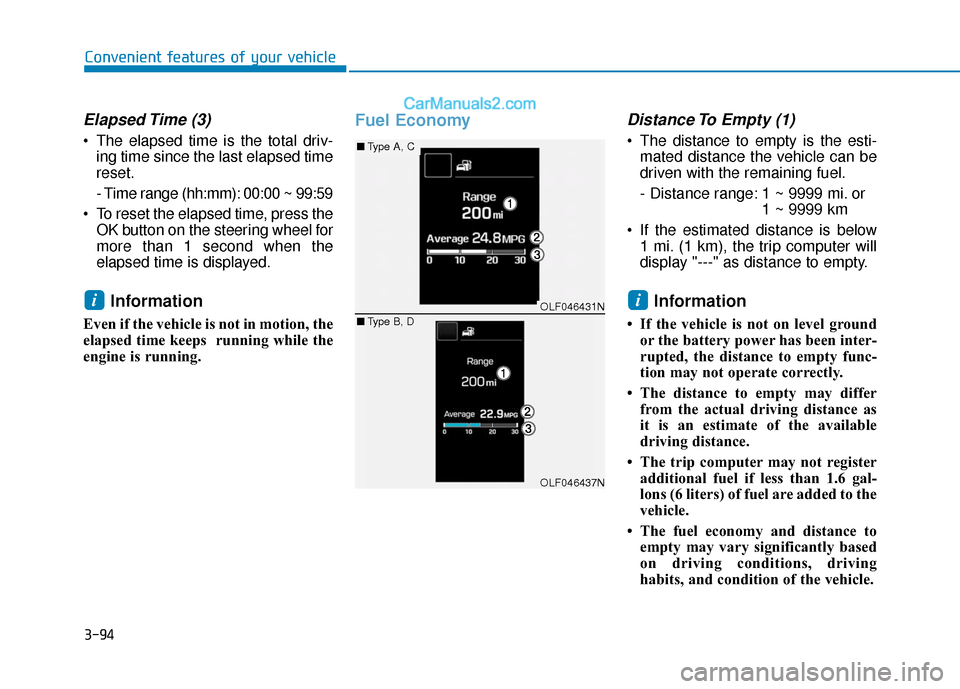
Fuel EconomyDistance To Empty (1)
The distance to empty is the esti-mated distance the vehicle can be
driven with the remaining fuel.
- Distance range: 1 ~ 9999 mi. or 1 ~ 9999 km
If the estimated distance is below 1 mi. (1 km), the trip computer will
display "---" as distance to empty.
Information
• If the vehicle is not on level groundor the battery power has been inter-
rupted, the distance to empty func-
tion may not operate correctly.
• The distance to empty may differ from the actual driving distance as
it is an estimate of the available
driving distance.
• The trip computer may not register additional fuel if less than 1.6 gal-
lons (6 liters) of fuel are added to the
vehicle.
• The fuel economy and distance to empty may vary significantly based
on driving conditions, driving
habits, and condition of the vehicle.
iiOLF046431N
OLF046437N
■ Type A, C
■ Type B, D