Back up Hyundai Sonata 2017 Workshop Manual
[x] Cancel search | Manufacturer: HYUNDAI, Model Year: 2017, Model line: Sonata, Model: Hyundai Sonata 2017Pages: 563, PDF Size: 17.7 MB
Page 324 of 563
5-16
Driving your vehicle
R (Reverse)
Use this position to drive the vehicle
backward.
N (Neutral)
The wheels and transmission are not
engaged.
Use N (Neutral) if you need to restart
a stalled engine, or if it is necessary
to stop with the engine ON. Shift into
P (Park) if you need to leave your
vehicle for any reason.
Always depress the brake pedal
when you are shifting from N
(Neutral) to another gear.
D (Drive)
This is the normal driving position.
The transmission will automatically
shift through a six-gear sequence,
providing the best fuel economy and
power.
For extra power when passing anoth-
er vehicle or driving uphill depress
the accelerator pedal further until
you feel the transmission downshift
to a lower gear.
The DRIVE MODE switch, located
on the shift lever console, allows the
driver to switch from NORMAL mode
to SPORT or ECO mode.
For more information, refer to
"Drive Mode Integrated Control
System" later in this chapter.
Always come to a complete
stop before shifting into or out
of R (Reverse); you may dam-
age the transmission if you shift
into R (Reverse) while the vehi-
cle is in motion.
CAUTION
Do not shift into gear unless
your foot is firmly on the brake
pedal. Shifting into gear when
the engine is running at high
speed can cause the vehicle to
move very rapidly. You could
lose control of the vehicle and
hit people or objects.
WARNING
Page 325 of 563
5-17
Driving your vehicle
5
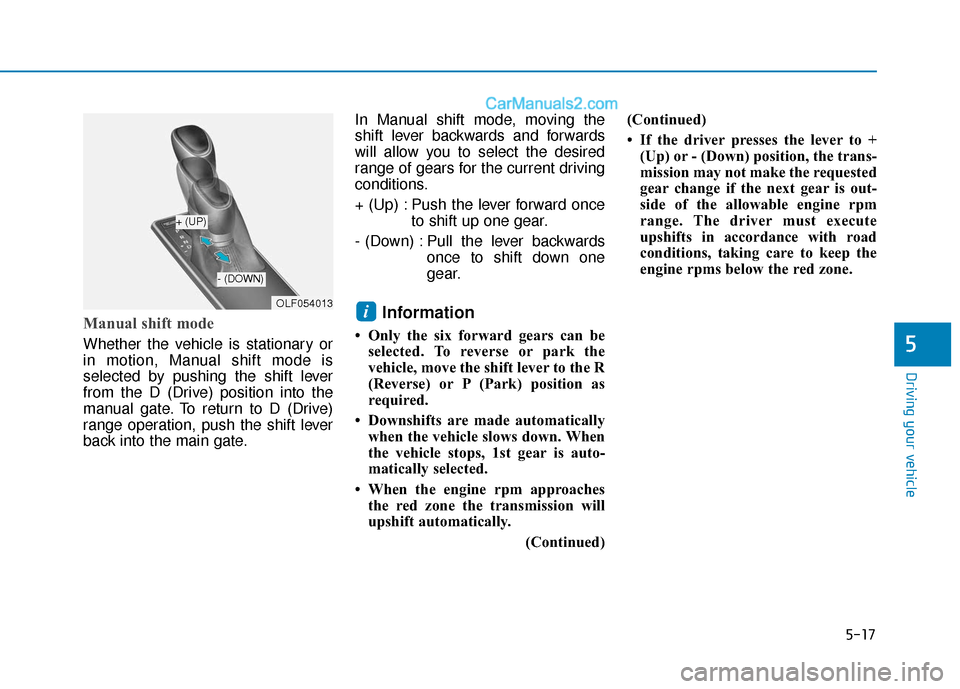
Manual shift mode
Whether the vehicle is stationary or
in motion, Manual shift mode is
selected by pushing the shift lever
from the D (Drive) position into the
manual gate. To return to D (Drive)
range operation, push the shift lever
back into the main gate.In Manual shift mode, moving the
shift lever backwards and forwards
will allow you to select the desired
range of gears for the current driving
conditions.
+ (Up) : Push the lever forward once
to shift up one gear.
- (Down) : Pull the lever backwards once to shift down one
gear.
Information
• Only the six forward gears can beselected. To reverse or park the
vehicle, move the shift lever to the R
(Reverse) or P (Park) position as
required.
• Downshifts are made automatically when the vehicle slows down. When
the vehicle stops, 1st gear is auto-
matically selected.
• When the engine rpm approaches the red zone the transmission will
upshift automatically.
(Continued)(Continued)
• If the driver presses the lever to +
(Up) or - (Down) position, the trans-
mission may not make the requested
gear change if the next gear is out-
side of the allowable engine rpm
range. The driver must execute
upshifts in accordance with road
conditions, taking care to keep the
engine rpms below the red zone.
iOLF054013
+ (UP)
- (DOWN)
Page 330 of 563
5-22
R (Reverse)
Use this position to drive the vehicle
backward.
N (Neutral)
The wheels and transmission are not
engaged.
Use N (Neutral) if you need to restart
a stalled engine, or if it is necessary
to stop with the engine ON. Shift into
P (Park) if you need to leave your
vehicle for any reason.
Always depress the brake pedal
when you are shifting from N
(Neutral) to another gear.
D (Drive)
This is the normal driving position.
The transmission will automatically
shift through a seven-gear
sequence, providing the best fuel
economy and power.
For extra power when passing anoth-
er vehicle or driving uphill depress
the accelerator pedal further until
you feel the transmission downshift
to a lower gear.
The DRIVE MODE switch, located
on the shift lever console, allows the
driver to switch from NORMAL mode
to SPORT or ECO mode.
For more information, refer to
"Drive Mode Integrated Control
System" later in this chapter.
Driving your vehicleAlways come to a complete
stop before shifting into or out
of R (Reverse); you may dam-
age the transmission if you shift
into R (Reverse) while the vehi-
cle is in motion.
CAUTION
Do not shift into gear unless
your foot is firmly on the brake
pedal. Shifting into gear when
the engine is running at high
speed can cause the vehicle to
move very rapidly. You could
lose control of the vehicle and
hit people or objects.
WARNING
Page 331 of 563
5-23
Driving your vehicle
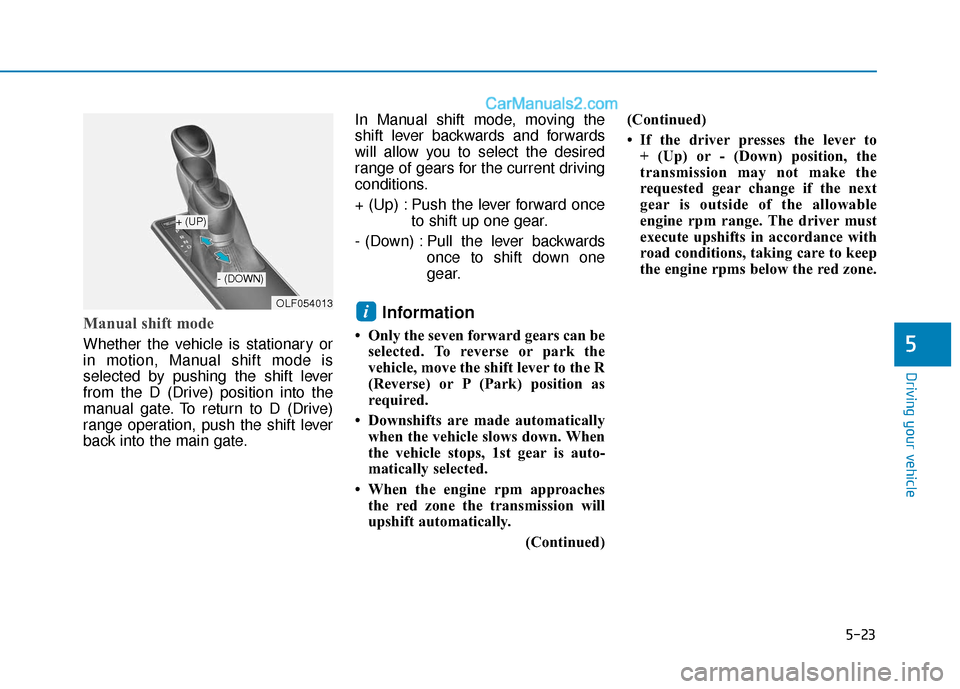
Manual shift mode
Whether the vehicle is stationary or
in motion, Manual shift mode is
selected by pushing the shift lever
from the D (Drive) position into the
manual gate. To return to D (Drive)
range operation, push the shift lever
back into the main gate.In Manual shift mode, moving the
shift lever backwards and forwards
will allow you to select the desired
range of gears for the current driving
conditions.
+ (Up) : Push the lever forward once
to shift up one gear.
- (Down) : Pull the lever backwards once to shift down one
gear.
Information
• Only the seven forward gears can beselected. To reverse or park the
vehicle, move the shift lever to the R
(Reverse) or P (Park) position as
required.
• Downshifts are made automatically when the vehicle slows down. When
the vehicle stops, 1st gear is auto-
matically selected.
• When the engine rpm approaches the red zone the transmission will
upshift automatically.
(Continued)(Continued)
• If the driver presses the lever to
+ (Up) or - (Down) position, the
transmission may not make the
requested gear change if the next
gear is outside of the allowable
engine rpm range. The driver must
execute upshifts in accordance with
road conditions, taking care to keep
the engine rpms below the red zone.
i
5
OLF054013
+ (UP)
- (DOWN)
Page 335 of 563
5-27
Driving your vehicle
5
Information - Kickdown
Mechanism
Use the kickdown mechanism for
maximum acceleration. Depress the
accelerator pedal beyond the pressure
point. The automatic transmission will
shift to a lower gear depending on the
engine speed. i
To reduce the risk of SERIOUS
INJURY or DEATH:
ALWAYS wear your seatbelt.
In a collision, an unbelted
occupant is significantly more
likely to be seriously injured
or killed than a properly belt-
ed occupant.
Avoid high speeds when cor-
nering or turning.
Do not make quick steering
wheel movements, such as
sharp lane changes or fast,
sharp turns.
The risk of rollover is greatly
increased if you lose control
of your vehicle at highway
speeds.
Loss of control often occurs if
two or more wheels drop off
the roadway and the driver
over steers to reenter the
roadway. (Continued)
(Continued)
In the event your vehicle
leaves the roadway, do not
steer sharply. Instead, slow
down before pulling back into
the travel lanes.
HYUNDAI recommends you
follow all posted speed limits.
WARNING
Page 340 of 563
5-32
Driving your vehicle
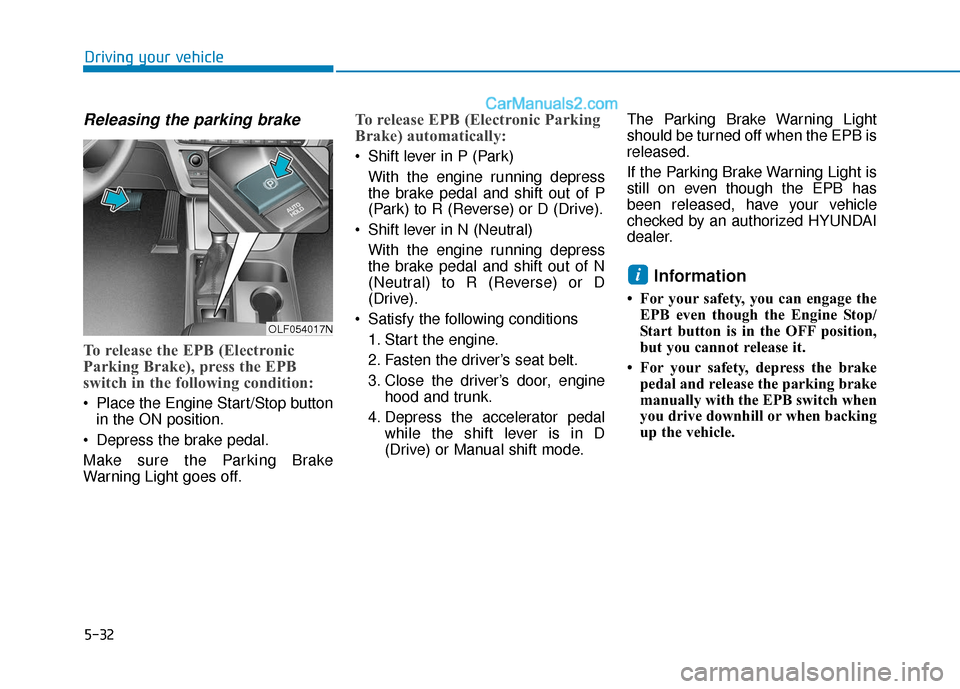
Releasing the parking brake
To release the EPB (Electronic
Parking Brake), press the EPB
switch in the following condition:
Place the Engine Start/Stop buttonin the ON position.
Depress the brake pedal.
Make sure the Parking Brake
Warning Light goes off.
To release EPB (Electronic Parking
Brake) automatically:
Shift lever in P (Park) With the engine running depress
the brake pedal and shift out of P
(Park) to R (Reverse) or D (Drive).
Shift lever in N (Neutral) With the engine running depress
the brake pedal and shift out of N
(Neutral) to R (Reverse) or D
(Drive).
Satisfy the following conditions 1. Start the engine.
2. Fasten the driver’s seat belt.
3. Close the driver’s door, engine hood and trunk.
4. Depress the accelerator pedal while the shift lever is in D
(Drive) or Manual shift mode. The Parking Brake Warning Light
should be turned off when the EPB is
released.
If the Parking Brake Warning Light is
still on even though the EPB has
been released, have your vehicle
checked by an authorized HYUNDAI
dealer.
Information
• For your safety, you can engage the
EPB even though the Engine Stop/
Start button is in the OFF position,
but you cannot release it.
• For your safety, depress the brake pedal and release the parking brake
manually with the EPB switch when
you drive downhill or when backing
up the vehicle.
i
OLF054017N
Page 344 of 563
5-36
Driving your vehicle
If the EPB Malfunction Indicator is still on, have the system
checked by an authorized
HYUNDAI dealer.
If the Parking Brake Warning Light does not illuminate or
blinks even though the EPB
switch was pulled up, the EPB
may not be applied.
If the Parking Brake Warning Light blinks when the EPB
Malfunction Indicator is on,
press the EPB switch, then pull
it up. Once more, press the
switch back to its original posi-
tion and pull it back up. If the
EPB Malfunction Indicator does
not go off, have your vehicle
checked by an authorized
HYUNDAI dealer.
Emergency braking
If there is a problem with the brake
pedal while driving, emergency brak-
ing is possible by pulling up and
holding the EPB switch. Braking is
possible only while you are holding
the EPB switch. However, braking
distance will be longer than normal. During emergency braking the
Parking Brake Warning Light will
illuminate to indicate that the sys-
tem is operating.
If there is a noise or burning smell
after using the emergency brake,
have your vehicle checked by an
authorized HYUNDAI dealer as
soon as possible.
NOTICE
NOTICENOTICE
Do not operate the parking
brake while the vehicle is mov-
ing except in an emergency sit-
uation. It could damage the
brake system and lead to a
severe accident.
WARNING
Page 354 of 563
5-46
Driving your vehicle
To prevent damage to the trans-
mission:
Do not allow wheel(s) of one axle to spin excessively while
the ESC, ABS, and brake warn-
ing lights are displayed. The
repairs would not be covered by
the vehicle warranty. Reduce
engine power and do not spin
the wheel(s) excessively while
these lights are displayed.
When operating the vehicle on a dynamometer, ensure the ESC is
turned off (ESC OFF light illumi-
nated).
Information
Turning the ESC off does not affect
ABS or standard brake system opera-
tion.
Hill-Start Assist Control (HAC)
The Hill-Start Assist Control (HAC)
prevents the vehicle from rolling
backwards when starting a vehicle
from a stop on a hill. The system
operates the brakes automatically for
approximately 2 seconds and releas-
es the brake when the accelerator
pedal is depressed or after 2 sec-
onds. The HAC does not operate when
the shift lever is in P (Park) or N
(Neutral)
The HAC activates even though the ESC (Electronic Stability
Control) is off but does not acti-
vate when the ESC has malfunc-
tioned.
NOTICE
i
NOTICE
Always be ready to depress the
accelerator pedal when starting
off on a incline. The HAC acti-
vates only for approximately 2
seconds.
WARNING
Page 375 of 563
5-67
Driving your vehicle
5
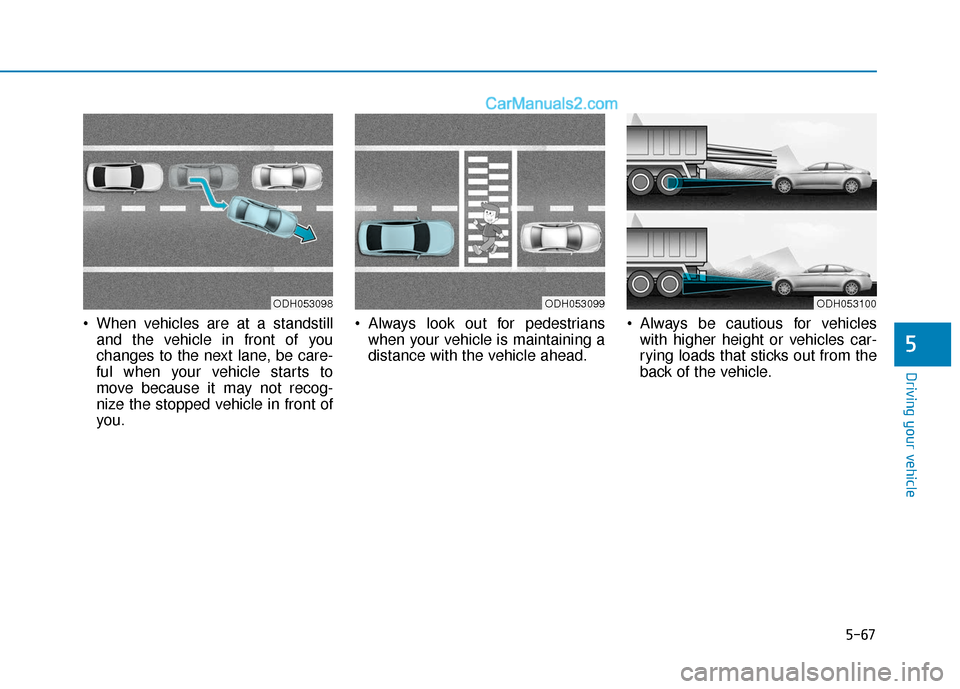
When vehicles are at a standstilland the vehicle in front of you
changes to the next lane, be care-
ful when your vehicle starts to
move because it may not recog-
nize the stopped vehicle in front of
you. Always look out for pedestrians
when your vehicle is maintaining a
distance with the vehicle ahead. Always be cautious for vehicles
with higher height or vehicles car-
rying loads that sticks out from the
back of the vehicle.
ODH053098ODH053099ODH053100
Page 381 of 563
5-73
Driving your vehicle
5
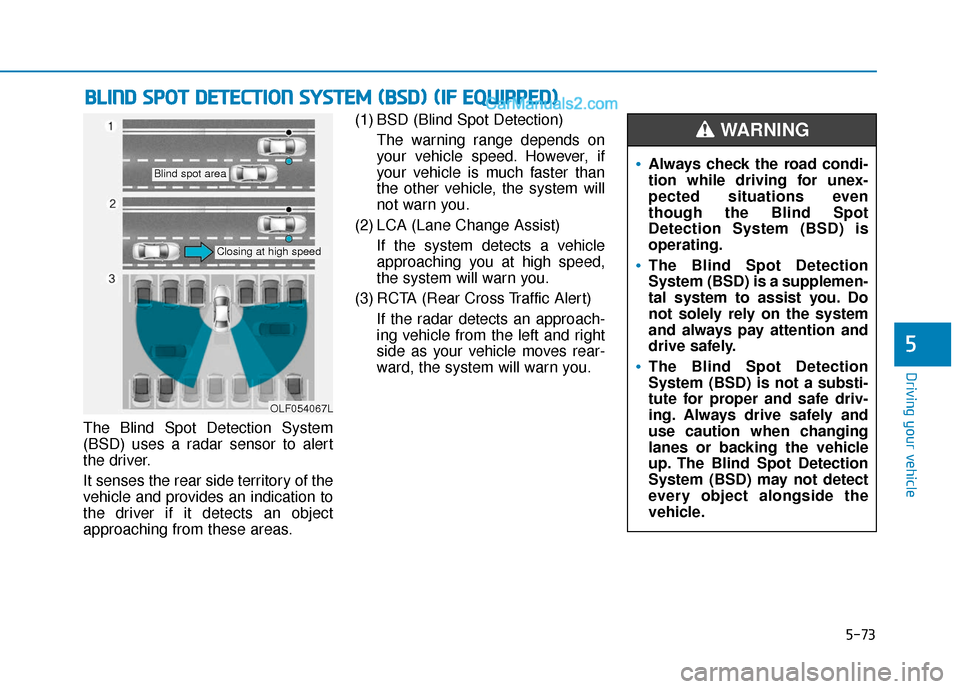
The Blind Spot Detection System
(BSD) uses a radar sensor to alert
the driver.
It senses the rear side territory of the
vehicle and provides an indication to
the driver if it detects an object
approaching from these areas.(1) BSD (Blind Spot Detection)
The warning range depends on
your vehicle speed. However, if
your vehicle is much faster than
the other vehicle, the system will
not warn you.
(2) LCA (Lane Change Assist) If the system detects a vehicle
approaching you at high speed,
the system will warn you.
(3) RCTA (Rear Cross Traffic Alert) If the radar detects an approach-
ing vehicle from the left and right
side as your vehicle moves rear-
ward, the system will warn you.
B BL
LI
IN
N D
D
S
S P
P O
O T
T
D
D E
ET
T E
EC
CT
T I
IO
O N
N
S
S Y
Y S
ST
T E
EM
M
(
( B
B S
SD
D )
)
(
( I
IF
F
E
E Q
Q U
UI
IP
P P
PE
ED
D )
)
OLF054067L
Blind spot area
Closing at high speed
Always check the road condi-
tion while driving for unex-
pected situations even
though the Blind Spot
Detection System (BSD) is
operating.
The Blind Spot Detection
System (BSD) is a supplemen-
tal system to assist you. Do
not solely rely on the system
and always pay attention and
drive safely.
The Blind Spot Detection
System (BSD) is not a substi-
tute for proper and safe driv-
ing. Always drive safely and
use caution when changing
lanes or backing the vehicle
up. The Blind Spot Detection
System (BSD) may not detect
every object alongside the
vehicle.
WARNING