cruise control Hyundai Sonata 2017 Owner's Manual
[x] Cancel search | Manufacturer: HYUNDAI, Model Year: 2017, Model line: Sonata, Model: Hyundai Sonata 2017Pages: 563, PDF Size: 17.7 MB
Page 16 of 563
I
IN
N S
ST
T R
R U
U M
M E
EN
N T
T
P
P A
A N
N E
EL
L
O
O V
VE
ER
R V
V I
IE
E W
W
1-5
Your vehicle at a glance
1
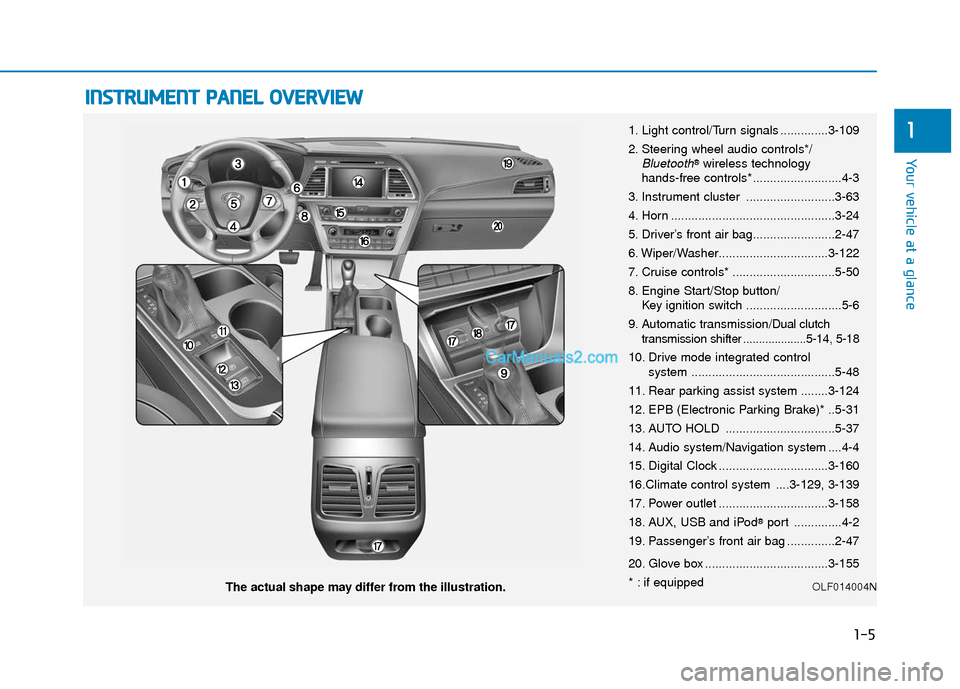
The actual shape may differ from the illustration. 1. Light control/Turn signals ..............3-109
2. Steering wheel audio controls*/
Bluetooth®wireless technology
hands-free controls* ..........................4-3
3. Instrument cluster ..........................3-63
4. Horn ................................................3-24
5. Driver’s front air bag........................2-47
6. Wiper/Washer................................3-122
7. Cruise controls* ..............................5-50
8. Engine Start/Stop button/ Key ignition switch ............................5-6
9. Automatic transmission/
Dual clutch
transmission shifter ....................5-14, 5-18
10. Drive mode integrated control system ..........................................5-48
11. Rear parking assist system ........3-124
12. EPB (Electronic Parking Brake)* ..5-31
13. AUTO HOLD ................................5-37
14. Audio system/Navigation system ....4-4
15. Digital Clock ................................3-160
16.Climate control system ....3-129, 3-139
17. Power outlet ................................3-158
18. AUX, USB and iPod
®port ..............4-2
19. Passenger’s front air bag ..............2-47
20. Glove box ....................................3-155
* : if equipped
OLF014004N
Page 160 of 563
3-75
Convenient features of your vehicle
3
LCD Modes
L
LC
C D
D
D
D I
IS
S P
P L
LA
A Y
Y
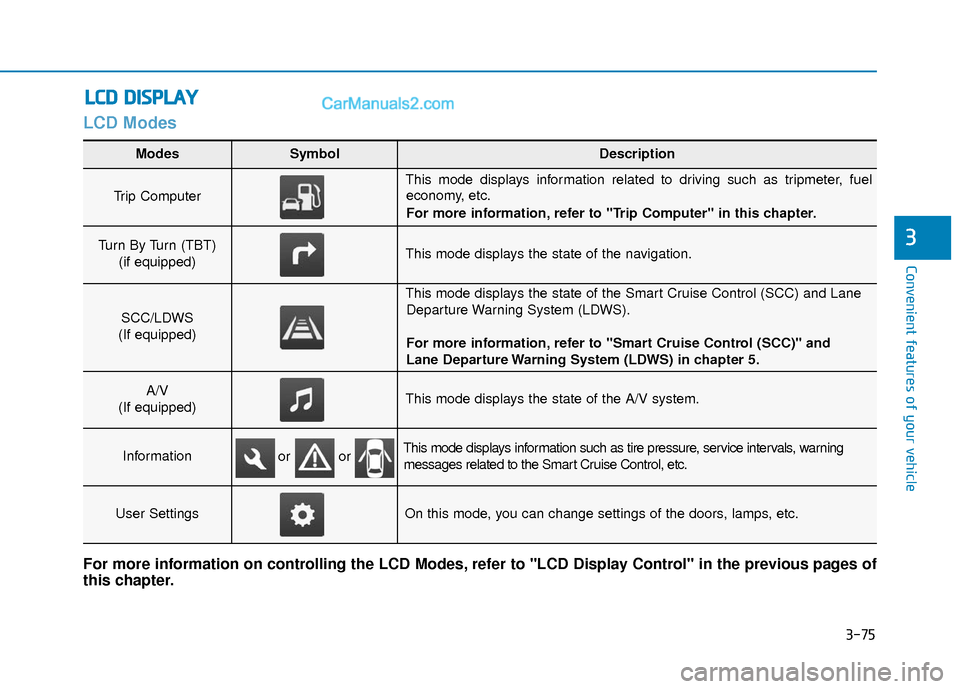
Modes SymbolDescription
Trip Computer
This mode displays information related to driving such as tripmeter, fuel
economy, etc.
For more information, refer to "Trip Computer" in this chapter.
Turn By Turn (TBT)
(if equipped)This mode displays the state of the navigation.
SCC/LDWS
(If equipped)
This mode displays the state of the Smart Cruise Control (SCC) and Lane Departure Warning System (LDWS).
For more information, refer to "Smart Cruise Control (SCC)" and
Lane Departure Warning System (LDWS) in chapter 5.
A/V
(If equipped)This mode displays the state of the A/V system.
InformationThis mode displays information such as tire pressure, service intervals, warning messages related to the Smart Cruise Control, etc.
User SettingsOn this mode, you can change settings of the doors, lamps, etc.
For more information on controlling the LCD Modes, refer to "LCD Display Control" in the previous pages of
this chapter.
or or
Page 162 of 563
3-77
Convenient features of your vehicle
3
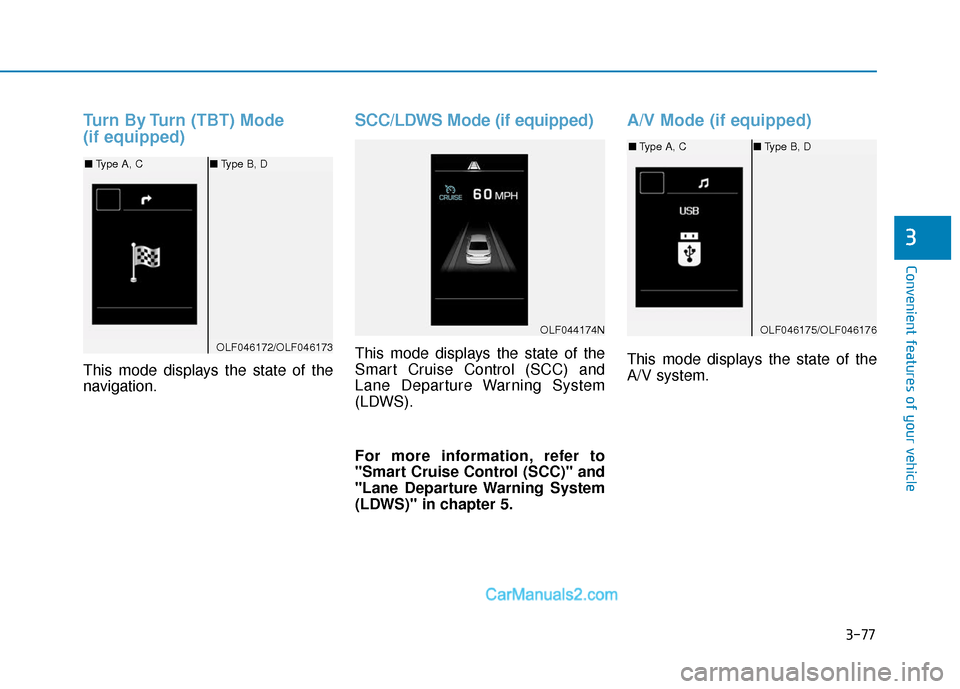
Turn By Turn (TBT) Mode
(if equipped)
This mode displays the state of the
navigation.
SCC/LDWS Mode (if equipped)
This mode displays the state of the
Smart Cruise Control (SCC) and
Lane Departure Warning System
(LDWS).
For more information, refer to
"Smart Cruise Control (SCC)" and
"Lane Departure Warning System
(LDWS)" in chapter 5.
A/V Mode (if equipped)
This mode displays the state of the
A/V system.
OLF044174N
OLF046172/OLF046173
■Type A, C ■Type B, D
OLF046175/OLF046176
■Type A, C ■Type B, D
Page 165 of 563
3-80
Convenient features of your vehicle
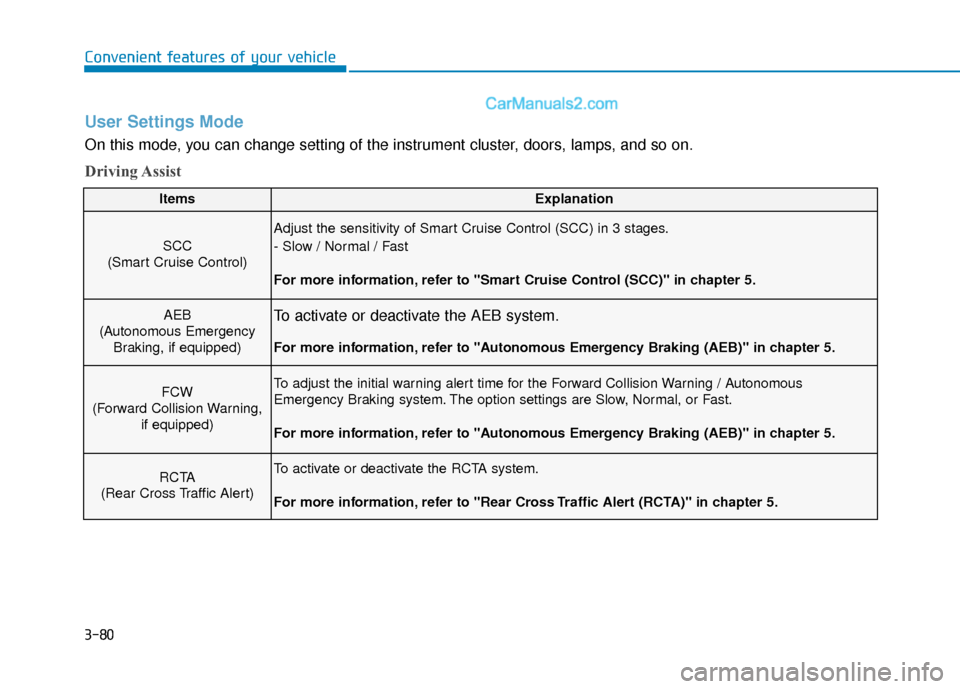
User Settings Mode
On this mode, you can change setting of the instrument cluster, doors, lamps, and so on.
Driving Assist
ItemsExplanation
SCC
(Smart Cruise Control)
Adjust the sensitivity of Smart Cruise Control (SCC) in 3 stages.
- Slow / Normal / Fast
For more information, refer to "Smart Cruise Control (SCC)" in chapter 5.
AEB
(Autonomous Emergency Braking, if equipped)To activate or deactivate the AEB system.
For more information, refer to "Autonomous Emergency Braking (AEB)" in chapter 5.
FCW
(Forward Collision Warning, if equipped)To adjust the initial warning alert time for the Forward Collision Warning / Autonomous
Emergency Braking system. The option settings are Slow, Normal, or Fast.
For more information, refer to "Autonomous Emergency Braking (AEB)" in chapter 5.
RCTA
(Rear Cross Traffic Alert)To activate or deactivate the RCTA system.
For more information, refer to "Rear Cross Traffic Alert (RCTA)" in chapter 5.
Page 189 of 563
3-104
Convenient features of your vehicle
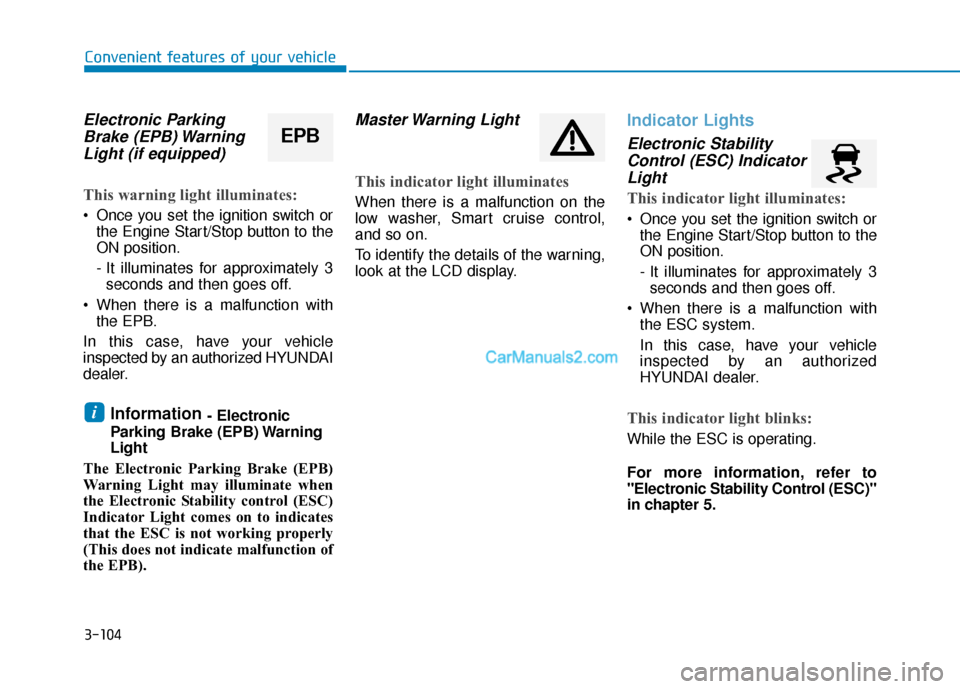
Electronic ParkingBrake (EPB) WarningLight (if equipped)
This warning light illuminates:
Once you set the ignition switch or
the Engine Start/Stop button to the
ON position.
- It illuminates for approximately 3seconds and then goes off.
When there is a malfunction with the EPB.
In this case, have your vehicle
inspected by an authorized HYUNDAI
dealer.
Information - Electronic
Parking Brake (EPB) Warning
Light
The Electronic Parking Brake (EPB)
Warning Light may illuminate when
the Electronic Stability control (ESC)
Indicator Light comes on to indicates
that the ESC is not working properly
(This does not indicate malfunction of
the EPB).
Master Warning Light
This indicator light illuminates
When there is a malfunction on the
low washer, Smart cruise control,
and so on.
To identify the details of the warning,
look at the LCD display.
Indicator Lights
Electronic Stability Control (ESC) IndicatorLight
This indicator light illuminates:
Once you set the ignition switch or
the Engine Start/Stop button to the
ON position.
- It illuminates for approximately 3seconds and then goes off.
When there is a malfunction with the ESC system.
In this case, have your vehicle
inspected by an authorized
HYUNDAI dealer.
This indicator light blinks:
While the ESC is operating.
For more information, refer to
"Electronic Stability Control (ESC)"
in chapter 5.
i
EPB
Page 192 of 563
3-107
Convenient features of your vehicle
3
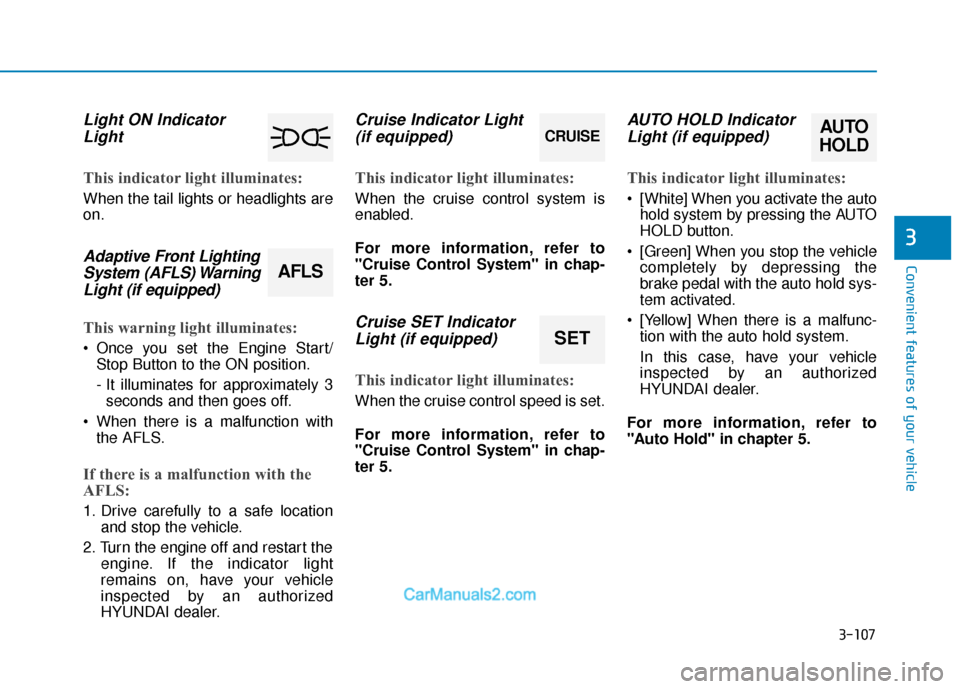
Light ON IndicatorLight
This indicator light illuminates:
When the tail lights or headlights are
on.
Adaptive Front LightingSystem (AFLS) WarningLight (if equipped)
This warning light illuminates:
Once you set the Engine Start/
Stop Button to the ON position.
- It illuminates for approximately 3seconds and then goes off.
When there is a malfunction with the AFLS.
If there is a malfunction with the
AFLS:
1. Drive carefully to a safe location and stop the vehicle.
2. Turn the engine off and restart the engine. If the indicator light
remains on, have your vehicle
inspected by an authorized
HYUNDAI dealer.
Cruise Indicator Light(if equipped)
This indicator light illuminates:
When the cruise control system is
enabled.
For more information, refer to
"Cruise Control System" in chap-
ter 5.
Cruise SET IndicatorLight (if equipped)
This indicator light illuminates:
When the cruise control speed is set.
For more information, refer to
"Cruise Control System" in chap-
ter 5.
AUTO HOLD IndicatorLight (if equipped)
This indicator light illuminates:
[White] When you activate the auto
hold system by pressing the AUTO
HOLD button.
[Green] When you stop the vehicle completely by depressing the
brake pedal with the auto hold sys-
tem activated.
[Yellow] When there is a malfunc- tion with the auto hold system.
In this case, have your vehicle
inspected by an authorized
HYUNDAI dealer.
For more information, refer to
"Auto Hold" in chapter 5.
CRUISE
SET
AUTO
HOLD
AFLS
Page 309 of 563
Driving your vehicle
5
Before Driving ........................................................5-4
Before Entering the Vehicle ...........................................5-4
Before Starting ..................................................................5-4
Ignition Switch ........................................................5-6
Key Ignition Switch ...........................................................5-6
Engine Start/Stop Button................................................5-9
Transmission .........................................................5-14
Automatic Transmission .................................................5-14
Ecoshift Dual Clutch Transmission..............................5-18
Paddle Shifter ..................................................................5-24
Shift-Lock System ..........................................................5-25
Shift-Lock Release .........................................................5-25
Parking ........................................................................\
.......5-26
Good Driving Practices ..................................................5-26
Braking System ....................................................5-28
Power Brakes ...................................................................5-28
Disc Brakes Wear Indicator ..........................................5-29
Foot Parking Brake.........................................................5-29
Electronic Parking Brake (EPB)...................................5-31
AUTO HOLD ......................................................................5-\
37
Anti-lock Brake System (ABS) ....................................5-40
Electronic Stability Control (ESC)................................5-43
Hill-Start Assist Control (HAC) ...................................5-46
Good Braking Practices .................................................5-47
Drive Mode Integrated Control System ............5-48
Cruise Control .......................................................5-50
Cruise Control Operation...............................................5-50
Smart Cruise Control system..............................5-54
To Adjust the Sensitivity of Smart Cruise Control ....5-55
To Convert to Cruise Control Mode............................5-55
Smart Cruise Control Speed .........................................5-56
Smart Cruise Control Vehicle-to-Vehicle Distance...5-60
Radar to Detect Distance to the Vehicle Ahead .....5-63
Limitations of the System .............................................5-64
Lane Departure Warning System (LDWS) ........5-69
LDWS Operation ..............................................................5-70
Warning Light and Message.........................................5-71
Blind Spot Detection System (BSD) ..................5-73
BSD (Blind Spot Detection) /
LCA (Lane Change Assist) .............................................5-74
RCTA (Rear Cross Traffic Alert) ..................................5-77
Automatic emergency braking (AEB) ...............5-81
System setting and activation......................................5-81
AEB warning message and system control ..............5-83
Sensor to detect the distance from the vehicle
in front (front radar) .....................................................5-86
System malfunction ........................................................5-87
Limitation of the system ...............................................5-89
Page 352 of 563
5-44
Driving your vehicle
If the Cruise Control was in use when the ESC activates, the
Cruise Control automatically disen-
gages. The Cruise Control can be
reengaged when the road condi-
tions allow. See "Cruise Control
System" later in this chapter. (if
equipped)
When moving out of the mud or driving on a slippery road, the
engine rpm (revolutions per
minute) may not increase even if
you press the accelerator pedal
deeply. This is to maintain the sta-
bility and traction of the vehicle and
does not indicate a problem.
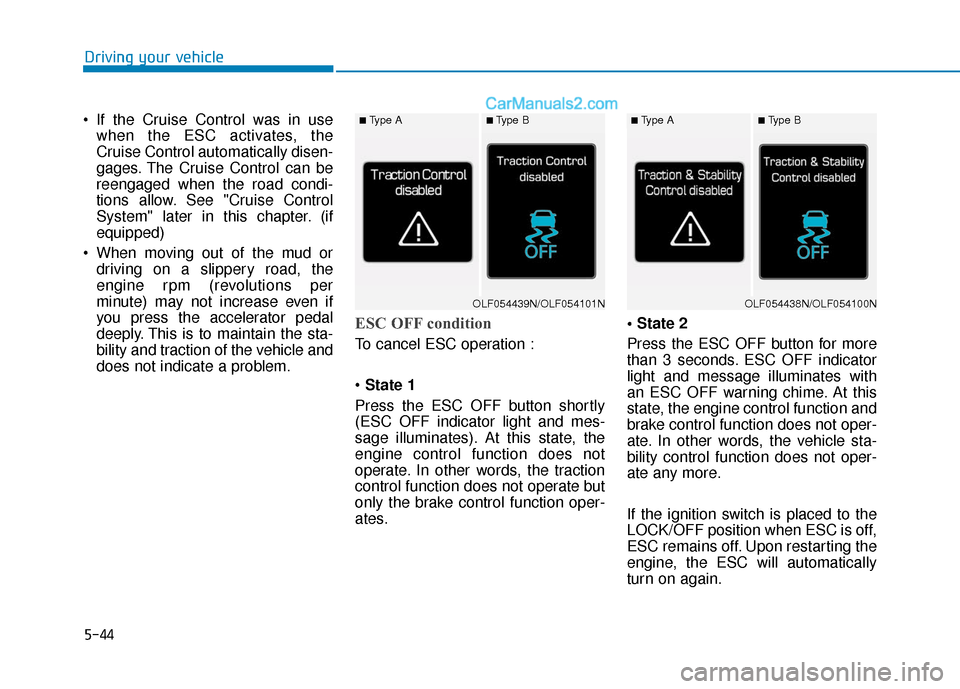
ESC OFF condition
To cancel ESC operation :
State 1
Press the ESC OFF button shortly
(ESC OFF indicator light and mes-
sage illuminates). At this state, the
engine control function does not
operate. In other words, the traction
control function does not operate but
only the brake control function oper-
ates.
Press the ESC OFF button for more
than 3 seconds. ESC OFF indicator
light and message illuminates with
an ESC OFF warning chime. At this
state, the engine control function and
brake control function does not oper-
ate. In other words, the vehicle sta-
bility control function does not oper-
ate any more.
If the ignition switch is placed to the
LOCK/OFF position when ESC is off,
ESC remains off. Upon restarting the
engine, the ESC will automatically
turn on again.
■Type A■Type B■Type A■Type B
OLF054439N/OLF054101NOLF054438N/OLF054100N
Page 358 of 563
5-50
Driving your vehicle
Cruise Control Operation
1. CRUISE indicator
2. SET indicator
The Cruise Control system allows
you to drive at speeds above 20 mph
(30 km/h) without depressing the
accelerator pedal.
C CR
R U
U I
IS
S E
E
C
C O
O N
NT
TR
R O
O L
L
(
( I
IF
F
E
E Q
Q U
UI
IP
P P
PE
ED
D )
)
OLF054040
Take the following precautions:
If the Cruise Control is left on,
(CRUISE indicator light in the
instrument cluster illuminat-
ed) the Cruise Control can be
activated unintentionally.
Keep the Cruise Control sys-
tem off (CRUISE indicator
light OFF) when the Cruise
Control is not in use, to avoid
inadvertently setting a speed.
Use the Cruise Control system
only when traveling on open
highways in good weather.
Do not use the Cruise Control
when it may not be safe to
keep the vehicle at a constant
speed:
(Continued)
(Continued)- Driving in heavy or varyingspeed traffic.
- On slippery (rainy, icy or snow covered) roads.
- Hilly or winding roads.
- Very windy areas.
- When driving with limited view (possibly due to bad
weather, such as fog, snow,
rain or sandstorm).WARNING
Page 359 of 563
5-51
Driving your vehicle
5
To set Cruise Control speed
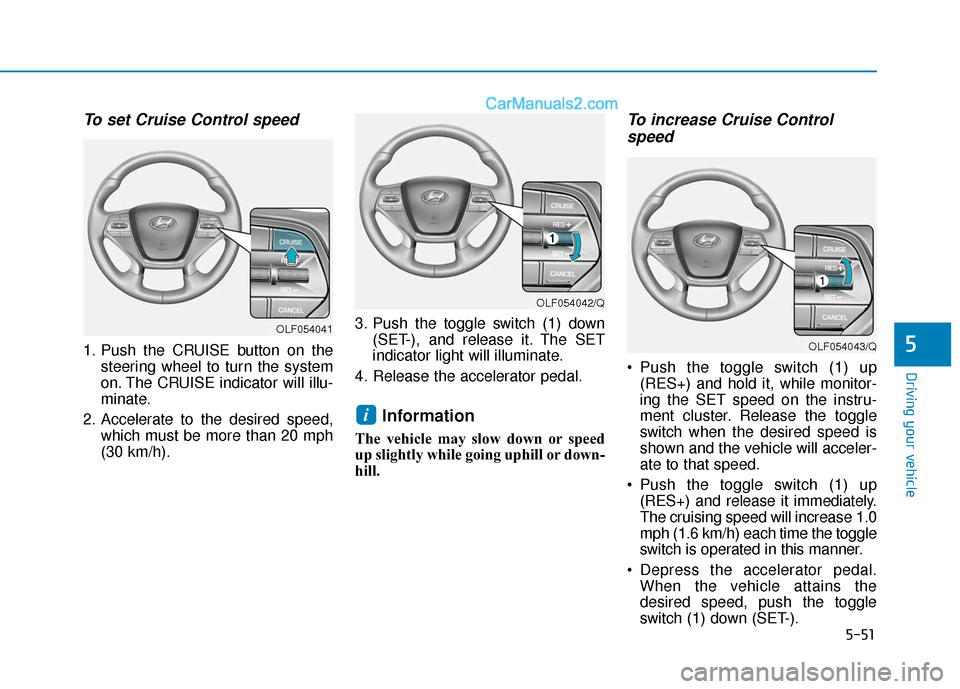
1. Push the CRUISE button on thesteering wheel to turn the system
on. The CRUISE indicator will illu-
minate.
2. Accelerate to the desired speed, which must be more than 20 mph
(30 km/h). 3. Push the toggle switch (1) down
(SET-), and release it. The SET
indicator light will illuminate.
4. Release the accelerator pedal.
Information
The vehicle may slow down or speed
up slightly while going uphill or down-
hill.
To increase Cruise Control speed
Push the toggle switch (1) up
(RES+) and hold it, while monitor-
ing the SET speed on the instru-
ment cluster. Release the toggle
switch when the desired speed is
shown and the vehicle will acceler-
ate to that speed.
Push the toggle switch (1) up (RES+) and release it immediately.
The cruising speed will increase 1.0
mph (1.6 km/h) each time the toggle
switch is operated in this manner.
Depress the accelerator pedal. When the vehicle attains the
desired speed, push the toggle
switch (1) down (SET-).
i
OLF054042/Q
OLF054043/Q
OLF054041