Alert Hyundai Sonata 2018 Owner's Guide
[x] Cancel search | Manufacturer: HYUNDAI, Model Year: 2018, Model line: Sonata, Model: Hyundai Sonata 2018Pages: 522, PDF Size: 14.52 MB
Page 337 of 522
5-87
Driving your vehicle
The Driver Attention Alert system
utilizes the camera sensor on the
front windshield for its operation.
To keep the camera sensor in the
best condition, you should
observe the followings:
Do not disassemble cameratemporarily for tinted window or
attaching any types of coatings
and accessories. If you disas-
semble a camera and assemble
it again, take your vehicle to an
authorized HYUNDAI dealer and
have the system checked for a
calibration.
Do not locate any reflective objects (i.e. white paper, mirror)
over the dashboard. Any light
reflection may cause a mal-func-
tion of the Driver Attention Alert
(DAA) system.
Pay extreme caution to keep the camera sensor out of water.
(Continued)(Continued)
Do not arbitrarily disassemble
the camera assembly, nor apply
any impact on the camera
assembly.
Playing the vehicle audio sys- tem at high volume may offset
the Driver Attention Alert sys-
tem warning sounds.
NOTICE
5
The Driver Attention Alert
system is not a substitute for
safe driving practices, but a
convenience function only. It
is the responsibility of the
driver to always drive cau-
tiously to prevent unexpected
and sudden situations from
occurring. Pay attention to the
road conditions at all times.
It may suggest a break
according to the driver's driv-
ing pattern or habits even if
the driver doesn't feel
fatigued.
The driver, who feels fatigued,
should take a break, even
though there is no break sug-
gestion by the Driver
Attention Alert system.
WARNING
Page 338 of 522
5-88
Driving your vehicle
The Driver Attention Alert sys-
tem may not properly operate
with limited alerting in the fol-
lowing situations:
Not properly recognize lane
(See the LKAS)
Rough or intentionally eva-
sive driving
Large tire pressure deviation,
uneven wear, poor wheel
alignment, etc.
Severe winding road
Uneven road surface condi-
tion
Windy road
The vehicle drives through a
windy area.(Continued)
(Continued)
The vehicle is controlled by
the following driving assist
systems:
- Lane Keeping Assist System(LKAS)
- Autonomous Emergency Braking (AEB) System
- Smart Cruise Control (SCC) System
CAUTION
Page 339 of 522
5-89
Driving your vehicle
5
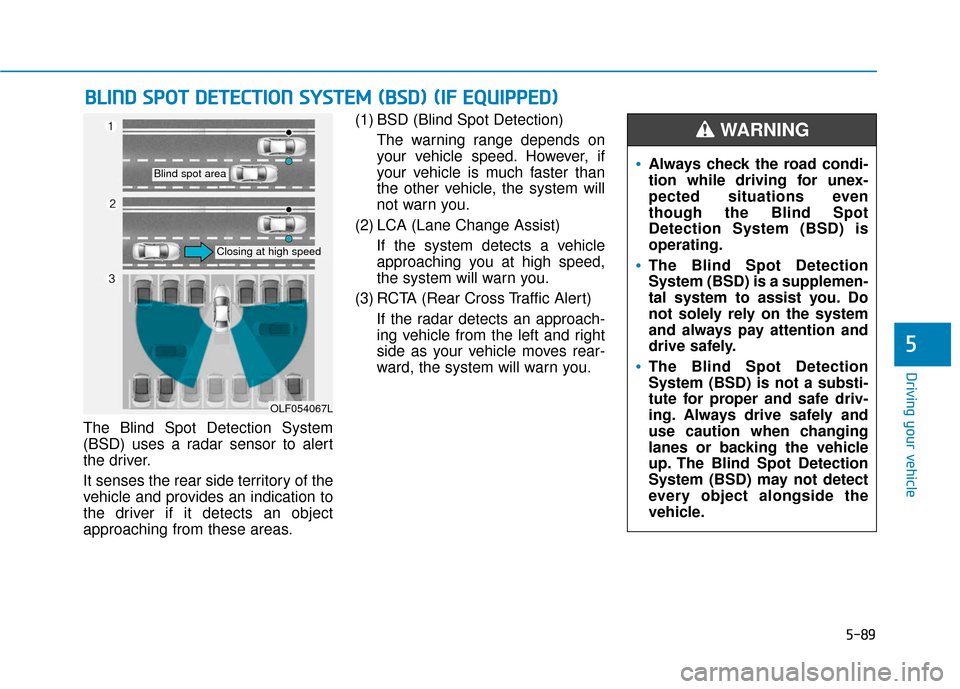
The Blind Spot Detection System
(BSD) uses a radar sensor to alert
the driver.
It senses the rear side territory of the
vehicle and provides an indication to
the driver if it detects an object
approaching from these areas.(1) BSD (Blind Spot Detection)
The warning range depends on
your vehicle speed. However, if
your vehicle is much faster than
the other vehicle, the system will
not warn you.
(2) LCA (Lane Change Assist) If the system detects a vehicle
approaching you at high speed,
the system will warn you.
(3) RCTA (Rear Cross Traffic Alert) If the radar detects an approach-
ing vehicle from the left and right
side as your vehicle moves rear-
ward, the system will warn you.
B BL
LI
IN
N D
D
S
S P
P O
O T
T
D
D E
ET
T E
EC
CT
T I
IO
O N
N
S
S Y
Y S
ST
T E
EM
M
(
( B
B S
SD
D )
)
(
( I
IF
F
E
E Q
Q U
UI
IP
P P
PE
ED
D )
)
OLF054067L
Blind spot area
Closing at high speed
Always check the road condi-
tion while driving for unex-
pected situations even
though the Blind Spot
Detection System (BSD) is
operating.
The Blind Spot Detection
System (BSD) is a supplemen-
tal system to assist you. Do
not solely rely on the system
and always pay attention and
drive safely.
The Blind Spot Detection
System (BSD) is not a substi-
tute for proper and safe driv-
ing. Always drive safely and
use caution when changing
lanes or backing the vehicle
up. The Blind Spot Detection
System (BSD) may not detect
every object alongside the
vehicle.
WARNING
Page 341 of 522
5-91
Driving your vehicle
5
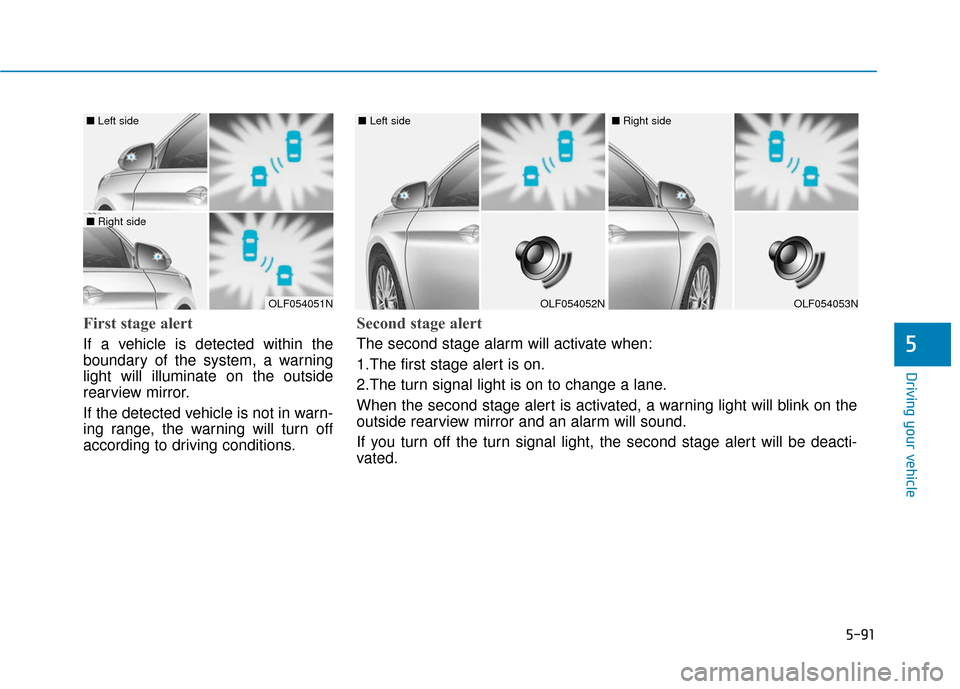
First stage alert
If a vehicle is detected within the
boundary of the system, a warning
light will illuminate on the outside
rearview mirror.
If the detected vehicle is not in warn-
ing range, the warning will turn off
according to driving conditions.
OLF054051N
■ Left side
■ Right side
OLF054052N
■ Left side
OLF054053N
■ Right side
Second stage alert
The second stage alarm will activate when:
1.The first stage alert is on.
2.The turn signal light is on to change a lane.
When the second stage alert is activated, a warning light will blink on the
outside rearview mirror and an alarm will sound.
If you turn off the turn signal light, the second stage alert will be deacti-
vated.
Page 343 of 522
5-93
Driving your vehicle
5
If the system does not work properly,
a warning message will appear and
the light on the switch will turn off.
The system will turn off automatical-
ly. Have your vehicle checked by an
authorized HYUNDAI dealer.
RCTA (Rear Cross Traffic Alert)
Operating conditions
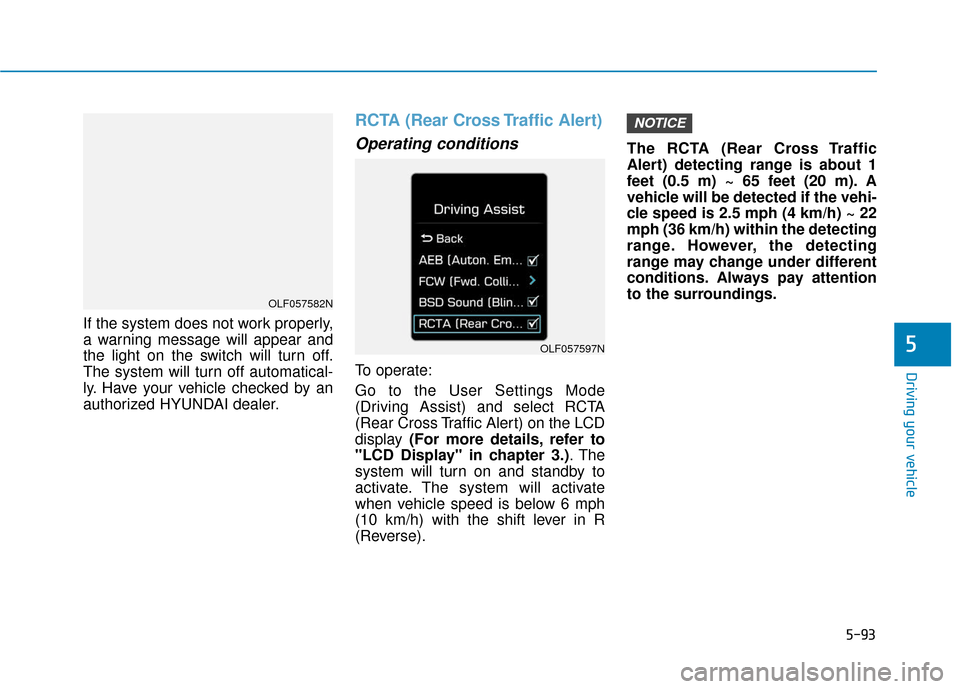
To operate:
Go to the User Settings Mode
(Driving Assist) and select RCTA
(Rear Cross Traffic Alert) on the LCD
display (For more details, refer to
"LCD Display" in chapter 3.) . The
system will turn on and standby to
activate. The system will activate
when vehicle speed is below 6 mph
(10 km/h) with the shift lever in R
(Reverse). The RCTA (Rear Cross Traffic
Alert) detecting range is about 1
feet (0.5 m) ~ 65 feet (20 m). A
vehicle will be detected if the vehi-
cle speed is 2.5 mph (4 km/h) ~ 22
mph (36 km/h) within the detecting
range. However, the detecting
range may change under different
conditions. Always pay attention
to the surroundings.
NOTICE
OLF057597N
OLF057582N
Page 344 of 522
5-94
Driving your vehicle
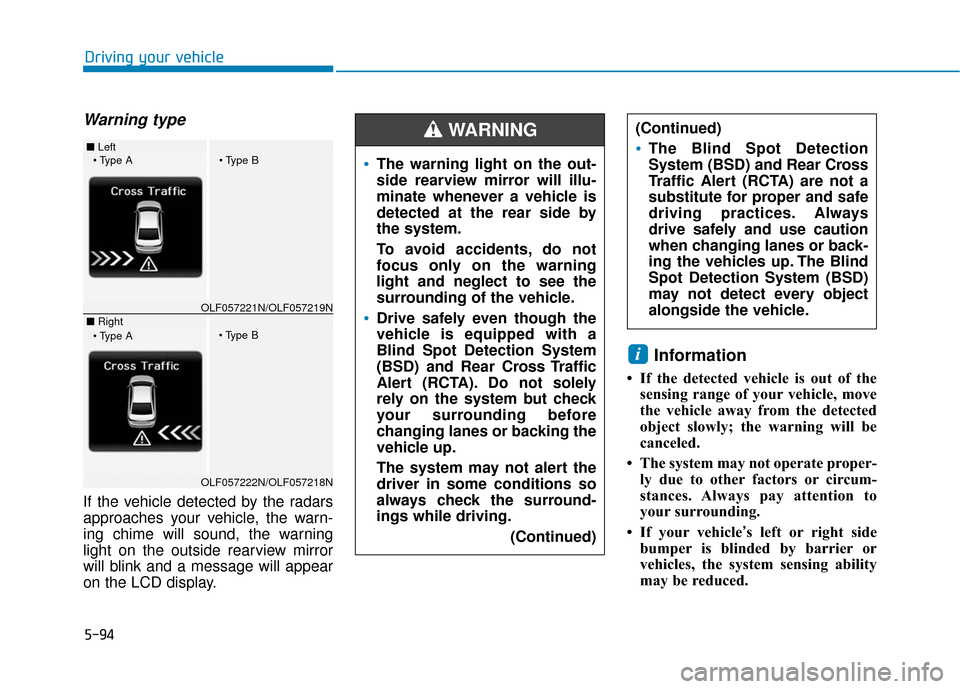
Warning type
If the vehicle detected by the radars
approaches your vehicle, the warn-
ing chime will sound, the warning
light on the outside rearview mirror
will blink and a message will appear
on the LCD display.
Information
• If the detected vehicle is out of thesensing range of your vehicle, move
the vehicle away from the detected
object slowly; the warning will be
canceled.
• The system may not operate proper- ly due to other factors or circum-
stances. Always pay attention to
your surrounding.
• If your vehicle’s left or right side bumper is blinded by barrier or
vehicles, the system sensing ability
may be reduced.
i
The warning light on the out-
side rearview mirror will illu-
minate whenever a vehicle is
detected at the rear side by
the system.
To avoid accidents, do not
focus only on the warning
light and neglect to see the
surrounding of the vehicle.
Drive safely even though the
vehicle is equipped with a
Blind Spot Detection System
(BSD) and Rear Cross Traffic
Alert (RCTA). Do not solely
rely on the system but check
your surrounding before
changing lanes or backing the
vehicle up.
The system may not alert the
driver in some conditions so
always check the surround-
ings while driving.
(Continued)
(Continued)
The Blind Spot Detection
System (BSD) and Rear Cross
Traffic Alert (RCTA) are not a
substitute for proper and safe
driving practices. Always
drive safely and use caution
when changing lanes or back-
ing the vehicles up. The Blind
Spot Detection System (BSD)
may not detect every object
alongside the vehicle.
WARNING ■ Left
■ RightOLF057221N/OLF057219N
OLF057222N/OLF057218N
Page 345 of 522
5-95
Driving your vehicle
5
The system may not work prop-erly if the bumper has been
replaced or if repair work has
been done near the radar.
The detection area differs according to the roads width. If
the road is narrow the system
may detect other vehicles in the
next lane. In addition, if the road
is very wide the system may not
detect other vehicles.
The system may turn off due to strong electromagnetic waves.
Non-operating condition
Outside rearview mirror may not
alert the driver when:
- The outside rearview mirror hous-ing is damaged or covered with
debris.
- The window is covered with debris.
- The windows are severely tinted.
DRIVER'S ATTENTION
The driver must be cautious in the
below situations for the system
may not detect other vehicles or
objects in certain circumstances.
- Curved roads, tollgates, etc.
- The surrounding of the radar is polluted with rain, snow, mud,
etc
- The rear bumper near the radar is covered or hidden with a for-
eign matter such as a sticker,
bumper guard, bicycle stand etc.
- The rear bumper is damaged or the radar is out of place.
- The height of the vehicle is altered such as when the trunk is
loaded with heavy objects, or
there is low tire pressure etc.
- Bad weather such as heavy rain or snow.
- A fixed object is near such as a guardrail, tunnel, human and ani-
mal etc.
(Continued)
NOTICE
Page 379 of 522
6-8
What to do in an emergency6. If you cannot find the cause of theoverheating, wait until the engine
temperature has returned to nor-
mal. Then, if coolant has been
lost, carefully add coolant to the
reservoir to bring the fluid level in
the reservoir up to the halfway
mark.
7. Proceed with caution, keeping alert for further signs of overheat-
ing. If overheating happens again,
call an authorized HYUNDAI deal-
er for assistance.
Serious loss of coolant indi-
cates a leak in the cooling sys-
tem and should be checked as
soon as possible by an author-
ized HYUNDAI dealer.
CAUTION
NEVER remove the
radiator cap or the
drain plug while the
engine and radiator
are hot. Hot coolant
and steam may blow out under
pressure, causing serious
injury.
Turn the engine off and wait
until the engine cools down.
Use extreme care when remov-
ing the radiator cap. Wrap a
thick towel around it, and turn it
counterclockwise slowly to the
first stop. Step back while the
pressure is released from the
cooling system. When you are
sure all the pressure has been
released, press down on the
cap, using a thick towel, and
continue turning counterclock-
wise to remove it.
WARNING
Page 385 of 522
6-14
What to do in an emergency
A cold tire means the vehicle has
been sitting for 3 hours and driven for
less than 1 mile (1.6 km) in that 3
hour period.
Allow the tire to cool before measur-
ing the inflation pressure. Always be
sure the tire is cold before inflating to
the recommended pressure.
Information
This device complies with Part 15 of
the FCC rules.
Operation is subject to the following
three conditions:
1. This device may not cause harmful interference, and
2. This device must accept any inter- ference received, including interfer-
ence that may cause undesired
operation.
3. Changes or modifications not expressly approved by the party
responsible for compliance could
void the user's authority to operate
the equipment.
i
The TPMS cannot alert you to
severe and sudden tire dam-
age caused by external fac-
tors such as nails or road
debris.
If you feel any vehicle instabil-
ity, immediately take your foot
off the accelerator, apply the
brakes gradually with light
force, and slowly move to a
safe position off the road.
WARNING
Tampering with, modifying, or
disabling the Tire Pressure
Monitoring System (TPMS)
components may interfere with
the system's ability to warn the
driver of low tire pressure con-
ditions and/or TPMS malfunc-
tions. Tampering with, modify-
ing, or disabling the Tire
Pressure Monitoring System
(TPMS) components may void
the warranty for that portion of
the vehicle.
WARNING
Page 514 of 522
I-2
Accessing your vehicle .....................................................3-4Immobilizer System ...................................................3-12
Remote Key ..................................................................3-4
Smart Key.....................................................................3-8\
Air Bag - Advanced Supplemental Restraint System.....2-45 Additional Safety Precautions ....................................2-67
Air Bag Warning Labels.............................................2-68
How Does the Air Bag System Operate? ...................2-51
Occupant Classification System (OCS) .....................2-56
SRS Care ....................................................................2-66\
What to Expect After an Air Bag Inflates ..................2-55
Where Are the Air Bags? ...........................................2-47
Why Didn't My Air Bag Go Off in a Collision? (Air bags are not designed to inflate in
every collision.).......................................................2-61
Air Cleaner......................................................................7-\
31 Filter Replacement .....................................................7-31
Air Conditioning System ..................................................8-6
Appearance Care .............................................................7-77 Exterior Care ..............................................................7-77
Interior Care ...............................................................7-82
Automatic climate control system ................................3-132 Automatic Heating and Air Conditioning ................3-133
Manual heating and Air Conditioning......................3-134
System Maintenance ................................................3-142
System Operation .....................................................3-140 Automatic emergency braking (AEB) ............................5-97
AEB warning message and system control................5-99
Limitation of the system ..........................................5-105
Sensor to detect the distance from the vehicle in front (front radar) ..............................................5-102
System malfunction ..................................................5-103
System setting and activation .....................................5-97
Battery ........................................................................\
.....7-37 Battery Recharging .....................................................7-38
For Best Battery Service ............................................7-38
Reset features .............................................................7-39
Before Driving ..................................................................5-4 Before Entering the Vehicle .........................................5-4
Before Starting .............................................................5-4
Blind Spot Detection System (BSD) ..............................5-89 BSD (Blind Spot Detection) / LCA (Lane Change Assist) .....................................5-90
RCTA (Rear Cross Traffic Alert) ...............................5-93
Brake Fluid .....................................................................7-2\
9 Checking the Brake Fluid Level ................................7-29
Index
A
B