tire Hyundai Sonata 2019 Owner's Manual
[x] Cancel search | Manufacturer: HYUNDAI, Model Year: 2019, Model line: Sonata, Model: Hyundai Sonata 2019Pages: 522, PDF Size: 15.66 MB
Page 13 of 522
1-2
E
EX
X T
TE
ER
R I
IO
O R
R
O
O V
VE
ER
R V
V I
IE
E W
W
(
( I
I)
)
Your vehicle at a glance
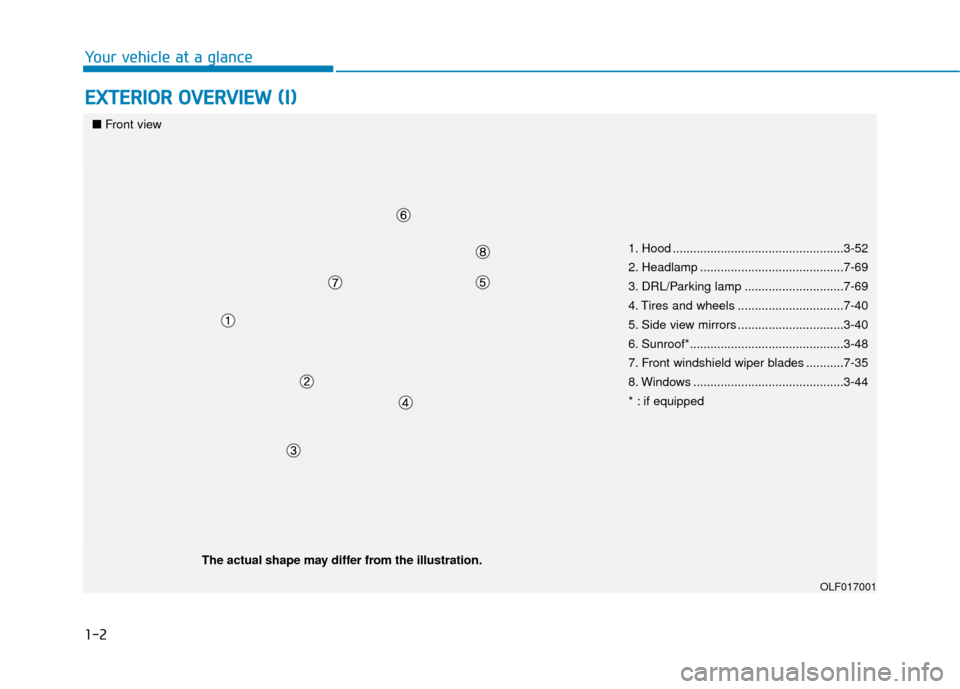
1. Hood ..................................................3-52
2. Headlamp ..........................................7-69
3. DRL/Parking lamp .............................7-69
4. Tires and wheels ...............................7-40
5. Side view mirrors ...............................3-40
6. Sunroof*.............................................3-48
7. Front windshield wiper blades ...........7-35
8. Windows ............................................3-44
* : if equipped
OLF017001
■ Front view
The actual shape may differ from the illustration.
Page 20 of 522
2-3
Safety system of your vehicle
• ALWAYS set up your mobile devices(i.e., MP3 players, phones, naviga-
tion units, etc.) when your vehicle is
parked or safely stopped.
ONLY use your mobile device when allowed by laws and when conditions
permit safe use. NEVER text or
email while driving. Most states have
laws prohibiting drivers from texting.
Some states and cities also prohibit
drivers from using handheld phones.
NEVER let the use of a mobile device distract you from driving. You
have a responsibility to your passen-
gers and others on the road to
always drive safely, with your hands
on the wheel as well as your eyes
and attention on the road.Control Your Speed
Excessive speed is a major factor in
crash injuries and deaths. Generally,
the higher the speed, the greater the
risk, but serious injuries can also
occur at lower speeds. Never drive
faster than is safe for current condi-
tions, regardless of the maximum
speed posted.
Keep Your Vehicle in Safe
Condition
Having a tire blowout or a mechanical
failure can be extremely hazardous. To
reduce the possibility of such prob-
lems, check your tire pressures and
condition frequently, and perform all
regularly scheduled maintenance.
2
Page 40 of 522
2-23
Safety system of your vehicle
2
Seat Belt Warning Light
Seat belt warning light (for driver's seat)
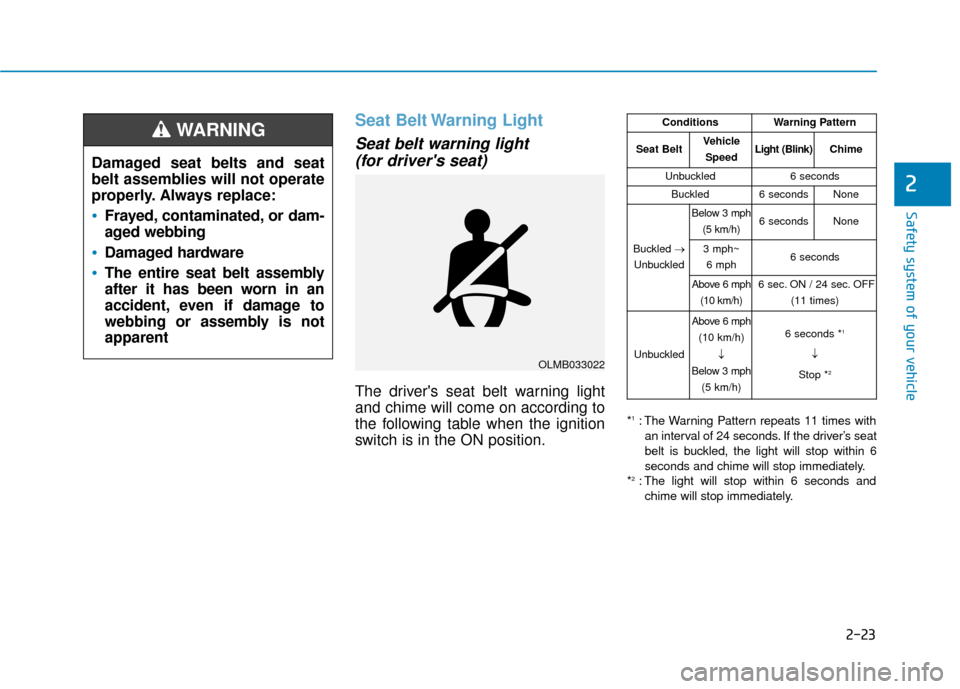
The driver's seat belt warning light
and chime will come on according to
the following table when the ignition
switch is in the ON position.
*1: The Warning Pattern repeats 11 times with
an interval of 24 seconds. If the driver’s seat
belt is buckled, the light will stop within 6
seconds and chime will stop immediately.
*
2: The light will stop within 6 seconds and chime will stop immediately.
Damaged seat belts and seat
belt assemblies will not operate
properly. Always replace:
Frayed, contaminated, or dam-
aged webbing
Damaged hardware
The entire seat belt assembly
after it has been worn in an
accident, even if damage to
webbing or assembly is not
apparent
WARNING
OLMB033022
ConditionsWarning Pattern
Seat BeltVehicle
SpeedLight (Blink)Chime
Unbuckled6 seconds
Buckled6 secondsNone
Buckled →
Unbuckled
Below 3 mph (5 km/h)6 secondsNone
3 mph~6 mph6 seconds
Above 6 mph (10 km/h)6 sec. ON / 24 sec. OFF (11 times)
Unbuckled
Above 6 mph(10 km/h)
↓
Below 3 mph
(5 km/h)6 seconds *1
↓
Stop *
2
Page 50 of 522
2-33
Safety system of your vehicle
2
A seat belt cannot provide proper
protection if the person is lying down
in the rear seat or if the front or rear
seats are in a reclined position.Care of Seat Belts
Seat belt systems should never be
disassembled or modified. In addi-
tion, care should be taken to assure
that seat belts and belt hardware are
not damaged by seat hinges, doors
or other abuse.
Periodic inspection
All seat belts should be inspected
periodically for wear or damage of
any kind. Any damaged parts should
be replaced as soon as possible by
an authorized HYUNDAI dealer.
Keep belts clean and dry
Seat belts should be kept clean and
dry. If belts become dirty, they can be
cleaned by using a mild soap solu-
tion and warm water. Bleach, dye,
strong detergents or abrasives
should not be used because they
may damage and weaken the fabric.
When to replace seat belts
The entire seat belt assembly or
assemblies should be replaced if the
vehicle has been involved in an acci-
dent. This should be done even if no
damage is visible. Additional ques-
tions concerning seat belt operation
should be directed to an authorized
HYUNDAI dealer.
NEVER ride with a reclined
seatback when the vehicle is
moving.
Riding with a reclined seatback
increases your chance of seri-
ous or fatal injuries in the event
of a collision or sudden stop.
Drivers and passengers should
always sit well back in their
seats, properly belted, and with
the seatbacks upright.
WARNING
Page 52 of 522
2-35
Safety system of your vehicle
2
Child restraint system (CRS)
Infants and younger children must be
restrained in an appropriate rear-fac-
ing or forward-facing CRS that has
first been properly secured to the
rear seat of the vehicle. Read and
comply with the instructions for
installation and use provided by the
manufacturer of the child restraint.
Selecting a Child Restraint
System (CRS)
When selecting a CRS for your child,
always:
Make sure the CRS has a labelcertifying that it meets applicable
Federal Motor Vehicle Safety
Standards (FMVSS 213).
Select a child restraint based on your child's height and weight. The
required label or the instructions
for use typically provide this infor-
mation.
Select a child restraint that fits the vehicle seating position where it
will be used.
Read and comply with the warn- ings and instructions for installation
and use provided with the child
restraint system.
(Continued)Always follow the child
restraint system manufactur-
er's instructions for installa-
tion and use.
Always properly restrain your
child in the child restraint.
If the vehicle head restraint
prevents proper installation of
a child seat (as described in
the child restraint system
manual), the head restraint of
the respective seating posi-
tion shall be readjusted or
entirely removed.
Do not use an infant carrier or
a child safety seat that
"hooks" over a seatback, it
may not provide adequate
protection in an accident.
After an accident, have a
HYUNDAI dealer check the
child restraint system, seat
belts, tether anchors and
lower anchors.
An improperly secured child
restraint can increase the risk
of SERIOUS INJURY or DEATH
in an accident. Always take the
following precautions when
using a child restraint system:
NEVER install a child or infant
restraint in the front passen-
ger's seat.
Always properly secure the
child restraint to a rear seat of
the vehicle.
(Continued)
WARNING
Page 54 of 522
2-37
Safety system of your vehicle
2
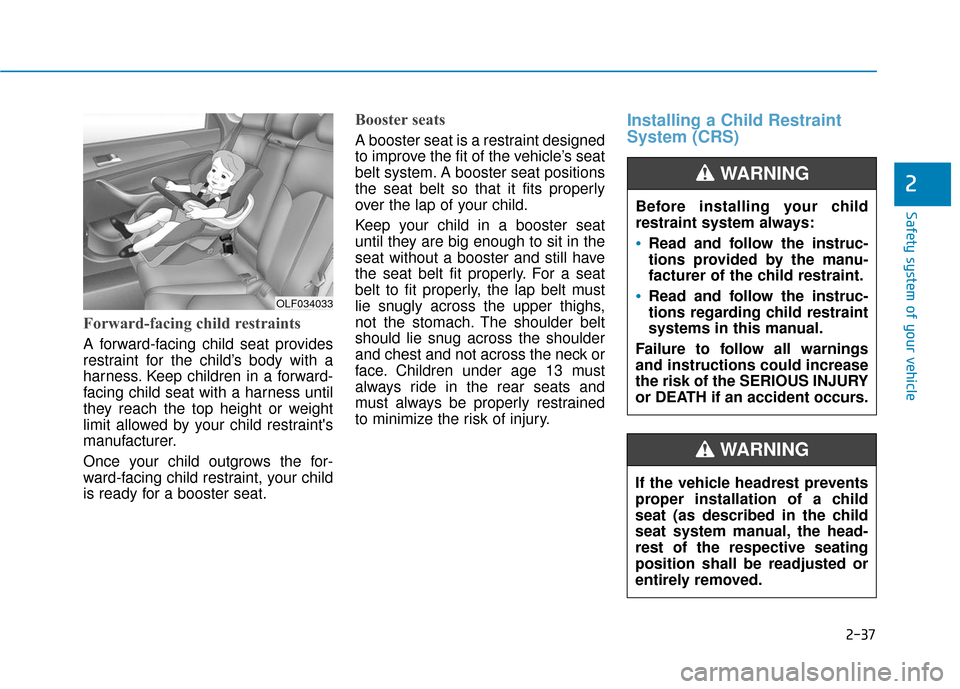
Forward-facing child restraints
A forward-facing child seat provides
restraint for the child’s body with a
harness. Keep children in a forward-
facing child seat with a harness until
they reach the top height or weight
limit allowed by your child restraint's
manufacturer.
Once your child outgrows the for-
ward-facing child restraint, your child
is ready for a booster seat.
Booster seats
A booster seat is a restraint designed
to improve the fit of the vehicle’s seat
belt system. A booster seat positions
the seat belt so that it fits properly
over the lap of your child.
Keep your child in a booster seat
until they are big enough to sit in the
seat without a booster and still have
the seat belt fit properly. For a seat
belt to fit properly, the lap belt must
lie snugly across the upper thighs,
not the stomach. The shoulder belt
should lie snug across the shoulder
and chest and not across the neck or
face. Children under age 13 must
always ride in the rear seats and
must always be properly restrained
to minimize the risk of injury.
Installing a Child Restraint
System (CRS)
Before installing your child
restraint system always:
Read and follow the instruc-
tions provided by the manu-
facturer of the child restraint.
Read and follow the instruc-
tions regarding child restraint
systems in this manual.
Failure to follow all warnings
and instructions could increase
the risk of the SERIOUS INJURY
or DEATH if an accident occurs.
WARNING
If the vehicle headrest prevents
proper installation of a child
seat (as described in the child
seat system manual, the head-
rest of the respective seating
position shall be readjusted or
entirely removed.
WARNING
OLF034033
Page 144 of 522
3-59
Convenient features of your vehicle
3
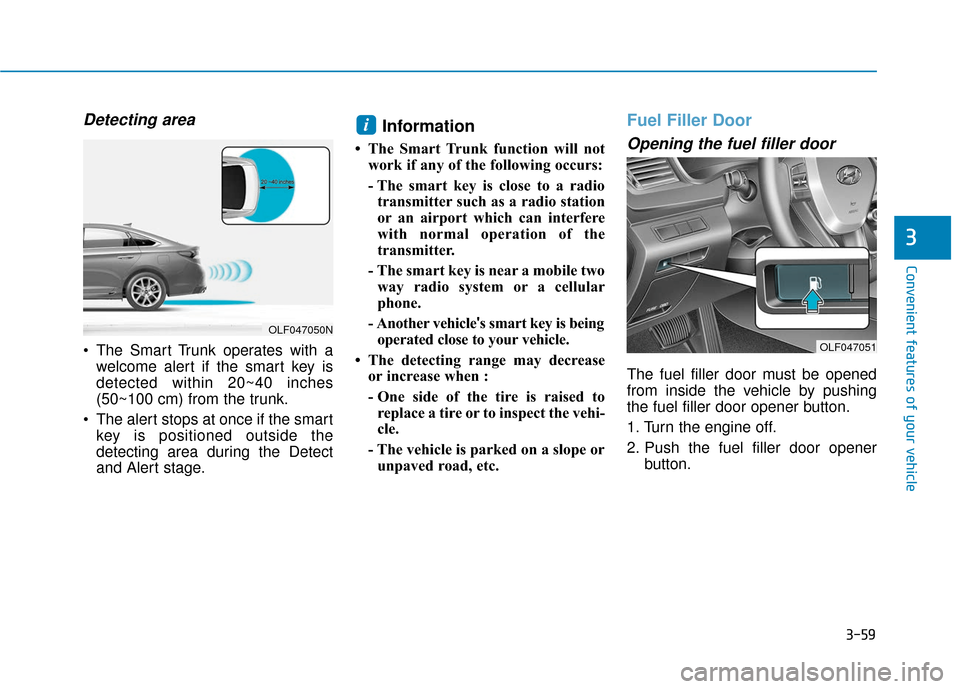
Detecting area
The Smart Trunk operates with awelcome alert if the smart key is
detected within 20~40 inches
(50~100 cm) from the trunk.
The alert stops at once if the smart key is positioned outside the
detecting area during the Detect
and Alert stage.
Information
• The Smart Trunk function will notwork if any of the following occurs:
- The smart key is close to a radiotransmitter such as a radio station
or an airport which can interfere
with normal operation of the
transmitter.
- The smart key is near a mobile two way radio system or a cellular
phone.
- Another vehicle 's smart key is being
operated close to your vehicle.
• The detecting range may decrease or increase when :
- One side of the tire is raised toreplace a tire or to inspect the vehi-
cle.
- The vehicle is parked on a slope or unpaved road, etc.
Fuel Filler Door
Opening the fuel filler door
The fuel filler door must be opened
from inside the vehicle by pushing
the fuel filler door opener button.
1. Turn the engine off.
2. Push the fuel filler door opener button.
i
OLF047050N
OLF047051
Page 157 of 522
3-72
Convenient features of your vehicle
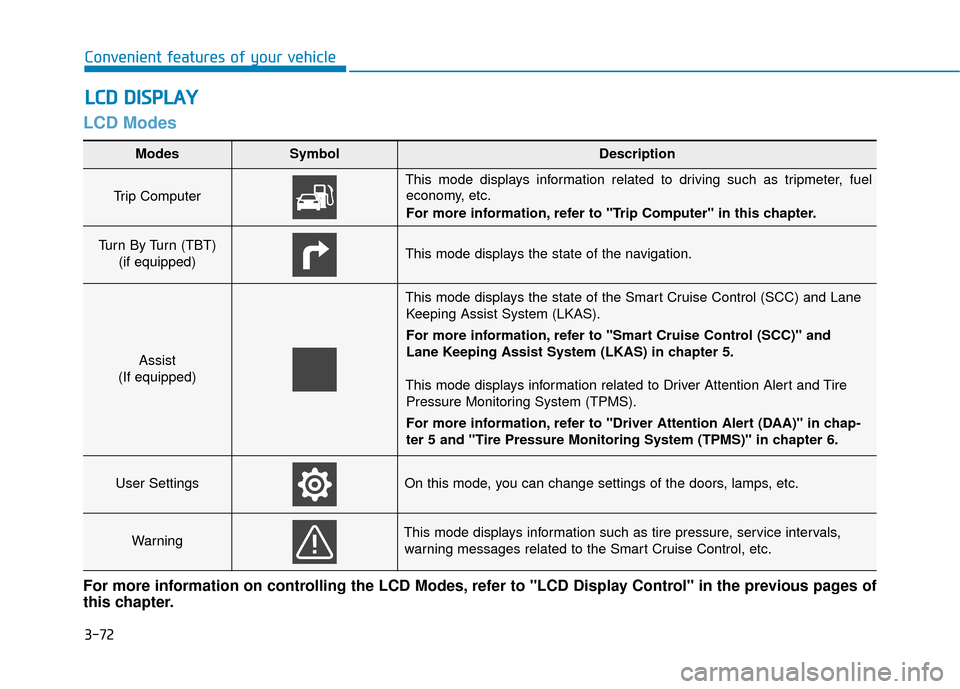
LCD Modes
L
LC
C D
D
D
D I
IS
S P
P L
LA
A Y
Y
Modes SymbolDescription
Trip Computer
This mode displays information related to driving such as tripmeter, fuel
economy, etc.
For more information, refer to "Trip Computer" in this chapter.
Turn By Turn (TBT)
(if equipped)This mode displays the state of the navigation.
Assist
(If equipped)
This mode displays the state of the Smart Cruise Control (SCC) and Lane Keeping Assist System (LKAS).
For more information, refer to "Smart Cruise Control (SCC)" and
Lane Keeping Assist System (LKAS) in chapter 5.
This mode displays information related to Driver Attention Alert and Tire Pressure Monitoring System (TPMS).
For more information, refer to "Driver Attention Alert (DAA)" in chap-
ter 5 and "Tire Pressure Monitoring System (TPMS)" in chapter 6.
User SettingsOn this mode, you can change settings of the doors, lamps, etc.
WarningThis mode displays information such as tire pressure, service intervals,warning messages related to the Smart Cruise Control, etc.
For more information on controlling the LCD Modes, refer to "LCD Display Control" in the previous pages of
this chapter.
Page 159 of 522
3-74
Convenient features of your vehicle
Turn By Turn (TBT) Mode (if equipped)
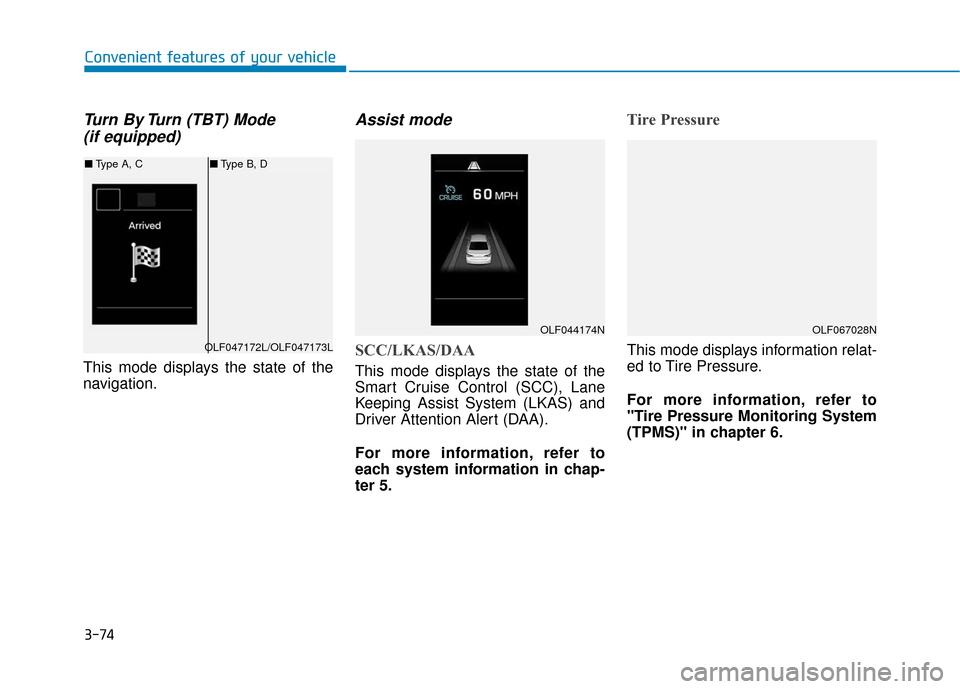
This mode displays the state of the
navigation.
Assist mode
SCC/LKAS/DAA
This mode displays the state of the
Smart Cruise Control (SCC), Lane
Keeping Assist System (LKAS) and
Driver Attention Alert (DAA).
For more information, refer to
each system information in chap-
ter 5.
Tire Pressure
This mode displays information relat-
ed to Tire Pressure.
For more information, refer to
"Tire Pressure Monitoring System
(TPMS)" in chapter 6.
OLF044174N
OLF047172L/OLF047173L
■ Type A, C ■Type B, D
OLF067028N
Page 164 of 522
3-79
Convenient features of your vehicle
If the service interval is activated and
the time and distance is adjusted,
messages are displayed in the fol-
lowing situations each time the vehi-
cle is turned on.
- Service in: Displayed to inform the driver theremaining mileage and days to
service.
- Service required : Displayed when the mileage anddays to service has been reached
or passed.
Information
If any of the following conditions
occur, the mileage and number of days
to service may be incorrect.
- The battery cable is disconnected.
- The fuse switch is turned off.
- The battery is discharged. 7. Other Features
Fuel Economy Auto Reset
- Off: The average fuel economy will
not reset automatically whenever
refueling.
- After Ignition: The average fuel economy will reset automatically
whenever it has passed 4 hours
after turning OFF the engine.
- After recharging: The average fuel economy will reset automatically
when refueling.
For more information, refer to
"Trip Computer" in this chapter.
Fuel Economy Unit
To select the fuel economy unit.
(km/L, L/100, MPG)
Temperature Unit
To select the temperature unit.
(°C,°F)
Tire Pressure Unit
To select the tire pressure unit.
(psi, kPa, bar) 8. Reset
You can reset the menus in the User
Settings Mode. All menus in the User
Settings Mode are initialized, except
language and service interval.
i
3