display Hyundai Sonata 2020 Owners Manual
[x] Cancel search | Manufacturer: HYUNDAI, Model Year: 2020, Model line: Sonata, Model: Hyundai Sonata 2020Pages: 537, PDF Size: 14.54 MB
Page 365 of 537
06
6-81
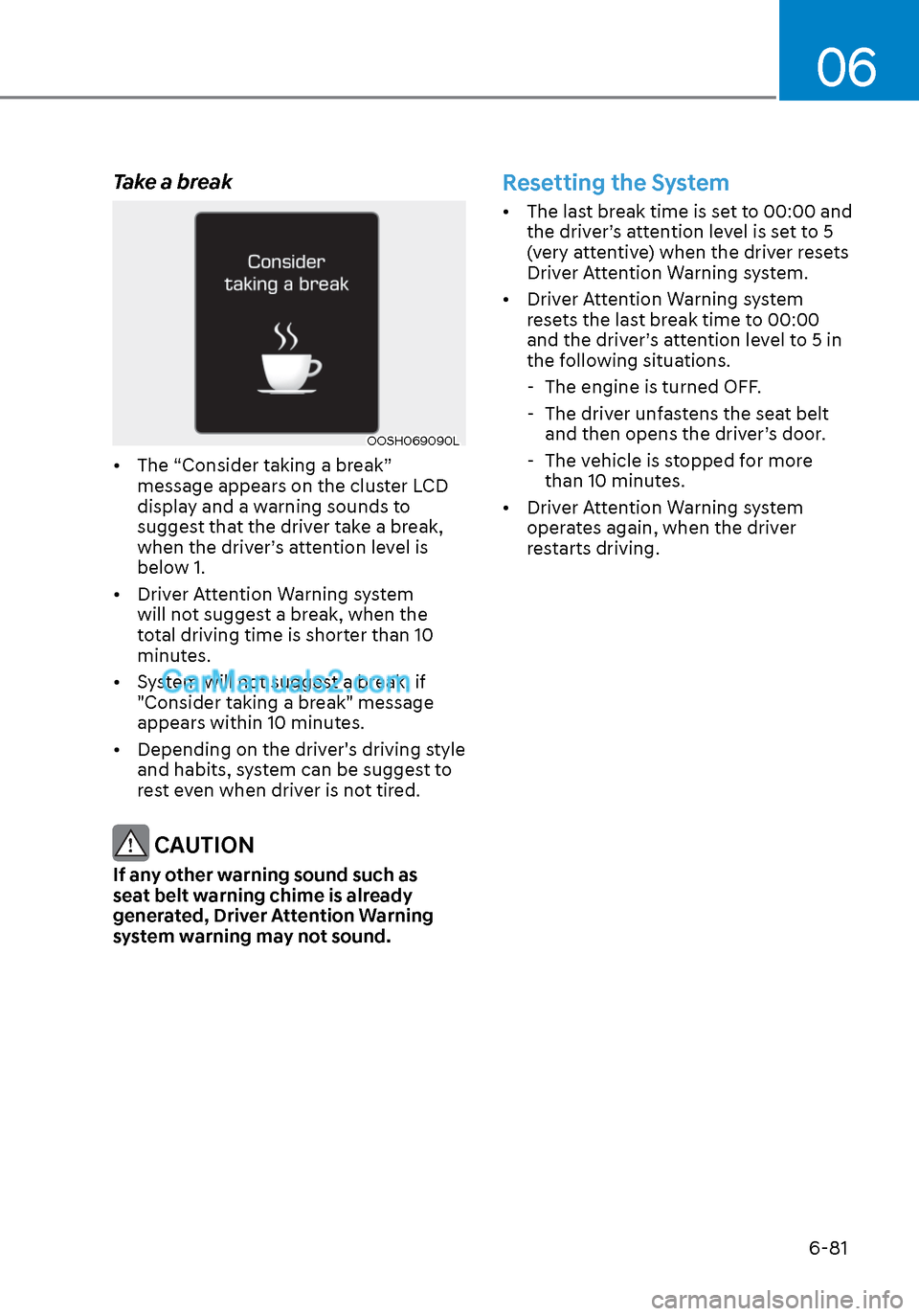
Take a break
OOSH069090LOOSH069090L
• The “Consider taking a break” message appears on the cluster LCD
display and a warning sounds to
suggest that the driver take a break,
when the driver’s attention level is
below 1.
• Driver Attention Warning system will not suggest a break, when the
total driving time is shorter than 10
minutes.
• System will not suggest a break, if "Consider taking a break" message
appears within 10 minutes.
• Depending on the driver's driving style and habits, system can be suggest to
rest even when driver is not tired.
CAUTION
If any other warning sound such as
seat belt warning chime is already
generated, Driver Attention Warning
system warning may not sound.
Resetting the System
• The last break time is set to 00:00 and the driver’s attention level is set to 5
(very attentive) when the driver resets
Driver Attention Warning system.
• Driver Attention Warning system resets the last break time to 00:00
and the driver’s attention level to 5 in
the following situations.
- The engine is turned OFF.
- The driver unfastens the seat belt
and then opens the driver’s door.
- The vehicle is stopped for more than 10 minutes.
• Driver Attention Warning system operates again, when the driver
restarts driving.
Page 366 of 537
While Driving6-82
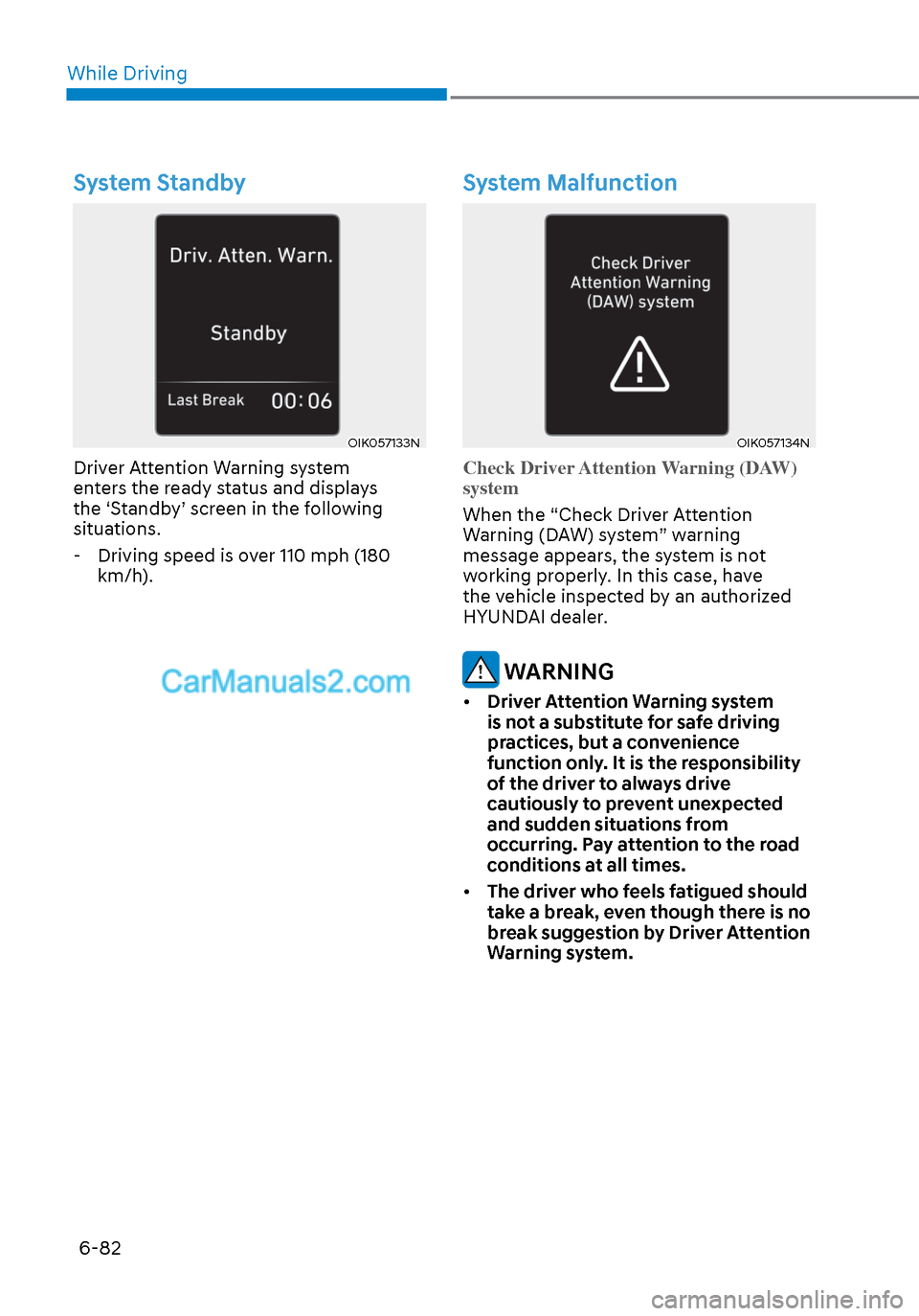
System Standby
OIK057133NOIK057133N
Driver Attention Warning system
enters the ready status and displays
the ‘Standby’ screen in the following
situations. - Driving speed is over 110 mph (180 km/h).
System Malfunction
OIK057134NOIK057134N
Check Driver Attention Warning (DAW)
system
When the “Check Driver Attention
W
arning (DAW) system” warning
message appears, the system is not
working properly. In this case, have
the vehicle inspected by an authorized
HYUNDAI dealer.
WARNING
• Driver Attention Warning system
is not a substitute for safe driving
practices, but a convenience
function only. It is the responsibility
of the driver to always drive
cautiously to prevent unexpected
and sudden situations from
occurring. Pay attention to the road
conditions at all times.
• The driver who feels fatigued should
take a break, even though there is no
break suggestion by Driver Attention
Warning system.
Page 368 of 537
While Driving6-84
Leading Vehicle Departure Alert
(if equipped)
After the vehicle in front departs an alert
informs the driver.
System setting
With the engine ON, Leading Vehicle
Departure Alert function turns on and
gets ready to be activated when the
‘User Settings → Driver Assistance →
Driver Attention Warning → Leading
Vehicle Departure Alert’ is selected on
the cluster. The function stops operation
when the setting is deactivated.
However, if the engine is turned off then
on again, the function maintains the
previous state.
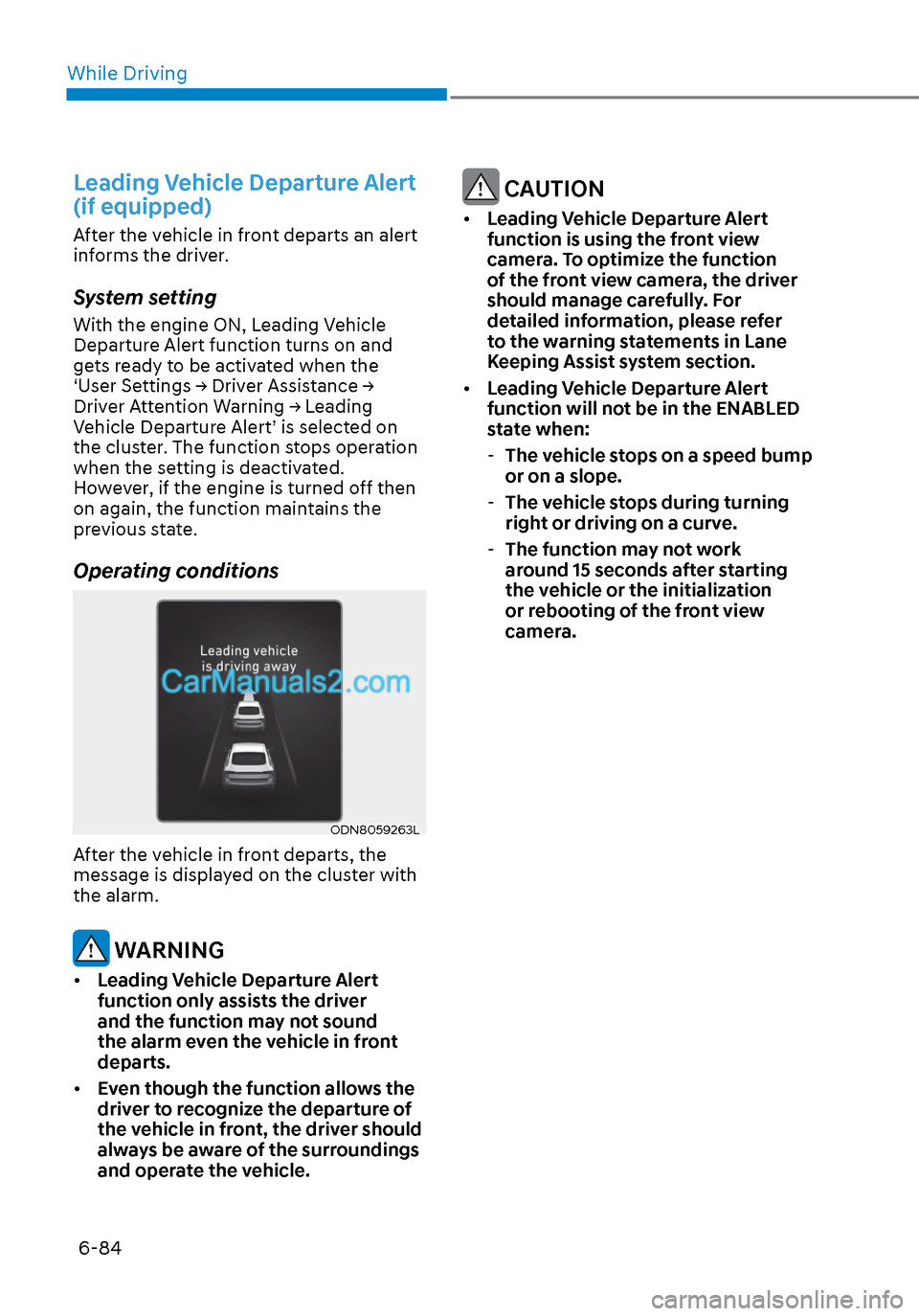
Operating conditions
ODN8059263LODN8059263L
After the vehicle in front departs, the
message is displayed on the cluster with
the alarm.
WARNING
• Leading Vehicle Departure Alert
function only assists the driver
and the function may not sound
the alarm even the vehicle in front
departs.
• Even though the function allows the
driver to recognize the departure of
the vehicle in front, the driver should
always be aware of the surroundings
and operate the vehicle.
CAUTION
• Leading Vehicle Departure Alert
function is using the front view
camera. To optimize the function
of the front view camera, the driver
should manage carefully. For
detailed information, please refer
to the warning statements in Lane
Keeping Assist system section.
• Leading Vehicle Departure Alert
function will not be in the ENABLED
state when:
- The vehicle stops on a speed bump
or on a slope.
- The vehicle stops during turning
right or driving on a curve.
- The function may not work
around 15 seconds after starting
the vehicle or the initialization
or rebooting of the front view
camera.
Page 371 of 537
06
6-87
LeftLeft
ODN8A059141ODN8A059141
RightRight
ODN8A059142ODN8A059142
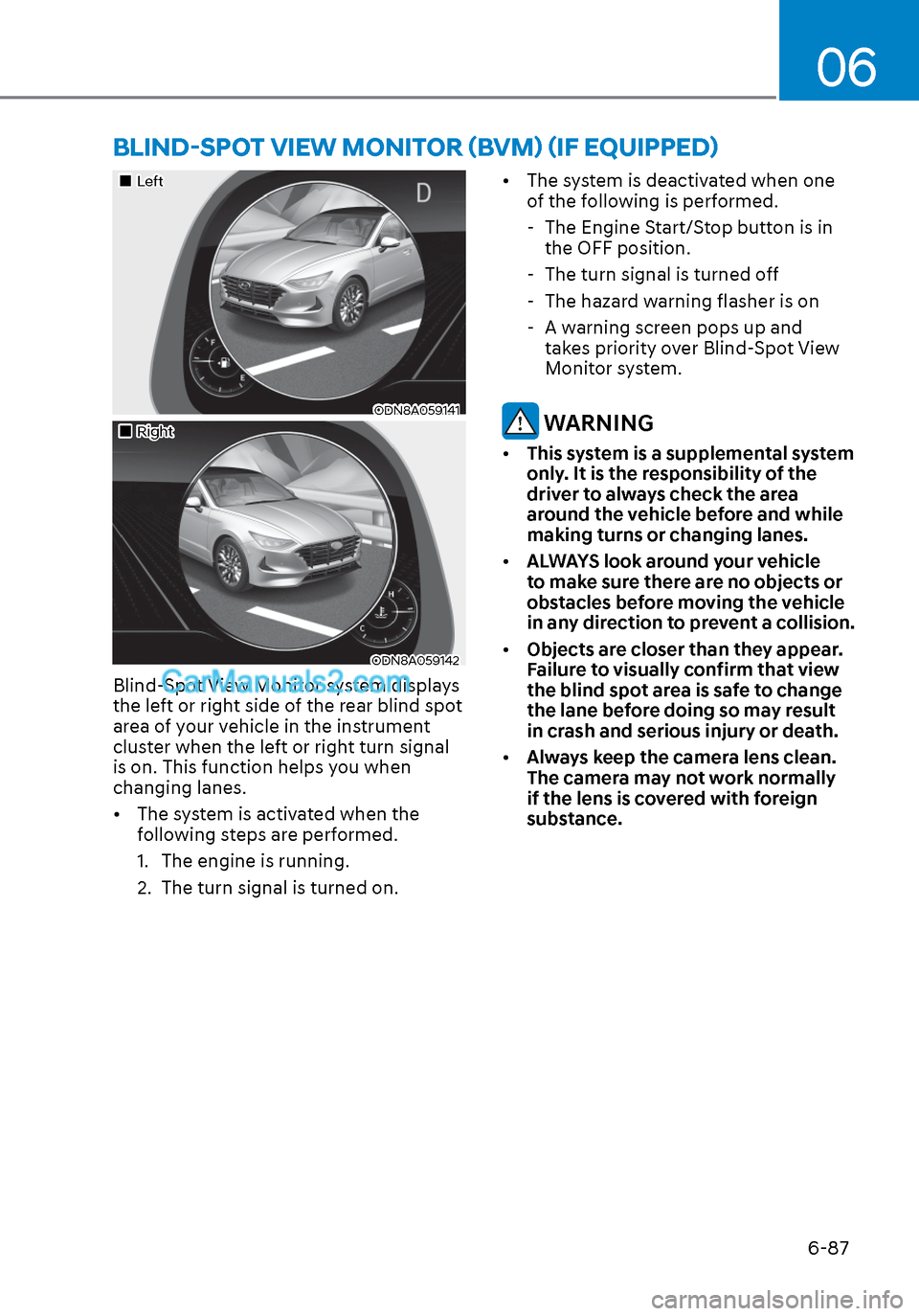
Blind-Spot View Monitor system displays
the left or right side of the rear blind spot
area of your vehicle in the instrument
cluster when the left or right turn signal
is on. This function helps you when
changing lanes.
• The system is activated when the following steps are performed.
1. The engine is running.
2. The turn signal is turned on. • The system is deactivated when one
of the following is performed.
- The Engine Start/Stop button is in the OFF position.
- The turn signal is turned off
- The hazard warning flasher is on
- A warning screen pops up and takes priority over Blind-Spot View
Monitor system.
WARNING
• This system is a supplemental system
only. It is the responsibility of the
driver to always check the area
around the vehicle before and while
making turns or changing lanes.
• ALWAYS look around your vehicle
to make sure there are no objects or
obstacles before moving the vehicle
in any direction to prevent a collision.
• Objects are closer than they appear.
Failure to visually confirm that view
the blind spot area is safe to change
the lane before doing so may result
in crash and serious injury or death.
• Always keep the camera lens clean.
The camera may not work normally
if the lens is covered with foreign
substance.
BLIND-SPOT VIEW MONITOR (BVM) (IF EQUIPPED)
Page 372 of 537
While Driving6-88
ODN8A069211ODN8A069211
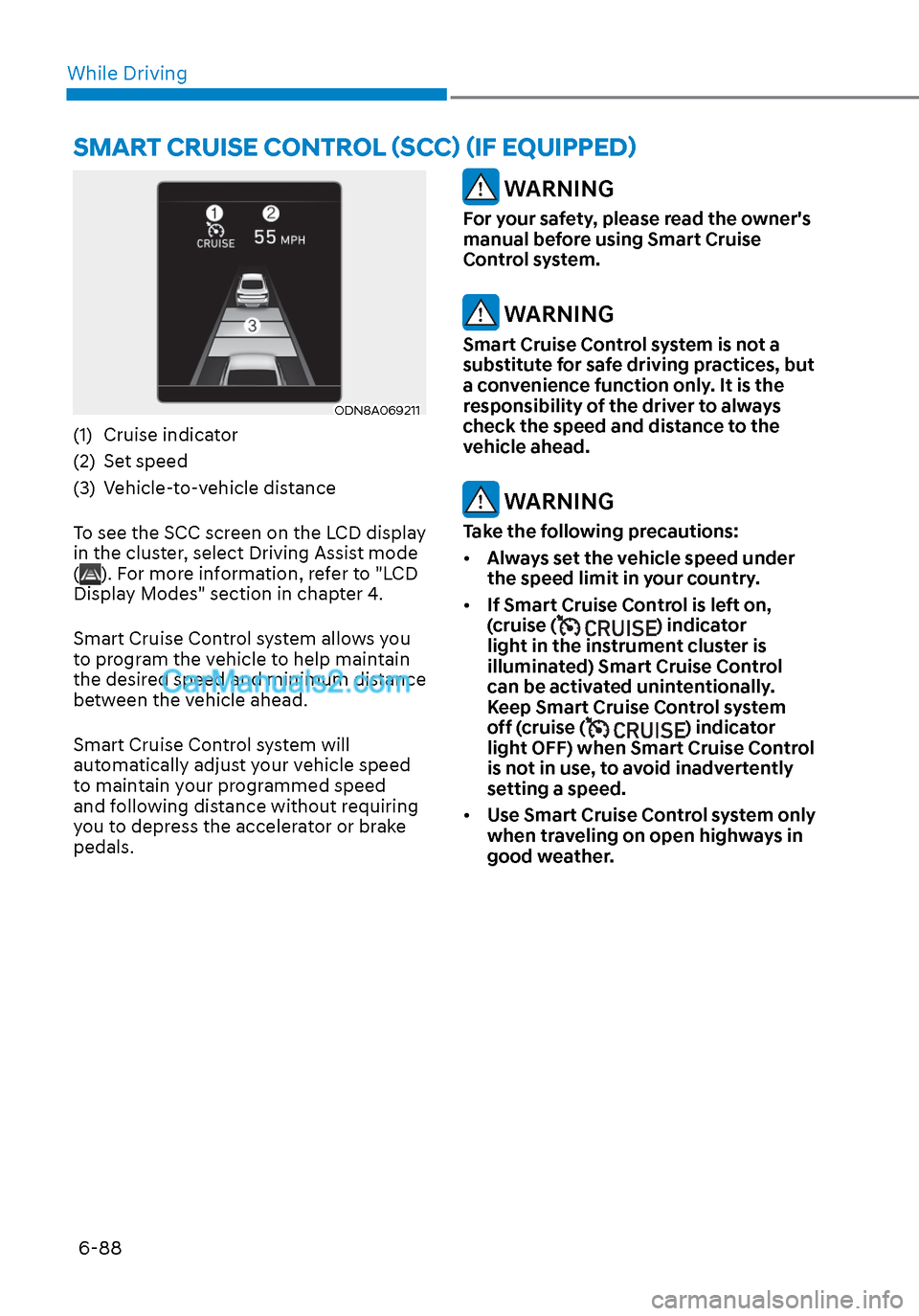
(1) Cruise indicator
(2) Set speed
(3) Vehicle-to-vehicle distance
To see the SCC screen on the LCD display
in the cluster, select Driving Assist mode
(
). For more information, refer to "LCD
Display Modes" section in chapter 4.
Smart Cruise Control system allows you
to program the vehicle to help maintain
the desired speed and minimum distance
between the vehicle ahead.
Smart Cruise Control system will
automatically adjust your vehicle speed
to maintain your programmed speed
and following distance without requiring
you to depress the accelerator or brake
pedals.
WARNING
For your safety, please read the owner's
manual before using Smart Cruise
Control system.
WARNING
Smart Cruise Control system is not a
substitute for safe driving practices, but
a convenience function only. It is the
responsibility of the driver to always
check the speed and distance to the
vehicle ahead.
WARNING
Take the following precautions:
• Always set the vehicle speed under
the speed limit in your country.
• If Smart Cruise Control is left on,
(cruise (
) indicator
light in the instrument cluster is
illuminated) Smart Cruise Control
can be activated unintentionally.
Keep Smart Cruise Control system
off (cruise (
) indicator
light OFF) when Smart Cruise Control
is not in use, to avoid inadvertently
setting a speed.
• Use Smart Cruise Control system only
when traveling on open highways in
good weather.
SMART CRUISE CONTROL (SCC) (IF EQUIPPED)
Page 374 of 537
While Driving6-90
Smart Cruise Control Speed
To set Smart Cruise Control speed
ODN8069043ODN8069043
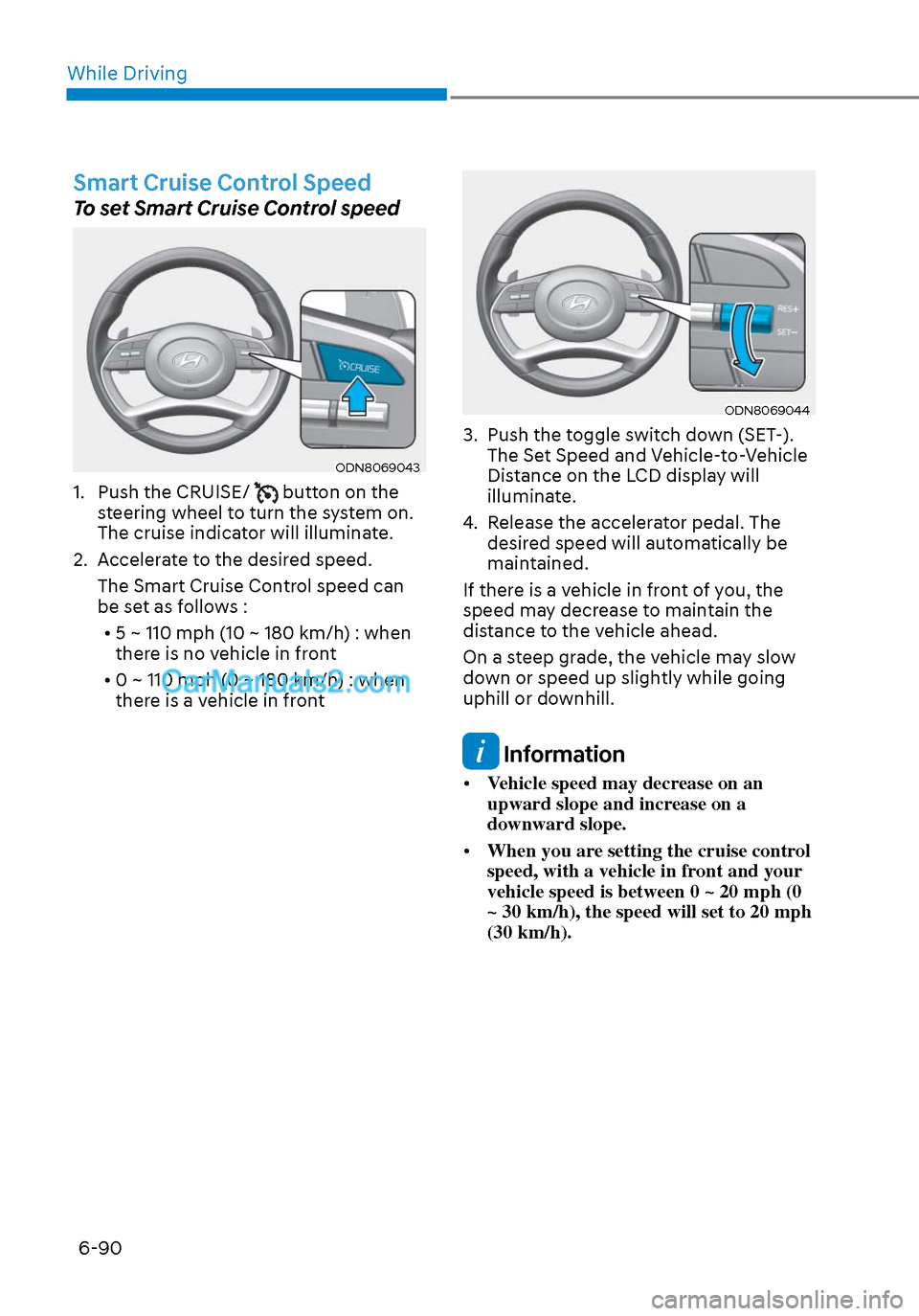
1. Push the CRUISE/ button on the
steering wheel to turn the system on.
The cruise indicator will illuminate.
2. Accelerate to the desired speed. The Smart Cruise Control speed can
be set as follows :
• 5 ~ 110 mph (10 ~ 180 km/h) : when there is no vehicle in front
• 0 ~ 110 mph (0 ~ 180 km/h) : when there is a vehicle in front
ODN8069044ODN8069044
3. Push the toggle switch down (SET-). The Set Speed and Vehicle-to-Vehicle
Distance on the LCD display will
illuminate.
4. Release the accelerator pedal. The desired speed will automatically be
maintained.
If there is a vehicle in front of you, the
speed may decrease to maintain the
distance to the vehicle ahead.
On a steep grade, the vehicle may slow
down or speed up slightly while going
uphill or downhill.
Information
• Vehicle speed may decrease on an
upward slope and increase on a
downward slope.
• When you are setting the cruise control
speed, with a vehicle in front and your
vehicle speed is between 0 ~ 20 mph (0
~ 30 km/h), the speed will set to 20 mph
(30 km/h).
Page 376 of 537
While Driving6-92
To temporarily accelerate with
Smart Cruise Control on
If you want to speed up temporarily
when Smart Cruise Control is on, depress
the accelerator pedal. Increased speed
will not interfere with Smart Cruise
Control operation or change the set
speed.
To return to the set speed, take your foot
off the accelerator pedal.
If you push the toggle switch down
(SET-) at increased speed, the set speed
is updated.
Information
Be careful when accelerating temporarily,
because the speed is not controlled
automatically at this time even if there is a
vehicle in front of you.
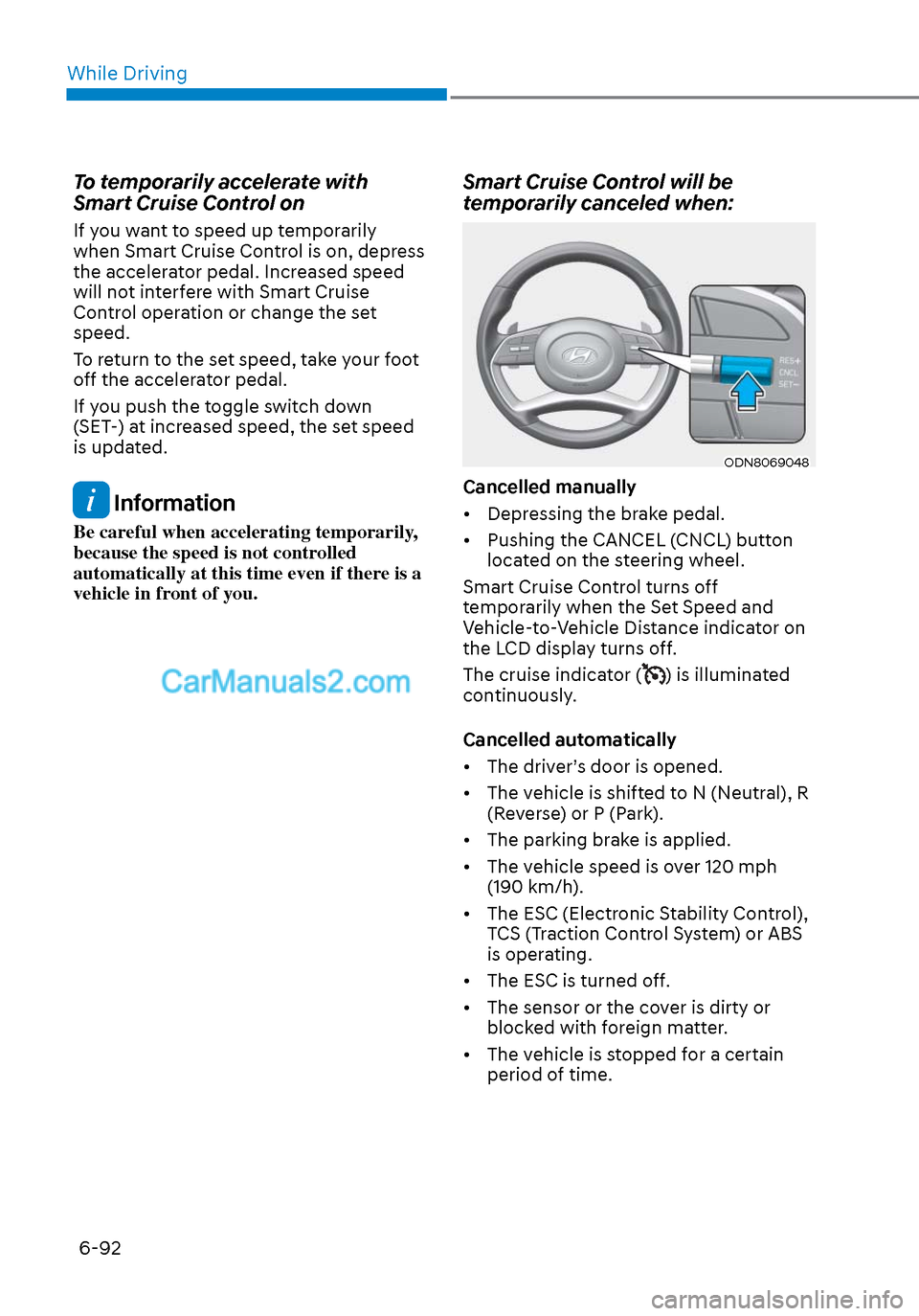
Smart Cruise Control will be
temporarily canceled when:
ODN8069048ODN8069048
Cancelled manually
• Depressing the brake pedal.
• Pushing the CANCEL (CNCL) button located on the steering wheel.
Smart Cruise Control turns off
temporarily when the Set Speed and
Vehicle-to-Vehicle Distance indicator on
the LCD display turns off.
The cruise indicator (
) is illuminated
continuously.
Cancelled automatically
• The driver’s door is opened.
• The vehicle is shifted to N (Neutral), R (Reverse) or P (Park).
• The parking brake is applied.
• The vehicle speed is over 120 mph (190 km/h).
• The ESC (Electronic Stability Control), TCS (Traction Control System) or ABS
is operating.
• The ESC is turned off.
• The sensor or the cover is dirty or blocked with foreign matter.
• The vehicle is stopped for a certain period of time.
Page 377 of 537
06
6-93
• The vehicle is stopped for more than 5 minutes.
• The vehicle stops and goes repeatedly for a long period of time.
• The accelerator pedal is continuously depressed for a long period of time.
• The accelerator pedal is continuously depressed for more than one minute.
• The engine performance is abnormal.
• Engine rpm is in the red zone.
• The driver starts driving by pushing the toggle switch up (RES+)/down
(SET-) or depressing the accelerator
pedal, after the vehicle is stopped by
Smart Cruise Control system with no
other vehicle ahead.
• The driver starts driving by pushing the toggle switch up (RES+)/down
(SET-) or depressing the accelerator
pedal, after stopping the vehicle with
a vehicle stopped far away in front.
• Forward Collision-Avoidance Assist is activated.
• The engine speed is in dangerous range.
• When engine is stopped by ISG (Idle Stop & Go).
Each of these actions will cancel the
Smart Cruise Control operation. The Set
Speed and Vehicle-to-Vehicle Distance
on the LCD display will go off.
In a condition Smart Cruise Control is
cancelled automatically, Smart Cruise
Control will not resume even though the
RES+ or SET- toggle switch is pushed. Information
If Smart Cruise Control is cancelled by
other than the reasons mentioned, have
the vehicle inspected by an authorized
HYUNDAI dealer.
OIK057096LOIK057096L
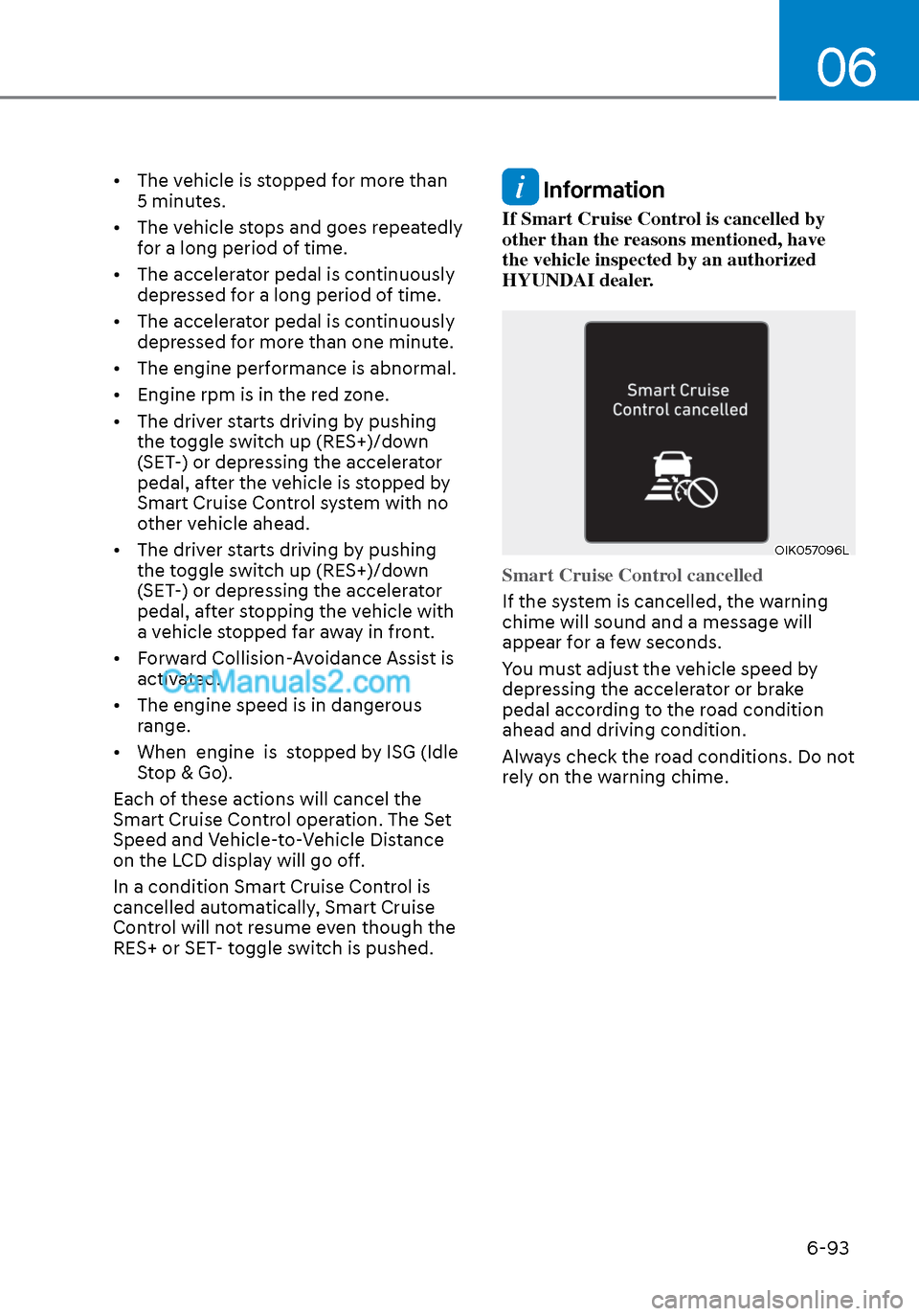
Smart Cruise Control cancelled
If the system is cancelled, the warning
chime will sound and a message will
appear f
or a few seconds.
You must adjust the vehicle speed by
depressing the accelerator or brake
pedal according to the road condition
ahead and driving condition.
Always check the road conditions. Do not
rely on the warning chime.
Page 381 of 537
06
6-97
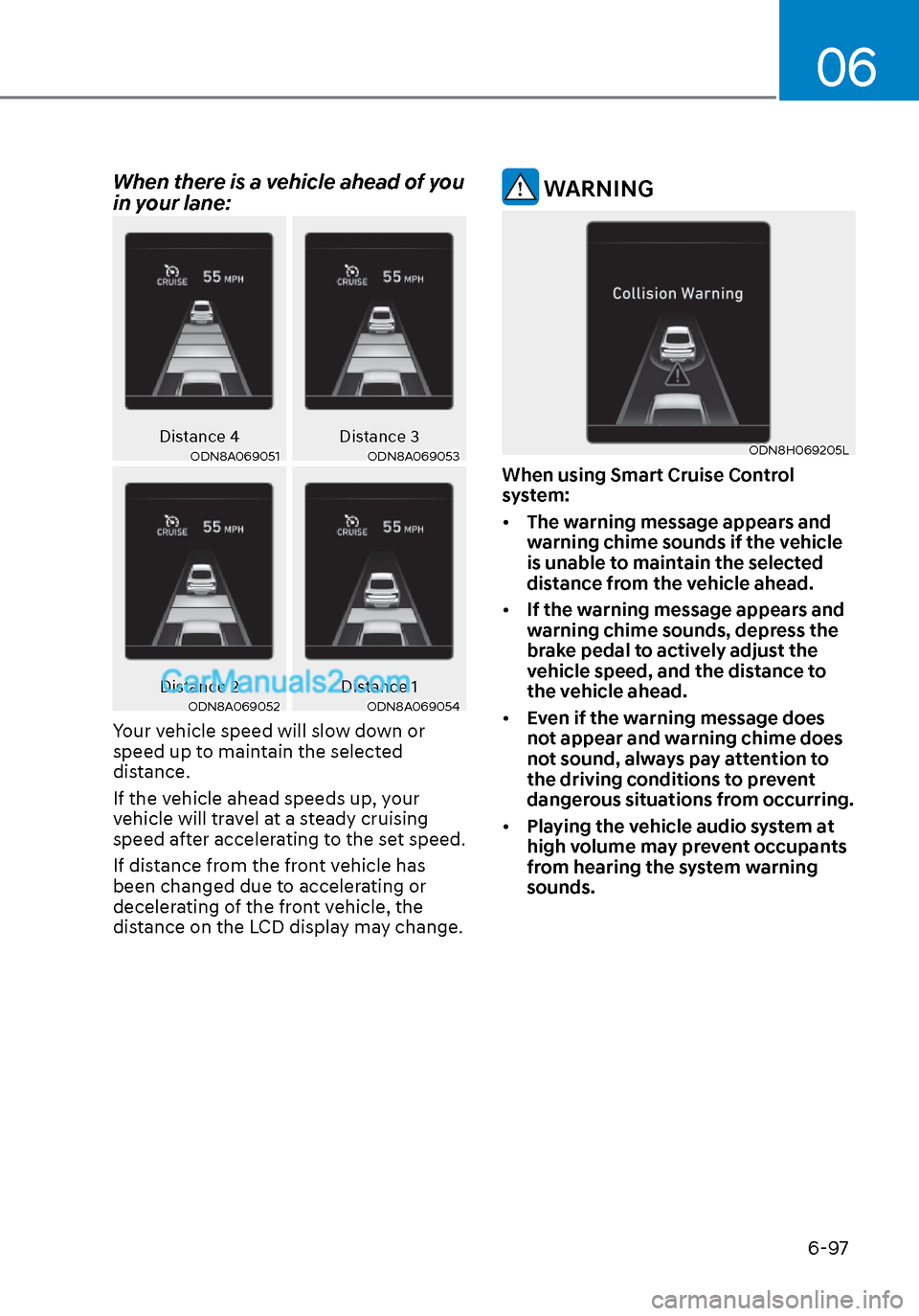
When there is a vehicle ahead of you
in your lane:
Distance 4Distance 3ODN8A069051ODN8A069051ODN8A069053ODN8A069053
Distance 2 Distance 1ODN8A069052ODN8A069052ODN8A069054ODN8A069054
Your vehicle speed will slow down or
speed up to maintain the selected
distance.
If the vehicle ahead speeds up, your
vehicle will travel at a steady cruising
speed after accelerating to the set speed.
If distance from the front vehicle has
been changed due to accelerating or
decelerating of the front vehicle, the
distance on the LCD display may change.
WARNING
ODN8H069205LODN8H069205L
When using Smart Cruise Control
system:
• The warning message appears and
warning chime sounds if the vehicle
is unable to maintain the selected
distance from the vehicle ahead.
• If the warning message appears and
warning chime sounds, depress the
brake pedal to actively adjust the
vehicle speed, and the distance to
the vehicle ahead.
• Even if the warning message does
not appear and warning chime does
not sound, always pay attention to
the driving conditions to prevent
dangerous situations from occurring.
• Playing the vehicle audio system at
high volume may prevent occupants
from hearing the system warning
sounds.
Page 383 of 537
06
6-99
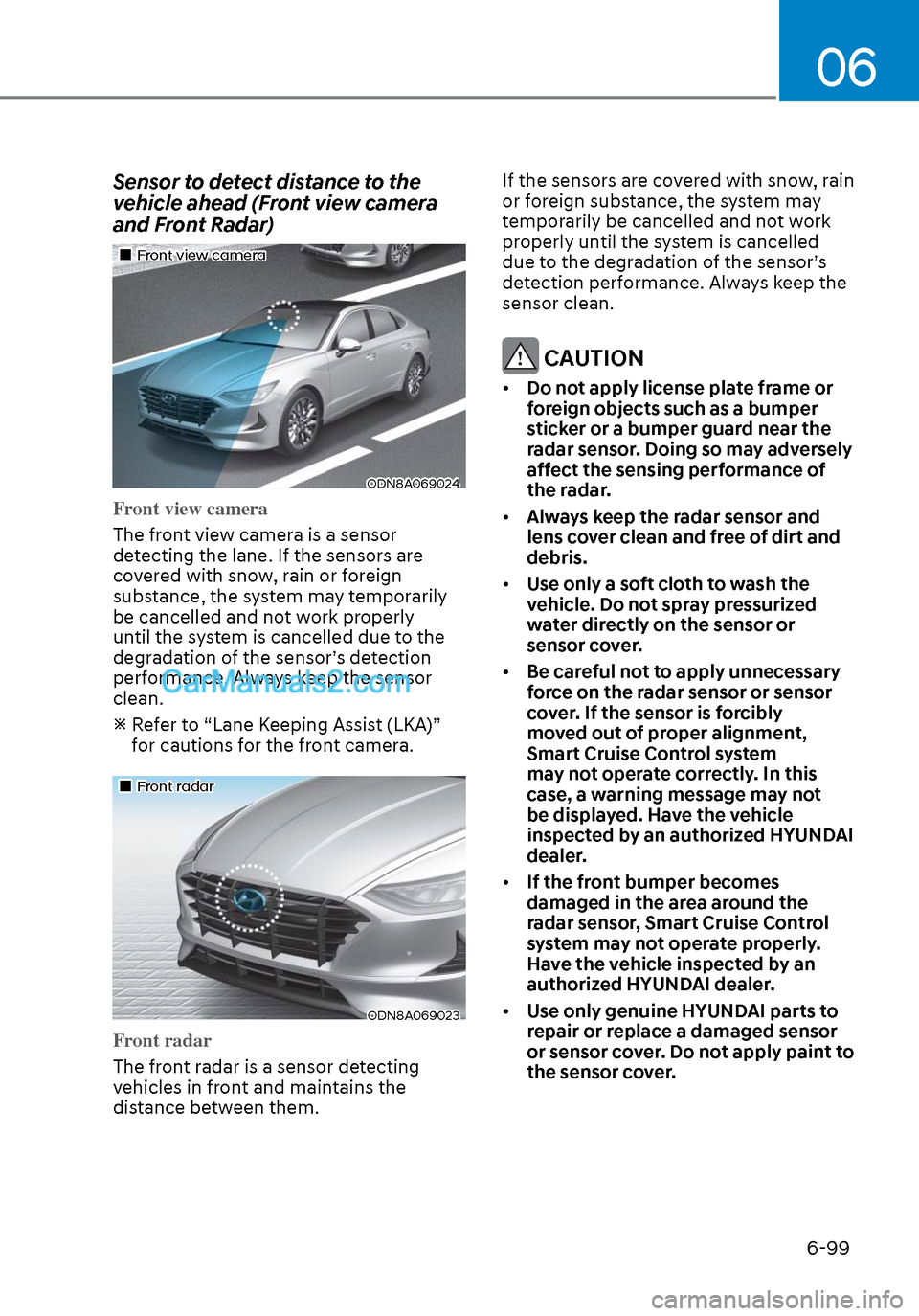
Sensor to detect distance to the
vehicle ahead (Front view camera
and Front Radar)
Front view cameraFront view camera
ODN8A069024ODN8A069024
Front view camera
The front view camera is a sensor
de
tecting the lane. If the sensors are
covered with snow, rain or foreign
substance, the system may temporarily
be cancelled and not work properly
until the system is cancelled due to the
degradation of the sensor’s detection
performance. Always keep the sensor
clean.
Refer to “Lane Keeping Assist (LKA)” for cautions for the front camera.
Front radarFront radar
ODN8A069023ODN8A069023
Front radar
The front radar is a sensor detecting
v
ehicles in front and maintains the
distance between them. If the sensors are covered with snow, rain
or foreign substance, the system may
temporarily be cancelled and not work
properly until the system is cancelled
due to the degradation of the sensor’s
detection performance. Always keep the
sensor clean.
CAUTION
•
Do not apply license plate frame or
foreign objects such as a bumper
sticker or a bumper guard near the
radar sensor. Doing so may adversely
affect the sensing performance of
the radar.
• Always keep the radar sensor and
lens cover clean and free of dirt and
debris.
• Use only a soft cloth to wash the
vehicle. Do not spray pressurized
water directly on the sensor or
sensor cover.
• Be careful not to apply unnecessary
force on the radar sensor or sensor
cover. If the sensor is forcibly
moved out of proper alignment,
Smart Cruise Control system
may not operate correctly. In this
case, a warning message may not
be displayed. Have the vehicle
inspected by an authorized HYUNDAI
dealer.
• If the front bumper becomes
damaged in the area around the
radar sensor, Smart Cruise Control
system may not operate properly.
Have the vehicle inspected by an
authorized HYUNDAI dealer.
• Use only genuine HYUNDAI parts to
repair or replace a damaged sensor
or sensor cover. Do not apply paint to
the sensor cover.