Fuel Hyundai Sonata 2020 User Guide
[x] Cancel search | Manufacturer: HYUNDAI, Model Year: 2020, Model line: Sonata, Model: Hyundai Sonata 2020Pages: 537, PDF Size: 14.54 MB
Page 89 of 537
Instrument Cluster4-4
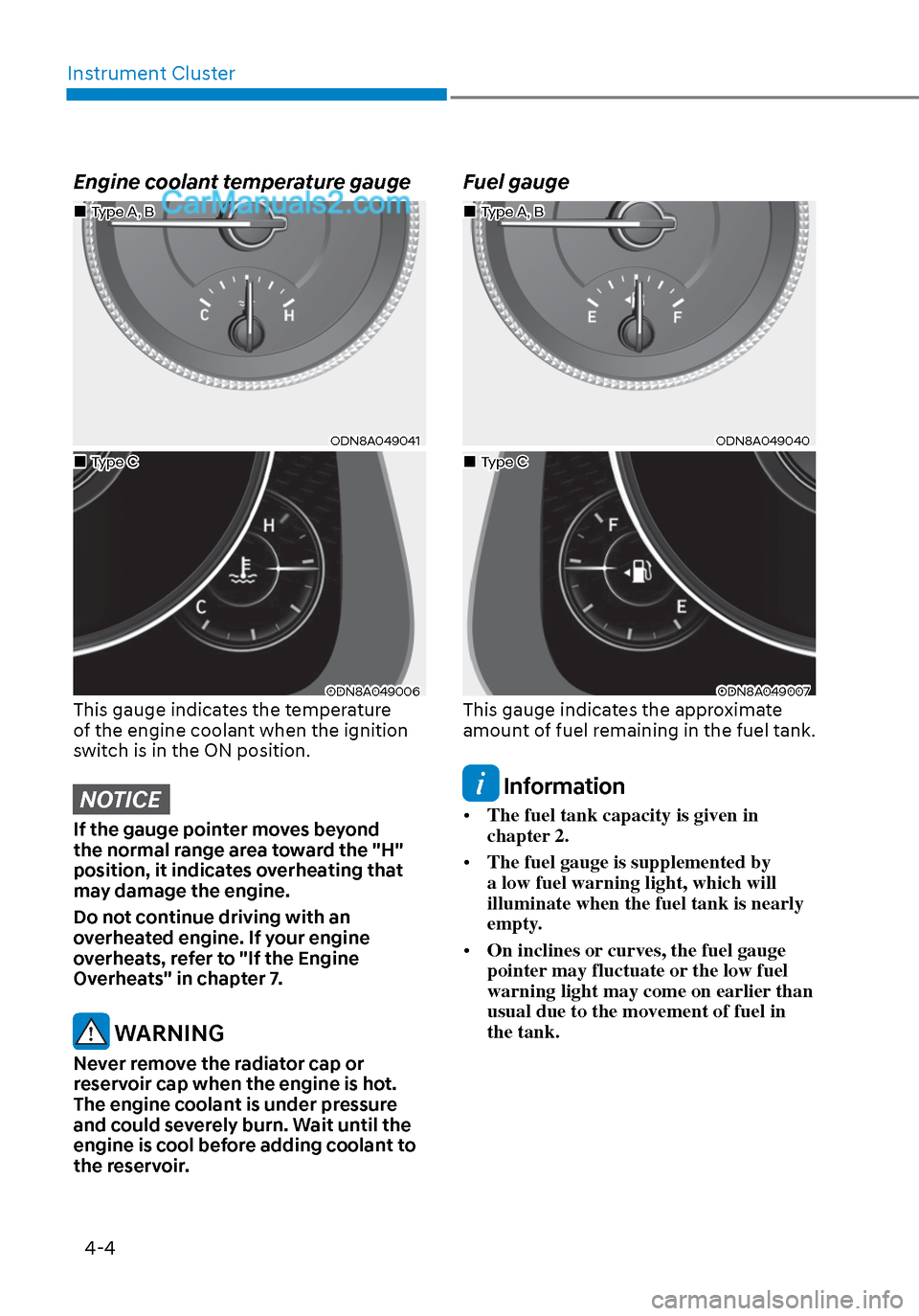
Engine coolant temperature gauge
ODN8A049041ODN8A049041
ODN8A049006ODN8A049006This gauge indicates the temperature
of the engine coolant when the ignition
switch is in the ON position.
NOTICE
If the gauge pointer moves beyond
the normal range area toward the "H"
position, it indicates overheating that
may damage the engine.
Do not continue driving with an
overheated engine. If your engine
overheats, refer to "If the Engine
Overheats" in chapter 7.
WARNING
Never remove the radiator cap or
reservoir cap when the engine is hot.
The engine coolant is under pressure
and could severely burn. Wait until the
engine is cool before adding coolant to
the reservoir.
Fuel gauge
ODN8A049040ODN8A049040
ODN8A049007ODN8A049007This gauge indicates the approximate
amount of fuel remaining in the fuel tank.
Information
• The fuel tank capacity is given in
chapter 2.
• The fuel gauge is supplemented by
a low fuel warning light, which will
illuminate when the fuel tank is nearly
empty.
• On inclines or curves, the fuel gauge
pointer may fluctuate or the low fuel
warning light may come on earlier than
usual due to the movement of fuel in
the tank.
Type A, BType A, B
Type CType C
Type A, BType A, B
Type CType C
Page 90 of 537
04
4-5
WARNING
Running out of fuel can expose vehicle
occupants to danger.
You must stop and obtain additional
fuel as soon as possible after the
warning light comes on or when the
gauge indicator comes close to the "E
(Empty)" level.
NOTICE
Avoid driving with an extremely low
fuel level. Running out of fuel could
cause the engine to misfire and damage
the catalytic converter.
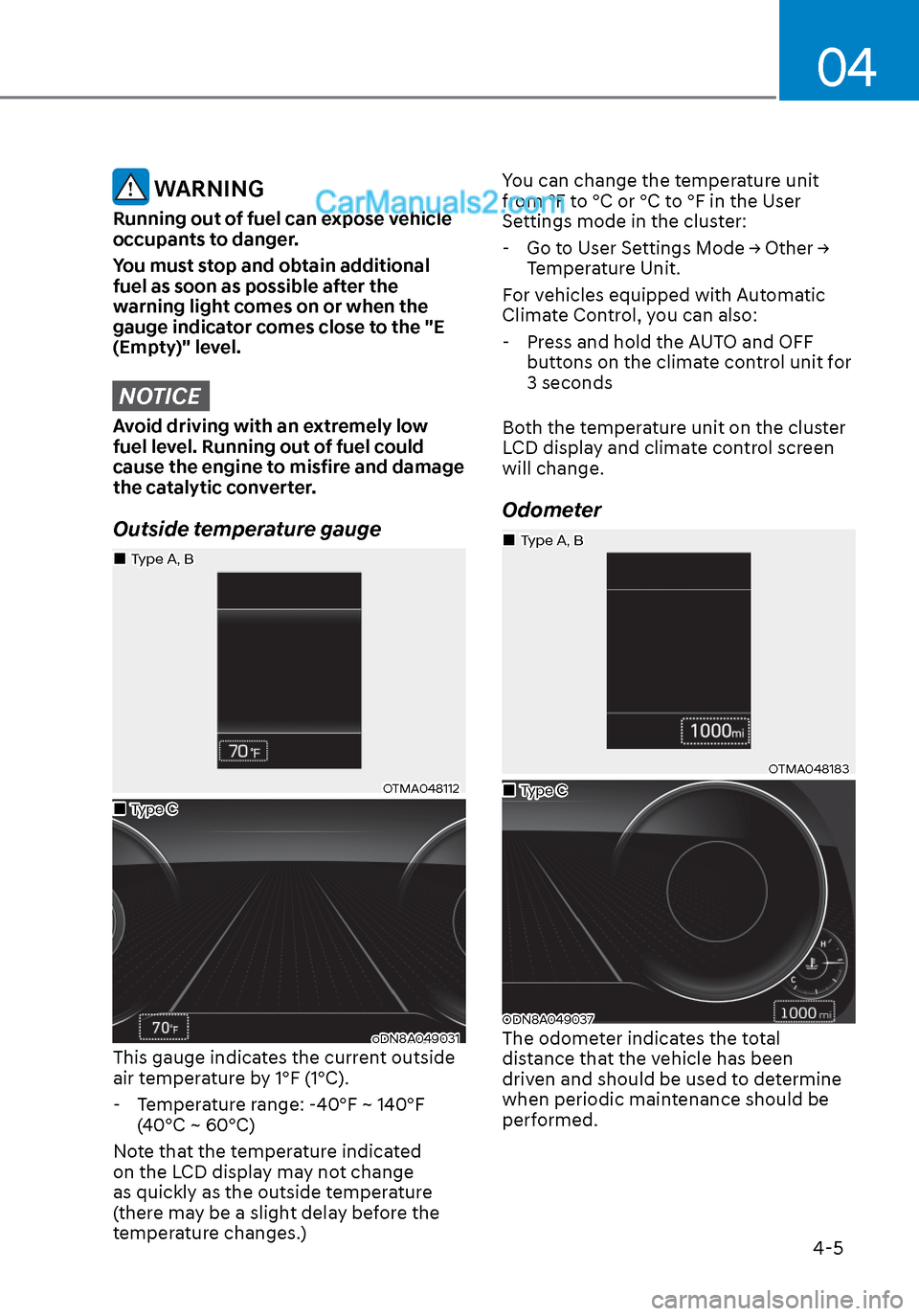
Outside temperature gauge
OTMA048112OTMA048112
oDN8A049031oDN8A049031This gauge indicates the current outside
air temperature by 1°F (1°C). - Temperature range: -40°F ~ 140°F (40°C ~ 60°C)
Note that the temperature indicated
on the LCD display may not change
as quickly as the outside temperature
(there may be a slight delay before the
temperature changes.) You can change the temperature unit
from °F to °C or °C to °F in the User
Settings mode in the cluster:
- Go to User Settings Mode → Other → Temperature Unit.
For vehicles equipped with Automatic
Climate Control, you can also:
- Press and hold the AUTO and OFF buttons on the climate control unit for
3 seconds
Both the temperature unit on the cluster
LCD display and climate control screen
will change.
Odometer
OTMA048183OTMA048183
ODN8A049037ODN8A049037The odometer indicates the total
distance that the vehicle has been
driven and should be used to determine
when periodic maintenance should be
performed.
Type CType C
Type A, BType A, B
Type CType C
Type A, BType A, B
Page 91 of 537
Instrument Cluster4-6
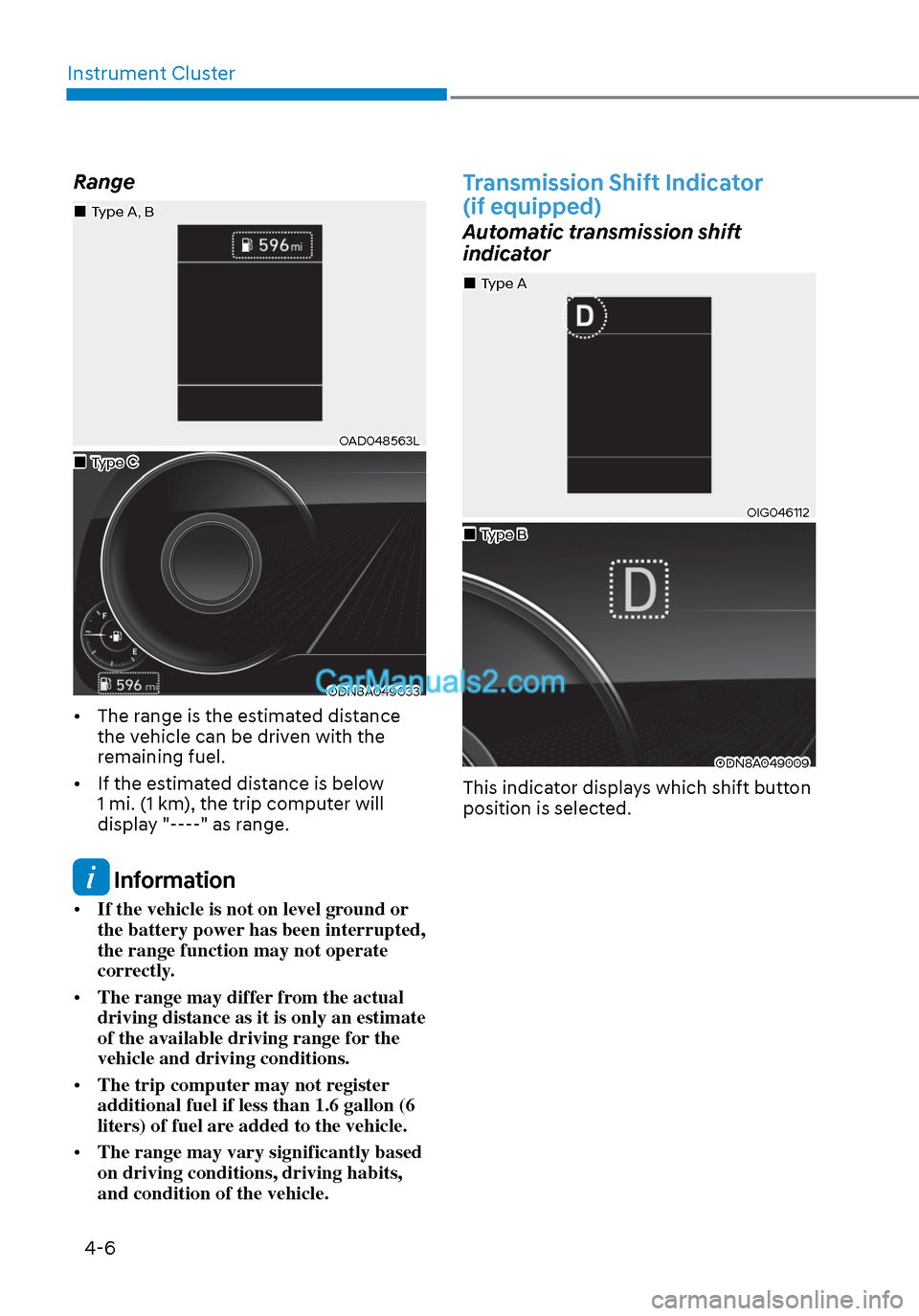
Range
OAD048563LOAD048563L
ODN8A049033ODN8A049033
• The range is the estimated distance the vehicle can be driven with the
remaining fuel.
• If the estimated distance is below 1 mi. (1 km), the trip computer will
display "----" as range.
Information
• If the vehicle is not on level ground or
the battery power has been interrupted,
the range function may not operate
correctly.
• The range may differ from the actual
driving distance as it is only an estimate
of the available driving range for the
vehicle and driving conditions.
• The trip computer may not register
additional fuel if less than 1.6 gallon (6
liters) of fuel are added to the vehicle.
• The range may vary significantly based
on driving conditions, driving habits,
and condition of the vehicle.
Transmission Shift Indicator
(if equipped)
Automatic transmission shift
indicator
OIG046112OIG046112
ODN8A049009ODN8A049009
This indicator displays which shift button
position is selected.
Type CType C
Type A, BType A, B
Type AType A
Type BType B
Page 95 of 537
![Hyundai Sonata 2020 User Guide Instrument Cluster4-10
AUTO HOLD Indicator Light
(if equipped)
This indicator light illuminates:
• [White] When you activate the auto hold s
ystem by pressing the AUTO
HOLD button.
• [Green]](/img/35/16773/w960_16773-94.png "Hyundai Sonata 2020 User Guide Instrument Cluster4-10
AUTO HOLD Indicator Light
(if equipped)
This indicator light illuminates:
• [White] When you activate the auto hold s
ystem by pressing the AUTO
HOLD button.
• [Green]")
Instrument Cluster4-10
AUTO HOLD Indicator Light
(if equipped)
This indicator light illuminates:
• [White] When you activate the auto hold s
ystem by pressing the AUTO
HOLD button.
• [Green] When you stop the vehicle completely by depressing the brake
pedal with the auto hold system
activated.
• [Yellow] When there is a malfunction with the auto hold system.
In this case, have the vehicle
inspected by an authorized HYUNDAI
dealer.
For more information, refer to “Auto
Hold” in chapter 6.
Electric Power Steering (EPS)
Warning Light
This warning light illuminates:
• When you place the ignition switch to the ON position.
-
The Electric Power Steering Warning
light illuminates for about 3 seconds
and then goes off.
• Whenever there is a malfunction with the EPS.
If this occurs, have the vehicle
inspected by an authorized HYUNDAI
dealer.
Malfunction Indicator Lamp
(MIL)
This warning light illuminates:
• When you place the ignition switch to the ON position.
-
The malfunction indicator light
illuminates for about 3 seconds and
then goes off.
• Whenever there is a malfunction with either the emission control system or
the engine or the vehicle powertrain.
If this occurs, have the vehicle
inspected by an authorized HYUNDAI
dealer.
NOTICE
Driving with the Malfunction Indicator
Lamp (MIL) on may cause damage to
the emission control system which
could affect drivability and/or fuel
economy.
NOTICE
If the Malfunction Indicator Lamp
(MIL) illuminates, potential catalytic
converter damage is possible which
could result in loss of engine power.
In this case, have the vehicle inspected
by an authorized HYUNDAI dealer as
soon as possible.
Page 96 of 537
04
4-11
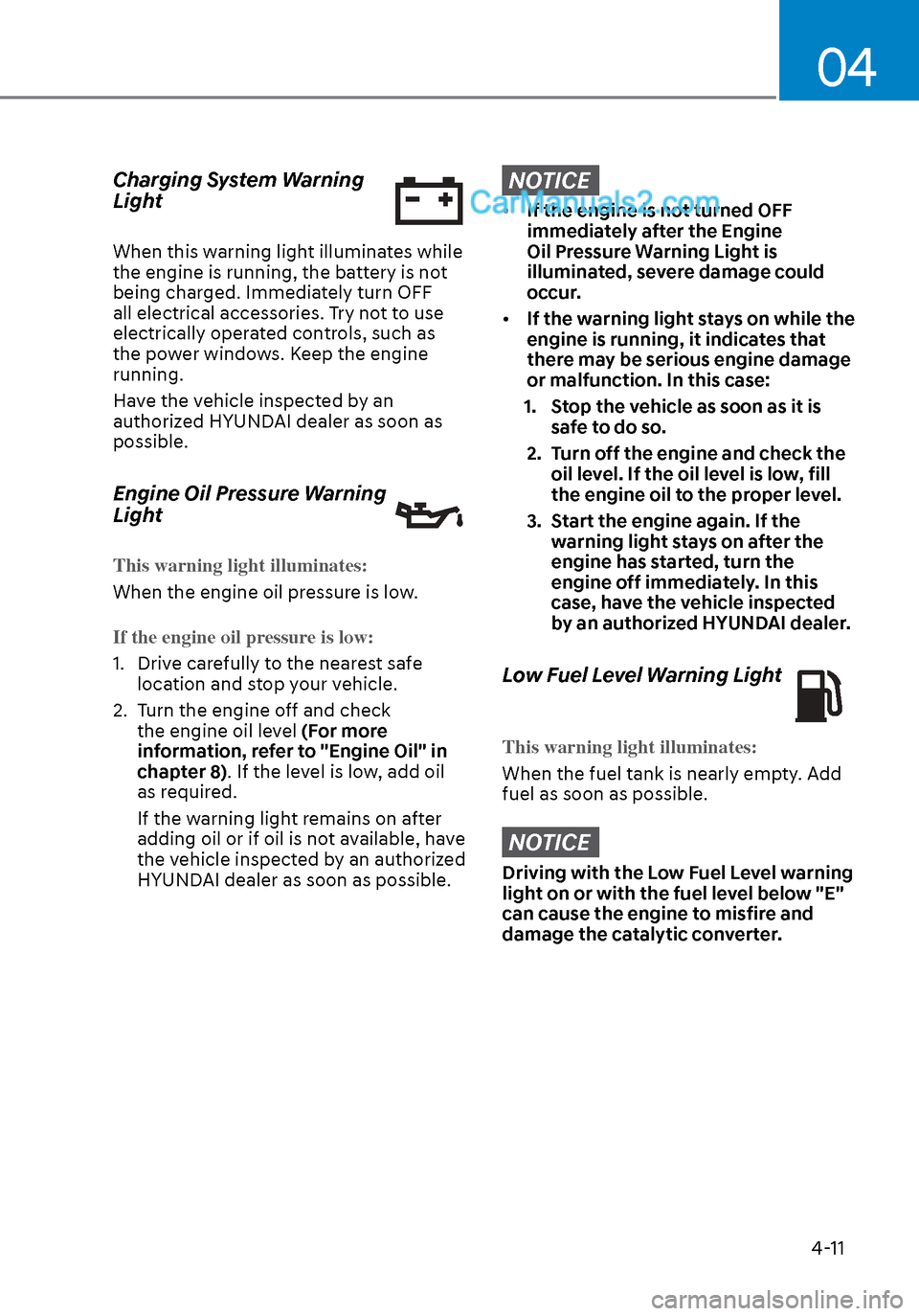
Charging System Warning
Light
When this warning light illuminates while
the engine is running, the battery is not
being charged. Immediately turn OFF
all electrical accessories. Try not to use
electrically operated controls, such as
the power windows. Keep the engine
running.
Have the vehicle inspected by an
authorized HYUNDAI dealer as soon as
possible.
Engine Oil Pressure Warning
Light
This warning light illuminates:
When the engine oil pressure is low.
If the engine oil pressure is low:
1. Drive carefully to the nearest safe loca
tion and stop your vehicle.
2. Turn the engine off and check the engine oil level (For more
information, refer to "Engine Oil" in
chapter 8). If the level is low, add oil
as required.
If the warning light remains on after
adding oil or if oil is not available, have
the vehicle inspected by an authorized
HYUNDAI dealer as soon as possible.
NOTICE
• If the engine is not turned OFF
immediately after the Engine
Oil Pressure Warning Light is
illuminated, severe damage could
occur.
• If the warning light stays on while the
engine is running, it indicates that
there may be serious engine damage
or malfunction. In this case:
1. Stop the vehicle as soon as it is safe to do so.
2. Turn off the engine and check the oil level. If the oil level is low, fill
the engine oil to the proper level.
3. Start the engine again. If the warning light stays on after the
engine has started, turn the
engine off immediately. In this
case, have the vehicle inspected
by an authorized HYUNDAI dealer.
Low Fuel Level Warning Light
This warning light illuminates:
When the fuel tank is nearly empty. Add
fuel as soon as possible.
NOTICE
Driving with the Low Fuel Level warning
light on or with the fuel level below "E"
can cause the engine to misfire and
damage the catalytic converter.
Page 105 of 537
Instrument Cluster4-20
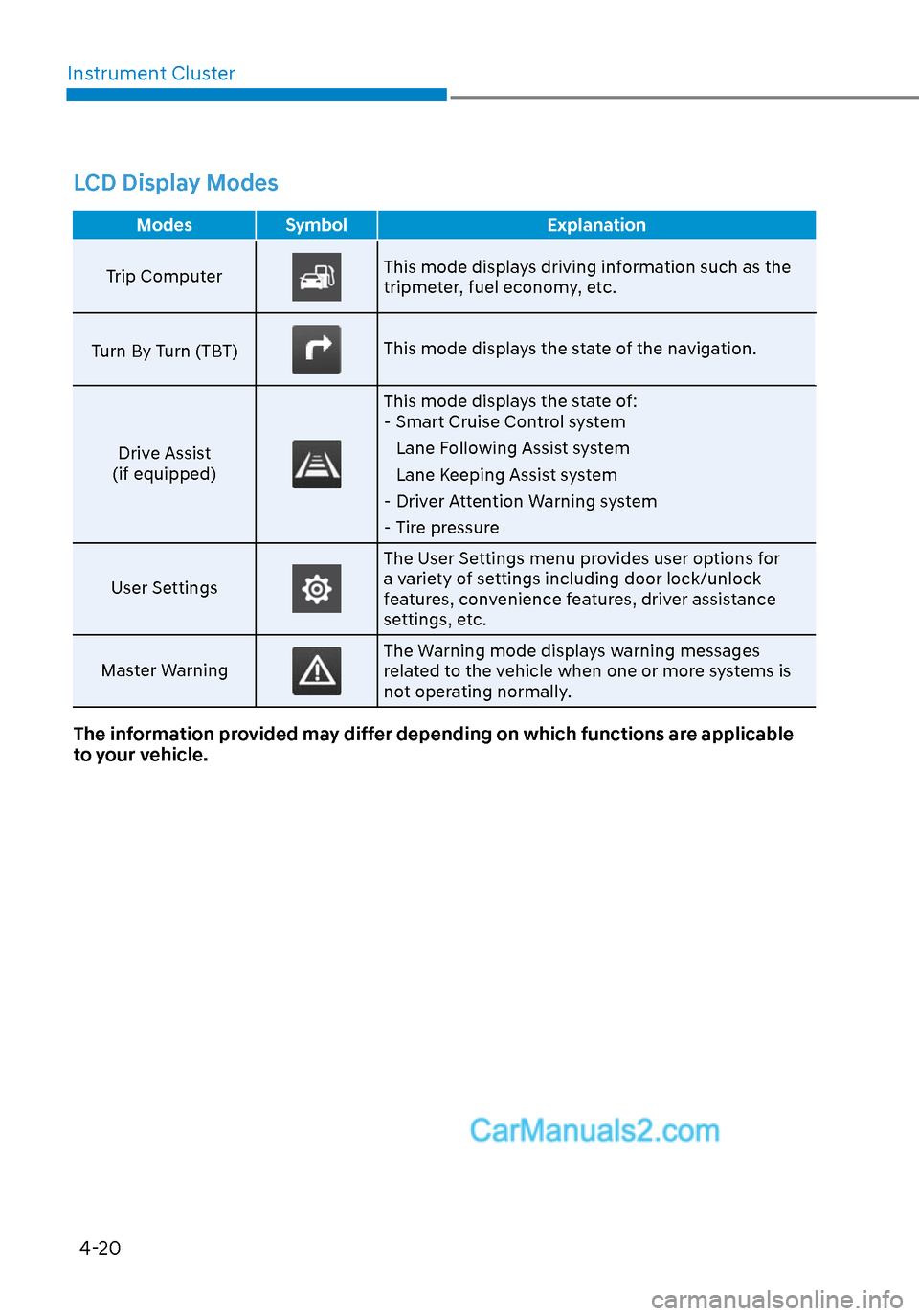
LCD Display Modes
Modes Symbol Explanation
Trip Computer
This mode displays driving information such as the
tripmeter, fuel economy, etc.
Turn By Turn (TBT)
This mode displays the state of the navigation.
Drive Assist
(if equipped)
This mode displays the state of: - Smart Cruise Control system
Lane Following Assist system
Lane Keeping Assist system
- Driver Attention Warning system
- Tire pressure
User Settings
The User Settings menu provides user options for
a variety of settings including door lock/unlock
features, convenience features, driver assistance
settings, etc.
Master Warning
The Warning mode displays warning messages
related to the vehicle when one or more systems is
not operating normally.
The information provided may differ depending on which functions are applicable
to your vehicle.
Page 106 of 537
04
4-21
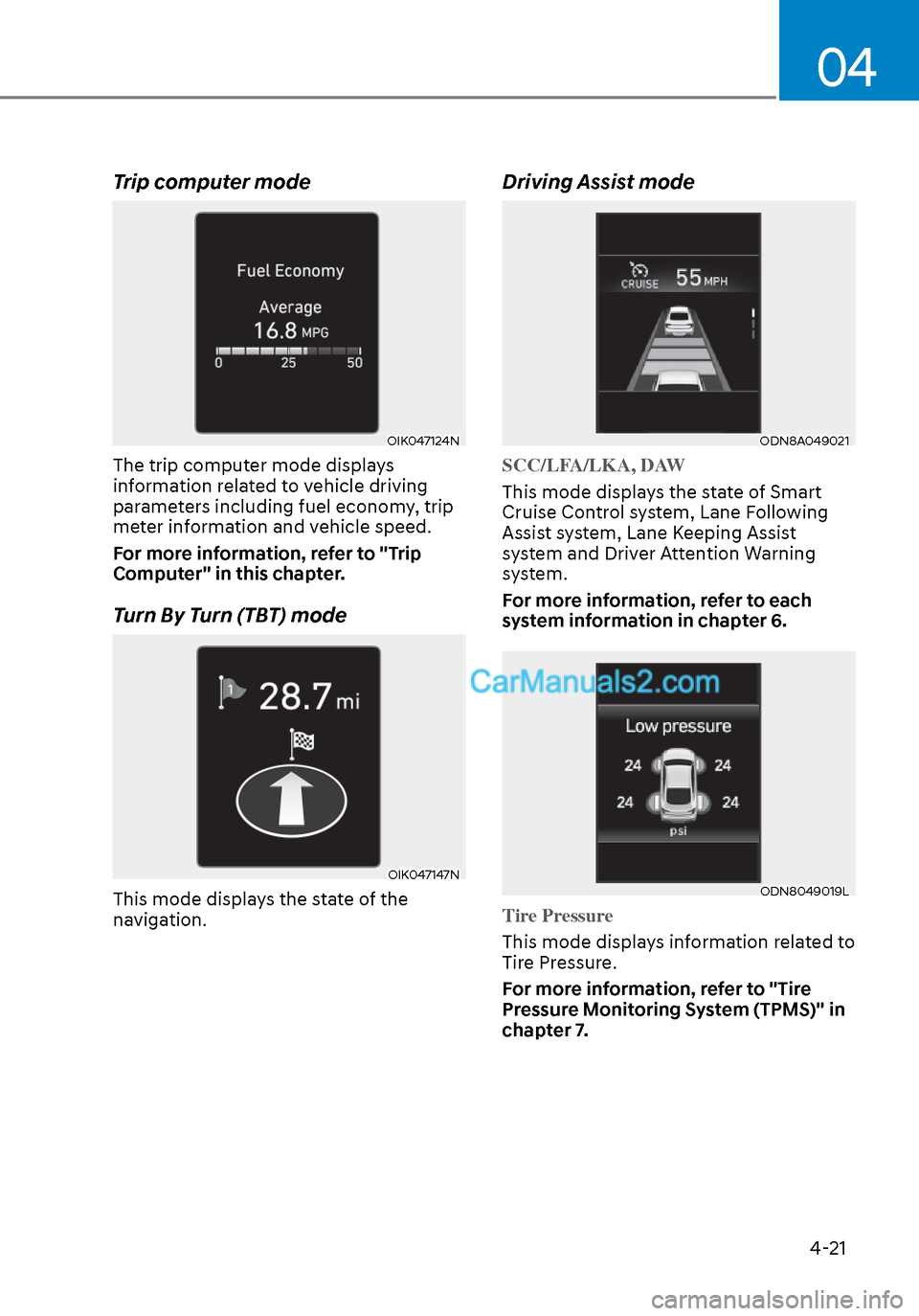
Trip computer mode
OIK047124NOIK047124N
The trip computer mode displays
information related to vehicle driving
parameters including fuel economy, trip
meter information and vehicle speed.
For more information, refer to "Trip
Computer" in this chapter.
Turn By Turn (TBT) mode
OIK047147NOIK047147N
This mode displays the state of the
navigation.
Driving Assist mode
ODN8A049021ODN8A049021
SCC/LFA/LKA, DAW
This mode displays the state of Smart
Cruise Contr
ol system, Lane Following
Assist system, Lane Keeping Assist
system and Driver Attention Warning
system.
For more information, refer to each
system information in chapter 6.
ODN8049019LODN8049019L
Tire Pressure
This mode displays information related to
Tir
e Pressure.
For more information, refer to "Tire
Pressure Monitoring System (TPMS)" in
chapter 7.
Page 115 of 537
Instrument Cluster4-30
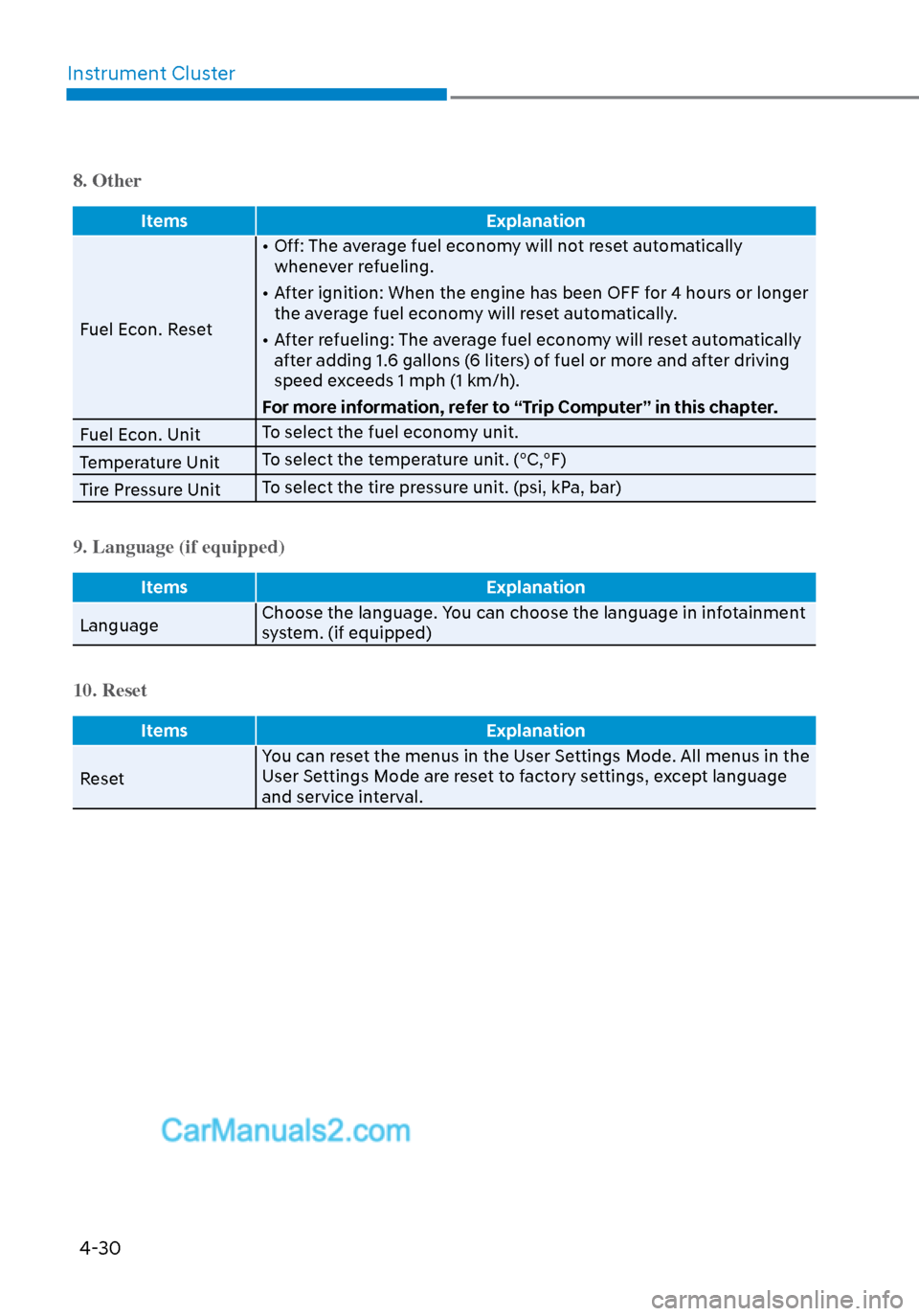
8. Other
Items Explanation
Fuel Econ. Reset •
Off: The average fuel economy will not reset automatically
whenever refueling.
• After ignition: When the engine has been OFF for 4 hours or longer the average fuel economy will reset automatically.
• After refueling: The average fuel economy will reset automatically after adding 1.6 gallons (6 liters) of fuel or more and after driving
speed exceeds 1 mph (1 km/h).
For more information, refer to “Trip Computer” in this chapter.
Fuel Econ. Unit To select the fuel economy unit.
Temperature Unit To select the temperature unit. (°C,°F)
Tire Pressure Unit To select the tire pressure unit. (psi, kPa, bar)
9. Language (if equipped)
Items
Explanation
Language Choose the language. Y
ou can choose the language in infotainment
system. (if equipped)
10. Reset
Items Explanation
Reset Y
ou can reset the menus in the User Settings Mode. All menus in the
User Settings Mode are reset to factory settings, except language
and service interval.
Page 116 of 537
04
4-31
Trip Computer
The trip computer is a microcomputer-
controlled driver information system that
displays information related to driving.
Information
Some driving information stored in the
trip computer (for example Average
Vehicle Speed) resets if the battery is
disconnected.
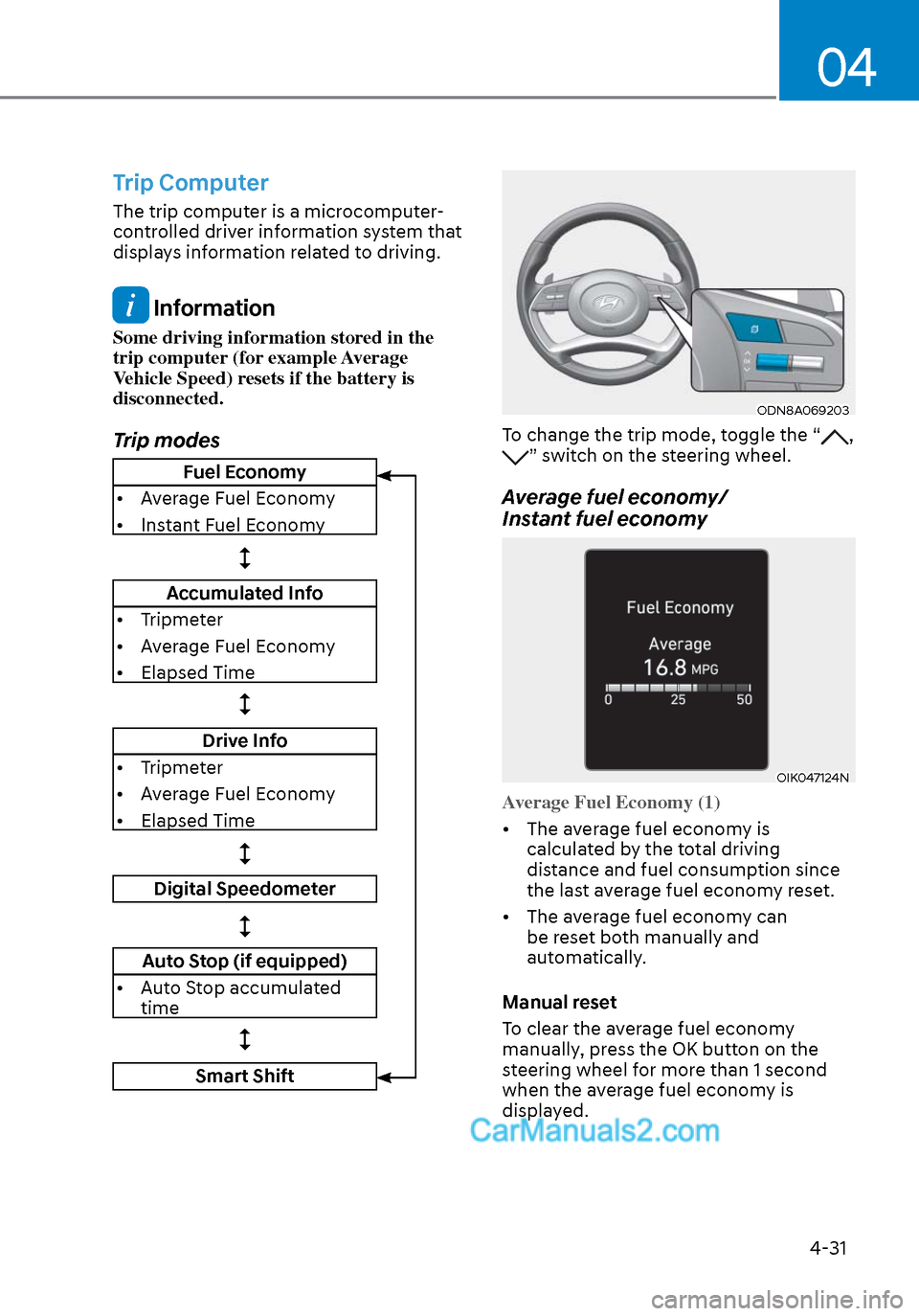
Trip modes
ODN8A069203ODN8A069203
To change the trip mode, toggle the “, ” switch on the steering wheel.
Average fuel economy/
Instant fuel economy
OIK047124NOIK047124N
Average Fuel Economy (1)
• The average fuel economy is calcula
ted by the total driving
distance and fuel consumption since
the last average fuel econ omy reset.
• The average fuel economy can be reset both manually and
automatically.
Manual reset
To clear the average fuel economy
manually, press the OK button on the
steering wheel for more than 1 second
when the average fuel economy is
displayed.
Fuel Economy
• Average Fuel Economy
• Instant Fuel Economy
Accumulated Info
• Tripmeter
• Average Fuel Economy
• Elapsed Time
Drive Info
• Tripmeter
• Average Fuel Economy
• Elapsed Time
Digital Speedometer
Auto Stop (if equipped)
• Auto Stop accumulated time
Smart Shift
Page 117 of 537
Instrument Cluster4-32
Automatic reset
To automatically reset the average fuel
economy after refueling, select the "Fuel
Econ. Reset" mode in the User Settings
menu on the LCD display.
- After Ignition: When the engine has
been OFF for 4 hours or longer the
average fuel economy will reset
automatically.
- After Refueling: The average fuel economy will reset automatically after
adding 1.6 gallons (6 liters) of fuel or
more and after driving speed exceeds
1 mph (1 km/h).
Information
The vehicle must be driven for a minimum
of 0.19 miles (300 meters) since the last
ignition key cycle before the average fuel
economy will be recalculated.
Instant Fuel Economy (2)
The instantaneous fuel economy is
displa
yed according to the bar graph in
the LCD display while driving.
Accumulated Info display
OIK047174NOIK047174N
This display shows the accumulated trip
distance (1), the average fuel economy
(2), and the total driving time (3).
The information is accumulated starting
from the last reset. To reset the information, press and
hold the OK button when viewing the
Accumulated driving info. The trip
distance, the average fuel economy,
and total driving time will reset
simultaneously.
The accumulated driving information will
continue to be counted while the engine
is still running (EX: when the vehicle is in
traffic or stopped at a stop light).
Information
The vehicle must be driven for a minimum
of 300 meters (0.19 miles) since the last
ignition key cycle before the average fuel
economy will be recalculated.
Drive Info display
OIK047176NOIK047176N
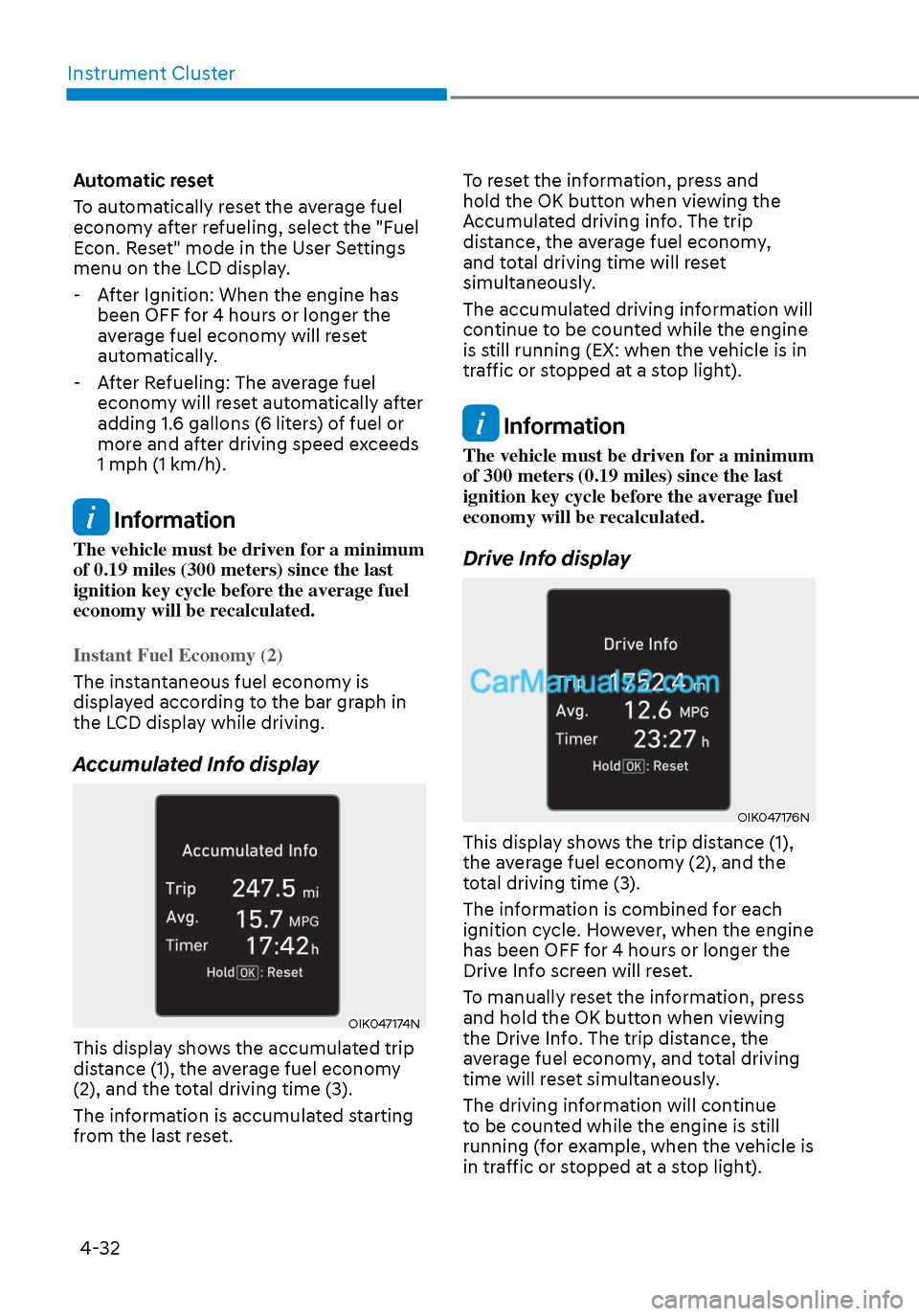
This display shows the trip distance (1),
the average fuel economy (2), and the
total driving time (3).
The information is combined for each
ignition cycle. However, when the engine
has been OFF for 4 hours or longer the
Drive Info screen will reset.
To manually reset the information, press
and hold the OK button when viewing
the Drive Info. The trip distance, the
average fuel economy, and total driving
time will reset simultaneously.
The driving information will continue
to be counted while the engine is still
running (for example, when the vehicle is
in traffic or stopped at a stop light).