parking brake Hyundai Sonata 2020 User Guide
[x] Cancel search | Manufacturer: HYUNDAI, Model Year: 2020, Model line: Sonata, Model: Hyundai Sonata 2020Pages: 537, PDF Size: 14.54 MB
Page 204 of 537
Convenient Features5-74
LIGHTING
Exterior Lights
Lighting control
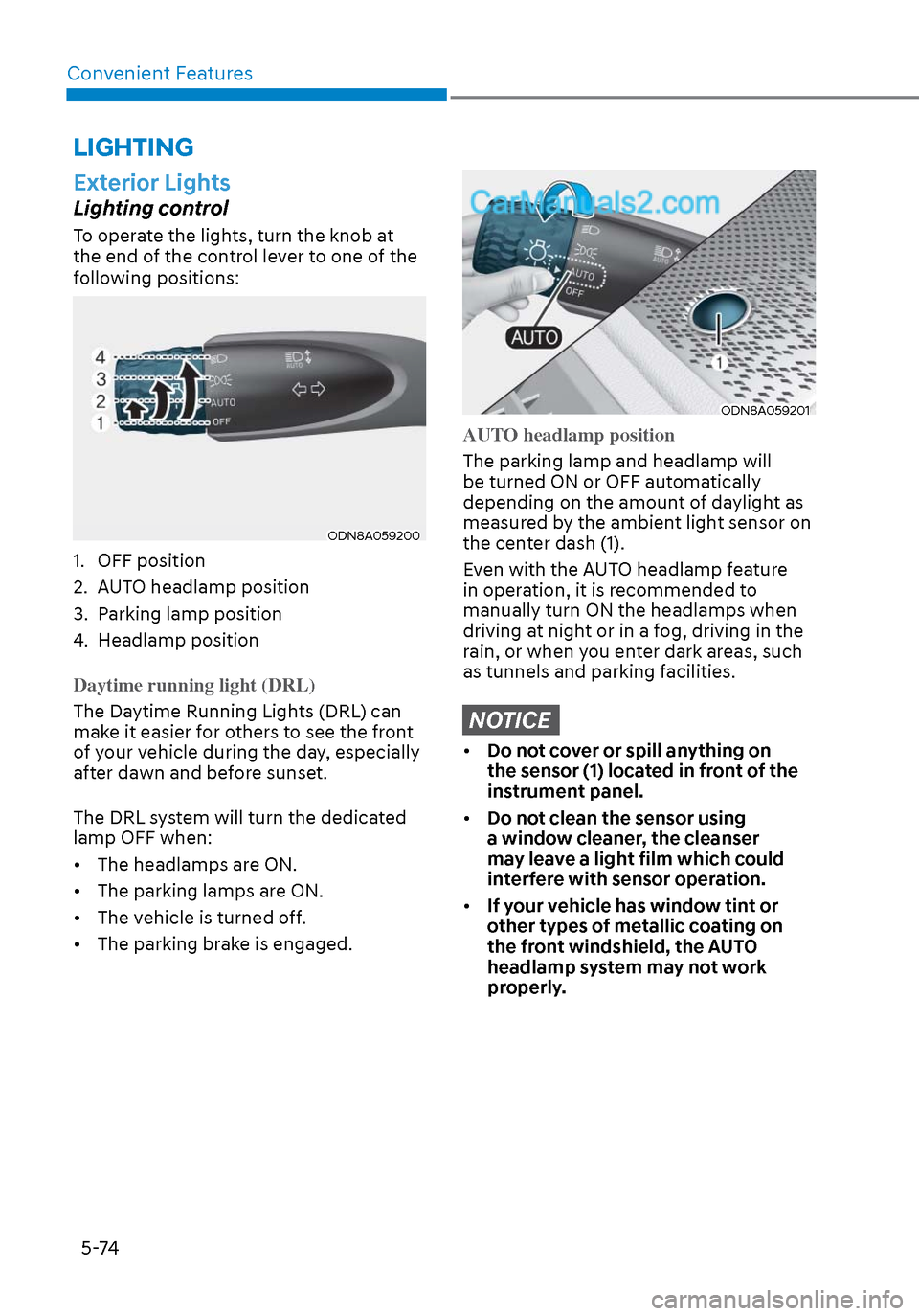
To operate the lights, turn the knob at
the end of the control lever to one of the
following positions:
ODN8A059200ODN8A059200
1. OFF position
2. AUTO headlamp position
3. Parking lamp position
4. Headlamp position
Daytime running light (DRL)
The Daytime Running Lights (DRL) can
mak
e it easier for others to see the front
of your vehicle during the day, especially
after dawn and before sunset.
The DRL system will turn the dedicated
lamp OFF when:
• The headlamps are ON.
• The parking lamps are ON.
• The vehicle is turned off.
• The parking brake is engaged.
ODN8A059201ODN8A059201
AUTO headlamp position
The parking lamp and headlamp will
be turned ON or OFF aut
omatically
depending on the amount of daylight as
measured by the ambient light sensor on
the center dash (1).
Even with the AUTO headlamp feature
in operation, it is recommended to
manually turn ON the headlamps when
driving at night or in a fog, driving in the
rain, or when you enter dark areas, such
as tunnels and parking facilities.
NOTICE
• Do not cover or spill anything on
the sensor (1) located in front of the
instrument panel.
• Do not clean the sensor using
a window cleaner, the cleanser
may leave a light film which could
interfere with sensor operation.
• If your vehicle has window tint or
other types of metallic coating on
the front windshield, the AUTO
headlamp system may not work
properly.
Page 220 of 537
Convenient Features5-90
Operating conditions
Reverse Parking Collision-Avoidance
Assist system enters the ready status,
when ‘Active Assist’ or ‘Warning Only’ is
selected in the AVN system screen and
the following conditions are satisfied:
• The trunk is closed
• The shift lever is in R (Reverse)
• Vehicle speed is below 6 mph (10 km/h)
• System components such as the rear view camera and the rear ultrasonic
sensors are in normal conditions
The driver needs to select ‘Active Assist’
on the LCD display or infotainment
system display for collision-avoidance
assist.
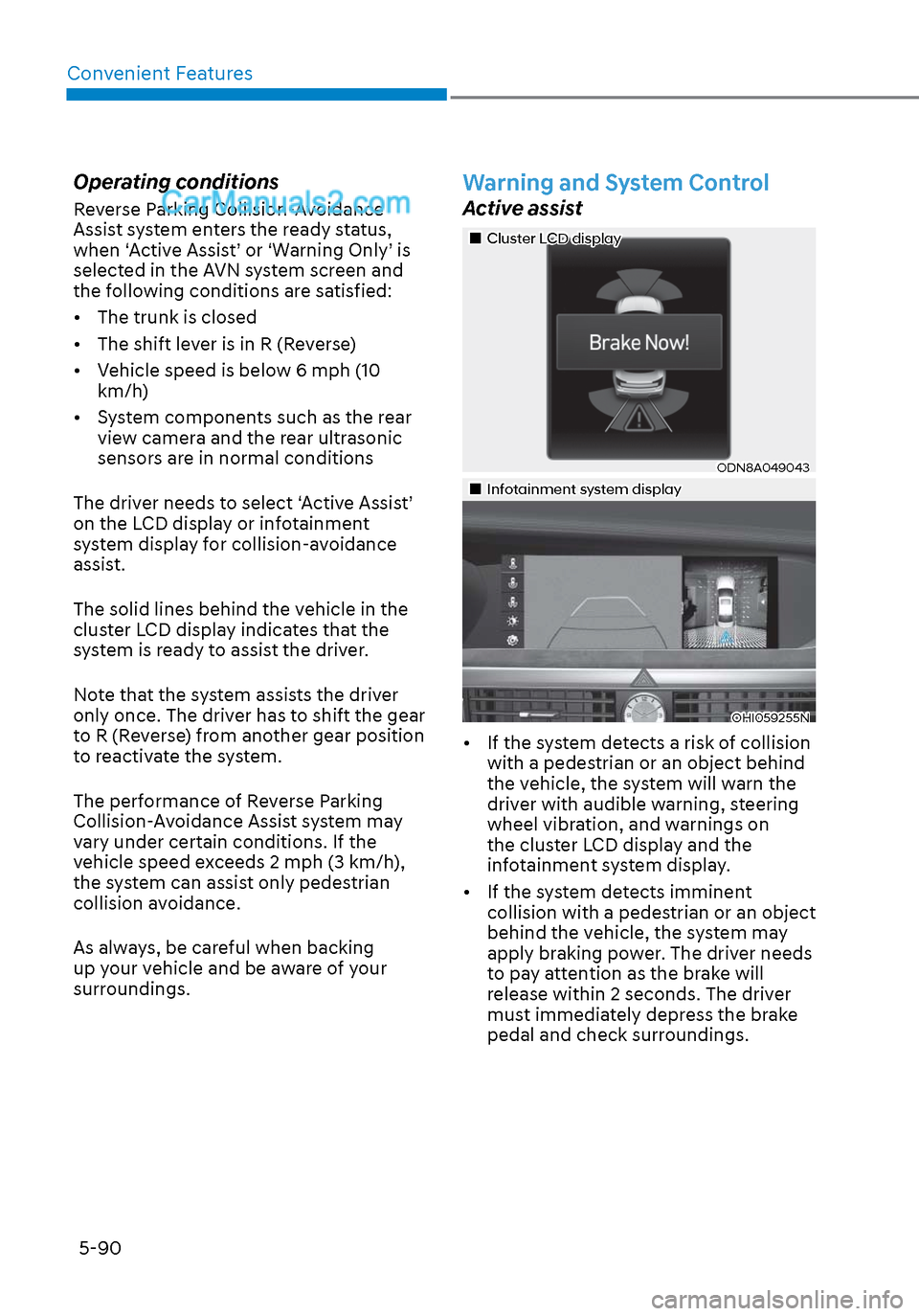
The solid lines behind the vehicle in the
cluster LCD display indicates that the
system is ready to assist the driver.
Note that the system assists the driver
only once. The driver has to shift the gear
to R (Reverse) from another gear position
to reactivate the system.
The performance of Reverse Parking
Collision-Avoidance Assist system may
vary under certain conditions. If the
vehicle speed exceeds 2 mph (3 km/h),
the system can assist only pedestrian
collision avoidance.
As always, be careful when backing
up your vehicle and be aware of your
surroundings.
Warning and System Control
Active assist
Cluster LCD displayCluster LCD display
ODN8A049043ODN8A049043
Infotainment system display Infotainment system display
OHI059255NOHI059255N
• If the system detects a risk of collision with a pedestrian or an object behind
the vehicle, the system will warn the
driver with audible warning, steering
wheel vibration, and warnings on
the cluster LCD display and the
infotainment system display.
• If the system detects imminent collision with a pedestrian or an object
behind the vehicle, the system may
apply braking power. The driver needs
to pay attention as the brake will
release within 2 seconds. The driver
must immediately depress the brake
pedal and check surroundings.
Page 221 of 537
05
5-91
The brake assist will turn off when: - The driver shifts the gear to P (Park) or D (Drive)
- The driver depresses the brake pedal with sufficient power
- The braking has been assisted for approximately 2 seconds
The warning will turn off when: - The driver shifts the gear to P (Park), N (Neutral), or D (Drive)
The brake control may not operate
properly depending on the status of the
ESC (Electronic Stability Control). There
will only be a warning when: - The ESC (Electronic Stability Control) warning light is on
- The ESC (Electronic Stability Control) is engaged in a different function
Warning only
• If the system detects a risk of collision with a pedestrian or an object, the
system will warn the driver with
audible warning and warnings on the
cluster LCD display or infotainment
system display.
• If ‘Warning Only’ is selected, braking will not be assisted.
The warning will turn off when: - The driver shifts the gear to P (Park), N (Neutral), or D (Drive)
WARNING
• Reverse Parking Collision-
Avoidance Assist system may
not operate properly or may
operate unnecessarily in some
circumstances.
• Always pay extreme caution while
driving. The driver is responsible for
controlling the brake appropriately.
CAUTION
• Always pay attention to road and
traffic conditions while driving,
whether or not there is a warning.
• Playing the vehicle audio system at
high volume may prevent occupants
from hearing Reverse Parking
Collision-Avoidance Assist system
warning sounds.
• If any other warning sound, such as
seat belt warning chime, is already
generated, Reverse Parking Collision-
Avoidance Assist system warning
may not sound.
Information
The system can detect a pedestrian or an
object when:
• A pedestrian is standing behind the
vehicle.
• A large obstacle, such as a vehicle, is
parked in the rear center of the vehicle.
Page 224 of 537
Convenient Features5-94
• Outside air temperature is hot or cold.
• The wind is either strong (over 12 mph (20 km/h)) or blowing perpendicular
to the rear bumper.
• Objects generating excessive noise, such as vehicle horns, loud
motorcycle engines, or truck air
brakes, are near the vehicle.
• An ultrasonic sensor with a similar frequency is near the vehicle.
• There is ground height difference between the vehicle and the
pedestrian.
• The image of the pedestrian in the rear view camera is indistinguishable
from the background.
• The pedestrian is near the rear edge of the vehicle.
• The pedestrian is not standing upright.
• The pedestrian is either too short or too tall for the system to recognize.
• The pedestrian is wearing clothes that are hard for the system to recognize.
• The pedestrian is wearing a cloth that does not reflect ultrasound well.
• The size, thickness, height, or shape of the object does not reflect ultrasound
well (e.g., pole, bush, curbs, carts,
edge of a wall, etc.).
• The pedestrian or the object is moving.
• The pedestrian or the object is very close to the rear of the vehicle.
• A wall is behind the pedestrian or the object.
• The object is not at the rear center of the vehicle.
• The plane of the obstacle is not parallel to the rear bumper.
• The road is slippery or inclined.
• The driver backs up the vehicle immediately after shifting to R
(Reverse).
• The driver accelerates or turns the vehicle. Reverse Parking Collision-Avoidance
Assist system may alert the driver or
apply brake power unnecessarily under
the following conditions even if there are
“no” pedestrians or objects.
• Any non-factory equipment or
accessories have been installed.
• The condition of the vehicle is unstable due to an accident or other
causes.
• The height of the bumper or the sensor installation has been modified.
• The bumper height has changed due to heavy loads, tire pressure change,
etc.
• The rear view camera or the ultrasonic sensor(s) is stained with foreign
matter, such as snow, dirt, etc.
• The pattern on the road is mistaken for a pedestrian.
• There is a shadow or a light reflecting on the ground.
• Pedestrians or objects are around the path of the vehicle.
• Objects generating excessive noise, such as vehicle horns, loud
motorcycle engines, or truck air
brakes, are near the vehicle.
• The vehicle is backing towards a narrow passage or parking space.
• The vehicle is backing towards an uneven road surface, such as unpaved
road, gravel, bump, gradient, etc.
• A trailer is attached to the vehicle
Page 227 of 537
05
5-97
To Turn off Reverse Parking
Distance Warning System
(if equipped)
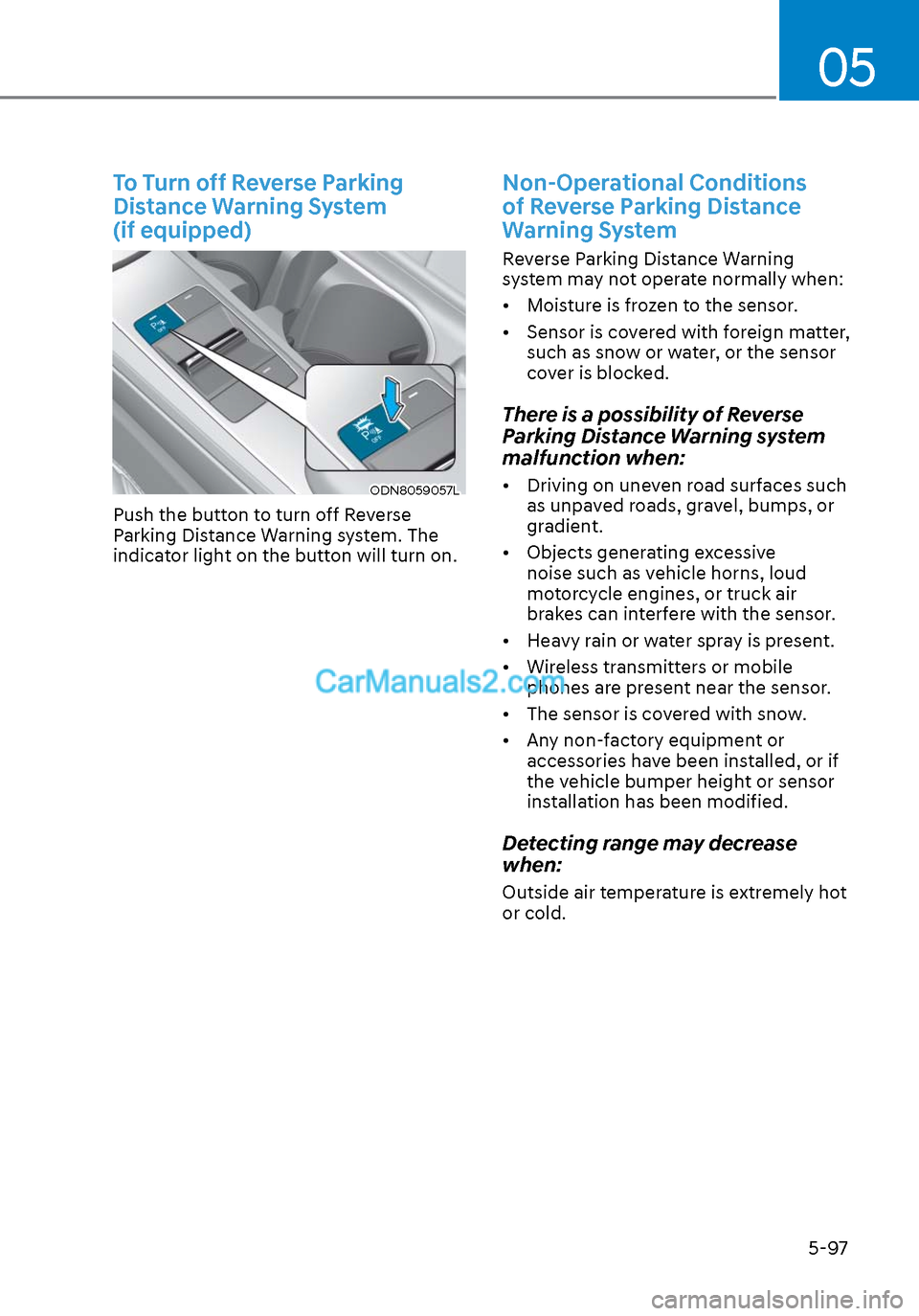
ODN8059057LODN8059057L
Push the button to turn off Reverse
Parking Distance Warning system. The
indicator light on the button will turn on.
Non-Operational Conditions
of Reverse Parking Distance
Warning System
Reverse Parking Distance Warning
system may not operate normally when:
• Moisture is frozen to the sensor.
• Sensor is covered with foreign matter, such as snow or water, or the sensor
cover is blocked.
There is a possibility of Reverse
Parking Distance Warning system
malfunction when:
• Driving on uneven road surfaces such as unpaved roads, gravel, bumps, or
gradient.
• Objects generating excessive noise such as vehicle horns, loud
motorcycle engines, or truck air
brakes can interfere with the sensor.
• Heavy rain or water spray is present.
• Wireless transmitters or mobile phones are present near the sensor.
• The sensor is covered with snow.
• Any non-factory equipment or accessories have been installed, or if
the vehicle bumper height or sensor
installation has been modified.
Detecting range may decrease
when:
Outside air temperature is extremely hot
or cold.
Page 232 of 537
Convenient Features5-102
Non-Operational Conditions
of Forward/Reverse Parking
Distance Warning System
Forward/Reverse Parking Distance
Warning system may not operate
normally when:
• Moisture is frozen to the sensor.
• Sensor is covered with foreign matter, such as snow or water, or the sensor
cover is blocked.
There is a possibility of Forward/
Reverse Parking Distance Warning
system malfunction when:
• Driving on uneven road surfaces such as unpaved roads, gravel, bumps, or
gradient.
• Objects generating excessive noise such as vehicle horns, loud
motorcycle engines, or truck air
brakes can interfere with the sensor.
• Heavy rain or water spray is present.
• Wireless transmitters or mobile phones are present near the sensor.
• The sensor is covered with snow.
• Any non-factory equipment or accessories have been installed, or if
the vehicle bumper height or sensor
installation has been modified.
Detecting range may decrease
when:
Outside air temperature is extremely hot
or cold.
The following objects may not be
recognized by the sensor:
• Sharp or slim objects such as ropes, chains or small poles.
• Objects, which tend to absorb sensor frequency such as clothes, spongy
material or snow.
• Undetectable objects smaller than 40 in (100 cm) and narrower than 6 in (14
cm) in diameter.
WARNING
Your new vehicle warranty does not
cover any accidents or damage to the
vehicle or injuries to its occupants
related to Forward/Reverse Parking
Distance Warning system. Always drive
safely and cautiously.
Page 236 of 537
Convenient Features5-106
Limitations of the system
• When the vehicle has been parked/ stopped for a long time in a cold
environment, the Remote Moving
Forward/Backward may be delayed
depending on the vehicle condition
when the vehicle is turned on
remotely.
• Remote Smart Parking Assist system may suddenly apply brake to avoid
collision against stationary or moving
object.
• The performance of the system may be degraded and frequently stop
when driving in strong electric field
area.
• When there is any obstacle within the blind-spot area, drive out of the
parking space manually
• Remote Smart Parking Assist system may not recognize the object that
appears suddenly.
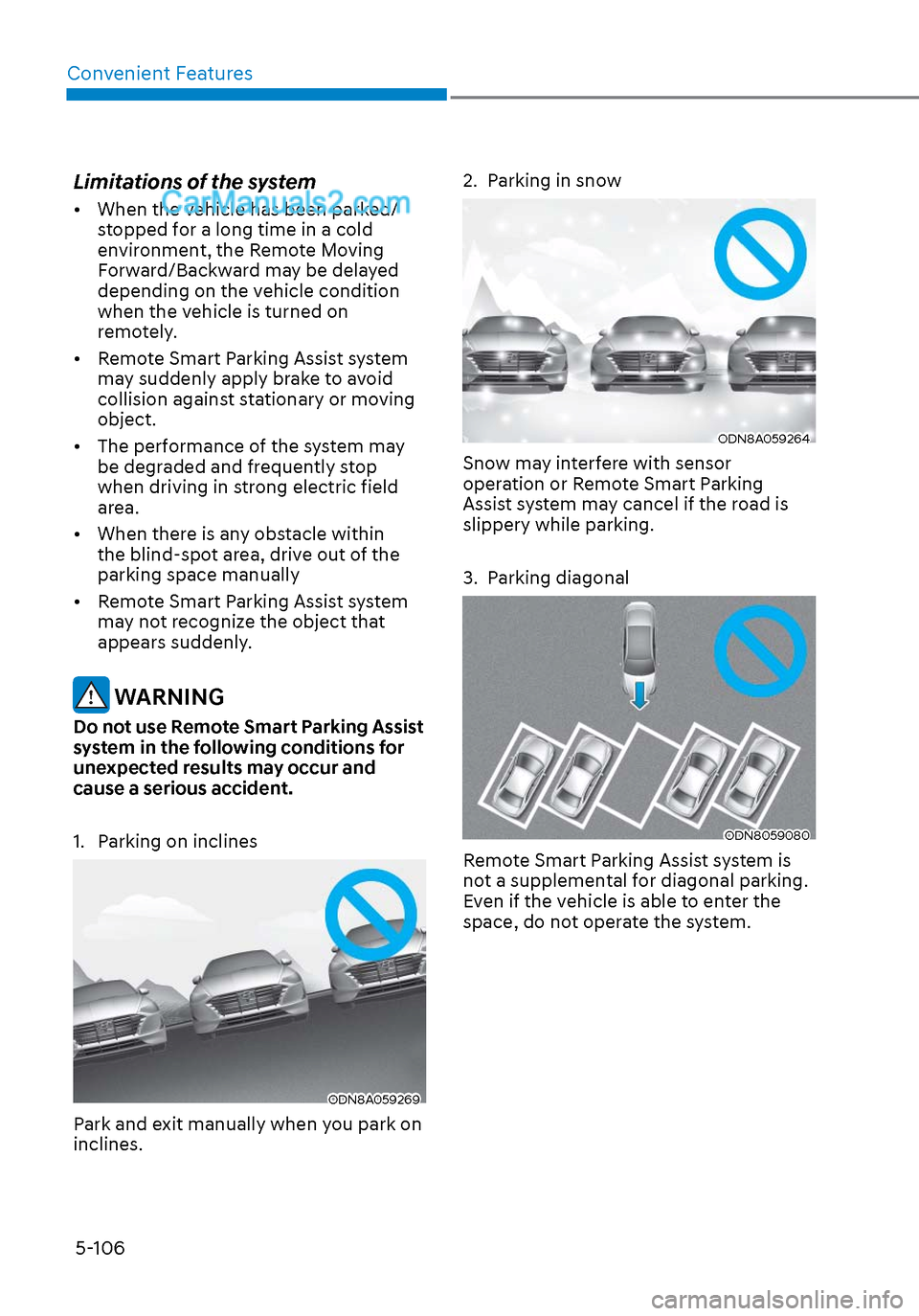
WARNING
Do not use Remote Smart Parking Assist
system in the following conditions for
unexpected results may occur and
cause a serious accident.
1. Parking on inclines
ODN8A059269ODN8A059269
Park and exit manually when you park on
inclines.
2. Parking in snow
ODN8A059264ODN8A059264
Snow may interfere with sensor
operation or Remote Smart Parking
Assist system may cancel if the road is
slippery while parking.
3. Parking diagonal
ODN8059080ODN8059080
Remote Smart Parking Assist system is
not a supplemental for diagonal parking.
Even if the vehicle is able to enter the
space, do not operate the system.
Page 240 of 537
Convenient Features5-110
When the Remote Moving Forward
is ready by the above No. (1)
method, the vehicle recognizes the
condition as exit. After confirming
the surroundings within 13 ft. (4 m), it
allows to operate the steering wheel
up to the conditions ahead.
When Remote Moving Forward is
ready by the above No. (2) method,
the vehicle recognizes the condition
as entering to the parking space.
According to the front condition, it
immediately allows the vehicle to
enter to the parking space and line
up with the steering wheel control.
However, the function performance
can be degraded up to the shape or
position of the surrounding objects.
If you select the remote moving
backward, both of the No. (1) and (2)
methods make the vehicle go straight
after lining up.
While Remote Moving Forward/
Backward assist is operating, the
brake light turns on.
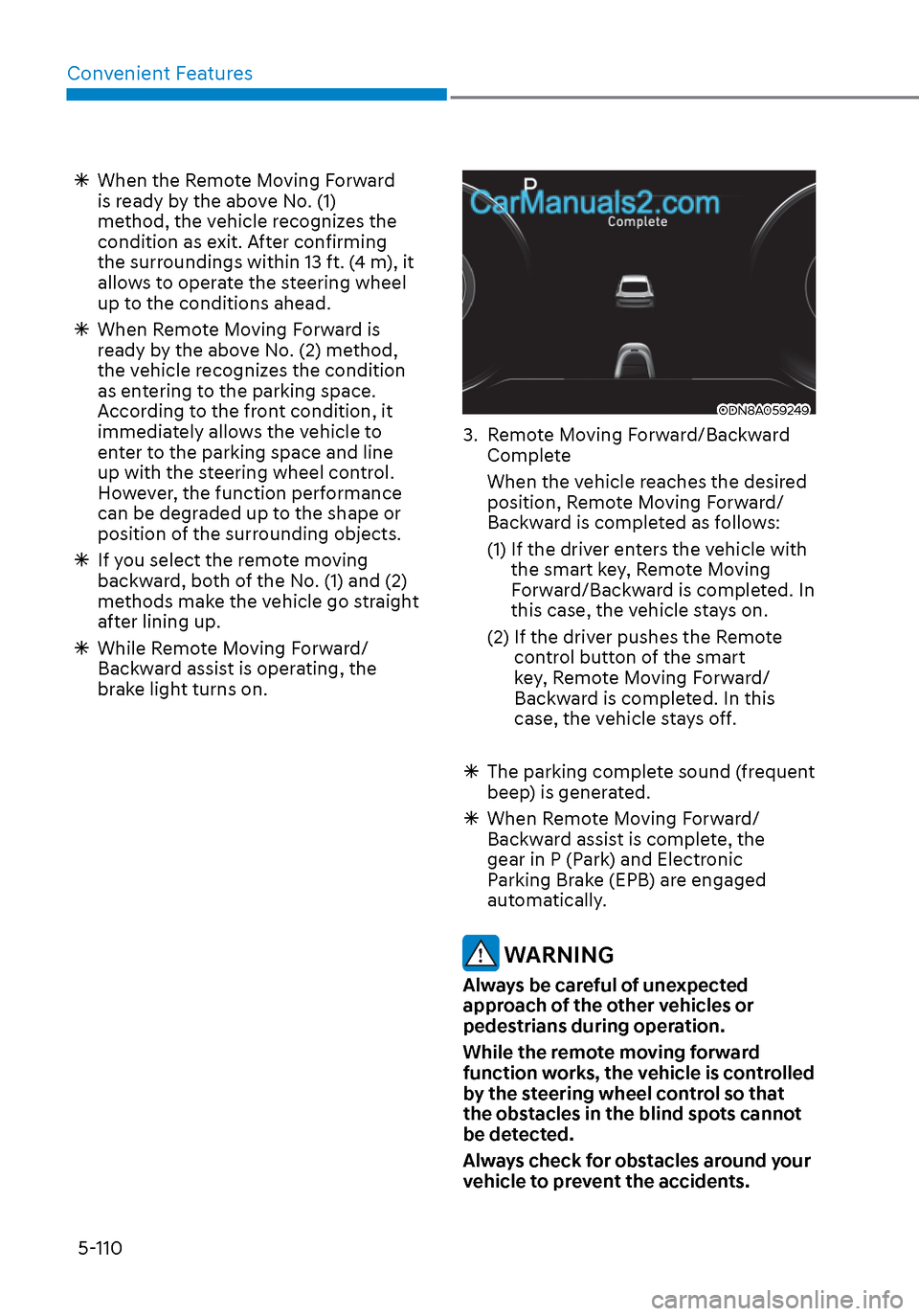
ODN8A059249ODN8A059249
3. Remote Moving Forward/Backward
Complete
When the vehicle reaches the desired position, Remote Moving Forward/
Backward is completed as follows:
(1) If the driver enters the vehicle with the smart key, Remote Moving
Forward/Backward is completed. In
this case, the vehicle stays on.
(2) If the driver pushes the Remote control button of the smart
key, Remote Moving Forward/
Backward is completed. In this
case, the vehicle stays off.
The parking complete sound (frequent
beep) is generated.
When Remote Moving Forward/
Backward assist is complete, the
gear in P (Park) and Electronic
Parking Brake (EPB) are engaged
automatically.
WARNING
Always be careful of unexpected
approach of the other vehicles or
pedestrians during operation.
While the remote moving forward
function works, the vehicle is controlled
by the steering wheel control so that
the obstacles in the blind spots cannot
be detected.
Always check for obstacles around your
vehicle to prevent the accidents.
Page 242 of 537
Convenient Features5-112
The Remote Moving Forward/
Backward assist will stop
temporarily when:
7. An obstacle is detected at the direction the vehicle is heading.
8. The door or trunk is opened.
9. The moving forward/backward button on the smart key is released.
10. Multiple buttons on the smart key are pressed at the same time.
11. The distance between the smart key and vehicle is over 13 ft. (4 m).
12. A button on the other smart key is pressed during operation.
13. Rear Cross-Traffic Collision-Avoidance Assist system is activated while
reserving.
14. The vehicle moves 23 ft. (7 m) with the Remote Moving Forward/Backward
while the smart key is pressed.
(Maximum travel distance per move)
The vehicle stops when the Remote
Smart Parking Assist system will stop
temporarily and the function will
resume when the above condition is
cleared.
The Remote Moving Forward/
Backward assist is cancelled while
in operation when:
1. The driver holds the steering wheel
while the steering wheel is controlled.
2. The gear is shifted or the Electronic Parking Brake (EPB) is activated.
3. The hood opens.
4. The vehicle speed exceeds 3 mph (5km/h).
5. The vehicle accelerates suddenly.
6. The vehicle slips back while controlling the vehicle speed.
7. The wheel is stuck and the vehicle is unable to move.
8. About 3 minutes and 50 seconds have passed after the Remote Moving
Forward/Backward assist starts. 9. The gradient of the road exceeds
the range supported by the Remote
Moving Forward/Backward assist.
10. The steering, shifting gear and drive assist are difficult.
11. The suspended status lasts for over 1 minute.
12. The driver continuously presses and releases the smart key’s moving
forward/backward button over 10
times.
13. The Traction Control System (TCS) is activated while controlling the vehicle
speed.
14. The smart key is damaged.
15. The accelerator/brake pedal is depressed while all the doors are
closed.
16. The brake pedal is depressed while the driver’s door is open and the smart
key is outside the vehicle.
17. The vehicle travels more than 46 ft. (14 m) after the Remote Moving Forward/
Backward assist is activated.
18. The theft alarm system is activated.
When the Remote Moving Forward/
Backward is completed, the gear in
P(Park) and Electronic Parking Brake
(EPB) are engaged automatically and
the vehicle turns off.
The frequent beep sounds are
generated to show the deactivation
status.
Page 285 of 537

6
6. While Driving
Before Driving ........................................................................\
........................ 6-5Before Entering the Vehicle ........................................................................\
............. 6-5
Before Starting ........................................................................\
................................. 6-5
Ignition Switch ........................................................................\
.......................6-6Key Ignition Switch ........................................................................\
........................... 6-6
Engine Start/Stop Button ........................................................................\
................ 6-9
Remote Start ........................................................................\
.................................... 6-12
Automatic Transmission ........................................................................\
.......6-13Automatic Transmission Operation ........................................................................\
6-13
Parking .................................................................\
....................................................6-16
LCD Display Message ........................................................................\
...................... 6-17
Good Driving Practices ........................................................................\
..................6-18
Paddle Shifter (Manual Shift Mode) ......................................................................6-\
19
Brake System ........................................................................\
........................ 6-20Power Brakes ........................................................................\
.................................. 6-20
Disc Brakes Wear Indicator......................................................................\
.............. 6-20
Electronic Parking Brake (EPB) ........................................................................\
....... 6-21
Auto Hold ........................................................................\
........................................ 6-24
Anti-lock Brake System (ABS) ..................................................................... 6-27Electronic Stability Control (ESC) ........................................................................\
. 6-29
Vehicle Stability Management (VSM) ....................................................................6-31
Hill-Start Assist Control (HAC) ........................................................................\
....... 6-32
Good Braking Practices ................................................................\
......................... 6-32
ISG (Idle Stop and Go) system..................................................................... 6-33To Activate the ISG System ........................................................................\
............ 6-33
To Deactivate the ISG System ........................................................................\
....... 6-35
ISG System Malfunction ........................................................................\
................ 6-35
Battery Sensor Deactivation ........................................................................\
.......... 6-36
Drive Mode Integrated Control System ...................................................... 6-37Drive Mode ........................................................................\
..................................... 6-37