remote start Hyundai Sonata 2020 User Guide
[x] Cancel search | Manufacturer: HYUNDAI, Model Year: 2020, Model line: Sonata, Model: Hyundai Sonata 2020Pages: 537, PDF Size: 14.54 MB
Page 168 of 537
Convenient Features5-38
THEFT-ALARM SYSTEM
This system helps to protect your vehicle
and valuables. The horn will sound and
the hazard warning lights will blink
continuously if any of the following
occur: - A door is opened without using the remote key or smart key.
- The trunk is opened without using the remote key or smart key.
- The engine hood is opened.
The alarm continues for 30 seconds, then
the system resets. To turn off the alarm,
unlock the doors with the remote key or
smart key.
The Theft Alarm System automatically
sets 30 seconds after you lock the doors
and the trunk. For the system to activate,
you must lock the doors and the trunk
from outside the vehicle with the remote
key or smart key or by pressing the
button on the outside of the door handle
with the smart key in your possession.
The hazard warning lights will blink and
the chime will sound once to indicate the
system is armed.
Once the security system is set, opening
any door, the trunk, or the hood without
using the remote key or smart key will
cause the alarm to activate.
The Theft Alarm System will not set if the
hood, the trunk, or any door is not fully
closed. If the system will not set, check
the hood, the trunk, or the doors are fully
closed.
Do not attempt to alter this system or
add other devices to it. Information
• Do not lock the doors until all
passengers have left the vehicle. If the
remaining passenger leaves the vehicle
when the system is armed, the alarm
will be activated.
• If the vehicle is not disarmed with the
remote key or smart key, open the
doors by using the mechanical key
and place the ignition switch in the
ON position (for remote key) or start
the engine (for smart key) by directly
pressing the ignition switch with the
smart key.
• If the system is disarmed by unlocking
the vehicle, but neither a door or the
trunk is opened within 30 seconds, the
doors will relock and the system will
rearm automatically.
Page 238 of 537
Convenient Features5-108
How Remote Smart Parking
Assist System Works
Remote Moving Forward/Backward
Remote Moving Forward/Backward is
available with the driver outside the
vehicle. Make sure the conditions are
met before activating Remote Moving
Forward/Backward function. With the
function, you can park or exit the vehicle
and the procedure is as follows.
1. Remote Moving Forward/Backward ready:
(1) With the vehicle off: Remotely turn on the vehicle.
(2) With the vehicle on: with shift button is in P (Park) position,
then press Remote Smart Parking
Assist system button. Then exit the
vehicle possessing the smart key.
2. Remote Moving Forward/Backward assist: Press and hold the Moving
Forward/Backward button of the
smart key to provide the Remote
Moving Forward/Backward assist
through steering wheel, gear shift and
vehicle speed control.
3. Remote Moving Forward/Backward complete: When the vehicle reaches
the desired position, release the
smart key button. Then complete the
Remote Moving Forward/Backward
by entering the vehicle possessing the
smart key or by pressing the remote
start button of the smart key.
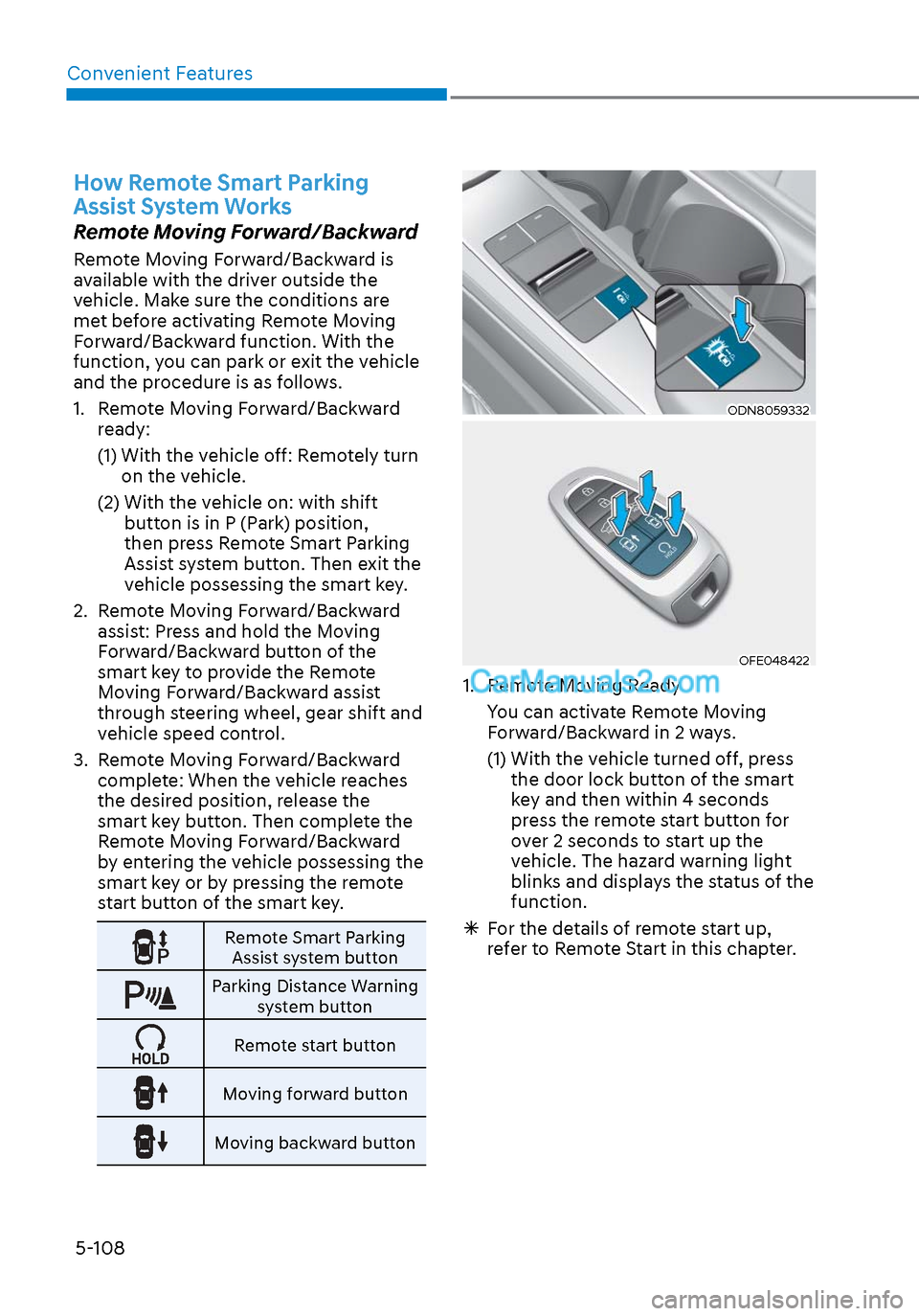
Remote Smart Parking
Assist system button
Parking Distance Warning system button
Remote start button
Moving forward button
Moving backward button
ODN8059332ODN8059332
OFE048422OFE048422
1. Remote Moving Ready
You can activate Remote Moving Forward/Backward in 2 ways.
(1) With the vehicle turned off, press the door lock button of the smart
key and then within 4 seconds
press the remote start button for
over 2 seconds to start up the
vehicle. The hazard warning light
blinks and displays the status of the
function.
For the details of remote start up,
refer to Remote Start in this chapter.
Page 241 of 537
05
5-111
CAUTION
• The driver should check for obstacles
directly around the vehicle.
• The function may be cancelled if you
attach something (cover, etc.) to the
steering wheel.
• Make sure all the passengers exit the
vehicle when the Remote Moving
Forward/Backward is in activation.
• Make sure all the smart keys are
outside the vehicle when the Remote
Moving Forward/Backward assist is
in activation.
• The detection range of the smart key
can be differed by the surroundings
(ex: Indoor/outdoor, strong electric
field area)
• If the parking distance warning
sounds three consecutive times
during operating the Remote Moving
Forward/Backward system, you
should not move your vehicle in that
direction since the objects are too
close. The driver should operate the
vehicle manually.
To cancel the Remote Moving
Forward/Backward while in
operation
1. Press the remote start button on the
smart key.
2. The driver should press Remote Smart Parking Assist system button while
Remote Moving Forward/Backward is
instructed.
3. The driver should shift the gear besides P (parking) while Remote
Moving Forward/Backward is
instructed.
4. The driver should press Parking Distance Warning system button
while the Remote Moving Forward/
Backward is instructed.
5. During Remote Moving Forward/ Backward operation, the vehicle
turns off when the driver presses the
remote start button on the smart key.
6. The function is cancelled but the vehicle stays on when the driver
enters the vehicle with the smart key
and all the doors are open.
Page 242 of 537
Convenient Features5-112
The Remote Moving Forward/
Backward assist will stop
temporarily when:
7. An obstacle is detected at the direction the vehicle is heading.
8. The door or trunk is opened.
9. The moving forward/backward button on the smart key is released.
10. Multiple buttons on the smart key are pressed at the same time.
11. The distance between the smart key and vehicle is over 13 ft. (4 m).
12. A button on the other smart key is pressed during operation.
13. Rear Cross-Traffic Collision-Avoidance Assist system is activated while
reserving.
14. The vehicle moves 23 ft. (7 m) with the Remote Moving Forward/Backward
while the smart key is pressed.
(Maximum travel distance per move)
The vehicle stops when the Remote
Smart Parking Assist system will stop
temporarily and the function will
resume when the above condition is
cleared.
The Remote Moving Forward/
Backward assist is cancelled while
in operation when:
1. The driver holds the steering wheel
while the steering wheel is controlled.
2. The gear is shifted or the Electronic Parking Brake (EPB) is activated.
3. The hood opens.
4. The vehicle speed exceeds 3 mph (5km/h).
5. The vehicle accelerates suddenly.
6. The vehicle slips back while controlling the vehicle speed.
7. The wheel is stuck and the vehicle is unable to move.
8. About 3 minutes and 50 seconds have passed after the Remote Moving
Forward/Backward assist starts. 9. The gradient of the road exceeds
the range supported by the Remote
Moving Forward/Backward assist.
10. The steering, shifting gear and drive assist are difficult.
11. The suspended status lasts for over 1 minute.
12. The driver continuously presses and releases the smart key’s moving
forward/backward button over 10
times.
13. The Traction Control System (TCS) is activated while controlling the vehicle
speed.
14. The smart key is damaged.
15. The accelerator/brake pedal is depressed while all the doors are
closed.
16. The brake pedal is depressed while the driver’s door is open and the smart
key is outside the vehicle.
17. The vehicle travels more than 46 ft. (14 m) after the Remote Moving Forward/
Backward assist is activated.
18. The theft alarm system is activated.
When the Remote Moving Forward/
Backward is completed, the gear in
P(Park) and Electronic Parking Brake
(EPB) are engaged automatically and
the vehicle turns off.
The frequent beep sounds are
generated to show the deactivation
status.
Page 245 of 537
05
5-115
Link with other systems
Activation of other systems may
be restricted according to the
circumstances while Remote Smart
Parking Assist system is in activation.
The systems linked to the Remote Smart
Parking Assist system are as follows:
1. Idle Stop & Go
(1) While Remote Smart Parking Assist system is operating, ISG is
deactivated.
(2) If Remote Smart Parking Assist system is completed or cancelled,
ISG can be activated.
2. Auto Hold
(1) The activated Auto Hold is switched to deactivation status
when Remote Smart Parking Assist
system starts.
(2) The Auto Hold button will not respond while Remote Smart
Parking Assist system is in
activation.
(3) After Remote Smart Parking Assist system is completed or
deactivated, the Auto Hold will
return to the status before Remote
Smart Parking Assist system was
activated.
3. Electronic Stability Control (ESC)
(1) Electronic Stability Control (ESC) system switches from OFF to
activation status (ESC OFF button
turns off) when Remote Smart
Parking Assist system is activated.
(2) The ESC OFF button will not respond while Remote Smart
Parking Assist system is in
activation.
(3) The ABS/TCS/ESC system activates while Remote Smart Parking Assist
system is in activation.
(4) After Remote Smart Parking Assist system is completed or
deactivated, the ESC maintains the
ON status.
How the Remote Moving
Forward/Backward System
Works
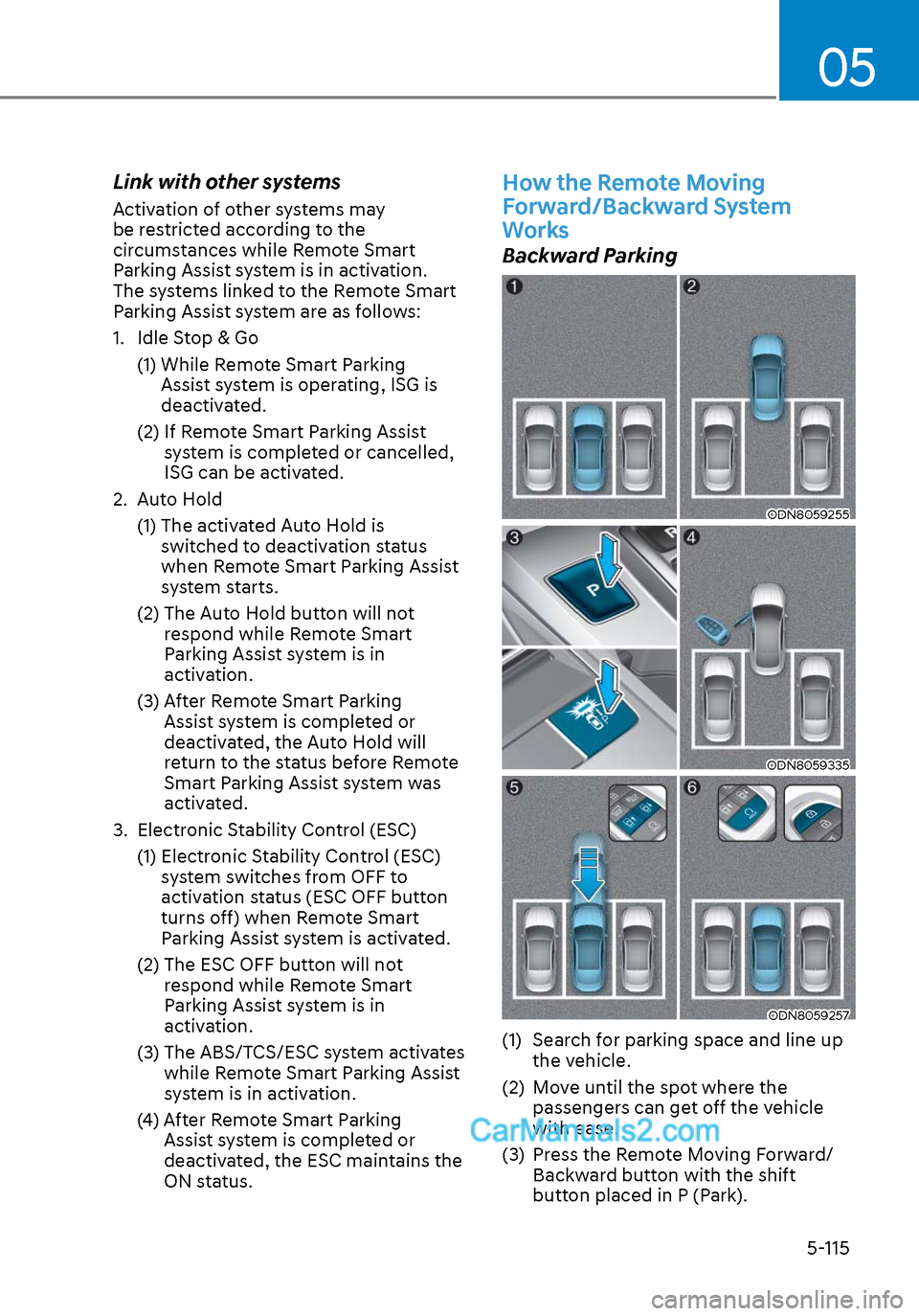
Backward Parking
ODN8059255ODN8059255
ODN8059335ODN8059335
ODN8059257ODN8059257
(1) Search for parking space and line up the vehicle.
(2) Move until the spot where the passengers can get off the vehicle
with ease.
(3) Press the Remote Moving Forward/ Backward button with the shift
button placed in P (Park).
Page 278 of 537
![Hyundai Sonata 2020 User Guide Convenient Features5-148
Wireless Cellular Phone
Charging System (if equipped)
ODN8059223ODN8059223
[A]: Indicator light, [B]: Charging pad
On certain models, the vehicle comes
equipped with a wirel](/img/35/16773/w960_16773-277.png "Hyundai Sonata 2020 User Guide Convenient Features5-148
Wireless Cellular Phone
Charging System (if equipped)
ODN8059223ODN8059223
[A]: Indicator light, [B]: Charging pad
On certain models, the vehicle comes
equipped with a wirel")
Convenient Features5-148
Wireless Cellular Phone
Charging System (if equipped)
ODN8059223ODN8059223
[A]: Indicator light, [B]: Charging pad
On certain models, the vehicle comes
equipped with a wireless cellular phone
charger.
The system is available when all doors
are closed, and when the ignition switch
is ON.
To charge a cellular phone
The wireless cellular phone charging
system charges only the Qi-enabled
cellular phones. Read the label on the
cellular phone accessory cover or visit
your cellular phone manufacturer’s
website to check whether your cellular
phone supports the Qi technology.
The wireless charging process starts
when you put a Qi-enabled cellular
phone on the wireless charging unit.
1. Remove other items, including the smart key, from the wireless charging
unit. If not, the wireless charging
process may be interrupted. Place
the cellular phone on the center of
the charging pad (
).
2. The indicator light is orange when the cellular phone is charging. The
indicator light turns green when
phone charging is complete.
3. You can turn ON or OFF the wireless charging function in the user settings
mode on the instrument cluster. For
further information, refer to the “LCD
Display Modes” in this chapter.
If your cellular phone is not charging:
- Slightly change the position of the cellular phone on the charging pad.
- Make sure the indicator light is orange.
The indicator light will blink orange for 10
seconds if there is a malfunction in the
wireless charging system.
In this case, temporarily stop the
charging process, and re-attempt to
charge your cellular phone again.
The system warns you with a message
on the LCD display if the cellular phone
is still on the wireless charging unit after
the engine is turned OFF and the front
door is opened.
Information
For some manufacturers’ cellular phones,
the system may not warn you even though
the cellular phone is left on the wireless
charging unit. This is due to the particular
characteristic of the cellular phone and
not a malfunction of the wireless charging.
NOTICE
• The wireless cellular phone charging system may not support certain
cellular phones, which are not
verified for the Qi specification (
).
• When placing your cellular phone on the charging mat, position the
phone in the middle of the mat for
optimal charging performance. If
your cellular phone is off to the side,
the charging rate may be less and in
some cases the cellular phone may
experience higher heat conduction.
• In some cases, the wireless charging may stop temporarily when the
Remote Key or Smart Key is used,
either when starting the vehicle or
locking/unlocking the doors, etc.
• When charging certain cellular phones, the charging indicator
may not change to green when the
cellular phone is fully charged.
Page 285 of 537

6
6. While Driving
Before Driving ........................................................................\
........................ 6-5Before Entering the Vehicle ........................................................................\
............. 6-5
Before Starting ........................................................................\
................................. 6-5
Ignition Switch ........................................................................\
.......................6-6Key Ignition Switch ........................................................................\
........................... 6-6
Engine Start/Stop Button ........................................................................\
................ 6-9
Remote Start ........................................................................\
.................................... 6-12
Automatic Transmission ........................................................................\
.......6-13Automatic Transmission Operation ........................................................................\
6-13
Parking .................................................................\
....................................................6-16
LCD Display Message ........................................................................\
...................... 6-17
Good Driving Practices ........................................................................\
..................6-18
Paddle Shifter (Manual Shift Mode) ......................................................................6-\
19
Brake System ........................................................................\
........................ 6-20Power Brakes ........................................................................\
.................................. 6-20
Disc Brakes Wear Indicator......................................................................\
.............. 6-20
Electronic Parking Brake (EPB) ........................................................................\
....... 6-21
Auto Hold ........................................................................\
........................................ 6-24
Anti-lock Brake System (ABS) ..................................................................... 6-27Electronic Stability Control (ESC) ........................................................................\
. 6-29
Vehicle Stability Management (VSM) ....................................................................6-31
Hill-Start Assist Control (HAC) ........................................................................\
....... 6-32
Good Braking Practices ................................................................\
......................... 6-32
ISG (Idle Stop and Go) system..................................................................... 6-33To Activate the ISG System ........................................................................\
............ 6-33
To Deactivate the ISG System ........................................................................\
....... 6-35
ISG System Malfunction ........................................................................\
................ 6-35
Battery Sensor Deactivation ........................................................................\
.......... 6-36
Drive Mode Integrated Control System ...................................................... 6-37Drive Mode ........................................................................\
..................................... 6-37
Page 296 of 537
While Driving6-12
NOTICE
To prevent damage to the vehicle:
When the stop lamp switch fuse is
blown, you can't start the engine
normally. Replace the fuse with a new
one. If you are not able to replace
the fuse, you can start the engine by
pressing and holding the Engine Start/
Stop button for 10 seconds with the
Engine Start/Stop button in the ACC
position.
Do not press the Engine Start/Stop
button for more than 10 seconds except
when the stop lamp switch fuse is
blown.
For your safety always depress the
brake pedal before starting the engine.
ODN8069002ODN8069002
Information
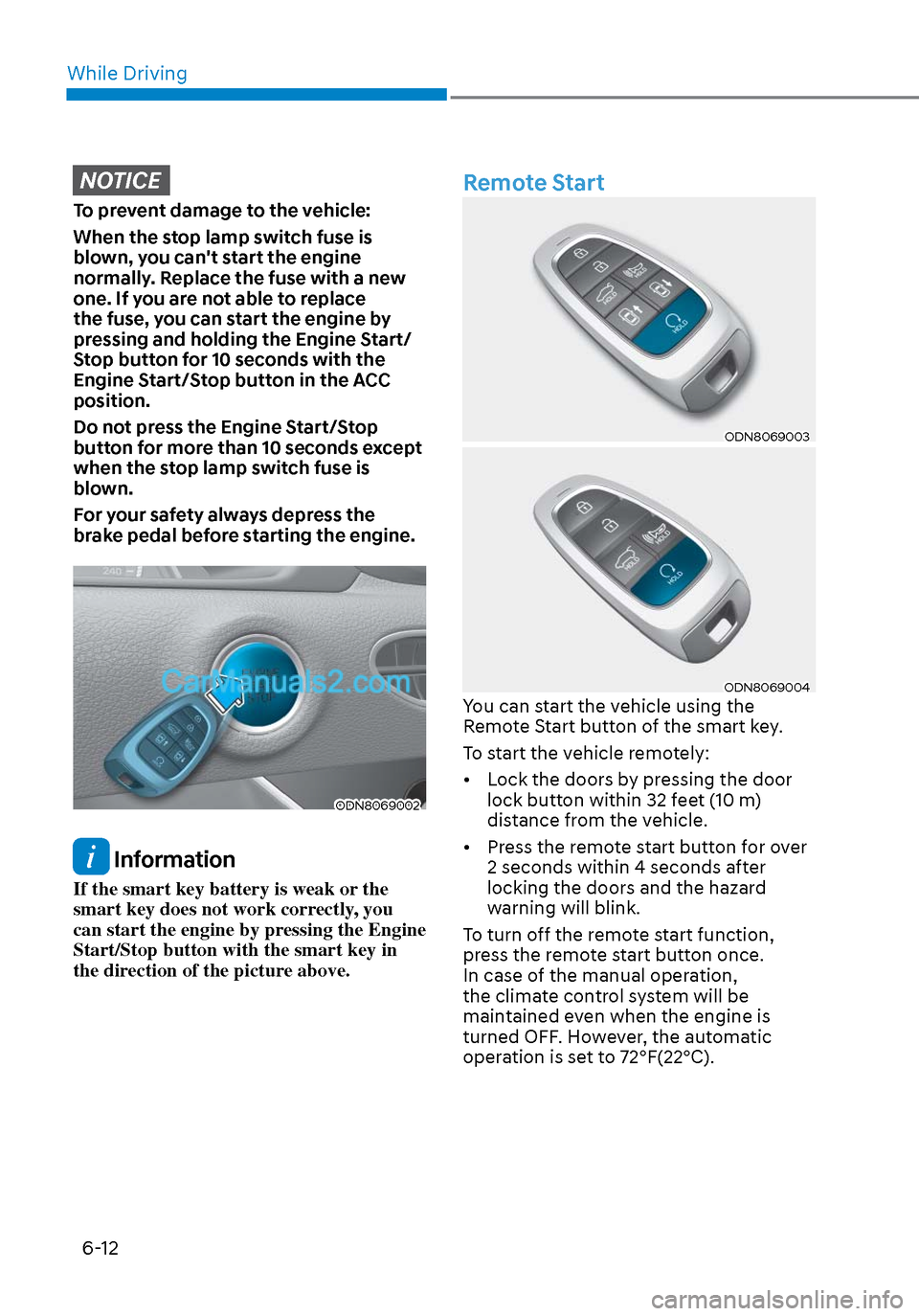
If the smart key battery is weak or the
smart key does not work correctly, you
can start the engine by pressing the Engine
Start/Stop button with the smart key in
the direction of the picture above.
Remote Start
ODN8069003ODN8069003
ODN8069004ODN8069004You can start the vehicle using the
Remote Start button of the smart key.
To start the vehicle remotely:
• Lock the doors by pressing the door lock button within 32 feet (10 m)
distance from the vehicle.
• Press the remote start button for over 2 seconds within 4 seconds after
locking the doors and the hazard
warning will blink.
To turn off the remote start function,
press the remote start button once.
In case of the manual operation,
the climate control system will be
maintained even when the engine is
turned OFF. However, the automatic
operation is set to 72°F(22°C).
Page 438 of 537
Emergency Situations7-10
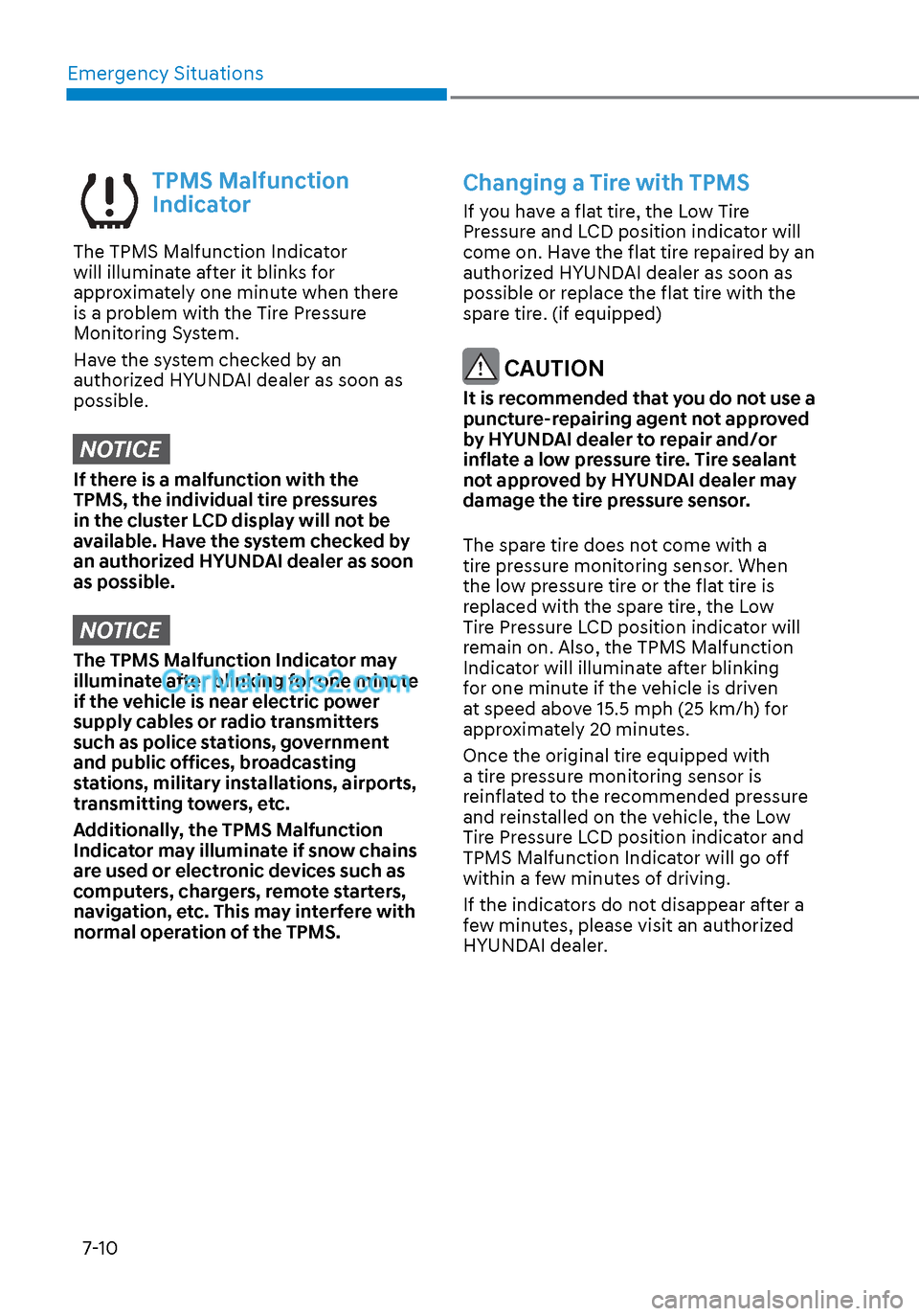
TPMS Malfunction
Indicator
The TPMS Malfunction Indicator
will illuminate after it blinks for
approximately one minute when there
is a problem with the Tire Pressure
Monitoring System.
Have the system checked by an
authorized HYUNDAI dealer as soon as
possible.
NOTICE
If there is a malfunction with the
TPMS, the individual tire pressures
in the cluster LCD display will not be
available. Have the system checked by
an authorized HYUNDAI dealer as soon
as possible.
NOTICE
The TPMS Malfunction Indicator may
illuminate after blinking for one minute
if the vehicle is near electric power
supply cables or radio transmitters
such as police stations, government
and public offices, broadcasting
stations, military installations, airports,
transmitting towers, etc.
Additionally, the TPMS Malfunction
Indicator may illuminate if snow chains
are used or electronic devices such as
computers, chargers, remote starters,
navigation, etc. This may interfere with
normal operation of the TPMS.
Changing a Tire with TPMS
If you have a flat tire, the Low Tire
Pressure and LCD position indicator will
come on. Have the flat tire repaired by an
authorized HYUNDAI dealer as soon as
possible or replace the flat tire with the
spare tire. (if equipped)
CAUTION
It is recommended that you do not use a
puncture-repairing agent not approved
by HYUNDAI dealer to repair and/or
inflate a low pressure tire. Tire sealant
not approved by HYUNDAI dealer may
damage the tire pressure sensor.
The spare tire does not come with a
tire pressure monitoring sensor. When
the low pressure tire or the flat tire is
replaced with the spare tire, the Low
Tire Pressure LCD position indicator will
remain on. Also, the TPMS Malfunction
Indicator will illuminate after blinking
for one minute if the vehicle is driven
at speed above 15.5 mph (25 km/h) for
approximately 20 minutes.
Once the original tire equipped with
a tire pressure monitoring sensor is
reinflated to the recommended pressure
and reinstalled on the vehicle, the Low
Tire Pressure LCD position indicator and
TPMS Malfunction Indicator will go off
within a few minutes of driving.
If the indicators do not disappear after a
few minutes, please visit an authorized
HYUNDAI dealer.
Page 498 of 537
08
8-51
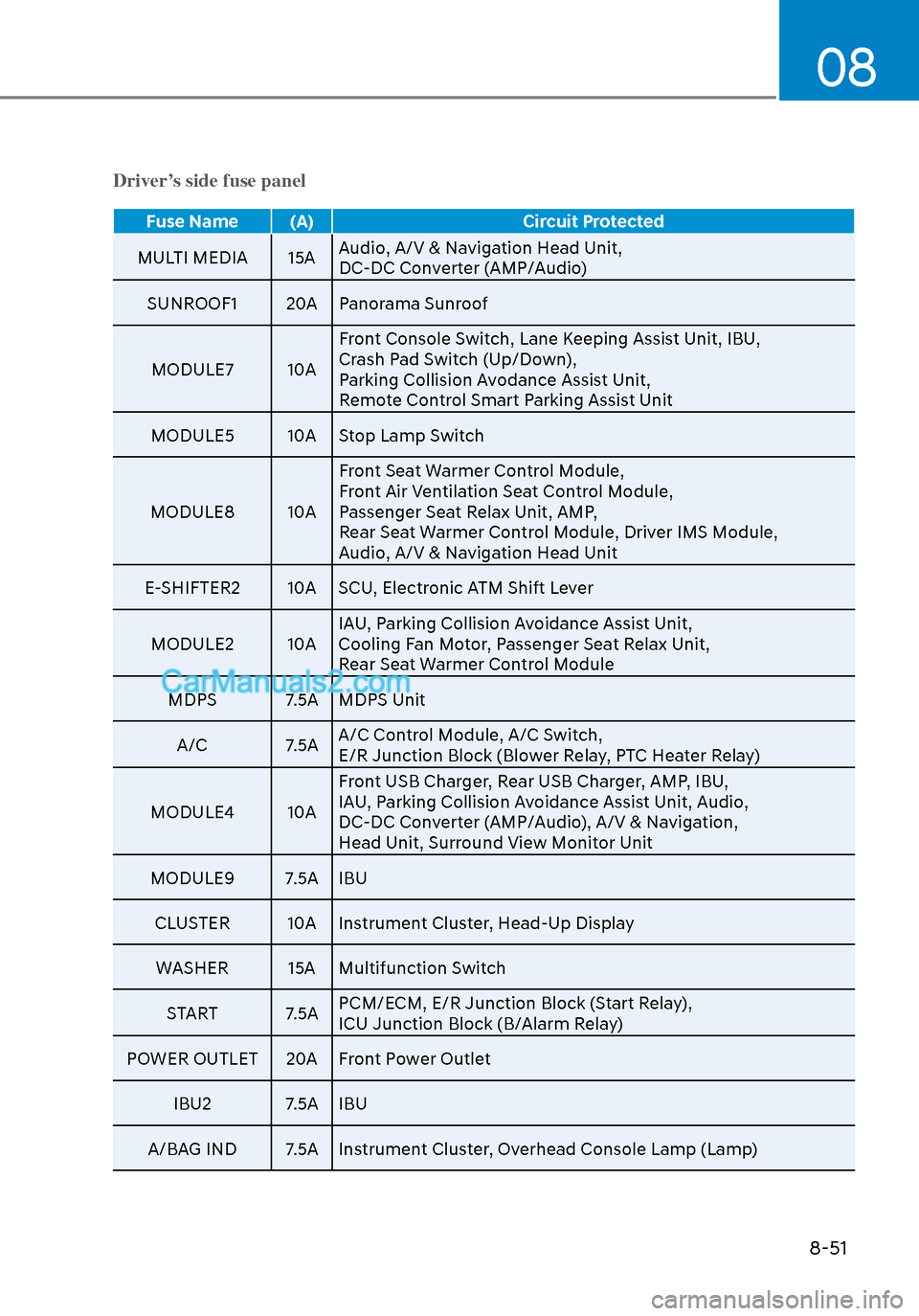
Driver’s side fuse panel
Fuse Name (A)Circuit Protected
MULTI MEDIA 15A Audio, A/V & Na
vigation Head Unit,
DC-DC Converter (AMP/Audio)
SUNROOF1 20A Panorama Sunroof
MODULE7 10A Front Console Switch, Lane Keeping Assist Unit, IBU,
Crash Pad Switch (Up/Down),
Parking Collision Avodance Assist Unit,
Remote Control Smart Parking Assist Unit
MODULE5 10A Stop Lamp Switch
MODULE8 10A Front Seat Warmer Control Module,
Front Air Ventilation Seat Control Module,
Passenger Seat Relax Unit, AMP,
Rear Seat Warmer Control Module, Driver IMS Module,
Audio, A/V & Navigation Head Unit
E-SHIFTER2 10A SCU, Electronic ATM Shift Lever
MODULE2 10A IAU, Parking Collision Avoidance Assist Unit,
Cooling Fan Motor, Passenger Seat Relax Unit,
Rear Seat Warmer Control Module
MDPS 7.5A MDPS Unit
A/C 7.5A A/C Control Module, A/C Switch,
E/R Junction Block (Blower Relay, PTC Heater Relay)
MODULE4 10A Front USB Charger, Rear USB Charger, AMP, IBU,
IAU, Parking Collision Avoidance Assist Unit, Audio,
DC-DC Converter (AMP/Audio), A/V & Navigation,
Head Unit, Surround View Monitor Unit
MODULE9 7.5A IBU
CLUSTER 10A Instrument Cluster, Head-Up DisplayWASHER 15A Multifunction Switch
START 7.5A PCM/ECM, E/R Junction Block (Start Relay),
ICU Junction Block (B/Alarm Relay)
POWER OUTLET 20A Front Power Outlet
IBU2 7.5A IBU
A/BAG IND 7.5A Instrument Cluster, Overhead Console Lamp (Lamp)