Cruise control Hyundai Sonata 2020 Owner's Guide
[x] Cancel search | Manufacturer: HYUNDAI, Model Year: 2020, Model line: Sonata, Model: Hyundai Sonata 2020Pages: 537, PDF Size: 14.54 MB
Page 391 of 537
06
6-107
Information
• Navigation-based Smart Cruise Control
is limited in other countries.
• The system may not operate due to the
existence of leading vehicles and the
driving situations of the vehicle.
• The system operates regardless of
whether the sharp curve warning
appears on the navigation, but the time
gap could occur between the warning
and system operation.
• The navigation only provides curve
information within permitted speed
ranges so that the system may not
decrease its speed during extreme over-
speed driving.
• The system is not designed to work on
highways other than mentioned as a
controlled access road.
• The system automatically cancels when
you leave the highway. •
Highway Driving Assist and
Navigation-based Smart Cruise
Control uses the same symbol
that indicates the status of the system.
Therefore, even if Navigation-based
Cruise Control is off, the
symbol
may be displayed.
• If there is a problem with Navigation-
based Smart Cruise Control, the system
cannot be activated in the AVN system
screen, and the
symbol will turn
off. However, if Highway Driving Assist
is activated, the
symbol will be
displayed.
• After you pass through a tollgate on a
highway, the system operates based
on the first lane. If you enter one of
the other lanes, the system might not
properly decelerate.
• If you over speed, the system may not
decelerate the vehicle in a curve.
• Deceleration by the system may not be
sufficient if the driver accelerates while
the system is operating,
• Deceleration by the system may not be
sufficient due to road conditions such
as uneven road surfaces, narrow lanes,
etc.
• If the road is controlled, due to
construction or holiday events, the
system might not work properly.
Page 392 of 537
While Driving6-108
CAUTION
Navigation-based Cruise Control
system may not function properly in the
following situations:
• The navigation is not working
properly.
• The navigation is not updated.
• The real-time GPS or map
information provided has errors.
• The navigation is overloaded by
performing functions such as route
search, video playback, voice
recognition, etc. are performing
simultaneously.
• GPS signals are blocked in areas such
as a tunnel.
• The driver goes off course or the
route to the destination is changed
or canceled by resetting the
navigation.
• The vehicle enters a service station
or rest area.
• A section of the highway’s shape has
changed.
• Android Auto or Car Play is operating.
• The navigation cannot detect the
current vehicle position (ex: elevated
roads including overpass adjacent to
general roads or nearby roads exist
in a parallel way).
• The navigation is being updated
while driving.
• The navigation is being reset while
driving.
• The road is slippery due to bad
weather such as rain or snow.
Information
This device complies with Part 15 of the
FCC rules.
Operation is subject to the following three
conditions:
1. This device may not cause harmful
interference, and
2. This device must accept any
interference received, including
interference that may cause undesired
operation.
3. Changes or modifications not expressly
approved by the party responsible
for compliance could void the user's
authority to operate the device.
Information
Radio frequency radiation exposure
information:
This equipment complies with FCC
radiation exposure limits set forth for an
uncontrolled environment.
This equipment should be installed and
operated with minimum distance of 8 in.
(20 cm) between the radiator (antenna)
and your body.
This transmitter must not be co-located or
operating in conjunction with any other
antenna or transmitter.
Page 400 of 537
While Driving6-116
System Setting and Operation
System setting
• With the Engine Start/Stop button in the ON or START position, Highway
Driving Assist can be activated
by selecting 'Driver Assistance
Highway Driving Assist’ from the User
Settings mode on the infotainment
system. For detailed information,
please refer to the infotainment
system manual separately supplied.
• If the engine is turned off then on again, the system maintains the last
setting.
Operating conditions
Select 'Highway Driving Assist' from
the Settings menu in the infotainment
system screen and satisfy the following
conditions for the system to operate.
• Driving on the highway main line
• Smart Cruise Control is operating
- If Smart Cruise Control is in the READY state the Highway Driving
Assist will be in the READY state.
The
indicator on the cluster
will illuminate white.
• Vehicle speed is under 95 mph (153 km/h)
If all the mentioned conditions are
satisfied, the system is ENABLED and
the
indicator on the cluster will
illuminate green.
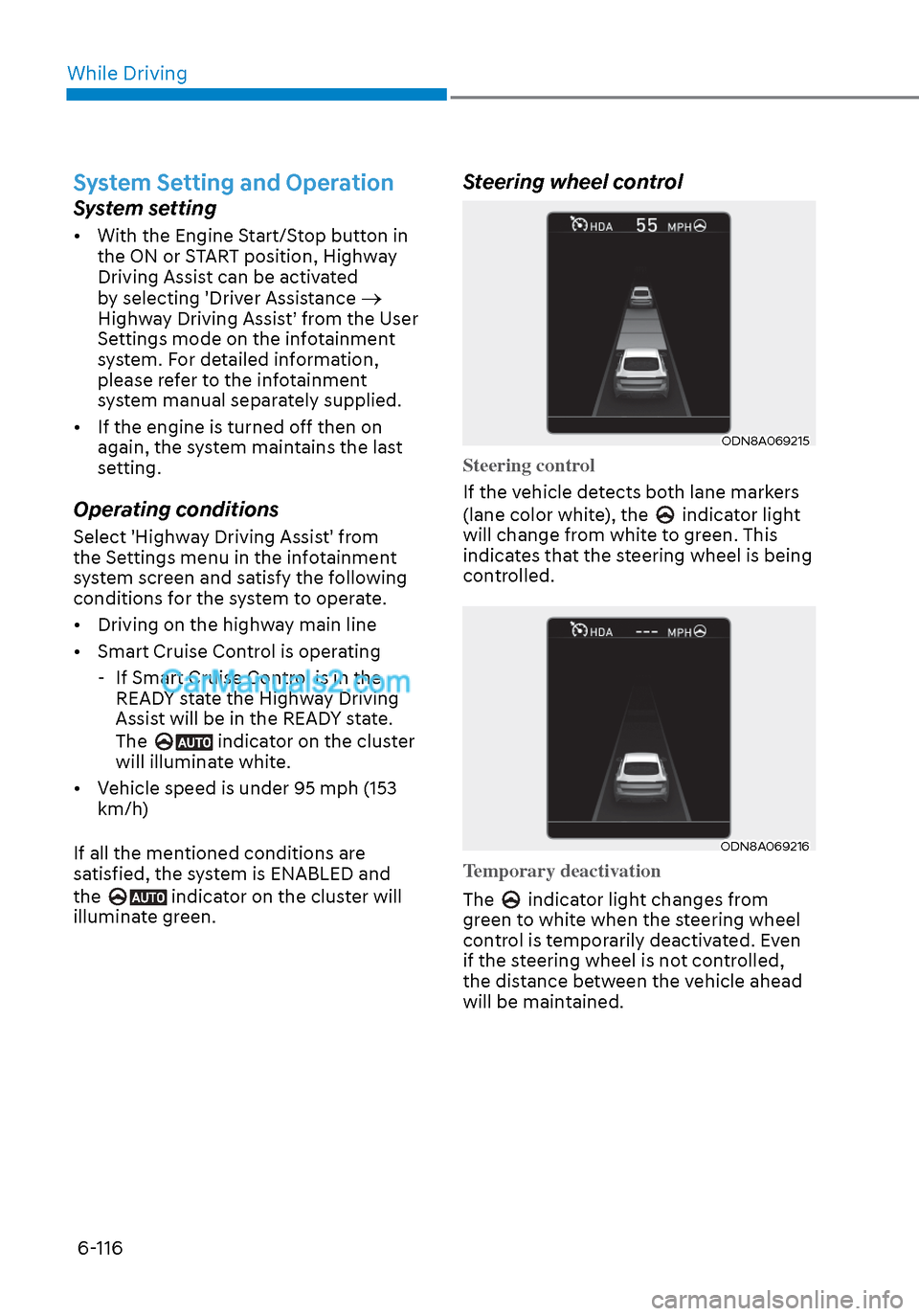
Steering wheel control
ODN8A069215ODN8A069215
Steering control
If the vehicle detects both lane markers
(lane color whit
e), the
indicator light
will change from white to green. This
indicates that the steering wheel is being
controlled.
ODN8A069216ODN8A069216
Temporary deactivation
The
indicator light changes from
green to white when the steering wheel
control is temporarily deactivated. Even
if the steering wheel is not controlled,
the distance between the vehicle ahead
will be maintained.
Page 401 of 537
06
6-117
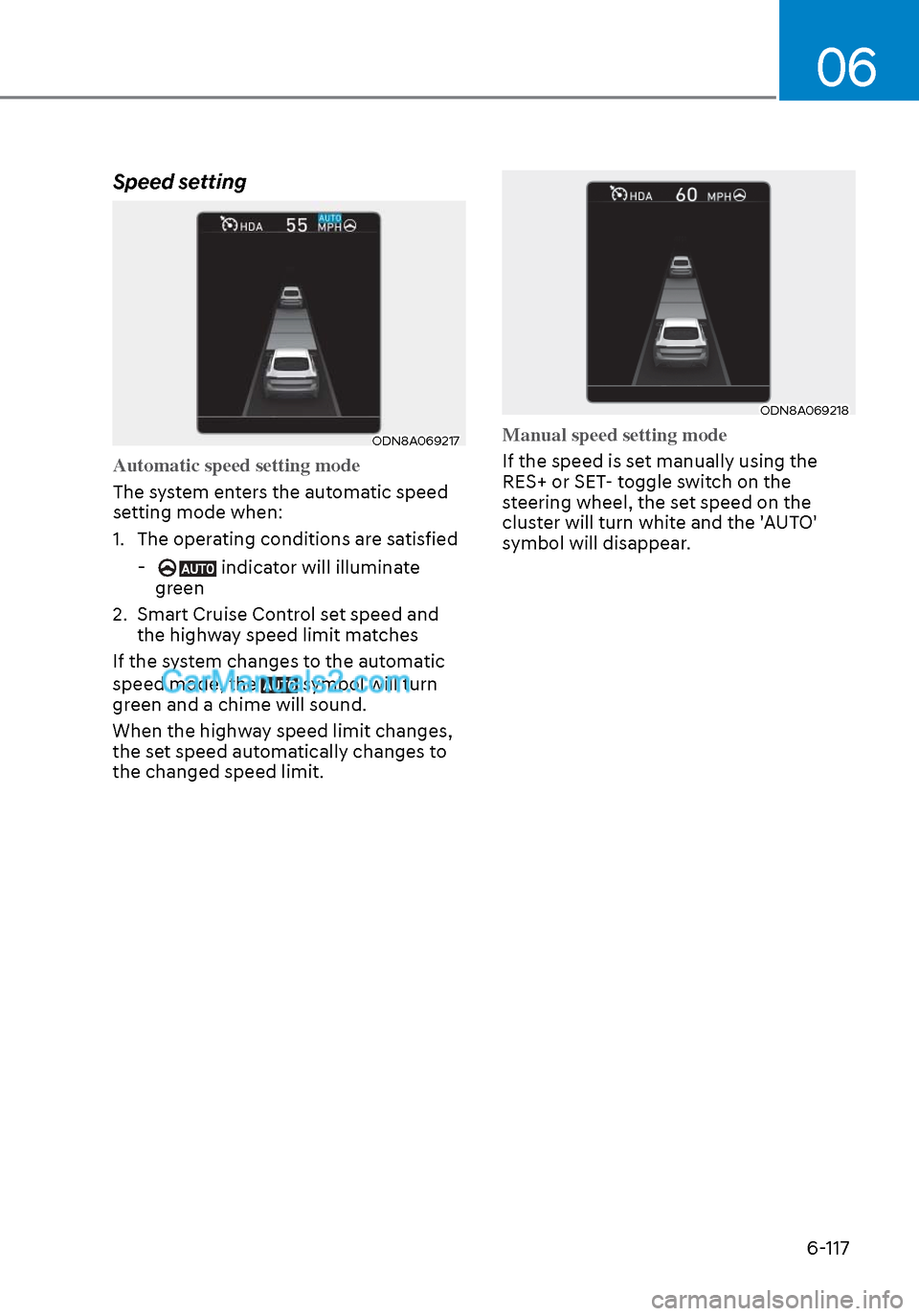
Speed setting
ODN8A069217ODN8A069217
Automatic speed setting mode
The system enters the automatic speed
se
tting mode when:
1. The operating conditions are satisfied
- indicator will illuminate
green
2. Smart Cruise Control set speed and the highway speed limit matches
If the system changes to the automatic
speed mode, the
symbol will turn
green and a chime will sound.
When the highway speed limit changes,
the set speed automatically changes to
the changed speed limit.
ODN8A069218ODN8A069218
Manual speed setting mode
If the speed is set manually using the
RES+ or SET
- toggle switch on the
steering wheel, the set speed on the
cluster will turn white and the 'AUTO'
symbol will disappear.
Page 403 of 537
06
6-119
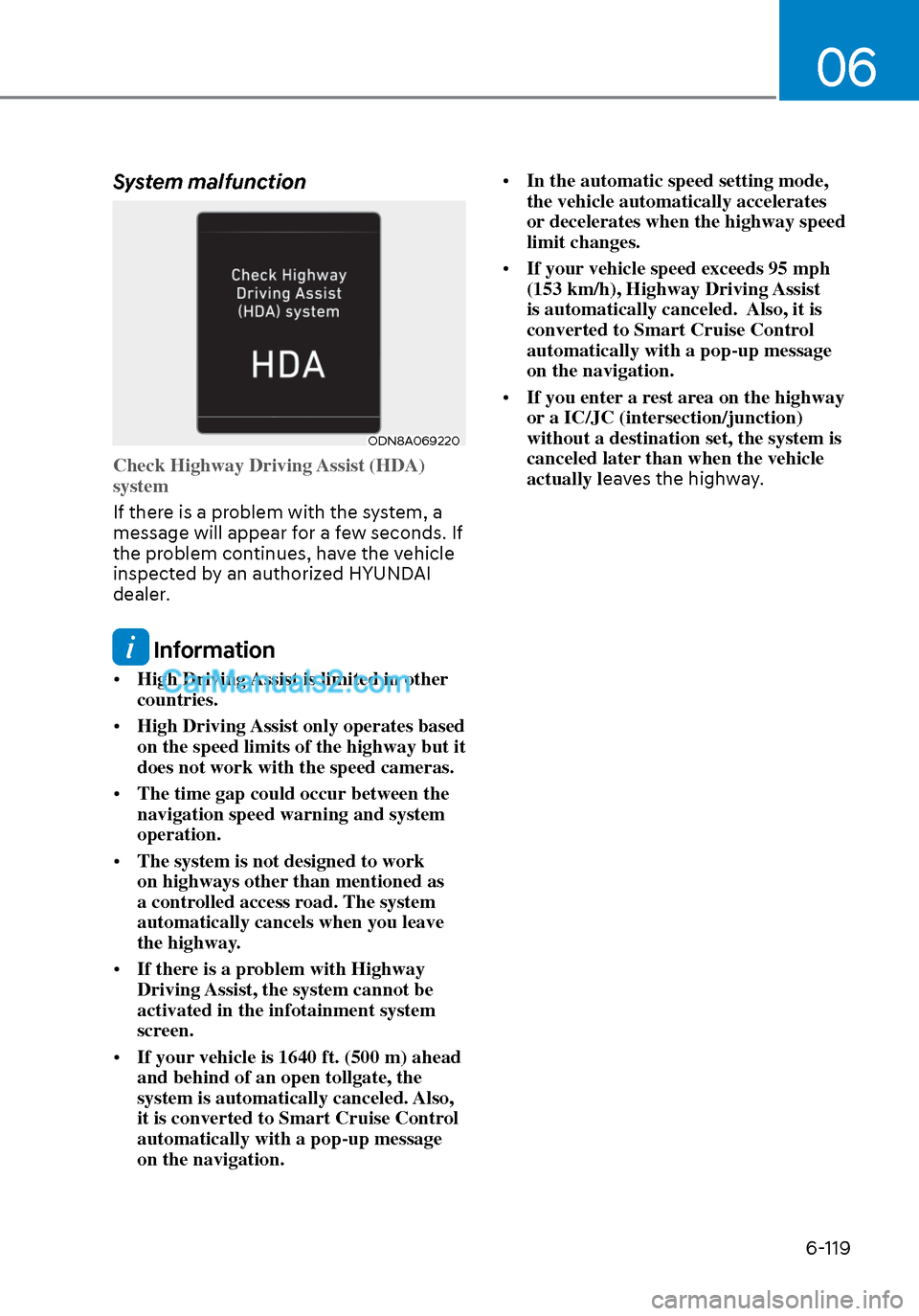
System malfunction
ODN8A069220ODN8A069220
Check Highway Driving Assist (HDA)
system
If there is a problem with the system, a
message will appear f
or a few seconds. If
the problem continues, have the vehicle
inspected by an authorized HYUNDAI
dealer.
Information
• High Driving Assist is limited in other
countries.
• High Driving Assist only operates based
on the speed limits of the highway but it
does not work with the speed cameras.
• The time gap could occur between the
navigation speed warning and system
operation.
• The system is not designed to work
on highways other than mentioned as
a controlled access road. The system
automatically cancels when you leave
the highway.
• If there is a problem with Highway
Driving Assist, the system cannot be
activated in the infotainment system
screen.
• If your vehicle is 1640 ft. (500 m) ahead
and behind of an open tollgate, the
system is automatically canceled. Also,
it is converted to Smart Cruise Control
automatically with a pop-up message
on the navigation. •
In the automatic speed setting mode,
the vehicle automatically accelerates
or decelerates when the highway speed
limit changes.
• If your vehicle speed exceeds 95 mph
(153 km/h), Highway Driving Assist
is automatically canceled. Also, it is
converted to Smart Cruise Control
automatically with a pop-up message
on the navigation.
• If you enter a rest area on the highway
or a IC/JC (intersection/junction)
without a destination set, the system is
canceled later than when the vehicle
actually l eaves the highway.
Page 404 of 537
While Driving6-120
CAUTION
Highway Driving Assist system may
not function properly in the following
situations:
• The navigation is not working
properly.
• The navigation is not updated.
• The real-time GPS or map
information provided has errors.
• The navigation is overloaded by
performing functions such as route
search, video playback, voice
recognition, etc. are performing
simultaneously.
• GPS signals are blocked in areas such
as a tunnel.
• The driver goes off course or the
route to the destination is changed
or canceled by resetting the
navigation.
• The vehicle enters a service station
or rest area
• Android Auto or Car Play is operating.
• The navigation cannot detect the
current vehicle position (ex: elevated
roads including overpass adjacent to
general roads or nearby roads exist
in a parallel way).
• The navigation is being updated
while driving.
• The navigation is being reset while
driving.
• The road is slippery due to bad
weather such as rain or snow.
Information
• For information's on vehicle to vehicle
distance control and the front radar,
refer to "Smart Cruise Control (SCC)"
in this chapter.
• For information's on steering control
and distance control and the front
camera, refer to "Lane Following Assist
(LFA)" in this chapter.
Information
This device complies with Part 15 of the
FCC rules.
Operation is subject to the following three
conditions:
1. This device may not cause harmful
interference, and
2. This device must accept any
interference received, including
interference that may cause undesired
operation.
3. Changes or modifications not expressly
approved by the party responsible
for compliance could void the user's
authority to operate the device.
Information
Radio frequency radiation exposure
information:
This equipment complies with FCC
radiation exposure limits set forth for an
uncontrolled environment.
This equipment should be installed and
operated with minimum distance of 8 in.
(20 cm) between the radiator (antenna)
and your body.
This transmitter must not be co-located or
operating in conjunction with any other
antenna or transmitter.
Page 418 of 537
While Driving6-134
Smooth Cornering
Avoid braking or gear changing in
corners, especially when roads are wet.
Ideally, corners should always be taken
under gentle acceleration.
Driving at Night
Night driving presents more hazards than
driving in the daylight. Here are some
important tips to remember:
• Slow down and keep more distance between you and other vehicles, as it
may be more difficult to see at night,
especially in areas where there may
not be any street lights.
• Adjust your mirrors to reduce the glare from other driver's headlamps.
• Keep your headlamps clean and properly aimed. Dirty or improperly
aimed headlamps will make it much
more difficult to see at night.
• Avoid staring directly at the headlamps of oncoming vehicles. You
could be temporarily blinded, and it
will take several seconds for your eyes
to readjust to the darkness.
Driving in the Rain
Rain and wet roads can make driving
dangerous. Here are a few things to
consider when driving in the rain or on
slick pavement:
• Slow down and allow extra following distance. A heavy rainfall makes
it harder to see and increases the
distance needed to stop your vehicle.
• Turn OFF your Cruise Control.
• Replace your windshield wiper blades when they show signs of streaking or
missing areas on the windshield.
• Tires should be properly maintained with at least 2/32nds of an inch of
tread depth. If your tires do not have
enough tread, making a quick stop on
wet pavement can cause a skid and
possibly lead to an accident. See "Tire
Tread" in chapter 8.
• Turn on your headlamps to make it easier for others to see you.
• Driving too fast through large puddles can affect your brakes. If you must go
through puddles, try to drive through
them slowly.
• If you believe your brakes may be wet, apply them lightly while driving until
normal braking operation returns.
Hydroplaning
If the road is wet enough and you are
going fast enough, your vehicle may
have little or no contact with the road
surface and actually ride on the water.
The best advice is SLOW DOWN when
the road is wet.
The risk of hydroplaning increases as
the depth of tire tread decreases, refer
to "Tire Tread" in chapter 8.
Page 531 of 537

IndexI-12
Manual climate control system ........................................................................\
.. 5-118 Heating and air conditioning ........................................................................\
. 5-119
Mode selection ........................................................................\
...................... 5-120
Instrument panel vents ........................................................................\
.......... 5-122
Temperature control ........................................................................\
.............. 5-122
Air intake control ........................................................................\
.................. 5-122
Fan speed control ........................................................................\
.................. 5-123
Air conditioning ........................................................................\
.................... 5-123
System operation ........................................................................\
................... 5-124
System maintenance ........................................................................\
.............. 5-125
Air conditioning refrigerant label......................................\
............................ 5-126
Mirrors ................................................................\
................................................. 5-46
Inside rearview mirror ........................................................................\
............. 5-46
HomeLink
® system.................................................................\
......................... 5-47
Side view mirrors ........................................................................\
.................... 5-53
Adjusting the side view mirrors ...................................................................... 5-54
Folding the side view mirrors ........................................................................\
. 5-54
Reverse parking aid function ........................................................................\
.. 5-55
N
Navigation-based Smart Cruise Control (NSCC) .............................................. 6-105
O
Occupant Classification System (OCS) ............................................................... 3-47
Odometer ...............................................................\
................................................ 4-5
Oil (Engine) ........................................................................\
................................. 8-19
Outside temperature gauge ........................................................................\
............ 4-5
Owner maintenance ........................................................................\
....................... 8-5
P
Panoramic sunroof ........................................................................\
....................... 5-60
Parking lamp position ........................................................................\
.................. 5-75
Passenger’s front air bag ........................................................................\
.............. 3-39
Power brakes ........................................................................\
................................ 6-20
Power outlet ........................................................................\
............................... 5-146
Power window lock switch ........................................................................\
.......... 5-59
Pre-tensioner seat belt ........................................................................\
.................. 3-24 Retractor pretensioner ........................................................................\
............. 3-24
Page 533 of 537

IndexI-14
Seat belts ........................................................................\
...................................... 3-19 Seat belt safety precautions ........................................................................\
..... 3-19
Seat belt warning light ........................................................................\
............ 3-20
Emergency locking retractor ........................................................................\
... 3-21
Convertible locking retractor ........................................................................\
.. 3-22
Rear center seat belt ........................................................................\
................ 3-23
Pre-tensioner seat belt ........................................................................\
............. 3-24
Additional seat belt safety precautions ........................................................... 3-26
Seat belt use during pregnancy ....................................................................... 3-26
Seat belt use and children ........................................................................\
........ 3-26
Transporting an injured person ....................................................................... 3-27
One person per belt ........................................................................\
................. 3-27
Do not lie down ........................................................................\
....................... 3-27
Care of seat belts ........................................................................\
..................... 3-28
Periodic inspection ........................................................................\
.................. 3-28
Keep belts clean and dry ........................................................................\
......... 3-28
When to replace seat belts ........................................................................\
....... 3-28
Seat warmers and air ventilation seats ................................................................. 3-14
Front seat warmers ........................................................................\
.................. 3-15
Front air ventilation seat..............................................\
.................................... 3-17
Seatback pocket ........................................................................\
............................. 3-9
Seats ..................................................................\
..................................................... 3-3
Safety precautions ........................................................................\
..................... 3-4
Front seat adjustment ........................................................................\
................ 3-5
Rear seat adjustment ........................................................................\
............... 3-10
Head restraints ........................................................................\
......................... 3-11
Front seat warmers ........................................................................\
.................. 3-14
Side air bags ........................................................................\
................................. 3-40
Side view mirrors ........................................................................\
......................... 5-53
Smart Cruise Control (SCC) ........................................................................\
........ 6-88
Smart key ........................................................................\
....................................... 5-7 Locking ................................................................\
............................................. 5-7
Unlocking ..............................................................\
............................................ 5-9
Trunk opening ........................................................................\
......................... 5-10
Mechanical key ........................................................................\
....................... 5-12
Battery replacement ........................................................................\
................ 5-13