temperature HYUNDAI SONATA 2021 User Guide
[x] Cancel search | Manufacturer: HYUNDAI, Model Year: 2021, Model line: SONATA, Model: HYUNDAI SONATA 2021Pages: 546, PDF Size: 51.21 MB
Page 133 of 546
5
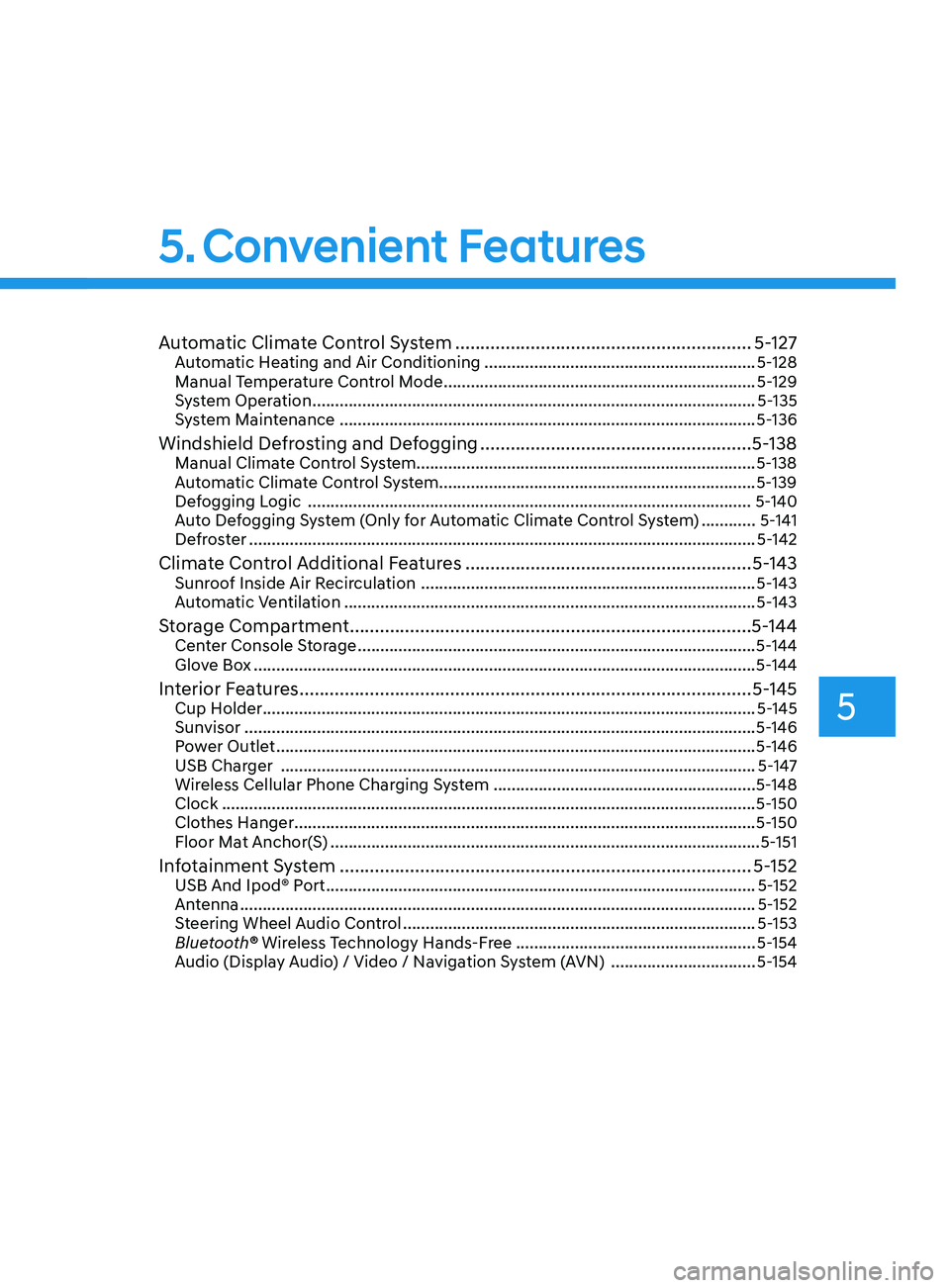
Automatic Climate Control System ...........................................................5- 127Automatic Heating and Air Conditioning ............................................................5- 128
Manual Temperature Control Mode ..................................................................... 5-129
System Operation
........................................................................\
.......................... 5-135
System Maintenance
........................................................................\
.................... 5-136
Windshield Defrosting and Defogging ......................................................5- 138Manual Climate Control System........................................................................\
...5-138
Automatic Climate Control System......................................................................5-139
Defogging Logic
........................................................................\
.......................... 5-140
Auto Defogging System (Only for Automatic Climate Control System)
............5-141
Defroster
........................................................................\
........................................ 5-142
Climate Control Additional Features .........................................................5- 143Sunroof Inside Air Recirculation ........................................................................\
..5- 143
Automatic Ventilation ........................................................................\
................... 5-143
Storage Compartment ........................................................................\
........5- 144Center Console Storage ........................................................................\
................5- 144
Glove Box ........................................................................\
....................................... 5-144
Interior Features ........................................................................\
..................5- 145Cup Holder ........................................................................\
.....................................5- 145
Sunvisor ........................................................................\
......................................... 5-146
Power Outlet
........................................................................\
.................................. 5-146
USB Charger
........................................................................\
................................. 5-147
Wireless Cellular Phone Charging System
..........................................................5-148
Clock
........................................................................\
.............................................. 5-150
Clothes Hanger
........................................................................\
.............................. 5-150
Floor Mat Anchor(S)
........................................................................\
....................... 5-151
Infotainment System ........................................................................\
..........5- 152USB And Ipod® Port ........................................................................\
.......................5- 152
Antenna ........................................................................\
.......................................... 5-152
Steering Wheel Audio Control
........................................................................\
...... 5-153
Bluetooth® Wireless Technology Hands-Free
.....................................................5-154
Audio (Display Audio) / Video / Navigation System (AVN)
................................5-154
Head Up Display (HUD) ........................................................................\
...... 5-72
Lighting ........................................................................\
................................. 5 -74
Exterior Lights ........................................................................\
................................. 5 -74
Interior Lights ........................................................................\
................................. 5-80
Welcome System ........................................................................\
........................... 5-83
Wipers and Washers ........................................................................\
............5-84Windshield Wipers ........................................................................\
......................... 5-84
Windshield Washers ........................................................................\
....................... 5-85
Rear View Monitor (RVM) ........................................................................\
... 5-86Rear View Monitor with Parking Guidance ........................................................... 5-86
Rear View Monitor - Top View ........................................................................\
....... 5-86
Surround View Monitor (SVM) ................................................................... 5-88
Reverse Parking Collision-Avoidance Assist .............................................. 5-89
System Setting and Operation ........................................................................\
...... 5-89
Warning and System Control ........................................................................\
......... 5-90
Detecting Sensor ........................................................................\
............................ 5-92
System Malfunction ........................................................................\
....................... 5-93
Limitations of the System ........................................................................\
.............. 5-93
Reverse Parking Distance Warning (PDW) ................................................5-95Operation of Reverse Parking Distance Warning System .................................... 5-95
To Turn Off Reverse Parking Distance Warning System ..................................... 5-97
Non-Operational Conditions of Reverse Parking Distance Warning System ..... 5-97
Reverse Parking Distance Warning System Precautions ..................................... 5-98
Forward/Reverse Parking Distance Warning (PDW) ................................5-99Operation of Forward/Reverse Parking Distance Warning System .................. 5-100
Non-Operational Conditions of Forward/Reverse Parking Distance Warning
System ........................................................................\
............................................ 5-102
Forward/Reverse Parking Distance Warning System Precautions .................... 5-103
Remote Smart Parking Assist (RSPA) .......................................................5-104Operating Condition ........................................................................\
..................... 5-105
How Remote Smart Parking Assist System Works ............................................. 5-108
Additional Instructions ........................................................................\
................... 5-113
Display Operation Status ........................................................................\
.............. 5-114
How the Remote Moving Forward/Backward System Works ............................. 5-115
Manual Climate Control System ............................................................... 5-118Heating and Air Conditioning ........................................................................\
....... 5-119
System Operation ........................................................................\
.......................... 5-124
System Maintenance ........................................................................\
.................... 5-125
5. Convenient Features
Page 135 of 546
05
5-5
Trunk unlocking
To unlock the trunk :
1.
Pr
ess and hold the Trunk Unlock
button (3) on the remote key for more
than one second.
2.
The hazar
d warning lights will blink
two times and the trunk will be
unlocked.
3.
Once the trunk is opened and then
closed, the trunk will aut
omatically
re-lock after 30 seconds.
Information
The word “HOLD” is written on the
button to inform you that you must press
and hold the button for more than one
second.
Panic button (4)
Press and hold the Panic button (4) for
more than one second. The horn sounds
and hazard warning lights flash for about
30 seconds.
To cancel the panic mode, press any
button on the remote key.
Start-up
For information, refer to the “Key
Ignition Switch” section in chapter 6.
NOTICE
To prevent damaging the remote key:
• Keep the remote key away from
water or any liquid and fire. Internal
circuits may malfunction if the inside
of the remote key gets damp (from
liquids or moisture) or if it is heated.
This can exclude the remote key from
being covered under warranty.
• Avoid dropping or throwing the
remote key.
• Protect the remote key from extreme
temperatures.
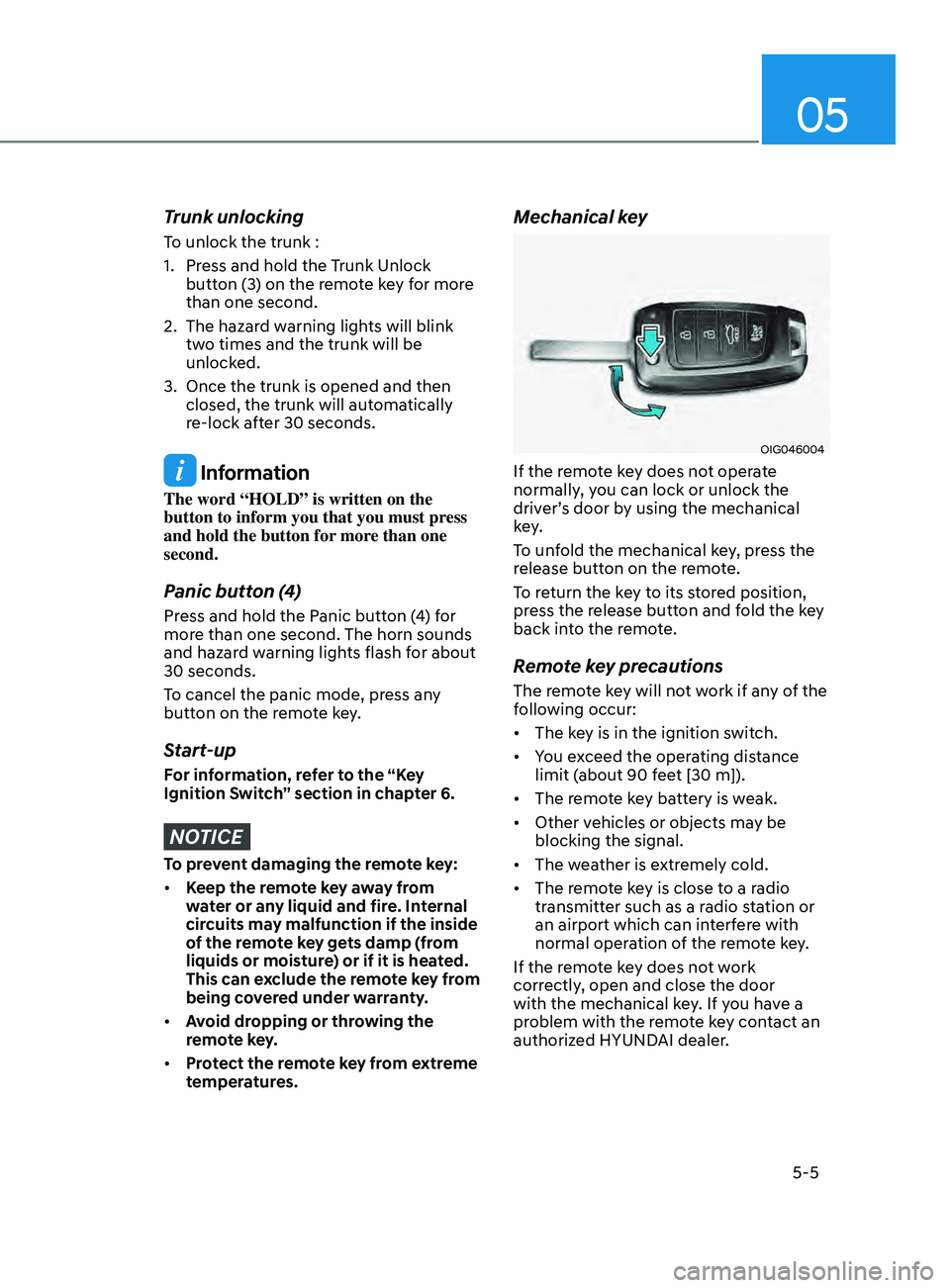
Mechanical key
OIG046004
If the remote key does not operate
normally, you can lock or unlock the
driver’s door by using the mechanical
key.
To unfold the mechanical key, press the
release button on the remote.
To return the key to its stored position,
press the release button and fold the key
back into the remote.
Remote key precautions
The remote key will not work if any of the
following occur:
• The key is in the ignition switch.
• You exceed the operating distance
limit (about 90 feet [30 m]).
• The remote key battery is weak.
• Other vehicles or objects may be
blocking the signal.
• The weather is extremely cold.
• The remote key is close to a radio
transmitter such as a radio station or
an airport which can interfere with
normal operation of the remote key.
If the remote key does not work
correctly, open and close the door
with the mechanical key. If you have a
problem with the remote key contact an
authorized HYUNDAI dealer.
Page 141 of 546
05
5-11
Start-up
You can start the vehicle without
inserting the key.
For information, refer to the “Engine
Start/Stop Button” section in chapter 6.
NOTICE
To prevent damaging the smart key:
• Keep the smart key in a cool,
dry place to avoid damage or
malfunction. Exposure to moisture
or high temperature may cause
the internal circuit of the smart key
to malfunction which may not be
covered under warranty.
• Avoid dropping or throwing the
smart key.
• Protect the smart key from extreme
temperatures.
Remote start
You can start the vehicle using the
Remote Start button (7) of the smart key.
To start the vehicle remotely:
• Lock the doors by pressing the door
lock button within 32 feet (10 m)
distance from the vehicle.
• Press the remote start button for over
2 seconds within 4 seconds after
locking the doors and the hazard
warning will blink.
To turn off the remote start function, press
the remote start button once. In case of
the manual operation, the climate control
system will be maintained even when
the engine is turned OFF. However, the
automatic operation is set to 72°F (22°C).
Remote smart parking assist (RSPA)
(if equipped)
The Remote smart parking assist (RSPA)
system helps the drivers park their
vehicle by using sensors to measure
parking spaces and control the steering
wheel, gear shift and vehicle speed to
semi-automatically park the vehicle.
With the smart key, the driver can move
the vehicle forward or backward using
the rearward /forward buttons (5, 6) on
the smart key.
For information, refer to “Remote smart
parking assist (RSPA)” in this chapter.
Page 156 of 546
Convenient Features
5-26
If the digital key (card key) does not
work, please detach the key around
4 inches (0.1 m) from the handle
authentication pad and retry to contact.
The card key may be damaged by the
impact. It would not work properly if
the key is damaged. You should buy a
new card and register again. Long-time
exposure to high temperature may cause
the card key to malfunction. Please be
careful not to expose the key to direct
sunlight or high temperature.
After unlock the door or start up the
vehicle with digital key, even though
the driver tries to lock the doors by the
central door lock switch, the door lock
will be once locked and immediately
released at the moment of door closed.Start-up with Card key
After placing your registered card key
onto the interior authentication pad
(wireless charger), step on the brake and
press the Engine Start/Stop button.
WARNING
•
If you do not place the digital key
(card key) onto the center of the
interior authentication pad (wireless
charger) exactly, the card key may
not be recognized. If the engine is
not turned on, adjust and place the
key again.
• If you overlap and use the key
with NFC-enabled cards such as
transportation card or credit card,
the card key may not be recognized.
• If the digital key (card key) does not
work, please detach the key around
4 inches (0.1 m) from the handle
authentication pad and retry to
contact.
• The card key may be damaged due to
impact. It would not work properly if
the key is damaged. You should buy a
new card and register again.
For more information, refer to the
Engine Start/Stop button in chapter 6.
Page 160 of 546
Convenient Features
5-30
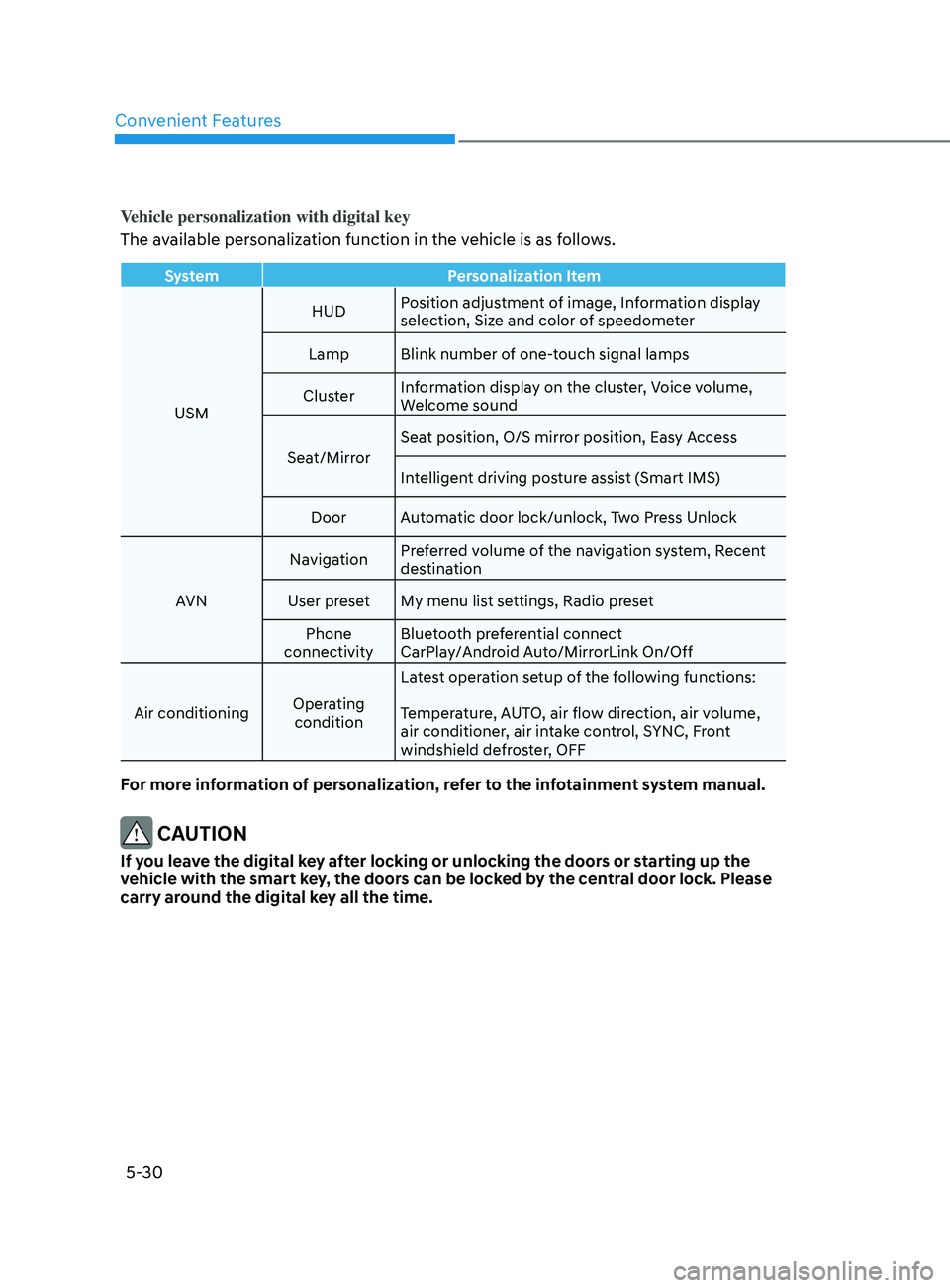
Vehicle personalization with digital key
The available personalization function in the vehicle is as follows.
SystemPersonalization Item
USM HUD
Position adjustment of image, Information display
selection, Size and color of speedometer
Lamp Blink number of one-touch signal lamps
Cluster Information display on the cluster, Voice volume,
Welcome sound
Seat/Mirror Seat position, O/S mirror position, Easy Access
Intelligent driving posture assist (Smart IMS)
Door Automatic door lock/unlock, Two Press Unlock
AVN Navigation
Preferred volume of the navigation system, Recent
destination
User preset My menu list settings, Radio preset Phone
connectivity Bluetooth preferential connect
CarPlay/Android Auto/MirrorLink On/Off
Air conditioning Operating
condition Latest operation setup of the following functions:
Temperature, AUTO, air flow direction, air volume,
air conditioner, air intake control, SYNC, Front
windshield defroster, OFF
For more information of personalization, refer to the infotainment system manual.
CAUTION
If you leave the digital key after locking or unlocking the doors or starting up the
vehicle with the smart key, the doors can be locked by the central door lock. Please
carry around the digital key all the time.
Page 172 of 546
Convenient Features5-42
steering Wheel
Electric Power Steering (EPS)
The system assists you with steering the
vehicle. If the vehicle is turned off or
if the power steering system becomes
inoperative, you may still steer the
vehicle, but it will require increased
steering effort.
Also, the steering effort becomes heavier
as the vehicle’s speed increases and
becomes lighter as the vehicle’s speed
decreases for better control of the
steering wheel.
Should you notice any change in the
effort required to steer during normal
vehicle operation, have the system
checked by an authorized HYUNDAI
dealer.
CAUTION
• If the Electric Power Steering System
does not operate normally, the
warning light (
) will illuminate
on the instrument cluster. You may
steer the vehicle, but it will require
increased steering efforts. Take your
vehicle to an authorized HYUNDAI
dealer and have the system checked
as soon as possible.
• When an abnormality is detected
in the electric power steering
system, to prevent a an accident, the
steering assist function may become
inoperative. At this time, the warning
light turns on or blinks on the cluster.
The steering wheel may become
difficult to control or operate. Have
your vehicle checked immediately,
after moving the vehicle to a safe
area.
Information
The following symptoms may occur during
normal vehicle operation:
• The steering effort may be high
immediately after placing the ignition
switch in the ON position.
This happens as the system performs
the EPS system diagnostics. When the
diagnostics are completed, the steering
wheel effort will return to its normal
condition.
• When the battery voltage is low, you
might have to put more steering effort.
However, it is a temporary condition so
that it will return to normal condition
after charging the battery.
• A click noise may be heard from the
EPS relay after the ignition switch is in
the ON or LOCK/OFF position.
• Motor noise may be heard when the
vehicle is at a stop or at a low driving
speed.
• When you operate the steering wheel
in low temperatures, abnormal noise
may occur. If the temperature rises, the
noise will disappear. This is a normal
condition.
• When an error is detected from the
EPS, the steering effort assist function
may become inoperative in order to
prevent fatal accidents. Instrument
cluster warning lights may be on or the
steering effort may be high. If these
symptoms occur, drive the vehicle to
a safe area as soon as it is safe to do
so. Have the system checked by an
authorized HYUNDAI dealer as soon
as possible.
Page 174 of 546
Convenient Features
5-44
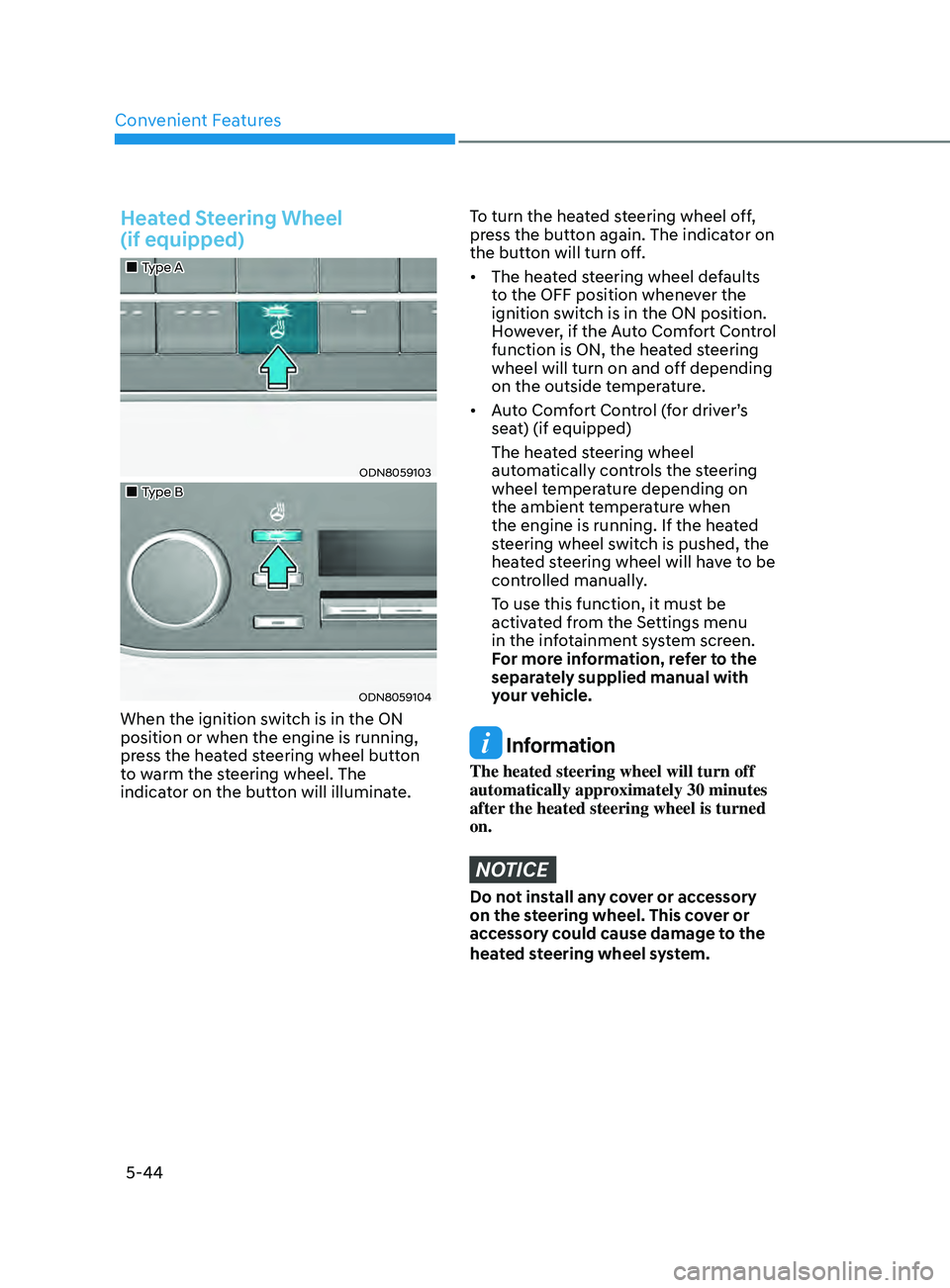
Heated Steering Wheel
(if equipped)
„„Type A
ODN8059103
„„Type B
ODN8059104
When the ignition switch is in the ON
position or when the engine is running,
press the heated steering wheel button
to warm the steering wheel. The
indicator on the button will illuminate.
To turn the heated steering wheel off,
press the button again. The indicator on
the button will turn off.
• The heated steering wheel defaults
t
o the OFF position whenever the
ignition switch is in the ON position.
However, if the Auto Comfort Control
function is ON, the heated steering
wheel will turn on and off depending
on the outside temperature.
• Auto
Comfort Control (for driver’s
sea
t) (if equipped)
The hea
ted steering wheel
automatically controls the steering
wheel temperature depending on
the ambient temperature when
the engine is running. If the heated
steering wheel switch is pushed, the
heated steering wheel will have to be
controlled manually.
T
o use this function, it must be
activated from the Settings menu
in the infotainment system screen.
F
or more information, refer to the
separately supplied manual with
your vehicle.
Information
The heated steering wheel will turn off
automatically approximately 30 minutes
after the heated steering wheel is turned
on.
NOTICE
Do not install any cover or accessory
on the steering wheel. This cover or
accessory could cause damage to the
heated steering wheel system.
Page 192 of 546
Convenient Features
5-62
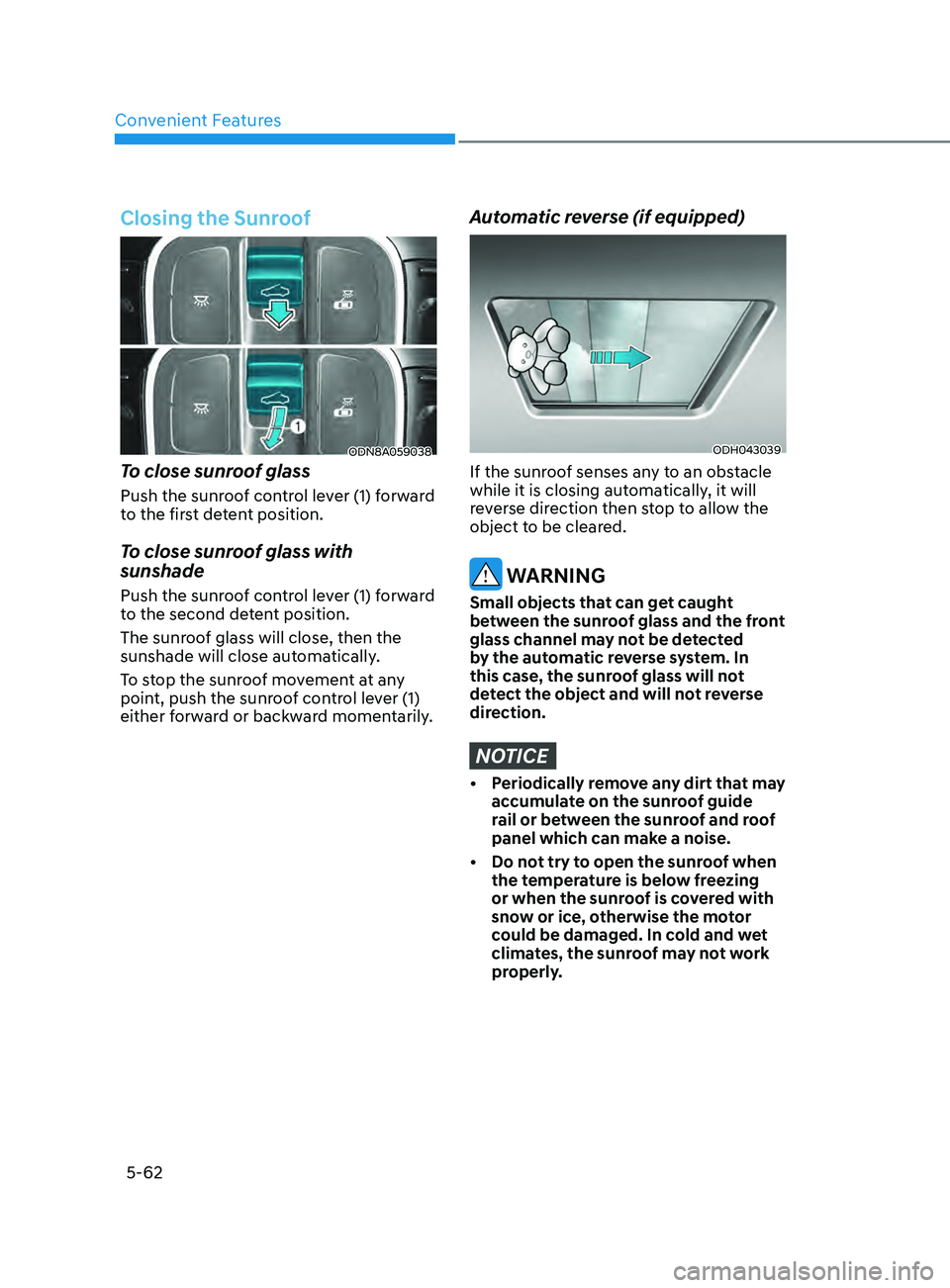
Closing the Sunroof
ODN8A059038
To close sunroof glass
Push the sunroof control lever (1) forward
to the first detent position.
To close sunroof glass with
sunshade
Push the sunroof control lever (1) forward
to the second detent position.
The sunroof glass will close, then the
sunshade will close automatically.
To stop the sunroof movement at any
point, push the sunroof control lever (1)
either forward or backward momentarily.
Automatic reverse (if equipped)
ODH043039
If the sunroof senses any to an obstacle
while it is closing automatically, it will
reverse direction then stop to allow the
object to be cleared.
WARNING
Small objects that can get caught
between the sunroof glass and the front
glass channel may not be detected
by the automatic reverse system. In
this case, the sunroof glass will not
detect the object and will not reverse
direction.
NOTICE
• Periodically remove any dirt that may accumulate on the sunroof guide
rail or between the sunroof and roof
panel which can make a noise.
•
Do no
t try to open the sunroof when
the temperature is below freezing
or when the sunroof is covered with
snow or ice, otherwise the motor
could be damaged. In cold and wet
climates, the sunroof may not work
properly.
Page 215 of 546
05
5-85
Information
If the wiper switch is set in AUTO mode
when Engine Start/Stop button is in the
ON position, the wiper will operate once to
perform a self-check of the system. Set the
wiper to the OFF position when the wiper
is not in use.
WARNING
To avoid personal injury from the
windshield wipers, when the engine
is running and the windshield wiper
switch is placed in the AUTO mode:
•
Do no
t touch the upper end of the
windshield glass facing the rain
sensor.
•
Do no
t wipe the upper end of the
windshield glass with a damp or wet
cloth.
•
Do no
t put pressure on the
windshield glass.
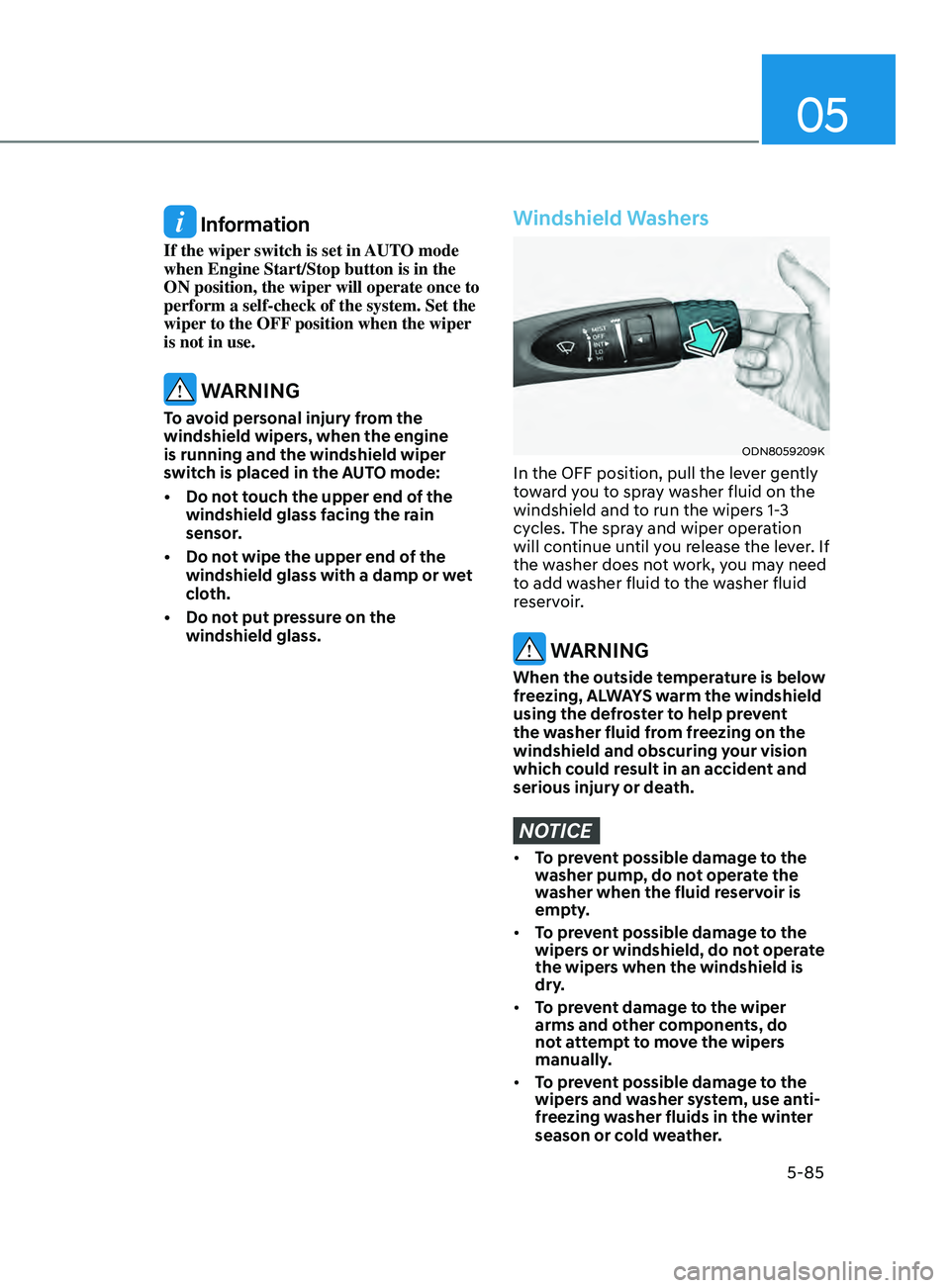
Windshield Washers
ODN8059209K
In the OFF position, pull the lever gently
toward you to spray washer fluid on the
windshield and to run the wipers 1-3
cycles. The spray and wiper operation
will continue until you release the lever. If
the washer does not work, you may need
to add washer fluid to the washer fluid
reservoir.
WARNING
When the outside temperature is below
freezing, ALWAYS warm the windshield
using the defroster to help prevent
the washer fluid from freezing on the
windshield and obscuring your vision
which could result in an accident and
serious injury or death.
NOTICE
• To prevent possible damage to the
washer pump, do not operate the
washer when the fluid reservoir is
empty.
• To prevent possible damage to the
wipers or windshield, do not operate
the wipers when the windshield is
dry.
• To prevent damage to the wiper
arms and other components, do
not attempt to move the wipers
manually.
• To prevent possible damage to the
wipers and washer system, use anti-
freezing washer fluids in the winter
season or cold weather.
Page 224 of 546
Convenient Features
5-94
• Outside air temperature is hot or cold.
• The wind is either strong (over 12 mph
(20 km/h)) or blowing perpendicular
to the rear bumper.
• Objects generating excessive
noise, such as vehicle horns, loud
motorcycle engines, or truck air
brakes, are near the vehicle.
• An ultrasonic sensor with a similar
frequency is near the vehicle.
• There is ground height difference
between the vehicle and the
pedestrian.
• The image of the pedestrian in the
rear view camera is indistinguishable
from the background.
• The pedestrian is near the rear edge of
the vehicle.
• The pedestrian is not standing upright.
• The pedestrian is either too short or
too tall for the system to recognize.
• The pedestrian is wearing clothes that
are hard for the system to recognize.
• The pedestrian is wearing a cloth that
does not reflect ultrasound well.
• The size, thickness, height, or shape of
the object does not reflect ultrasound
well (e.g., pole, bush, curbs, carts,
edge of a wall, etc.).
• The pedestrian or the object is
moving.
• The pedestrian or the object is very
close to the rear of the vehicle.
• A wall is behind the pedestrian or the
object.
• The object is not at the rear center of
the vehicle.
• The plane of the obstacle is not
parallel to the rear bumper.
• The road is slippery or inclined.
• The driver backs up the vehicle
immediately after shifting to R
(Reverse).
• The driver accelerates or turns the
vehicle. Reverse Parking Collision-Avoidance
Assist system may alert the driver or
apply brake power unnecessarily under
the following conditions even if there are
“no” pedestrians or objects.
•
Any non-factory equipment or
accessories have been installed.
• The condition of the vehicle is
unstable due to an accident or other
causes.
• The height of the bumper or the
sensor installation has been modified.
• The bumper height has changed due
to heavy loads, tire pressure change,
etc.
• The rear view camera or the ultrasonic
sensor(s) is stained with foreign
matter, such as snow, dirt, etc.
• The pattern on the road is mistaken
for a pedestrian.
• There is a shadow or a light reflecting
on the ground.
• Pedestrians or objects are around the
path of the vehicle.
• Objects generating excessive
noise, such as vehicle horns, loud
motorcycle engines, or truck air
brakes, are near the vehicle.
• The vehicle is backing towards a
narrow passage or parking space.
• The vehicle is backing towards an
uneven road surface, such as unpaved
road, gravel, bump, gradient, etc.
• A trailer is attached to the vehicle